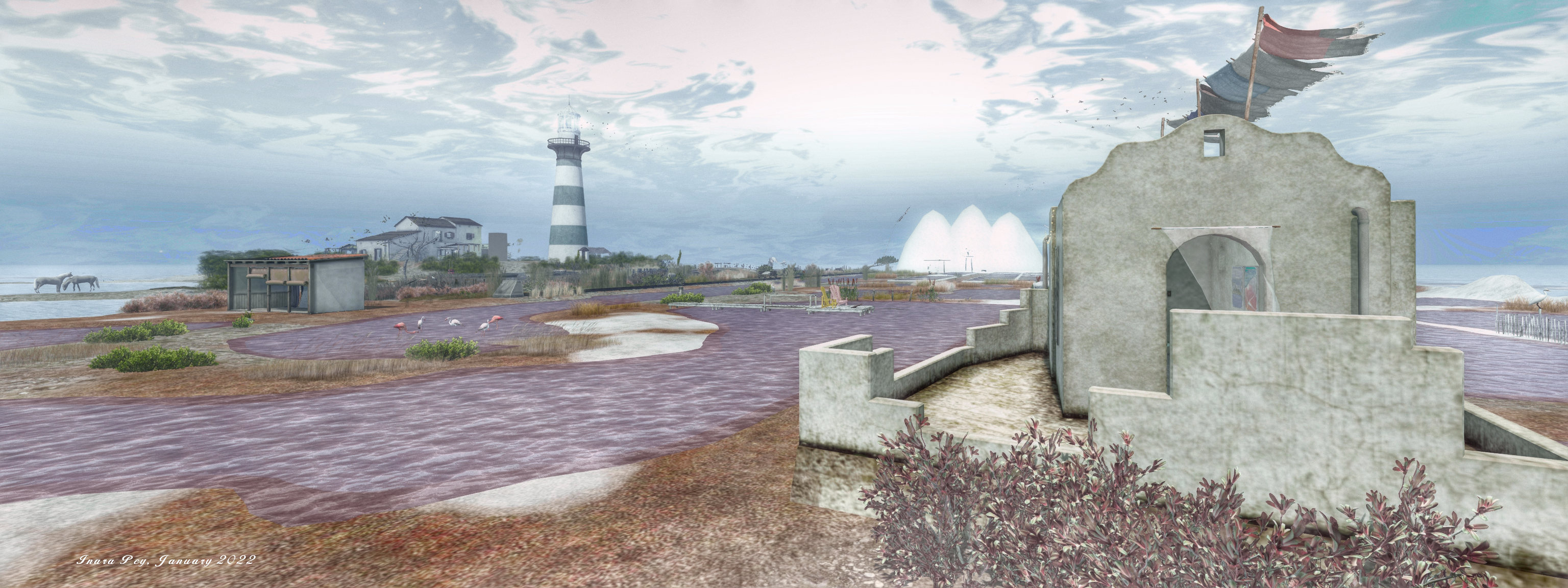
Grauland, January 2022 – click any image for full sizeIt was back to JimGarand’s Homestead region of Grauland for me to mark the start of the year. As regulars to this blog know, I’ve tended to drop into the region two or three times a year to witness Jim’s designs and work. In fact, my last came in October 2021, a couple of months after Jim had decided to move things away from Mobile – leaving it as the home of his SL business – and give his region designs a little more room in terms of land capacity.
That design for Grauland was something of a departure from the designs we have tended to associate with Grauland, offering as it did an examination of lighting in Second Life using an urban setting. However, with this current iteration, Jim returns to his more familiar island themes in which he folds art and landscape into a unified whole.
Grauland, January 2022
The landing point sits to the north-west of the island, tucked into the cover of a large concrete-and-wood structure of the kind that can so often be a feature of of the region. This faces a line of jet skis sitting on the water across the beach that are available for riding around the island’s shallows. But if you opt to do so, take note that these waters form a narrow ribbon along the north and west sides of the island, so careful navigation is required to avoid bouncing off the region boundary (there’s more room to the south and east).
Those who prefer can walk around the beach to the west side of the island, passing by one of Jim’s little touches that always make visits interesting: a telephone kiosk that sits on the sands under the single light of a street lamp.
Grauland, January 2022
The southern end of the beach provides access to the island’s most prominent natural feature: a sandstone headland. This is a place where time has allowed the sea to sculpt it into a series of large caverns, the eroded rocks in turn ground down to form a broad expanse of sand below that that now helps prevent the sea from washing way the narrow towers and walls of rock that support the high ceilings of most of the cavern spaces – although a part of these have actually collapsed to form an open ring of stone.
Follow the sand through the caverns and it is clear the sea is still shaping them on their east side, where a table of rock extends out into a large bay, leaving their top supported by broad legs of rock, although a blow-hole has been blasted through a part of the table, forming another ring of stone.
Grauland, January 2022
The easiest way to see this high ground is to climb the steps at the back of the landing point structure or take the stone steps rising from the beach close by to reach a cutting and path through the rock. Both of these routes offer their own attractions, with the staircase in the building allowing visitors to climb to the roof and thence to a path the heads south over the top of the west cliffs to where a zen garden awaits – something that helps link this design with past iterations of Grauland.
Alternatively, prior to climbing all the way to the roof of the landing point, visitors can opt to walk along a roofless corridor that offers an echo of the previous version of Grauland, lit as it is by a series of coloured lighting strips. Beyond this sits a an artificial depression that forms part of an artistic statement, the second part of which is to be found beyond the zen garden, itself connected to the depression by a set of steps. Beyond the zen garden a further path winds to where concrete columns rise from the grass and rock over the top of the southern caverns.
Grauland, January 2022
To the east of the island, paths run between its uneven surface, one from the stone steps and path running up from the beach, the other from the concrete depression. Both point the way to the island’s main house as it overlooks the sweep of the island’s southern bay and eastern and southern beaches – the later of which forms a broad finger of sand. With its deck and pool and split-level nature, the house is open to the public and offers a cosy retreat. To the north of it, along a loosely paved footpath sits a further little hideaway for those seeking a little privacy
As a personal note, I’ll admit that I did find the sound scape – designed to represent the echoing sound of the sea within the caverns – a little overwhelming whilst wandering. Nevertheless, with places to sit throughout, including out on the water to the south (brave souls, given what lies beneath!) – so jet ski users be aware that others might be relaxing on the water – Grauland again offers an engaging and rich environment in which to spend time, together with (need it be said?) plenty of opportunities for photography.
The following notes were taken from the Tuesday, January 11th, 2022 Simulator User Group (SUG) meeting. The meeting was recorded by Pantera Północy, and the video is embedded at the end of this summary. Note this summary focuses on the key points of the meeting; where there is something to report, the video should be referred to should full details of the meeting wish to be reviewed.
The planned update to the SLS Main channel (comprising the simulator version deployed to the RC channels prior to the end-of-year break) has been pushed by to week #3. Instead, simhosts on the SLS channel were therefore restated without any deployment.
Wednesday, January 12th should see all simhosts on the RC channels updated to a new simulator release built – 566406 – using the updated toolset.
Available Viewers
There have been no updates to the current crop of official SL viewers, leaving them as follows:
Release viewer: version version 6.5.1.566335, formerly the Cache+ 360 Capture viewer, dated December 7, promoted December 15 – No change
The Jenever Maintenance RC viewer, version 6.5.2.566860, issued on December 17.
The Koaliang Maintenance 2 RC viewer, version 6.5.2.566879, issued on December 17.
The Tracy Integration RC viewer version 6.4.23.563771 (dated Friday, November 5) issued Tuesday, November 9.
Project viewers:
Performance Improvements project viewer version 6.5.2.566967, dated December 17.
Performance Floater project viewer, version 6.4.23.562625, issued September 2.
Mesh Optimizer project viewer, version 6.4.23.562614, issued September 1.
Legacy Profiles viewer, version 6.4.11.550519, dated October 26, 2020.
Copy / Paste viewer, version 6.3.5.533365, dated December 9, 2019.
In Brief
Bug-225288 “llStopAnimation is stopping all animations on detach instead of only the one specified” has by an issue for more than three years, but user Lucia Nightfire has made an interesting discovery.
A core part of the meeting involved LSL / HTTP error returns – please refer to BUG-231657 and the video for details.
The second half of the meeting includes a discussion of the Map API and llRequestSimulatorData returning region grid coordinates, per BUG-231443. Again, please refer to the video for further information.
The last part of the meeting largely revolves around speculation / opinions on the “avatar expressiveness” feature said to be coming in 2022. However, as the Lab is not in a position to discuss this feature further, I’ll again leave it to the video to cover.
For the opening exhibition of 2022 at her Nitroglobus Roof Gallery, Dido Haas brings us Mindscapes, a celebration of the humble prim by Moki Yuitza. Featuring both 2D and 3D elements, this is an engaging, joyous exhibition, which is best introduced by Moki herself:
SL is a virtual world in which everything is possible; space is a mathematical/mental construction in which anything we can conceive can be realised. When I was young, I loved building everything that popped into my head with coloured bricks, and here in SL I used the same basic bricks which were available to give substance to my mental spaces; landscapes, formed just with simple prims in which we as avatars, giving it body and dimension [because] one is meaningless without the other.
– Moki Yuitza on Mindscapes
Mindscapes can be very broadly split into two parts. On, over, and under the transparent floor is the 3D element: prims ranging from the relatively small to the extremely large, some apparently jumbled together, others arranged to form patterns and objects or stacked into columns. Around the walls, meanwhile, is a series of 2D images by Moki, presented in the traditional large format used at Nitroglobus.
The latter most clearly offer a visual representation of our avatar-based relationship with prims. Offered as primarily black-and-while / monochrome pieces, the 2D elements used the shapes and forms present within several of the 3D pieces within the gallery to present intriguing landscapes, rooms and situations from the seemingly simple – giant pyramids being looked upon by a couple of avatars -, through to almost alien landscapes filled with what might be giant spores or pollen, or spaces that seem to comprise random shards of light and dark through which two tiny avatars dance.
Colour plays a minimal role in these pieces, but where it is used, it is to great effect, emphasising the avatars through arms, hands, feet (and in one shot, the avatars directly). By using colour in this way, Moki both draws attention to the avatars, even if largely unseen, and thus the relationship we have with them when bringing this virtual world to life, whilst also equally emphasising the life and vitality we give to our avatars.
Through many of the images and the 3D elements, Moki also celebrates the mathematical dimension of shapes and space, a further outworking of the aspects of Second Life, design and art she notes within her introduction to Mindscapes.
Moki has a long and deservedly recognised reputation for producing installations and art that is richly expressive, engaging and thought-provoking. With Mindscapes she offers all of this and an exhibition that simply offers – as noted – a joyful celebration of the magic to be found within the humble prim.
Catznip version R13 surfaced on Sunday, January 2nd, 2022 as the current release version of the viewer. It comes some two years after the last full public release of the viewer – although there have been interim releases of “alpha / beta” versions during that time. As such, it is a significant release in terms of Catznip moving back towards a good degree of parity with the official SL viewer.
In reference to the official viewer, this release see Catznip:
Reach full parity with SLV release 6.4.12.555248 (Dawa maintenance viewer, promoted to de facto release status, February 1st, 2021)
Incorporate:
The Environment Enhancement Project (with Catznip improvements).
The Camera Presets capability (again, with Catznip improvements).
As always, full details of the changes and updates in this Catznip release are available through the official release notes; what follows is a general summary of the more interesting updates.
Linden Lab Derived Updates
Environment Enhancement Project (EEP)
The Environment Enhancement Project (EEP) was officially released on April 20th, 2020, and incorporated into numerous Catznip “alpha/beta” builds, but R13 marks the first “full” release of the viewer to incorporate EEP functionality.
A complete overhaul and replacement of the Windlight system, EEP is a complex capability which has been covered expensively in blog posts and tutorials including within this blog. As such, I will just drop a couple of links in here for those who may need a further introduction to / understanding of EEP and its capabilities:
However, Catznip R13 incorporates a number of refinements over the original EEP implementation, as outlined below.
EEP Quick Preferences: The Catznip Quick Preferences panel has been updated to provide a set of EEP options. This includes:
Buttons to apply a region’s or parcel’s Shared Environment and to access the Personal Lighting floater.
Individual sections for selecting / editing Fixed Sky, Day Cycle and Water settings, each with:
A drop-down list of available settings, defined by those in your inventory → Settings folder and those in the Library → Environments folder.
The ❮ [left] and ❯ [right] buttons to cycle you through each type of setting.
A wrench button to open the Edit floater for each class of setting.
Day Cycles only:
Radio buttons for selecting the Sun or Moon
Azimuth and Elevation sliders tied to the radio buttons to adjust the position of the Sun or Moon.
A Reapply Current Windlight at logon check box, which does precisely what it says when checked.
An Interpolate Preset Changes checkbox. When checked, this will transition you from one setting to the next over 5 seconds; if unchecked, transitions between EEPs will occur fairly instantly.
The EEP options available through the Catznip Quick Preferences
Edit Library EEP Assets: Under most EEP implementations, those contained within the Library → Environments folder must first be copied to a user’s inventory (e..g to the Settings folder).
Catznip R13 allows users to open EEP assets within Library → Environments directly into the appropriate edit panel (highlight the asset, then right-click on it and select Open) the Windlight settings straight from the library (right-click inventory / Open). This allows changes to be made to the settings, which can be saved to inventory (e.g. within the Settings folder) using the edit panel’s Save As option (or, if the changes are to be temporary, Apply Only To Myself can be used without creating a new inventory asset).
Active EEP Asset indicator: Catznip R13 will display “(active)” alongside the currently active EEP asset / settings in both inventory and the My Environments floater.
General panel / floater clean-up: the majority of the EEP panels and floaters have been cleaned up to reduce their footprint without feeling too cramped.
Camera Presets
The ability to create and save custom Camera Presets (how the viewer camera is positioned) became part of the official release viewer release viewer in the first half of 2020, and which finds its way into the Catznip release viewer with R13.
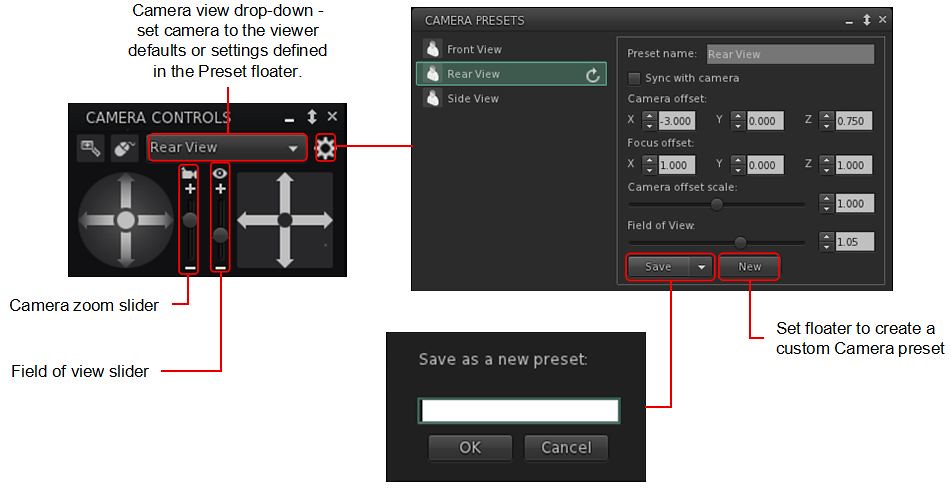
Again, I’ve covered the capability in depth within: Tutorial: Viewer Camera Presets, so those unfamiliar with the capability should refer to that document – keeping in mind it directly reference the official viewer. However, Catznip have implemented the capability with their own updated Camera floater, which also includes a couple of options specific to the viewer, and this panel and its options is outlined below.
Catznip’s Camera Presets implementation
A gear icon opens the Presets panel, where the default set of Camera positions (e.g. Front, Rear, Side), can be amended to suit personal needs, and where additional custom presets can be created (via the New button within the panel).
Note the Catznip Camera Prresets panel also allows the setting of the viewer’s field of view, an option not included in the official implementation of Camera Presets.
All presets (default and custom) can be accessed via a drop-down list at the top of the camera floater – click the arrow to the right of the button to open the drop-down and then click on the required preset.
The Zoom and Field of View sliders:
Using the Camera icon, the Zoom camera slider does what its name states: zooms the camera in and out.
Using the Eye icon, the Field of View slider controls the field of view (Ctrl-8 / Ctrl-0) which is more commonly used to ‘zoom’ in tight to an attachment for editing.
Note that both of these sliders will refer to their defaults on tapping Esc. If you wish to set a new Field of of View, this should be done by creating a new preset.
Catznip have also included Penny Patton’s popular over-the-shoulder presets within R13.
Catznip Updates
Resolution Scale
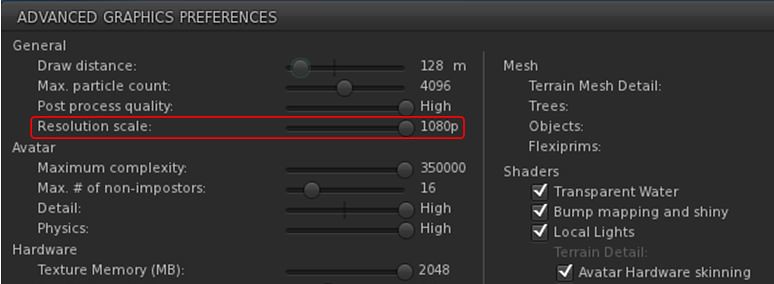
Viewer frame rates (FPS) can be a problem for some, and while Linden Lab is attempting improvements to address this, Catznip R13 includes one of the Catznip team’s approaches to boosting FPS – altering the screen resolution scale in the viewer.
A new slider, Resolution Scale, has been added to the Advanced Graphics Presets panel (Preferences → Graphics click Advanced Settings … button). By default, this is set to the highest resolution of your monitor, and but can be reduced by up to half of that resolution by moving the slider to the left. Doing so should improve viewer FPS – but will make the scene resolution displayed on your screen look increasingly blocky.
The Catznip R13 (screen) Resolution Slider
Other Updates of Note:
Places Search tab: Catznip R13 adds the following capabilities to the Legacy Places search tab:
Pressing Enter within the text input field will search on the text in the field (as will click the Search button).
Pressing Enter or double-clicking on a specific search result will teleport yo to that location.
CATZ-530 – Group Notice Creation: when writing a Group notice, the number of remaining characters is displayed under the text entry field.
CATZ-547 – Option to turn off extra lighting that is applied when editing appearance.
CATZ-557 – Improve initial opening time for the landmarks floater (+ improved filtering performance).
CATZ-584 – Give visual feedback when using an invalid regex for an inventory search.
CATZ-593 – Add option to sort Nearby and Friends list by username.
CATZ-594 – Opening the feedback floater should give focus to the feedback form.
CATZ-601 – Increase default and minimal texture cache size.
Again, please refer to the official blog post from the Catznip team for a complete list of updates and fixes.
Feedback
Catznip still lags somewhat behind the official viewer in terms of more recent releases from the latter, but this release gives a good base on which to build and catch up. Points worthy of note for me are:
EEP Quick Preference Tab – well considered, and with more-or-less the right options.
Camera Presets – good to see them “officially arrive” in Catznip, and the reworking of the Camera floater and the Camera Presets floaters / panels is very well done.
Even so, and again from a personal perspective, Catznip still isn’t quite there in terms of becoming my viewer of choice – in that regard Kokua has currently overtaken it in terms of an alternative to Firestorm, but I remain swayed towards the latter purely because of the Phototools floater and its tabs – it simply offers everything I need in a nice, convenient package that Catznip R13’s EEP Quick Preference tab doesn’t fully match and Kokua really lacks – although it does offer more that is up-to-date with the official viewer than either Firestorm or Catznip.
That said, for Catznip users, there should be little, if anything, in R13 to complain about.
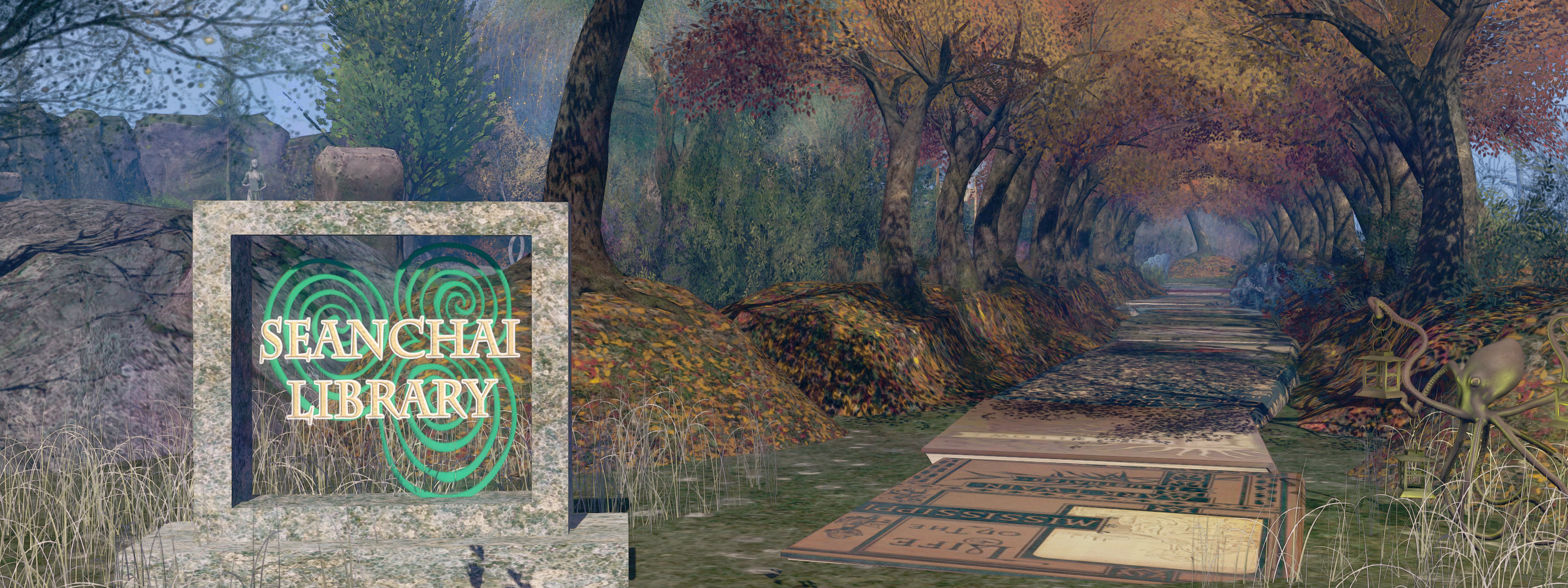
It’s time to highlight another week of storytelling in Voice by the staff and volunteers at the Seanchai Library. As always, all times SLT, and events are held at the Library’s home in Nowhereville, unless otherwise indicated. Note that the schedule below may be subject to change during the week, please refer to the Seanchai Library website for the latest information through the week.
January 10th, 19:00: A World Out of Time
After being cryogenically frozen in the 1970s to await a cure for his (then) incurable cancer, Jaybee Corbell awakes after more than 200 years – to find his own body destroyed and his mind and memories transferred into the “mindwiped” body of a criminal. And this is not all that has changed: the Earth is now overseen by an oppressive, totalitarian global government called “The State”, and Corbell’s existence is to be determined by a “checker”; if he is found wanting, he will be discarded.
However, Peerssa, the checker, recommends Corbell as ideal fodder in The State’s attempts to seek out exoplanets suitable for terraforming. Disgusted by his treatment, Corbell works out a way to take control of his one-person ship on its otherwise one-way mission, and heads toward the galactic core. Entering suspended animation, he is unaware his vessel skims close enough to the super-massive black hole at the centre of the galaxy to experience time dilation.
Emerging from his suspended state, and believing only 150 years have passed, Corbell returns to the solar system to find it vastly changed: more than three million years have passed, and the Sun has become a bloated red giant, and Earth … well, Earth appears to have been relocated to an orbit around Jupiter, whilst humanity itself had endured extensive changes – and Corbell must face an entirely new set of challenges if he is to survive.
Join Gyro Muggins as he reads the 1976 novel (and originally a short story) by Larry Niven.
Logos representative only and should not be seen as an endorsement / preference / recommendation
Updates from the week ending Sunday, January 9th, 2022
This summary is generally published every Monday, and is a list of SL viewer / client releases (official and TPV) made during the previous week. When reading it, please note:
It is based on my Current Viewer Releases Page, a list of all Second Life viewers and clients that are in popular use (and of which I am aware), and which are recognised as adhering to the TPV Policy. This page includes comprehensive links to download pages, blog notes, release notes, etc., as well as links to any / all reviews of specific viewers / clients made within this blog.
By its nature, this summary presented here will always be in arrears, please refer to the Current Viewer Release Page for more up-to-date information.
Note that for purposes of length, TPV test viewers, preview / beta viewers / nightly builds are generally not recorded in these summaries.
Official LL Viewers
Release viewer: version version 6.5.1.566335, formerly the Cache+ 360 Capture viewer, dated December 7, promoted December 15 – No change.






 After being cryogenically frozen in the 1970s to await a cure for his (then) incurable cancer, Jaybee Corbell awakes after more than 200 years – to find his own body destroyed and his mind and memories transferred into the “mindwiped” body of a criminal. And this is not all that has changed: the Earth is now overseen by an oppressive, totalitarian global government called “The State”, and Corbell’s existence is to be determined by a “checker”; if he is found wanting, he will be discarded.
 Inara Pey: Living in a Modemworld