Modding a house in Second Life: tips and pointers

This slideshow requires JavaScript.

I recently wrote about my purchase of the CONVAIR Edelweiss Chalet and work on modifying it for use on our main island home (see: A little Edelweiss in Second Life).  The article prompted a request from BarbarA for me to go into more detail about how I go about such work – and it’s not the first time I’ve received such a request.

Truth is, and for a variety of reasons (e.g. how any particular house is put together, what someone might want to do with a house, etc.), providing a step-by-step guide to modding a house isn’t really practical. So instead, I’ve tried to provide a set of more general notes focused on how I go about things.

Basic Skills

Obviously, any modding requires some basic skills:

  • An understanding of the core Build functions (e.g. creating prims; moving / rotating / resizing objects; using Shift-select; linking (CTRL-L) and unlinking (CTRL-SHIT-L) objects / object parts; use of the Show Transparent Prims toggle (CRTL-ALT-T).
  • Knowledge of texturing: how to select object faces, apply textures, scale and (possibly)  rotate them; how to use Local Textures to “test fit” textures you may wish to upload from your computer & use; and a basic appreciation of basic texture memory use. Note that “seamless” textures are generally best for buildings.
  • A basic understanding of the permissions system, particularly the Modify and Copy permissions (the former is vital to any form of modification, since without it you won’t be able to alter a building so easily; latter a nice-to-have).

An article like this isn’t really the place to go into any of the above in particular depth, so I refer those who need to learn more about editing and building in SL, I’m including some links to resources at the end.

My General Approach

I tend to approach modding any building as a 3-step process:

  1. Determine what is to be done. For example: will the work require combining parts of different buildings? Will it involve integrating items from other creators? Will it require inclusion of purpose-made new prim elements (e.g. walls, floors, etc.)?
  2. Visit a copy of the building in-world (e.g. a copy displayed at an in-world store or found in a public region) before any purchase and:
    • Confirm it has the required permissions (generally Copy and Modify).
    • Examine the use of textures to determine if they might need replacing / make require replacing as a result of my changes (e.g. because some surfaces have shadows or lighting effects “baked” into a texture.
    • Check how the building has been put together, and whether the desired changes can easily be made (e.g. by removing parts), or whether there might be complications / whether you may have to include “replacement” prim parts yourself.
    • Look at the general structure of the building and whether simple structural changes can be made to  improve LI.
  3. Revise plans accordingly after (2.), and if the decision is made to go ahead, break the work down into logical steps and complete each in turn.

Checking the Suitability of a Building for Modding

Checking Textures

There are a couple of reasons why textures might need to be replaced:

  • They don’t meet the desired aesthetics.
  • They include “baked” details that may not be wanted.

In the case of the latter, some baked details may be easy to spot – as per the image below left, other may be harder to identify, such as with the image below right, and may not be revealed until you actually start physically altering the build, should you go ahead. However, in both cases, it’s worth checking the faces (surfaces) of a building that you might want / need to re-texture.
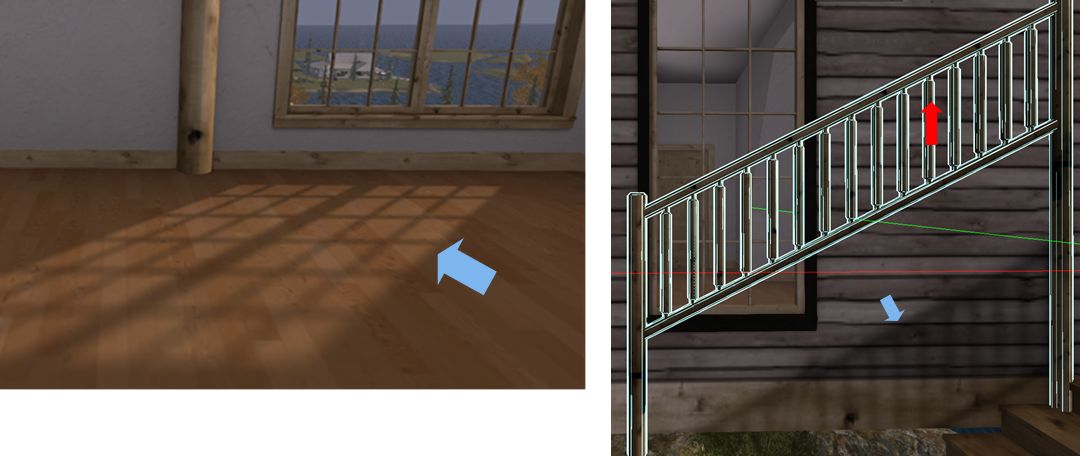
Some builders bake details into their textures, such as the light “cast” by windows (l); or shadows which can be left behind when an element of the building is moved or removed, as with the railings (r). So careful checking of a building may help determine where / if textures may be replaced.

Carrying out such checks is pretty straightforward:

  • Visit a copy of the building in-world and right-click on it and select Edit from the menu.
  • In the Edit floater, do two things:
    • Click on the Edit Linked selection box to make sure it is ticked (enabled).
    • Click on the Select Face radio button to enable it as well.
  • Finally, left-click on the surface in the building you would like to re-texture to display the texturing cross-hairs.
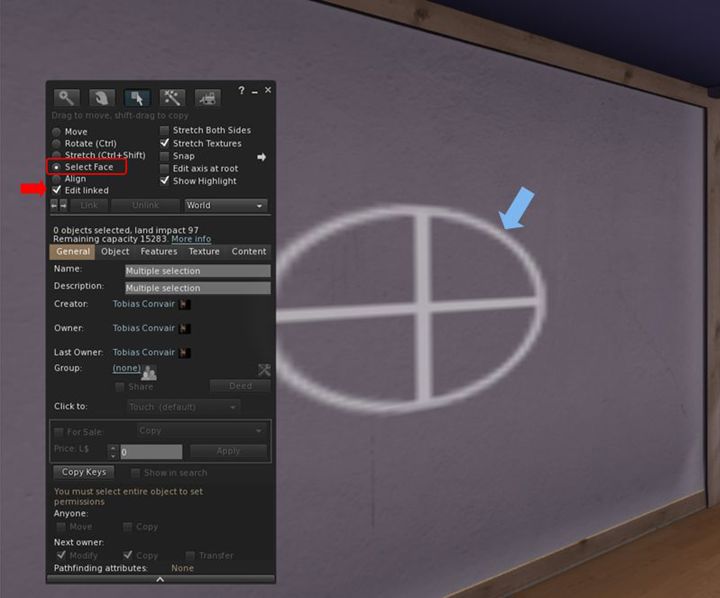
Identifying and checking surfaces for re-texturing it. Use the Edit Linked and Select face options in the Edit / build floater to identify the extend of a given face, shown by the cross-hairs (arrowed).

Note that some builders incorporate transparent prims in their builds (e.g. in walls and floors). Such prims can get in the way of checking surfaces, so you must keep an eye out for them. There are two ways to do this:

  • By pressing CTRL-ALT-T: this will highlight all transparent surfaces in red. If a part of the red is highlighted, then you have likely selected a face of the transparent prim.
  • With the surface selected, click on the Texture tab in the Edit floater. If the Transparency % spinner is set to 100, you have selected the face of a transparent prim.

Should you find you’re actually selecting a transparent prim face instead of the surface you want, I’m afraid there is no easy solution except manoeuvring your camera in as close as possible to the surface you want, and then trying to select it. To assist with this, go to the Advanced menu (use CTRL-SHIT-ALT-D to display the Advanced menu if not already enabled) and make sure Disable Camera Constraints is checked (click it if not).

With the required surface selected, check around it carefully for any of the following:

  • If the cross-hairs / highlighting on a wall / floor / ceiling extend into other rooms beyond the one you’re checking (e.g. a neighbouring wall / floor).
  • Whether the highlighting extends to other features within the surface you’ve selected (e.g. if you’re checking a wall with a window frame, is the frame also highlighted, or if you are checking a door, is the handle and other furniture also highlighted?).
  • Do any other parts of the house you might not expect to be highlighted appear to be so?
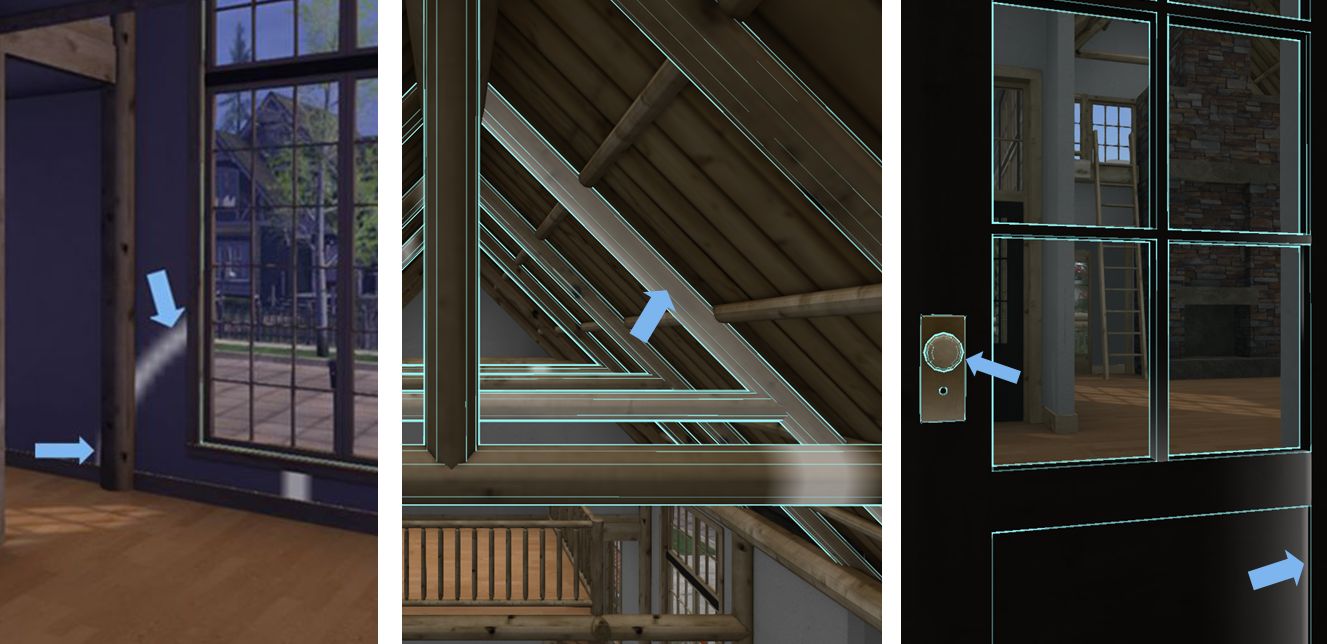
Always check around surfaces you might want to re-texture to see how other surfaces might be affected. Left: the texture cross hairs extend beyond a doorway into the next room, indicating they share a single wall face. Centre: selecting a single roof beam (arrowed) all selects those “in front” and “behind” it, indicating they are all a single texture face. Right: selecting the paintwork of the door (right side arrow) also highlights the door handle (left side arrow), indicating they are the same face and any texture applied to the door will also cover the door handle.  

If the answer to any of these questions is “yes”, then the items that are highlighted will also be affected by any texture you apply. This doesn’t mean you cannot necessarily go ahead with your ideas, just that you may revise what your re-texture or how you go about your alterations (e.g. might your problem be overcome by adding a prim and texturing that?).

Continue reading “Modding a house in Second Life: tips and pointers”

Bamboo’s Blue Snow in Second Life

Kondor Art Centre: Bamboo Barnes – Blue Snow

Blue Snow is the title Bamboo Barnes has given to her most recent exhibition, which opened at the Kondor Centre Art Gallery (curated by Hermes Kondor) on February 27th. I’m not sure of the origins for the title, but that hardly matters given the theme of the exhibition and the nature of Bamboo’s art.

Bamboo is a self-taught digital artist who started producing her work using Second Life in the form of avatar studies and images of other people’s art installations. In 2013 she started producing original pieces, and in the eight years since, she has developed a unique and striking style that has not only been exhibited in virtual spaces but also in the physical world.

Kondor Art Centre: Bamboo Barnes – Blue Snow

For this exhibition, Bamboo plumbs personal depths, exploring her growing understanding of art as a means of expression and her development as an artist.

In her introduction to the exhibit she notes that “Art is never finished, just abandoned”, a statement that might at first seem a little confusing, as clearly, many pieces of art do stand as finished items – hence why we can see them in galleries and museums, reproduced, sold, hanging on our walls at home, and so on.

Kondor Art Centre: Bamboo Barnes – Blue Snow

However the capitalisation of “Art” is important: signifying that rather than referencing any singular piece of art, Bamboo is referring to the medium in all its forms, be it painting, photography, sculpture, models, the written and / or spoken word and so on; recognising that it is always evolving, and that artists can change genre, format and style, taking on some and abandoning others as they find new or different ways to express themselves.

As is usual with Bamboo, all of the pieces offered within Blue Snow are endlessly vibrant, both in terms of the colours used and the degree of life they each exude. There is a strength about each one that captivates the eye and challenges the imagination, offering stories that might – when considering the central theme of the exhibition – enfold thoughts of the artist and her relationship with her work as well as revolving around our own perceptions of who we are and where we might be going.

Kondor Art Centre: Bamboo Barnes – Blue Snow

Richly engaging, Blue Snow is another superb exhibition from one of SL’s leading digital artists.

SLurl Details

2021 SUG meeting week #10 summary

Mount Campion National Forest: Roscommon Ridge – blog post

The following notes were taken from the Tuesday, March 9th, 2021 Simulator User Group (SUG) meeting.

Server Deployments

Please refer to the server deployment thread for the latest news and updates.

  • Tuesday, March 9th saw the servers on the SLS Main channel updated to server release 556255, containing “some internal tweaks related to launching region”.
  • There are no planned RC channel deployments scheduled for Wednesday, March 10th.

SL Viewer

There have been no updates to the current pipeline of official viewers at the start of the week, leaving them as follows:

  • Current release viewer: version 6.4.13.555567 (Jelly Doll improvements) originally promoted February 17th, and re-established as the default viewer following the rollback of the Simple Cache viewer.
  • Release channel cohorts:
    • Custom Key Mappings project viewer, version 6.4.14.556098, March 4.
    • Maintenance RC viewer – Eau de Vie, version 6.4.14.556149, released March 4.
    • Love Me Render (LMR) 5 project viewer, version 6.4.14.556118, February, 23, 2021.
  • Project viewers:
    • Legacy Profiles viewer, version 6.4.11.550519, October 26.
    • Copy / Paste viewer, version 6.3.5.533365, December 9, 2019.
    • Project Muscadine (Animesh follow-on) project viewer, version 6.4.0.532999, November 22, 2019.
    • 360 Snapshot project viewer, version 6.2.4.529111, July 16, 2019.

Region Crossings

A simulator version currently in QA at the Lab has some region crossing changes in it. It is hoped the updates will take some of the load off of agents trying to enter crowded regions. The engineering team also intend to look at the protocol for moving an agent from region to another; however, this is viewed as “a much larger project” that has yet to be started.

In Brief

  • Group chat is being tweaked. It is hoped that an update will be ready for deployment Soon™.
  • Map tiles continue to be worked on, but not fully fixed. However, some updates to the World Map are being seen.
  • HTTP 5xx errors: some with internal services reliant on external web pages for data have been seeing an uptick in 5xx HTTP errors (see BUG-229660 and BUG-230059 as examples). Some this may be more directly related to the external service hosting the web pages (Cloudflare), while some are apparently seeing 503 errors when regions are down (rather than 404s), but are seeing recoveries once the region is back.
  • BUG-229871 TP issues: some people are experiencing teleport issues whereby they cannot teleport back to any region they’ve previously successfully teleported to previously in the same session, but are disconnected. This is being investigated. It has been suggested by some users the issue might be related to a past similar issue that was the result of a local firewall or router setting issue.

A little amusement at GEL Park in Second Life

GEL Park, looking towards Space and Funland, March 2021

Sitting within the GEL residential community that spans some 40-ish regions, GEL Park is billed as an all-mesh public amusement park that offers some 26 different rides for the enjoyment of all who visit. It grabbed my attention after appearing in the Recently Added section of the Destination Guide, so over the weekend, I suggested to Caitlyn we hop over and take a look.

Utilising the entire ground level area of a Full private region and extending into the air overhead, the park is laid out in the manner of many a physical world amusement park – as anyone who has been to the likes of Disneyland, Six Flags Alton Towers and so on will likely recognise. There’s the familiar “main street” style of entrance next to the landing point, complete with mini arcades and store spaces (some of which are available for rent), with the rest of the region divided into five areas: Space, Adventure, Imagine, Yesterland and Funland.  There’s even a cable car to help give the sense of arriving from a distant car park.

GEL Park, March 2021

Most of these areas carry something of a theme to them. For example, Space has a distinctly futuristic look to it and features rides related to rockets, etc., that culminate in the region’s version of Space Mountain. Meanwhile, Yesterland takes a trip into the past with rides themed on ancient Egypt, Vikings and Atlantis. However, there is some degree of cross-over: Funland for example, includes Torgon’s Space Ride, whilst it is hard to miss the Stagate franchise references in a couple of Yesterland’s ancient Egypt themed rides.

While there is a lean towards rollercoasters, the park does offer a good mix of rides large and small, and anyone who enjoys amusement parks in the physical world will feel right at home among the dodgems/bumper cars, drop rides, pendulums and spinning rides,  and so on to be found here.

The rollercoasters themselves come in both of the common varieties: those with cars on the track and those with cars suspended from the track. Some have apparently been specially built for the park, others are commercially available and some have a touch of history to them. Torgon’s Space Ride, for example, first appeared at SL13B, and I can recall riding it there and am pleased to say it is as enjoyable now as it was then.

Yesterland, GEL Park, March 2021

There are a number of different approaches taken in how the different rides operate. Several will start automatically, waiting a number of seconds before setting off; some require you manually start them either via chat or the use of a supplied HUD, and some are triggered through the use of a local experience.

The latter are generally the rides that are located on sky platforms above the region, the experience intended to move you relatively seamlessly between ground and ride and back again. You’ll be asked to join it the first time you pass into the ground-level entrance for one of these rides (indicated by an area of deep shadow you’ll need to walk through); thereafter the experience will freely move you back and forth as required without any prompting or clicking.

The best way to appreciate most of the rides is to switch to Mouselook view, as this gives a more realistic sense of actually being on the ride (screen allowing), although a couple can result in a certain motion-induced giddiness, so a little care might be needed. Some rides will automatically drop you into Mouselook when you sit on them, others may require you to toggle it yourself.

Imagine, GEL Park, March 2021

This being SL, some of the rides can have the odd case of the jitters or have one or two small oddities (one rollercoaster is so compact, part of it seem to slice through you as you ride it!) but none of these hiccups actually prevent enjoyment of any given experience. My only real niggle was that I found the Haunted House ride in Adventure to be just that little bit too long (but then, I also feel the same way about LL’s annual Haunted House ride that rolls out each October).

Should the rides all get a little much, the north-east corner of the region presents Imagine, a garden space to wander within. This is home to paths, sculptures and water features, with places to sit and just unwind for a bit. It is also home to the Imagine Theatre, which I assume is home to dance productions and events – there is a auto-subscription board to one side of the theatre stage for the Imagine Dance update group (touching the board again will allow you to unsubscribe).

GEL Park – a Mouselook view whilst inverted in a loop, March 2021

Amusement parks are not new in Second Life (I’ve covered a number previously in these pages), and can be hit-and-miss events for visitors. However, GEL has a clean, open design that makes for an easy, fun visit, and aside for the minor hiccups mentioned above, all the rides worked for us.

SLurl Details

  • GEL Park (GEL Community 38, rated General)

Poetry, music and science fiction in Second Life

Seanchai Library

It’s time to highlight another week of storytelling in Voice by the staff and volunteers at the Seanchai Library. As always, all times SLT, and events are held at the Library’s home in Nowhereville, unless otherwise indicated. Note that the schedule below may be subject to change during the week, please refer to the Seanchai Library website for the latest information through the week.

Tuesday, March 9th

12:00 Noon: Russell Eponym, Live in the Glen

Music, poetry, and stories in a popular weekly session.

19:00: Variable Winds

A continuing experiment in poetry, music, and communal dances with Ktadhn Vesuvin.

Wednesday, March 10th, 19:00: The Guns of Avalon

Across the worlds of Shadow, Corwin, prince of blood royal, heir to the throne of Amber, gathers his forces for an assault that will yield up to him the crown that is rightfully his. But, a growing darkness of his own doing threatens his plans, an evil that stretches to the heart of the perfect kingdom itself where the demonic forces of Chaos mass to annihilate Amber and all who would rule there.

One of the most revered names in sf and fantasy, the incomparable Roger Zelazny was honoured with numerous prizes—including six Hugo and three Nebula Awards—over the course of his legendary career. Among his more than fifty books, arguably Zelazny’s most popular literary creations were his extraordinary Amber novels. The Guns of Avalon is the second book of The Chronicles of Amber.

With Corwyn Allen.

Thursday, March 11th:

19:00: Star Wars a New Hope

The story that started a saga with the immortal words:

A long time ago, in a galaxy far, far, away…

Join Sandon Loring and Caledonia Skytower as they bring us the story of Luke, Leia, Han, Chewbacca and two certain ‘droids as they fight for the Rebellion against the tyranny of the Galactic Empire. Also in Kitely! Find teleport from the main Seanchai World grid.kitely.com:8002:SEANCHAI.

21:00 Seanchai Late Night

Finn Zeddmore presents contemporary Sci-Fi-Fantasy from such on-line sources as Light SpeedEscape PodClarkesworld Magazine, and more.

2021 viewer release summaries week #9

Logos representative only and should not be seen as an endorsement / preference / recommendation

Updates for the week ending Sunday, March 7th

This summary is generally published every Monday, and is a list of SL viewer / client releases (official and TPV) made during the previous week. When reading it, please note:

  • It is based on my Current Viewer Releases Page, a list of all Second Life viewers and clients that are in popular use (and of which I am aware), and which are recognised as adhering to the TPV Policy. This page includes comprehensive links to download pages, blog notes, release notes, etc., as well as links to any / all reviews of specific viewers / clients made within this blog.
  • By its nature, this summary presented here will always be in arrears, please refer to the Current Viewer Release Page for more up-to-date information.
  • Note that for purposes of length, TPV test viewers, preview / beta viewers / nightly builds are generally not recorded in these summaries.

Official LL Viewers

  • Current release viewer: Project Jelly viewer (Jellydoll updates), version 6.4.13.555567 and dated February 5th, 2021, promoted February 17th – ROLL BACK, see below.
  • Release channel cohorts:
    • Maintenance RC viewer – Eau de Vie, version 6.4.14.556149, released on March 4th.
    • Custom Key Mappings viewer updated to version 6.4.14.556098 on March 4th.
  • Project viewers:
    • No updates.

Roll Back Notes

The Simple Cache viewer, version 6.4.14.556088,was promoted to de facto release status on Tuesday, March 2nd. However, as a result of two significant bug (BUG-230337 – cache location not being adhered to, and BUG-230295 – uploads of textures above a certain size failing), it had to be rolled back, with the release viewer reverting to the Jelly Doll improvements viewer (6.4.13.555567). However, this resulted in some users who had updated to the Simple Cache viewer users experiencing a corrupted texture cache when using an older version of the viewer.

Because of this, the Simple Cache viewer has returned to a development status, and viewer releases were paused pending investigation into the texture cache corruption issue. Currently, and while the Lab continue to investigate the texture cache problem, it has been indicated that the Love Me Render 5 viewer, which was not merged with the Simple Cache viewer code, might be promoted in week #10.

LL Viewer Resources

Third-party Viewers

V6-style

V1-style

  • Cool VL Stable branch updated to version 1.28.2.12, followed by a hotfix release of 1.28.2.13, both on March 6th.

Mobile / Other Clients

  • No updates.

Additional TPV Resources

Related Links