Frogmore’s Cornish twist in Second Life

Frogmore, June 2020 – click any image for full size

We recently made a return trip to Frogmore on the recommendation of Shawn Shakespeare, who nudged me about it having received another seasonal update, and with it a change of influences.  Still held by Tolla Crisp and once again laid out by Terry Fotherington, the region now draws on a summery England for inspiration – specifically the county of Cornwall in the south-west of the country.

This is a multi-faceted design, surrounded on all four sides by water rather than making use of any region surround. “Multi-faceted” because it draws on multiple influences from the Cornish landscape, rather than being a representation of any specific part of that county, while the lack of any region surround allows it to be presented as an island setting in is own right and a place unique to the world of Second Life.

Frogmore, June 2020

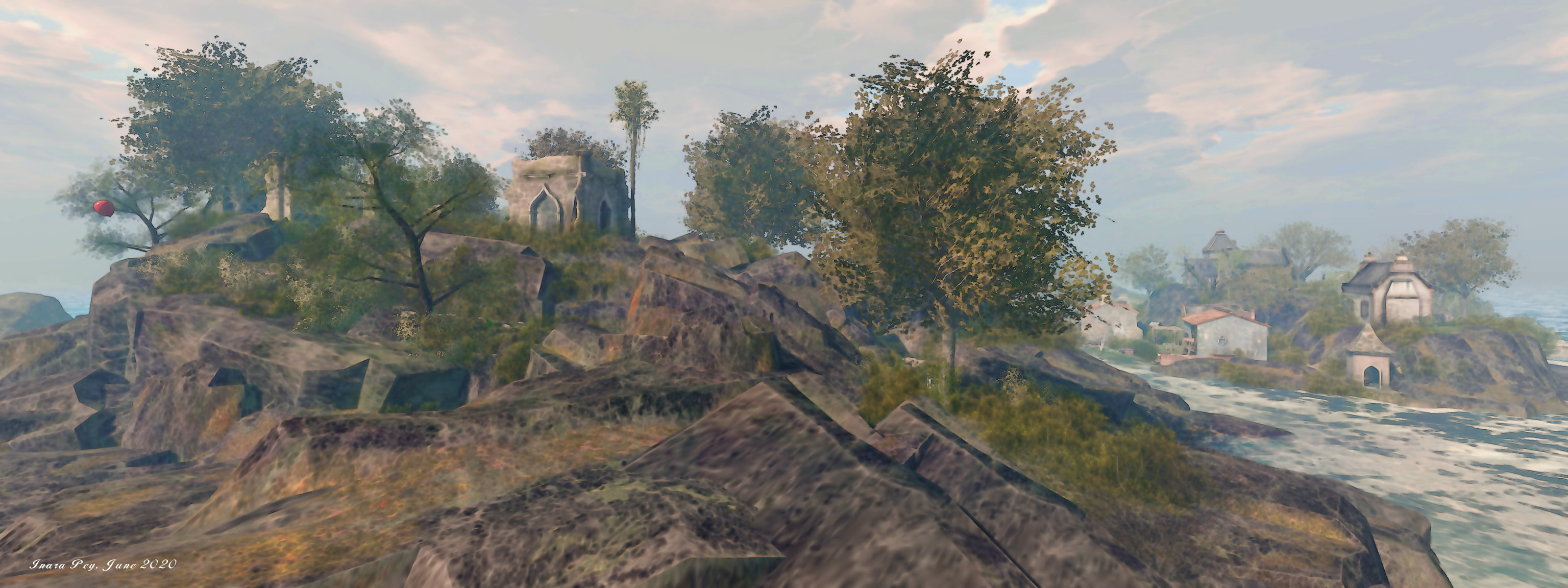
These Cornish influences are reflected in right across the region, from the shaping of the land through to many of the buildings found within it. For example, the landing point sits to the south-east, in an upland region that might represent the more rugged aspects of the country’s moorlands, the ruins at its top perhaps suggestive of the ruins of one of the old wings of Bodmin Jail (although admittedly, in the physical world, the core of that building is in much better shape than the ruins in the region).

Similarly, across the region, in the north-west corner lies a secluded beach back by a rugged curve of hilly coastline. It is typical of many of the little coves that might be found around the Cornish coast, whilst the round rounded structure that guards one end of the beach carries echoes of Restormel Castle or Trematon Castle.

Frogmore, June 2020

Exploring the region is a case of following the path down from the landing point and around  and between the rocky shoulders of the hills to reach an inland bay. Here, tucked into the curve of the southern uplands is a small tidal harbour, clearly with the tide out, although the breakwater still has its feet in the water, rowing boats sitting high and dry on the seaweed-edged sands. West of here is a working waterfront of unusual design – I’ve no idea if it is inspired by an actual place, but the lay of the stone built wharves and water channels is intriguing, and potentially a magnet for camera lenses.

To the north, a narrow causeway links the bulk of the region with its north side element, laid out as a line of smaller islands. The first of these is home to the secluded beach mentioned above, complete with an old lighthouse (another building design that has gained a lot of popularity among region designers of late).

Frogmore, June 2020

Beyond this and daisy chained to it by bridges, the second island appears to be drawn from a number of Cornish influences, both coastal and moorland. Within this is a cosy little bar waiting to be found, whilst the third island offers another classic building oft found within region designs: the Runestone castle, here used to offer a cosy home with a slightly bohemian feel.

For those who have visited it, exactly how much the region captures the heart of Cornwall is a matter of personal familiarity with the subject. As noted at the top of this article, if you enter the region in the expectation that you’re visiting a reproduction of a part of Cornwall, you’ll likely be a little disappointed. However,. take the region as drawing on a number of Cornish influences rather than a particular place, and the echoes and motifs are hard to miss, whilst allowing Frogmore to stand as a place in its own right.

Frogmore, June 2020

What cannot be denied, is the fact that it is a very photogenic region, although some who have shadows enabled on their systems may want to disable them when moving around between shots in order to maintain frame rates.

To mark the region’s new look, Tolla is running a photography contest between now and July 15th, 2020. On offer is a total prize pool of L$17,500, to be split between three winners (L$10,000 going to the first place winner).  Submissions can be made via the Frogmore Flickr group, and must be on the subject of the region (and can include avatars / be post-processed). Group membership to the in-world Frogmore group is not required, but all submissions must be titled Frogmore 3.0 Photo Contest 2020, and include the artist’s name. Entries will be judged by a panel of three.

Frogmore, June 2020

SLurl Details

2020 Simulator User Group week #23 summary

Vintage Lace, April 2020 – blog post

The following notes were taken at the Simulator User Group meeting held on Tuesday, June 2nd.

Simulator Deployments

Please refer to the simulator deployment thread for updates.

  • On Tuesday, June 2nd, the RC channels were updated with a server update, version 543116, intended to fix an expired cert that was causing problems with HTTP calls..
  • On Wednesday, June 3rd, and providing there are no issues arising from the above deployment, the same server update will be deployed across the rest of the grid.

SL Viewer

On Tuesday, June 2nd:

  • The FMOD Studio RC viewer, version 6.4.3.542964, and dated May 29th, was promoted to de facto release status.
  • The Mesh Uploader project viewer updated to version 6.4.3.542535.

All other viewer pipelines are as follows:

  • Release channel cohorts (please see my notes on manually installing RC viewer versions if you wish to install any release candidate(s) yourself):
  • Project viewers:
    • Copy / Paste viewer, version 6.3.5.533365, December 9th, 2019.
    • Project Muscadine (Animesh follow-on) project viewer, version 6.4.0.532999, November 22nd, 2019.
    • Legacy Profiles viewer, version 6.3.2.530836, September 17th, 2019. Covers the re-integration of Viewer Profiles.
    • 360 Snapshot project viewer, version 6.2.4.529111, July 16th, 2019.

In Brief

  • Parcel EEP settings are still drawing complaints from some who travel over Mainland (particularly by air) who are not particularly enamoured with seeing “their” daytime settings suddenly change. However, there is a simple answer: all they need to do is apply their preferred EEP settings to their avatar before flying, and *presto* they have a constant environment in their viewer for both parcel and region crossings. Simples.
  • Apparently, a rumour has been circulating somewhere that LL are “rethinking” the cloud uplift. In response to being asked if there is any truth to it, Oz Linden replied:

[There’s] no truth to the rumour at all. The only re-thinking we’re doing is how to do it better/faster.

  • Group chat lag still continues to be a problem for some groups – notably those with a large membership. This appears to be related to the volume of message traffic a back-end group chat server is handling, rather than a specific issue within the chat service.
  • Those wishing to test the upcoming changes to nearby chat ranges (channel 0), can do so on Aditi in the following regions: Animesh1, Animesh2 and Snark

Tom Boellstorff: teaching digital culture in Second Life

Tom Boellstorff and his digital alter ego, Tom Bukowski (image: Steve Zylius / UCI)

Professor Tom Boellstorff is someone I’ve oft written about in these pages. Known as Tom Bukowski  in Second Life, he is a professor of anthropology at the University of California, Irvine (UCI), and has a long association with the platform as he has, and continues, to engage a range of studies both on his own and in collaboration with Donna Davis (Tredi Felisimo in-world), a digital ethnographer at the University of Oregon.

Tom’s involvement with Second Life goes back to 2004, and has carried out numerous studies in-world that have resulted in a range of publications including Coming of Age in Second Life: An Anthropologist Explores the Virtually Human (Princeton University Press, 2008), the result of two years fieldwork in Second Life, living among and observing its residents in exactly the same way anthropologists traditionally have done to learn about cultures and social groups in the so-called real world. He has also co-authored Ethnography and Virtual Worlds: A Handbook of Method (Princeton University Press, 2012) a concise, comprehensive, and practical guide for students, teachers, designers, and scholars interested in using ethnographic methods to study on-line virtual worlds, including both game and non-game environments. Alongside of Donna, he co-curates and operates Ethnographia Island, about which I first wrote in 2016 (see: Exploring disability, new cultures and self in a virtual realm), and which later became the subject of a segment of The Drax Files World Makers video series.

My own contact with Tom started in 2013, as a result of my learning about and covering the story of Fran Swenson (Fran Serenade in Second Life – see: Of Parkinson’s, Second Life and a story worth reading), and with whom both Tom and Donna worked. Since then, I’ve tried to follow Tom’s work – albeit not always successfully, so I’d like to extend my thanks to Luca (lucagrabcr), co-founder of the Virtual Existence Society, for tweeting about Tom’s latest project (so to speak): bringing his classroom and students directly into Second Life as a result of the SARS-CoV-2 pandemic.

Anteater Island: landing point

As reported in the UCI News by Lilibeth Garcia, because social / physical distancing prevents him from teaching in his usual environment – an auditorium located in UCI’s state-of-the-art Anteater Learning Pavilion – Tom has created Anteater Island within Second Life, a place that allows him to continue to teach his course, Digital Cultures (Anthropology 128C), directly to his students without fear or risk of possible infection.

UCI’s digital cultures class is a rare sight these days, with unmasked students sitting together, often shoulder to shoulder, in a large venue and listening attentively as anthropology professor Tom Boellstorff presents a slide show. But the pre-coronavirus-style format isn’t flouting any social distancing guidelines. The class takes place in Second Life – a 3D virtual world that allows users to create communities and interact with each other – and the instructor and students are avatars.

– from Anteater Island, UCI News, June 1st, 2020

Anteater Island: the auditorium

Tom made the move to using Second Life as UCI sought to moving its teaching activities on-line as a result of the pandemic. Thanks to his long association with the platform, and while his colleagues were doubtless looking at potential options for moving their classes entirely on-line, Tom was able to capture the essence of the collaborative working spaces offered within the physical Anteater Pavilion as used by his students and replicate their capabilities within Second Life without having to confine himself to the traditional view of learning spaces as bricks-and-mortar structures.

Within the region, learning spaces are located around the coastline, offering a primary lecture auditorium, meeting areas for each student team, a display area where students will eventually display their work, and an office where he can be reached. Towards the centre of the island lies a social space where students can relax, chat and even dance, while a primary landing point providing an introduction to the island for students, and some basic notes on viewer use.

Given the course is about digital cultures, the approach of using Second Life is not only practical in terms of overcoming the issues of social / physical distancing, it is actually a potential enhancement to the course. After all, how better to get students thinking about digital cultures and how they impact / reflect / alter people’s lives, than by actually placing them within a digital environment where they can experience things first-hand, both through their own involvement in, and reaction to, the environment and through observation of their fellow students.

Anteater Island: central social area

Hence why, perhaps, Tom has also included three fun fair rides – roller coaster, sky drop and bumper cars – for students to try, as well as offering sandbox building space in the sky above the island. All of these allow students to both relax and have fun outside class time, and also experience some of the interactive appeal of virtual environments.

In a time when, thanks to the SARS-CoV-2 pandemic, our relationship with, and use of, on-line capabilities for communication, contact, learning and more, are being subject to so much re-evaluation, Tom notes that virtual spaces are especially deserving of greater understanding and study.

We need to get away from talking about the physical world as the real world. On-line sociality is a set of cultures that can be just as real as what is in the physical world … Virtual space gives you a sense of shared space that you don’t get with a phone call. Zoom fatigue is an interesting aspect, because I find engaging through an avatar less stressful than Zoom. There’s something lost with having an avatar, but there’s also something gained.

– Professor Tom Boellstorff, UCI

Hopefully, this is something we’ll be able to witness, as Tom plans to lead studies himself, with the assistance of a further grant from the National Science Foundation. Certainly, it’s something I hope to be able to report on in the future.

Links to Tom Boellstorff

Kokua: 6.4.2 release overview

On Wednesday, May 27th, the Kokua team released Kokua 6.4.2, bringing the viewer up to parity with the Linden Lab official viewer, 6.4.2 code base (Camera Presets), promoted on May 19th, 2020.

This means that with this release, Kokua now includes:

  • the Environment Enhancement Project (EEP) release.
  • The most recent viewer Maintenance updates.
  • The aforementioned Camera Presets.

In addition, the Restrained Love Viewer (RLV) variants of this Kokua release include both include the latest updates to Marine Kelley’s RLV API updates – version 2.9.27.0 -, which include support specific to EEP, and which the Kokua team have also used with regards the new Camera Presets, as part of their own updates to the viewer.

Lab-Derived Updates

Environment Enhancement Project

In including support for EEP, Chorazin Allen makes an important point that all SL users should keep in mind when moving to EEP-capable viewers:

Before getting into the additional features and fixes we need to point out that EEP represents a major overhaul of the viewer’s weather, lighting, shine and reflection areas – it’s more than just a new weather system with configuration files as inventory assets instead of separate xml files. As a result you WILL find that scenes, structures and avatars can all look different. If you find a particularly noticeable instance you are encouraged to log details of it in LL’s Jira issue tracking system so that these differences can be fixed at their origin.

– Chorazin Allen [my emphasis]

The Kokua 6.4.2 release appears to be a direct implementation of EEP and its various floaters without any alterations to their layout. As such, I do not propose to cover them here; rather I’ll leave you with a series of links to resources:

Camera Presets

Kokua adds four new defaults for Camera Presets

The Camera Presets controls, developed and contributed by Jonathan Yap, is a capability that allow users to create one more more custom camera presets within the viewer to suit particular needs and then save them. This means, for example, that a user can now have a camera position for general exploring, another suitable for combat games, another for building, etc., all of which can easily be accessed and used at any time.

Again, the Kokua implementation of the UI elements is the same as the official viewer. However, the Kokua implementation of Camera Presets adds addition default presets as follows:

  • Left, Right and top: provide viewers of your avatr from the left and right side, and from directly above.
  • FPS (First Person Shooter) – positions the camera directly in front of your avatar and looking forward.
  • Nearer – a view looking from close behind your avatar designed to be more suitable for corridors and other narrow spaces.

Again, rather than go into specifics on creating and using Camera Presets, I refer readers to my Camera Presets tutorial.

Kokua Updates

Edit Floater – Bulk Rename

Kokua 6.4.2 includes a new button in the Content tab of the Edit floater that allows the contents of an object to be easily renamed. A typical case for this might be when updating the version number of the individual contents on an object for a new release: after the specific elements that have been updated / replaced in the object, the rest can easily be renamed with the new version number.

Kokua object contents bulk rename

As this is liable to be a special usage option, I’ll refer interested parties to the Kokua documentation on how it works.

Animation Override

Client AO updates

Kokua 6.4.2 offers two new options to the client-side Animation Override system:

  • Chat check box: when enabled, each new animation to run will be reported in local chat in the user’s viewer.
    • The intent is to allow a user to keep track of the currently running animation when using a new set of poses/animations to decide decide which should be kept or discarded.
    • It is not recommended this option is kept on at all times, as the animation reports can be intrusive.
  • Any button: located between the next / previous animation paging buttons a the bottom of the floater, it will randomly select a pose from the current listed set (Walking, Standing, etc), and play it.
    • Clicking the Next or Previous buttons will resume stepping forward / back through the list of animations from the randomly selected animation.

Hover Height

This release of Kokua includes the hover height slider from Marine’s RLV viewer, with the release notes stating:

Rather than include the small button to reset it to 0.0 we have made the numerical value next to the slider writable allowing any value to be directly entered.

Additional Links

2020 viewer release summaries week #22

Logos representative only and should not be seen as an endorsement / preference / recommendation

Updates for the week ending Sunday, May 31st

This summary is generally published every Monday, and is a list of SL viewer / client releases (official and TPV) made during the previous week. When reading it, please note:

  • It is based on my Current Viewer Releases Page, a list of all Second Life viewers and clients that are in popular use (and of which I am aware), and which are recognised as adhering to the TPV Policy. This page includes comprehensive links to download pages, blog notes, release notes, etc., as well as links to any / all reviews of specific viewers / clients made within this blog.
  • By its nature, this summary presented here will always be in arrears, please refer to the Current Viewer Release Page for more up-to-date information.
  • Note that for purposes of length, TPV test viewers, preview / beta viewers / nightly builds are generally not recorded in these summaries.

Official LL Viewers

  • Current Release viewer version 6.4.2.541639, dated May 11th, promoted May 19th, formerly the Camera Presets RC viewer – No Change.
  • Release channel cohorts:
    • FMOD Studio RC viewer updated to version 6.4.3.542964 on May 29th.
    • CEF RC viewer, version 6.4.3.542757, issued May 27th.
  • Project viewers:
    • No updates.

LL Viewer Resources

Third-party Viewers

V6-style

V1-style

  • Cool VL viewer stable branch updated to 1.26.24.20 and Experimental branch to 1.27.0, both  on May 30th – release notes.

Mobile / Other Clients

  • No updates.

Additional TPV Resources

Related Links

Sharing FionaFei’s dream in Second Life

Hannington Endowment for the Arts: FionaFei

FionaFei invited me to visit her new installation that opened on May 29th at the Hannington Endowment for the Arts (HEA). Entitled I Had a Dream, And You Were There, it is a reflection of thoughts and feelings that may come upon us unbidden, be it through dream or through finding an object or hearing a sound or seeing an image or event, that bring to mind someone now gone from our lives.

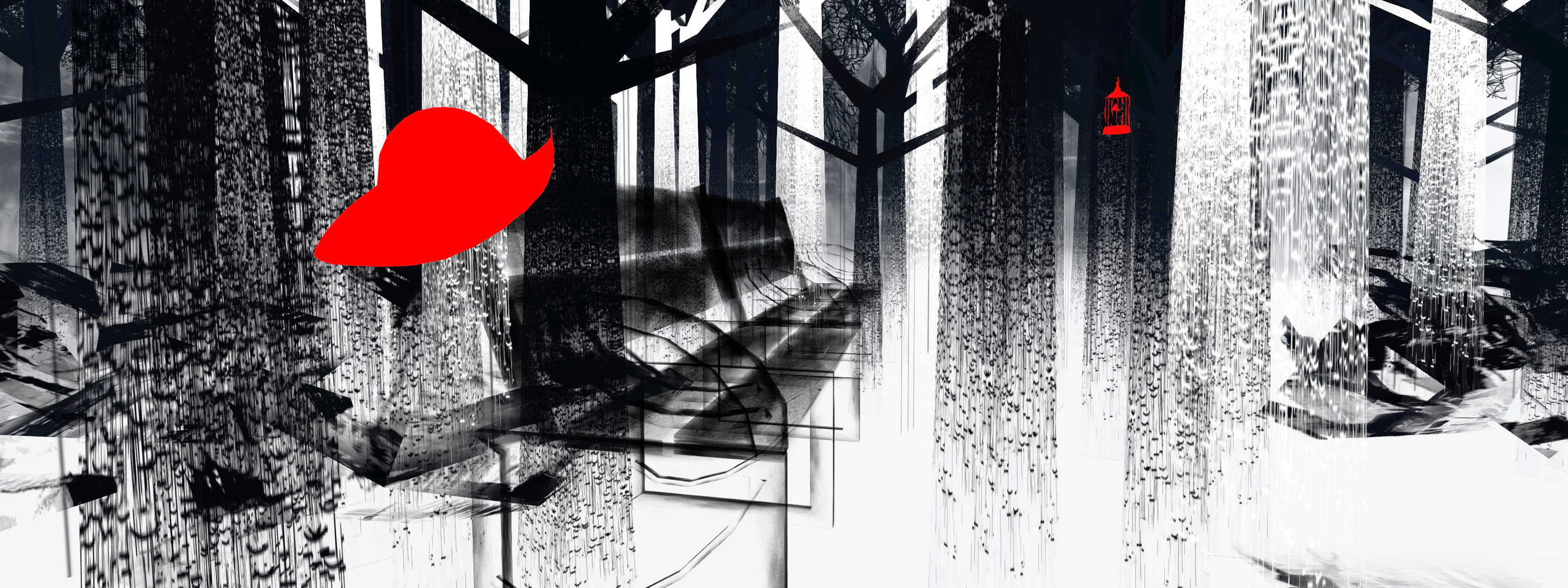
Set as a dream-like forest, the trees rendered in Fiona’s familiar ink wash black on white, that we’re invited to explore. Within it, the ground is white, as if mist is sliding through the trees, brushed ferns grouping around the base of trunks. Among these trees are park benches offering places to sit in contemplation.

On or near the benches are bright red objects: an alarm clock here, a scarf draped over a branch there, a hat hanging on the back of a bench, a flittering butterfly or two, and so on. All of them are precisely the kind of thing liable to trigger a sudden memory of someone once close to us. Touch them, and they will even offer a specific memory in local chat.

Hannington Endowment for the Arts: FionaFei

For those who have lost someone from their physical or virtual lives, I Had a Dream is liable to be an evocative visit. And by “lost”, I don’t necessarily mean the individual memory recalls has passed away; we lose people from our lives in a wide variety of ways: friendships form and end; closeness fades as physical distance grows; relationships naturally shift in desire, want and need, and so on. Even so, memories of their presence and former closeness can remain with us long after a parting of the ways have come and can – no matter how the parting came about – still come to the fore in the most unexpected ways.

It’s also important not to ascribe the installation to a specific loss on Fiona’s part. As she states in the introduction to the installation:

It is a creative manifestation of thinking about someone and wishing that they were here … The artwork is not about any specific person.

– FionaFei

Hannington Endowment for the Arts: FionaFei

Simply and artistically presented, I Had a Dream… is an installation that can unfold to reveal considerable emotional depth, echoing as it does, feelings that many, if not all of us, have felt in our adult lives.

SLurl Details