Speedlight: access SL via a browser (incl. mobile devices)

via Speedlight

During the Open-Source development meeting on Wednesday, February 12th, my ears picked up at the mention of Speedlight, a browser-based means of accessing Second Life from different devices and with the need for any downloads. Curious, I trotted off to find out more.

Developed by long-term Second Life resident Glaznah Gassner, who is responsible for the SmartBot group / bot management application, SpeedLight potentially offer users an alternative means of accessing Second Life from the browser of their choice, and which has been optimised for both statics and mobile displays, making it an entirely OS agnostic means of accessing Second Life to carry out various tasks.

At the time of writing, the core functionality offered by Speedlight comprises:

  • View a map of your current location and list all nearby avatars.
  • Send and receive local chat and IMs (and view your IM history when off-line).
  • View your friends list, groups, and avatar profiles.
  • Search for other avatars.
  • Use group chat.
  • View your inventory, and carry out basic inventory tasks.
  • Send / L$ amounts amounts to others and view your recent transaction history.
  • Teleport via SLurls.

In addition, Speedlight offers two account types:

  • Free – all of the above capabilities, but:
    • Users are limited to 1 hour on-line, after which a re-log is required.
      • Note that this can be avoided, if preferred, by paying for additional hours at the rate of L$10 per hour from within the service.
    • Avatars are automatically logged out if the browser is closed.
      • Note that closing the active Speedlight browser tab will not log you out, only closing the browser as a whole.
  • Gold monthly subscription: all of the above capabilities plus:
    • Avatars can remain on-line for an unlimited time.
    • Avatar can remain on-line even if the browser is closed.
    • Send “mass” IMs.
    • Further Gold capabilities as they are added.

The application’s website also notes that capability availability for each account type may change any any time, and also lists planned enhancement to the service. These include, but are not limited to:

  • Group notices: regular and scheduled Status: alpha, the regular notices.
  • Group chat moderation.
  • 3D world view in a browser.

The ability to send regular group notices and the 3D world view are both defined as being in an “alpha” state, although the latter doesn’t render avatars at this point.

The rest of this article is designed to provide a general overview of Speedlight and its available functionality at the time this article was written.

Sign-up and Accessing Second Life

Sign-Up

Signing-up to use Speedlight  is a two-stage process:

  1. Create a Speedlight Account, requiring a user (avatar) name, e-mail address and acceptance of the Speedlight Terms of Service and Privacy Policy.
  2. Link an avatar to your Speedlight Account – a step that requires acceptance of the Speedlight Terms once more.
    • Note that you can link more that one avatar to your Speedlight account if you wish. Click or touch the +panel in the pre-log-in avatar list in order to do so.

Accessing Second Life

Once you have linked one or more avatars to Speedlight, and you have one or more avatars linked to your Speedlight account:

  1. Go to you Speedlight Account page (logging-in to the service if required).
  2. Click / touch on Avatars in the top left of the page to display the avatar panels for all of your linked avatars.
  3. Click /touch the log-in button associated with the avatar you wish to log-in.
  4. Supply you avatar log-in credentials (you can have Speedlight optionally save these).
  5. Confirm you are not a robot (one time only).
  6. Click / touch the Login Now button.
  7. You will be returned to the avatar panel – click / touch Open to access the Speedlight display for that avatar.
When you have linked one or more avatars to your Speedlight Account, you can log into SL using any of them by clicking /touching the Login button on the avatar’s panel (l), then entering your log-in credentials (c), then clicking the Open button when you are returned to the avatar button (r). Note that the button with the gear icon of the avatar panel (outlined in red on the left) accesses the SL settings you’ve set for Speedlight (e.g. your default log-in location, shown in the avatar log-in credentials panel (c)).

The Speedlight Display and Options

When you are logged-in to SL, the Speedlight display can be split into three sections:

  • The options menu on the left, providing:
    • Access to all of your available in-world options: avatar search, Friends list, Chat, IM, Groups, Inventory, L$ and transactions.
    • An option to purchase additional hours for Free account use or to sign-up for a Gold subscription.
    • An option to access or Speedlight account settings for the avatar (default log-in location, etc.).
    • An option to log-out of SL.
  • A central information display. By default this displays the Avatar Summary providing:
    • Your avatar’s name, account balance and location at the top,
    • A map of the region showing your avatar’s position and direction of view.
    • A list of nearby avatars and their distance from your avatar.
      • Note that clicking / touching an avatar name will open the avatar search display, with the avatar in question selected and their profile displayed.
  • Two options on the right:
    • A modal displaying the avatar’s name, on-line status and the current time in SL (closed by clicking / touching the X in the top right of the modal).
    • A Wish List tab:
      • When opened, displays a list of user-requested enhancements to Speedlight, which can be voted up or down, and the option to add further ideas for enhancements.
      • Includes two additional tab – IM and Inventory, which I admit to not experimenting with.
      • Click / touch the X in the top right of the Wish List panel to close it.
The Speedlight application window, as it should appear in any browser, and with the Avatar Summary option selected

Search

Search allows avatars to be searched via a full or partial name.

  • A full name search, if valid will display the avatar’s Profile.
  • A partial name search will return an unsorted scrollable list of potential matches. Clicking / touching a name in the list will open the corresponding profile.
Speedlight Avatar Search

Continue reading “Speedlight: access SL via a browser (incl. mobile devices)”

Previewing One Billion Rising in Second Life 2020

One Billion Rising 2020

One Billion Rising in Second Life will once again be taking place in Second Life on Friday, February 14th, 2020. The event will officially commence at just after midnight SLT on the 13th/14th February with a live performance by Holly Giles. Activities will then run right through the 24 hours of February with music, dancing, art and events.

When launched in the physical world on Valentine’s Day 2012, One Billion Rising (OBR) was the biggest mass action in human history; a call to action based on the staggering statistic that 1 in 3 women on the planet will be beaten or raped during her lifetime. With the world population at 7 billion, this adds up to more than one billion women and girls who are at risk. OBR aims to bring people together, raise greater awareness of the plight of those at risk the world over, and bring about a fundamental change in how vulnerable and defenceless women and girls are treated.

One Billion Rising 2020

This year follows the established format for OBR in Second Life, with four regions laid out to offer a central music / dance arena, around which sets and music sessions will move throughout the 24 hours of the event. In the surrounding parkland, and linked to the central stages and one another by trails and paths, are the landing points (with information givers), art exhibits, gardens, and additional event areas, such as the Poetry and Prose area.

Art installations this year include works by Instituto Español SL, Daark Gothly, iSky Silverweb, 2Lei, Jaz, Fran Gustav, Fifi Oh, Marcel Mosswood, FionaFei, Solkilde Auer, Ilyra Chardin, BB Woodford, Burners Without Borders in SL, Isadora Alaya, Campbell Hero Walk, Pixxe Snowpaw, and Darkstone Aeon.

In addition for 2020, there is a special exhibition: the OBR I Rise Campaign. In January 2020, Second Life artists and photographers were invited to produce original images for display at OBR in SL 2020. All of the images have been created from the heart and are intended to support the message of One Billion Rising: educating people about the plight of women. However, survivors may find some of the images uncomfortable. If this is the case, they are asked to reach out to event organisers if they feel they need support. All of the photographs can additionally be seen on the Campaign’s Flickr group.

One Billion Rising 2020

In addition, the four corners of the OBR estate offer park areas, two of them with elevated aspects that offer views across the regions, while the #MeToo Forest on the Unite region presents a place of retreat and meditation / contemplation. Also within Unite is the Heroes’ Pavilion featuring inspirational stories about women from many different cultures and communities.

The full schedule of events is now available, covering all live performers, DJs, dance performances and poetry.

One Billion Rising 2020

Why Dance?

A critique sometimes levelled at OBR / OBR in SL is that the issues it raises cannot be solved by dance. Well, that’s absolutely true, just as marching through the streets carrying placards and banners is unlikely to have a lasting impact on whatever it is people might be marching about.

But – like marches and protests, dance and music does serve to draw attention to matters. It provides a means by which people are encouraged to stop and think, and for information and ideas to be disseminated. What’s also important is that it’s a lot harder to see dancing as a threat than might be the case with an organised march or protest – something to take into consideration given there are countries where the right to march or protest freely does not exist. Hence why, as well, OBR in Second Life is marked each year with a dance video to the OBR theme song.

Practical Support

OBR in SL is not itself a fund-raising event, but exists as a means of raising awareness of violence against women and girls. If you’d like to show your support for organisations that work tirelessly throughout the year to bring about change, please visit the OBR in Second Life Non-Profits page for a short list of organisations.

One Billion Rising 2020

One Billion Rising in Second Life 2020 will open its doors to the public shortly before midnight SLT on the 13th/14th February 2020. Do consider popping along and showing support during Friday, February 14th.

Related Links

Second Life: Lab provides statement after Sansar lay-offs

Update, February 21st: please also see Lab seeking a “plan B” to secure Sansar’s future.

As I noted earlier this week (and following Ryan Schultz’s lead on the matter – see the link in the referenced article) – there have been some significant changes at the Lab in respect of Sansar; notably multiple lay-offs.

The news of the lay-offs spurred a lot of speculation concerning Sansar, the Lab and Second Life – and given the last, on Thursday, February 13th, 2020, the Lab issued a statement specifically about Second Life and its future, indirectly touching on the matter of lay-offs in the process.

The statement reads in full:

There’ve been quite a few rumours about changes at the Lab and their possible effects on Second Life and Tilia. The truth is that we have made a few operational and personnel changes to ensure that we continue to stay strong for the next decade and beyond. This means that we had to say goodbye to a few employees, but at the same time we also strengthened our team by bringing back some heavy hitters who will help make Second Life better than ever.

So, Second Life is still here and still strong. We’re continuing to invest in its future and you’ll see the results of our commitment this year as we roll out a new mobile companion app, new Linden Home themes, performance and usability improvements, and a number of other new features and enhancements. The ability to change names will be available in the next few weeks, too.

These changes reflect our commitment to making SL strong for many years to come. To infinity and beyond!

The statement has resulted in further forum speculation on whether the changes mean Linden Lab will have “more time, more money and effort to spend on Second Life”. This prompted a response from Soft Linden on the increased effort now available:

100% what this was about! Second Life has THREE rock star graphics devs now, an engineer with a proven track record for asset optimization to make texture delivery and management fast and reliable, and so much more. The various teams will have more to say in coming months, or just watch the viewer and server release notes. Right now, some of them are literally re-learning to get dressed. They missed the era between Bento bodies and Bakes on Mesh. :)

It was a painful adjustment. But a lot of the old timers and hardcore off-hours SL users here believe these changes are important. It’s part of the strategy for breathing many extra years of life into our favourite world.

As Whirly Fizzle notes in the same forum thread (she and I have been poking to see what may have been happening in terms of staff moves), the “heavy hitters” mentioned in the official statement (and referenced in Soft’s forum post) may be Runitai Linden and Monty Linden (Monty actually popped-up in the SL forums in December 2019 to respond to a comment there, so he may have been back with SL for a while, or possibly bouncing between Sansar and SL), Kurt Linden (QA) may also of transitioned back it late 2019, while Maestro Linden (from the engineering team) appears to have most recently moved back to SL.

Certainly, nothing that has occurred with Sansar  / at the Lab doesn’t appear to have had any negative direct impact on Second Life, again as the official statement indicates.

Tansee’s Pearls of Wisdom in Second Life

ArtCare Gallery: Pearls of Wisdom

Pearls of Wisdom is the title of an art exhibition currently available in its own space at ArtCare Gallery, curated by Carelyna, and which opened on February 7th.

Produced by Tansee, it is perhaps best described as an examination of some of the viewer’s advanced rendering capabilities, notably Advanced Lighting and lighting projectors, together with surface environment and shine effects available through the Build menu, through the medium of art. It utilises both 2D and 3D elements and allows for audience interaction.

ArtCare Gallery: Pearls of Wisdom

Given the above, it is necessary to have Advanced Lighting Model enabled in your viewer (Preferences→Graphics and check Advanced Lighting Model); failure to do so means that most of the exhibition will not work for you. Note that enabling ALM does not require enabling Shadows, which tend to have the most severe impact on viewer performance; however if you can run with shadows enabled, they do give additional depth to the 3D element of the exhibition.

This comprises a large hall with animated spheres – the pearls of the exhibit’s title, illuminated by projected lights and with shine applied together with animated textures. These are set against walls illuminated by projectors and a landscape of pearl-topped plants to create a soothing, alien-like setting in which visitors are invited to relax and spend time, either on the lidos on the floor or the floating cushions within an airborne sphere.

ArtCare Gallery: Pearls of Wisdom

The L-shaped hall leading to the 3D element of the installation offers a range of 2D art, some of it using layering techniques and transparency settings, lighting projections to great effect, with some mixing digital images and techniques with images taken in the physical world. These again offer a sense of alien environments and ideas. It also includes the introduction to Pearls of Wisdom which should be read not only for the instructions on how to best view it, but also things to look for whilst spending time visiting the installation.

These pointers include hints at some of the element hidden within the images, and one notes the glittering pearls scattered throughout the exhibition. Touching these will offer pearls of wisdom in local chat. Further large silver pearls are scattered around the floor that use projected lights and can be pushed around by avatars when visiting, so “personal” lighting effects can be created as a part of the exhibition.

ArtCare Gallery: Pearls of Wisdom

An eye-catching exercise in digital art, lighting and viewer capabilities, Pearls of Wisdom is an engaging installation to visit and witness.

SLurl Details

Fantasy Faire 2020: dates announced and merchant applications open

via Fantasy Faire

Fantasy Faire, the largest fantasy-related event to take place in Second Life, will take place in 2020 from Thursday, April 23rd, through Sunday May 10th, 2020 inclusive, with the scheduled activities programme running between April 23rd and Monday, May 4th.

The theme for this year’s event has yet to be formally announced, although at the time of writing, the banner still displays the 2019 theme – but this may change. In the meantime, merchant applications for this year’s Faire opened on Wednesday, February 12th with the following announcement:

Have you been reloading this page for months, waiting for this moment? Have you been having nightmares of waking up in May and realizing you forgot about the Faire? Did you become a Fairelander last year and now cannot wait to become a bigger part of the annual enchantment?

For all of you struggling with the Faire-withdrawal, the moment of that first step of the spring is here.

As with previous years, Fantasy Faire 2019 will comprise multiple shopping regions offering space to Second Life’s top Fantasy Creators, offering the most comprehensive opportunity for fantasy shopping. In addition, there will be further regions focusing on entertainment, the Fairelands Quest, art and more.

The Shrine Tree, Fantasy Faire 2019

The merchant opportunities run from L$2,500 for a Themed Store with a 300 Land Impact allowance through to L$60,000 to sponsor an entire shopping region with (among other things) a store with 1,600 LI, plus merchant name in the region’s title and landmark, and region crossing recognition.

Merchants interested in participating in this year’s Fantasy Faire should visit the guidelines and applications page for full details on the available opportunities.

As always, I’ll be doing my best to provide updates and relay news on Fantasy Faire through the pages of this blog – but to keep right up-to-date on things, be sure to visit the Fantasy Faire website, and follow the event via the social media links below.

Additional Links

Finding The Muse in Second Life

The Muse – The Library, February 2020 – click any image for full size

The Muse is a new Homestead region design that has recently opened to the public to offer “a place to find your own muse”. It is a group build by the wonderfully named United Nerds of Building, led by FenrisJohnson, and offers a series of interlinked settings available for exploration, photography, romance, dancing and relaxation.

In all there are six core areas within the region to be explored, with the landing point – which is not enforced – routed to the region’s sky platform; the remaining five being at ground level within a contiguous landscape. These five locations are: the Library, the Elven Ballroom, Gypsy Lane, Nemo’s Rest and The Pond, and all of them are connected to one another and the sky platform via teleport boards – but exploration on foot is the best way to appreciate those on the ground.

The Muse – Elven Ballroom, February 2020

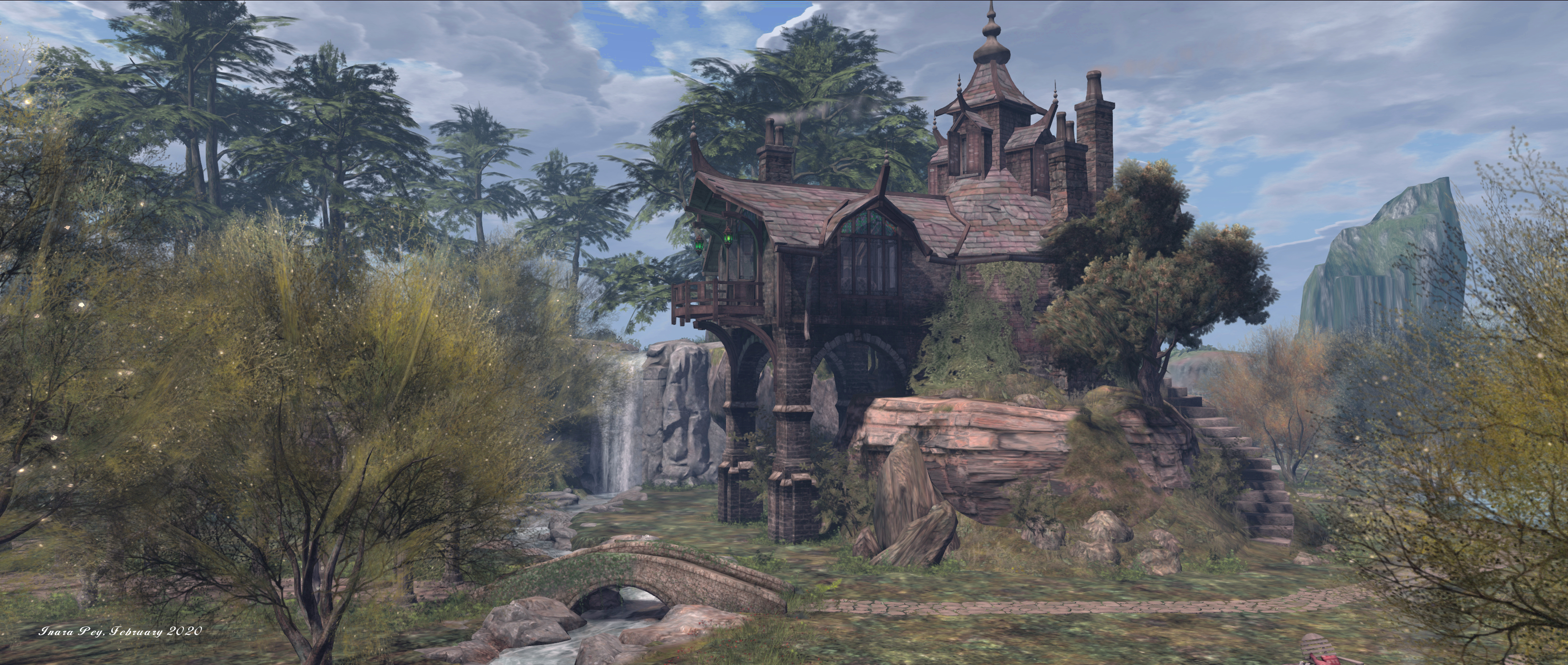
The Library sits close to the centre of the region, adjoining a mesa that rises above the otherwise flat terrain. It is reached via a curving stairway that rises from a point just around the corner from the teleport board serving it, the path to it running between the sheer face of the mesa and a fast-flowing stream that runs outward from it and to the sea. The building is one suggestive of great age and with a fantasy lean. And while the Library may not have a plethora of books for avid readers, it does present a cosy retreat with views out over the landscape to the surrounding off-shore (off-sim) islets.

A walk along a narrow viaduct to one side of the Library and then between tall trees, will bring you to the Pond, a broad body of water occupying the top of the plateau that feeds four falls that drop into narrow streams to cut the landscape into four unequal quarters, each stream crossed by an identical humpbacked bridge, a mix of footpath and rutted track connecting them.

The Muse – Nemo’s Rest, February 2020

Two of these bridges are reached from the steps leading up to the The Library. Go north along the west side of the path, and crossing the bridge in that direction will deliver you to the arches and circle of the Elven Ballroom, the arches forming a pair of walks leading to and from the circular stone dance floor that is ghost an ethereal light by spheres hanging within the boughs of the surrounding trees.

Eastwards from the Library’s steps, the path passes over another bridge and to low grasslands bordering Nemo’s Rest, the home to the grounded wreck of a submarine, its hollowed-out shell of its hull forming a cosy hideaway.

The Muse – Gypsy Row, February 2020

Beyond both Nemo’s Rest and the Elven Ballroom sits Gypsy Lane, a row of three large Romany caravans sitting under the lee of the plateau and between it and a coastal woodland running along the north-east side of the island. Each of the caravans offers another cosy place to spend time, each one far enough from its neighbour(s) to invoke a sense of privacy.

The skyborne part of the region offers a large dance floor encircled by floating islands set against a backdrop of deep space. The dance floor has an animated wave-like finish to it and coral garden at its centre, while the islands surrounding it are connected one to the next by rope bridges and steps leading down to the first from the dance area. Each of the islands has its own small attraction – places to sit, Tai Chi, etc., – whilst floating a short distance away is a little space station that presents a further private space, while the local blue whale offers rides around the platform for those so inclined.

The Muse – Space, February 2020

A setting that is ideal for easy exploration and offers much for avatar-related photography, The Muse is a nicely designed and serene in setting. Our thanks to Liss Beattie for pointing us to it!

SLurls

Peaceful Play, the home of The Muse is rated Adult.

  • The Muse Consensual Kinks, rated Adult)