Cory Edo’s water maps add depth to SL water

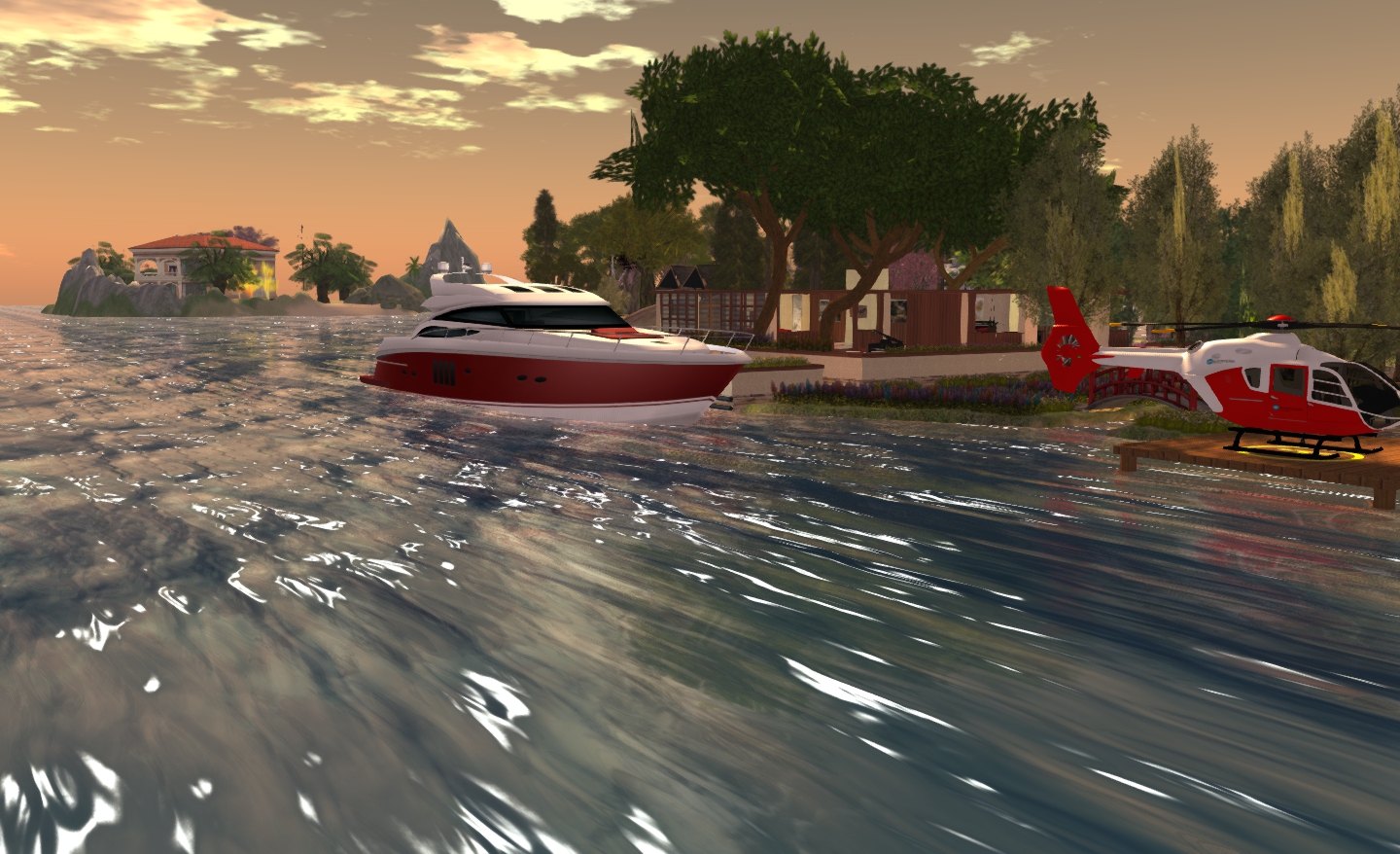
Wave effect using the Trompe Loeil "Cresting" normal water map
Wave effect using the Trompe Loeil “Cresting” normal water map

I’m coming to this via a pointer from Honour, which directed me to Strawberry’s blog entry on the subject.

Cory Edo, of Trompe Loeil fame, has released a pack of 10 free water normal maps for use in Second Life. These present a range of different wave textures which make creating your own custom water windlights for use on Linden Water a breeze. The finished results can, as with other windlight settings, be used purely within your own viewer or, for region / estate owners, can be used a default water setting  for their region / estate.

Four presets compared under the same sky settings, clockwork from top left: Linden water default; Trompe Loeil "cresting"; Trompe Loeil "Long Ripple"; Trompe Loeil "Glass" (click for full size image)
Four presets compared under the same sky and water settings, clockwork from top left: Linden water default; Trompe Loeil “cresting”; Trompe Loeil “Long Ripple”; Trompe Loeil “Glass” (click for full size image)

Strawberry has provided a  nice video tutorial on using the maps to create new water presets using the SL viewer, which can also be used alongside most v3 TPVs.  Cory also provides some notes on using the maps with Firestorm, but I thought I’d provide an additional overview on using the maps with that viewer and Phototools here as well.

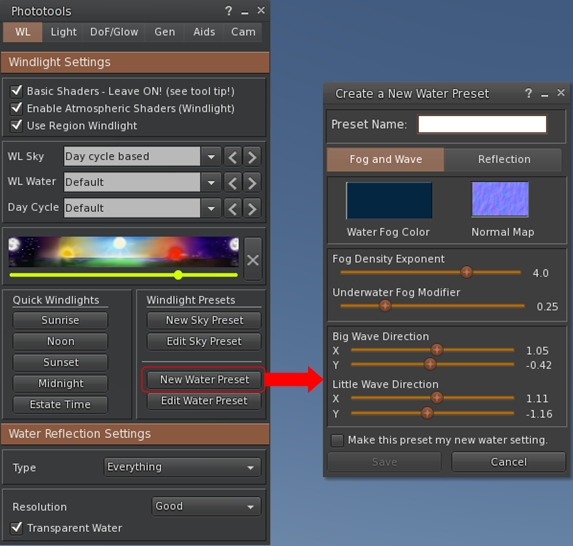
If you use the Phototools button in Firestorm, click it to open the Phototools floater, then click on the New Water Preset button in the WL tab. This will open the Create a Water Preset floater.
Accessing the
Accessing the Create a New Water Preset floater through the Phototools floater

If you’re not using the Phototools button, go to World > Environment Editor > Water Presets > New Preset …

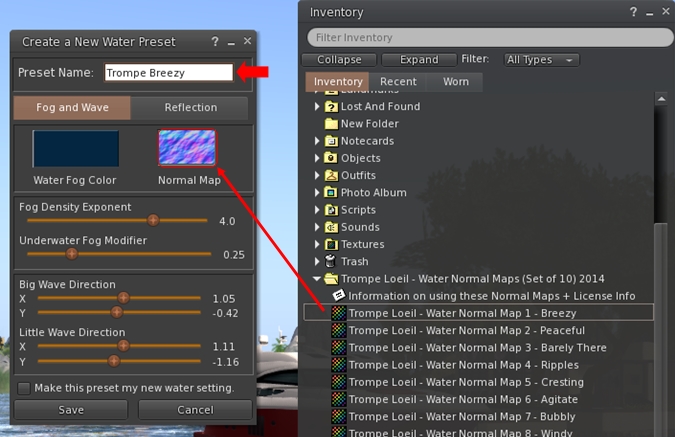
With the Create a New Water Preset floater open, simply drag and drop one of the Trompe Loeil water maps into the Normal Map box, then enter a name for the preset in the text box at the top of the floater.
Creatting a new water preset using the Trompe Loeil maps is a simple matter of drag-and-drop and applying settings and a name
Creating a new water preset using the Trompe Loeil maps is a simple matter of drag-and-drop and applying settings and a name

If you want, you can then adjust the Fog and Wave sliders and the Reflection tab sliders to produce the effect you desire.

When you’re satisfied with the result, click the Save button to save the preset to your hard drive. This will also close the Create a New Water Preset floater, so repeat all the steps above to create further presets using any of the Trompe Loeil normal maps.
You'll need to restart Firestorm after creating your new water presets in order to see them listed in the WL Water drop-down
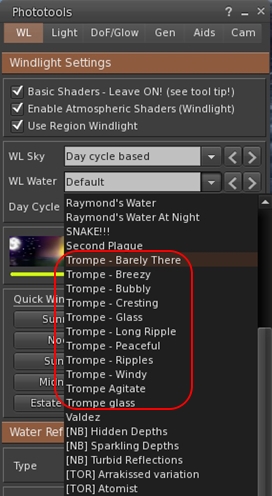
You’ll need to restart Firestorm after creating your new water presets in order to see them listed in the WL Water drop-down

The new presets will be immediately available via the Edit a Water Preset floater (Pototools > Edit Water Preset or World > Environment Editor > Water Presets > Edit Preset …).

However, to show them in the WL Water drop-down list in the Phototools WL tab (shown on the right), you will need to re-start Firestorm.

Also, remember that Firestorm also backs-up custom windlights for you (make sure you have the options to do so checked in Preferences > Backup), so make sure you take a fresh back-up of your settings after adding any new windlights. That way you avoid having to recreate them once more after a clean install.

Do please note that these normal maps are intended to work with Second Life windlight; they are not “traditional” water textures and they will not work to create prim-bases water effects for pools, hot tubs and so on.

A great addition to the tool box of any sim designer and / or SL photographer – many thanks to Cory for creating them and making them available.

Related Links

Help Virtual Ability in a healthcare study

Virtual AbilityVirtual Ability are seeking volunteers (primarily in the United States) to help with a nationwide healthcare research project.

The research, which is being carried out in conjunction with the University of Pennsylvania Perelman School of Medicine, is intended to assess the level of access to quality healthcare people with disabilities have in the US, with a focus on determining if people with disabilities who get better healthcare stay healthier and are able to live independently longer than do those who get lower quality healthcare. A unique part of the study is that not only are people with disabilities providing data for the researchers, but some people with disabilities will be involved as members of the research team.

The study will run for three years, and will involve research into quantitative and qualitative care:

  • The quantitative portion of the study will yield findings about how access and healthcare quality, as perceived by thousands of Medicare beneficiaries of all ages, impacts the progression of their disabilities and their survival
  • The qualitative portion of the study will be conducted in an urban setting in Wisconsin and also in Second Life. It will use Focus Groups that provide a “voice” to the general public with the aim of revealing relationships among quality of health care and access to high quality healthcare for persons at varying levels of impaired function and disability.

Second Life users, disabled and able-bodied, are being invited to be a part of a Focus Group within the qualitative portion of the study. In all, there will be three types of Focus Group: people with a disability or their proxies; people without disabilities; and clinicians; volunteers are being sought to participate in all three.

Those joining a Focus Group will be asked to participate in a variety of activities, some of which will be limited to just a few people at a time while others will be open to the general public. A commitment to the full three years of the study is not required; anyone wishing to withdraw from the study can do so any time in the process.

Volunteer Involvement

Second Life users wishing to volunteer to be a part of a Focus Group must:

  • Be a US citizen (non-citizens can participate in other ways)
  • Be a person 21 years of age or older
  • Have at least 3 months of experience in Second Life and be able to communicate in text (with ADA accommodations).

In addition, the following criteria also apply to volunteers:

  • Those wishing to participate as a person with a disability or their proxy must:
    • Be a person with one or more disabilities (physical, mental, emotional, or sensory), OR
    • Be a provider of personal care to a person with a disability and serve as their proxy  (e.g. sharing their likely opinions or experiences because they are unable to do so directly)
  • Non-disabled people wishing to apply must not have a disability at this time AND must be a person who is not caring for a person with a disability at this time
  • Clinicians wishing to be a part of the study must be a practicing health professional AND have had clinical experience in the provision of care to people with and without disabilities

If you are willing to participate as a research subject, please send an IM to Sister Abeyante (or email her at sister@virtualability.org),  indicating whether you wish to participate as a person with a disability, a non-disabled person or a clinician.

You will receive a consent form (note card) by return with further information on the study.

  • Please read through the note card, and feel free to forward any questions you have about the research (and / or the research process, and / or your involvement in the study) using the contact information provided on the note card
  • When you are satisfied you are willing to participate in the research, please follow the directions on the note card (typing your name and renaming the note card) and return a copy to Sister Abeyante in-world.

Within a week of returning your consent form, you will receive a unique URL that will allow you to take a demographic survey. This survey will ask you questions about yourself, your health, and your life circumstance. Your responses to this survey will be kept strictly confidential by the University of Pennsylvania.

Within a few months of taking the survey, people will be randomly selected to participate in a private Focus Group meetings which will be held in Second Life, and will discuss a variety of questions of interest to the researchers, including interpretation of statistical results. There will be separate Focus Group meetings for people with disabilities (or their proxies), people without disabilities, and clinicians.

As the study will continue for two additional years, those chosen to join future Focus Groups will be asked to re-sign a consent form ahead of their participation to confirm their continued interest in the research.

The Research Pavilion at Healthinfo Island will host public elements of the study
The Research Pavilion on Healthinfo Island will host public elements of the study

Public Involvement

Anybody interested in the topic of healthcare quality, but who does not qualify or does not want to be a research subject can participate in the public portion of the study by:

If you have further questions concerning this study, please contact: Sister Abeyante in Second Life, or email sister@virtualability.org.

For and on behalf of Virtual Ability Inc.

Linden Lab revamp the secondlife.com home page

secondlifeOn Wednesday June 4th, Linden Lab launched a re-vamp of the secondlife.com home page.

Gone is the old single image home page – which was perhaps already staid the day it was launched – and in comes a much bolder 3-part design with not only a fresh look, but a very welcome addition.

Obviously, to see the new page, you’ll have to log-out of your web Dashboard if you have been using it.

At the top is the expected splash-style image, with the familiar Join Now button replaced by a Play for Free button. This section of the page retains the login and local language options towards to top right corner, together with the Twitter and Facebook links, and a link to the Second Life You Tube channel.

The top section of the new Second Life website log-in / splash page

Scroll down from this and you get the What’s New section, which currently has – wait for it – a picture of the Oculus Rift headset-to-be (i.e. the image of how the production version should look, once it arrives), and a shot of the new starter avatars.

A Learn More button under the Oculus image opens the blog post on the Oculus Rift project viewer announcement,  while a Join Now button under the avatars takes you to the sign-up page.

The What's New section of the new page
The What’s New section of the new page

Beneath this is a section which may surprise some, but which forms – from my perspective at least – the very welcome addition.

Entitled Global Community, it presents The Drax Files: World  Makers, with a special trailer  Drax has put together for the new-look home page, allowing newcomers to grasp more of what SL is about. In addition, a Watch More button will take them to the You Tube channel for the series, which lists all episodes made to date.

The Global Community section

The presence of the series here indicates another change as well: Linden Lab are now officially sponsoring The Drax Files: World Makers, allowing it to continue on a monthly basis well into the future.  With the deal comes the promise that the Lab will not attempt to exercise any editorial or other influence over how the series is produced, or the stories it tells, nor will it impact any other projects Draxtor undertakes in relation to Second Life.

Below the Global Community section is the familiar corporate links bar.

The new design is crisp and clean, and the addition of The Drax Files: World Makers is an excellent move. Not only does this series truly capture the breadth and depth of Second Life in a way which perhaps hadn’t been seen prior to it, the trailer is fast and hits a good number of strong beats of what Second Life is and about, and the people who use it.

It will be interesting to see how the What’s New section is updated and the frequency with which it is updated. The danger with anything that’s labelled “What’s New” is that if it isn’t seen to be changing frequently, it can be mistakenly taken to mean that whatever it represents isn’t changing and is staid.

Whether this update is indicative of further changes to come with their web properties, remains to be seen. When I contacted the Lab to ask this very question, immediately after the new home page appeared, I was only given a tantalising “For now, this refresh is just of the SL.com homepage…” So we’ll have to wait and see if anything more does pop-up at some point down the road.

Overall, and from a first looks perspective, a most welcome move on the part of Linden Lab – and full kudos to them on striking the deal with The Drax Files: World Makers.

SL projects update 23/2: object detachment and inventory issues

I opted to put the following under a separate projects update piece, rather than “Other Items” (as I usually do), as they are quite extensive and worth noting. All of these items were discussed at the Simulator User Group meeting on Tuesday June 3rd.

Scripted Object Detachment Issue

This problem has been around for a while (see JIRA SVC-7626 for a description, although there have been more recently JIRA filed), and Simon Linden has been digging into it.

It relates to the scripted detachment of objects using a REGION_CHANGED event following a region crossing. When entering the new region, the order of the messages received by the viewer gets mixed-up such that it may get the order to “kill” (stop rendering) the object ahead of the message telling it to detach the object.

Should this happen, the viewer actually doesn’t know which object it should remove, and the result is that the object remains in visible to the wearer, but it cannot be detached or edited (because the server considers it removed). However, to other people in the region, the object will not appear to be attached, as they received the correct updates. So, if you have multiple attachments doing this, everyone may see different things.

One way to correct the problem is to re-log. This can cause the object to render properly and be detached.  Simon Linden also offered a possible solution:

If you click on it, it will likely go away. What happens then is the viewer sends up a “select” or some similar message with that local ID. The server can’t find the local ID, so it echos back a “kill” to the viewer … under the assumption that the viewer is confused and has this odd local ID.  That’s why similar problems of ghost objects [seen in-world rather than attached to an avatar] can often be fixed by clicking on them …

I’m not sure why but the click / selection thing seems to work more if you go back to the original region [where the object was still attached].

Why the order of the messages received by the viewer gets mixed-up is unclear, and there may be a number of possible causes, as Simon also explained:

Having controls [e.g. PERMISSION_TAKE_CONTROLS] may affect how scripts get run, and thus the REGION_CHANGED event gets processed faster [leading to the mix-up in the order of the messages]. I have to drop my bandwidth down to the lowest setting to make it happen … that’s another factor.

It’s an interesting bug because it combines region crossings with scripts, object deletions and the interest list updates … all pretty complicated parts of the server.

It’s not clear what is going to be done to rectify the issue, given it is a timing issue touching on several areas of interaction. In the meantime, if you encounter the issue, you may want to raise an additional JIRA, citing location, behaviour, etc., and also try one of the workarounds mentioned above.

Problems with Inventory’s Received Items Panel

received-itemsReceived Items is a system folder introduced with Direct Delivery and intended to be used for the initial receipt of SL Marketplace purchases before moving them into “normal” inventory. Because it is intended to be a “temporary” store, Received Items isn’t included in any inventory searches, so any items stored in folders created there won’t ever be listed when using search.

Within the official SL viewer, Received Items appears as a separate section at the bottom of the Inventory Folder (shown on the right). When displayed like this, it is not possible to move Received Items. However, when receiving goods from the Marketplace, Received Items does appear as a folder in the Recent tab of Inventory – and it is here that problems can occur, for example:

  • It is possible to drag the Received Items folder shown in the Recent tab into another folder, causing Received Items to vanish from the bottom of the Inventory floater following a re-log
  • It is possible to right-click on the Received Items folder in the Recent tab and delete it.

Neither of these issues are unrecoverable, however, and neither leads to a permanent loss of inventory.

Recovering After Accidentally Deleting the Received Items Folder

  • If you accidentally delete the Received Items folder in the Recent tab, you can recover it the same way as anything else – open Trash and drag it back under the My Inventory folder
  • If you purge your Trash after accidentally deleting the Received Items folder from the Recent tab, simply go to the Marketplace and make a purchase – Received Items will be re-created on receipt, although anything stored within it prior to the deletion will be lost.
When
SL viewer: following the receipt of a purchase, it is possible to accidentally move the Received Items folder in the Recent tab to another folder (l). Should this happen, then following a relog, it would appear as if the Recent Items section at the bottom of the Inventory floater has vanished (c). Also, when displaying Received Items as a folder under the Recent tab, it is possible to right-click it and accidentally delete it (r).

Continue reading “SL projects update 23/2: object detachment and inventory issues”

Calling viewer developers: help enhance and improve SL Go!

SL go logoOnLive, the company behind the revolutionary SL Go service which streams the SL viewer and  SL content directly to the user’s computer or Android device, is looking to supplement the development of their version of the viewer by hiring contract developers to help with fixes and new features.

Since its introduction in March 2014, SL Go has proven popular among SL users, and OnLive have sought to improve the service in order to better meet users’ needs. In April 2014, for example, the company introduced a new pricing model in response to users’ feedback, and on Tuesday June 3rd, the company announced that the original 20-minute free trial period had been replaced by a 7-day free trial.

SL Go by OnLive: the full functionality of Second Life as seen on a Nexus HD 2013

Now, conscious of the pace with which the SL viewer is developing, OnLive want to ensure their viewer keeps up-to-date with developments coming out of the Lab and – potentially, as things progress over time – incorporate some of the functionality seen in other TPVs.

“We are looking to move forward with SL Go in many ways,” Dennis Harper, the Senior Product Manager for SL Go at OnLive informed me when he contacted me about this move. “The first order of business would be to merge our code to the latest branch of the SLV code, bringing SL Go completely up to date. Then, it becomes more features.  I’d like to do a number of tweaks on the UI and camera to make it easier to use on a tablet.  Then voice chat would be a huge addition.  The text chat system needs an overhaul.”

The work would be offered on a paid contract basis, and subject to applicants passing an interview process. However, the benefits could be far-reaching, as Dennis pointed out to me, “I would think that this would be a fantastic opportunity for developers,” he said. “They would get to create cutting-edge technology and work with a world-class development organisation.”

So, if you have a solid track record of viewer code development and enhancement, and you would like to be involved in a project at the very cutting-edge of viewer development and implementation, then OnLive would like to hear from you.

To make your interest known, please submit an e-mail with a brief summary of your background and experience to Dennis Harper, Senior Product Manager, OnLive, at this address: dennis.harper@onlive.com.

Related Links

SL projects updates 23/1: server, viewer, group bans

Simulator UG meeting (stock)

Server Deployments Week 23

As always, please refer to the server deployment thread in the Technology forum for the latest updates, news or changes to the deployment schedule and for any issues which may have been reported.

Main (SLS) Channel

There was no main channel deployment on Tuesday June 3rd. Instead, the maintenance work which had been scheduled for May 22nd, but which had to be postponed due to problems earlier in the week, took place. Some of us who report on server updates, etc., had mistakenly believed that this maintenance work was actually carried out May 28th; so ho-hum on that score!

Release Candidate Channels

The release channel updates for week 23 will be:

  • BlueSteel will remain on the inventory update project, and will not be rolled this week.  This project enables support for a new version of the inventory service, AISv3.  To make use of this new feature, login with the Sunshine RC Viewer
  • Magnum will remain on the Experience Tools project, but will gain some minor changes related to the project – release notes
  • LeTigre will move to the “group ban” project.  As the name implies, this project adds the ability to ban users from groups (more below)  – release notes

The release candidate channel rolls (Magnum and LeTigre) should take place on Wednesday June 4th.

SL Viewer

On Tuesday June 3rd, the Lab released the MemShine release candidate viewer, version 3.7.9.290582. This viewer combines updates from the MemPlugs RC viewer (a variety of fixes to address memory leaks in the viewer and to improve crash rates), and the Sunshine / AIS v3 RC viewer (additional server-side appearance improvements and AIS v3 improvements aimed at outfit changes). Both of these RCs also remain listed on the Alternate Viewers wiki page at the tim of writing.

For the status of all SL viewer releases, please refer to my Current viewer Releases page.

Group Bans

As noted above, the server-side code for group bans is due to start its deployment to the main grid. This functionality, which comprises both server-side and viewer updates, provides the means for owners (and selected roles) in an open enrollment group to selectively ban people from either joining / re-joining their group, in order to help with issues such as group spamming.

The following general points apply to the group bans functionality:

  • By default, only the Owners role is assigned the ability to ban other avatars from a group
  • The ability can be granted to other roles, if required
  • Roles which are granted this ability are also granted the Eject Members and the Remove Members from Roles abilities
  • Group members with the Manage Ban List ability will be able to add or remove other users to and from the group ban list
  • When a group member is banned from the group, they are automatically ejected
  • A user who is banned from a group will not be able to join it either directly or through an invitation (once the capability is fully deployed)
  • The ban list for a group can store a maximum of 500 entries
  • Group Owners cannot be banned
  • When a user is banned from a group, their viewer version does not matter; they will be ejected and banned whether or not they are also using a viewer with the group ban ability
  • Additional notes on the capability can be found here.

The code is initially being deployed to the LeTigre RC, and the remaining RCs and the main channel will follow in due course.

There is currently no formal release of a project viewer able to use the group ban functions available via the Alternate Viewers wiki page. According to Baker Linden, speaking at the Simulator User Group meeting on Tuesday June 3rd, the project viewer will most likely be formally released once the server code is fully deployed across the grid.

Group bans provides the ability to ban (and remove, where appropriate) people from a group. The Group Bans prject viewer contains the necessary updates to manage the ban process.
Group bans provides the ability to ban (and remove, where appropriate) people from a group. The Group Bans project viewer contains the necessary updates to ban individuals or lists of people from a group (whether or not they are already members of the group) and to view the names / dates of all those banned

However, those wishing to test the capability can obtain the current version of the project viewer (Windows / Mac / Linux). If you opt to do so, please keep in mind that until the server-side functionality has been fully deployed across the main grid, group bans will only be enforced by simulators which support the feature.

This means that user who was banned from a group may still be able to join or re-join the group by moving to a region running on a channel which does not currently support the group bans. This may  result in them appearing on both the Members List and the Banned Residents list, so once the project has gone grid-wide it might be necessary to either eject or re-ban them once more.

I’ll be providing a complete overview of the group ban function once it has been fully deployed to the grid and the project viewer is officially available via the Alternate Viewers wiki page.