SL projects update week 42 (1): Server, viewer updates, misc news

Server Deployments – Week 42

As always, please refer to the week’s forum deployment thread for the latest news and updates.

Second Life Server (Main Channel) – Tuesday October 15th

The main channel received the server maintenance project previously on all three RC channels in week 41. This project includes a fix for a group notice delivery issue, introduces a missing JSON operation to LSL, and includes preparatory work for an upcoming viewer with scene loading (interest list) improvements.

Second Life RC BlueSteel, RC Magnum, and RC LeTigre – Wednesday October 16th

All three RC channels should receive a new server maintenance project.  However, at the time of writing, it is unclear whether the RC deployment will occur due to a last-minute bug being identified. Speaking at the Simulator User Group meeting, Andrew Linden indicated that while it had been fixed, it has yet to pass internal QA.

Assuming it does go ahead, the deployment includes fixes for the following issues:

  • “Group member access to parcels fails when ‘Sell passes to’ is enabled” (BUG-3992)
  • “‘Ghost’ avatars and vehicles sometimes appear to an observer at the sim border” (BUG-3872)
  • “Vehicles which exit a region with a passenger are incorrectly auto returned and become ‘ghost shapes’ in the physics engine” (BUG-4024)
  • A performance issue with avatar loading speed in the experimental ‘viewer-interesting’ viewer.
Simulator User Group meeting, Tuesday October 15th 2013

In addition, extremely high Avatar Render Weights reported to the server are now capped at 500,000 (BUG-4010)  – so the server will take any report over 500k and treat it as 500k.  Simon explained that this cap had been arrived through a process of observation and data-gathering he undertook himself or resident supplied to him, all of which suggested the average for ARW among users is around 100K. In describing the cap in general, he went on:

You should consider anything close to 500k as just “way too high”. The system is a compromise that’s needed because some people will try to game it You should not trust the values too much. They are from viewers, which (don’t take this personally, anyone) cannot be trusted to be accurate 500k is at the very high-end of usage.

Really, anyone near that in a public place is hogging your viewer display power if you’re up by 500k – you’re using roughly 5x the viewer render resources as everyone else Also remember that SL is not doing anything with this data. It’s up to scripters and land owners to react.  So I can imagine a popular club maybe sending a warning IM to someone who’s really complex.

 I hope some people can find it useful within its limitations.   As it currently works, it should give scripts a good idea if some people are extra-costly.   It’s up to the scripter to handle that well or not.

SL Viewer Updates

Two new release candidate viewers were deployed to the release channel on October 14th and 15th. These are the Catalyst Viewer and a further Maintenance Viewer.

Maintenance Viewer

Release on October 14th, Maintenance RC 3.6.8.282335 includes:

  • finer access control for estate/parcel owners
  • CHUI: toggle expanding Conversations by clicking on icon
  • clean up messaging & notifications
  • fix crashes & hangs
  • GPU table update

Catalyst Viewer

Release on October 15th, the Catalyst RC, release 3.6.8.282367, is intended to address a start-up crash on latest AMD Catalyst drivers: 13.9, 13.10, 13.11.

Interest List

Not much to report here, the viewer-side code has yet to emerge as an RC, but Andrew Linden has been working on comparisons with scene loading in the hopes of producing a film to demonstrate the improvements. He’d recorded the “before” footage a while ago, and has been focusing on the “after” footage.

“I brought the regions up on some old simulator code from before any of the latest interest list work… from Dec 2012. Andrew Linden: and I was reminded as to how poorly the scene used to load;  everything arrived in mostly random order,” he said during the simulator User Group meeting, “I found a very small room in one of my test regions. So I logged out while standing in this closet, cleared my cache, and logged back in… On the old simulator code you could see the world streaming in and then BAM! the walls of the room would obscure everything. On the new code… the walls are there as soon as the login curtain raises. Not that the scene loading is perfect now, but some of you may remember… it used to be much worse.”

Hopefully we’ll be able to see the video soon, and Andrew will be able to avoid further plays on him coming out of the closet…

Group Ban List

Again, not a lot to report at the moment. Appearing at the Simulator User Group meeting, Baker Linden said:

I wanted to give an update on group bans:  I’m currently working through the bugs found by internal QA testing, trying to fix them as quickly as I can. Later today I’ll be doing another round of code reviews, and hopefully everything there will go smoothly.

Firestorm meeting and Q&A, October 12th: video and transcript

firestorm-logoOn Saturday October 12th 2013, the Firestorm team hosted another informal question-and-answer session. While the meeting was recorded, the Firestorm team are aware that many of their users have hearing difficulties, and / or prefer to read text. It is because of this that this transcript has been provided. When reading it, please remember:

  • This is not a word-for-word transcript of the entire meeting. While all quotes given are as they are spoken in the video, to assist in readability and maintain the flow of conversation, not all asides, jokes, interruptions, etc., have been included in the text presented here
  • If there are any sizeable gaps in comments from a speaker which resulted from asides, questions to other etc,, these are indicated by the use of “…”
  • Timestamps are provided as guidance should anyone wish to hear the comments in full from any speaker on the video
  • Questions were asked in chat while speakers were talking. This inevitably meant that replies to questions would lag well behind when they were originally asked. Therefore, to provide context between questions and answers, questions in the transcript are time stamped at the point at which each is addressed by a member of the Firestorm team, either in voice or via chat.

Please note: This transcript is provided for informational purposes only. As such, questions on technical issues relating to Firestorm and  / or project-specific questions cannot be answered here unless one of the Firestorm team drops by.

The TL;DR Summary

The numbers in braces are timestamps which refer to the section of this transcript where more details can be read, and to the section of the video recording where the relevant comments can be heard.

  • Current status for Firestorm, and potential time frames for the next release: end of October – unlikely; early December – possibly; early 2014 – if early December is missed, due to no change windows) [0:00:44-0:02:33]
  • Status with regards to LL’s viewer projects:
    • SSA updates (AISv3) – unlikely to make it into the next release and why [0:02:33-0:03:42]
    • SLShare (sharing with Facebook accounts) – possibly in next release, but low priority [0:03:42-0:04:22]
    • Group ban list – what it is and hopefully in the next release [0:04:22-0:06:30]
    • Interest list updates – unlikely to be in the next release and why [0:06:30-0:08:08]
    • Chat history capabilities from CHUI [0:18:50]
  • The hoped-for refactoring of the Preferences floater will not be in the next release [1:02:09]
  • What will be in the next release:
    • Materials, support for new particle capabilities, export features [0:08:08]
    •  Firestorm will include export capabilities, the majority of which have been in development in-house for a while, but which will include Singularity’s .DAE export capability. All export options will respect the SL permission system, so you will only be able to export things which are wholly your creation [0:09:57-0:16:14]
    • Linden Lab have introduced new particle capabilities, including a ribbon particle capability and a new means of dealing with particle griefing by right-clicking on particles to mute their source. These abilities will be in the next release of Firestorm [0:16:42-0:17:39]
  •  Firestorm may be getting a means for IM encryption in the future which will be more secure than OTR. This has arisen out of Firestorm being used as the default viewer for MOSES, the US Army’s Military Open Simulator Enterprise Strategy [0:23:50-0:28:50]
  • Firestorm is unlikely to gain 64-bit builds in the near future. So far, few advantages have been shown to exist with 64-bit builds compared to 32-bit builds utilising LAA, and 64-bit builds could present added complexity in trying to manage the project [0:33:28-0:41:39]
  • Firestorm and TPVs are experiencing much improved co-operation with the Lab, although striking a balance between openness and managing complex projects is hard to achieve and this leads to compromises [0:48:16-0:58:21]
  • The remainder of the meeting was more in the way of an open Q&A session covering a range of topics, and the transcript should be referred to for further details.

With thanks to North for the video.

Continue reading “Firestorm meeting and Q&A, October 12th: video and transcript”

Viewer release summary 2013: week 41

This summary is published every Monday and is a list of SL viewer / client releases (official and TPV) made during the previous week. When reading it, please note:

  • It is based on my Viewer Round-up Page, a list of  all Second Life viewers and clients that are in popular use (and of which I am aware) and which are recognised as adhering to the TPV Policy
  • By its nature, this summary will always be in arrears
  • The Viewer Round-up Page is updated as soon as I’m aware of any releases / changes to viewers & clients, and should be referred to for more up-to-date information
  • The Viewer Round-up Page also includes comprehensive links to download pages, blog notes, release notes, etc., as well as links to any / all reviews of specific viewers / clients made within this blog.

Updates for the week ending: October 13th, 2013

Official LL Viewers

LL Viewer Resources

Third-party Viewers

V1-Style

  • Cool VL updated on October 13th to:
    • Stable version: 1.26.8.33
    • Experimental version: 1.26.9.33
    • Release notes (both) core update: major bug fix for the “.32” releases. please update if you are running either one)

Mobile / Other Clients

  • Lumiya updated on October 10th to version 2.5.5 – core updates: sliding gesture toggles between contact list and chat; ability to share / give inventory; llLoadURL() support; ability to view chat logs with the application (release notes)

Additional TPV Resources

Related Links

On a SilverMyst and through a Veil of Darkness

Veil of Darkness
Veil of Darkness

On Saturday October 12th, Tymus Tenk and Truck Meredith invited me to see their 2013 Halloween Experience, Veil of Darkness a little ahead of opening it to group members to preview on Sunday October 13th. A full public opening is scheduled for Monday October 14th, and if you’re into Halloween, horror, the macabre or simply like a little spookiness, this is something you are not going to want to miss.

You start at the side of a road. Before you is a bridge, albeit bordered by information boards (one of which contains important information intended to help you enjoy the experience to the fullest). Make sure you accept the region windlight and, if you can, turn on Advanced Lighting Model (ALM: Preferences > Graphics > Advanced Lighting Model) – you can leave Shadows set to None. If ALM causes your computer problems, trying setting local time to Midnight.

Veil of Darkness
Veil of Darkness

Before you is a path winding through a woodland. Your goal – follow it and make your way to the brooding, dark mass of a castle on high and once there, find the door which will return you to the relative safety of the start-point. But don’t expect this to be a simple night-time hike; as my friend in the picture above shows, there are things to see here, and not all of them may be friendly. There are also places to explore, such as the village of the damned, the Halloween pavilion or the castle itself, as well as things to do, including a tour through a part of the region by raft.

Veil of Darkness is wonderfully immersive. As well as setting ALM (if you can) and windlight, make sure you have sounds on and allow the region’s audio stream to play. Truck has hand-picked the music for the stream, and it greatly adds depth and feeling to your explorations.

The routes you can take in your wanderings many be easy to find – or they may not. As the region is intentionally dark (another reason for keeping Shadows set to None when wandering), you may want to tweak the brightness on your screen a little. Keep an eye out for the torches which mark some of the route, and for paths through the trees and for boarded walkways; all of lead somewhere. Make sure you touch the things you pass in places. Not all of them bite. Some may even treat you :).

Veil of Darkness
Veil of Darkness

The level of creativity Ty and Truck have invested in this build is phenomenal, and the care and love employed in bringing it all together is evident everywhere – hence why I refer this to an experience, rather than a destination. The more fully you can immerse yourself in it, the more you’ll enjoy it. In fact, it’s fair to say that while it wasn’t built with Oculus Rift in mind, it would be ideal for use with the headset.

As you explore, you’ll get the feeling eyes are watching you  – or at least, eye sockets – and you’d be right. Here be monsters, ogres, witches, zombies, and other creatures of the night(mare) – some of which have far more than the usual two eyes one generally expects to find in others… There are also some delightful touches of humour to be found which will raise a small (or a wail!), and which are fully in keeping with the theme of the region. Keep an eye out for Bambi and his, um, friend, for example!

Veil of Darkness
Veil of Darkness

Finding your way to the castle is not hard – and there is certainly no need to fly or click-teleport to get there. Rather, the fun of the walk is discovering all there is to see. I spent two hours roaming around, and still found more to see when I returned after reluctantly dragging myself off to bed. So the key is to take your time. Especially in the castle.

Perched on a plateau overlooking the rest of the region, the castle is a foreboding place, reached via a long bridge. Here you will need to watch your step – literally – if you are to find your way. And if footsteps fail, a guiding hand may just help with directions. Or not.

Within the cold, hard stone of the castle are rooms and passages, each with its own secrets to be discovered. Finding your way up to the top may take time, but it is worth it. Once there you will find a Wonderland,  although the Cheshire Cat might not be quite so friendly as you’d been lead to believe from certain books. You might even find yourself in conversation with Malice in Wonderland, if she’s available.

Veil of Darkness
Veil of Darkness

It is in this room that the door to freedom is hid. But can you find it? The clue is there, as anyone with an inkling for Alice’s encounters should realise – if not quite right away. If you are stuck as to where it might be, there are at least comfortable armchairs and a sofa to sit on … and one or two objects inviting you to touch them. Will you dare?

Veil of Darkness opens on Monday October 14th and will remain so through until the start of November. As well as being open to exploration by the intrepid, it will also host some Halloween events – so keep an eye on the Calas Galadhon website.

Veil of Darkness
Veil of Darkness

Related Links

Mysterious disappearances, magical goings-on and tales with a twist

It’s time to kick-off another week of fabulous story-telling in Voice, brought to Second Life by the staff and volunteers at the Seanchai Library SL.

As always, all times SLT, and unless otherwise stated, events will be held on the Seanchai Library’s home on Imagination Island.

Sunday October 13th

13:30: Tea Time at Baker Street – The Adventure of the Missing Three-Quarter

Sherlock Holmes and Dr. Watson in “The Adventure of the Missing Three-Quarter”, Sidney Paget / Strand Magazine, 1904

Caledonia and Corwyn bring us another installment in Sir Arthur Conan Doyle’s volume of stories The Return of Sherlock Holmes.

Godfrey Staunton is missing. He’s the key player in Cambridge University’s rugby team (and also the heir of Lord Mount-James, his uncle).

With an important match against arch-rivals Oxford looming, Staunton needs to be found, and Mr. Cyril Overton of Trinity College, responsible for the university’s rugby team, has come to London to seek Holmes’ help.

Overton informs Holmes that Staunton had not been looking well and seemed preoccupied. Then, the previous evening, a bearded man had arrived at Staunton’s hotel with a note for him – and Staunton apparently vanished shortly afterwards.

Returning to Cambridge with Overton, Holmes and Watson set about their investigation, learning that the bearded man who delivered the note to Staunton appeared to be worried as well – the hotel porter noted his hand was shaking, and that he muttered something about “time”.

Staunton’s uncle is unable to provide information which may help matters. However an academic at the university, Dr. Leslie Armstrong, may hold the key to the mystery …

18:00: Magicland Storytime – Bonfires and Broomsticks

bonfires-broomsticksAuthor Mary Norton is perhaps best know for her long-running series of fantasy books The Borrowers (named for the first book of the series) published between 1952 and 1982.

However, her first published work, in 1943, was entitled The Magic Bed Knob; or, How to Become a Witch in Ten Easy Lessons, a fantasy piece about an elderly woman who practices magic for a hobby and has a magic bed knob, and three London children evacuated to the country during the bombing of London.

This was followed in 1945 by the sequel Bonfires and Broomsticks. Then, in 1957, the two books were republished as a single volume entitled Bed-Knob and Broomstick. And it was a play on this title by which the story became most widely known, when in 1971, Walt Disney released the film Bedknobs and Broomsticks starring Angela Lansbury and the late David Tomlinson.

Join Caledonia Skytower at Magicland Park as Caledonia reads from the second volume of this classic tale.

Monday October 14th, 19:00: Sci-fi Classics

With Gyro Muggins.

Tuesday October 15th, 19:00: The Letter

With Caledonia Skytower – check the Seanchai Library blog for further details.

Wednesday October 16th, 19:00: TBA

Check the Seanchai Library blog for further details.

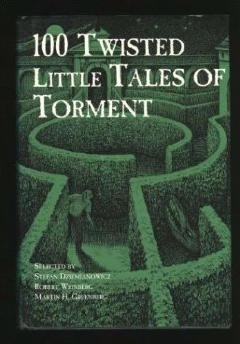
Thursday October 17th, Twisted Tales of Torment

tales-tormentShandon Loring dips into another of the “100 stories” anthologies, this one focused on the subject of revenge.

From the book sleeve:

The criminals in this entertaining collection of stories really know how to make the punishment fit the crime. An anthology of agonizingly exquisite tales from the pens of Saki, David H. Keller, Thomas Ligotti, and other masters of the mystery genre. Prepare yourself for the unimaginable. You may think you like horror stories, but these aren’t your average tales of things that go bump in the night. These are gripping accounts of perversion. These are awful stories of getting trapped in an elevator (Garry Kilworth’s “The Elevator”), a terrifying car ride (Arthur Conan Doyle’s “How It Happened”), or a vampire (Alan Ryan’s “Onawa”). Test your stoicism; see if you can get through all of the 100 Twisted Little Tales of Torment.

—–

Please check with the Seanchai Library SL’s blog for updates and for additions or changes to the week’s schedule. The featured charity for September and October is Water for People. Have questions? IM or notecard Caledonia Skytower.

Related Links

Lumiya 2.5.5: Share and enjoy

lumiya-logoThursday October 10th saw the latest release of Lumiya, the Android client for Second Life and OpenSim arrive.

Version 2.5.5 brings with a number of updates and improvements including:

  • Sliding gesture toggles between contact list and chat
  • Share inventory
  • Partner information in user profiles
  • Option to view chat logs within the application.

Slide Gesture for Chat / IMs and Contacts

iI5IrndThe slide gesture is a handy means of moving between your contacts list and an ongoing conversation either in open chat or IM without needing to use your device’s Back button.

To move between a conversation window and your Contacts list:

  • Start a conversation in chat or use Contacts to IM a friend
  • Place you finger on the screen and drag to the right. Your Contacts list will slide into view
  • Drag your finger to the left to return to the conversation
  • The image on the right, courtesy of Alina Lyvette, shows the function in use (the size of the image is unfortunately dictated by a limitation within WordPress.com when handling animated GIF files. Apologies if it is a little “in your face”.)

You can move between multiple IM windows by “sliding” back to Contacts and then tapping the name of the person you which to talk with and then “sliding” back and tapping the name of someone else.

Share Inventory

Version 2.5.5 allows you to share /give inventory items with / to others (subject to permissions, as usual).

To share and item:

  • Open you inventory and navigate to the folder containing the item you wish to share / give
  • Long touch the item for the context menu
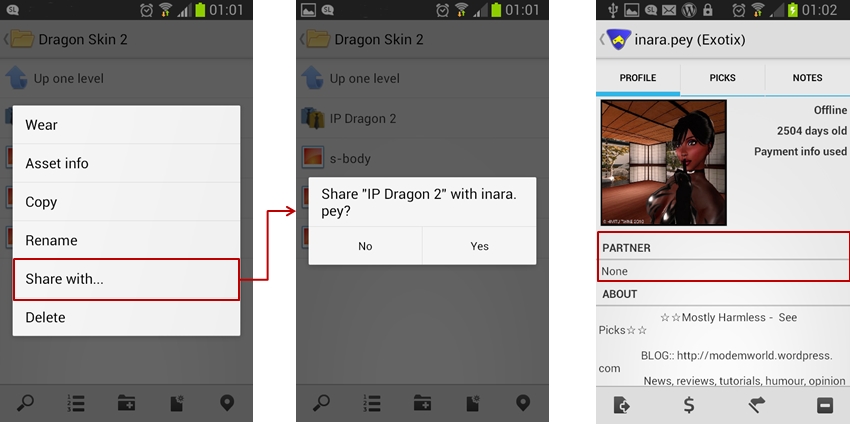
  • Tap the Share With… button – this will open your Contacts screen
  • Tap the name of the person you with whom you wish to share the item
  • A pop-up dialogue will be displayed asking you to confirm that to wish to proceed. Tap Yes to do so.

Note that Lumiya doesn’t display the warning notification if you are sharing a Transfer / No Copy item, nor does it display the “User is offline….” message when the recipient is offline. However, a message confirming the object has been transferred is displayed in local chat.

Lumiya 2.5.5 allows you to share / give inventory items with / to others (left and centre) and also display partner information in the Profile display (right)

Partner Information

The ability for Lumiya to display partner information has been added to the Profile display.

Viewing Chat Logs within Lumiya

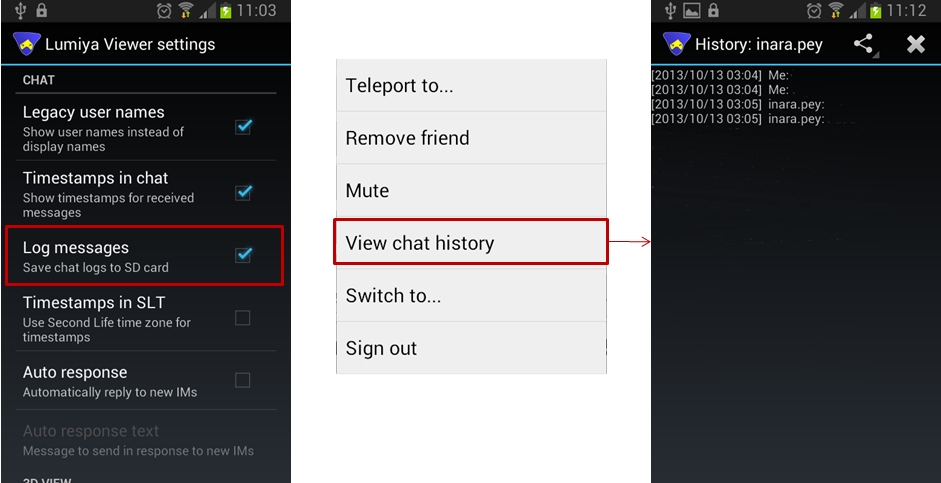
Lumiya 2.5.5 allows you to access chat logs (history) within the application. This does require that Log Messages is enabled in Settings.  Also note that due to a file name format change, chat logs saved in previous versions of Lumiya may not display.

  • Tap the Menu key on your device from Lumiya’s main screen and then tap Settings
  • Scroll down the Settings page to the Chat section and make sure Log Messages is checked
  • Initiate a conversation with someone
  • To see the chat history, tap the Menu screen from within the Chat / IM window and select View Chat History – note that if there is no recorded history log, this option will not be displayed in the menu
  • If a chat log file exists, it will be displayed.
View chat history: make sure the Log messages option is checked (l); from the chat / IM screen, tap the Menu button on your device and select the View Chat History option (c) to open the history, if available (r).
View chat history: make sure the Log messages option is checked (l); from the chat / IM screen, tap the Menu button on your device and select the View Chat History option (c) to open the history, if available (r). Note that if the option is not displayed, there is no history file to view

Other Items

Other updates in this release comprise:

  • Support for llLoadURL() – so you can now open a web page in a browser installed on your device, if a dialogue box is displayed asking if you wish to do so
  • Improved notifications
  • Bug fixes and performance improvements.

Feedback

Another very tidy update from Alina which adds some useful functions to Lumiya, with the ability to share / give items of inventory liable to be welcome among users. Kudos!

Related Links