SL viewer and project mini-update

A couple of items came up at the Open Dev meeting held last night (Thursday 27th September) which are worth pushing out by way of updates to my SL Projects Update from earlier in the week.

Beta Viewer

The beta release ((3.4.1.265134) made available on September 24th is still suffering from high crash rates. Whether these are related to memory leaks or not is currently unclear, as the Lab is apparently having trouble reproducing specific causes of crashes. It is believed that tcmalloc is no longer a part of the code. As a result of the investigations, the planned frequent deploys of 3.4.1 beta releases as specified by Oz last week has been delayed. This is liable to have a knock-on effect with planning for the 3.4.2 beta releases as well, although 3.4.2 continues to roll to the development branch, with 3.4.2.265141, released on the 25th September being the current development build at the time of writing.

Mesh Deformer

Following the release of version 3.4.1.265139 on September 25th, the Mesh Deformer project viewer updated to 3.4.1.265192 on September 26th. This version has the normals calculation disabled, as it conflicted with how Blender creates sharp edges and would cause the deformer to split the edge. In addition, it appears from comments made at the Open Dev meeting that meshes uploaded prior to this version will not deform unless worn with a mesh uploaded using this version, which is intentional.

There have been further contributions to the test clothing at Hippotropolis, and Nalates Uirriah commented that some creators are placing free copies of clothing for testing up on the SL Marketplace for people to use in tests. Oz requested that anyone doing this to please explicitly state the version number of the project viewer they used to upload the mesh clothing.

At the moment, and based on contributions received, Oz is hoping to arrange for a new series of tests to be run to test the overall functionality for the deformer as it stands. Again, if you do wish to contribute clothing (uploaded using the current version of the project viewer), please refer to Oz’s original request on the subject.

Avatar Baking

Bake fail: a familiar problem for many

Avatar baking is progressing, although there is still no time-frame for any project viewer or roll-out of code on the server-side.

Currently, work is being undertaken to move the viewer’s baking code to its own library, which will be used with the new server-side baking service as well. Thus the same code will be used when changing your appearance locally, and to send your updated appearance out via the new baking service, once it has received the updates from your viewer. This aim of this work is to further eliminate some of the errors which can occur as a result of the current baking process being reliant upon viewer-side hardware, drivers, etc., wherein the same inputs can lead to different results when using different hardware.

One of the biggest benefits of this work will be removing the burden of texture caching from the simulators. With the new system, avatar texture caching will essentially be a global service: the Texture Compositing service becomes a single point-of call for avatar texture information, instead of a simulator having to contact the simulator a visiting avatar was originally baked on in order to obtain texture data.

This not only means that texture caching will be removed from the simulators once the new service is up and running smoothly, it could pave the way for other benefits as well, as Oz mentioned in the meeting, “In theory at least, that lets us introduce persistent connections and pipelined requests (don’t know if that will be in the first version or not), which could enormously speed up getting the bakes when you enter a crowded area.”

Plans for the project remain aimed towards providing TPV developers with as much advanced warning as possible prior to the new service being enabled on the main grid (Oz has been aiming at around two months’ notice), to give them time to incorporate the viewer-side code changes and assist with testing the new service. When the server-side code is ready, a project viewer will be released, and a series of regions on Aditi (the beta grid) will be updated to use the new service for testing purposes.

I have a more explicit explanation of the core aims of the new avatar baking service available in an overview of the Shining project.

Related Links

Curiosity: the rivers of Mars

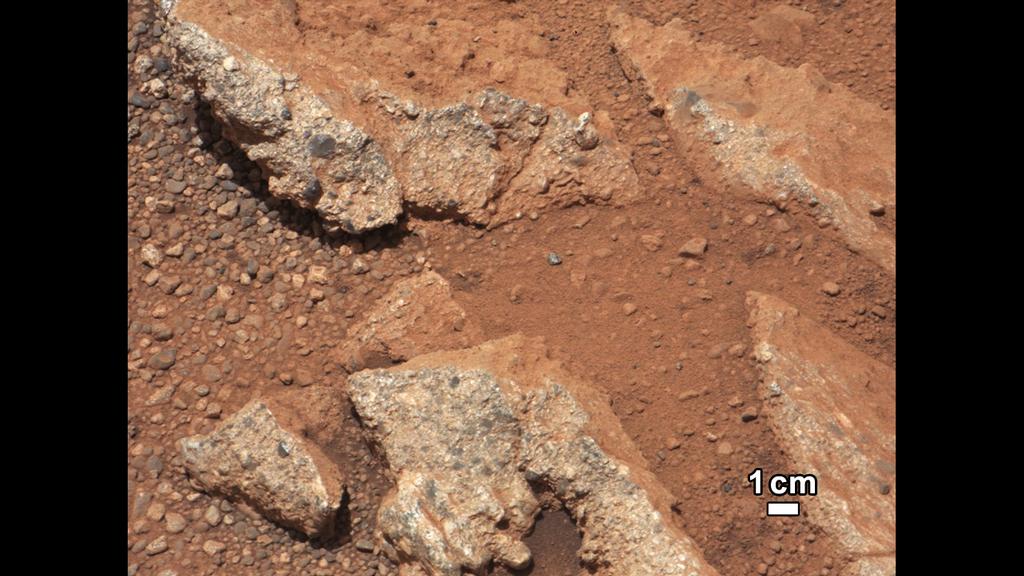
NASA has released images returned to Earth by the Curiosity rover of what appears to be an ancient stream bed, together with images showing further evidence of liquid water once having flowed freely within Gale Crater.

The images have been captured at separate locations on the route to Glenelg, with the first images being captured on Sol 27 (September 2nd), with additional images of another location being captured on Sol 39 (September 14th).

The Link outcrop images on Sol 27 using the 100mm Mastcam

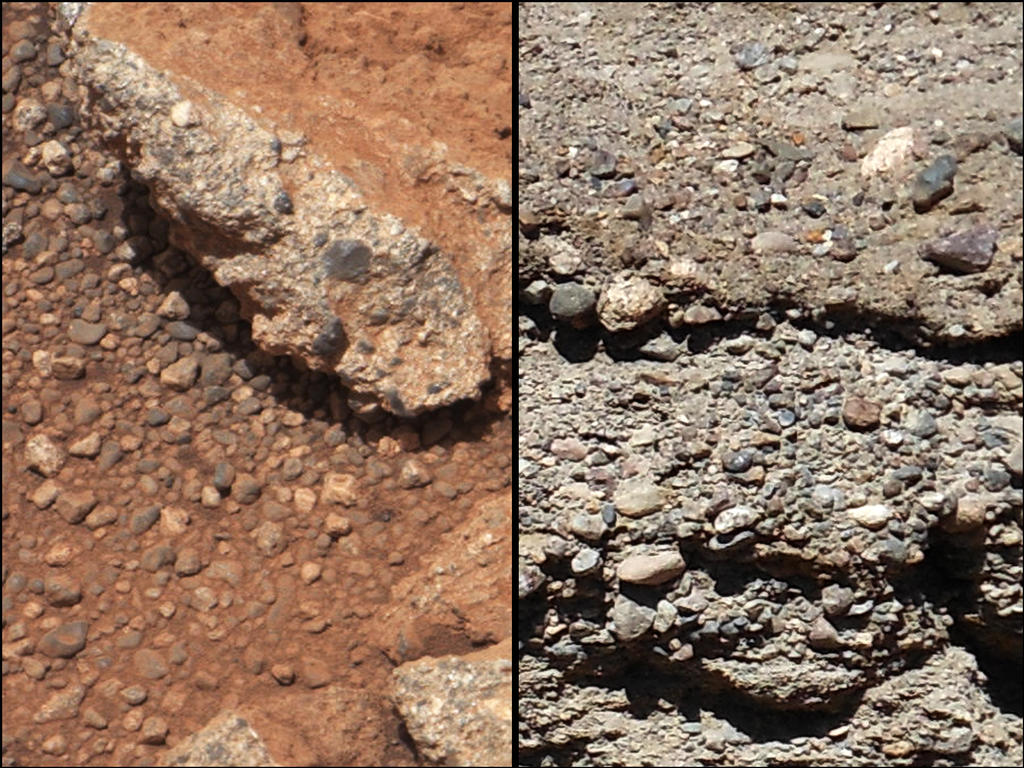
The first set of these images were of an outcrop of rock dubbed Link, and showed rounded gravel fragments, called clasts, up to a  few centimetres in size within the rock outcrop. Too large to have been moved as a result of wind action, these clasts have been deemed to be consistent with a sedimentary conglomerate, or a rock that was formed by the deposition of water and is composed of many smaller rounded rocks cemented together.

A close-up of Link (l) compared with similar rocks seen on Earth (r).  Erosion of the outcrop on Mars has resulted in gravel clasts which have fallen onto the ground, creating the gravel pile. The outcrop characteristics are consistent with a sedimentary conglomerate, or a rock that was formed by the deposition of water

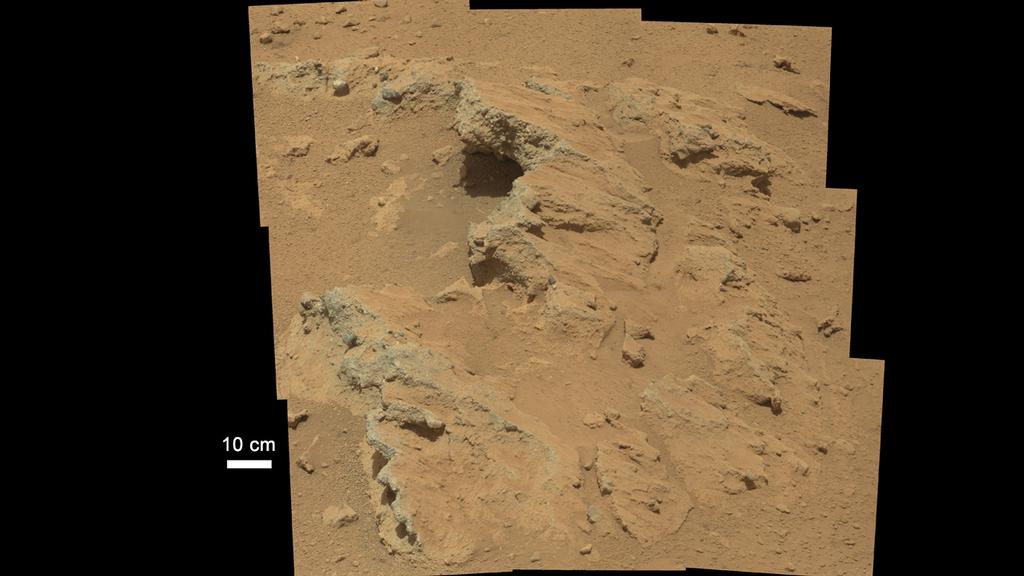
On Sol 39, Curiosity imaged a more remarkable outcrop, dubbed Hottah after Hottah Lake in Canada’s Northwest Territories. The exposed bedrock in the images, again captured with the 100mm Mastcam, is made up of smaller fragments cemented together to again form sedimentary conglomerate.

The location of the stream bed lies between the north rim of Gale Crater and the base of “Mount Sharp”, the mound towards the centre of the crater which Curiosity will explore later in the mission. Imaging of the region from orbit shows an alluvial fan of material washed down from the rim, streaked by many apparent channels, sitting uphill of the new finds, further evidence that water was once free-flowing in the region, probably over a reasonably long period of time in Mars’ ancient past. The images of the outcrops themselves show what are referred to as “classic conglomerates”, rocks that are made up of gravels and sand which have been cemented together. The sizes and shapes of stones offer clues to the speed and distance of the ancient stream’s flow.

“From the size of gravels it carried, we can interpret the water was moving about 3 feet [1 metre] per second, with a depth somewhere between ankle and hip deep,” William Deitrich, an MSL science co-investigator said, reviewing the images.

The Hottah outcropping of bedrock – evidence of an ancient stream bed imaged by Curiosity

Use the page numbers below left to continue reading this article

“When I consider your heavens….” – SunAeon update

The SunAeon team have been working on the primary site, and adding a raft of new features, which launched on Wednesday 26th September. Once again, I was very honoured to be asked to contribute to the site, providing information on the Earth, the Moon, the Sun and little Pluto.

Launching SunAeon presents you with a new introductory video, a virtual tour of the Sun, the eight planets and Pluto, showing each in turn, together with notable surface features in the case of the Earth, the Moon and the Sun, and cutaway views of the interiors of the major planets.

The main screen navigation tools remain unchanged, although the Navigate drop-down menu (accessed from the SunAeon button, top left of the screen), now includes the Sun, Earth, Moon and Pluto. Clicking on any of these will take you to your topic of interest and present the familiar surface view of the target, and the data display options.

Data Display for the Sun

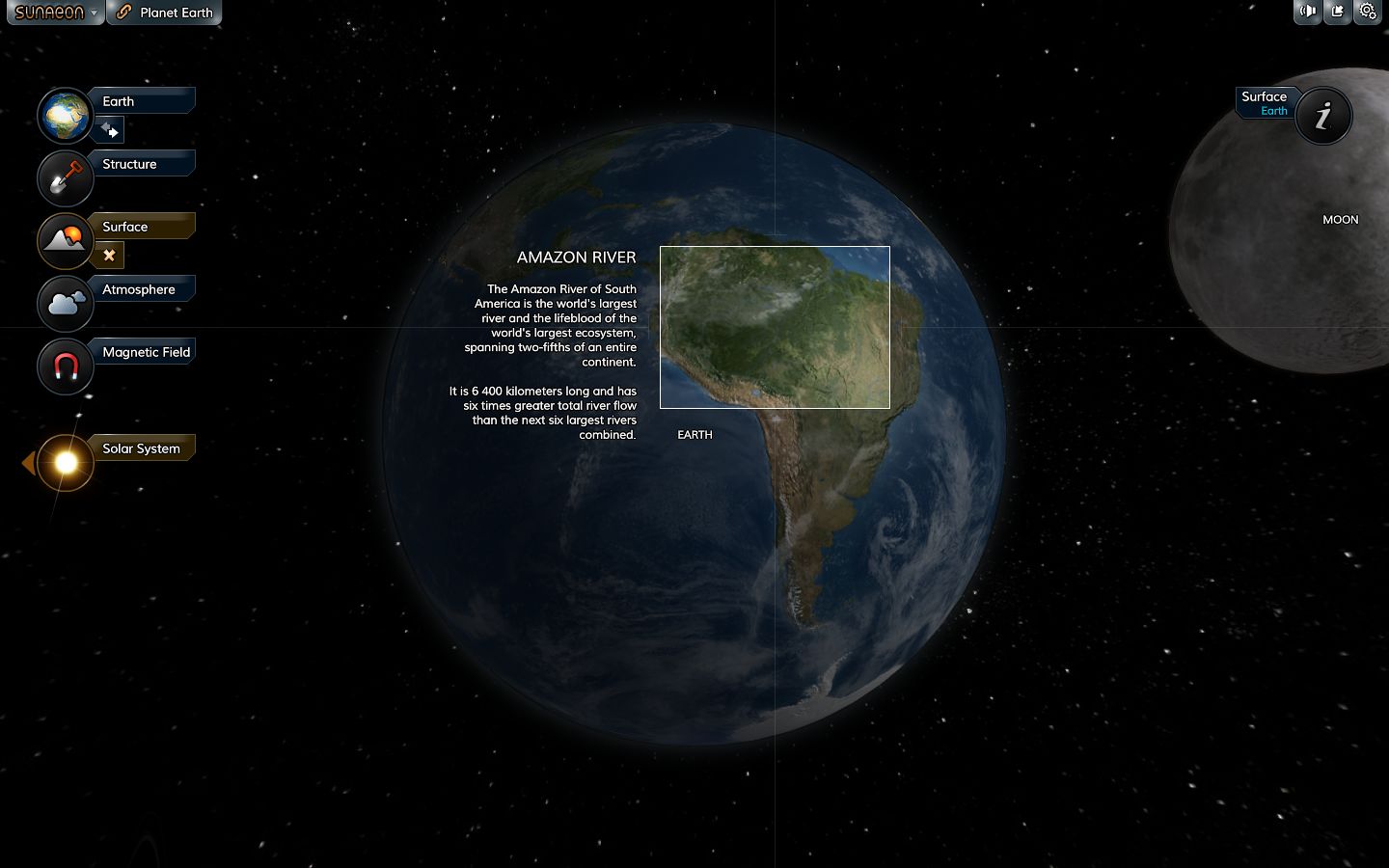
The amount of information available for each target is currently a little variable – Earth and the Sun, for example, have a lot more data options available for them, including panels for their atmospheres as well as internal structures (blame me for that – I may have overloaded Mito and the team with text!). Surface features are also now annotated for them, and for the Moon, allowing specific points / features to be focused upon and dedicated information panels displayed for them. I confess I wasn’t involved in these panels, but now I’ve seen them, I hope very much that Mito and the team will include a similar approach for the other planets as well – such as coverage of Olympus Mons, Gale Crater, Gusev Crater, the Vallis Marineris on Mars; Jupiter’s Great Red Spot, and so on.

An additional surface features pop-up panel for Earth

Some of the planetary data display pages now also include videos, provided courtesy of NASA. The pages for the Sun, the Moon and Mars all now incorporate optional videos, one of which features the upcoming MAVEN mission to study the upper atmosphere of Mars, and which is scheduled for launch at the end of 2013.

Ace of Space

This update also includes a very simple game as well. Called Ace of Space, This is essentially racing a small spaceship around the eight planets of the solar system, passing just close enough to each to make a checkpoint. The race is against the clock, and planets can be tackled in any order (although there is a degree of planetary alignment which can be used if you hit on the right course). Controls are simple – the arrow keys, with UP firing your main engines and DOWN firing your retro motors (both burning your fuel allowance, which can be renewed), and LEFT and RIGHT turning your ship. For those that feel up to it, you can also activate the planets’ gravity wells, which you can use to assist your flight – as long as you’re careful!

Flying past Mars in Ace of Space

Ace of Space is lighthearted fun, and includes a “free flight” mode. It’s hopefully a sign of more sophisticated space flight / exploratory capabilities will be added to SunAeon as time goes on, in accordance with the original roadmap for the site. The game can also be downloaded, for those who prefer to play it directly on their desktop / laptop, and the code is available to embed into webpages as well. If I have any critique at all, it is that the only way to get back to the main SunAeon solar system model appear to be going via the HELP option in the game or clicking the BACK button on your browser – an on-screen option would make things easier.

This is another nice update to SunAeon, and I’m again honoured in being asked to assist with a small part of it. I’m now looking forward to seeing it grow to include more details on the planets, moons and other bodies in our solar system.

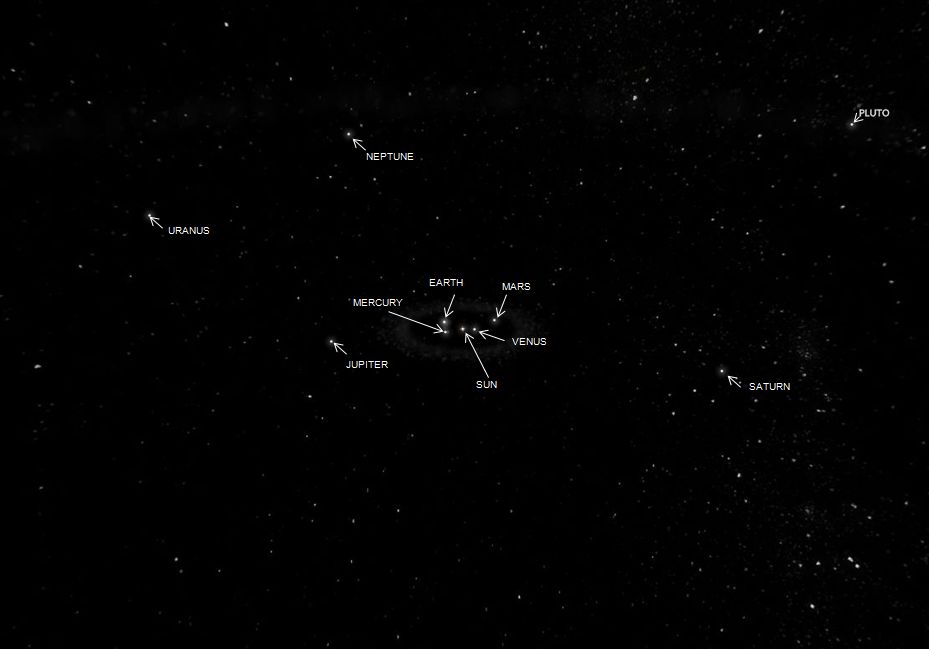
The Solar System is seen from space with SunAeon

Related Links

Considering SL large regions

While reading the transcript of the Simulator User Group meeting of Tuesday 25th September as a part of preparing my last SL projects update, I came across an interesting exchange on the subject of large regions –  megaregions in OpenSim parlance – which gives some insight into the broad level of thinking about the platform that goes on within the Lab.

For those unfamiliar with the concept, a megaregion is essentially a number of standard 256×256 metre regions stitched together to present what appears to be a single large region. These are generally presented in terms of areas equivalent to 2×2 regions (i.e. 4 region in total) or 3×3 (equivalent to nine regions) and so on.

The Universal Campus designed for 4-region (2×2) megaregions, created by Michael Emory Cerquoni. The arrow indicates my avatar, to demonstrate the size of the build

Megaregions have been available within the OpenSim environment for the last few years, and are seen as means of providing far more space free from the terrors of region crossings, greatly facilitating a range of activities – flying, sailing, vehicle racing, etc., – although there are some limitations with them at present, which can make working with them difficult (parcel media tends to be restricted to the South-west corner “region” of a megaregion, for example, and elements such as terrain textures cannot currently be easily edited).

Second Life is very much geared to the 256×256 metre region, so it was surprising to come across a discussion on large regions in SL – and to learn that Linden Lab have in fact looked at them in some detail. The revelation came in a comment from Simon Linden, “Yeah, big regions have been a pet project of mine … unfortunately it’s an incredible hassle to get right,” he goes on to say, a short time later:

I’ve spent some serious time looking at large regions … it’s a huge project to do it right, involving a bunch of messaging changes to the viewer (like layer data, object positions, etc), region-to-region communication (all the neighbours) our back-end (the grid layout itself) … it touches almost everything in some way, which is why we’re where we are today 😛

Simon also indicated that he felt an ideal size for large regions – were they ever to happen – would be to a scale of 1 km on a side, rather than  1024m on a side (as would be the case if large regions were somehow “scaled up” from the current region size, as with OpenSim). However, this would mean breaking away from the current power of 2 approach to building Second Life, and might lead to position translation issues (as in translating the position known in one region to the relative position in a neighboring region), although Andrew Linden felt this might actually be easier to handle this in 1k blocks between neighbouring regions, rather than relaying on power of 2. When asked as to what would happen to the 24 metres per side which would be lost in scaling to 1000x1000m, rather than 1024×1024, Andrew suggested (semi-jokingly) that they’d be lost “To … boundary conditions.”

Large regions in SL would offer much to the sailing, flying, role-play and racing communities, were they possible

Were any change in region sizes to be undertaken, they would not be limited to just the simulator / server-side of things. The viewer itself is predicated on the power of 2 approach, being specifically geared to handling regions of 256m on a side (hence why megaregions in OpenSim have some limitations in terms of editing, etc.). So for large regions to work properly, it is likely that substantial changes would have to be made to the viewer – which even with the best will in the world, isn’t something which is going to happen any time soon, even were LL pondering looking beyond the theoreticals of large regions.

Nevertheless, the fact that the matter has been – and might still be – something some in Linden Lab are actively looking at, even at only the conceptual level, is interesting, and does tend to demonstrate that LL do think about the platform in somewhat radical ways.

Kitely: faster worlds, transfer stations and more

Over the course of the last month, Kitely, the on-demand virtual world service, has continued to refine their megaregion offering introduced at the start of August, improving their OpenSim performance in the process. They’ve also announced an upcoming feature called “Transfer stations”.

Traditionally, working with megaregions is limited in some ways due to the viewer code being geared towards handling regions which are 256×256 metres in size. Editing terrain textures, for example, is something which usually cannot be done when working on a megaregion. While megaregion mode can be disabled to allow work to be carried out on a per-region basis, it can also lead to problems: landmarks can stop working, in-world objects may show at the correct location, etc.

Kitely have solved this problem by introducing an Advanced Megaregion option, which works relatively seamlessly with the viewer. When a world owner / manager using a megaregion attempts to carry out an operation such as changing the terrain settings, a pop-up is displayed advising them that the operation cannot be performed with the world running in Advanced Megaregion mode. A link on the pop-up allows the world owner to switch to their browser and disable the Advanced Megaregion  option via their Manage World webpage. This then allows them to work on the world as if it were a series of individual regions. Once terrain work has finished, the Advanced Megaregion mode can be turned on once more.

The Advanced Megaregion also allows parcel media to be heard right across a megaregion (rather than being limited to the south-west corner region).

“Oren, We Need Warp Speed!”

As well as working on megaregions, Kitely has been optimising the OpenSim code running on their cloud-based servers. In the same blog post announcing the Advanced Megaregions, Oren Hurvitz, Kitely’s co-founder and VP of R&D describes the improvements thus:

We have made numerous improvements to OpenSim to make big worlds work faster on Kitely. These changes reduce OpenSim’s CPU usage up to 80%! This makes the user experience smoother and allows for the use of more complex worlds and more avatars than regular OpenSim. The following chart shows how much we reduced CPU usage compared to regular OpenSim. These tests were done on a world running in its own server, with one avatar in the world.

Kitely CPU server optimisation (courtesy Kitely)

This optimisation allows Advanced Megaregions on Kitely to run up to 5% faster than regular megaregions.

Transfer Stations

Transfer Stations are an upcoming Kitely feature. They are described as, “Miniature worlds that users wait in while their world is being loaded.” The blog post announcing them goes on:

Kitely is a cloud-based virtual world provider, so when a user tries to enter a world that is currently offline we need to start the world first. This is fairly quick, but not instantaneous. Currently users look at a progress bar on our website while the world is being started, and once the world is ready their viewer is automatically launched. Transfer Stations are going to change this: when a user tries to enter an offline world their viewer will start immediately, but they will enter a Transfer Station instead of the desired world. Once the world is ready the user will be teleported to it automatically.

The Transfer Stations will be located on dedicated worlds specifically set-up for them, and could, in the case where more than one user is logging-in to the same offline world, allow people to meet and chat while awaiting their destination to load (not that the wait should in any way be extensive!).

To encourage the development of Transfer Stations, Kitely are inviting world owners to submit themed Transfer Station designs of their own, which other world owners and managers will then be able to pick from when setting-up a Transfer Station on their world(s).

Kitely Transfer Station conceptual drawing (courtesy Kitely)

There are certain requirements which must be met for Transfer Station submissions, and these can be found in the Kitely blog post. Reviews of submissions, which will be performed by the Kitely Mentor’s Group, will commence on October 1st.

New Avatars

On September 21st, Kitely updated their default avatars with a range of seven new avatars, using modified assets based on ones provided by designer Linda Kellie. The avatars are available to new users signing-up to Kitely, and the assets are currently also available at in-world Linda Kellie malls for those who wish to use them as their base model.

Kitely’s new default avatars (image courtesy of Kitely) – click to enlarge

Related Links

Marketplace issues: September update

On September 20th, Commerce Team Linden provided a terse update to the ongoing problems related to direct delivery. The Update reads in full:

The transition from Magic Boxes to Direct Delivery has been extended indefinitely. We will be providing a 30-day warning before any shutdown actions are taken and will avoid doing this before peak holidays for the Marketplace (Halloween, Christmas/New Year’s, Valentine’s Day).

We are aware that some Merchants are still having problems with the Merchant Outbox. We are are working with TPVs and our internal development teams to address this issue.

The comment relating to TPV involvement possibly relates to  WEB-4600, VWR-28630/VWR-28631 and VWR-28629, although it has caused some confusion, as there appears to have been little or no recent discussion on matters between LL and at least one TPV team.

The update gives no further information on the status of the range of JIRA items related to the Marketplace which have been under investigation now for the greater part of 2012. These items comprise:

  • Limited Quantity Support Merchant does not have rights to copy the items for sale (no JIRA number supplied)
  • WEB-2974 (Listing enhancement stuck in “Charging, cannot edit right now” state)
  • WEB-4138 (Confirmation emails failing to deliver)
  • WEB-4441 (Orders stuck in “Being Delivered” state)
  • WEB-4554 (Test delivery permissions incorrect)
  • WEB-4567 (Bulk delete fails for some merchants)
  • WEB-4587 (listings with the wrong images)
  • WEB-4592 (Orders marked as “Delivery Partially Failed” on success)
  • WEB-4600 (Merchant Outbox failures)
  • WEB-4696 (Deleted listings appearing in search results)

Meanwhile, in the Marketplace release for September 26th, 2012, the Commerce Team did successfully change the “sent from” from email address to service@mail.Secondlife.com for all sales notification e-mails sent to merchants (this was previously no-reply@marketplace.secondlife.com). However, as no formal notification was apparently given on this change ahead of time, many merchants only discovered the change as a result of their e-mail applications treating incoming sales notifications with the new “from” address as spam …