Linden Lab has recently acquired the right to sub-licence the Havok physics engine technology used within their Viewer. This has resulted in the Lab issuing new guidelines to third-party Viewer developers wishing to incorporate advanced Viewer capabilities developed using the Havok technology within their offerings.
The guidelines read in part:
The technology is provided in the form of an autobuild package ‘llphysicsextensions’ containing header files and the required library. This does not directly expose the Havok APIs, but a set of higher level interfaces specific to the viewer. Sources for the wrapper itself will not be open source. The llphysicsextensions package includes all features that use Havok (currently convex decomposition and features related to navigation mesh for pathfinding).
This move is already a subject of debate among TPV developers and the OpenSim community, because the sub-licence associated with the guidelines appears to place clear restrictions on TPV developers, notably in clause (b) of the Conditions to Grant, which reads:
(b) Sublicensee must require the Third Party Viewer to connect only to servers owned or operated by the Company; [i.e. Linden Lab]
So if a TPV developer wishes to work on both Second Life and OpenSim, they’ll have to look at options very carefully, as Maria Korolov points out in Hypergrid Business.
Within Second Life, there is concern as to what this may mean for some TPVs – specifically those utilising GPL rather than LGPL. Such Viewers appear to be effectively excluded from applying for a sub-licence. While this will not prevent such Viewers from accessing Second Life, it does mean that they’ll be excluded from using code that implements the Havok capabilities. The requirement for TPVs wishing to obtain a sub-licence being required to be publicly listed on the Third-Party Viewer Directory may also have a negative impact in some quarters.
The flip side to this, however, is that it means Havok physics will effectively be in the Viewer itself, which could pave the way to many new enhancements and capabilities within Second Life. As such, it is far to say that the move to sub-licence the Havok engine is less about LL attempting to restrict Viewer development per se (the apparent attempt to push out V1-based Viewers not withstanding), but rather to provide a means by which they can integrated what is effectively a closed-source, licenced product (Havok) into what is essentially an open-source project (the Viewer) without breaking the terms of their agreement with Havok.
The program itself is not available as yet, and discussions within the community are ongoing, with TPV developers aiming to seek further clarification from Linden Lab on possible impacts on their work – again, specifically where OpenSim support is concerned.
Update: I’ve add a link to Zonja’s excellent instructions to the my Tutorials Index Page.
Last night, Chestnut Rau led me, by way of Whiskey Monday to a three-year-old post from Zonja Capalini on using Linden Water as a mirror. As old as the post may be, it has considerable relevance given how LL and TPVs are striving to improve the graphics capabilities of the Viewer – and it goes to show how easy it is to miss a highly informative blog post! My thanks to Chestnut and Whiskey for pointing me in the right direction, and to Zonja for documenting the process.
The technique isn’t new, per se, as a number of people have been using the idea for a while and produced some very clever effects, but Zonja’s instructions make it so easy to implement, they are a joy to follow and make trying things out for oneself as easy as 1-2-3. And I mean easy – if I can get things sorted, then anyone can.
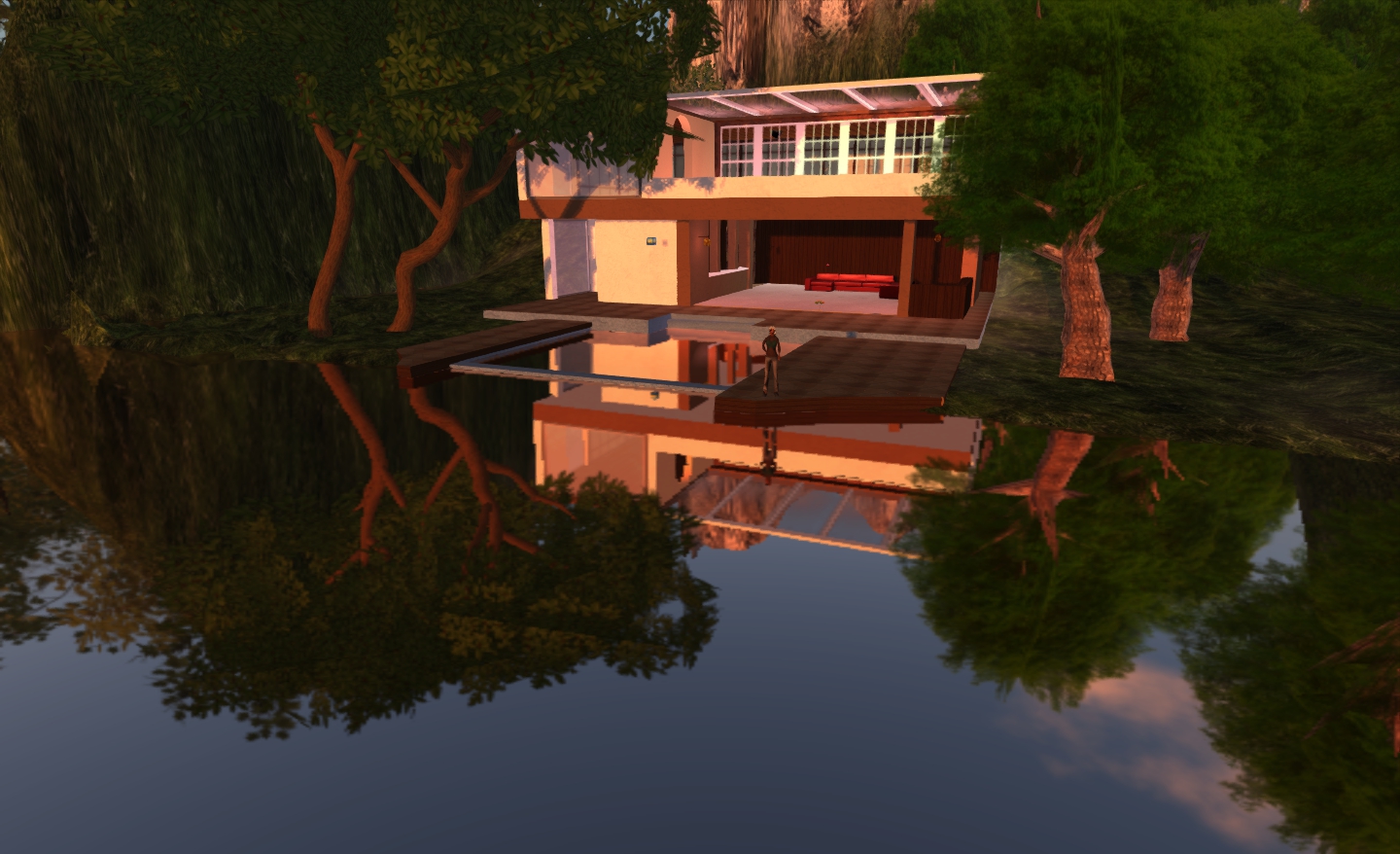
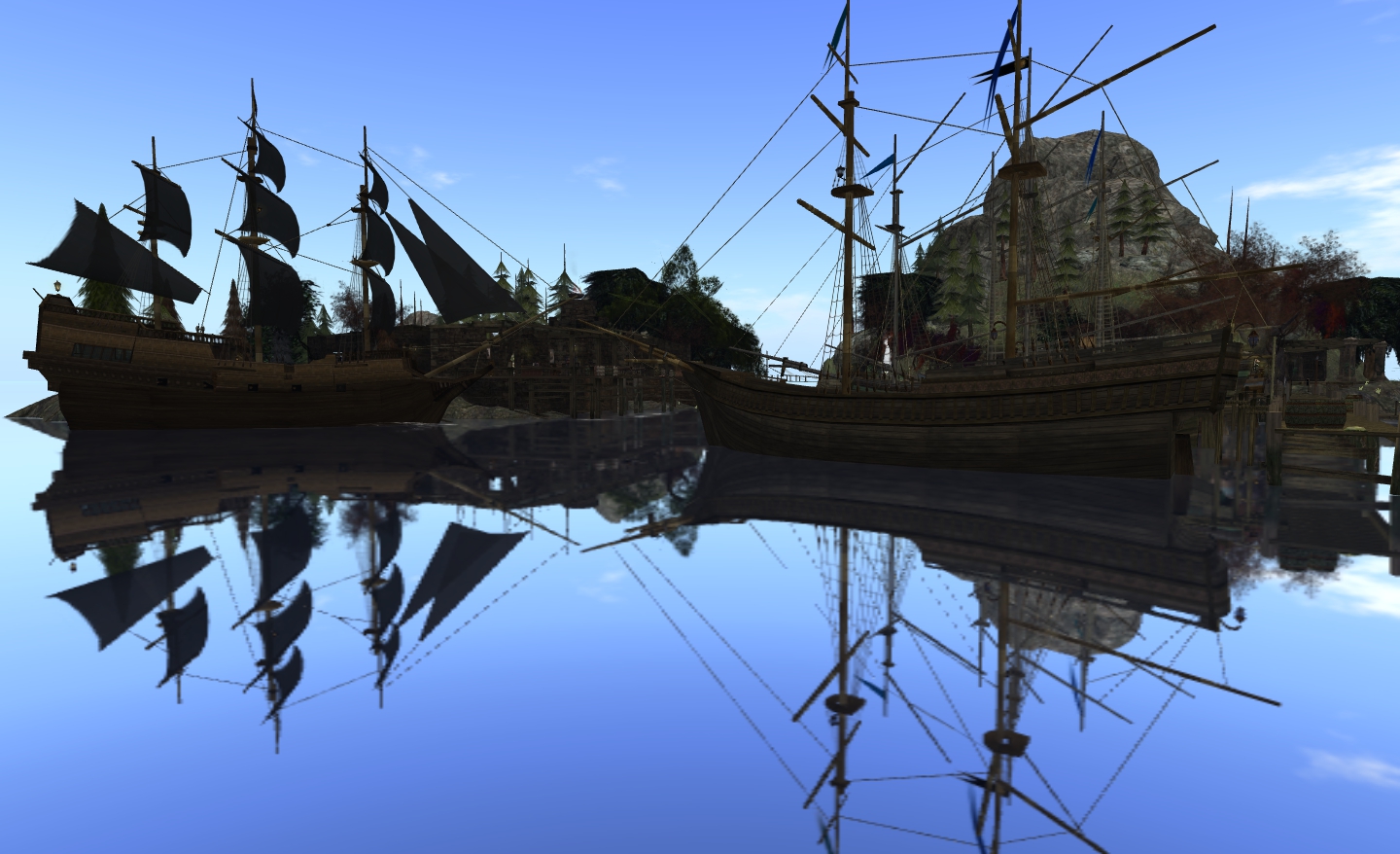
As well as clever visual effects, the technique can be used to produce some interesting shots as one travels SL – or even of one’s own home region.
Using the mirror water effect to capture one of the houses on my land (click to enlarge)Black Spot, one of my favourite places in SL, gets the mirror water treatment (click to enlarge)
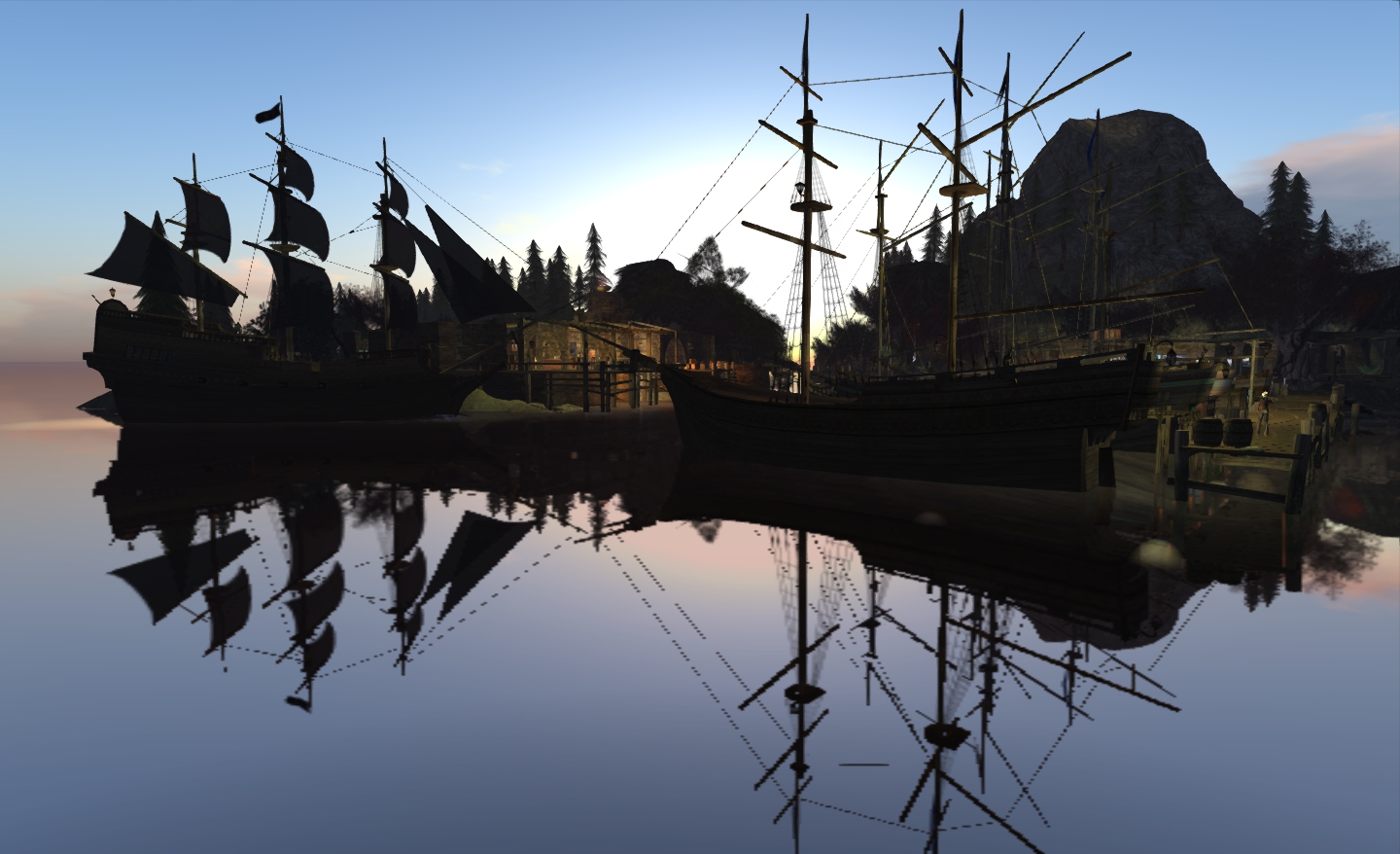
Of course, it is rare for real water to be so glassy-smooth, but the results are worth ignoring that fact. The effect can obviously be combined with other graphics effects – Windlight sky settings, lighting and shadows, etc., – although you can find your system getting pushed hard. Lighting and shadows in particular left me with very grainy pixelation on images…
The same shot, but with lighting and shadows active – on my system, this does degrade the image quality somewhat
There is a slight difference between Zonja’s instructions and achieving the same result in V3-based Viewers, inasmuch as everything can be achieved from the one dialogue box when setting-up the water Windlight requirements. Just go to WORLD->ENVIRONMENT EDITOR->WATER PRESETS->NEW PRESET… Not exactly rocket science to find, but worth mentioning. Once there, set all options and sliders as Zonja defines in her article.
The most interesting use for the technique is that of self-portrait style pictures, where some fun can be had. Zonja and Whiskey has some stunning examples of these. I was a little reluctant to include any of myself, given my current fetish look – but “in for a penny”, as they say.
This is a weekly summary of changes to all SL Viewers / clients of which I’m aware and which are in popular use across the grid / listed in the TPVD. Detailed links to said Viewers / clients can be found in my Viewer Round-up Page. The links supplied in this summary are either to change logs or to reviews within this blog.
Updates for week ending: 8 April, 2012
Slightly late this week, due to Easter.
There were several changes last week, some of which fell just after publishing the Week 13 round-up. Changes are always reflected in the Round-up page as soon as I learn about them, so always best to follow the links to that page for the most up-to-date news.
The SL Beta and Development Viewers rolled out updated versions shortly after the last update, moving to 3.3.1.252229 and 3.3.2.252822 respectively
The Pathfinding Beta Viewer moved to release 3.3.2.252475
Dolphin saw a further release, 3.3.2.23722, which primarily comprised updates to the Build floater, with clean-up to Preferences and improvements to ID3 info on Linux
The Kokua team released an experimental version of their Viewer for the Mac
Niran’s Viewer saw a Preview release of version 1.33
Zen Viewer rolled to version 3.3.2.6, the release technical being this week, but as this summary is running late, it’s listed here as well
Cool VL Viewer rolled out 1.26.4.7 (.7b in the case of Linux due to repackaging). This release saw the port of the Merchant Outbox support
I received word via Twitter that the Astra Viewer is likely to be making a return to SL; as and when this happens, it will be added to this list.
The Cool VL viewer becomes the first V1-style SL Viewer to gain the Merchant Outbox for Direct Delivery. The new capability comes with release 1.26.4.7 (.7b for Linux due to a repackaging issue), released on April 5th.
There is no support for the Beta grid (Aditi) or the Beta Marketplace
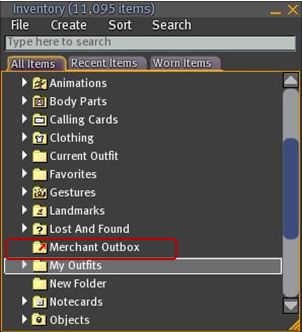
The Outbox is implemented as a folder within Inventory, rather than as a separate floater
There is (currently?) no right-click->Copy to Merchant Outbox capability for items / folders, as seen in V3-based Viewers with Outbox functionality.
Coll VL Viewer: Merchant Outbox folder
To use the Outbox, simply drag and drop folders / items to be transferred to your SL Marketplace store to the Merchant Outbox folder. Or if you prefer, COPY and PASTE them.
If you are dragging one or more folders, a copy of each folder will be made in the Outbox folder with the same name as the original
If you are copying one or more objects into the Outbox folder, each object will be placed in a folder bearing the object’s name (same functionality as V3-based Merchant Outboxes)
To send items to the Marketplace, right-click on the Outbox folder and select SEND TO MARKETPLACE. A pop-up will be displayed in the bottom right-hand corner of the Viewer window upon successfully transfer (and will also note any issues encountered).
As is to be expected, all other constraints (number of items, nested folder levels, etc.) are the same within Cool Viewer and for other Outbox-capable Viewers (as these are LL-imposed contraints).
In testing the capability, I found it functioned smoothly and without any incident: all items dropped into the Outbox folder arrived safely (and suitably “foldered” themselves, where required), and the upload handled multiple items and nested folders without incident.
If there are merchants who have been waiting for a V1-style Viewer to implement Merchant Outbox support prior to committing themselves to Direct Delivery (and allowing for current Marketplace issues), then Cool VL Viewer now provides the answer.
SL has tended to have its share of scams over the years, running from the misuse of Account Debiting scripts (wherein an unknown object sends you a request asking to be allowed to take money from your account), through to quite involved and complicated data-scraping efforts as most clearly exemplified by the infamous RedZone affair of 2010/2011.
Recently, we’ve had two attempts at what amounts to phishing for SL user’s log-in credentials (and possibly other information). These attempts are focused on trying to take advantage of the Second Life name and the widespread popularity of the Phoenix and Firestorm TPVs.
SL Log-in Scam
This problem first appeared in March which people began receiving seemingly genuine information directing them to what appears to be the SL web log-in page, with a request to log-in to SL The site was actually a false page, geared solely towards gain people’s user name and password.
Over the Easter weekend, a new scam appeared using the lure of a L$ reward to tempt people. It comprises a message the can be received either in-world or relayed to e-mail (if you are offline), encouraging you to visit a website and “confirm your details” in return for a L$1000 reward. The following is a typical example of such a message (as I received today, relayed via e-mail):
The object ‘Second Life’ has sent you a message from Second Life:Happy Holidays Everyone! Get 1000L just for signing up here and confirming your email –http://bit.ly/????
Second Life is owned by FirestormRelease Resident
(Note that I have redacted a part of the URL short link to avoid any accidents with people copy/pasting it out of curiosity.)
This is a particularly insidious scam because it is using the names of SL’s two most widely used TPVs in order to gain a veneer of authenticity – notice the name of the avatar responsible for sending the message. This has prompted the Phoenix / Firestorm team to issue a cautionary Message of the Day warning, seen when logging in to either of their Viewers:
Multiple accounts are being used to circulate such messages – “FirestormRelease Resident”, the attribution for the message I received being just one. Indeed, when I contacted Jessica Lyon about this account name and location she replied, “I just got a bunch of those accounts shut down, however, if more show up please send me the SLurls to the objects and account names.”
How to Deal with a Scam Message
The important thing here is that if you are in receipt of such a message / e-mail either asking you to log-in to the SL website or which gives the impression it is associated with a valid group or organisation within SL (such as the Phoenix / Firestorm team as seen here), do not click on any link it contains or provide any information to the website you’re taken to if you do.
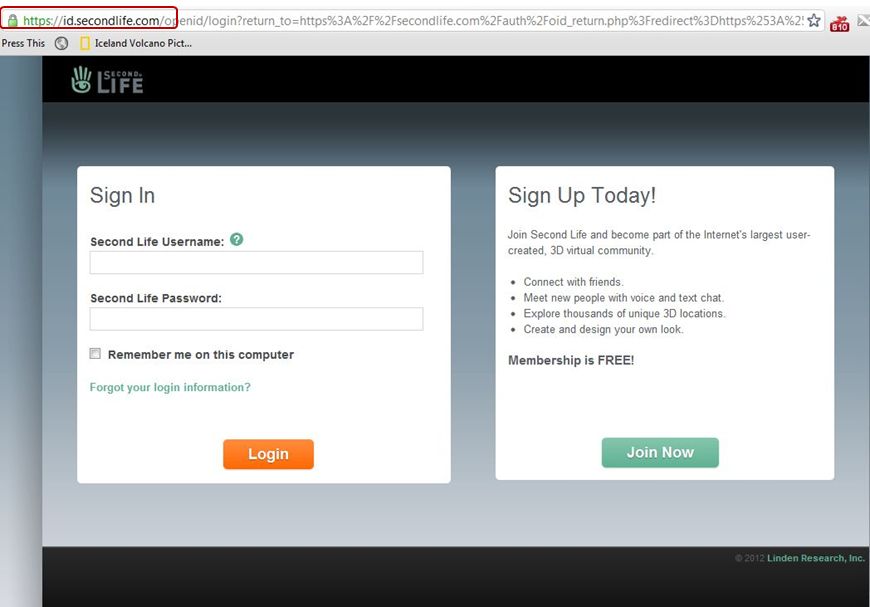
In respect of the SL log-in page, you can always test the validity of the page you are displaying prior to logging-in simply by looking at the URL. The genuine SL website log-in page will always commence with: https://id.secondlife.com/, regardless of whether you are trying to log into your Dashboard or the Marketplace or your web Profile.
SL log-in page: the real McCoy (click to enlarge)
If the URL for the page contains any other information than this, regardless of how “real” the rest of the page may look, then the URL is bogus; do not follow it. An example of such a bogus URL which was circulated last month commenced: “http://marketplacesi.altavista…..”.
False prophet – note the (made up) URL (click to enlarge)
Where messages appearing to come from established in-world groups or organisations are concerned, check the message carefully and if you have any doubts at all, contact a representative of the group / organisation to verify whether the message is genuine or not.
If you have followed any such link and supplied information to a website / possibly had something download from the website, then you should:
At the very least, change your account password immediately
If you believe the account has already been tampered with, contact Linden Lab and inform them of the situation. They may lock the account while they investigate. Note that you’ll have to supply RL information in order for them to release it back to you
Raise an Abuse Report if you have sufficient information on the perpetrator. Contrary to popular myth, LL do take Abuse Reports seriously and will investigate
Run an anti-virus / malware sweep of your computer.
In the case of scam messages relating to Phoenix / Firestorm, you may wish to inform Jessica or a member of the team, so they can continue to work with LL to get bogus accounts shut down en masse.
Linden Lab are working pro-actively on matters as well – not long after I’d informed Jessica about “FirestormRelease Resident”, a representative from the Lab was on-hand investigating the location being used.
One of the things that has always attracted me to Niran’s Viewer – and is drawing back to it now that performance has once again improved on my hardware – is the fact that NiranV Dean is constantly looking at the UI as a seasoned user of SL and other immersive software and trying to find ways to reorganise things within the UI – particularly menus and floaters. This has led to Niran’s Viewer being highly innovative in both look and feel.
In recent releases, this has been reflected in the fact that right from the moment you load the Viewer, you know you’re using something very unique: The log-in / splash screen has been markedly different from other Viewer for a while, and recently gained a video element to replace static images. The video – shot in the Insilico region – demonstrates the power of Niran’s Viewer as a Machinimatographer’s tool, and is beautifully overlaid with the log-in options without the latter intruding on the video itself.
I’d still link to see some kind of link to the Grid Status page (indeed, given LL won’t step-up to the plate on this one and provide a Viewer-based means for users to be aware of SL issues prior to logging in (not everyone uses the Dashboard). I’d like to see all TPV take a leaf from Firestorm’s book in this regard), but other than that Niran’s approach to the log-in splash screen is enticing. Once you’ve entered your credentials, the screen reverts to the familiar images, progress bar, mandelbrot-like animation and Niran’s famous (and amusing) tips.
Of Floaters and Preferences
Given this is a Preview of an upcoming release, I don’t intend to cover everything that NiranV is doing with the Viewer – I’ll take a broader look once a former release is made. Instead, I’d like to focus on the massive amount of work he’s been putting into the various UI floater panels – which, with this release – reaches the Preferences floater itself.
Now, I’ll be the first to admit that when NiranV first started to work on redesigning the floaters (the Build floater in fact, after revising the World Map), I wasn’t entirely convinced as to the result. Since that time, he’s continued to refine and improve his layouts and I have no hesitation in saying that they are reaching a point where my early concerns have been completely invalidated.
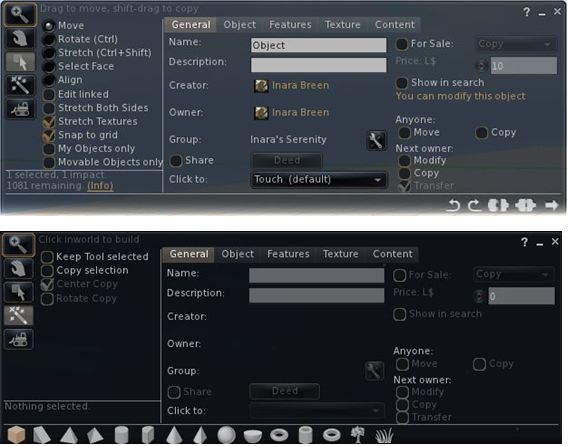
And evolutionary process: the redesigned Build floater as it first appeared in Niran’s viewer (top) and how it looks today
More recently, the work has extended to the People floater, allowing information of friends and groups to be presented in a way that easily scans on the eye and doesn’t require floater resizing or other messing around with each update that comes out.
The People floater showing the Nearby tab with mini-map enabled, and the Groups tab (edited for privacy)
Other examples of Niran’s work can be found in elements such as the Mesh Upload floater, which I looked at recently and which presents the necessary information and options without putting a size 14 footprint all over the in-world view.
Preferences: a Complete Overhaul
Version 1.33 of Niran’s Viewer brings with it something we’ve never really seen in the entire history of the SL Viewer: a radical redesign of the Preferences floater.
That you’re into new territory when accessing Niran’s Preferences is immediately obvious: there are no left-side tabs. Instead, primary options are accessed from a left / right scrollable tab list at the top of the floater, with additional sub-categories for a given option are displayed in sub-tabs access at the bottom of the current Preferences page being viewed.
Options have also been renamed in an attempt to make the tabs more reflective of the options they contain. By default, Preferences will open on the Communications Options tab (above). However, and in a move long overdue in Viewers: the floater will actually re-open to display the last tab actually in use / displayed when OK was pressed / X was clicked on to close the floater.
The tabs as currently displayed in Preferences comprise (from left to right across the top scroll area):
User Options: includes three sub-tabs:
General: analogous to the General tab in the official Viewer and containing the familiar language, content access (General, Mature, Adult), name tag display options and busy response, together with options to set name tag colours
Advanced: provides access to all popular camera, movement and mouselook options found within the official Viewer and TPVs
Privacy: displays the Privacy tab options (clear history, log file options, options for setting who can see you are on-line, etc.
Display and Audio Options: Combines the Graphics and Sound & Media tabs and comprises three sub-tubs:
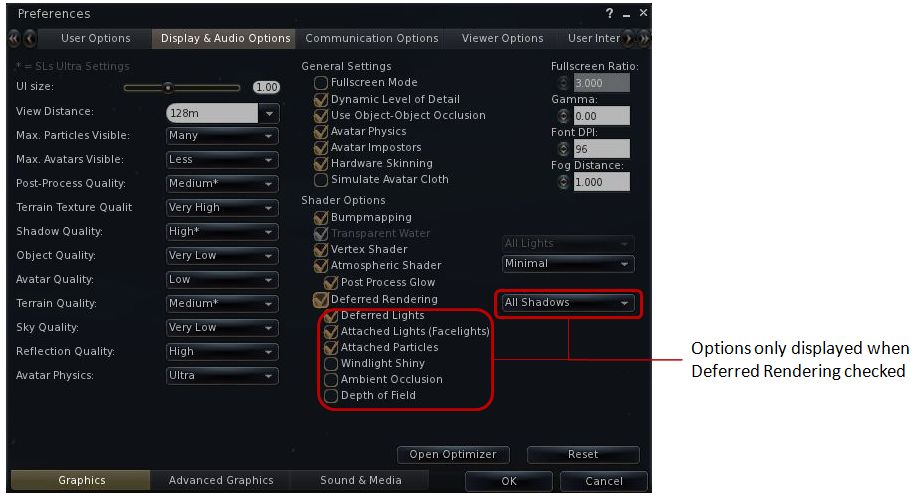
Graphics: displays a re-ordered and improved graphics settings option list as shown below, with advanced options for deferred rendering only displayed when the deferred rendering option is checked. This tab also includes a button for accessing Niran’s own Optimiser floater
Re-ordered and clearer graphics settings
Advanced Graphics: displays all major advanced graphics options (glow definition, lighting, performance options (including visual auto-mute), etc., all logically grouped and accessed via dedicated buttons
Sound and Media: includes the volume controls, media playback options, Voice settings, etc., as found in Sound & Media in other Viewers
Communications Options: brings together the communications options variously found under Chat, Notifications and Colors, and presents them in three sub-tabs which also include the relevant popular TPV options such as MU* poses, OOC auto-complete, etc.
Viewer Options: presents those options usually associated with setting-up the Viewer, including the Setup tab, the Advanced tab and also include a dedicated sub-tab for RLV/a options, all in their own dedicated sub-tabs.
User Interface Options: includes all of Niran’s Viewer’s comprehensive UI customisation options, including the ability to set the colour and transparency of all commonly used floaters in the UI. Includes three sub-tabs: UI Colors, Skins & Themes and UI customisation.
Feedback and Thoughts
NiranV Dean continues to push the envelope in terms of re-working the Viewer UI. In terms of the changes to Preferences, I think the approach taken has a lot of merit and actually provides a much faster means for one to locate options (after traversing the initial learning curve). The layout is easy to use and options have been brought together with considerable thought. Obviously, there is a degree of re-training one must go through to use the Preferences with ease, but this isn’t exactly mountainous and shouldn’t be cause for complaint.
Were I to critique it at all, it would be in that the User Options and Viewer Options contain some degree of cross-over in terms of what they do. As such, even after spending a good deal of time using the Viewer it can still be confusing as to where a given set-up function might be – do I go to User or Viewer (or even the Viewer sub-tab under User Options?). I’m not sure how this could be avoided without having something of a mess in terms of one page displayed a multitude of sub-tabs, but I do feel that these are areas where further work may be required – and is probably being considered, given this is only a preview.
Now, if Niran provides a means to left / right align buttons (I’m not so much fussed by top / bottom alignment on the left/ right, if I’m honest, as I don’t place buttons to the side of the screen) and gets the chat bar so it can be “docked” to (or at least aligned with) the bottom of the Viewer window, I’ll be one very happy bunny!
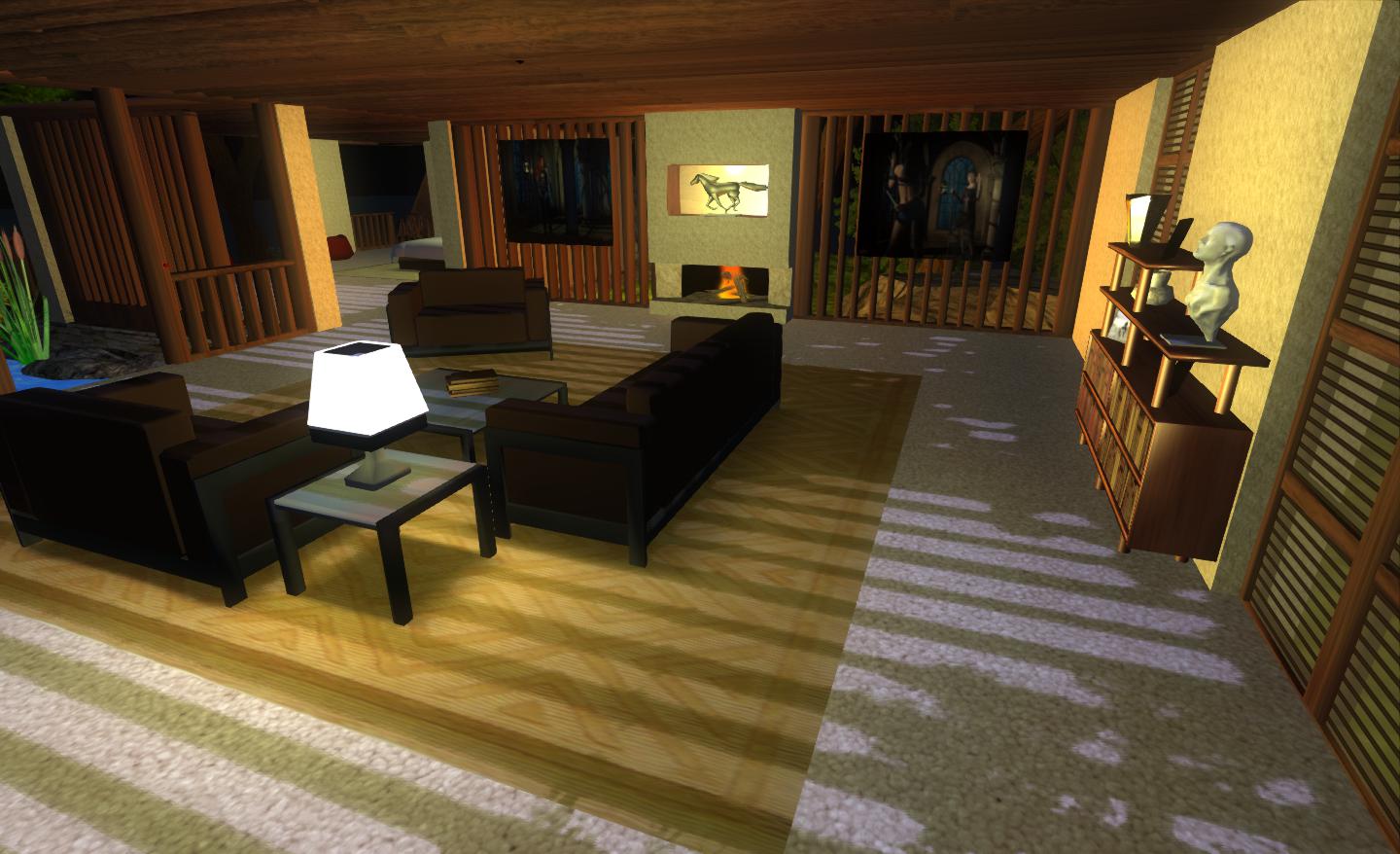
Performance-wise, 1.33 is perhaps the best release of Niran’s Viewer I’ve run on my PC recently, with respectable frame rates at my standard settings in the high 20s / low 30s. Enabling deferred and shadows does still crash this – and rather more so than recently LL Viewer releases, with an average frame rate of just 7-9fps with shadows on running my normal defaults (see the Review System panel on the right of the main page of this blog). However, Niran’s seriously kicks bottoms when it comes to the sheer quality of the world-view generated when running deferred with shadows: the lattice-work of the roof of my house casts beautifully crisp shadows that suffer none of the “greying” or blocky fuzziness I’ve experienced with other Viewers.
Crisp shadows
I’ll have a further look at updates and changes to 1.33 when it reaches a full release status.





 Inara Pey: Living in a Modemworld