Updated 20th March to reflect Niran’s, Firestorm and Phoenix releases. Also, review links will take you to a library page for those viewers / clients I’ve reviewed more than once.
Changes since the last Round-up shown in green.
SL Official Viewers
Available for: Windows, Linux, Mac
Current Release version: 3.2.6.248931 (download page)
Beta version: 3.3.0.250306 (released: March 1st) (download page)
Development version: 3.3.1.250772 (released: March 8th) (wiki page)
Simplified Inventory Project version 3.2.8.248008 (wiki page)
This is intended to be a weekly round-up of current public SL ciewers / clients (of which I’m aware / for which I have information / which I can run (Windows / Android)). As few Viewers are static, and releases are made according to individual development cycles, further versions of any given viewer / client may well be released between these updates, and as such the information here may become out-of-date as the week progresses. Please check with the relevant download pages.
Note: This article has been taken to mean I was unaware of the Community Gateway programme. Not so; rather I wanted to focus on the Destination Islands in this piece. As it is, and subsequent to this being published, a comment was passed elsewhere indicating the new Destination Islands are in fact something of a collaborative effort between the Lab and residents.
“Shared” is a word that has gained increasing prominence where Second Life is concerned over the last year. We’ve had Rod Humble talking about “shared creativity” and more recently, Oz raising the issue of the “shared experience”. Now there would appear to be an opportunity available for LL to come together with members of the user community to share creativity in order to develop a shared experience that can be of great potential benefit.
As I reported recently, LL have – at some point – launched a new range of “Destination Islands” to which new users are delivered. Currently, it’s hard to see what these regions actually achieve; they provide no introduction to SL, they don’t build on information given to the new user through the Viewer installation process, etc. As some have commented, they could even result in people thinking they’ve entered little more than a cartoon-based game with no obvious goal or function.
However, they are evidence that LL are still trying to address the issue of the “new user experience” by at least providing a means to direct newcomers to experiences they might be interested in. The problem is, the entire process is very hit-and-miss, and actually leaves much that is attractive about SL completely hidden – such as building and content creation.
New destination islands: low-key
It’s Not Easy
In fairness to the Lab, providing a means of supporting new users is no easy task. As we all tend to point out, SL cannot be taught in a day, and when one goes from talking about the “first hour experience” to the “first five hours experience” – as Mark Kingdon famously did – then something, somewhere is going more than a little pear-shaped when considering new users. At the same time LL have been presented with ample evidence that help centres that rely on direct user / user interaction don’t always work.
However, there is also a risk in going too far in the other direction as well and simply providing too little help and support – and this is the issue one tends to have with the new Destination Islands; they are minimalist in approach, both in terms of appearance and information, to the point of being mere way-stations that direct people elsewhere in SL without doing anything to help them understand where they are or what they might be doing.
How much better might it be if, rather than trying to deal with the “new user experience” without actually addressing it, LL were to seek to collaborate with the user community to provide a means by which new users entering Second Life for the first time are faced with an immersive, engaging experience that helps them understand the basic mechanisms in using the Viewer and the nuances of performing basic tasks SL before passing on elsewhere.
The Competitive Edge
This could be run as a form of a competition or a request for proposals (RFP) process, with Linden Lab providing a set of guidelines as to what is required, together with access to capabilities such as the new advanced creation tools, allowing those in the community to offer potential solutions / responses that meet the requirements /criteria in imaginative and innovative ways, with people free to work either individually or as a collaborative group.
Obviously, not every eventuality for user interaction in SL needs to be covered – just enough to get users reasonably acquainted with getting on with things in SL – and the experience could finish be delivering users to the style of portals currently positioned on the Destination Islands, allowing them to continue their adventures elsewhere. As such, potential criteria for the competition / proposal might be:
Provide users with sufficient information on using key aspects of the official Viewer 3.x UI – HOW TO, setting-up buttons, key menu options, etc.
How to walk, talk, IM perhaps leveraging HOW TO)
Provide an overview of inventory, including the basics of wearing clothing
Show how basic interaction with in-world objects work: opening doors, selecting and opening objects with contents
Use the advanced tools to demonstrate more advance interactions with in-world objects, such as opening an item and wearing the contents
Provide an introduction to building in SL, perhaps with some explanation of what sandboxes are
These criteria could be met through anything from simple read-and-do style notices, to practical demonstrations and / or by the user exploring an immersive build, where they walk a path of their choosing and encounter objects and information boards along the way and are encouraged to apply what they are learning along the way (an example of this might start with a simple door into a building / in a room with the words “click me” written on it to encourage someone to click & open it).
Linden Lab would then be free to select the entry / proposal that most closely fulfils their requirements and proceed to work with those responsible for the entry / proposal to develop and enhance the current Destination Islands.
Portals to more directed experiences might even be provided along the way; for example: those particularly drawn to in-world content creation might be offered a portal taking them to the Ivory Tower of Prims or on reaching the end of the experience, be offered a portal connected to various sandboxes across the grid.
In order to simplify understanding things like the UI, portals could perhaps be included to the gated Orientation Island regions (assuming these are to be continued, given there only appears to be one left & they could be made somewhat more relevant) or to platforms over the Destination Islands, where those who need it can obtain more in-depth guidance. In turn, portals from them could allow new users to find their way back to specific elements of the Destination Islands experience.
Gated Orientation Islands: fold them into the mix?
Such an approach potentially achieves three goals:
Relieve LL of the burden of having the physically devote a large amount of time and effort to the development of a “new user experience” while allowing them to retain control over how such an experience should be framed
Leverage the core experience and familiarity with SL that the user community has
Promote a collaborative, shared experience between the Lab and the user community that can be used to benefit new users, the community and the platform as a whole.
Add to that the capability to “regionalise” the experience by sign-up language (so that those whose primary language is, say, Portuguese, arrive in a Portuguese Destination Island for example), then so much the better. (This may already be the case for the current system, hence the number of Destination Islands already on the grid; I’ve simply no idea.)
Working in this manner isn’t entirely new to Linden Lab – they’ve recently taken a similar approach elsewhere in terms of issuing an RFP. Admittedly, this approach might require a little more structure from LL to avoid cried of “foul!” from elsewhere – but providing the process is as transparent as possible, there is no reason why it shouldn’t result in a positive outcome. Were the approach to be run as a competition, involvement from users needn’t be limited to those presenting entries: there is no reason why selected users shouldn’t sit on the “judging panel”.
Some would inevitably find fault were LL to take the opportunity to generate a project this way, but overall, given the potential benefit it could bring, it’s hard to find a show-stopping fault with the idea.
In a low-key move, Linden Lab has rolled-out what appears to be a “new” new user experience and which seems to utilise some of the new game controls LL are shortly to be rolling-out to the community as a whole. However, what it is precisely aimed at doing is unclear.
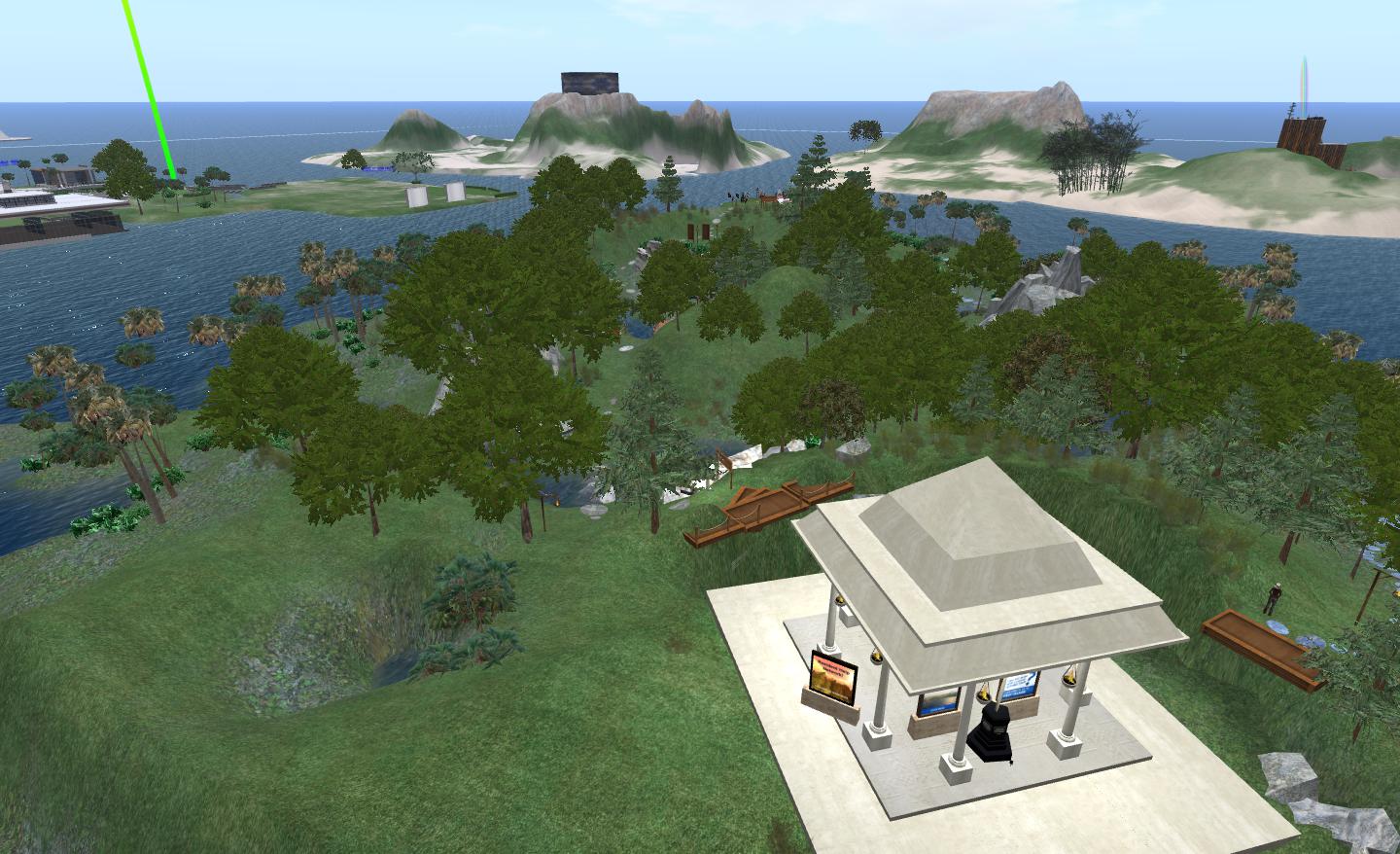
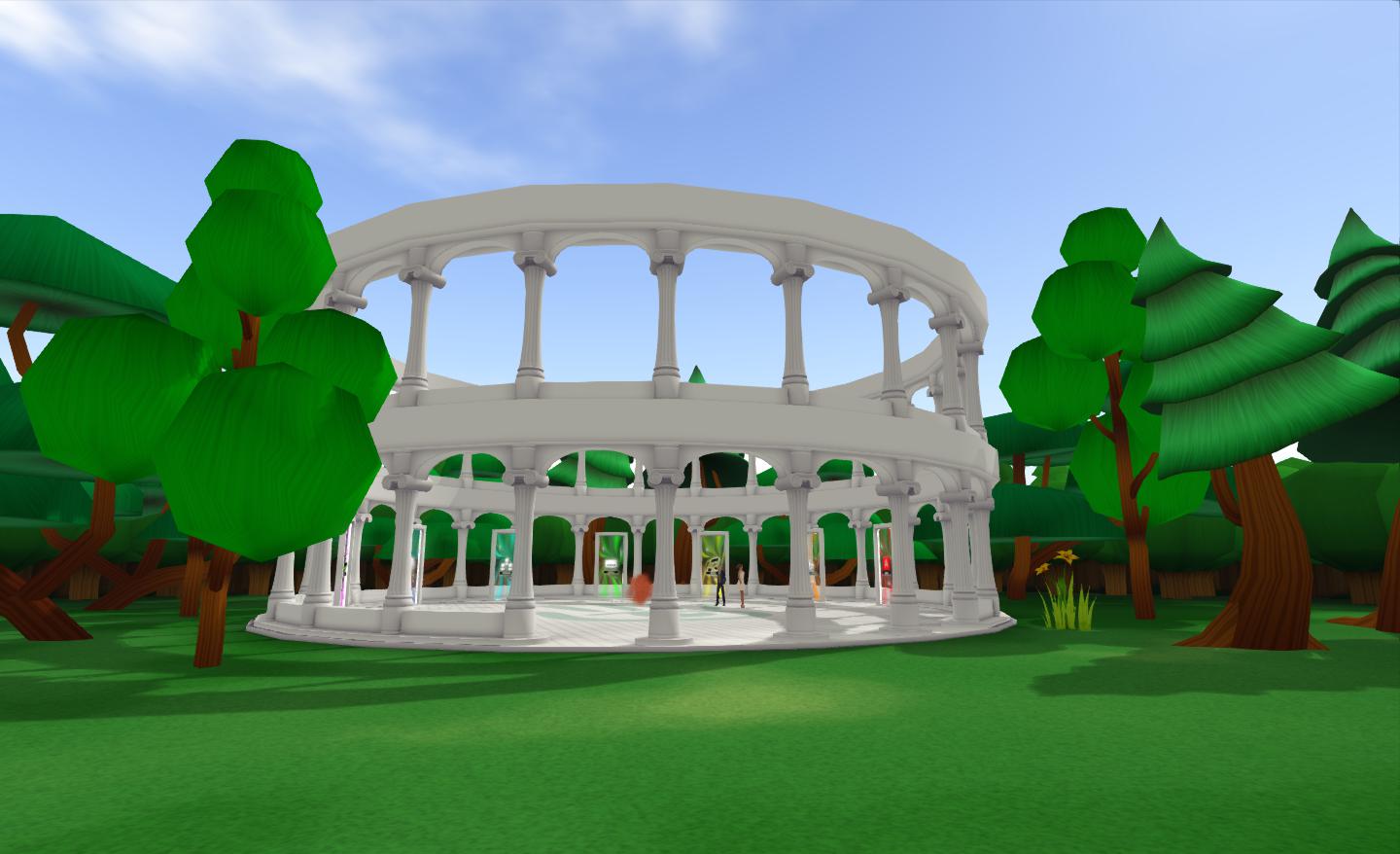
On signing-up to Second Life, new users (or those with a new avatar account) are now delivered to one of 24 Destination Islands. Like Linden Realms, these are a group of identical regions, each containing mesh trees from the game, with a central coliseum-like structure towards the centre which forms the arrival-point for new users.
Once of the new Destination Islands
No real explanation is provided as to what the place represents or how to use it. Arrivals are instead presented with a series of glass-like doorways with arrows and footprints leading to them, and each with is own label.
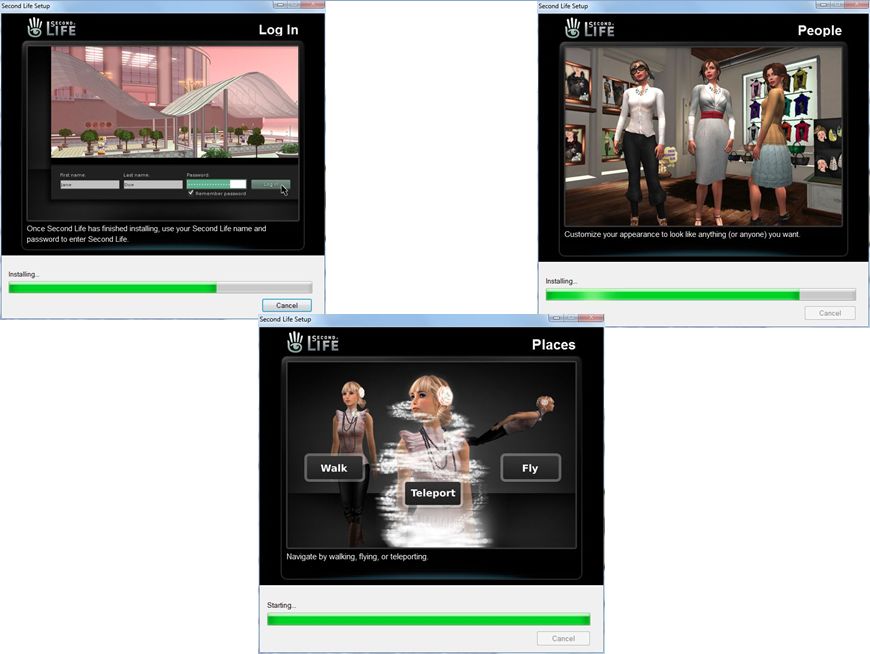
Information slides for those installing the SL Viewer for the very first time following sign-up
True, as a part of installing the Viewer for the first time (the download being a part of the sign-up process), new users are treated to a series of slides that provide a little more detail on using SL (see selected screen captures above), and they’ll have the Destination Guide open once they’ve logged-in to SL – but that’s it. Within the Destination Island areas there are no hints, tips or tutorials available to help the new user – there are just the seven doors (Art, Role-playing, Popular, Social, Music, Editor’s Picks and Adult), arrows and footprints.
Magical mystery tour
Walking through a portal will do two things: open the world-map at a potential destination and auto-teleport your avatar to a destination. Unless you’re using an unverified adult account and try the Adult portal. In this case you’ll simply get a flat nose and no explanation as to why. While an e-mail on this subject of adult verification is sent out to users as a part of the sign-up process, it would be nice if walking-into the door with an unverified account popped-up some kind of explanation rather than leaving people bouncing off the portal for no readily apparent reason.
Passing though other doors drops you into a destination based on the portal’s category. These appear to be selected at random from the Destination Guide. The process doesn’t seem entirely smooth: the world map opens during teleport (or it did for me. Twice), only to close on arrival. This is something that doesn’t happen in Linden Realms, so if the system i use at the Destination Islands is the same as the auto-teleport function used within LR, I assume this is a glitch that will be fixed, rather than a “feature” of the auto-teleport function.
Once you’ve left the Destination Islands there is no way back. Any attempt to teleport directly to them (assuming a new user understand the concept of teleporting) is met “Teleport Failed. You cannot teleport back to Help Island. Go to ‘Help Island Public’ to repeat the tutorial” and an OK button. Hence why you’ll have to create a new account if you want to test the system yourself.
OK, where next? What next?
This isn’t the solution you’re looking for?
Much – perhaps too much – has been made of the new user experience over the past few years. We’ve had talk of the “first hour”, the “first five hours” and, at the opposite end of the spectrum, “the first five minutes”. From comments he’s passed, it’s clear that Rod Humble is swayed towards the latter – that if you don’t capture the heart and mind of a new user in the first five minutes, then you’ve potentially lost them forever.
I’m not about to debate his wisdom on that one – but I will say that it’s hard to see how this approach actually improves matters. While one doesn’t necessarily need to have masses of information on display at the Destination Islands, having at least some guidance provided would, I’d have thought, be beneficial. Of course, this may be coming – in which case LL have rather put cart before horse in hooking-up the new islands to the sign-up process ahead of the information arriving.
This is where I think LL missed a step in merging-up the Basic and Advanced modes of the Viewer. In the former, we had a very good introductory series of tutorials in the form of the HOW TO pages. At the time I felt these could be enhanced, but overall they provided a good starting-point. While HOW TO is still evidenced in the Viewer in the form of a button – it would be useful if the installation process at least drew attention to it. Much better would be for HOW TO to be open by default until the first time it is manually closed (as with the Destination Guide). It wouldn’t solve all the issues in getting new users semi-oriented to SL, but it would at least help them feel comfortable with the Viewer UI – not everyone is happy with randomly pushing on-screen buttons and seeing what happens.
My experience demonstrated that people arriving at the same destination as myself were very confused as to what was happening and what they were supposed to be doing. The flow of people into the region I arrived in was fairly steady, but all of those stating they had just joined SL (and the number was around one or two arriving every few minutes) all pretty much had the same three questions:
What just happened?
Where am I?
What am I supposed to be doing?
Few had actually appreciated there was a HOW TO button (more-or-less the first thing I directed them to), and I found that doing so, and pointing them to functions such as Search, was greeted with verbal facepalming, e.g.: “Well, it would help to be told that from the start!”
It’s hard to see how this system relates to the Public Help Islands, which are still active. There are no links between the two (other than the message displayed when trying to teleport directly to a Destination Island, as described above). Whether information from PHI will be incorporated into the Destination Islands is an unknown and remains to be seen.
Right now, I’m curious as to where this idea is going. Is it offered-up as delivered, or will there be enhancements based on feedback or observation (and if based on feedback, where do people give it?). As it stands, it’s hard to see how this system helps new users – although LL are doubtless in a far better position to make a call on this than my casual observations. I can’t help feel the approach, as currently presented is potentially as much a hindrance as anything else, and getting to grips with SL is still a matter of dogged determination on the part of those signing-up.
But then, this isn’t the easiest of issues to address, as we’ve seen over the years.
I’d like to keep an eye on if / how the new regions develop. As such I’ve held back with a new account on one of the islands to see if anything changes. If it does, I’ll be following-up here.
Update 16th March: features from this Viewer have been attributed as coming from NACL, which is apparently incorrect. As information is taken at source, I’ve now removed references from the article below. It is also reported that the Sound Explorer and Asset Blacklist may have licencing issues – see Comments.
Lance Corrimal is working steadily on Dolphin, with roughly a release every couple of weeks of late, providing plenty of new features and tweaks to the V3.2-based Viewer.
The latest release, 3.2.10.23198 offers potentially improved graphics handling for older / lower-specification graphics systems (with the exception of ATi systems) and provides blacklisting capabilities for those who are repeatedly troubled by unwanted sights / sounds or need to find an elusive sound.
Texture Compression
For graphics cards with 512Mb or less of memory, Dolphin will have texture compression enabled by default. This should help prevent such systems crashing when running SL. The option can be manually enabled / disabled via PREFERENCES->GRAPHICS->HARDWARE SETTINGS.
Lance advises that users with ATi graphics cards should avoid using the option, and keep it switched off.
Asset Blacklisting and Sound Explorer
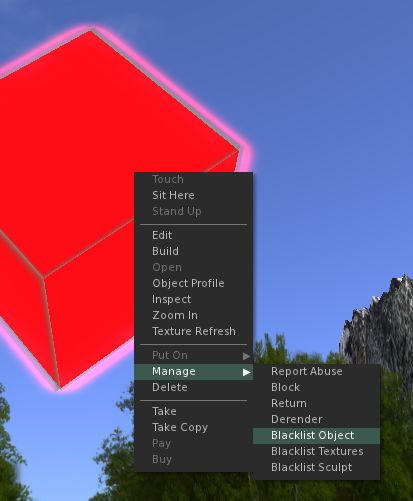
The Asset Blacklist is a means of removing unwanted objects, textures or sculpt maps from your world-view. Sounds can also be blacklisted via the Sound Explorer (described below).
The Asset Blacklist operates in a similar manner to derendering an item, but with the advantages that a) items that are blacklisted remain so until de-listed, so that if you teleport away from a location and return, you do not need to de-render them again; b) the asset blacklist can be shared by accounts using the same Viewer; c) you can even share lists with other users – hand if you are running a Group or similar and your base of operations is blighted in some way.
Problems with things regularly ruining your personal world-view?Add them to your Asset BlacklistAnd enjoy the view
Items are added to the list by asset type – object, texture, sculpt map – and recorded by UUID to prevent a simple renaming of the object causing it to reappear.
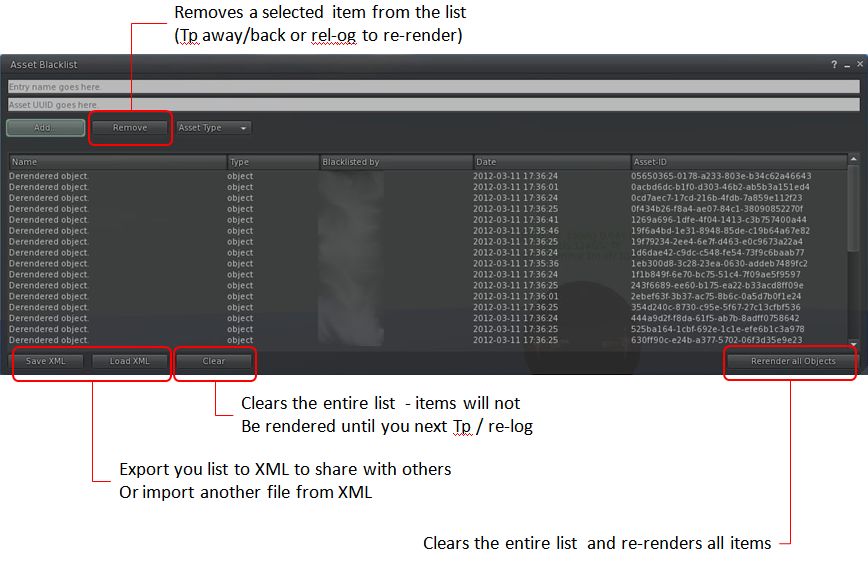
Blacklisted items are managed via the Asset Blacklist floater (WORLD->ASSET BLACKLIST).
The Asset Blacklist floater and key buttons
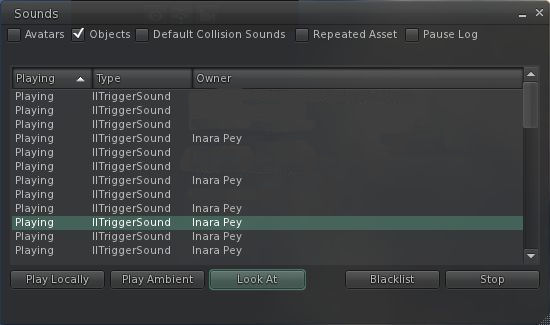
The Sound Explorer allows you to list all sound sources operating around you. It is accessed via WORLD->SOUND EXPLORER. This enables you to filter the available sounds by type, listen to them individually, identify their location and, if required, add them to your Asset Blacklist.
Sound Explorer: locate, listen-to or even blacklist sounds in your location by type
Both of these make extremely useful additions to the Viewer, and will likely prove very useful for those who routinely visit places where there may be issues with items or sounds impacting personal enjoyment.
Other Nips and Tucks
Anti-spam also arrives in Dolphin with this release (ME->PREFERENCES->DOLPHIN 3-> ANTI-SPAM
Help has been extensively overhauled within this release of Dolphin so that all help buttons in the Viewer now redirect to the Dolphin Viewer forum
The “Items incoming too fast” pop-up behaviour has been changed so that it is no longer necessary to click OK in order to remove the message – it will now fade-out on its own (something I hope all other TPVs will adopt; the message is annoying in its default behaviour)
Anti-aliasing is no longer off by default as it doesn’t impact overall performance so much as it once did
Fly-after-teleport has been fixed within the Viewer so that if you were flying prior to a teleport, you’ll still be flying on arrival
There have been some performance tweaks.
Opinion
This release has some nice additions for those that suffer visual / audio blights around their home space in-world. While the “performance tweaks” aren’t specified in the Dolphin blog, while running this release I did obtain a very small improvement of my average fps rates (around 3-4fps), with this release averaging around 41fps at 390 metres, and 23fps on the ground compared with the last release of Dolphin I actively tried (2.3.8.23163). With shadows enabled, this drops-off to around 12fps at 390 metres and 10fps on the ground (all checks with 3 other avatars on-sim)..
I also recently used Dolphin on Kitely, where it also worked flawlessly, making it my 2nd choice of Viewer for visiting other VWs, after Exodus.
Humble’s reasons for joining the company are enlightening – he’d actually forgotten about the platform and had been thinking of developing something along the same lines when the opportunity to join Linden Research popped-up. A nice example of serendipity in action.
Since joining Linden Research, Humble’s focus has been on the platform’s usability, which the article describes as being “far from perfect” – something many users would doubtless regard as an understatement. While there is still a good way to go in making things “better”, only the churlish would refuse to accept there haven’t been improvements in a number of areas, and that Linden Lab is working to get some deep-rooted issues – stability, performance, region crossings, even (dare I say it) the official Viewer – properly addressed.
There are also some comments that are liable to have users cringing in some quarters. Humble’s comments on gaming mechanics in particular may well offer little comfort to some as to the future of the platform. While SL may not itself be a game, it is a perfectly valid platform upon which users can develop games of their own if they so wish. Indeed, one might argue many have been doing precisely that almost since the platform entered open beta 10 years ago. That LL are now making the capabilities to do so easier to use is demonstration that the company is working meet user demands and provide more effective means by which the platform can be leveraged by users themselves.
As well as wanting to get issues around SL’s usability sorted out, Humble reveals that one of his overall goals would be to expand LL’s portfolio of products – to put the “Lab” back into “Linden Lab”. Reading this, one is tempted to wonder if this desire formed a part of his pitch for the CEO position, and was thus one of the reasons he was hired. Thirteen years with just a single product is a remarkable achievement for any company – but it is also a precarious position to hold.
In terms of the acquisition of LittleTextPeople, it appears to be something of a natural symbiosis more than a straight buy-out: Humble / LL were working in a particular direction and at the end of last year it became apparent that Short and Evans were working towards the same destination. Thus, the acquisition was to their mutual advantage. It’s also interesting to note that the Humble / Short / Evans relationship is a lot deeper than the EA Games link between Humble and Evans many of pointed to when news of the acquisition broke.
As to the product itself, little is said in detail, but what is mentioned helps frame the product more clearly. It will be primarily text-based with 2D graphics. It will be a story form, but deal with social interactions – how people treat each other and what say to one another. Most intriguingly of all however, is that it appears the product will be capable of supporting user-generated content. “Although it will launch with some very, very well crafted content, the overall plan – just like all Linden lab products – is to democratise the actual creation process. Other people will be able to make things on that platform. That’s really the business we’re in: building platforms that allow people to express themselves in different ways.” Humble informs Games Industry when mentioning the product.
Of the other two products currently being developed at the Lab, even less is said other than the intimation they will also support user-generated content – although Humble did hint this would be the case when the development of new products was first announced at SLCC-2011. However, this is the first time we’ve had it directly confirmed that three products are currently in the pipeline. Again, Humble has only previously hinted at this in a comment on New World Notes, wherein he made reference to the LTP project being “Product 3”, and there being a “Product 2” under way at the Lab as well – although at the time, some did speculate as to whether “Product 1” was perhaps Second Life.
The interview isn’t going to satisfy everyone within the SL community, but for my part, I found it a worth-while read, not so much the for the titbits of information that emerge about the upcoming new products, but because it again shines a light on Rod Humble’s thought processes and some of his strategic thinking where both the company and SL are concerned. Given the company has been pretty quiet when it comes to talking to the community as a whole on such things, it’s refreshing to gain this kind of near-candid insight, and actually does help restore one’s faith that, overall, SL is in a safe pair of hands right now – a perception that has been slipping a little of late.
Obviously, the new tools being rolled-out / developed for SL and the new products themselves aren’t going to lift LL out of the perceived mire, and it fair to stay the company is facing further clouds on the horizon – particularly around the stormy issue of tier. But taken as a whole, this is a positive piece and carries with it the promise that we may well be hearing a lot more from LL as whole in the coming months – and that in itself will be refreshing.
Don’t just take my word for it – go read the article, and don’t miss the side-bar piece as well.
Dranopia, the breedable dragons system developed by Timmi Allen, Leni Galli and Ciaran Maktoum, has added a new chapter to the ongoing saga of Dranopia: The Quest.
In Revolt of the Forgotten, the story is picked-up shortly after the groms have been defeated and the lost souls of the Dranopia ancestors rescued. But a new cataclysm has engulfed the resting-place of the ancestors’ souls: a great flood has occurred, sweeping away everything before it, leaving only a vortex of swirling water, and the openings to long-forgotten tunnels leading deep into the walls of the gorge, tunnels revealed as earth and stone collapsed under the force of the swirling water below…
Dranopia after the great flood
Revolt takes the mechanics of the original Quest and moves them into a labyrinth of underground tunnels which must be explored while once again flying upon a dragon (either your own or one obtained from the start-point for the quest), and attempting to obtain a range of items along the way.
The essential game system remains the same, but presents significantly more to do. From the start point / rezzing area, you take your dragon (and a game HUD available from the free vendors) and fly through the arch and out over the water. Your goal is to collect as many coins and keys as you can in the game time. Along the way, you can also obtain additional game-play time and restore the health and vitality of your dragon – and you must also avoid various threats and obstacles.
The start area
Moving the game into a tunnel systems adds a new dimension in flying your dragon; the confines of the tunnels mean that camera angles and views are much tighter. Those familiar with operating in the first person (Mouselook) in SL might be at something of an advantage here; as the tunnels twist and turn, rise and fall, seeing what lies ahead is not always easy in third person; adjusting your camera offsets might also help.
Speed is also something to watch, as it is easy to find yourself hitting walls and floors, costing you time and possibly points, or missing branches and turns where the tunnels split and twist.
Down in the depths
The labyrinth comprises a number of distinct forms, each separated from the other via a door. Each contains a key to be found as well as coins, green health hearts and red hearts for bonus time. Both of the latter are of equal importance: the green hearts help restore your dragon’s vitality and handling – if the dragon’s strength drops to zero, then your game is over; you’ll be dropped to the ground and your dragon will vanish. Red hearts help extend you game time, allowing you to collect more coins and keys; you can gain up to 600 seconds at any one time.
Points are awarded for coins, etc., obtained – but are also deducted should you have an encounter with whatever lurks in the passages and tunnels – of which I cannot say more here, you’ll have to discover things for yourself 🙂 – but that fact the points can be lost is another reason for watching your speed. Coins start at 5 points for the blue glass coins, rising to 100 points for the gold coins. Treasure chests can be opened by obtaining the required keys (each of which will gain you 50 additional points).
Game HUD
Given all these elements – coins, keys, treasure, bonus time, health – the game HUD is somewhat more complex that the original, but well-presented and easy to understand. By default it attaches to the top centre of your screen – and that’s probably the best place for it, as it is easy to reference it without blocking your in-world view.
High scores are recorded on scoreboards located at the start area – but you’ll need to have media-on-a-prim (MOAP) running in order to see the scoreboard displays.
I would advise playing the game without running anything else that might be processor-intensive on your computer; I had my anti-virus software start a scan during my time in the tunnels and my ability to fly my dragon in the confines of the passageways completely fell through the floor…
All-in-all, Revolt of the Forgotten builds nicely on the game-play from the original Quest, adding additional elements that should help attract those who played the original game, while providing a nice gaming experience for those who haven’t yet tried the system. There are seven dragons available at the start-point for those that don’t have a Dranopia dragon of their own to rez, and each again has its own characteristics.
Why not hop over to Dranopia and give things a try for yourself?
Dranopia: Revolt of the Forgotten is available on the Virtual Services Sculptie Experiments region.







 Inara Pey: Living in a Modemworld