Test drive: Firestorm Beta

Yesterday I gave a rapid overview of Firestorm Beta. I’ve now had more of a chance to take it for a spin, so here’s a more detailed look.

Installation

First off, make sure you completely remove any previous versions of Firestorm prior to install – in the case of Windows, probably best to restart your PC after doing so and prior to installing the Beta. The Widows installer comes in at around the same size as the official Viewer 2 installer (25 Mb) and runs a seamless install, and places 151 Mb of data onto your hard drive.

The first thing you may notice on logging in – assuming you do not rez directly – is that Firestorm has borrowed from Imprudence  / Kokua, and while a cloud you are now an orange cloud, rather than the default grey mist.

Pie Anyone?
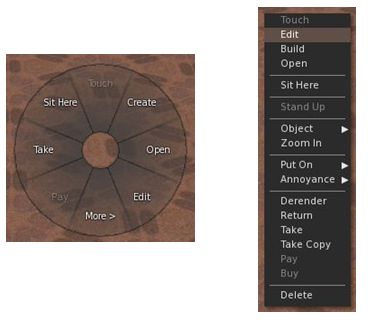
Pie or Context – you decide

The next two things you’re liable to notice is that there is now an AO button on the bottom toolbar, and if you click on anything, you get…a pie menu! Viewer 1 lovers, your prayers are answered.

I’m going to commit sacrilege here and say that, after using Firestorm and Viewer 2 and S20 / S21 for a while – and despite Phoenix still being my primary Viewer – I actually think the pie menu is vastly overrated (particularly given it varies so widely as to where anything is, depending upon which Viewer you use; one person’s Detach is another’s More, so to speak). I’ve found the Viewer 2 context menus to be far more consistent in options faster to learn and easier to use.

This being the case, I went straight to AVATAR -> PREFERENCES and pulled up the UI Extras. Much work has been done here to bring together some great UI customisation options on the Viewer – including a check option to toggle between the pie and context menus. I’m not going to run through the options – they are all pretty self-explanatory, and to be honest, most have been available in the earlier Preview options.
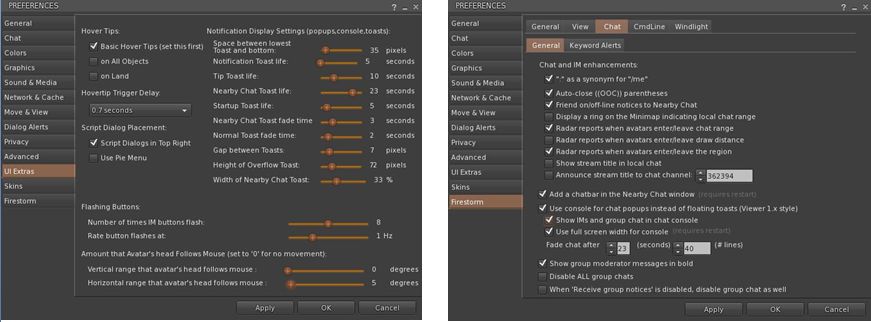
Updated Preferences tabs – new options

Other tabs within Preferences have also been massively improved. The Firestorm tab now includes pretty much everything those familiar with Phoenix would expect to see – with a lot of rationalisation and simplification of tabs and options. A nice touch here is that under FIRSTORM -> GENERAL you now get a greater choice in how names and display names are seen, and you can toggle between the Viewer 2 search and the “improved Viewer 2 beta” search (currently on the Search Project Viewer) – those who wish to compare and contrast and identify improvements can now have a field day playing with both! Within this sub-tab is one of my personal favourite new additions: TURN AVATAR AROUND WHEN WALKING BACKWARDS. This is something HUDdles has long had and I’ve really missed it when relying on built-in AOs.

A new element to the FIRESTORM tab is the VIEW sub-tab, which brings together several camera-related functions previously scattered around the place, if available at all. Along side it, the CHAT sub-tab has been massively expanded over earlier releases – and now includes a set of options related to … radar!

I See You!
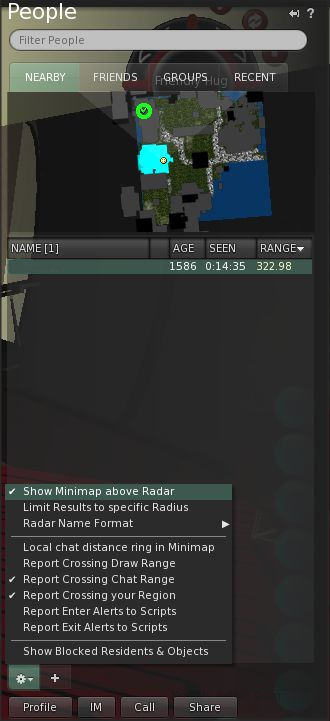
Radar tabbed

Radar is one of the biggest bones of contention in Second Life. People either love it or loathe it – with those loathing it frequently loudly and persistently screaming here, there and everywhere about it being an “invasion of privacy” and a “tool for drama” (and in the latter case, totally missing the irony in the fact that they tend to be the ones creating the drama).

If I’m honest here, almost any tool in the Viewer can be used properly or to create mischief and the radar is no exception – it is how you choose to use it, and I think it fair to say that most people use it responsibly. Those screaming on…and on…and on… about it representing an invasion of privacy would do well to remember that privacy can be invaded simply by removing camera constraints, pushing up draw distance and camming-in remotely (all possible on the “official” Viewer).

As far as I’m concerned, radar is a HUGE boon. As a former estate manager, it enabled me to identify problem people / areas quickly, get directly to them and deal with matters / provide assistance. Combined with other tools, it enabled me to deal with trouble remotely and confirm the required action had been taken. Even today I find it very useful at times – and it is one of the reasons I’ve stuck it out with Phoenix for so long. Well, no more. I’m in love with the improved Firestorm radar.

Aswith the Preview, Radar forms a part of the PEOPLE tab on the Sidebar – but is much improved. For a start there is an optional minimap display; you can also adjust the scan range for the radar and alter the way avatar and adisplay names are displayed.

If you want a more Phoenix-like radar display, simply go to the tab PREFERENCES (shown in the image), uncheck the show minimap option, and then undock the PEOPLE tab from the sidebar and resize accordingly; however, be aware that doing so can make scrolling through your friend list a tad more tiresome. As with Phoenix, the radar also includes a right-click option when highlighting specific names, allowing you to IM people, etc.

Continue reading “Test drive: Firestorm Beta”

Firestorm Beta

firestorm-logoSecond Life Viewers are making the news this week. As Linden Lab roll-out the Windlight Project Viewer and Viewer 2.7.1 with “real time” shadows, Jessica and the team over at Phoenix Firestorm roll out a Beta version of their offering.

Firestorm has been around in a couple of pre-release versions for a while, both of which I’ve looked at here in the past. I have to say that overall, it’s been a magnificent addition to TPVs even while still a work-in-progress; currently my only complaint is that it isn’t as faster, fps-wise as either Kirstenlee’s S21 and LL’s own viewer 2.

The Beta release moves Firestorm closer to prime time, and includes many features users have been requesting, making it something of a true hybrid – Viewer 2 functionality with the capability to use Viewer 1 facilities such as pie menus. Here’s a bullet-point outline of some of what to expect with it:

  • The option to switch between Viewer 1 pie menus (default) and Viewer 2 context menus
  • A resizable chat bar in the bottom toolbar area
  • Radar (still embedded in the People tab of the Sidebar by default) gets:
    • A minimap option
    • Most of the features of the Phoenix radar
    • Additional options
    • The ability to undock it from the People tab and have in displayed in its own window
  • Client-side AO with improved functionality
  • Massively-improved Bridge capabilities and security
  • Keyword alerts
  • Shared Windlight settings
  • Everything currently in the pre-releases.

You can download the Beta from here.

A video has also been produced, featuring Jessica herself, to support the release:

Viewer 2 Gets “Real-Time” Lighting

Linden Lab are certainly ramping-up Viewer 2. On top of yesterday’s announcement about the inclusion of Windlight settings for sim owners, comes the release of Viewer 2.7.1 with – among other things, “real time” shadows.

Users of many TPVs will already be familiar with the use of Dynamic Shadows, but until now, these haven’t been available in the “official” Viewer 2. This new release changes all that – and what’s more, it does so with less of a performance compromise for many GPUs.

I don’t have a top-end PC or graphics system – I have a 3-year-old Q6600 quad core and a 1Gb nVidia Ge9800. It can render shadows, but the performance hit means that the Viewer is pretty much crippled as far as doing anything else is concerned (although Kirstenlee’s marginally less so that the like of Phoenix).

With Viewer 2.7.1, however, I find the “hit” to be a lot less: fps tumbles to around 18, but that is massively better than the 5-8 fps I get elsewhere. I can actually walk around and do things! Viewer 2 also renders shadows far more crisply than I can get with other Viewers.

Me and my shadows: Phoenix (left) and Viewer 2.7.1 (right). Note how in Phoenix the Alpha Mask fails to hide my feet & the blobby shadow I cast. no such issues in Viewer 2..7.1

Another problem I get with Phoenix and the like when dynamic shadows are enabled is that items of prim clothing can flicker on avatars around me and alpha masks frequently fail (so that people’s feet are visible through there shoes). This is probably an artefact of my graphics card…but Viewer 2 eliminates it completely!

Combine shadows with the depth-of-field option (which creates a natural blurring of objects in accord with distance) and set the occulsion option, and you can get some stunning shadow effects, day and night.

The new release isn’t limited to the shadows option, either. Further improvements have been made to Search – although I’ve not actually tested that, to be honest.

Driving 2.7.1 with shadows enabled left me feeling very happy. My system may not render as well as more recent machines, but the fact that I can finally move around and interact and have smooth camera movement with shadows enabled is a massive plus.

I just hope that whatever LL have done with the code finds its way into Firestorm – while it has the same lighting options – doesn’t appear to have them implemented as yet (at least, they make no difference on my machine). When that happens, I’ll be one very happy little bunny: a much improved user interface and shadows! Bliss!

Find out more on lighting and shadows in Viewer 2.

Windlight project viewer released

Linden Lab has released the Windlight Project Viewer for Viewer 2. This is a much-anticipated Viewer that puts Windlight environmental controls directly into the hands of sim owners.

Most of us are familiar with Windlight presets – they allow us to alter the day / night settings and general ambience of the sim we’re in – so you can make it foggy or give it a psychedelic sunrise – but until now, these effects have been restricted to your Viewer – everyone else will see things howsoever they’ve set the time of day  / whatever Windlight settings they like.

With the new Windlight Project Viewer all this changes: howsoever the sim owner sets the sim’s Windlight defaults will automatically be reflected in the Viewers of visiting avatars. So, if you have a role-play sim that is set in London of the 1880s, you’ll be able to set the sim’s environment to reflect this: nighttime, foggy, etc., – any everyone entering the sim will see precisely that by default – unless and until you opt to change it for your own personal view.

As the Linden Lab announcement warns, any effects set server-side will initially only be seen by those people using the Windlight Project Viewer – but as the code is incorporated in the main viewer 2 code base, so defaults and settings will be seen by everyone.

This is pretty cool stuff, especially for those with themed sims and role-play sims, and kudos to LL for getting the controls into the server code!

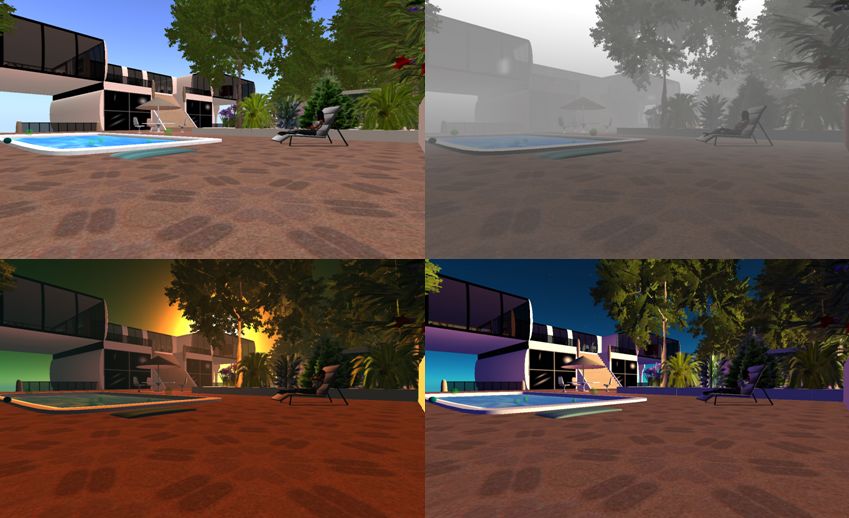
Windlight and me: four views of my home, three using Windlight presets. The ability to set a sim’s environment through Windlight is now available in the Windlight Project Viewer

You can find the Viewer on the Windlight Project Viewer wiki page.

Linden Lab: IP infringement?

IP rights, DMCA, copyright, trademarks, content theft – they are all the subject of heated debate within and around Second Life.

Linden Lab themselves have been known to react very heavy-handedly regarding what they view as their own intellectual rights including laying claim to the word “Life” in all matters relating to Second Life, thus forcing Marine Kelley to rename the “Restrained Life Viewer” to “Restrained Love Viewer” – something of a petty stance in the circumstances – while also roundly slapping those it purports to support in the education sector.

And now Linden Lab seem to be wading deeper into the water – by snagging Miso Susanowa’s work, and the credit thereto. As Miso explains, she was approached regarding the creation of a logo for SL8B – and the outcome appears to have been somewhat less than positive.

It’s going to be interesting to see how this works out; right now the story is not winning Linden Lab much in the way of support – or doing SL8B any favours. Indeed, in reading it, one is reminded of the old adage about politicians: if one isn’t kissing your baby, you can be sure he’s stealing its lollypop.

Addendum

18:00 BST:As suggested in my reply to Gwyn, Rod “Rodvik” Humble was straight on to the case via Twitter:

rodvik rodvik humble  
Thanks for the notes all. Will look into the mystery of the magic hat! 🙂

Further updates will (hopefully) follow, if warranted.

21:30 BST: Pete Linden, posting on behalf of Amanda Linden on Miso’s blog, had this to say (also linked to above):

Hi Miso, Amanda Linden tried posting the comment below on your original post, but it wasn’t published. Here it is again:

Despite how this unfortunate situation clearly feels, it’s really just a misunderstanding and a case of two designers independently choosing a similar image to represent the theme.

The Lindens and community organizers who saw your original submission liked the idea, but it needed to not make use of the eye-in-hand SL logo. They asked that you re-submit the design without the eye-in-hand logo, but when they’d not heard back after several follow-ups, they asked a Linden designer to create a few options so that we would be sure to have a logo in time for the event. 

The Linden designer presented a few concepts based on the theme of ‘the magic of SL,’ and, without having seen your concept or having been told about it, she also created a logo using a magician’s hat image to represent the ‘magic’ theme.

At this point, the Lindens picking the logo had an opportunity to notice the similarities and should have addressed this with you directly; we didn’t, and for that we apologize sincerely. While the Linden designer arrived at similar imagery independently, we will update the attribution of the logo design to reflect that your earlier submission first presented this concept. [posted by Pete Linden]

Welcome back, Esbee

Esbee Linden from the official wiki

Sarah Kuehnle, aka Esbee Linden, who departed Linden Lab back in January is apparently back. The news is spreading like wildfire across blogs and Twitter (curse you, ironing, for making me miss the “breaking news”!).

Although the news isn’t exactly that new – she’s been Tweeting about it for almost a month, so most of us seem to have missed it!

Exactly what she’ll be doing is unclear, but it looks like she’ll once again be involved in Viewer development going on her comments about being in the Viewer scrum once more with Yoz and Oz; this has given rise to speculation that “Viewer 3” might be on the horizon – although that’s nine parts wishful thinking more than anything else – Rodvik himself has been more than candid about the continued development of Viewer 2.

Anyway, here’s a little welcome back!