Be ready: WebRTC goes grid-wide in Second Life, May 5th, 2026

via Linden Lab

As indicated in a recent official blog post, the WebRTC voice service is due to complete its deployment to the entire main grid (Agni) on Tuesday, May 5th, 2026.

Currently available across around 25% of the grid on RC channels, the full deployment of WebRTC will see the completion of the initial phase of converting Second Life to a Voice service that is not dependent on a third-party supplier (Vivox) and can be directly maintained and enhanced by Linden Lab, opening the door to a potential range of new capabilities in the future (such as voice-to-text).

The WebRTC project started roughly two years ago, when the Lab first publicly made known it was looking to move Voice services away from a reliance on Vivox and the SL Voice plug-in for the viewer to something more modern and potentially capable. WebRTC (RTC=”real-time communication”) was selected as it is something of a “defacto standard”, being built-in to most web browsers and supporting  wide range of real-time communications tools in common use.

Since then the project has taken time to mature and reach a point where the Lab is confident it can be fully deployed across the grid without too much risk of disruption, particularly now that people are increasingly using viewers which have adopted WebRTC in their more recent versions (which was a particular problem for Firestorm with its large user-base, where because WebRTC was somewhat linked to the arrival of PBR and the performance impacts that caused, many users opted to remain with “pre-PBR” versions of the Firestorm viewer which also did not have the requisite support for WebRTC).

What This Means

  • Firstly, if you do not use Voice at all, then probably not a lot.
    • If you are using a recent (i.e. from around mid-2024 onwards) viewer version, you’ll most likely already have WebRTC support even if you never actually use it.
    • If Voice has never been a part of your SL and you’re on a viewer version without WebRTC support, you can allow other factors and viewer updates determine your upgrade path.
  • If you do use Voice, and again are on a “recent” version of a viewer, then you again don’t need to do anything; the change to grid-wide availability of WebRTC occurs on the simulator / server side of things, so there is no need to upgrade your viewer.
    • That said, if you want to have the latest bug fixes for WebRTC, and are not already using it, then you should consider updating to the latest release version of the official viewer, or whether your preferred TPV has incorporated the fixes in either a release or beta/RC version.
  • As the legacy Vivox system is decommissioned, viewer versions reliant on that service will lose all Voice functionality. This is a mandatory backend change by Linden Lab that cannot be altered or bypassed by third-party viewers. So if you wish to continue to use Voice and are on an older version of your preferred viewer, you should update to a WebRTC-capable version in order to smoothly continue using Voice.
  • If you regularly use the SL Mobile App, again there is nothing you need to do; the App already supports WebRTC.
  • One of the more noticeable impacts of the full deployment will be with peer-to-peer (P2P) Voice communications. During the transitional period, when both WebRTC and Vivox have both been operational on the grid, cross-system P2P communications between WebRTC and Vivox have not always functioned correctly. With the full deployment of WebRTC, this will no longer be an issue.
  • Similarly, other points of confusion (and possible disconnects) as a result of moving between regions running the two services will also be eliminated, as WebRTC will be the primary service across all regions.

Adding Capabilities

Moving forward, the WebRTC service will continue to be enhanced. In fact, as a part of this work, WebRTC viewer-side voice moderation capabilities are already being tested on the grid using the Second Life 2026.02 Release Candidate (RC) viewer available via the Alternate Viewers page.

Voice moderation provides the following capabilities to authorised users (e.g. Group moderators): mute or unmute individual participants; mute or unmute all users in a voice channel; manage disruptive or unintended background noise. Further:

  • WebRTC voice moderation is already available in some TPVs, so check the release notes on the most recent versions (including any beta/RC versions) of your preferred viewer to see if this is the case.
  • The official 2026.02 RC viewer with the voice moderation capabilities will be promoted to release status in the near future, allowing the code to be picked-up and incorporated in all TPVs as and when they update.

As well as voice moderation tools, and as noted above, WebRTC offers the potential for other capabilities such as voice-to-text, etc., to be added. In fact, experiments with voice-to-text have been underway within the Lab for some time, although the focus on getting the initial WebRTC fit for full deployment means that this work is far from complete and has yet to make it to a publicly-accessible project or RC viewer. Given this, it may be a while before the capability surfaces for public testing.

In the meantime, if you wish to keep up-to-date with WebRTC development, it is frequently a subject for discussion at the following user groups:

Linden Lab announces Project Zero to end

via Linden Lab

On Tuesday April 21st, 2026, Linden Lab announced it is ending support for Project Zero, the viewer-in-a-browser application launched just 14 months ago, and which I was able to co-announce through this blog following a Zoom meeting between myself and Brad Oberwager and Philip Rosedale.

The project, which saw the viewer streamed to a person’s web browser from Amazon AWS servers remained in something of a beta state throughout its lifespan, initially overseen by Philip Rosedale and then (the now Lab-departed) Sntax Linden, with a dedicated User Group meeting being formed around it (although meetings ceased in the latter half of 2025). It also gained much interest among existing users, despite it being largely aimed at incoming new users, leaving access to it limited for established SL users.

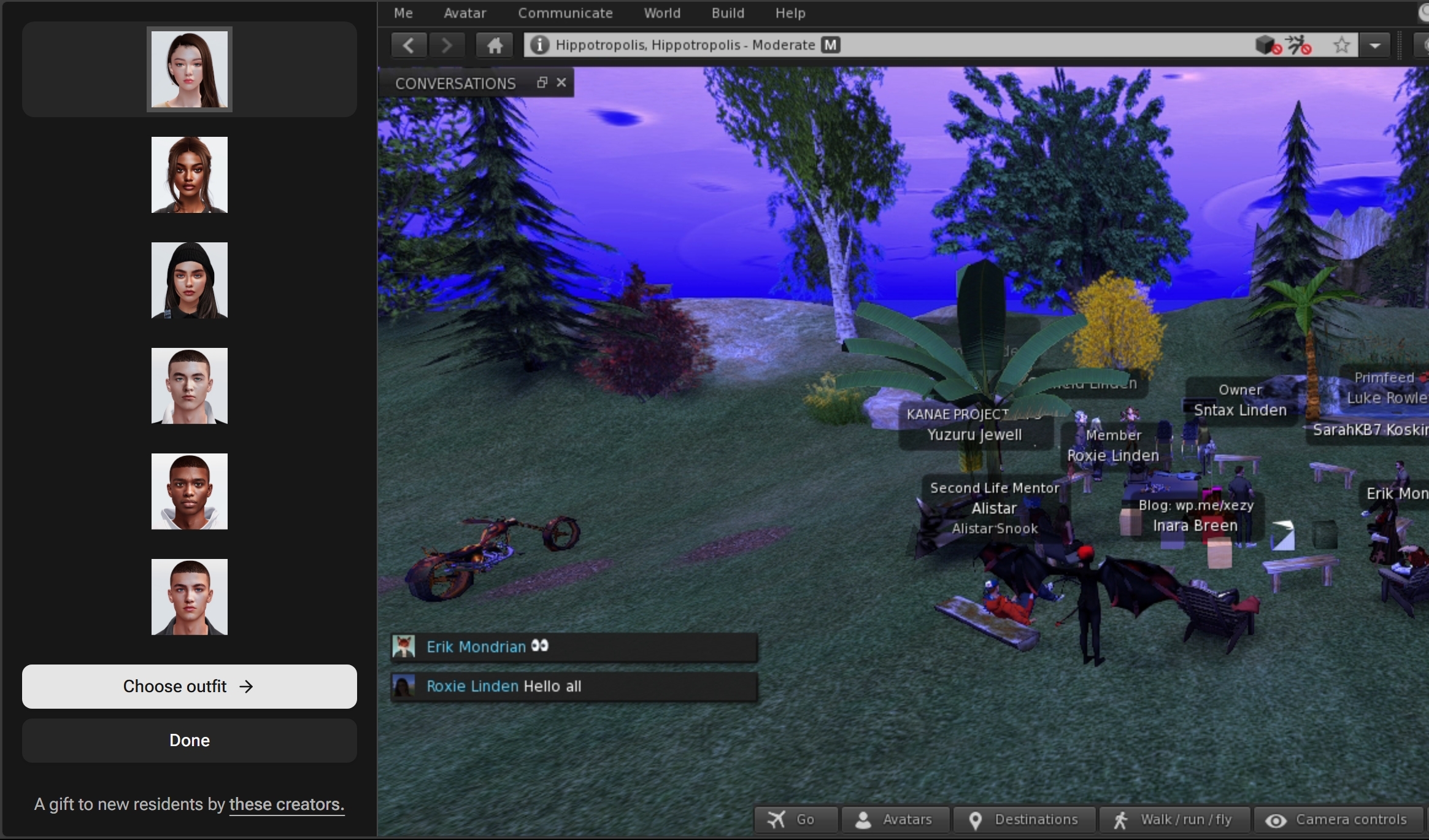
The revised Avatar Picker for Project Zero saw the function moved out of the viewer window and displayed within the browser tab, leaving the viewer window unencumbered. This approach was ported to the SL Mobile App.

The project did see some interesting development – such as the updated Avatar Picker mechanism, which was also ported to the SL Mobile App, and at the time of its launch at the start of 2025 and through the initial six or so months of its development, there were plans to undertake a gradual rebuilding of the viewer UI as presented through a browser, using modern tools such as HTML5 and React. To further interest in streaming the viewer through a web browser, Linden Lab also worked with the Firestorm team to take a version of the latter’s viewer and present that as a streaming service as well – although this experiment was ultimately short-lived.

By September 2025, the Lab was indicating that between them, Project Zero (using the official viewer) and the SL Mobile App had lead to a “10x” increase in the numbers of people trying out Second Life when compared to the more traditional requirement to sign-up and then download the viewer (the latter having long been a break-point for sign-ups, with many would-be users turning away from the platform rather than downloading and installing the viewer on their computers). However, not long after this update, things began to go quiet on the Project Zero front.

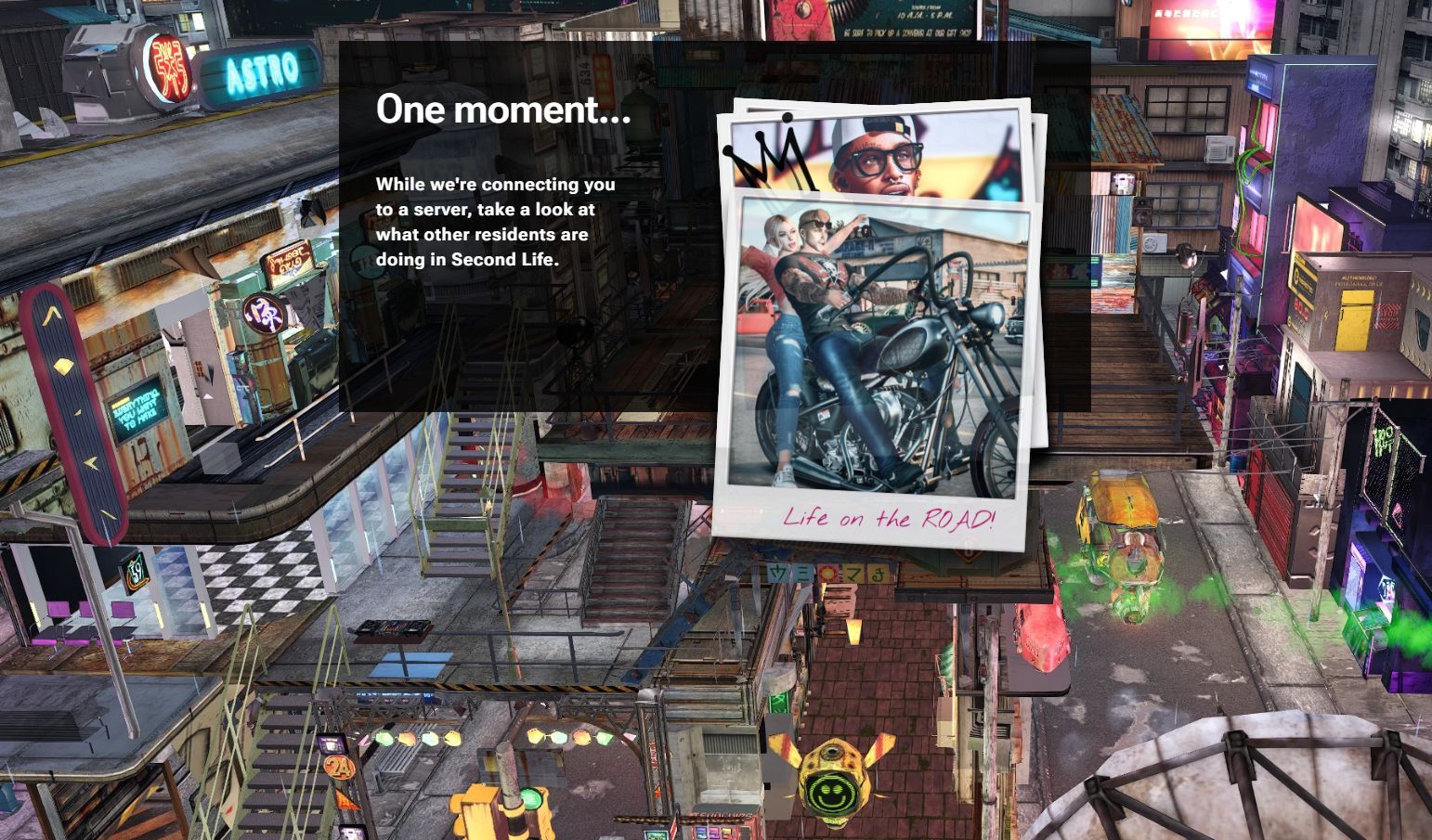
As a part of the new user sign-up, those directed towards using Project Zero, rather than to having to download and install the viewer, were directed to a revised splash screen comprising a static backdrop and a “Polaroid snapshots” slide show whilst they were connected to a Project Zero streaming server

With the curtailment of the Project Zero User Group meetings and, later, the departure of Sntax Linden from Linden Lab, the Project as a whole seemed to go dark, with little in the way of direct news being given through any User Group meetings. As such, the announcement that the project is now being ended comes as both a surprise (given the enthusiasm for it evidenced by Linden Lab in 2025) and a non-surprise (lack of news / updates on the project through late 2025 and the start of 2026 suggesting it was perhaps withering on the vine).

The announcement blog post offers little in the way as to why Project Zero is being halted, other than the decision being based on both “feedback” and what the Lab has “learned” in running the project, and “insights gained from Project Zero will directly inform improvements” to both the Desktop viewer and the SL Mobile App. However, the beneficial nature of the project in circumventing the need to download and install the viewer is acknowledged.

As it stands, support for Project Zero will end on Friday, April 24th at 17:00 SLT.

Further:

  • If you have remaining paid time associated with Project Zero, you are encouraged to use it before the [project is shuttered – access allowing, given the potentially limited number of slots at any given time.
  • If you have any unused time on Project Zero after April 24th, please file a support ticket for a refund (which will be processed up to 30 days after the ticket is received).
  • Exactly “what’s next” isn’t actually indicated in the official blog post (despite the post’s title), other than

Note that the ending of Project Zero does not affect either the desktop viewer or the ongoing development on the SL Mobile App, which will “continue to operate as usual”.

Related Links

LL announce Mainland changes & Town Hall to discuss

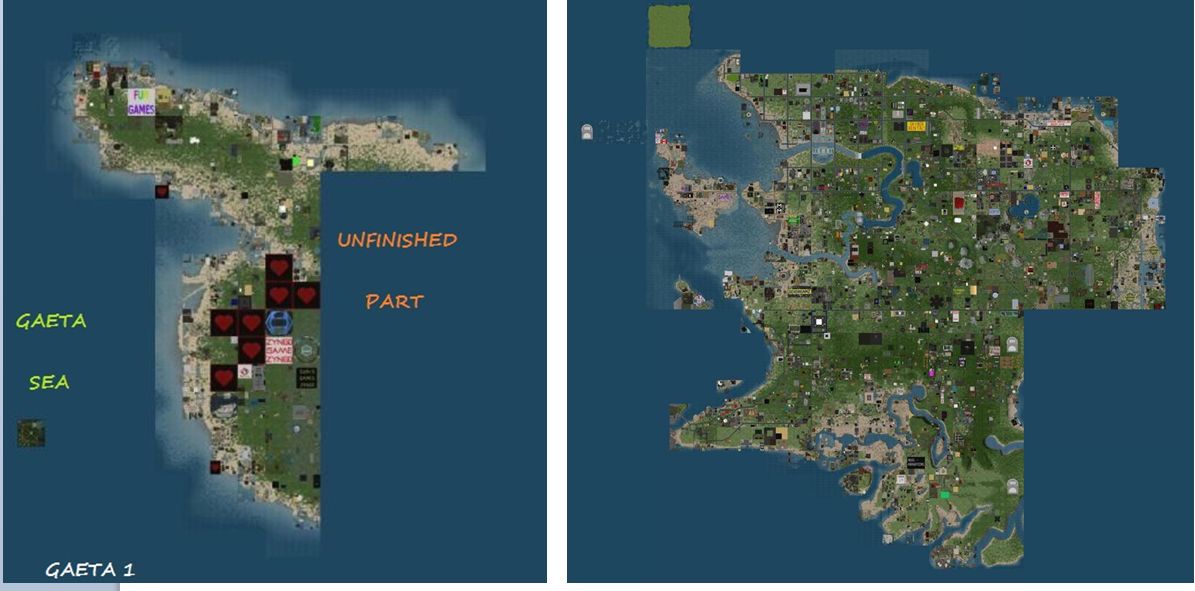
Linden Lab has announced changes to the standalone Gaeta 1 continent, and the Zindra adult continent. Via the SL Wiki

On Wednesday April 15th, 2026, Linden Lab announced some significant Mainland changes involving the Gaeta 1 continent and the Adult continent of Zindra.

The Changes

Gaeta 1

  • A transitioning of all current residents from Gaeta 1 to other Mainland continents. This is to start in April 2026, with an aim to complete by the end of 2026.
  • This transitioning will be handled carefully, with personalised outreach to residents on Gaeta 1 by members of the Lab’s staff.
  • Land holders on Gaeta 1 will be offered size-for-size parcel replacements, and LL will work with them to find a comparable parcel that suits their needs and preferences.
  • No region on Gaeta will be retired without due consultation with the land holders currently based on it. Time will be given for all land holders to plan, examine options and discuss matters with the Lab as the process commences and progresses over time.
  • The transition is expected to unfold “over many months”.
  • Once complete, Gaeta 1 will go offline as a continent.

Zindra

  • Zindra will see an expansion of approximately 90 regions.
  • This expansion will be rolled-out alongside the transitioning of Gaeta 1 – but does not mean Gaeta 1 land holders “must” accept parcels within Zindra.
    • However, if moving to Zindra is seen as preferable by any Gaeta 1 land holder, they will be given priority access to the new Zindra regions.
  • These new Zindra regions will include scenic waterfront, extended road networks, coastal water passages, and additional development that helps complete and enhance the Zindra continent.

Why is this being done?

To quote from the official blog post:

Adult mainland continues to operate at very high occupancy and shows consistent demand. At the same time, some General and Moderate mainland areas, including Gaeta 1, have seen lower overall use over time. Instead of expanding the total size of mainland, we are adjusting existing capacity to better reflect where Residents are most active today.
This change applies only to the unconnected continent named Gaeta 1. IT IS NOT PART OF A BROADER MAINLAND CLOSURE, and there are no changes to content policy connected to this announcement.

– From the Lab’s official blog post on the Gaeta 1 and Zindra changes

Town Hall Meeting

As a part of the consultation process and to answer initial questions  / hear feedback on these changes, Linden Lab will be holding an in-World Town Hall meeting on Monday, April 20th, 2026, commencing at 11:00 SLT. The Town Hall meeting area can be accessed using the following SLurls:

In addition, the Lab has opened a forum discussion thread on these changes, and invited users to join that conversation.

Related Links

LL announce a pause in the current SL AI character designer project

via Linden Lab

On Thursday, July 31st, Linden Lab provided an update on the AI Character Generation project which indicates it it to be paused / closed at the start of September.

The project was initially launched in December 2024 and powered by Convai, a platform for developers and creators proving an intuitive approach to designing characters with multimodal perception abilities in both virtual and real world environments (see: Linden Lab leverage Convai for AI character generation in Second Life). However, it was shortly thereafter suspended as a result of community feedback, before being re-launched to a wider audience of potential users at the end of February 2025.

The Character Designer was launched as an experimental feature to explore the potential of AI-powered characters in Second Life. Built in collaboration with our AI technology partner Convai, this tool enabled residents to create interactive, virtual characters with conversational capabilities.
From elaborate roleplay scenarios to immersive visitor greeters, your projects and feedback have been invaluable. This pause gives us time to carefully evaluate everything we’ve learned and determine how best to evolve this technology in a way that aligns with the broader future of Second Life.
This is not the end of AI in Second Life; rather, it is a thoughtful pause as we refine our strategy and continue exploring new opportunities for innovation.

– Linden Lab blog post

The “pause” is set to come into effect from Monday, September 1st, 2025, with the Lab further noting that as of that date:

  • It will no longer be possible to create, deploy, or run AI Characters using the Character Designer interface.
  • Characters created through the Designer will no longer function or appear in-world.
  • Previously created characters and their memory will not be retained post-pause.
  • Any alt accounts created specifically for testing the Character Generator will remain valid Second Life accounts, and can be logged into just like any other alt account.

Community support for the project will continue through the following channels:

  • A dedicated forum thread for on-going Q&A and feedback.
  • Second Life Discord for real-time responses from staff and developers.
  • Support Portal for any account-specific issues.

In addition, those who have used the Character Generator are encouraged to record their work during the wind-down period and share video through the forum thread or suitable platforms.

The sunsetting of this project does not mean the end of further possible projects and experiments in the use of AI technologies, with the blog post also stating:

 This is not the end of AI features in Second Life—we’re using this moment to regroup and plan for future development … We are actively and cautiously experimenting with other AI technologies to enhance Second Life’s creative potential, performance, and immersion. The insights from this project are already helping to inform future efforts.

For further information, please refer to the official blog post, which includes a short-term FAQ.

LL completes Tilia sale to Thunes: What you need to know

via Tilia.io

Update: Linden Lab has now blogged on the change-over – see: A New Chapter: Tilia Joins Global Payments Leader Thunes, together with a FAQ. I have further updated this piece to include details on user data security, as given by Brad Oberwager in April 2024, as a result of being was on this subject.

On Thursday, 29th, 2025, Linden Lab Executive Chair Brad Oberwager and members of his team held a Zoom call with bloggers and creators to provide an update on the acquisition of Tilia.io, the all-in-one payments platform the Lab launched, and which handles payments processing, USD account balances, etc., for Second Life, to Singapore-based Thunes, based business-2-business (B2B) payments infrastructure firm.

The following is a summary of the core points of the discussion, some of which re-trod the subject of account security, as I’ve already covered in Linden Lab: keeping your Second Life account safe.

Acquisition and Change-Over

  • The acquisition is due to complete on Wednesday, June 4th, 2025.
  • On this date, there will a series of steps taken by both Linden Lab and Thunes to complete the change-over.
  • Perhaps most notably, Second Life web pages referencing Tilia Inc., will instead reference Thunes Financial Services LLC, and the Tilia website will be rebranded.
  • While there are chances of some hiccups given the back-end complexity of the change, these should be minimal, and the SL support teams will be ready to help any users who may experience issues.
  • In short: “Don’t Panic” when/if you see the changes happening.

What This Immediately Means to Users

For the majority of users, there should be no visible difference to the processes of buying L$ or cashing-out.

  • User Data Security: An important point to note with the acquisition of Tilia is that Second Life user data is not changing hands.
    • Tilia will have new owners and will be renamed, but the lock-down of Second Life user data resides in two places: Tilia (for financial information) and Second Life (actual user data).
    • As a financial services company, Thunes is required to keep financial data as secure as it currently is with Tilia, and the data will not be removed from the current Tilia systems and moved elsewhere.
  • There will be no changes in existing fees charged by the Lab for cashing-out or buying L$.
  • No-one needs to create an account with Thunes to keep buying L$ or cashing-out, etc.
  • There will be no change in how support issues relating to finances are handled: users will continue to deal with the Lab’s own billing support team. you will not have to deal with Thunes directly.
  • Linden Lab will continue to manage the LindeX, and nothing will be changing on this front.
  • However:
    • Following the change-over, users may be required to acknowledge the change via a check-box the first time they engage with the rebranded service.
    • Some users may have to re-submit information such as their credit card details or re-confirm a payment account as a result of the change-over.

What It Means Going Forward

  • Potentially more methods by which to receive payments from Second Life (e.g. to different accounts, through different services, etc.) or by which to purchase L$ – Thunes supports pay-outs across 130+ countries and 320+ payment methods globally.
  • It is possible that as new payment methods are added to Second Life, they may be subject to increased fees as a result of charges made by the payment method.
    • To aid in understanding of fees charged, the Lab will start to provide a breakdown: how much they are charging & how much of that due to the payment method. This is to allow users to decide whether they wish to use a newer payment method, which might offer certain advantages (e.g. faster processing), or not.
  • LL has a 5-year agreement with Thunes to prevent Thunes forcing increases on existing services provided to LL (although this obviously does not prevent LL making changes to fees should they need to).
  • Much better fraud controls and investigation, leveraging Thunes own capabilities as well as LL’s support team.

Benefits to Linden Lab

  • The company is no longer engaged in trying to operate and maintain what is essentially a fintech company, with all the costs involved therein.
  • Ability for management to focus solely on building and improving Second Life.
  • The payments team can be focused solely on Second Life, rather than having to also focus on regulatory requirements and deal with multiple payment services, etc., as these will now be the responsibility for Thunes to manage.

Related Links