UKanDo Kokua and RLV updates

UKanDo, Kokua and the Restrained Love Viewer (RLV) have all seen recent updates in April 2015, bringing them up-to-par with the Lab’s 3.7.27 code base, which features the most recent maintenance updates from the Lab. In the case of UKanDo and Kokua, this means that Avatar Hover Height (AHH) is now available in the viewers, while RLV sees a couple of tweaks to AHH.

Core updates to the three viewers are summarised below.

UKanDo Viewer

UKanDo updated to version 3.7.27.28099 on April 16th. As well as incorporating AHH and the maintenance updates from the Lab, this release also brought with it:

  • Develop > HTTP Inventory now permanently enabled in UKanDo viewer, in line with recent LL server-side updates
    Develop > HTTP Inventory now permanently enabled in UKanDo viewer, in line with recent LL server-side updates

    An update to RLV release 2.9.8

  • Complete disabling of the Develop menu option allowing people to turn off HTTP Inventory loading. This is to ensure people do not encounter issues with avatar and / or inventory loading as a result of the Lab removing UDP inventory messaging support for the simulator code – see my notes on this for further information
  • The addition of a new debug setting, EnvironmentPersistAcrossLogin. When set to True, will to counter MAINT-2477 Feature Request – Sun position override should not persist across logins
  • The ability to toggle the Paste As Link option in the Inventory right-click context menu on or off, according to your personal preference (Preferences > General > Inventory Show ‘Paste As Link’ Option
  • A change to allow copy of worm items – So links for worn items can be created
  • Don’t show inventory item links or folder links in Recent Tab.

Kokua Viewer

Kokua updated to version 3.7.27.35441 on April 23rd. As well as incorporating AHH and the maintenance updates from the Lab, this release also brought with it:

  • AHH in Kokua's pie menu can be found under the Appearance ... option in the main pie menu
    AHH in Kokua’s pie menu can be found under the Appearance … option in the main pie menu

    The most recent RLV 2.9.9 updates

  • Fixes for:
  • In-world Flash playback issues on Linux – Ticket #333
  • Fix to top bar Draw Distance slider showing distance – Ticket #338
  • Upload fee not reflected on menus for OpenSim – Ticket #340
  • “compile as mono” option does not work – Ticket #342
  • File -> Upload -> Set Default Upload Permissions does nothing – Ticket #344
  • Changing the grid-selection option in preferences crashes viewer – Ticket #346
  • Determine correct webkit libraries that need delivered with the Linux version of the viewer – Ticket #347
  • Kokua 3.7.26.36845.x86_64 Linux Fails to start – Ticket #348
  • Chat history compact mode does not convert the Avatar Name in OpenSim – Ticket #351

Issues and feature requests can also be found in the release notes.

RLV Updates

RLV updated to version 2.9.8 on April 8th and then to version 2.9.9 on April 21st. The 2.9.8 release saw the existing avatar height slider in the RLV top bar tied to the Lab’s new Avatar Hover Height functionality, so that using either the top slider or Avatar Hover Height from the Avatar right-context menu will use the same code and result in the same adjustments.

The RLV avatar height slider (top bar) is now tied to the Avatar Hover Height functionality. Notice the top bar operates to 2 decimal places and AHH to 3, so small rounding differences are to be expected when comparing the two

In addition, the 2.9.8 update saw a tweak the viewer so that HTTP Inventory is enabled by default in the viewer, again in line with the Lab’s recent move to deprecate the UDP messaging for inventory loading server-side. As RLV previously had HTTP Inventory disabled by default, this meant RLV users were no longer seeing their own avatars render in-world, and could lead them to experiencing inventory load issues as well (see my nots, linked-to in the UKanDo section above for further information). The release also saw some nips and tucks to RLV functionality.

Version 2.9.9 added a small fix to the linked AHH functionality and incorporates the Lab’s 3.7.27 maintenance release updates, as noted at the top of this article.

Related Links

Kokua 3.7.24: from RLVa to RLV

kokua-logoNicky Perian and the Kokua team announced the release of version 3.7.24.35047 on Tuesday, January 20th.

This updates primarily focuses on code merges with the more recent Linden Lab code base updates, and changes to the viewer’s RLV support.

The Linden code base updates mean that Kokua is up-to-date with the the following updates from the Lab:

  • Release 3.7.21 – Snowstorm Fall Contributions – Japanese input; improved rendering of projectors; fixes for object editing bug when rotating and for crash on exit on OS X Yosemite in full screen mode, etc.
  • Release 3.7.22 – GPU Benchmark start-up crash fix release
  • Release 3.7.23 –  Maintenance release – bugfixes and improvements to many areas of SL and fixes to previously released changes in the way we handle joint offsets in rigged meshes
  • Release 3.7.24 –  HTTP Pipelining enhancements – reduced pipelined texture and mesh fetching timeout so that stalled connections fail quickly allowing earlier retry. Timeout value changed from 150 seconds to 60 seconds

RLVa to RLV Update

This release sees Kokua pivot away from the use of RLVa viewer code for RLV support and to using Marine Kelley’s own RLV support, as presented through her Restrained Love Viewer. Due to unavoidable events, RLV/a has fallen somewhat behind support for the more recent RLV features, and as Marine tracks the Lab’s releases through her own viewer, this switch should make RLV-related maintenance easier for the Kokua team.

As a result of this change, a clean install of Kokua is recommended, the blog post accompanying the release noting:

[The] Recommendation for a clean install is because of the different settings presented by having RLV versus RLVa in the last Kokua release … If you do not clean install you may experience a notification at viewer start about restarting to change RLV mode because the default is set to RLV off and settings in your local setting file is RLV on. You will need select off/on once more in order to sync the on/off selection. This can be avoided with a clean install.  

The default behaviour for RLV is that it will not be present (i.e. it must be enabled via the Advanced menu).

Additional Bug Fixes

In addition, the Kokua team have included the fixes for the following issues:

  • Opensim variable size region mini-map shows the base 256×256 region only Ticket #276
  • Move view floater does not persist at relog Ticket #286, resolved at Ticket #318
  • [RLVa] Names are not all gone Ticket #314
  • Touch restriction works not very well in RLV or RLVa Ticket #324
  • Right click an attached object brings up pie and context menu Ticket #325 Added
  • Typing module in the tag Ticket #313

Related Links

Kokua 3.7.21: group bans, unified snapshots, HTTP pipelining and more

kokua-logoUpdate, December 7th, 2014: Kokua 3.7.22.35091 was released on December 5th. This update includes fixes for issue #292 noted in the review below, and for an issue with the automatic updater (issue #322.

Nicky Perian released the latest update of Kokua for SL on Sunday, November 30th.

Given the last Second Life specific release of the viewer was in July, the new release, version 3.7.21.35082 sees the SL version of the viewer bounce up to parity with a lot of recent LL viewer updates, as noted in the release notes. This being the case, please note that a clean install is highly recommended.

The code updates from the Lab comprise:

The Kokua 3.7.21 release sees the addition of the unified snapshot floater

In addition, the viewer also includes the following LL updates which, at the time of the Kokua release, are still at release candidate status within the SL viewer:

  • 3.7.20 code base:
    • Attachments updates – adds some fixes to previously released changes in the way joint offsets in rigged meshes are handled & fixes some issues found with adding and removing attachments after the recent AISv3 deploy
    • GPU Benchmarking update – removes the need for the GPU table by performing a series of tests when first setting the graphics defaults for the viewer (note this code contains fixes for issues found with the original benchmarking code release in the official SL viewer)
  • 3.7.21 code base:
    • Snowstorm contributions release – Japanese input; improved rendering of projectors; fixes for object editing bug when rotating and for crash on exit on OSX Yosemite in full screen mode, etc
    • Maintenance updates – a broad range of fixes for voice, privacy, rendering, texture animation, avatar distortion, inventory management, sounds, mouselook in Mac, and more
    • Pipelining Enhancements release – reduced pipelined texture and mesh fetching timeout.
Group Bans now a part of Kokua with version 3.7.21.35082
Group Bans now a part of Kokua with version 3.7.21.35082 – click for full size

Kokua Team Contributions

In addition the the merging and testing of recent code release from the Lab, Kokua 3.7.21.35082 includes the following contributions:

  • The viewer has been updated so it will no longer automatically start following a Windows install
  • Custom currency support has been added so that the local grid currency symbol will be displayed (original work by Armin Weatherwax)
  • New option to hide account balance in snapshots: Preferences > Kokua > Privacy > Do Not Show Money Balance on Snapshots (original work by Armin Weatherwax)
  • An option to open the movement controls has been added to View > Movement Controls.

In addition, Nicky notes:

  • On Linux Mint 17 32 bit, the load library path was not set correctly, and this has been amended for both 32-, and 64-bit.
  • The gridargs.dat file is no longer reader when starting kokua. Instead pass parameters along the command line (e.g.  ./kokua –channel “‘Kokua XonXoff'”)

There are a few known issues with the release, all of which are being tracked via the Kokua ticket system. These include:

  • The option to display your avatar’s name in the viewer’s title bar ((Preferences > Kokua), should only be set after logging-in; if set from the log-in splash screen, they will crash the viewer – Issue #289
  • Teleport from SL search fails. Teleports from Legacy and Map searches work. Landmarks from inventory work. Issue #292
  • The YouTube media volume control doesn’t work –Issue #312
  • [RLVa] Names are not all gone in nearby chat list of names –Issue #314.

Related Links


Kokua forks development and releases version 3.7.8 for OpenSim

kokua-logoNikcy Perian has announced that Kokua is to fork development between Second Life and OpenSim.

While both versions of the viewer will operate on either OpenSim or Second Life for the immediate future, due to an increasing numbers of issues the viewer has been experiencing in connecting to OpenSim-based grids as a result of recent SL-specific updates, the two will diverge over time, each focusing on fixes and updates specific to the gird type to which they are intended to connect.

Commenting on the move in a blog post accompanying the release of version 3.7.8.35024, Nicky states:

The release of Kokua.3.7.12 exposed some vulnerabilities of having one viewer handle both environments. The problem with Kokua-3.7.12 was that it could log on and perform well on some OpenSim grids but, would hang and then crash on others. Particularly troublesome was that it would crash on a standalone instance built from opensim git Master , OpenSim’s development track. Also, as reported by Inara Pey LindenLab is moving to content delivery network (CDN) for Meshes and Textures and plans drop UDP portocol once CDN is adopted. I suspect there will be a delay while the OpenSim core developers determine how best to approach those changes.

The comment relating to the Lab’s plans to introduce a CDN solution for texture and mesh fetching (and possibly more in the future), is interesting, as it also applies to those other TPVs which span both OpenSim and Second Life in terms of how they handle the changes as the progress (will they attempt to retain the UDP legacy code once the Lab start to remove it from their core code base? Will they also opt to fork?). As Nicky points out; there is also the question as to how the OpenSim core developers respond to the Lab’s move, and whether CDN capabilities will be added as an option for those grids as can afford it, or whether grids themselves might opt to add supporting code, depending on their needs and the perceived benefits.

Kokua 3.7.8.35024

In the meantime, and alongside the announcement, Kokua have released version 3.7.8.35024 for OpenSim. The version number reflects the fact that the more recent code releases from the Lab (3.7.9  AIS v3 updates; 3.7.10 – SL Share 2; 3.7.11 – Snowstorm contributions: and 3.7.12 – Maintenance release quick fixes) have all been removed from the viewer, leaving it based on the 3.7.7 (interest list updates)  and the 3.7.8 (Maintenance fixes) Linden code.

To assist those using Kokua on both OpenSim and Second Life, the OpenSim version of Kokua will (under Windows) install separately to the SL version – I assume the same is possible with the Mac and Linux versions, allowing for the differences in how software is installed on those platforms. This means that once the differences between the two versions of Kokua become more apparent, users will be able to move between them when logging between SL and OpenSim with relative ease.

In addition, the OpenSim release includes the following updates (please refer to the release notes for full attributions):

  • The chat text entry bar has tinted background based of the type of conversation. Nearby chat remains as white. The rest of the chat types are:
    • IM sessions are tinted red
    • Group chat sessions are tinted green
    • Conference sessions are tinted blue
  • Added the following to the avatar context menu:
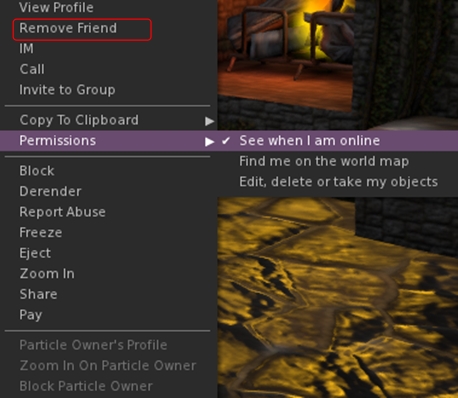
    • Remove friend
    • Grant or revoke permissions granted to a friend (see when you’re online, map you, etc) – only visible when clicking on a friend
The option to remove a friend from the avatar context menu (replaces Add Friend), and the Permissions sub-menu
  • Added the grant/revoke friend permissions sub-menu to the People floater right-click context menu (only visible when clicking on a friend’s name)
  • Added localhost Win Grid Proxy 127.0.0.1:8080 and localhost Local Grid 127.0.0.1:8002 to the default drop down list; also added Tangle Grid to the default grid selection.

Kokua 3.7.12.34831

Released on July 15th (and which I thought I’d written about at the time – my sincere apologies to Nicky) includes the changes noted above, and the additional LL code base updates (3.7.9-3.7.12) as listed above. Additional highlights for the release include (please refer to the release blog post for proper accreditation):

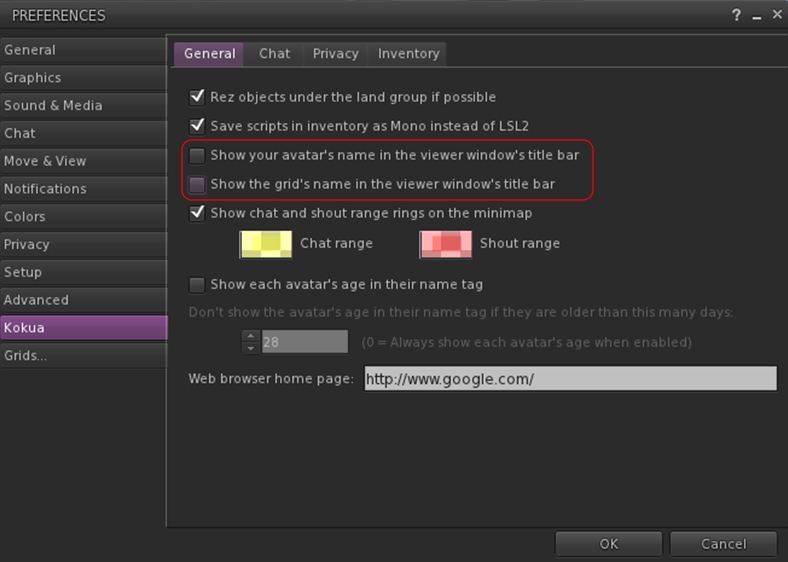
  • New Preferences option to display your avatar name and grid display in the program title bar (Preferences > Kokua – note these changes should only be set after logging-in; if set from the log-in splash screen, they will crash the viewer)
Kokua's options to display your avatar name and the grid name in the program title bar
Kokua’s options to display your avatar name and the grid name in the program title bar
  • Received Items folder now displays as a system folder in Inventory when Preference set (Preferences > Kokua > Inventory > Show the Received Items Folder in Normal Inventory), rather than appearing as a normal folder
  • Ported, with author permission, a change by Aleric Inglewood that prevents wearing of Inventory and Library root folders.

Both the 3.7.8 and 3.7.12 versions of Kokua work well on Second Life; both had a test-drive while I took my PBY6A for another trip around Blake Sea – where I encountered not one, but two other Cats! Both viewers are also available for the Kokua wiki download page – just scroll down for the 3.7.8 version.

Related Links

Kokua 3.7.6: Breakpad, Merchant Outbox and Voice

kokua-logoThe Kokua team released version 3.7.6.32681 on Wednesday April 30th, keeping to a roughly monthly release run for the last three experimental and full releases.

As always, please refer to the Kokua release notes for the full accreditation of any updates mentioned below.

The new version sees Kokua maintains parity with the Lab’s 3.7.5 and 3.7.6 code base releases, and sees the viewer gain the recent Google Breakpad changes (and fixes for the same from the Lab), as well as the Merchant Outbox fixes and the remaining voice updates for windows and Mac (these libraries ere merged into an earlier release of Kokua, so this release sees the final updates.

Together, the Voice and Merchant Outbox changes comprise the use of Vivox 4.6.x libraries for improved stability & to address Mac Mavericks issues and fixes for accurately detecting Merchant status & improving Merchant Outbox error recovery.

Kokua can now display Received Items as a regular inventory folder, allow the pull-up option is also still displayed

In addition, the release sees a number of TPV and Kokua team updates, the former notably coming from Firestorm. These comprise:

  • An option to display the Received Items section of the inventory floater as a regular folder
  • Hide empty system folders

Check boxes for both options can be found in Preferences > Kokua > Inventory. Note that when the Received Items folder is active, the slide-up Received Items bar at the foot of the inventory panel will remain visible, rather than being hidden (as is the case with the likes of Firestorm).

In addition, the release includes the following updates from the Kokua team:

  • Fixes for several merge regressions from RLVa affecting Kokua functionally
  • Windows: returned functionally of local chat right-click menu music stream title display. This was removed when FmodEx was installed
  • Macintosh: streaming music is now using the FmodEx library and streams appear more reliable than with previously used Quicktime
  • UI enhancements:
    • Fix for the parcel name not changing unless “Show region coordinates” was switched on
    • “Report Abuse” added to right-click context menus for objects and avatars.

This release doesn’t contain the SSA / AIS v3 updates (which are still only at RC status in the LL viewer). The reason given for this is that there are currently no public RLV / RLVa repositories containing a working merge of sunshine-external the SSA / AISv3 code, and Nicky Perian, the Kokua lead, doesn’t feel he is familiar enough with RLV code to go ahead with his own merge. So expect to see SSA / AIS v3 appear in Kokua in a future release.

There is a test version of Kokua which is running SSA / AIS v3, but which does not have RLVa, for those who wish to test the SSA / AIS v3 functionality, which is currently running on the three RC channels in Second Life.

RLV or RLVa?

Up until now, Kokua has used the RLVa API. However, Nicky P is considering swapping to using Marine Kelley’s original RLV API, on the grounds that it maintains a closer parity with the LL viewer. To this end, he has asked anyone who is aware of anyone of performance differences between RLV and RLVa, to please comment in the Kokua 3.7.6 release notes.


Related Links


Kokua 3.7.4 arrives

kokua-logoOn Friday March 28th, the Kokua viewer updated to version 3.7.4.32111.  This sees the viewer come to parity with the SL viewer code releases through to 3.7.4.

This means that Kokua now has:

  • FmodEx updates (SL viewer 3.7.4.288138)
  • The most recent MAINT fixes (SL viewer 3.7.3.287491)
  • The HTTP updates (SL viewer 3.7.2.286707)

In addition, the viewer includes a number of TPV code additions. Note that attributions are given where known.

Avatar Shape Import

You an import previously-saved shapes (XML) via the Edit Shape floater
You an import previously saved shapes (XML) via the Edit Shape floater

This option, from Firestorm, allows you to import an .XML avatar shape from your computer to your inventory.

Shapes are imported via the Import button on the Edit Shape floater.This opens a file picker window, allowing you to navigate to the folder in which the required shape has been saved, and then import it into Kokua.

When importing a shape, please note that it will replace the existing parameters for the shape you are currently wearing, and will be saved on exiting Edit Shape.

If you wish to retain the original shape, make sure you use the Save As button at the bottom of the floater, opposite the Import button, before you import a shape.

If you do forget to save your original shape to a new file name before importing a shape and replacing it, you can use Undo Changes to revert to your original shape. You can then use Save As to create a copy of it in your inventory, prior to re-importing your new shape.

Note that shapes you create can be exported to XML via the Develop menu (Ctrl-Alt-Q) > Avatar > Character Tests > Appearance to XML.

Attachment Inventory Edit

This is a popular TPV capability by Kitty Barnett.

Got a small attachment embedded in your avatar, or which you’ve dropped rather than detached, and cannot find? Go to your inventory, locate the object, right-click on it and select Edit. The edit crosshairs will be displayed over the object, allowing you to reclaim or reposition it.

Other Items of Note

  • Restore items to last position (from Firestorm): if you return an object to inventory by mistake, or delete it from in-world, subject to region permissions, you can now restore it to its last known position by locating it in inventory (use the Restore Item option if it is in your trash can) and then right-clicking on it and selecting Restore to Last Position. Again, note that this will only work if you have rezzing permissions at location 0,0,0 in the region
  • Maximum Frames per Second (MaxFPS) debug setting (from Firestorm): sets a maximum threshold for viewer frame rates to ease loads on GPUs and reduces the  amount of viewer / server traffic. A value of -1.0 sets MaxFPS to off. As a rule, the human eye cannot discern differences in refresh rates above 60 fps
  • A number of defaults have been altered:  Draw Distance Range is now 0 -1024 metres for all slider locations; Object Mesh Detail maximum is increased from 4 to 8; Limit Select Distance is off; Disable Camera Constraints is on; the left toolbar button area is set to align buttons at the bottom
  • The Advanced Build Constraints menu entry is removed and the debug entry is defaulted on due to conflicts and duplications between the Build constraints code and limit overrides set by server-side awareness of Aurora code
  • OpenSim legacy search fixed so that searches which fail to yield a result advance to “Not Found” rather than remaining at “Searching”
  • Crash logging is on but, reports are not being sent. This will allow more detailed crash reports that users may attach to issue tracker reports.

Another compact update for Kokua helping it to maintain parity with emerging SL viewer capabilities and feature while at the same time absorbing several more useful TPV viewer capabilities.

Related Links