The following notes were taken from the Tuesday, January 11th, 2022 Simulator User Group (SUG) meeting. The meeting was recorded by Pantera Północy, and the video is embedded at the end of this summary. Note this summary focuses on the key points of the meeting; where there is something to report, the video should be referred to should full details of the meeting wish to be reviewed.
The planned update to the SLS Main channel (comprising the simulator version deployed to the RC channels prior to the end-of-year break) has been pushed by to week #3. Instead, simhosts on the SLS channel were therefore restated without any deployment.
Wednesday, January 12th should see all simhosts on the RC channels updated to a new simulator release built – 566406 – using the updated toolset.
Available Viewers
There have been no updates to the current crop of official SL viewers, leaving them as follows:
Release viewer: version version 6.5.1.566335, formerly the Cache+ 360 Capture viewer, dated December 7, promoted December 15 – No change
The Jenever Maintenance RC viewer, version 6.5.2.566860, issued on December 17.
The Koaliang Maintenance 2 RC viewer, version 6.5.2.566879, issued on December 17.
The Tracy Integration RC viewer version 6.4.23.563771 (dated Friday, November 5) issued Tuesday, November 9.
Project viewers:
Performance Improvements project viewer version 6.5.2.566967, dated December 17.
Performance Floater project viewer, version 6.4.23.562625, issued September 2.
Mesh Optimizer project viewer, version 6.4.23.562614, issued September 1.
Legacy Profiles viewer, version 6.4.11.550519, dated October 26, 2020.
Copy / Paste viewer, version 6.3.5.533365, dated December 9, 2019.
In Brief
Bug-225288 “llStopAnimation is stopping all animations on detach instead of only the one specified” has by an issue for more than three years, but user Lucia Nightfire has made an interesting discovery.
A core part of the meeting involved LSL / HTTP error returns – please refer to BUG-231657 and the video for details.
The second half of the meeting includes a discussion of the Map API and llRequestSimulatorData returning region grid coordinates, per BUG-231443. Again, please refer to the video for further information.
The last part of the meeting largely revolves around speculation / opinions on the “avatar expressiveness” feature said to be coming in 2022. However, as the Lab is not in a position to discuss this feature further, I’ll again leave it to the video to cover.
For the opening exhibition of 2022 at her Nitroglobus Roof Gallery, Dido Haas brings us Mindscapes, a celebration of the humble prim by Moki Yuitza. Featuring both 2D and 3D elements, this is an engaging, joyous exhibition, which is best introduced by Moki herself:
SL is a virtual world in which everything is possible; space is a mathematical/mental construction in which anything we can conceive can be realised. When I was young, I loved building everything that popped into my head with coloured bricks, and here in SL I used the same basic bricks which were available to give substance to my mental spaces; landscapes, formed just with simple prims in which we as avatars, giving it body and dimension [because] one is meaningless without the other.
– Moki Yuitza on Mindscapes
Mindscapes can be very broadly split into two parts. On, over, and under the transparent floor is the 3D element: prims ranging from the relatively small to the extremely large, some apparently jumbled together, others arranged to form patterns and objects or stacked into columns. Around the walls, meanwhile, is a series of 2D images by Moki, presented in the traditional large format used at Nitroglobus.
The latter most clearly offer a visual representation of our avatar-based relationship with prims. Offered as primarily black-and-while / monochrome pieces, the 2D elements used the shapes and forms present within several of the 3D pieces within the gallery to present intriguing landscapes, rooms and situations from the seemingly simple – giant pyramids being looked upon by a couple of avatars -, through to almost alien landscapes filled with what might be giant spores or pollen, or spaces that seem to comprise random shards of light and dark through which two tiny avatars dance.
Colour plays a minimal role in these pieces, but where it is used, it is to great effect, emphasising the avatars through arms, hands, feet (and in one shot, the avatars directly). By using colour in this way, Moki both draws attention to the avatars, even if largely unseen, and thus the relationship we have with them when bringing this virtual world to life, whilst also equally emphasising the life and vitality we give to our avatars.
Through many of the images and the 3D elements, Moki also celebrates the mathematical dimension of shapes and space, a further outworking of the aspects of Second Life, design and art she notes within her introduction to Mindscapes.
Moki has a long and deservedly recognised reputation for producing installations and art that is richly expressive, engaging and thought-provoking. With Mindscapes she offers all of this and an exhibition that simply offers – as noted – a joyful celebration of the magic to be found within the humble prim.
Catznip version R13 surfaced on Sunday, January 2nd, 2022 as the current release version of the viewer. It comes some two years after the last full public release of the viewer – although there have been interim releases of “alpha / beta” versions during that time. As such, it is a significant release in terms of Catznip moving back towards a good degree of parity with the official SL viewer.
In reference to the official viewer, this release see Catznip:
Reach full parity with SLV release 6.4.12.555248 (Dawa maintenance viewer, promoted to de facto release status, February 1st, 2021)
Incorporate:
The Environment Enhancement Project (with Catznip improvements).
The Camera Presets capability (again, with Catznip improvements).
As always, full details of the changes and updates in this Catznip release are available through the official release notes; what follows is a general summary of the more interesting updates.
Linden Lab Derived Updates
Environment Enhancement Project (EEP)
The Environment Enhancement Project (EEP) was officially released on April 20th, 2020, and incorporated into numerous Catznip “alpha/beta” builds, but R13 marks the first “full” release of the viewer to incorporate EEP functionality.
A complete overhaul and replacement of the Windlight system, EEP is a complex capability which has been covered expensively in blog posts and tutorials including within this blog. As such, I will just drop a couple of links in here for those who may need a further introduction to / understanding of EEP and its capabilities:
However, Catznip R13 incorporates a number of refinements over the original EEP implementation, as outlined below.
EEP Quick Preferences: The Catznip Quick Preferences panel has been updated to provide a set of EEP options. This includes:
Buttons to apply a region’s or parcel’s Shared Environment and to access the Personal Lighting floater.
Individual sections for selecting / editing Fixed Sky, Day Cycle and Water settings, each with:
A drop-down list of available settings, defined by those in your inventory → Settings folder and those in the Library → Environments folder.
The ❮ [left] and ❯ [right] buttons to cycle you through each type of setting.
A wrench button to open the Edit floater for each class of setting.
Day Cycles only:
Radio buttons for selecting the Sun or Moon
Azimuth and Elevation sliders tied to the radio buttons to adjust the position of the Sun or Moon.
A Reapply Current Windlight at logon check box, which does precisely what it says when checked.
An Interpolate Preset Changes checkbox. When checked, this will transition you from one setting to the next over 5 seconds; if unchecked, transitions between EEPs will occur fairly instantly.
The EEP options available through the Catznip Quick Preferences
Edit Library EEP Assets: Under most EEP implementations, those contained within the Library → Environments folder must first be copied to a user’s inventory (e..g to the Settings folder).
Catznip R13 allows users to open EEP assets within Library → Environments directly into the appropriate edit panel (highlight the asset, then right-click on it and select Open) the Windlight settings straight from the library (right-click inventory / Open). This allows changes to be made to the settings, which can be saved to inventory (e.g. within the Settings folder) using the edit panel’s Save As option (or, if the changes are to be temporary, Apply Only To Myself can be used without creating a new inventory asset).
Active EEP Asset indicator: Catznip R13 will display “(active)” alongside the currently active EEP asset / settings in both inventory and the My Environments floater.
General panel / floater clean-up: the majority of the EEP panels and floaters have been cleaned up to reduce their footprint without feeling too cramped.
Camera Presets
The ability to create and save custom Camera Presets (how the viewer camera is positioned) became part of the official release viewer release viewer in the first half of 2020, and which finds its way into the Catznip release viewer with R13.
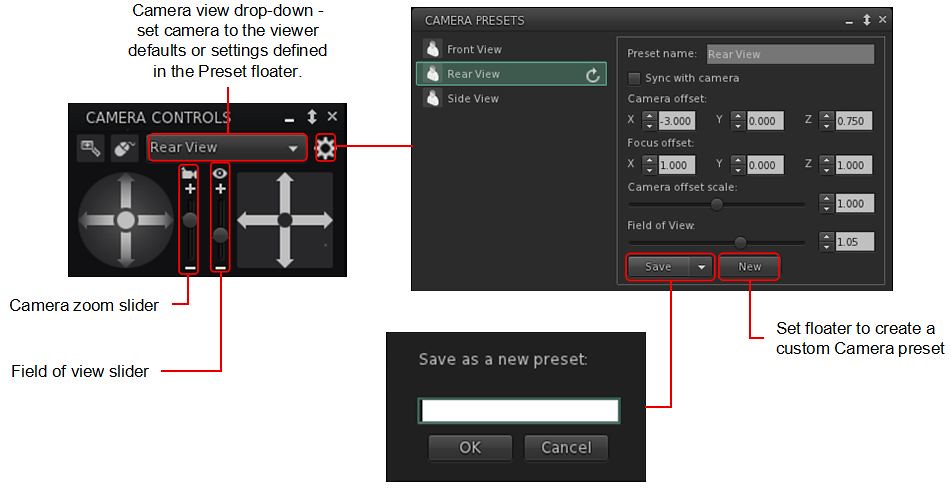
Again, I’ve covered the capability in depth within: Tutorial: Viewer Camera Presets, so those unfamiliar with the capability should refer to that document – keeping in mind it directly reference the official viewer. However, Catznip have implemented the capability with their own updated Camera floater, which also includes a couple of options specific to the viewer, and this panel and its options is outlined below.
Catznip’s Camera Presets implementation
A gear icon opens the Presets panel, where the default set of Camera positions (e.g. Front, Rear, Side), can be amended to suit personal needs, and where additional custom presets can be created (via the New button within the panel).
Note the Catznip Camera Prresets panel also allows the setting of the viewer’s field of view, an option not included in the official implementation of Camera Presets.
All presets (default and custom) can be accessed via a drop-down list at the top of the camera floater – click the arrow to the right of the button to open the drop-down and then click on the required preset.
The Zoom and Field of View sliders:
Using the Camera icon, the Zoom camera slider does what its name states: zooms the camera in and out.
Using the Eye icon, the Field of View slider controls the field of view (Ctrl-8 / Ctrl-0) which is more commonly used to ‘zoom’ in tight to an attachment for editing.
Note that both of these sliders will refer to their defaults on tapping Esc. If you wish to set a new Field of of View, this should be done by creating a new preset.
Catznip have also included Penny Patton’s popular over-the-shoulder presets within R13.
Catznip Updates
Resolution Scale
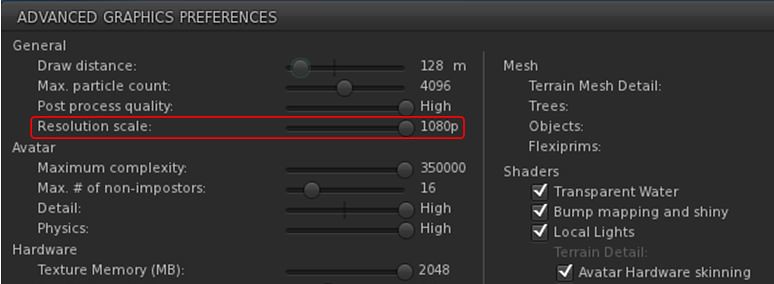
Viewer frame rates (FPS) can be a problem for some, and while Linden Lab is attempting improvements to address this, Catznip R13 includes one of the Catznip team’s approaches to boosting FPS – altering the screen resolution scale in the viewer.
A new slider, Resolution Scale, has been added to the Advanced Graphics Presets panel (Preferences → Graphics click Advanced Settings … button). By default, this is set to the highest resolution of your monitor, and but can be reduced by up to half of that resolution by moving the slider to the left. Doing so should improve viewer FPS – but will make the scene resolution displayed on your screen look increasingly blocky.
The Catznip R13 (screen) Resolution Slider
Other Updates of Note:
Places Search tab: Catznip R13 adds the following capabilities to the Legacy Places search tab:
Pressing Enter within the text input field will search on the text in the field (as will click the Search button).
Pressing Enter or double-clicking on a specific search result will teleport yo to that location.
CATZ-530 – Group Notice Creation: when writing a Group notice, the number of remaining characters is displayed under the text entry field.
CATZ-547 – Option to turn off extra lighting that is applied when editing appearance.
CATZ-557 – Improve initial opening time for the landmarks floater (+ improved filtering performance).
CATZ-584 – Give visual feedback when using an invalid regex for an inventory search.
CATZ-593 – Add option to sort Nearby and Friends list by username.
CATZ-594 – Opening the feedback floater should give focus to the feedback form.
CATZ-601 – Increase default and minimal texture cache size.
Again, please refer to the official blog post from the Catznip team for a complete list of updates and fixes.
Feedback
Catznip still lags somewhat behind the official viewer in terms of more recent releases from the latter, but this release gives a good base on which to build and catch up. Points worthy of note for me are:
EEP Quick Preference Tab – well considered, and with more-or-less the right options.
Camera Presets – good to see them “officially arrive” in Catznip, and the reworking of the Camera floater and the Camera Presets floaters / panels is very well done.
Even so, and again from a personal perspective, Catznip still isn’t quite there in terms of becoming my viewer of choice – in that regard Kokua has currently overtaken it in terms of an alternative to Firestorm, but I remain swayed towards the latter purely because of the Phototools floater and its tabs – it simply offers everything I need in a nice, convenient package that Catznip R13’s EEP Quick Preference tab doesn’t fully match and Kokua really lacks – although it does offer more that is up-to-date with the official viewer than either Firestorm or Catznip.
That said, for Catznip users, there should be little, if anything, in R13 to complain about.
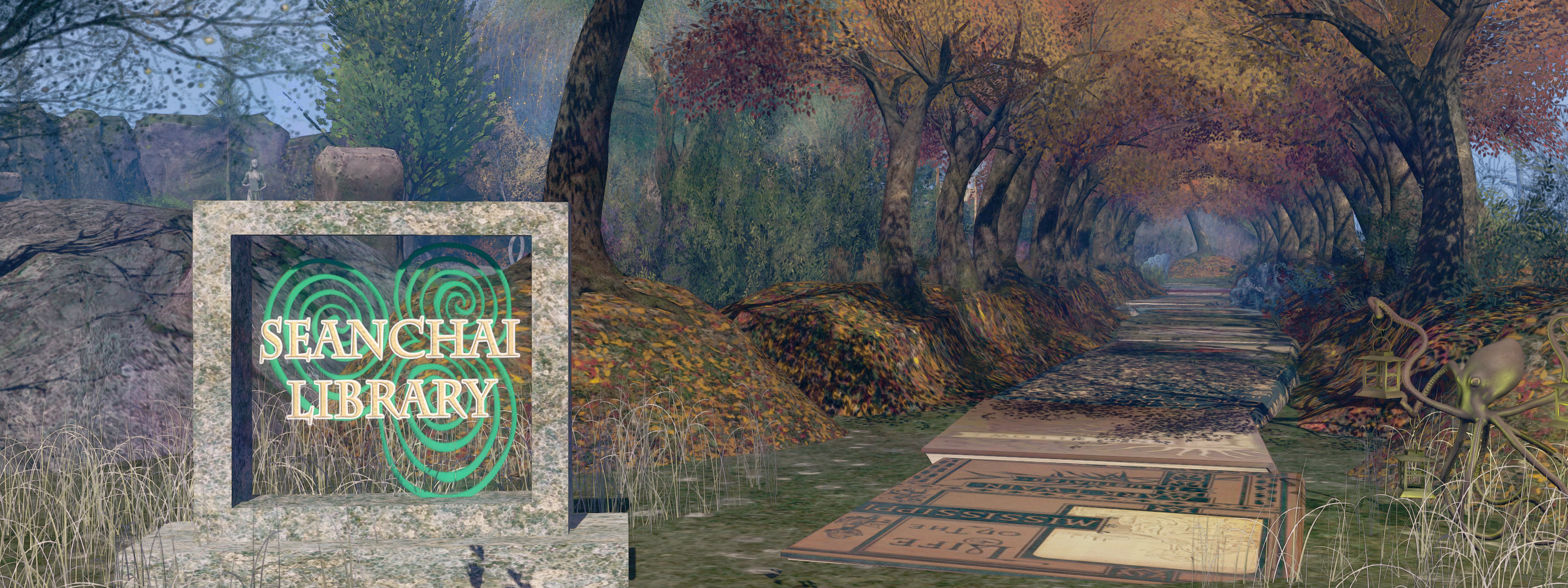
It’s time to highlight another week of storytelling in Voice by the staff and volunteers at the Seanchai Library. As always, all times SLT, and events are held at the Library’s home in Nowhereville, unless otherwise indicated. Note that the schedule below may be subject to change during the week, please refer to the Seanchai Library website for the latest information through the week.
January 10th, 19:00: A World Out of Time
After being cryogenically frozen in the 1970s to await a cure for his (then) incurable cancer, Jaybee Corbell awakes after more than 200 years – to find his own body destroyed and his mind and memories transferred into the “mindwiped” body of a criminal. And this is not all that has changed: the Earth is now overseen by an oppressive, totalitarian global government called “The State”, and Corbell’s existence is to be determined by a “checker”; if he is found wanting, he will be discarded.
However, Peerssa, the checker, recommends Corbell as ideal fodder in The State’s attempts to seek out exoplanets suitable for terraforming. Disgusted by his treatment, Corbell works out a way to take control of his one-person ship on its otherwise one-way mission, and heads toward the galactic core. Entering suspended animation, he is unaware his vessel skims close enough to the super-massive black hole at the centre of the galaxy to experience time dilation.
Emerging from his suspended state, and believing only 150 years have passed, Corbell returns to the solar system to find it vastly changed: more than three million years have passed, and the Sun has become a bloated red giant, and Earth … well, Earth appears to have been relocated to an orbit around Jupiter, whilst humanity itself had endured extensive changes – and Corbell must face an entirely new set of challenges if he is to survive.
Join Gyro Muggins as he reads the 1976 novel (and originally a short story) by Larry Niven.
Logos representative only and should not be seen as an endorsement / preference / recommendation
Updates from the week ending Sunday, January 9th, 2022
This summary is generally published every Monday, and is a list of SL viewer / client releases (official and TPV) made during the previous week. When reading it, please note:
It is based on my Current Viewer Releases Page, a list of all Second Life viewers and clients that are in popular use (and of which I am aware), and which are recognised as adhering to the TPV Policy. This page includes comprehensive links to download pages, blog notes, release notes, etc., as well as links to any / all reviews of specific viewers / clients made within this blog.
By its nature, this summary presented here will always be in arrears, please refer to the Current Viewer Release Page for more up-to-date information.
Note that for purposes of length, TPV test viewers, preview / beta viewers / nightly builds are generally not recorded in these summaries.
Official LL Viewers
Release viewer: version version 6.5.1.566335, formerly the Cache+ 360 Capture viewer, dated December 7, promoted December 15 – No change.
The James Webb Space Telescope (JWST) has completed deploying all of its major components whilst en route to its operational orbital position at the Earth-Sun Lagrange L2 position.
At the time of my last update, NASA was expected to start work on tensioning-out the layers of the observatory’s layered sunshield. However, this was delayed in preference of working on JWST’s power subsystem. The decision came as a result of telemetry showing the observatory’s solar arrays were not producing their anticipated output due to them operating at their factory defaults. After re-balancing them, engineers took the opportunity to gather a baseline of power requirements for future reference, and to ensure the motors that are key to the sunshield tensioning process were at their optimal temperatures prior to starting the tensioning operation.
The work on the power subsystem meant that tensioning operations did not start until January 3rd. This comprised each of the hair-thin layers of the sunshield being gently tensioned out and separated from the other layers to allow it to function most efficiently in absorbing / reflecting heat and sunlight. By the end of the 3rd, three of the five layers had been correctly tensioned, putting the operation well ahead of schedule, allowing the operation to be completed with the tensioning of the last two layers on Tuesday, January 4th.
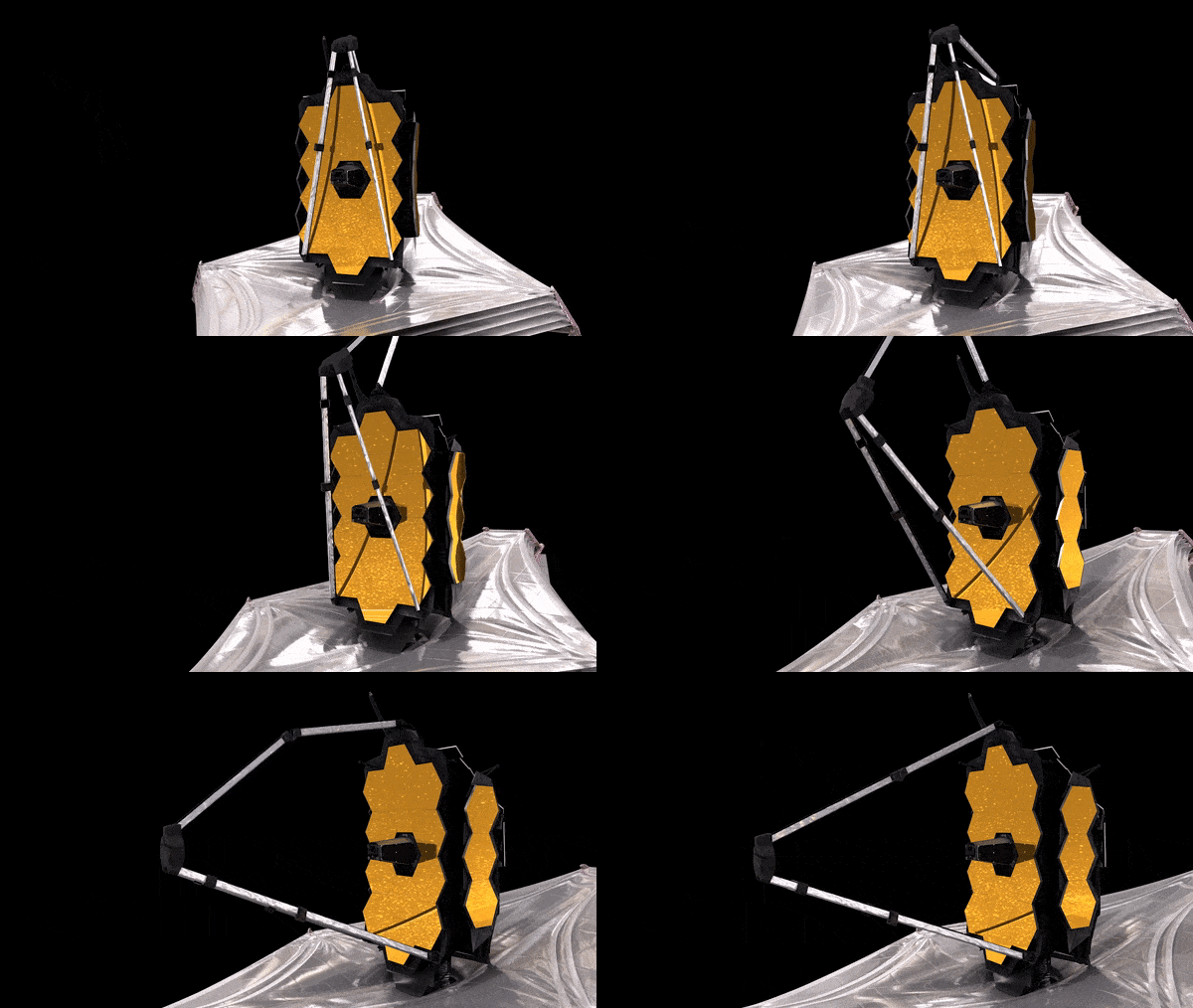
This left the way clear for the deployment of the observatory’s secondary mirror system. Commencing on January 5th, this involved unfolding a series of booms called the Secondary Mirror Support Structure (SMSS) to extend the secondary mirror assembly out in front of the primary mirror, allowing it to gather and focus the light from the primary back through an aperture at the centre of the primary, where a third mirror reflects it down into the observatory’s interior and to its instruments.
JWST secondary mirror deployment. Credit: NASA
On January 6th JWST deployed the radiator systems that serve to remove excess heat from the observatory. Stowed flat against the rear of the main mirror assembly, the radiator panels were successfully extended out and away from the body of the observatory, freeing the mechanisms required to unfold the two “wings” of the primary mirror.
At 6.5 metres in diameter, and comprising 18 hexagonal gold-covered segments JWST’s primary mirror is too big to fit in the payload fairings of any operational launch vehicle, thus the use of the two “wings” to the port and starboard sides of the mirror.
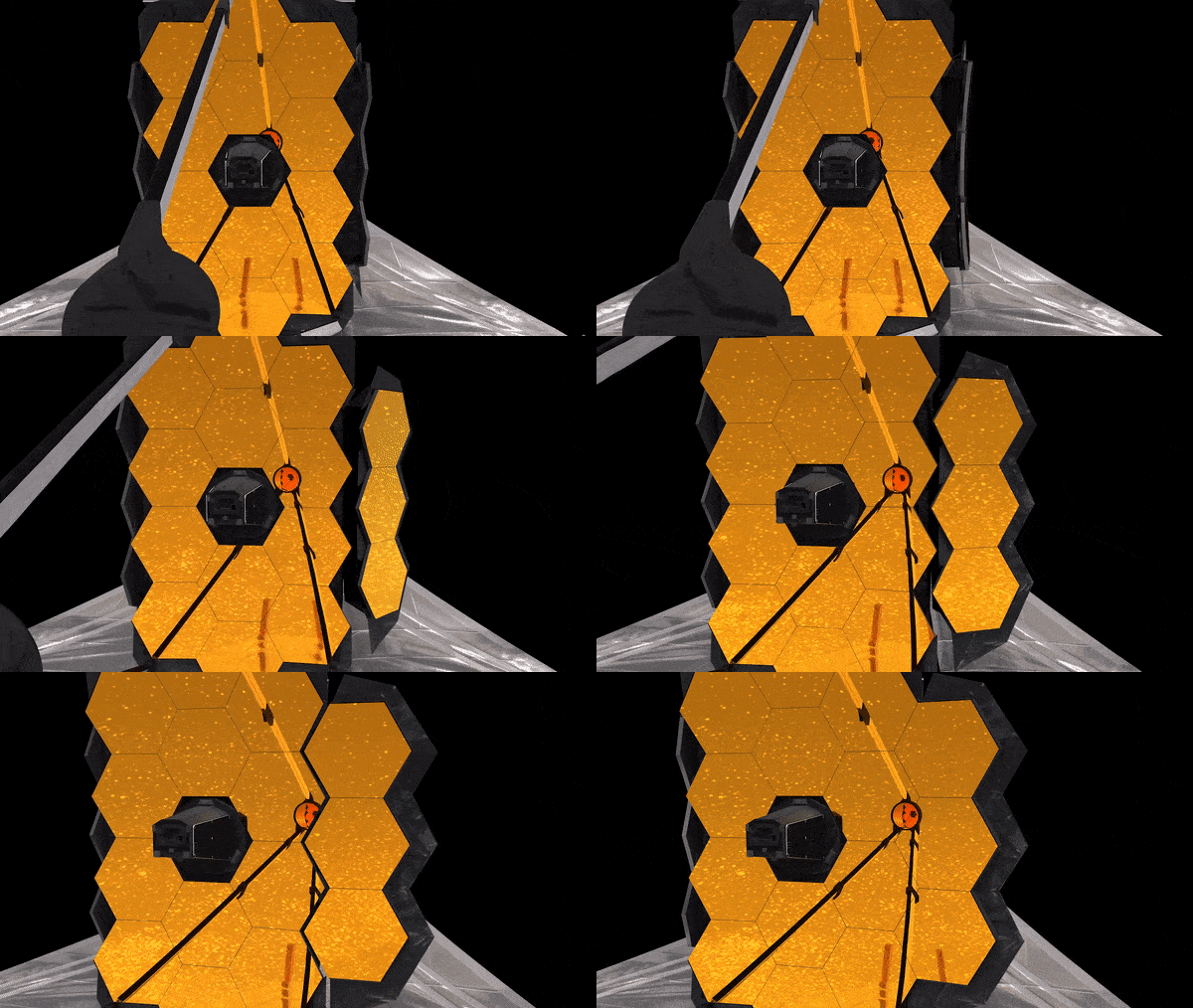
Work started on unfolding these on January 7th, commencing with the port wing. The operation commenced at 14:30 GMT, the wing unfolding in five minutes – although latching it into place took a further two hours. A similar operation was then initiated on January 8th to deploy the mirror’s starboard wing, with telemetry received at 18:17 GMT to confirm it had locked into place in its deployed configuration.
Unfolding one of JWST’s primary mirror segments. Credit: NASA
The successful unfolding and latching of the primary mirror segments marked the end of the deployment phase of the mission, allowing the JWST mission and engineering teams to move onto the commissioning phase of the mission.
In all, this will take some five months to complete; the first part of which involves correctly align the 18 individual mirrors that make up the observatory’s primary mirror so that they all work in concert to gather and reflect light into the secondary mirror. This is a multi-step process, in which each of the 18 segments is gently adjusted by means of 6 actuators located behind it to ensure proper alignment – with the secondary mirror also having actuators that allow minute adjustments to be made to it, assisting the alignment process whilst ensuring the gathered light remains correctly focused on the non-moveable third mirror. It is not an easy process, the work is expected to run the full 120 days of the commissioning period.
2022 Space Highlights II
In the last instalment of Space Sunday, I mentioned some of the forthcoming missions planned for 2022. In addition to those I mentioned then (limited by space), here are some more – all of which I hope to cover in more detail as the year progresses.
Axiom missions to ISS: Axiom Space plan to launch two “all private” missions to the International Space Station (ISS) utilising SpaceX Falcon 9 and Crew Dragon. Each mission will last around 8 days and focus on science and educational outreach. The first mission will launch at the end of February 2022, and the second in the autumn.
Jupiter Icy moons Explorer (JUICE) mission: ESA’s mission to Jupiter, to primarily study three of its moons – Ganymede, Europa and Callisto – should launch in May 2022. Arriving in Jovian orbit in 2029, it will then create a 3-year study mission.
Psyche asteroid mission: set for July 2002 and launched via a Falcon Heavy booster, NASA’s Psyche mission will study a metallic asteroid of the same name that orbits the Sun between Mars and Jupiter. It is believed the asteroid is the exposed nickel-iron core of an early planet. Thus, studies of it may offer new clues about how terrestrial planets like Earth form.
India’s Gaganyaan space missions: India plans to complete an uncrewed launch of its new Gaganyaan crew vehicle in summer 2022, with a second test flight before the end of the year.
An artist’s impression of India’s Gaganyaan crew capsule and is service module. Credit: ISRO
ExoMars Rover launch: the long-awaited European Mars rover mission will launch between August and October, carrying the Rosalind Franklin rover to Mars. Once there it will join the ExoMars Trace Gas Orbiter (TGO), which arrived at Mars in 2016, to study the red planet.
Dream Chaser ISS operations commence: Sierra Nevada Corporation’s Dream Chaser Cargo space plane will commence resupply flights to the ISS, carrying up to 5 tonnes of supplies and equipment to the station and returning around a tonne to Earth. The maiden Dream Chaser launch will mark the second flight of ULA’s new Vulcan rocket.
Lunar missions:
US Nova-C lunar lander: the Intuitive Machines Nova-C land will launch atop a SpaceX Falcon 9 vehicle early in 2022, carrying five NASA Commercial Lunar Payload Services (CLPS) payloads to the Mare Serenitatis, including a UK-built lunar rover.
Russia: the Luna 25 robot mission to the Moon’s South Pole will launch in July, marking the first Russian mission to the Moon in 45 years, and the first to land in the lunar Polar Regions. It will carry nine instruments to research the lunar regolith and exosphere (atmosphere).
Russia’s Luna 25 under construction. Credit: Roscosmos
NASA lunar drilling mission: scheduled for launch in December 2022, the Polar Resources Ice Mining Experiment-1 (PRIME-1) is the first-ever mission designed to harvest water ice from inside the moon — a resource NASA hopes to utilize for its Artemis program.
In Brief
Biden White House Commits to ISS Extension
The Biden administration has formally supported extending operations of the International Space Station through the end of the decade, an announcement that is neither surprising nor addresses how to get all of the station’s partners, notably Russia, to agree on the station’s future.
NASA has wanted to continue operating the ISS through until 2030 for several years, but has lacked outright political support to do so. In 2018, the US Senate agreed to extend US ISS operations through until 2028 or 2030, but the move failed to gain the required two-third House majority in order to pass. Support from the White House may help the agency gain full US support for the mission, and as a result of it, the European Space Agency has further indicated it would seek a resolution among members to continue to fund their side of station activities.
However, the major sticking point for operations lies with Russia. Most of the Russian modules on the station are growing increasingly old and subject to failure, and as such, Roscosmos is reluctant to continue supporting operations beyond 2024. In addition, geopolitics may impact the future of the ISS: Russia has already announced plans to operate its own space station at the expense of continued international cooperation with the ISS.
China Complete Key Station Robot Arm Test
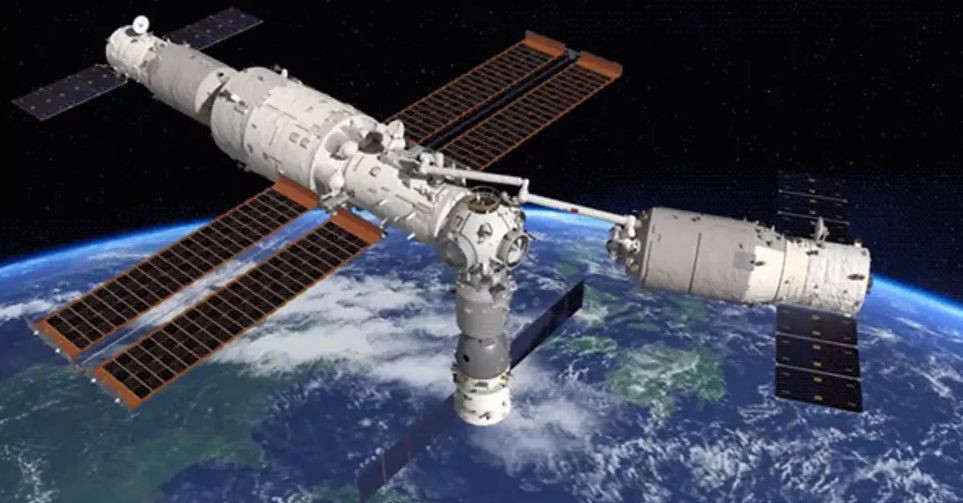
On Thursday, January 6th, a large robotic arm on China’s space station successfully grasped and manoeuvred a cargo spacecraft in a crucial test ahead of upcoming module launches.
An artist’s impression of the robot arm test on the Chinese space station. Credit CMSAThe 10 metre long robotic arm on the Tianhe-1 module of China’s new Tiangong space station was used to grasp Tianzhou-2 supply vehicle that has been docked with the module since the end of May 2021, and move out away from the station, angling it through 20 degrees before returning it to the Tianhe-1’s forward docking port, where it reattached itself.
The 47-minute operation began at 22:12 UTC, as was designed to test the robot arm’s ability to manipulate and move large modules that will form a part of the station as it progresses. In particular, the test is vital to China’s plans to launch two science modules – called Wentian and Mengtian – to dock with Tianhe-1 in May / June and August / September 2022 respectively, thus completing the Tiangong space station.
Hubble Space Telescope’s One Billion Seconds
One January 1st, 2022, the Hubble Space Telescope (HST) achieved another milestone in its distinguished career – notching up 1 billion seconds in orbit since its launch on April 24th, 1990. That’s 31.7 years of near-continuous operations in Earth’s orbit.
A joint NASA / ESA project, HST has contributed massively to our understanding of the solar system, our galaxy and the universe as a whole. Despite recent issues with the observatory, it is hoped that HST will continue to operate through the 2020s and well into the 2030s.




 After being cryogenically frozen in the 1970s to await a cure for his (then) incurable cancer, Jaybee Corbell awakes after more than 200 years – to find his own body destroyed and his mind and memories transferred into the “mindwiped” body of a criminal. And this is not all that has changed: the Earth is now overseen by an oppressive, totalitarian global government called “The State”, and Corbell’s existence is to be determined by a “checker”; if he is found wanting, he will be discarded.



 Inara Pey: Living in a Modemworld