Tuesday, February 19th, 2019 saw the long-awaited release of Catznip R12.1 – the release coming a little over a year since the last update. Tuesday, February 19th, 2019 saw the long-awaited release of Catznip R12.1 – the release coming a little over a year since the last update.
The key feature with this update is support for Animesh, although it also sees Catznip come up to parity with the Lab’s viewer cove (release 6.0.1.522263 at the time of writing), which means there are a lot of bug fixes and other tweaks within the viewer. |
Table of Contents |
Catznip R12.1 also introduces a number of features and enhancements directly from the Catznip team.
These notes are designed to cover the most visible changes with the release. For details on specific bug fixes, please refer to the R12.1 release notes.
Log-In Splash Screen
The first major change with Catznip R12.1 can be seen within the viewer splash screen. This includes a revised destination panel and revised information tabs.
Web Links
The splash screen now includes five buttons located to the left of the large Catznip logo. These are links to:
- The Catznip Patreon page.
- The Catznip Flickr pool (empty at the time of writing).
- Clearer buttons to Catznip on Google+ (although Google+ will be closing on April 2nd, 2019), Facebook and Twitter.
Destination Guide Panel
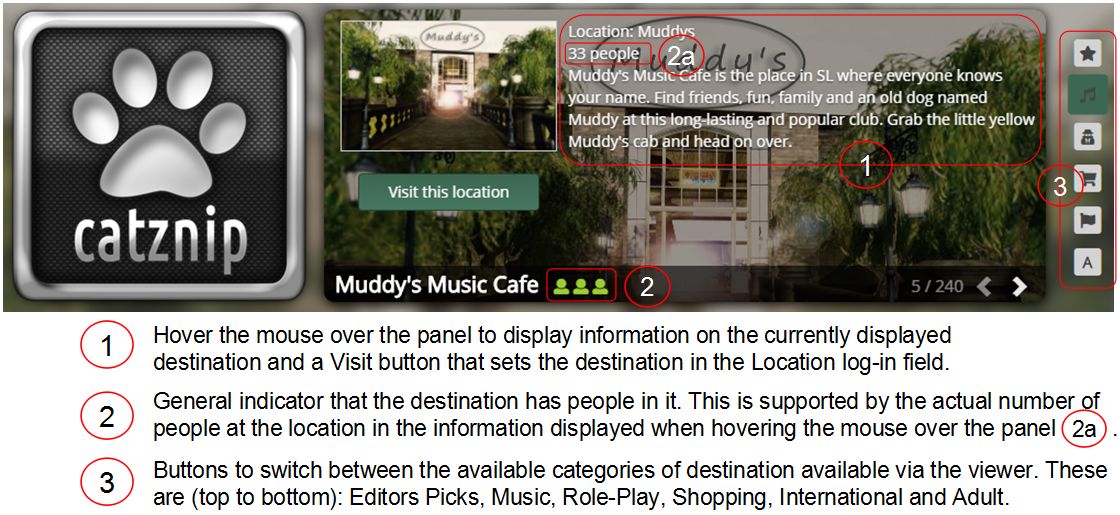
The Destination Guide panel has been overhauled for better access to destinations by selected category and to display information, as outlines in the image below.
Revised Information Tabs
The log-in screen information tabs located below the destination panel have also been revised, so it contains the following tabs:
- What’s New: primarily useful during Catznip beta releases, when it lists all the JIRAs that were fixed or added for that particular beta.
- Grid Status: displays information from the Second Life Grid Status RSS fed.
- Modem World: displays posts recorded by this blog’s RSS feed.
- Reddit : displays recent threads from the Second Life Reddit community.
- Seraphim: lists blog posts recorded in the Seraphim blog RSS feed. Clicking the location column will set your login location to that specific event.

Note that the tabs are considered experimental, and feedback on their inclusion from Catznip users is requested.
Lab Derived Updates
This version brings Catznip up to parity with Linden Lab release viewers through to release version 6.0.1.522263 (formerly the Spotykach RC viewer, promoted on December 13th, 2019. Major updates in that release include:
- Voice Server:
- Second Life: Vivox version 4.9.0002.30313.
- Chromium Embedded Framework (CEF) Dullahan:
- Dullahan: 1.1.1080
- CEF: 3.3325.1750.gaabe4c4.513446.
- Chrome: 65.0.3325.146.
Animesh
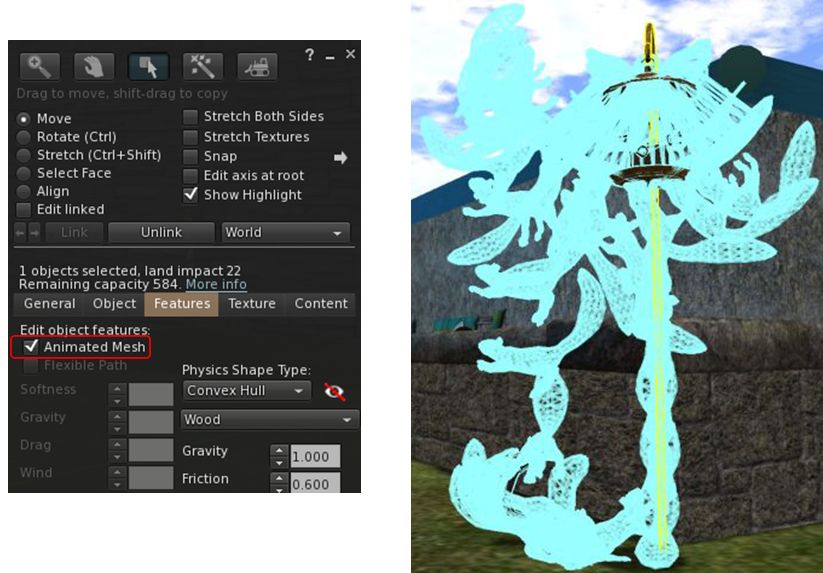
Animesh allows the avatar skeleton to be applied to any suitable rigged mesh object, which can then in turn be animated using suitable scripts and animations contained within the object’s Contents. This opens up a whole range of opportunities for content creators and animators to provide things like independently moveable pets / creatures, and animated scenery features.
While Animesh is likely to primarily be used by content creators, it has been designed so that any suitable rigged mesh can be converted to Animesh directly from the Build / Edit floater. Do be aware, however that simply converting an object will not cause it to start animating – you’ll need suitable animations and a script to run them. Like any other object utilising animation, this is done by adding the animations and scripts via the Edit > Contents tab for your converted object.

The best way to get started with Animesh is to use the available resources. These include:
- Official Linden Lab resources:
- Animesh User Guide
- Animesh test content ( Raptor and Aditya – rez and wander; Teddy – attachment)
- Animesh test regions: Animesh 1 ; Animesh 2 ; Animesh 3 ; Animesh 4 ; Animesh 5 ; Animesh Adult.
- Animesh LSL methods:
- Animesh feedback thread
- Additional resources:
- My Animesh overview
- Animesh example content by Silas Merlin (free and full permissions)
- Animesh on the Marketplace.