One thing I neglected to mention in my recent review of Firestorm 4.4.0 is the inclusion – by Cinder Roxley – of Vincent Nacon’s alternative cloud maps, which can be used to change / enhance the rendering windlight clouds.
The default cloud layer seen over Extropia, using the AnaLutetia-outdoor windlight setting and the sun adjust to around 10:00.
I’ve no excuse for this, given Cinder actually nudged me on the matter prior to the release; just blame it on me having a blonde moment…
So, what is it all about? Quite simply, Firestorm now includes additional cloud maps made by Vincent Nacon, and which Cinder has added to the Preferences > Firestorm > Windlight tab for easy selection.
The Windlight cloud options
This presents you with four basic cloud types – the default map, Altocumulus (a middle altitude cloud, usually characterised by globular masses or rolls in layers or patches), Cumulonimbus (the familiar towering cloud formations associated with thunderstorms) and a “Layered” map. Do note that selecting any option other than the one already in use appears to require a viewer re-start in order to take effect.
Exactly what effect these different maps will have on your in-world view is a matter of experimenting with the various available windlight settings within Firestorm (a task made easier thanks to William Weaver’s Phototools). However, they can be used to produce some stunning effects – the images here are simply to provide some form of comparison.
Extropia seen under the same windlight setting as the first image in this article, but using the Layered cloud map.
What’s more, as Cinder indicated in her little nudge to me, you can create (or obtain) cloud maps of your own and add them to Firestorm to create your own unique cloud looks. “Drop any 8-bit grayscale tga with a power of 2 size you make or find under app_settings/windlight/clouds,” she comments, “And they’ll be automatically added to the list.”
For those wishing to try the cloud maps on other viewers, Vincent provides forum thread in which his discusses the maps and provides guidelines and caveats on their usage in viewers. Links to download the maps are also provided.
The Cumulonimbus map applied to the sky, using the same windlight setting and time of day – note the “stacking” effect visible in the formations on the right of the image, given the impression of some additional vertical height
The maps appear to be particularly well-suited to sunrise / sunset images, where the combination of sun and clouds can be particularly dramatic and result in some incredible images.
The blog post says it all – “old school” – a simple message with a lot of meaning. Kirstenlee Cinquetti has been twiddling under the hood with the S19 (v1-style) version of Kirsten’s Viewer with the result that an updated version – code-named “Blackbird” (version S19.404 at the time of writing) was released via Google Code on Wednesday 24th April.
This is the second time there has been a surprise update to one of Kirstenlee’s viewers – in September 2012 a couple of updates were made to the v2-style S22 viewer. As with those updates, the new release of S19 does not mean that Kirstenlee is returning to the field of viewer development per se. Nor is this a complete update – although it does incorporate a lot of v3 code and is Server-side Baking ready. As it stands, the release – as with the S22 releases in September 2012 – is offered “as is” and without support – and there is no time scale or firm commitment where further updates are concerned.
As readers, know, I’m not a fan of the v1-style interface, but I admit there is something pleasing about loading and running this release – quiet possibly because it is one of Kirstenlee’s builds, which, despite the odd hiccup between the viewer and my hardware, I’ve always felt pretty much at home with. Perhaps it’s the green :).
Some of the New Bits
I’m not proposing an in-depth review, but here are some of the main features in the update.
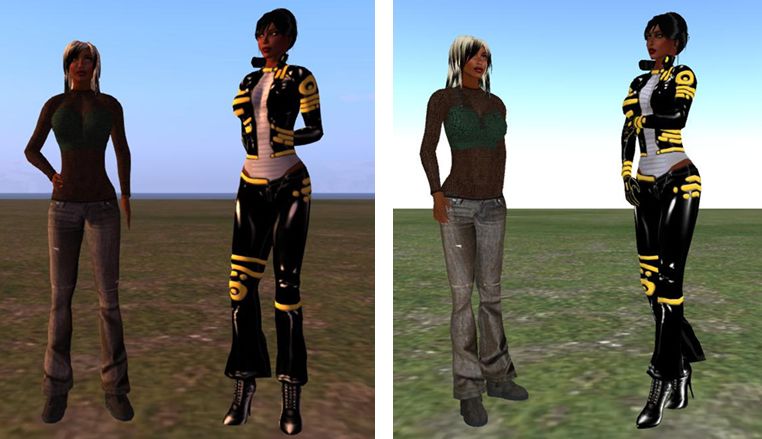
Server-side Baking / Appearance: as mentioned above, this update is “server-side baking / appearance ready – it will render avatars correctly on SSB/A-enabled regions and avatars using the viewer will render correctly to others. However, the new “hover” mode partial z-offset “fix” is not included in the Edit Appearance floater.
SSB/A-OK: O the left – S19 Blackbird rendering my Alt (on the SL SSB/A beta viewer) and I correctly on an SSB/A-enabled region; on the right – I render correctly in my Alt’s view
Mesh Uploads: Nicky Dasmijn’s mesh uploader is included in this release of S19, again bringing it into line with other viewers and the age of mesh.
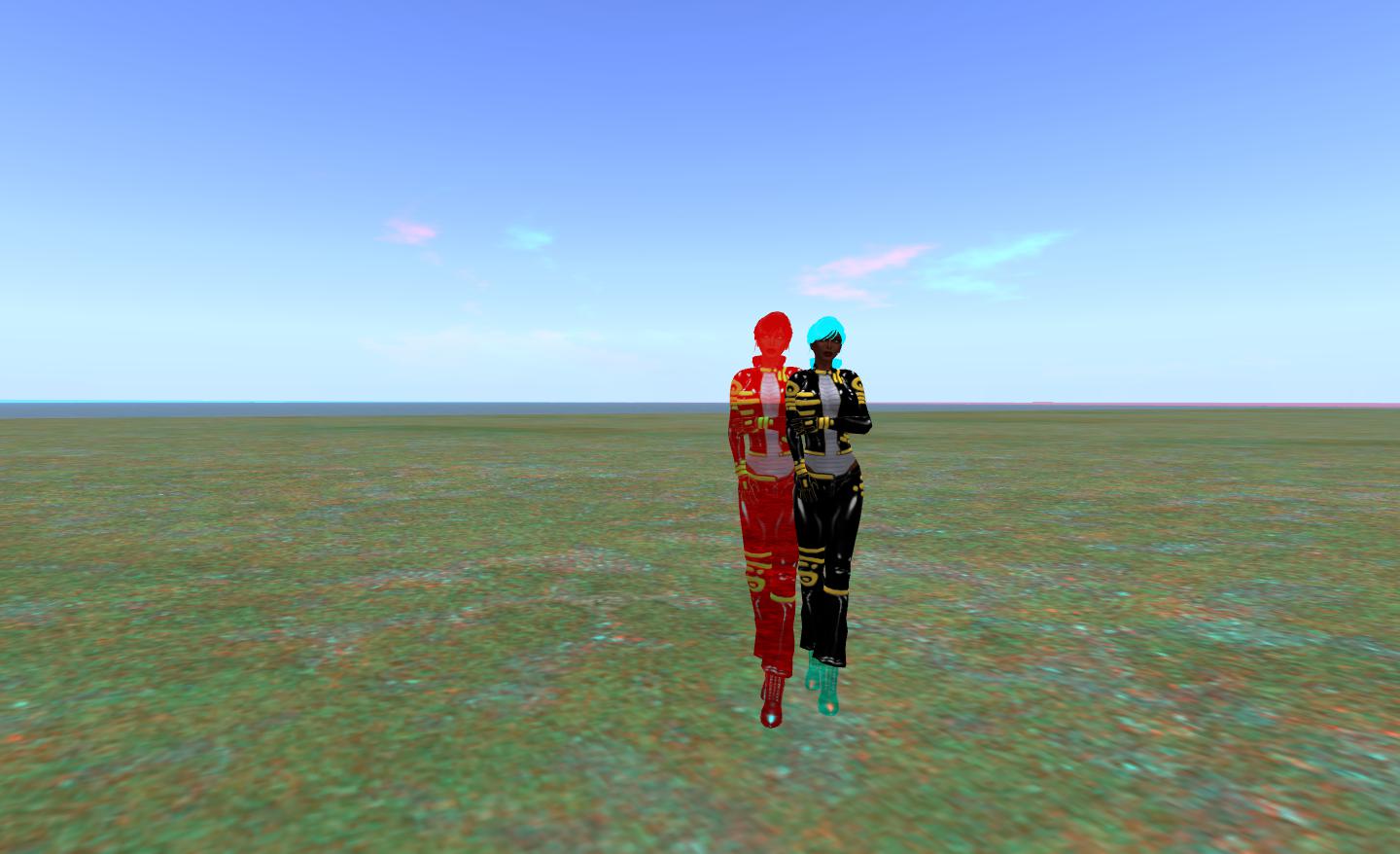
Anaglyph [3D] rendering: Kirsten’s first introduced 3D rendering in the S22 viewer. While still very experimental, with all the interest in Oculus Rift, its inclusion in S19 with this release is perhaps a little pertinent and timely as a means of generating a 3D view in a viewer.
If you have 3D glasses, Kirsten’s latest S19 (404+) gives you a 3D world
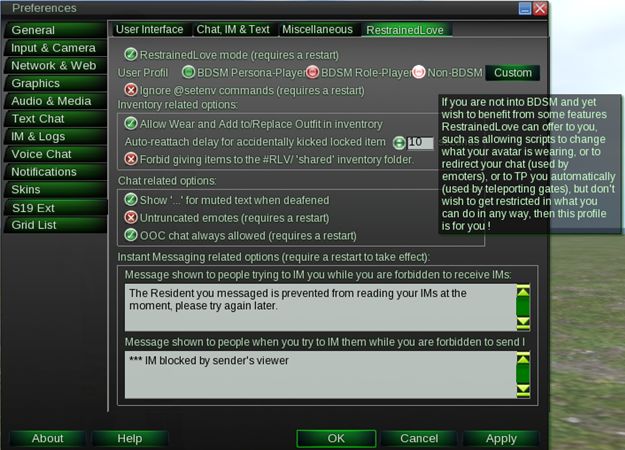
Restrained Love: RLV comes to Kirsten’s viewer with a dedicated preferences panel which includes the ability to set a “profile” against your RLV use – one of “BDSM Persona-Player”, “BDSM Role-player” and “Non-BDSM”. These define how many (and which) RLV controls can be blacklisted (i.e. prevented from operating), so that, for an example, someone using the “Non-BDSM” option can make use of options such as automatic chat redirection, shared folders for changing outfits and “forced” teleports which necessarily having to also have the more restrictive RLV options active.
RLV comes to Kirsten’s Viewer – complete with a set of “profiles”
Pathfinding: Kirsten’s Viewer S19 also gains options to display pathfinding information on linksets and characters. These options are on the Tools menu. As S19 supports OpenSim, there is no navmesh visualisation as there is no Havok sub-licence agreement.
Comments
Overall, this is a sudden and interesting update to Kirsten’s original v1-style viewer, incorporating a lot of v3 code which more than makes it capable of running on today’s grid. On the whole I found it to be stable, and with performance levels I’ve tended to get from Klee’s builds (somewhat lower than with other builds for reasons I’ve never fully fathomed). I did encounter an odd issue – while I could run the viewer in deferred mode, when I enabled shadows, my in-world view turned black, and refused to come out of its sulk until I disabled shadows once more. Whether this was due to a problem with the viewer, or simply another of the hiccups which seem to occur between my hardware an Klee’s viewer builds at times, I couldn’t say.
There are a few bits missing from the update as well – no Depth of Field for photographers, for example, (although Dawny Daviau, Kirstenlee’s partner, tells me this might be coming). So don’t expect it to be fully up to S22 / v3 standards in terms of options, etc.
Again, this release is not a return of Kirsten’s viewer per se, although there is an open invitation for those who like the viewer or the v1-approach to give it a go. Just remember, support isn’t given – and it may be a while before a further update arrives.
In the meantime, some more 3D, this time courtesy of a video demonstration from Chantal Harvey, filmed back when the capability first appeared in Kirsten’s Viewer.
Update April 29th: Don’t forget my additional piece on the new cloud options in Firestorm 4.4.0.
Firestorm 4.4.0.33720 made its formal debut on Monday 22nd April, although it has been well and truly put through its paces by both the Firestorm beta testers and the preview group for some time now, in order to ensure it is as ready for mainstream release as possible. It includes a huge number of updates and revisions, both from the Firestorm team and their contributors and from Linden Lab.
Given the size of the release, this is not intended to be a review of absolutely everything within Firestorm 4.4.0 – please refer to the release change log for that. Instead, this review focuses on what I regard as the key updates / changes. As always, credits for the various updates and contributions to Firestorm which re mentioned here can be found in the release change log – again, please check them there.
Server-side Baking /Appearance Support
Note that this item is Second Life-specific.
This isn’t actually a visible change to the viewer in term of UI, etc., – but it is an important one.
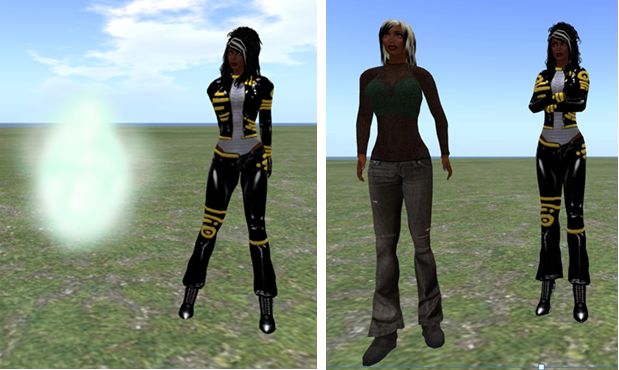
Server-side Baking / Appearance is a major change within Second Life which is primarily aimed at reducing or eliminating issues of “bake fail” (when the avatar skin & clothing layers fail to render correctly and with remain blurred or show the avatar wearing the “wrong” outfit). This capability is being introduced in two parts: viewer-side support and server-side support.
Viewers which do not have the viewer-side support will not work with the Server-side Baking / Appearance service once it starts being deployed on the grid – people using them will increasingly see grey avatars around them. Therefore, it is essential that Firestorm users update to Firestorm 4.4.0.
Server-side baking and how others see you: (l) if you continue to run a viewer without SSB support when the new service goes live, others will see you as a cloud, (and, other than attachments, you’ll see them as grey); (r) when you’re running a viewer with SSB support, you’ll appear correctly to everyone else – and they will to you.
For further information on Server-side Baking / Appearance, see the following blog posts:
This release sees a large number of Preferences updates, all of which are reported in the change log, and which include:
Chat:
General: new option to select display name format for IM tabs – a drop-down list of: Display Name, Username, Display Name (Username) and Username (Display name)
Notifications: a new option to Show group chat in chat console (useful if you opt to hide chiclets – see below); new drop-down option for IM receipt sounds: Play sound only if not in focus
Graphics:
General: the Quality and Speed slider incorporates additional settings (Low-Med, Med-High and High-Ultra); Lighting and Shadows is renamed Advance Lighting Model (as per the LL viewer); the Depth of Field check box is moved to the Depth of Field tab; the Windlight Sky Detail slider and the Avatar Physics slider swap positions
Rendering: Max number of concurrent HTTP GET requests slider removed; check box to Enable rendering of screen space reflections added
Sound and Media > General: uses radio buttons to show stream title notifications in chat, toasts or to be turned off
Move & View:
View: new check boxes to: disable the mouse wheel from controlling camera zoom; Show user interface in Mouselook; Enable context menus in Mouselook and Leave Mouselook after regaining focus
Firestorm: new check boxes to Reset camera position on avatar movement and Show the default camera controls mini-floater always as opaque
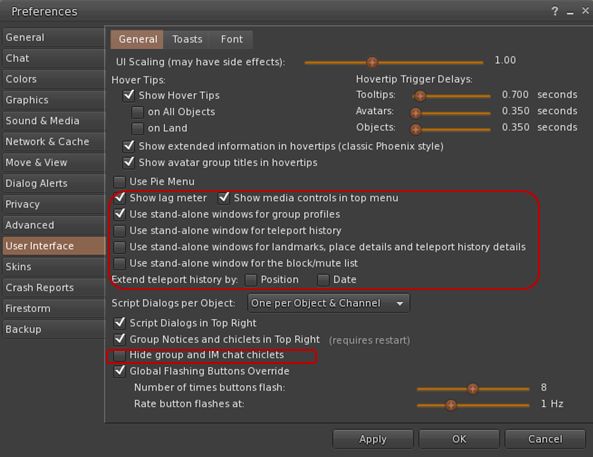
User Interface > General: new check boxes to open group profiles, teleport history, landmarks, place details, block / mute list in their own floaters; adds an option to show / hide the media control in the menu bar (useful when using a skin which includes the media controls elsewhere) and an option to hide IM and group chat chiclets completely (the notifications envelope and the number of IM’s will remain on the screen all the time whether or not chiclets are disabled)
New User Interface > General options
Skins: new colour option (Ectoplasma) for AnsaStorm
Firestorm:
Windlight: new capability to define cloud texture
Build: options to default prim settings, texture and permissions on creation – see the Firestorm Custom Prim Parameters video tutorial and the Firestorm wiki
Backup tab – see below.
Custom Quick Preferences
A popular feature with Firestorm is the Quick Preference floater which, as the name suggests, provides fast and easy access to some of the most frequently used options in the viewer without having to open the “full” Preferences floater.
With release 4.4.0, the Quick Preferences floater has been made somewhat customisable – essentially allowing almost anything which is a debug setting to be added to the floater. However – be warned that this capability is considered to be for advanced users, and does require a willingness to delve deeper into the viewer than some users may be used to. Further, not every debug setting can be added to the floater.
Cutomising Quick Preferences (click to enlarge)
For those wishing to find out more, Firestorm have produced a tutorial video on using the Customise Quick Preferences option, and a Firestorm wiki page.
Settings Back-up
Often, when installing a new version of a viewer, the recommendation is that one performs a “clean install” – removing all cached and settings files. This can make any viewer installation labour-intensive, as settings all need to be restored after the installation is complete, and this can take time and effort.
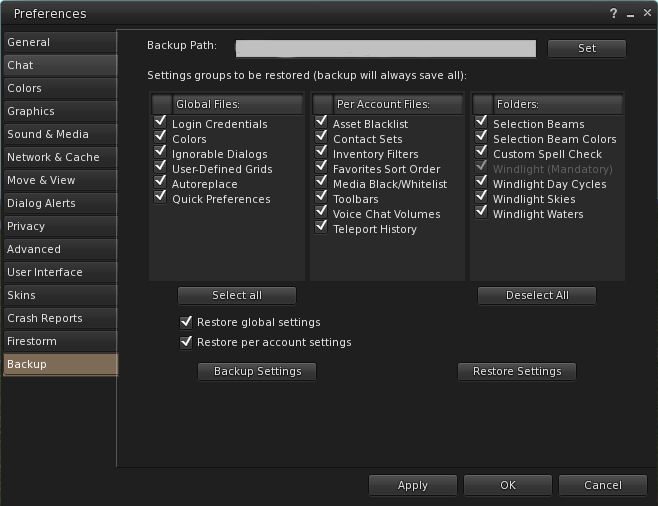
Firestorm 4.4.0 attempts to ease some of the pain by presenting users with a Preferences option which allows them to back-up many of their global and account settings to a local hard drive. Once done, the back-up can then be restored to an updated version of Firestorm following installation; so providing the back-up is kept up-to-date, restoring the majority of preferred settings is no longer a chore.
The Preferences Backup tab and options
The back-up option can be found in Preferences > Backup. To use it, simply select a folder on a local hard-drive as the back-up location, then select those options which are to be saved; you can then delete all files associated with Firestorm prior to performing a clean install.
Ahead of the upcoming Firestorm release – which will be available Real SoonTM, (sorry, I can’t say when as Jessica would douse me in catnip and set the moggies on me 🙂 ), Jessica has been busy on a new set of video tutorials for users.
Some of the videos are specific to the upcoming release, and one is for those still using Phoenix and who wish to make the switch to Firestorm. This is something which has been covered before in Firestorm tutorials (and something I’ve attempted to cover myself in the past), but as things have moved on somewhat since those days, the new video has been produced.
The Firestorm 4.4.0 video cover features which are both new to the upcoming release, and which are updated in the upcoming release in comparison with earlier releases of the viewer – such as with object de-rendering, as per the video below.
It’s the start of April, and for ONE DAY only, the Firestorm team have a very special offer for SL users.
Firestorm Mobile brings the power for Firestorm to any mobile device – even if it doesn’t have graphics! So don’t delay find out more about this first-of-the-month offer for April in this official Firestorm video!
The Firestorm team have announced the re-opening of their Second Life release preview group, for those who are interested in assisting the team with identifying potential issues / bugs with new releases of the Firestorm viewer.
The announcement, entitled “Feeling Brave?” from Jessica Lyon, reads in part:
“The perfect understanding of an event after it has happened, often when you realize too late what you could have done to avoid it.” We had one of those moments shortly after our last Firestorm release when we discovered that quite a few users were experiencing a bug that made their screens pink. This bug had slipped past our Quality Assurance team and went out in the official release. The hindsight is that we could have offered a pre-release to a larger number of users than what we have in our beta group. Chances are they would have discovered the bug, we would have fixed it and it would not have been released with that bug.
Jessica Lyon: call to the brave – and those willing to follow the rules!
With this in mind, the Preview group has been re-opened in order to try to ensure potentially obvious bugs don’t slip through the net in future and, as with all Firestorm groups, is on open membership. However, as Jessica notes, there are some rules those joining are asked to abide by:
We need your feedback. Please do not just grab the pre-release and run away. That would defeat the purpose of what we are doing, and we will not do it again. Remain in the group and report issues you’ve found. It’s especially important that you report them to our JIRA. Not familiar with or comfortable using the JIRA? We have a wiki page and a Reporting Bugs class to get you acquainted with it.
Do not give the viewer download link out to anyone outside the group. That kind of thing goes viral very quickly, and if we discover during the pre-release test phase that there are some major bugs or worse — exploits — we will have already lost control of the build. If your friends want to use the viewer, the preview group is open to them, as well. The rules apply to them, too.
Re-read rules #1 and #2.
So, if you have an interest in test-driving viewers, and are willing to abide by the stated rules, the Firestorm Preview group might be a group to consider.