Viewer 3 release: snapshot floater in and installer fixed

Viewer 3 has had a release slipped out. Version 3.2.4.246439, dated December 8th, brings with it the long-awaited (for those not using a recent TPV or either the Beta or Development versions) updated snapshot floater, allowing you to send snapshots directly to your web profiles feed.

I’d actually missed this release, if it did surface around the 8th, which is a little ironic, as I’ve been trying to keep a weather eye on Viewer 3 updates, but admittedly have had my attention elsewhere in the run-up to Christmas and also trying to put a few upcoming blog posts in order as well.

Installer loses Viewer number

Another change that should make Tateru a little happier 🙂 – is that the installer now simply calls the Viewer the “SecondLifeViewer” (on Windows at least, I can’t speak for other O/s versions of the Viewer) and installs into a folder of that name – the version number is now gone. I can’t speak for the issues on disconnects or those of grpahics issues, but I am assuming it has the OpenGL fixes included (which would, I believe, roughly fit the release date).

Sadly, the click-to-walk still results in mouse steering being, as we say in England, arse-backwards.

I’ve not looked too deeply at the release for other updates, but those using it should have been prompted to update if running an older version; although (again with Windows release at least), because of the install location name change, you need to uninstall the prior version yourself afterwards.

Snapshot floater makes it to a release version of the Viewer, complete with profile feed option


Kirstens: “And finally…”

The crowdfunder effort to keep Kirsten’s Viewer alive did not reach the required target of £25,000.

Kirstenlee (Lee Quick) posts a sad message today on the subject, confirming that the end of the road has now been reached, saying:

I will no longer have the time ( or inclination ) to develop any more, on January the 1st I start a new job, and will be busy looking after my nearest and dearest.

Given all they are facing, a move back to England, getting into a new home, Dawny’s health and the need for full-time work, one cannot help but extend both Lee and Sylvia (Dawny) love and best wishes.

It’s easy to dwell on what might have been in terms of the crowdfunding effort, and not to feel regret that Kirsten’s Viewer will not longer be under development. However, I’d like to remember some of what Kirsten’s gave us.

It may not have been my primary Viewer, but it was the one I always looked to when I wanted to take really good photos in SL – simply because it was so good, it made anything I took look good.

It was the first Viewer (indeed, the only Viewer for a long time) on which I could experience shadows in SL.

Kirsten’s goes V2

It was the first Viewer to demonstrate what Viewer 2 could have been and that the V2 UI could actually be made into something usable.

It was the first Viewer to give us DoF in a usable degree and the first hybrid TPV to bring us both mesh rendering and mesh uploads.

Kirsten’s and mesh

It remains the most comprehensive viewer made available for photography and machinima.

Kirsten’s goes 3D

It was the first – only, to date – Viewer that dared to go 3D.

To Kirsten and Dawny, and on a personal note, I hope that Second Life continues to bring you both fun, friendship and enjoyment throughout 2012, and I’d like to wish both Lee and Sylvia a happy and bright Christmas and a prosperous and healthy 2012.

Thank you to both of you, and to everyone involved in Kirsten’s Viewer.

Phoenix / Firestorm Q&A, December 17th, 2011- video

On Saturday December 17th, a Phoenix / Firestorm Q&A was held at the Rockcliffe University regions, where Jessica took questions on both Viewers from the audience and which had been posted beforehand either to her directly, or via the Phoenix blog.

Jessica and host Nigma Sterling at the Q & A session

The event, hosted by Nigma Sterling, was recorded for those who could not attend, and the video has now been released on YouTube. The video is some 2hrs 30 mins long, and covers a lot of ground.

This is an honest and open response to the many criticisms the team have faced from their user community, and for those that have concerns about Phoenix and / or Firestorm it is a worthwhile spending time watching it.

I’ve not been privy to much of the situation that is alluded to in the video – the heated discussions regarding Phoenix and the perceptions that the team are somehow “abandoning” their users in “forcing” them into the V3 world through Firestorm – and i’m not about to embroil myself in it.

However, I do emphasise very much with Jessica and the team – indeed with all TPV developers in that they all face a difficult hill to climb, whether they are attempting to stay current and work within the constraints of the new Viewer code base or whether they are trying to work within the constraints of a code base (Viewer 1) that has been effectively frozen by LL for a year now, and which LL have themselves indicated is only going to get more and more broken as time goes on.

It’s a thankless task, however you look at it, and one that is never going to please everyone, be it for genuine technical issues or simply because of people’s unwillingness to take the time to work with a new UI. This being the case, I’m going to take a moment and lift a metaphorical glass of mulled wine to all TPV developers and say “thank you” for all of your efforts over the years.

Sadly, I cannot embed the Phoenix / Firestorm Q&A, as it is locked from doing so. However, you can see it here.

Catznip goes FUI

catznip logo Catznip migrates to the V3 FUI with release of version 3.2.0, which comes in two flavours: R3 (without the LL OpenGL fixes) and R4 (with the fixes). Unlike the recent Dolphin and Niran’s releases, the release doesn’t add any new button positions or button options to the FUI, but instead offers some very nice features elsewhere.

The 3.2.0 R4 release installed without a hitch, and on launching displayed the now-familiar FUI, with almost all the buttons active by default, occupying the left and bottom sides of the window (only ABOUT LAND, BUILD, MAP, PICKS, PREFERENCES and SNAPSHOT are excluded).

New Features

The most obvious new feature added to Catznip is that rather natty “collapse” button on the majority of panels / floaters. If you are using several panels and simply want them out of the way, but not actually closed (as you’re still using them), this button causes the selected panel / floater to collapse into a single line, allowing you to “stack” a number of panels and quickly swtch back and forth between them.Collapsed panels can be aligned to the top side of the screen (e.g. under the Navigation / Favourites Bar, if you use it), allowing you to present yourself with an alternative means of accessing those panels  / floaters you routinely use.

The “collapse” button in the Inventory panel (top); the Inventory panel collapsed (centre); several panels collapsed (bottom)

Other key changes comprise:

  • “ChatTimestampSeconds” setting has been included to show seconds in chat timestamps (for nearby chat and instant messages)
  • An active group title drop-down to the group side panel tab, with the “” entry keeping the group active, but hiding the group title from your nametag
  • “Wear on Current Outfit” option has been added to the inventory category context menu; (replace) wears all items in the folder similarly to selecting all items and right-click “Wear”
  • The Me menu has been revised to include a new option to open profile Picks directly, and to include the SET AWAY and SET BUSY options (no longer in a submenu as with V3) – see right
  • An “Expiration” and a “Clear History” option have been added to the recent people history gear menu
  • Optional skins have been removed from the installation folder

As well as making your own Picks directly accessible from the Me menu, the panel can now be displayed from your avatar context menu by right-clicking on your avatar and selecting MY PICKS from the context menu.

Preferences UI Updates

The PREFERENCES->CATZNIP–>UI tab has been extended to include a range of options, including:

  • Whether or not the “collapse” button described above should be displayed in floaters and panels
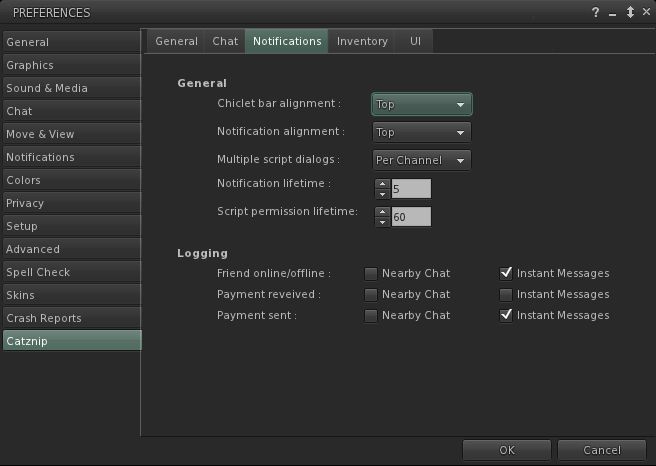
  • The ability to have the chiclet bar and / or notifications displayed at the top or bottom right of the screen
  • Whether item properties open in a separate floater or the inventory panel
  • The ability to set display lifetimes (seconds) for script permissions and notification
Catznip new custom UI options

Elsewhere Catznip sports the new translation options in PREFERENCES->CHAT (no surprises there) and gains the new snapshot floater that includes the option to upload snaps directly to your web profile feed.

Performance

On my PC, pretty much in line with the most recent V3 release and the likes of Dolphin 3.2. Frame rates on a sim with 5 other avatars hovered in the mid-teens, dropping sharply to single figures with shadows enabled. I have encountered a few problems in terms of settings not persisting between relogs (graphics would default back to HIGH and 128m Draw distance, while the Destination Guide insists it is open on my screen with each log-in). Other preferences (spell check language, button changes, etc), all persisted without incident.

Opinion

Yet another great Viewer from Kitty, with some very nice touches – did you know for example, that you can teleport directly from a landmark contained in a notecard in Catznip? Just open the notecard and right-click on the LM. Touches like this make Catznip fun to use (although I don’t use it nearly enough to discover all of them), and the move to the FUI, coupled with both popular TPV options (such as radar and Kitty’s own spell check) and the enhancements described here (as well as a number of bug fixes), continue to ensure Catznip presents a viable and well-considered alternative to the official viewer.

Links

Phoenix / Firestorm Q&A

I’ve been asked to pass on the following – and while only too happy to do so, I’m closing the item to comments as it is important anyone who has questions and who can’t attend the event, post their question to the official Phoenix Firestorm blog.

The Phoenix / Firestorm team are holding a public Q&A session this coming Saturday to answer questions and concerns relating to both the Phoenix and Firestorm Viewers.

The meeting will take place at 13:00 SLT at the 4-region auditorium at Rockcliffe University and will be hosted by Nigma Sterling of Rockcliffe University.

Those wishing to attend are advised to arrive early, and using the following SLurls according to the first initial of your FIRST name:

A – I:http://maps.secondlife.com/secondlife/Rockcliffe%20I/2/32/29
J – R:http://maps.secondlife.com/secondlife/Rockcliffe%20Library/227/5/30
S – Z:http://maps.secondlife.com/secondlife/Agile%203D/227/250/31

The event will be recorded and made available online after the fact (no live streaming planned at this point).

Note that the focus of the event is to discuss genuine concerns relating to either Viewer and their future development, and to answer questions and address specific critiques.

You can read the entire post from Jessica here.

Dolphin 3.2 gains the FUI – and more

dolphin-logoThis is turning in to the week I catch up on Viewers!

Lance Corrimal has released Dolphin 3.2 (3.2.0.22166), which sees his Viewer move to the new Flexible User Interface (FUI), and gain a few choice goodies as well.

Installation

Installation was smooth with the Windows installer, although it was interesting to see the a copy progress pop-up appear as files were extracted and copied to my install directory.

FUI and Updates

At first glance after installation, this would appear to be a simple adoption of the FUI with various other TPV updates. But if you think that – best look again. There may not be mesh upload in this release, but there’s more going on than meets the eye here.

Like Niran’s Viewer, Dolphin 3.2 tweaks the FUI a little – only rather than providing an area at the top of the screen where buttons can be added, Lance has incorporated additional buttons into the Button Toolbar:

  • AO ON/OFF and AO SETUP – for quick access to the Viewer’s animation override functions
  • AREA SEARCH – accesses the Area Search for Objects floater (WORLD->AREA SEARCH or CTRL-SHIFT-A)
  • ENVIRONMENT, provides quick access to the Environment Settings panel floater, otherwise accessed by WORLD->ENVIRONMENT EDITOR->ENVIRONMENT SETTINGS.
New button options in Dolphin 3.2

Note that by default, all four buttons are active when you launch Dolphin 3.2 from a fresh installation (all on the left side of the Viewer window), I’ve shown them in the toolbar floater out of convenience.

Providing buttons for the Viewer-side AO makes perfect sense, as does including Area Search (something not everyone is aware exists in  and keyboard shortcut notwithstanding) and quick access to environment settings, which itself is an option people twiddle with a lot.

Dolphin 3.2 also gets the new snapshots floater, complete with the option to upload to your web profile feed. According to Lance’s notes, he’s also working on porting the option to upload snapshots to Flickr to the new floater, but will probably be a while before it appears in the Viewer.

This release also gains

  • The ability to turn your avatar around when walking backwards, again a popular viewer-side feature among TPVs
  • Firestorm’s texture refresh, which forces a re-fetch of the textures for an avatar or object which remains stubbornly grey on your screen (right-click & select from the context menu)
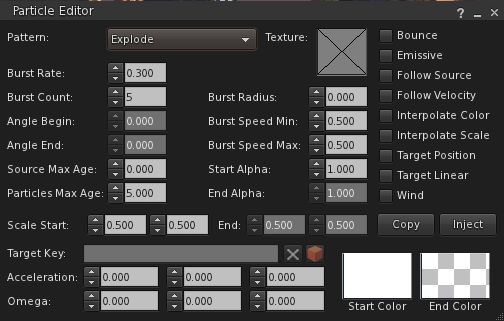
  • Firestorm’s object particle editor, which may yet be the subject of a separate blog post here
  • The latest RLV updates from Marine Kelley
  • The STORM-1713 fix, which corrects the issue of the mouse pointer flickering over UI elements that has been seen in V3.x.

Performance

Overall, performance on my system is comparable to the official SL V3.2 averaging in the mid-20s when I’m in a sim on my own, and dropping to around the mid-teens when sharing a sim with 5-6 others. All comfortable enough. With shadows enabled, this falls to an average of 6-8 fps, again pretty much in line with official V3 performance on my PC.

Opinion

Frankly, another robust Viewer from Lance that again builds on V3 to present a nice, tidy alternative with a good crop of additional features and options. The fact that it doesn’t have mesh upload shouldn’t be any hindrance to most – mesh rendering in the Viewer is fine. And one cannot blame Lance for wanting more time to consider what is the best fit for his Viewer when it comes to incorporating an uploader, rather than rushing to add the first that comes along.

If you’re looking for something that offers the V3.2 FUI, together with a good, solid selection of popular items from TPVs – radar, area search, Viewer-side AO, together with Lance’s own mods to the Viewer (including these excellent 3.2 FUI tweaks), then Dolphin 3.2.0.22166 is very much worth a look.

Related Links