The planned RC deployment scheduled for Wednesday, May 27th was rolled back as a result of a back-end issue. This currently leaves grid as a whole on the same server release.
Commenting on the roll-back at the Server Beta User Group (SBUG) meeting on Thursday, May 28th, Simon Linden said, “there was a minor issue but it was worth reverting; some internal tools weren’t running right and sending postcards was broken. [However] that code will likely be back next week, [as] I’ve already fixed the bug.”
These issues aren’t related to the region restart issues / caps failure people have noticed with some regions following a rolling restart, and as reported in my week 21/2 report, and which Simon indicates have yet to be looked into in-depth.
SL Viewer
Thursday, May 28th saw the Avatar Layer Limits viewer, version 3.7.29.301305, updated to the de facto release viewer. This viewer removed the limit of only being able to wear a maximum of 5 items per clothing layer (e.g. a maximum of 5 jackets and 5 shirts and 5 pants, etc), with a global limit of 60 layers which can be worn in any combination (e.g. you can wear 58 jacket layers, a tattoo layer and a pants layer if you wish).
This leaves two RCs in the release channel at present: the Avatar Attachment fixes RC (aka Project Big Bird and currently version 3.7.29.301943), and the Experience Keys viewer (currently version 3.8.0.300963, and which is awaiting the completion of back-end updates to the Experience Keys services). Both of these viewers will be updated to match the new release viewer, and it is anticipated that they will be joined by a new Snowstorm RC viewer in the near future (see below), which is currently awaiting some fixes prior to release.
General
Project news coming out of the Lab is a little light at the moment. This shouldn’t be taken to mean there isn’t a lot happening with Second Life. There are several projects that are in the pipeline – Viewer-Managed Marketplace and Experience Keys (/ Tools) being two that people are aware of.
The Lab don’t talk too much ahead of time as to what is going on, but it’s clear to see from Simon’s back-end work around avatar counts in regions, that there are various things which are being looked at. Again, we only recently had it confirmed that the Lab have, as a part of continuing work on improving the CDN services, shifted to another provider – and they are looking to move the delivery of more asset types to the CDN in the coming months.
In the meantime, we can expect to see more RC viewers appearing – notably the next Snowstorm RC viewer with Avatar Complexity, and which should include STORM-2082, the ability to save and load graphics settings to assist with viewer performance, depending on the environment you’re in.
Jonathan Yap is working on the ability to various graphics settings in the official viewer, allowing users to quickly change between saved settings depending on their performance needs – this should be appearing in an upcoming Snowstorm contributions viewer (note the finished panel may not resemble the one shown left, above)
Update, May 28th: a back-end issue with the RC deployment has meant that all three RC channels have been rolled-back to the their previous release, leaving the grid as a whole on the same server release.
A change logic on accessing group member lists for large groups
Internal server logging changes.
SL Viewer
Due to Monday being Memorial Day in the United States, the Lab was closed for normal office business, and there was no meeting to discuss potential RC viewer promotions. However, the most recent update to the Attachment Fixes RC viewer (Project Big Bird, currently version 3.7.29.301943) is showing a must reduced crash rate compared to the previous release (and which prevented it from being promoted to the de facto release viewer).
The crash rate is still slightly high than for the current release viewer, but speaking at the Simulator User Group meeting on Tuesday, May 26th, Oz Linden described it as “probably not a statistically significant difference”. Whether this means the viewer will be promoted to release status later in the week or not, remains to be seen.
Increasing the Number of Avatars Per Region
Simon Linden: looking at ways an means to make it easier for the simulator and a viewer to better handle large numbers of avatars
“There’s one change that I will follow up on … I added a way so I can adjust the ‘max avatars in a region’ setting. I’d like to do an experiment soon and see what falls apart if we can get over 100 people into a region,” Simon Linden said at the simulator UG when discussing the upcoming RC deployment.
“This is purely experimental and there are no plans for changing the SL limits,” he went on. “But sometimes regions hit 100 [and] it would be nice if the viewer and simulator handled that better.”
There is already an additional means en route to the viewer by which users can have greater control over how avatars around them in a region are rendered by the viewer, Avatar Complexity, when will draw avatars above a rendering limit set by the user as a solid colour (the so-called “Jelly Baby” avatars). The will work alongside the existing Avatar Imposters capability already in the viewer.
However, in terms of his experiment, Simon suggested that one way to improve things might be for the viewer to simply not draw everyone within a region; although how this would work, and the criteria used to determine what avatars are drawn and which aren’t, does require careful consideration. Simon suggested the viewer might simply skip drawing those avatars that are furthest away once a threshold number of avatars in the region has been reached. Another (suggest by a meeting attendee) would be for the control to be via the Max Number of Avatars settings within the viewer – so that once exceeded, avatars are again simply not rendered.
As noted, Simon’s work is purely experimental, and primarily aimed at helping the Lab understand what might be done to improve things where there are large gatherings of avatars, and to perhaps try out one or two ideas based on what they learn.
Simon’s Rendering Tricks
As a part of the discussion on avatar rendering, Simon handed out a note card of tips and trick for improving your performance when dealing with complex avatars. While this includes the debugs which will form a part of the new Avatar Complexity functionality, which will be appearing in a a Snowstorm RC viewer soon, as well as suggestions which may already be known, I’m including his suggestions in full here for reference:
From Advanced > Show Debug Settings, set:
RenderAutoHideSurfaceAreaLimit 0
RenderAutoMuteByteLimit 0
RenderAutoMuteFunctions 7
RenderAutoMuteLogging False
RenderAutoMuteRenderWeightLimit 350000
RenderAutoMuteSurfaceAreaLimit 150
In preferences / graphics, change “Max # of non-imposter avatars” to something like 8. Also try ctrl-alt-shift-4 to hide avatars, or ctrl-alt-shift-2 for alphas.
Note the two debugs shown in green are those related directly to Avatar Complexity and drawing avatars as “Jelly Babies”. Note that RenderAutoMuteFunctions must be set to 7 in order for this to work. Also note that the RenderAutoMuteRenderWeightLimit of 350,000 is purely an advisory starting point. The Lab estimate that this will reduce the very top 3% of very rendering-intensive avatars as solid colours. You may find you have to set the value somewhat lower in certain environments – such as night clubs and dance venues – in order for it to be effective. I’ve personally found that 150-200K tends to be required in very busy ballrooms, etc.
On Tuesday, May 19th the Main (SLS) channel received the server maintenance package previously deployed to the three RC channel, comprising Internal server logging changes, back-end system bug fixes and a change to Reply-To e-mail addressing on snapshots. There were no RC deployments on Wednesday, May 20th.
SL Viewer
The Attachments Viewer RC (Project Big Bird) was updated to version 3.7.29.301943 on Thursday May 21st. As noted in part 1 of this week’s report, the initial RC release of this viewer had an elevated crash rate compared to the current release viewer, including a crash-on-exit bug, so this release will hopefully address those issues.
Group Chat
A fix for issues around BUG-9130, where some people were unable to see any posts in some or all of there group chats, including their own posts, while everyone else in the same group could see their posts, has started to be deployed across the chat servers, and should be completed on Friday, May 22nd.
“The chat servers got stuck with bad info about where the sender was, so the messages never reached them,” Simon Linden said at the Server Beta User Group meeting on Thursday, May 21st, reiterating an explanation given at a recent Simulator UG meeting. “And unfortunately it wouldn’t fix with relogging or even a chat server restart.”
“Loading…” Issue with Names in Group Chats
This is a viewer-side problem which causes avatar names to appear as “Loading” under certain circumstances in group chat (see BUG-3829 and STORM-2114). A contribution by Ansariel Hiller is currently with the Lab and is expected to be released as a part of the next Snowstorm contributions viewer, which is expected to appear soon.
Other Items
Region Restart Glitch
There has been something of a rise in reports of regions experiencing issues following recent following restarts – most noticeably caps failures. This is something the Lab is looking into, and Simon commented, “we have a suspicion that after rolls, as that server host starts up regions, it’s doing enough of them at about the same time that things get overloaded. It’s still a theory but makes some sense why we’d get cap failures like that.”
On Tuesday, May 19th the Main (SLS) channel received the server maintenance package previously deployed to the three RC channel, comprising:
Internal server logging changes
Back-end system bug fixes
Reply-To email changed in postcard sends
As previously noted in these pages, the “reply-to email changed in postcard sends” relates to changing the way snapshots forwards to e-mail are handled. Until now, the Lab has substituted the user’s e-mail address in the “from” field of snapshots sent to e-mail, rather than displaying the “secondlife.com” address.
However, this added to issues of e-mail originating from “secondlife.com” being treated as spam by a/v software and ISPs. With the new format employed with this change, the sender’s e-mail address is given as the “reply to” address in the snapshot, and the “from” is “no-reply@secondlife.com”, thus avoiding the issue of LL looking like spammers who are forging invalid addresses.
There will be no RC deployment on Wednesday, May 20th.
SL Viewer
The week has not so far seen an RC viewer promoted to release status. If there is any promotion, it would most likely be the Layer Limits RC (currently version 3.7.29.301305). The Experience Tools RC viewer is still awaiting the completion of back-end work, while the Attachment Fixes RC (Project big Bird) currently has an elevated crash rate compared to the current release viewer, which includes a crash-on-exit bug, so further work is required on that RC.
CDN Provider Move
The Lab has been moving between CDN providers, and as a result, some people may have been experiencing particular texture / mesh / avatar rendering delays of late. Commenting on the process at the Simulator User Group meeting on Tuesday, May 19th, Oz Linden said:
We’ve just finished moving from one CDN provider to another, and it may take the caches a little while to catch up. We tried to do it gradually in a way that would be minimally disruptive, but when you’re dealing with as much data as we are, there are no perfect solutions.
One of the cases it is hoped the move will assist is with SL users in Florida (and neighbouring states) in the US who use Mediacom as their ISP, and who have found that there have been what appear to have been issues with Mediacom throttling the service at certain times of the day. Preliminary feedback from users so affected who have been involved in testing with the new CDN provider has been positive.
What Goes Through the CDN, And How
During the CDN conversation Oz reinterated the data that is currently delivered to the viewer through the CDN: textures, world map tiles, avatar baking data, and mesh data. In terms of in-world objects, two distinct operations are taking place:
Where an object is, how big it is, and so on, comes to the viewer via the simulator, together with the UUIDs fr the relevant objects / textures
The viewer then uses the UUIDs to fetch the mesh and texture data directly from the CDN.
As previously noted on these pages, this should mean faster loading of things like textures and mesh in-world, as the data is coming from a CDN node that is “local” relative to you, rather than coming to you from the Lab and through the simulator itself. However, experience is showing that for a small number of people, this isn’t always the case, and there can be situations where mesh and texture loading aren’t what might be expected. However, the Lab continues to try to improve things.
Second Life Network Architecture
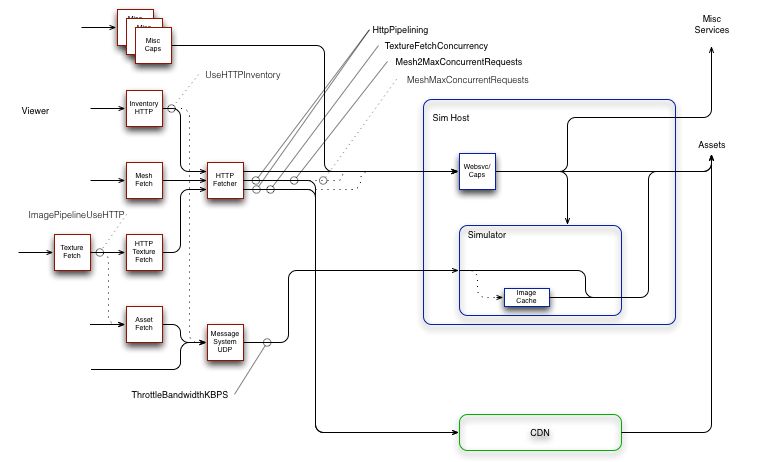
Writing on the forums, noted SL photographer Jackson Redstar recently asked meshmaxconcurrentrequests – does anybody know the real setting? In the ensuing debate, Monty Linden offered an updated overview of the SL network architecture.
Monty Linden’s updated SL network diagram
To borrow from Monty’s explanation:
On the left, in red, are pieces of the viewer; on the right, in blue are simhost/simulators and other backend services; at the bottom (green) are new CDN services
Solid lines with arrowheads are communication paths, either UDP or TCP/HTTP; dashed lines are legacy communication paths that are now or soon will be deprecated, obsoleted and/or deleted
Sold ball-and-stick indicators (e.g. TextureFetchConcurrency) indicate a viewer debug setting and the communication path or paths that setting influences; dashed ball-and-stick indicators (e.g. MeshMaxConcurrentRequests) indicate obsolete debug settings.
Monty goes on to say:
Generally, things are moving in the direction of simplification and less resource conflict. The mesh and texture HTTP traffic, which is usually the greatest load, tends to part ways with the UDP traffic a few network hops after a user’s router or modem. Lacking TCP’s throttling mechanism, UDP often wins in a fight (give-or-take the efforts of fairness algorithms along the path). Allowing UDP to overrun the path between viewer and simulator does still degrade the experience and the bandwidth setting remains an effective tool for avoiding this problem.
Other settings should generally be left alone. A lot of bad advice was spread around in the community in an effort to work around throughput problems. We’re trying to undo that history and get back on track with more typical (albeit aggressive) HTTP patterns.
Viewer Caching
During the Simulator UG meeting, Oz repeated a call he originally made at a TPV Developer meeting recently, asking that if there is developer wishing to volunteer for a “deep dive” into viewer caching, he’d like to hear from them.
While interest list updates made key changes to how the viewer’s cache is used, there are numerous issues which appear to be viewer-side caching related, so a deep investigation into the code could go further towards improving things.
One long-standing issue, which is thought to be caching related, is If someone uses a texture rezzed in-world same texture for a group profile image or their avatar profile image or in a profile pick, the object will never fully load the texture.
So, if you’re a developer willing to looking into viewer-side caching, Oz would like to hear from you.
There was no main (SLS) channel deployment on Tuesday, May 11th. On Wednesday, May 12th, the three RC channels were all updated with a new server maintenance package, comprising:
Internal server logging changes
Back-end system bug fixes
Reply-To email changed in postcard sends
As noted in my TPV Developer meeting report for week #17, snapshots are sent via the “secondlife.com” domain, but use the sender’s own e-mail address as the originating address in the “from” field. This, and other ways ways in which e-mails flowing out from “secondlife.com” are handled has resulted in some ISPs regarding the domain as a spam domain, and have been pro-actively blocking it.
The “reply-to email changed in postcard sends” refer to a change made to how the “from” field in snapshots sent to e-mail (which the Lab refers to as “postcards”) is addressed in an attempt to alleviate the problem.
At the time this issue was raised at the TPV Developer meeting, it was indicated that the Lab was considering removing the the snapshot to e-mail capability server-side. However, as was indicated in the meeting, doing so would break a number of wardrobe HUD systems which are popular among users. Whether or not this fix is an attempt to address the spam issue without having to remove the snapshot or e-mail functionality is currently unclear.
SL Viewer
Attachments Viewer (Project Big Bird)
The attachments viewer was promoted to release candidate status with version 3.7.29.301361, release on Wednesday, May 13th. This viewer provides a series of fixes for attachment-related issues, particularly when multiple attachments are added or removed at the same time. It also has enhanced logging, so the SecondLife.log file will have some additional lines related to avatar state in general and attachments in particular.
Linux
As noted in a separate report, the Lab have now blogged about seeking assistance from open source developers in the continued development and maintenance of the Linux flavour of the viewer.
Outfit Folder Changes
A recent change to viewer functionality means that it is no longer possible to drag and drop sub-folders of items into the My Outfits / Outfits folder – see BUG 9209 (FIRE-15603). This change, which is in the official release viewer, is filtering out into various TPVs, and has been causing some consternation.
While it is still possible to create sub-folders within My Outfits / Outfits and drag and drop items into them, many people have tended to simply unpack new clothing items into a default folder and drag that folder (or the Direct Delivery folder for the clothing) into My Outfits / Outfits, and then sort the contents into suitable outfits from there. Others have used the Appearance floater to create outfits, save them, and then drop them into My Outfit / Outfits – which also is no longer possible.
It’s unclear precisely what problems can occur in allowing drag-and-drop in My Outfits, although it appears drag-and-drop into My Oufits was never intended to be allowed. The change itself was made by Vir Linden, shoe has most recently been working on a range of improvements to try to reduce issues of inventory loss; he is now involved in the JIRA discussion, seeking to understand use cases relating to dragging-and-dropping folders into My Outfits.
“agent_limit”- get the maximum number of avatars normally allowed on the region (teleport home, and login to last location, are allowed to exceed this).
“estate_name”- returns the name of the estate (e,g, “mainland”, “Linden Homes”, “My Happy Estate”, etc. )
“region_cpu_ratio”- returns the number of regions per CPU for this region type (i.e. “1” or “4”)
“region_product_name” – returns the type of region this is: “Estate / Full Region”, “Mainland / Homestead”, “Estate / Openspace”, “Estate / Full Region – Skill Gaming” etc.
“region_product_sku” – returns the region’s product number as a string
“region_start_time” – returns the time the region was last (re)started, in llGetUnixTime format
“simulator_hostname” – returns the simhost running this region. Same as llGetSimulatorHostname but without the script delay.
There were no planned RC deployments or restarts for Wednesday, May 6th.
Group Chat Failures
There are been a number of odd group chat issues recently, such as those outlined in see BUG-9130. Simon Linden has been investigating the issues, and gave his findings at the Simulator User Group meeting on Tuesday, May 5th, “Basically the chat server gets stuck with bad info about where the avatar is. The normal ways that would get corrected aren’t working right … but trying to log off and back in, or leave and re-join the group might fix it.”
When asked if a re-start of the affected chat servers could clear the problem, he replied, “possibly … except one of the features of the chat servers is that they try to save everything and re-load it when they come back up. That way everyone isn’t kicked out of all their group chats when it restarts. I’d have to check but I think they may save the bad info about [the affect avatar]. ”
Group chat messages are routed to you via the region you are in at the time the message is sent. However, if you have moved to another region during the conversation, the region will tell the group chat service you are no longer there, and the service then performs a look-up to locate you so that the messages can again be sent to you via the region simulator. “In this case, Simon explained the current issue, “it’s failing with a different error due to a change in the grid configuration, and not handling it correctly.”
With the cause of the issue now identified, the Lab hopes to get an update out to the chat servers to fix the problem very soon.
Attachment Failures
As has been noted in these updates, the Lab currently has a series of viewer-side fixes for problems relating to attachment issues (items detaching on region crossing / teleporting, items showing as attached when detached or vice versa, etc.) which are at project viewer status (“Project Big Bird”) and will be progress through the viewer channels in due course.
In addition to the viewer fixes, there are are some server-side issues with attachments the Lab is investigating. In particular, the Lab has identified that requests for multiple simultaneous attachments at or near the upper limit (38) to be attached at the same time will invariably overload the pipe, although why this is the case still has yet to be determined.
Experience Keys / Tools
Work continues with the back-end of Experience Keys / Tools, and Simon Linden has most recently been working on the key values database for the system (which can be used to store information relating to users who have been / are engaged in an experience, such as their progress, items they may have collected / attached, etc.). Given the anticipated popularity of Experiences, and the fact that people have already identified other potential uses for the key value database, the Lab is trying to ensure it is robust enough to handle and and all uses it might be put to – and can deal with the potential of poorly-written scripts persistently polling / updating it more than is strictly required without necessarily impacting its performance.
Other Items
Agent Updates, Draw Distance and SL Performance
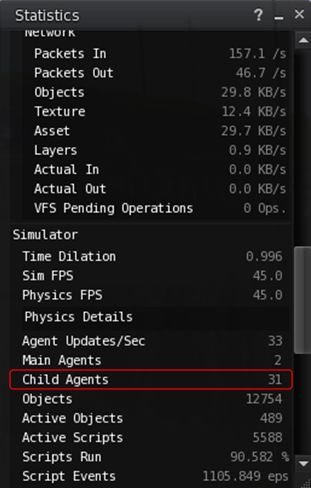
In discussing the group chat issues during the Simulator User Group meeting, the conversation turned to the matter of agents and child agents. While the region you are operating in has the main connection to your avatar (your agent), it may also be sending information to avatars on other regions, and you may also be receiving updates from surrounding regions.
The status panel (CTRL-SHIFT-1) reveals how many child updates the region you are in is sending elsewhere (31 in this case). some of these might be unavoidable, others might simply be down to people 3 or 4 regions away with ridiculously high draw distances
Simon explained things thus, “while you’re here, you’re also talking to the region next door; it will send you updates about what happens over there … it has a camera for you and knows what you can see, and sends you updates but it doesn’t run your scripts, for example.”
This tracking of what is going on in other regions is determined by an avatar’s draw distance and the direction in which they are looking, and the “camera” Simon referred to in his description is known as a “child agent”.
Child agents help with a number of tasks – the such as allowing you to see what is going on in a neighbouring region, as Simon mentioned, and also assisting with aspects of region crossings.
Obviously, there will be child agent updates going on between neighbouring regions as a matter of course. But when you have an abnormally high draw distance, the chances are that you are having an additional impact not only on the regions immediately adjacent to the one your in, but every region that falls within draw distance / view, as you are forcing them to send you updates as well, and you are forcing the region you are in to work that much harder to pass those updates to you.
Hence why it’s a good idea to keep your draw distance down to a reasonable level (say 256 metres or lower) for as much as you can. You’re not only helping improve your own experience (however powerful your own computer might be) – you’re showing courtesy to those active in the regions around you and who might also be affected by the region they are in having to take time serving data you may not need to your viewer.