2022 week #46: CCUG and TPVD meeting summaries

Vue Sur Mer, September 2022 – blog post

The following notes were taken from:

  • My audio recording and chat log of the Content Creation User Group (CCUG) meeting held on Thursday, November 17th, 2022 at 13:00 SLT.
  • My audio recording and chat log from the Third-Party Viewer Developer (TPVD) meeting held on Friday, November 18th, 2022 at 13:00 SLT. Pantera attended the meeting, but was unfortunately held-up beforehand, so around the first 10 minutes is absent from her video (embedded at the end of this summary).

Both meetings are chaired by Vir Linden, and their dates and times can be obtained from the SL Public Calendar.

This is a summary of the key topics discussed in the meeting and is not intended to be a full transcript.

Official Viewers Status

[Video: 0:00-2:00]

Available Viewers

The following reflect the list of current official viewers available through Linden Lab.

  • Release viewer: version 6.6.7.576223 – MFA and TOS hotfix viewer – November 1.
  • Release channel cohorts:
    • Maintenance P (Preferences, Position and Paste) RC viewer version 6.6.8.576431 on Monday, November 14.
    • VS  2022 RC viewer, version 6.6.8.576310, issued November 4 – utilises Visual Studio 2022 in the Windows build tool chain.
  • Project viewers:
    • PBR Materials project viewer, version 7.0.0.576331, issued on November 3.
      • This viewer will only function on the following Aditi (beta grid) regions: Materials1; Materials Adult and Rumpus Room 1 through 4.
    • Puppetry project viewer, version 6.6.3.575529,  issued on October 12.
    • Performance Floater / Auto-FPS project viewer, version 6.6.5.575378, October 4.
    • Love Me Render (LMR) 6 graphics improvements project viewer 6.6.2.573263, July 21.

General Viewer Notes

  • There is unlikely to be any major changes to the list above in week #47, as this is a short working week for the Lab due to the Thanksgiving holiday (Thursday / Friday).

Github Changeover and Streamlining the Code Contributions Process

Github Work

As previously announced, there is an initiative to improve continuous update integration in the viewer and improve the viewer deployment process.

  • For TPVs and developers, the most visible aspect of this is moving the viewer repositories from BitBucket to Github. This includes the viewer code base and the other public code bases currently in BitBucket (Autobuild, LLCA, etc.).
  • There is still no firm date as to when the actual switch-over to using the new repositories will occur, but the viewer development team is working steadily towards it, and the plan remains to provide plenty of advanced warning to TPVs on when LL plan to cut over to the new repositories before making a clean cut-over.

Status

  • The switch-over to using Github is now slated for “early in the morning” (PST / SLT) on Monday, November 21st, 2022.
  • This means that from the point of switch-over, the Bitbucket repositories will be locked and carry a warning that they are no longer current, and developers / viewer builders should use the GitHub repositories, as directed to in the warning.
  • The master viewer branch is already up-to-date on GitHub as of Friday, November 18th, 2022.
  • Notes on the switch-over were posted to developers on the open-source developers list.
  • There is no plan in place to phase out the Bitbucket repositories immediately, but they may well be removed in time.

PBR: Materials and Reflections

Project Summary

  • To provide support for PBR materials using the core glTF 2.0 specification Section 3.9 and using mikkTSpace tangents, including the ability to have PBR Materials assets which can be applied to surfaces and also traded / sold.
  • To provide support for reflection probes and cubemap reflections.
  • The overall goal is to provide as much support for the glTF 2.0 specification as possible.

Status

  • Please also see previous CCUG meeting summaries for further background on this project.
  • The  viewer is available as a project viewer via the Alternate Viewers page, but will only work on the following regions on Aditi (the Beta grid):  Materials1; Materials Adult and Rumpus Room 1 through 4.
  • The focus is currently on reviewing bugs reported by those testing the viewer, and creators using glTF PBR workflows to create content are encouraged to test out their content on the project viewer to ensure things look as expected when imported into SL.
  • One aspect of SL that does require testing is EEP assets; changes have had to be made to the shaders which mean that commercial EEP settings may not render as expected (things like haze density my  be modified, etc).
    • EEP creators may therefore want to test their settings using the project viewer, and Jira issues – please include “non PBR viewer” shots of how the settings should look and shots taken with the PBR project viewer for easier comparison / understanding of the issues seen.
  • Issues with alpha blending are being investigated – particularly linear space alpha blending and how best to carry forward “pre-PBR” alpha blending, which does not use linear space.
  • It has been reported that the PBR project viewer generating some 10% more CPU temperature and 17% more GPU temperature – this may be the result of the viewer having to work that much harder with PBR in order to maintain frame rates.
  • Reflection probes: concern was again raised over people excessively using probes (e.g. attaching them to all their products / objects they own).
    • Providing a means for users to disable probes attached to objects they purchase has been previously discussed within the project / CCUG meetings.
    • It is hoped the latter (people just randomly setting-up probes all over their house / land) can be mitigated against through a mix of education and explicit warnings / actions in the viewer.
    • Concern was also raised about the potential of localised reflection probes (essentially an invisible prim) could interfere with intended interactions (e.g. a probe enclosing a chair could block people’s ability to sit on the chair). If cases like this are found in testing, a request has been made for bug reports.
    • The PBR viewer does include a Build / Edit option to “ignore invisible prims” so that when building / editing, an attempt to select an object within the volume of a reflection probe prim will ensure the object is selected, not the probe prim, but it is acknowledged that this kind of operation needs to be better integrated with other mouse click options.
  • (TPV Meeting video)
    • It was noted that this project also marks the start of the deprecation (and eventual removal) of some real-time console performance reports, such as Fast Timers.
    • It has been reported that some testing the PBR viewer are finding that within the texture console, Bias is constantly being reported at 5 (which tends to cause texture thrashing in non-PBR viewers). However, within the PBR viewer  a Bias of 5 should indicate that the viewer is swapping – and keeping to – a lower texture resolution, and so should not result in any texture thrashing.

Screen Space Reflections (SSR)

  • LL does have a “subtle” SSR system working to replace Linden water reflections as currently rendered.
  • There is some further work to be carried out before it is “viewer-ready”, with the focus being on ironing out the bumps and cleaning-up bugs.
  • It was made clear that while this implementation of SSR will be applicable to scenes as a whole, it is not intended to be a replacement for creating mirrors – and so expectations should be set accordingly.

CCUG Meeting Specific Notes

The majority of the meeting was given over to a general discussion, per the cliff-notes below:

  • VR hardware and Second Life:
    • While frame rates are not so much an issue now in broad terms, there is still the need to get a high frame rate on a consistent basis for VR viewing to be enjoyable – and this is still not a giving with SL.
    • However, VR isn’t just about headsets; its about the “full” experience in using a range of associated peripherals: controllers, haptic gloves, the ability to have a “full-body experience” that VR users would want and expect, such as seeing your hand and arm when going to pick something up, being able to grip an object in your hands and feel responses from it when using it (e.g. the strike of a blade against another or a baseball sat against the ball, etc.).
    • The level of support for this more complete sense of immersiveness requires some extensive re-engineering of Second Life (e.g. facilitating a full and proper Inverse Kinematics system  as a single example).
    • The Puppetry project may facilitate some work towards this. However, the focus of this project is not on providing any form of in-depth VR support (it is intended to work with a broader range of peripherals, notably webcams, although use of some VR software support via OpenVR is being considered), being intended for use by as broad a cross-section of SL users as might be interested in it.
    • Another problem is determining what people want from VR; is it purely a mechanism for games, or does it need to be capable of “realistic” social interactions (some do still proclaim games, other demand social capabilities; the truth is probably more a blending of the two, just like life in the physical realm).
  • New users and their experience:
    • Much was made of the need for a completely new avatar system (LL is actually working on a new all-mesh “starter avatar”, but using the existing skeleton) – but overhauling / replacing the current avatar system raises its own compatibility / market issues.
    • A fair point was raised by LL concerning the use of eviction / ban scripts that specifically ban avatars that are less than X days old and / or avatars that do not have Payment Information On File.
      • These tend to get used at event spaces etc., to try to prevent griefers / trolls using throwaway accounts from accessing the space, rather than using other available moderation tools (which, admittedly tend to require human intervention with the right permissions, which might not always be available).
      • The problem here is that often, a “genuine” new user will often sign-up, go through the new user experience, then try to go to a event – only to immediately find they are denied entry or are ejected without warning or explanation, and as a result, they log-out.
      • The need for improved tools to handle griefing and trolling are likely required – but no discussion on what form these might take.
  • Audio: a general conversation on the potential of “full” spatial audio, including directional (e.g. so an audio stream at a disco appears to be coming from the speaker system in the venue) and also sound volumes.
    • Nothing is currently planned for audio in the roadmap, but it was noted that the first test of using volumes (reflection probes) is in Aditi testing, and LL will obviously seeing how well that works.
  • It  was made clear that scripts will “NEVER” be allowed to create new assets (so no ability to generate notecards from a script). One of the reasons cited for this is the cost of storing assets if there is an uncontrolled ability to generate them through scripts (particularly given SL’s asset count is already in the petabytes range in terms of storage).

TPVD Meeting Specific Notes

Atlassian Jira and Bug Reporting

  • Atlassian has announced it will be restructuring how it licenses the Jira bug reporting product from 2024 onwards. Currently, LL can run a public-facing Jira reporting system that effectively allows every Second Life user to create an account on it to view all the public SL bug reports and feature requests.
  • Under the 2024 pricing restructure (which will be pretty much per-account), this will be prohibitively expensive for LL, so they are starting into the process of looking for an alternative means to provide some form of user-facing bug reporting mechanism.
    • one option being considered is to continue to use Jira internally (where the number of licensed accounts can be controlled), and use a different mechanism for public bug reporting, with a bridge between the two.
    • Another is to move away from Jira entirely.
  • No decision has been made as yet, but as Firestorm also use Jira, the suggestion has been made that the two develop a joint plan to resolve the situation in terms of future tools.
  • The topic lead to a general discussion on possible options, but no conclusions drawn – and there is sufficient lead-time on the matter for various options to be looked into, allowing for the time required to transition to any alternate that might be selected / finding the means to keep the wealth of information on the SL Jira available for reference.

General Notes

  • There is a report that Active Voice on at least some viewers is not updating correctly (e.g. following a teleport, and it is proving easier to enable  / disable Voice morphing vie the menu than to disconnect / reconnect Voice in order to correct.
    • The issue here is not so much which is the preferred method to correct the problem, but whether the Active Voice list failing to update is a widespread issue with viewers, and whether it can be reproduced on the official viewer & a bug report raised.
  • Beq Janus has written a post on alpha blending issues (see: Alpha blend issues? Get them sorted – subtitled Making it easier to avoid alpha-clashes with Second Life and OpenSim outfits). Rather than have me  decimate the discussion, please refer to the video fat 35:56 through video end for more.

Next Meetings

  • CCUG: Thursday, December 1st, 2022.
  • TPVD: Friday, December 23rd, 2022.

2022 SUG meetings week #46 summary

Mousehole, September 2022 – blog post

The following notes were taken from the Tuesday, November 15th, 2022 Simulator User Group (SUG) meeting. They form a summary of the items discussed and is not intended to be a full transcript. A video of the entire meeting is embedded at the end of the article for those wishing to review the meeting in full – my thanks to Pantera for recording it.

Server Deployments

At the time of writing, a server deployment thread had yet to be published.

  • On Tuesday, November 15th, the Main SLS and Events channels were updated with simulator version 576376, making the new Linkset Data capability grid-wide.
  • On Wednesday, November 16th, the simhosts on the RC channels should receive a new simulator update, this one containing a single fix designed to keep regions from running out of voice connections (BUG-229984 “Voice chat is not working” and BUG-7371 “Voice cannot connect”).

Linkset Data (LSD) – Brief Notes

  • Linkset Data is a new collection of script functions and one optional event that reads and writes key-value-pairs to a small 64kb table of data that is part of a root object.
  • It works similarly to Experience Key-Value store, but:
    • It does not require an underpinning experience – the data lives with the object that sends and receives the data.
    • Only scripts in the same linkset will be able to read the data written with this feature.
  • Further information on LSD can be found in Linkset Data (LSD) – a new feature for Second Life by NeoBokrug Elytis  in this blog.

Upcoming Simulator Releases

The run of simulator updates through to the new year will likely comprise:

  • Link sounds will most likely the last roll of the year (this should behave exactly as though you had a script in the linked prim and called llPlaySound from that prim).
  • llGetSimStats updates are liable to be the first update of 2023.
  • llHTTPRequest updates (see below) will likely follow later in January 2023.
  • LSDFindKeys sorting updates will most likely be fixed in the first simulator maintenance release for next year.

Available Official Viewers

  • The Maintenance P (Preferences, Position and Paste) RC viewer updated to version 6.6.8.576431 on Monday, November 14th.

All other official viewer remain as follows:

  • Release viewer: version 6.6.7.576223 – MFA and TOS hotfix viewer – November 1.
  • Release channel cohorts:
    • VS  2022 RC viewer, version 6.6.8.576310, issued November 4 – utilises Visual Studio 2022 in the Windows build tool chain.
  • Project viewers:
    • PBR Materials project viewer, version 7.0.0.576331, issued on November 3.
      • This viewer will only function on the following Aditi (beta grid) regions: Materials1; Materials Adult and Rumpus Room 1 through 4.
      • There are unconfirmed reports that GPUs are running noticeably hotter with this viewer than other viewer.
    • Puppetry project viewer, version 6.6.3.575529,  issued on October 12.
    • Performance Floater / Auto-FPS project viewer, version 6.6.5.575378, October 4.
    • Love Me Render (LMR) 6 graphics improvements project viewer 6.6.2.573263, July 21.

llHTTPRequest Updates

Rider Linden is proposing changing the way we do accounting for CUSTOM_HEADERS.

  • Currently, headers of no longer than 253 bytes each are allowed.
  • Rider plans on changing this so that as many headers, each as long as is required, can be stored, to a maximum of 4096 bytes.
  • This is in recognition that there are a number of applications that require security headers which can blow through that 256 byte limit.

In Brief

  • BUG-232037 “Avatar Online / Offline Status Not Correctly Updating” – this is unlikely to be addressed until 2023, as the remaining simulator update slots for 2022 now have updates assigned to them.
  • BUG-232918 “Adding Friend will make all other friends appear offline”  – this is newly reported bug, and should be kept in mind if experiencing issues with your Friends list.
  • BUG-227303 “collisions makes a script stop running and revert its mono status” opened in 2019, was raised, but has yet to be deeply investigated by LL.
  • The meeting included  a further discussion on LSDListKeys and LSDFindKeys (e.g. negative index support). Please refer to the video below for this and the rest of the meeting.


2022 viewer release summaries week #45

Logos representative only and should not be seen as an endorsement / preference / recommendation

Updates from the week through to Sunday, November 13th, 2022

This summary is generally published every Monday, and is a list of SL viewer / client releases (official and TPV) made during the previous week. When reading it, please note:

  • It is based on my Current Viewer Releases Page, a list of all Second Life viewers and clients that are in popular use (and of which I am aware), and which are recognised as adhering to the TPV Policy. This page includes comprehensive links to download pages, blog notes, release notes, etc., as well as links to any / all reviews of specific viewers / clients made within this blog.
  • By its nature, this summary presented here will always be in arrears, please refer to the Current Viewer Release Page for more up-to-date information.
  • Note that for purposes of length, TPV test viewers, preview / beta viewers / nightly builds are generally not recorded in these summaries.

Official LL Viewers

  • Release viewer: version 6.6.7.576223 – MFA and TOS hotfix viewer – November 1 – No change.
  • Release channel cohorts::
    • No updates.
  • Project viewers:
    • No updates.

LL Viewer Resources

Third-party Viewers

V6-style

  • No updates.

V1-style

Mobile / Other Clients

  • No updates.

Additional TPV Resources

Related Links

2022 Puppetry project week #45 summary

Puppetry demonstration via Linden Lab – see below.  Demos video with the LL comment “We have some basic things working with a webcam and Second Life but there’s more to do before it’s as animated as we want.”

The following notes have been taken from chat logs and audio recording of the Thursday, November 10th Puppetry Project meetings held at the Castelet Puppetry Theatre on Aditi. These meetings are generally held on alternate weeks to the Content Creation User Group (CCUG), on same day / time (Thursdays at 13:00 SLT).

Notes in these summaries are not intended to be a full transcript of every meeting, but to highlight project progress / major topics of discussion.

Project Summary

  • Previously referred to as “avatar expressiveness”, Puppetry is intended to provide a means by which avatars can mimic physical world actions by their owners (e.g. head, hand, arm movements) through tools such as a webcam and using technologies like inverse kinematics (IK) and the  LLSD Event API Plug-in (LEAP) system.
    • Note that facial expressions and finger movements are not currently enabled.
    • Most movement is in the 2D plain (e.g., hand movements from side-to-side but not forward / back), due to limitations with things like depth of field tracking through a webcam, which has yet to be addressed.
  • The back-end support for the capability is only available on Aditi (the Beta grid) and within the following regions: Bunraku, Marionette, and Castelet.
  • Puppetry requires the use of a dedicated viewer, the Project Puppetry viewer, available through the official Second Life Alternate Viewers page.
  • No other special needs beyond the project viewer are required to “see” Puppetry animations. However, to use the capability to animate your own avatar and broadcast the results, requires additional work – refer to the links below.
  • There is now a Puppetry Discord channel – those wishing to join it should contact members of LL’s puppetry team, e.g. Aura Linden, Simon Linden, Rider Linden, Leviathan Linden (not a full list of names at this time – my apologies to those involved whom I have missed).

Bugs, Feature Requests and Code Submissions

  • For those experimenting with Puppetry, Jiras (bug reports / fixes or feature requests) should be filed with “[Puppetry]” at the start of the Jira title.
  • There is also a public facing Kanban board with public issues – those experiencing issues can also contact Wulf Linden.
  • Those wishing to submit code (plug-ins or other) or who wish to offer a specific feature that might be used with Puppetry should:

Further Information

Meeting Notes

Viewer and Plug-in Updates

  • The puppetry team is working on updating the viewer and LEAP plug-in, and an update to the project viewer is liable to be released in week #46.
  • This viewer includes:
    • The ability to move the avatar pelvis.
    • Ability to stretch other bones – although this is awaiting testing at the time of writing. However, the reference frame scale is that of the normal puppetry targets, so you would have to scale the data correctly; therefore additional work on this is required to provide a way for the plug-in to get the data necessary to know now to scale individual joint bones (e.g. change their parent-relative positions).
  • It still won’t be possible to clear puppetry target/config data, which remains on the teams “to do” list.
  • Aura Linden noted the new LEAP module it initialises on-demand rather than via instantiation (as with puppetry). LL will provide demos of using the new module.

Kincect v2 Support

  • Simon Linden has been working on an experimental plug-in taking inputs from a Kincect v2 device.
  • He describes the the code as being “pretty rough”  and using only basic geometry, but it allows avatar elbows / arms to be moved around.
  • This work in part utilises the data syntax described in OPEN-366 “Simplify Puppetry Configuration Through LEAP”, the new protocol proposed by Leviathan Linden as per previous meeting notes.
  • The code is not ready to be pushed to a public branch as let, and doing so is somewhat dependent on feedback from developers /creators.

Avatar Constraints / Interactions

  • OPEN-368 “[Puppetry] [LEAP]: Location Constraints” – LL have indicated there is “much” within this Jira they would like to support “eventually”.
  • The feeling at the Lab is that constraints can “definitely” be improved  – although what this may look like has yet to be properly determined. However, the general feeling is that there should be constraint data associated with a given skeleton, for example, so we’re not just imposing a human-centric model on the SL avatar.
  • A  good portion of the meeting was given over to a general discussion of how best to handle puppetry and avatar animations – and the potential to need to move away from canned animations and provide a more direct means of avatar animation.
  • Avatar-object interactions are potentially complex issue (e.g. how can an avatar accurately take and hold an in-world object – say an apple) through puppetry? If the apple is a physical object, does it collide when held? Does it become an attachment? If  the latter, how is this registered, together with hold is it properly released from the attachment system? etc.).
    • A suggestion for handling avatar’s handling objects is to have some for of temp-attach system or to use a key frame motion (KFM) system to match the position to the avatar’s hand, allowing the avatar can hold the object without directly “owning” it (thus also avoiding permission system issues).
  • Collisions also raise questions: avatar arms currently do not collide, and so would not under puppetry. So what about cases of simple interactions – flicking a light switch or similar. These are not “proper” collisions per se, but are rather event-triggered; how can this be managed if there is no actual collision between the scripted object and an avatar’s arm / hand to trigger the associated event?

In Brief

  • It has been suggested that a version number is included in puppetry-related messaging, so that changes to message formats are not read by versions of the viewer unable to do so, thus reducing the risk of crashes during development / testing.
  • It has been indicated that puppetry will eventually have LSL support for LEAP. Although what form this will take and how the simulator will track things is  still TBD, as currently animations are entirely viewer-side and untracked by the simulator.
  • There is concern that understanding of the potential of the puppetry project isn’t being fully understood by creators (and others) as it is being seen more as a “VR thing” than an ability to much improve avatar animations and their supporting systems / constraints, including the IK system.
  • How to manage network latency also formed a core discussion, together with making better use of the Havok physics sub-licence to allow the viewer do a lot more of the work, and simply stream the results through the simulator to other viewers.

Date of Next Meeting

  • Thursday, December 8th, 2022, 13:00 SLT.

Genesis: birth of a new v1.x styled viewer for Second Life

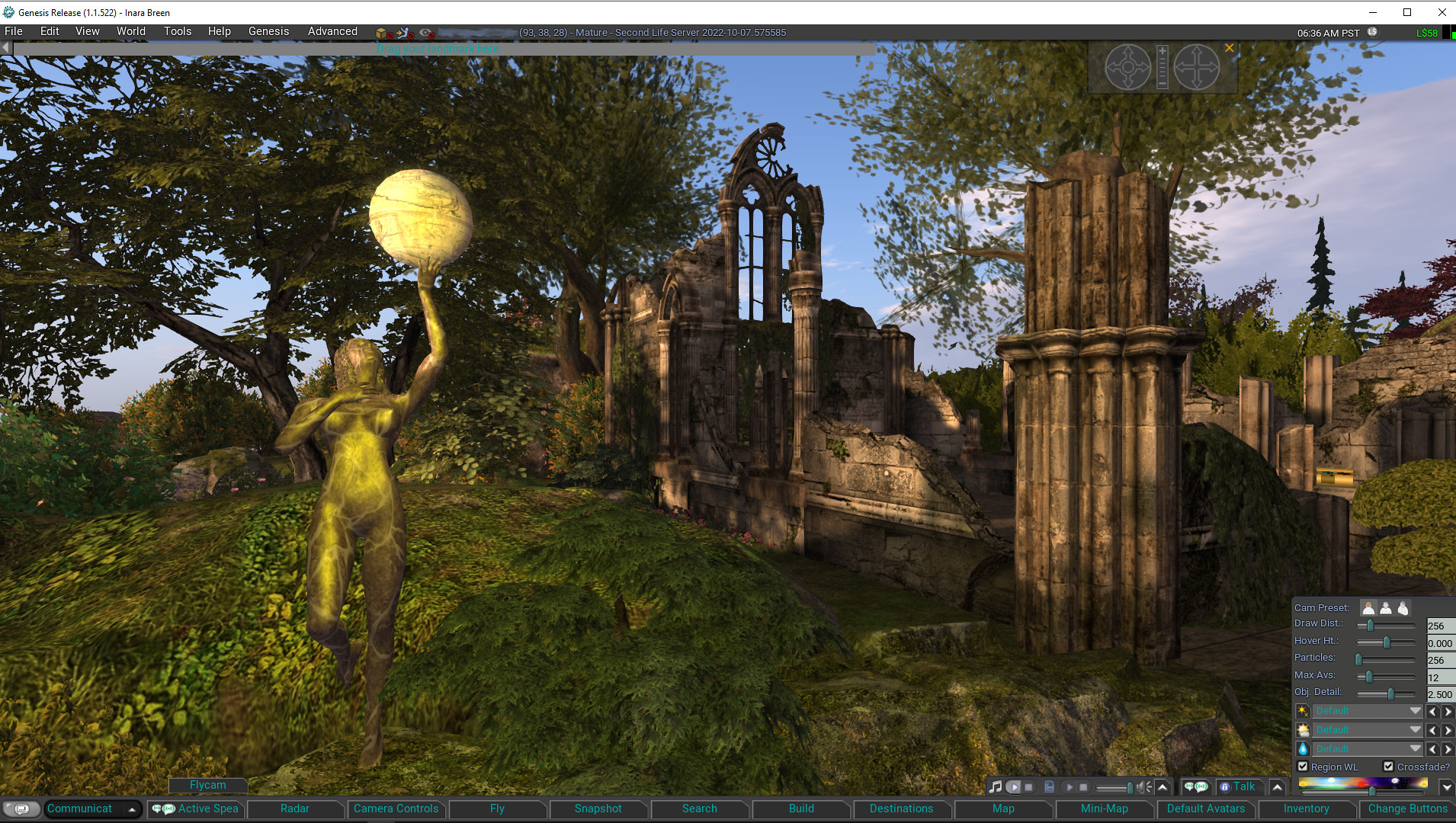
Genesis is the name for a new v1.x UI styled viewer, officially released on November 5th, 2022 (although nightly builds have been available for some time via the Genesis website). It is primarily by MelanieCosti and Torric Rodas, supported by a group of QA and nightly build testers.

At the time of writing, the release version is 1.1.522, and accompanying the release is a set of video resources available via the Genesis Viewer You Tube Channel (see below) to help people gain some insight into the viewer and also to learn how to use some of the features incorporated into it – notably those obtained using code provided by other TPVs.

The following is not intended to to be a full review of the Genesis viewer 1.1.522 release, but rather to provide a general overview of the viewer (particularly from the perspective of those more familiar with the v6.x UI style of viewers, which include the likes of the official viewer, firestorm, Kokua, etc.) and the supporting material; although some important exclusions from the current release are also noted.

Genesis Viewer splash screen

What is the Genesis Viewer?

The Genesis viewer is:

  • Based on a fork of the Singularity viewer, with a lot of under-the-hood reworking, together with a host of capabilities adopted from other TPVs as well. To quote from the Genesis website, it is:
A fast, responsive, low memory footprint viewer designed with laptop users in mind.
We inherited some very old code and settings, better suited to computers over a decade ago and have brought the code and settings up to date. A low-spec computer manufactured in the past ten years, should be able to run Genesis and enjoy improved performance.
  • Officially available for Windows only.
    • However, it should run on Linux Ubuntu/Mint, and a video guide is available for those wishing to try – see below for more.
  • Supported by a combination of release notes and change log notes on the Genesis website (click the tabs at the top of the page to switch between the two).
  • Self-certified for listing on the Third-Party Viewer directory and in accordance with the Third Party Viewer Policy.
  • Utilises the “v1.x UI style”.

What is the “v1.x UI Style”?

For those unfamiliar with it, the “1.x UI style” is a reference to Genesis being among a small group of viewer that utilise a general UI layout that reflects the original official viewer for Second Life, generally referred to as the 1.x (or sometimes the 1.2x) viewer.

The reason for this is that when first released, what is now the “v6.x” UI (and which started life as “Viewer 2.0”) had some significant design flaws that made it less-than-popular during the early days of its use (circa 2010-11). While these issues were largely addressed over time, there was also a certain amount of subjective resistance to change among some users that was sufficient to warrant some TPV developers to produce viewers  which largely retained the front-end look and feel of the old “viewer 1” those users preferred.

The most notable differences when comparing the v1.x UI style found within Cool VL Viewer and Genesis (as the two currently-maintained v1.x UI style viewers with a release cycle) can be found within the menus (titles and options) and the toolbar and its button / options.

As the menu systems found on v6.x UI style viewers also tend to vary in naming and options from one viewer to the next, and the use of the toolbar buttons is perhaps the most visual difference in UI presentation between the two flavours of viewer, I will only expend time on the latter.

Genesis Viewer showing the default set of toolbar options and the expanded Settings (aka “quick preferences” in other viewers) panel, accessed via the ∧ at the extreme right of upper row of toolbar options. Note hat local chat can be displayed on this upper row as well by clicking on the chat balloon button at the far left end of the toolbar (local chat is also displayed within the Communicate floater as per v6.x style UI viewers

In short, the V1.x UI toolbar:

  • Is fixed at the bottom of the viewer window – there is no support for placing buttons to the sides or top of the window, according to personal preference.
  • Comprises two rows:
    • An upper row used to display the local chat bar (also displayed in the Communicate floater), and media playback options, Voice chat options, and the Settings (aka “quick preferences” in other viewers) panel.
    • A lower row of fixed buttons.
  • This lower row of buttons can be customised to a degree using either clicking Change Buttons (displayed by default at the right-hand end of the button row) or via View → Change Toolbar Buttons in the menu.
    • Both of the above will display a list of available toolbar buttons. Toggle the check marks to the left of each to add / remove the associated button to / from the toolbar.
    • Note that:
      • Buttons will be automatically resized to fit the available space (fewer buttons = larger button sizes and vice-versa).
      • There is no ability to change the order of the buttons by dragging them left or right, as with v6.x UI style buttons.
      • There is no ability to switch the button displays between text or text / icon or icon only, again as per v6.x UI style toolbar buttons.
Genesis toolbar options – check those to be displayed in the toolbar button area at the foot of the viewer window, uncheck those you do not wish to see displayed

The Change Buttons floater does include a lot of options – far more than is the case with most other viewers, and it would appear a number have been included for those who are particularly keen on viewer performance – useful if you are running on older hardware / a poorer connection and find you need to tweak things. It  would perhaps be nice to see the button options ordered alphabetically for easier scanning of the floater, but that’s a personal observation.

Functionality

There can be a mistaken view that “v1.x UI” means “outdated”. However, this is not accurate. Yes, by comparison to the v6.x UI, viewers using the older style UI can appear to be harkening back to a bygone era of UI design (which is not to  say the v6 UI is anything close to leading edge!), but it is what is under the hood that is  important in terms of overall functionality – and as the Cool VL viewer has shown, there is  absolutely no reason why viewers presenting the “older” style of UI cannot maintain parity with the underpinning viewer code base.

Given this, the Genesis viewer is building towards supporting all of the capabilities offered directly by Linden Lab as the “core” viewer  code base, and also folds into to the more popular options offered by TPVs (some of which came by way of Singularity, which had also incorporated them). Thus, Genesis includes popular feature to be found in other TPVs such as (but not limited to):

  • “Legacy” style search
  • Area Search.
  • Client-side AO.
  • Contact sets (via the Communicate floater).
  • Right-click an inventory folder and select Open in New Window to open it in a separate Inventory floater.
  • Radar.
  • RLV/RLVa support.
  • Support for both the Pie Menu and right-click context menus.

The Genesis viewer also includes some nice touches of its own, including (but again not limited to):

  • Automatic complexity display: hover the mouse  over an avatar and their complexity will be displayed under their name and Group tag.
  • Communications – Genesis Group button: need help with Genesis? Click the button top right of the Local Chat tab labelled Genesis Group to ask for assistance.
  • Teleport improvements: work has been put into addressing teleport issues, including About Land not updating and physical region crossings which leave the avatar walking without control until the viewer disconnects.

A lot of effort has apparently gone into general code clean-up and refactoring in order to provide a more responsive viewer. While I have not had the time or the means to objectively test this, in the time I subjectively tested and used the viewer of the weekend, I will say that I found Genesis to be at least as performant as any v6/x viewer I routinely use.

Exclusions with Version 1.1.522

That said, there are some important exclusions with this initial release. These will be dealt with in future Genesis releases (the decision having been one of ship with what is currently implemented, they build from there, rather than constantly playing a game of catch-up with more recent LL releases). For now the more notable exclusions comprise:

  • No support for:
    • Multi-Factor Authentication.
    • 360-degree snapshots
  • Limited EEP functionality:
    • No ability to run EEP day/night cycles.
    • No ability to create new EEP environments.
  • No ability to:
    • Open profile floater from mute list.
    • Sort log-in names on log-in page.
    • Make favourite bar movable.
    • Pop-Outa person’s Profile from search.
    • Set transaction thresholds.

Genesis on You Tube

For those wishing to try Genesis – either a new-to-SL-users or those wishing to swap away from the v6.x style of viewer, the Genesis You Tube channel provides a range of tutorial and overview videos, including (but not limited to):

– Network Bandwidth is set to Adaptive by default.  This makes your connection to SL the best it can be.  It checks for packet loss and ratchets down during times of trouble then upward again.  You can override this setting should you wish:  Prefs > Network and set your own limits.  You should, from time to time check for “packet loss” as the viewer will relinquish monitoring, when adaptive was disabled. (Stats:  Ctrl+Shift+1).

Feedback

Which style of viewer UI a person prefers tends to be something of a “Marmite choice”, one version is either loved or hated; I admit I much prefer the v6.x UI style, and so Genesis is unlikely to sit on my “preferred” list of viewers. Which is not to say I dislike it or have any issues with it in terms of functionality. Variety, as they say, is the spice of life, and it’s good to see another maintained viewer utilising the V1.x style UI become available for those who do prefer that UI styling, and it’ll be good to see the various holes in the current functionality for Genesis viewer get plugged in upcoming releases and seeing it continue forward.

Given my personal preferences in viewer use, I cannot promise to offer reviews of every Genesis release, but I will obviously track them via my Current Viewer Releases page and weekly Viewer Release Summaries.

Related Links

2022 SUG meetings week #45 summary

Cap Thunderbird, September 2022 – blog post

The following notes were taken from the Tuesday, November 8th, 2022 Simulator User Group (SUG) meeting. They form a summary of the items discussed and is not intended to be a full transcript. A video of the entire meeting is embedded at the end of the article for those wishing to review the meeting in full – my thanks to Pantera for recording it.

Server Deployments

At the time of writing, a server deployment thread had yet to be published.

  • On Tuesday, November 8th, the Main SLS and Events channels were restarted without any simulator update being deployed leaving them on simulator version 575585.
  • On Wednesday, November 9th, simhosts on the RC channels will again updated with simulator release comprising the new Linkset Data capability (see below for more).
    • Whilst originally deployed on Wednesday, November 2nd, 2022, this release had to be rolled by on Friday, November 4th, 2022. See BUG-232866 “Each parcel is using the Region’s environment instead of the Parcel’s environment settings”.

Available Official Viewers

No changes to the current set of official viewers at the start o the week, leaving the list as:

  • Release viewer: version 6.6.7.576223 – MFA and TOS hotfix viewer – November 1.
  • Release channel cohorts (please see my notes on manually installing RC viewer versions if you wish to install any release candidate(s) yourself).
    • VS  2022 RC viewer, version 6.6.8.576310, issued November 4 – utilises Visual Studio 2022 in the Windows build tool chain
    • Maintenance P (Preferences, Position and Paste) RC viewer version  6.6.8.576321, November 3.
  • Project viewers:
    • PBR Materials project viewer, version 7.0.0.576331, issued on November 3.
      • This viewer will only function on the following Aditi (beta grid) regions: Materials1; Materials Adult and Rumpus Room 1 through 4.
      • There are unconfirmed reports that GPUs are running noticeably hotter with this viewer than other viewer.
    • Puppetry project viewer, version 6.6.3.575529,  issued on October 12.
    • Performance Floater / Auto-FPS project viewer, version 6.6.5.575378, October 4.
    • Love Me Render (LMR) 6 graphics improvements project viewer 6.6.2.573263, July 21.

Linkset Data (LSD)

  • Linkset Data is a new collection of script functions and one optional event that reads and writes key-value-pairs to a small 64kb table of data that is part of a root object.
  • It works similarly to Experience Key-Value store, but:
    • It does not require an underpinning experience – the data lives with the object that sends and receives the data.
    • Only scripts in the same linkset will be able to read the data written with this feature.
  • Important Note for the initial deployment:
    • Like all scripts containing new LSL functions, scripts running LinksetData calls will only run on regions running version 2022-10-27.576126 or newer (so only the RC channels to start with).
    • However unlike some other functions if you move an object containing Linkset Data (or teleport wearing an object containing Linkset Data) from a region that supports the capability to a region that does not support it, all Linkset Data stored with the object will be lost, even if you go back to a region that supports the feature.
    • This limitation will no longer exist once the back-end support for the capability has been deployed to all regions on the Main grid.
  • Further information on LSD can be found in Linkset Data (LSD) – a new feature for Second Life by NeoBokrug Elytis  in this blog.

In Brief

  • BUG-232037 “Avatar Online / Offline Status Not Correctly Updating” – this is unlikely to be addressed until 2023, as the remaining simulator update slots for 2022 now have updates assigned to them.
  • LL believe that they may have a fix for the Group chat issue of open Group chats appearing to freeze in their viewer tab, requiring the chat be closed and re-opened. The fix is being tested on Aditi.
  • The meeting revolved around a discussion on LSDFindKeys and sorting – please refer to the video for details.
  • llGetSimStats is getting “new fangs” (essentially everything from the Statistics floater is being added). The update is to be deployed in the New Year. Further information available in the meeting video.
  • Extended chat ranges within regions: this is described as “still in the works”. Apparently, there have been concerns about privacy on the viewer side which mean that, until addressed, extended chat range will remain a Linden only function.