This is a summary report only, due to the circumstances of the release. A full review on the Firestorm Mesh Beta will be forthcoming, complete with a detailed list of all new features and an overview of fixes.
Following the Phoenix Hour today, the Phoenix Firestorm team have released a BETA version of Firestorm with mesh object rendering support.
The release is not to be regarded as a full release – more work is required.
Furthermore, the team has specifically requested anyone wishing to download the release to read the accompanying notesbefore downloading and trying the Viewer as there are some critical issues.
There is also a list of known bugs that Firestorm has inherited from Linden Lab. These are already known about and the team request people do not raise further JIRAs on them again, please read the list before reporting bugs.
Other points to note:
nVidia 400-series and above graphics cards may be prone to immediate crashing on running the Viewer if Basic Shaders are enabled. This again is a bug inherited from Linden Lab, and users of 400-series and above nVidia cards are asked not to enable Basic Shaders
The release should clear settings and cache as a part of the installation. If you wish to preserve chat and IM logs, and set them to the default locations, make sure you move them elsewhere first
Should settings / cache not be automatically cleared, people should go to PREFERENCES -> NETWORK & CACHE and use the button there to clear settings and cache and then relog
This release does not include the spell check option – this will be added in the final release; all effort has gone into responding to user demands to provide a version of Firestorm that can render mesh objects
Mesh uploads are not in this release – the code needs further work.
Jessica (r) and Phaylen at today’s show
The following feature are included in the release (not definitive):
Yesterday I mentioned Radegast 2.0 (.1130) had been released and that it has, among other things, the 3D scene renderer (now called the Scene Viewer), the ability to support avatar physics and the capability to render mesh objects.
Well, it does – and it does so exceptionally well.
Installation is as per previous versions – unsurprisingly – and when you start the application, you’re greeted with the familiar splash screen, albeit it with the login data fields nicely resized and moved to the right. The discerning user will also note that 3D Scene has been added to the menu / tab bar – a hint of what is to come.
Once logged-in, you’re presented with the chat display, which retains the same overall layout as earlier versions, but with a somewhat sharper look, with resized movement controls and extended chat bar.
Preferences Options
The File menus now includes a PREFERENCES option which, when clicked, opens the Settings floater.
Radegast Preferences
This allows you a set a range of familiar preferences within Radegast, including the popular RLV Support (this is described as “partial” support in the documentation, of which more anon) and the use of MU* style emotes (so “:” can be used in place of “/me” when typing an emote), together with the ability to turn-off the typing animation. Unlike the SL Viewer, there is no requirement to re-start Radegast after checking / unchecking certain items (such as, again, RLV).
Preferences also gives you access to two other tabs: Auto Response and Graphics Settings. Auto Response operates in a similar manner to the Auto Response function found in popular TPV Viewers such as Firestorm and Phoenix, allowing you to send a customised message to people who IM you. You can set the response to be sent automatically under one of three conditions:
When you set BUSY from the World menu
When anyone not on your Friends list IMs you
Whenever anyone IMs you.
The Graphics Settings obviously apply to the 3D Scene Viewer. Here you can set a number of graphics defaults that are common to most TPVs, and adjust your draw distance to a maximum of 176 metres. There is also an option to turn-on water reflections, but this will only be accessible when the 3D Scene Viewer is running.
Graphics settings
All options selected in Preferences are applied automatically (unless a restart is explicitly asked for – as with Anti-aliasing in the Graphics Settings), so there is no APPLY button – simply close the Settings floater when done.
An important note to remember if you’re running Radegast over a mobile connection: you might was to keep the draw distance in the Scene Viewer turn down relatively low to reduce the bandwidth you’re using in downloading data & so reduce any charges you may be incurring.
The 3D Scene Viewer
The 3D Viewer itself is now fully embedded into the main Radegast window. When you start it, it simply opens up a new tab.This is a nice touch when compared with the experimental versions, especially as it includes the chat bar as well, a very practical addition over some of the early variants of the renderer.
Radegast scene rendering compared to the SL Viewer (inset) – impressive (click to enlarge)
The rendering is actually bloody impressive, and offers a very good alternative to the full Viewer – but bear in mind that:
This isn’t a full-blown graphical Viewer, so things might take a little time to render, especially in “busy” environments. The results, however are well worth it, as the image above hopefully demonstrates
Running the Scene Viewer significantly increases the use of system resources, and so might not be the best for older systems
There are a few issues, but whether these are tied to the software or your hardware set-up is hard to say. In my case, for example, I found that some prims (such as around the flowerbeds in my garden) simply didn’t rez at all, no matter what draw distance was set or where I stood relative to them. Similarly, not all my sculptie plants were properly rendered and some of the grass of one my lawns was rendered hovering above the surrounding grass and stonework.
However, to suggest this in any way ruined my enjoyment in having my in-world scene rendered, or my inability to interact with it, would be a lie. Certainly, when compared to a Second Life view of the same location, Radegast’s ability to render the scene so well is absolutely clear. I also think the ability to render water reflections is pretty amazing as well (below).
Water reflections
Mesh rendering is equally impressive, as the images below of two familiar vehicles from the Beta grid should demonstrate (top picture captured using the old Mesh Project Viewer, the lower image captured in Radegast 2.0).
Rendering mesh objects: “Full” Viewer (top) and Radegast
Movement in the Scene Viewer has been refined to be smoother than earlier versions, although avatar rendering isn’t entirely perfect. By default, the camera is positioned behind your avatar, a-la the SL Viewer, and you can use the LEFT and RIGHT arrow keys to turn, UP to walk forward and DOWN to walk backwards – all as one would expect. If you are using an AO, the Scene Viewer attempts to render the movement scripted by the AO, although this doesn’t always *quite* work, and occasionally your avatar might develop something of a drunken lean while walking!
Tip: if you opt to reposition the camera at any time, always tap ESCAPE to place it back behind your avatar before you attempt to move again (the camera will not automatically reposition itself should you try to move). Even if you can see your avatar, you should still reposition the camera prior to moving – direction of movement appears to be relative to the camera position, not avatar position, so if your camera is not behind your avatar, it is easy to get confused as your avatar sets off in a totally unexpected direction when you press the UP or DOWN keys!
Camera movement still take a a little getting used to. Movement is carried out through a combination of holding the left mouse button and either the ALT or CTRL keys:
Left-click (and hold) & press ALT to orbit around something when moving the mouse
Left-click (and hold) & press CTRL to pan left / right up/down when moving the mouse.
Camera movement can initially be confusing – using CTRL and the mouse to move to the left will apparently pan the camera to the right, for example. The best way to understand this is to think of all camera movement in terms of dragging the on-screen image. So if you use CTRL + left mouse-click and move the mouse to your right, you are effectively “dragging” the image to the right side of your screen – and the camera position will consequently appear to move to the left as a result. This rule applies to panning up / down (“drag” the image towards the bottom of your screen to pan up, etc.), and also to the use of the ALT key to orbit around something.
Tip: If you find the image going off-centre compared to what you are trying to achieve when panning / orbiting, try pointing the cursor at something you wish to centre-on and ALT-left click to centre the view on it; then try panning / orbiting again.
Additional Viewer Options
For those that prefer the Scene Viewer detached, right-click on the tab name for the Scene Viewer and select Detach. This will float the Scene Viewer in a separate window, complete with a chat bar
Right click anywhere within the Scene Viewer to display an additional menu:
Undock (/Dock): will float the Scene Viewer in its own window or re-dock it as a tab within the main Radegast window
Options: Displays the graphics preferences that can also be accessed through FILE -> PREFERENCES
Debug Panel: opens the Debug options for the Viewer, where you can RESET VIEW and move the camera back behind your avatar (i.e. the same as tapping ESCAPE on your keyboard), and adjust things like the image brightness and contrast using the top two sliders.
Objects in the Scene Viewer respond to touch as they would in the “full” SL Viewer: doors will open, menu-driven objects will display their menu, etc. Right clicking on in-world objects will display a context-sensitive series of additional option to the menu described above. For example, if you right-click on an item you own, you’ll get additional options to take, delete, touch or sit on the object. Right-clicking on an object owned by someone else may give you the options to touch it (if scripted) and / or sit on it.
RLV Support
This is an interesting addition to Radegast. While it is not a full implementation of the RLV API, it nevertheless opens options and possibilities. Among the things it can do:
Deny the ability to remove locked items
automatically accept forced teleports
Act upon forced animations (although not necessarily rendered in the Scene Viewer)
Restrict chat and IM (including forcing chat to whisper, etc.)
The broader restrictions provided by RLV aren’t replicated in Radegast, so things like blocking inventory access, restricting far touch, vision restrictions, etc., are not implemented.
Other Updates
The login screen now stores the details of avatars logged-in to virtual worlds using Radegast, including the actual grid the avatar logged-in to. Simply select the avatar (/grid name) from the drop-down list available from the USERNAME field. The user name, password and grid are all then set
Radegast now supports Viewer 2 avatar Physics Layer – so if you wear a physics layer of clothing, it will render movement correctly in other people full graphical Viewers (the movement won’t be rendered in the Radegast Scene Viewer).
Opinion
Radegast 2.0 offers some nice improvements over the previous releases, and still sits head an shoulders above other “non-graphical” clients in the most common areas of use. If you want a genuinely “light” text-based access to Second Life / OpenSim the likes of Libretto or SLiteChat might be more appealing, but if you are stuck in a situation where you simply cannot run a “full” Viewer and want to have a very flexible means of accessing your preferred VW for more direct interaction with friends and the people around you, Radegast really cannot be beaten.
Elements of the client are still described as “experimental” and as such may well still be prone to crashing. That said, I’ve sent the good portion of a day running the client on both a desktop PC and my Notebook (Intel Atom 330 w/2Gb RAM and nVidia Ion2 graphics processor) without any crashes or major issues (the Notebook did have occasional avatar rendering issues – I was hair and shoes a few times, with nothing between!) and both the PC and the Notebook seemed to have issues rendering the odd prim here and there.
All-in-all a significant and well-implemented update to Radegast which is enjoyable and intuitive (for the most part!) to use. And RLV is a nice option to have – and not just for those of us into D/s scenes *grins*.
Metabolt has recently been through two significant updates – and in doing so, has stolen a march on graphical Viewers. With Phoenix and Firestorm due to get “Contact Sets” for managing Friends lists in the future, Metabolt has the capability to sort and group Friends now.
The 0.9.47 release of 28th August saw a raft of major fixes and the inclusion of new LSL-related Action Commands: Eject from group, Touch, Sit, Stand, Move To (walk, run or fly), Follow, and Send Notice. Additionally, the following enhancements were made:
Metabolt upgraded to the latest version of libopenmetaverse
New neutral colour scheme throughout
LSL API is now activated via the Security tab under Application/Preferences where you need to specify a master avatar and a master object UUID so that commands are only accepted from them. Unchecking the “enforce” option will mean METAbolt will accepts commands from all avatars and objects that pass a valid METAbolt password as it used to be before.
Movement controls issues resolved for better avatar movement
Received Inventory items are auto accepted in 15 minutes of being received if not dealt with within that time limit and information is printed on the chat screen
Deleted inventory items now go into the Trash folder which you will need to empty
Viewer 2 Physics Layer supported (if a physics layer of clothing is worn, movement will render correctly in graphical Viewers).
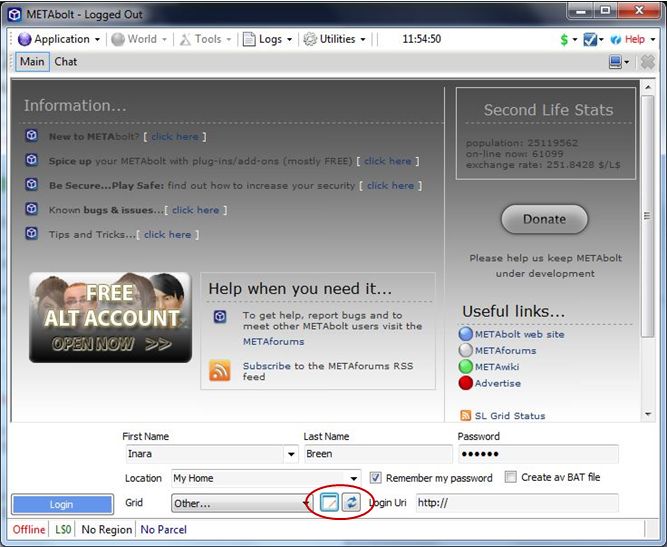
The 0.9.49 release of 3rd September (which obviously includes the 0.9.47 updates) revises the login splash screen to add two new button that are displayed when OTHER is selected from the Grid drop-down list.
New Grid list button (circled)
The first of these will open the grid list in a suitable editor (e.g. Notepad), allowing you to easily add additional grids to the list. The second button will refresh the list to display any new grids you’ve added.
Once logged in to Metabolt, 0.9.49 allows you to organise your friends list into Groups using two new tabs and a new drop-down list.
New Friend Groups options
Creat a Group allows you to create a new group you can categorise your friends by
Friend Groups displays a list of groups you’ve created. Clicking on a group will open a box allowing you to drag-and-drop the names of friends from the main list on the left into the Friend Group.
Currently Displaying under th you main friends list on the left of the window allows you to display all your friends, or select a specific group you have created via a drop-down list.
These are sure to be welcome additions that further enhance Metabolt.
In July, I reviewed Radegast 1.28.872 as part of a series on text clients for Second Life / OpenSim. As a part of that article, I took a quick look at the 3D scene renderer then under development.
Today, Latif Khalifa has announced Radegast 2.0, with the 3D viewer is now released. Not only that, but avatar physics are included and the ability to render mesh objects! Here, in full, is the announcement:
“The Radegast Development Team is proud to announce the immediate availability of Radegast version 2.0.
“This release brings the 3D Scene Viewer that allows users to see the 3d worlds around them. Most of the object rendering features are implemented and functional, including the support for showing regular prims, sculpties and meshes, but one should keep in mind that this is still very experimental and might cause crashes. Known issues include: not entirely correct avatar rendering, no support for glow or flexible prims. If you do encounter problems please do report them in our issue tracker.
“In addition to the Scene Viewer, Radegast 2.0 comes with the support of the new avatar physics wearable type. There is also a crash reporter that will ask you to submit the crash reports should something unexptected happen. We encourage you to submit those reports as they make the future releases of Radegast better.”
I have to say that of all the “text” clients, Radegast is personally my favourite simply because of the scene rendering. so you won’t be surprised to learn I’ve already downloaded the .EXE file and will be trying it out – and reporting back – very shortly.
In the meantime, for those of you who’d like to try it, here are the links:
“My name is Jessica Lyon. My goal during my time with the Emerald Project, was always to give the users what they want. That goal has never and will never change. I’m very happy to announce, it continues…
“A few days ago, I assembled a team of developers to work on a new viewer. Some who were originally Emerald developers, some who were not. All are respected reputable residents in the SecondLife Community. The goal was simple, to provide users with what they want and do it transparently.
“I’m am very proud to announce the launch of the Phoenix Viewer.”
Phoenix was aptly named, rising from the ashes of the Emerald project, to soar gracefully as potentially the more successful and popular of all Second Life third-party Viewers – and all in the space of a few short months.
The Phoenix party with dramatic windlight settings active
To mark the anniversary of that blog post and Phoenix’s birth, Jessica and her team held a party, hosted by Ed Merryman on Wailele Moku sim.
Jessica Lyon
Some 50 people were on the sim for most of the celebrations, which included speeches, music and dancing and general merriment.
Many of the Phoenix development and support teams were present, including Jessica herself, who was out on the dance floor and mingling, and there were opportunities to be had to chat about Phoenix and Firestorm.
It’s been a remarkable twelve months for the Phoenix team. Not only have they met – and exceed the wants and hopes and desires of a huge number of former Emerald users and overcome the angst and concerns that surrounded that particular episode of SL history, they’ve worked equally hard on developing Phoenix’s potential successor, Firestorm, which is already proving to be a huge success even before it has reached the status of a formal release.
So it’s been a remarkable and productive – not to mention successful – year. As a former Phoenix user now committed to Firestorm, I’d like to give my thanks to Jessica and the team for all of their effort over the year and say that I hope this is the first of many such birthday celebrations for both Phoenix and Firestorm in Second Life and in the OpenSim environment.
Just on a month after Jacek Antonelli announced she would be retiring from the Kokua / Imprudence project, the team have announced they have a new project organiser in the shape of ZATZAi Asturias.
ZATZAi, aka Sean Greyhound in SL, has been active in SL since 2005, and among other notable activities, helped organise the in-world elements of SLCC 2007, and his appointment has been warmly received.
Also, this weekend see Imprudence celebrate its third birthday, and the team are marking this with a series of events across a number of grids. In Thursday 1st, they celebrated on their “home” grid, 3rd Rock. Over Friday and Saturday, they’ll be travelling to InWorldz, OSGrid and Second Life, with an open invite for friends and supporters and everyone else to join them in celebrating. Here’s where:
 This is a summary report only, due to the circumstances of the release. A full review on the Firestorm Mesh Beta will be forthcoming, complete with a detailed list of all new features and an overview of fixes.





 Just on a month after Jacek Antonelli announced she would be retiring from the Kokua / Imprudence project, the team have announced they have a new project organiser in the shape of ZATZAi Asturias.