This summary is published every Monday, and is a list of SL viewer / client releases (official and TPV) made during the previous week. When reading it, please note:
It is based on my Current Viewer Releases Page, a list of all Second Life viewers and clients that are in popular use (and of which I am aware), and which are recognised as adhering to the TPV Policy. This page includes comprehensive links to download pages, blog notes, release notes, etc., as well as links to any / all reviews of specific viewers / clients made within this blog
By its nature, this summary presented here will always be in arrears, please refer to the Current Viewer Release Page for more up-to-date information.
Official LL Viewers
Current Release version: 4.1.2.321518, dated November 10, promoted November 15 – formerly the Maintenance RC viewer download page, release notes.
Project Bento RC (avatar skeleton extensions), updated to version 5.0.0.321760 on November 22 – bug fixes (download and release notes)
Project viewers:
360-degree snapshot viewer updated to version 4.1.3.321712 on November 23 – ability to take 360-degree panoramic images – hands-on review – download and release notes.
Cool VL viewer Stable branch updated to version 1.26.18.34 and the Experimental branch updated to version 1.26.19.36, both on November 26th (release notes).
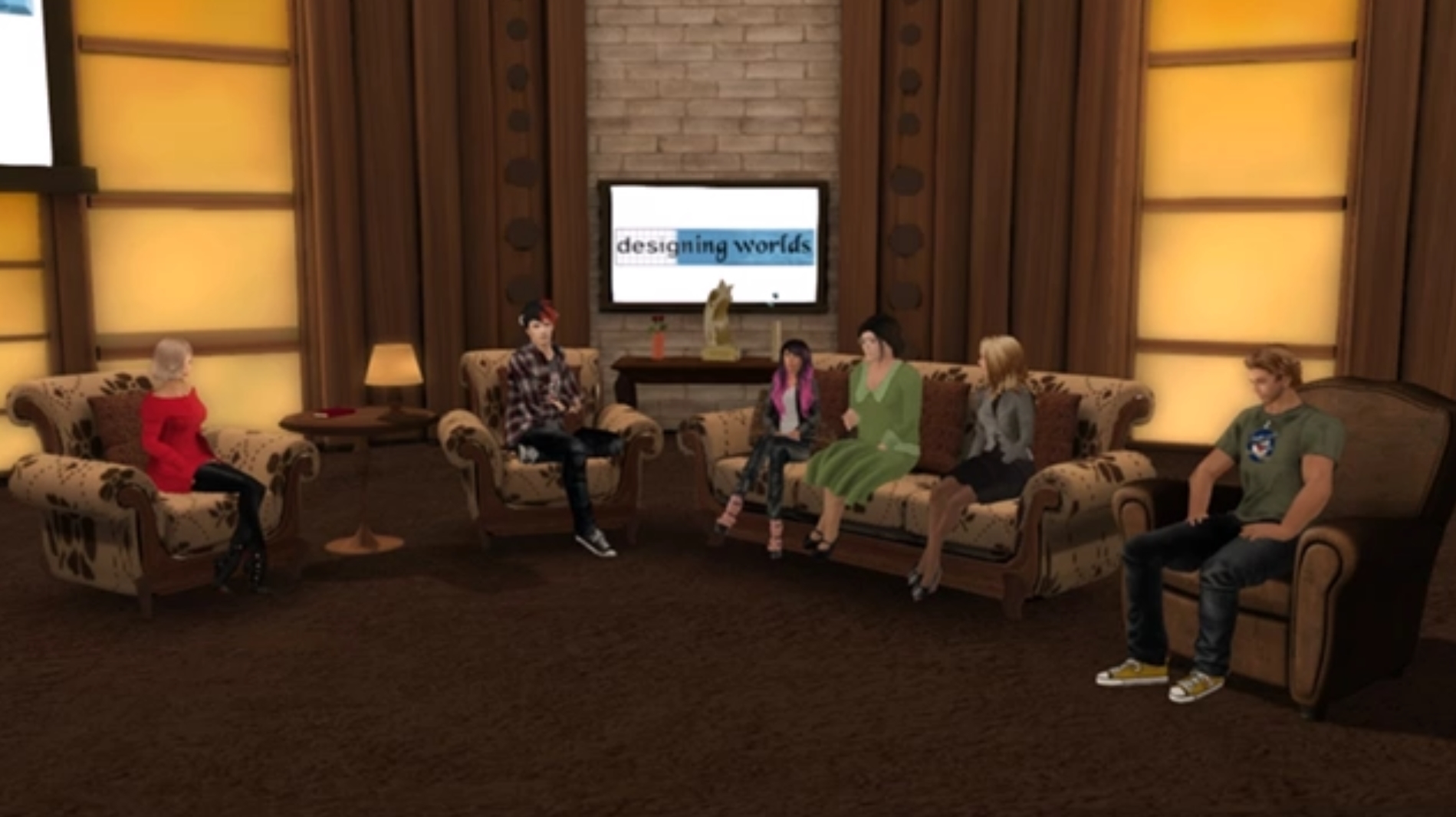
Gentle Heron, second from the right encountered a Radegast Voice installation during the recording of a Designing Worlds special. Credit: Beq Janus
Update, November 30th: Cinder Roxley has updated the Radegast installer to work with the most recent SLVoice package. See her comments here and here (following this article). There is also a separate blog post on her work, for easier future linking.
It was recently discovered that the Radegast client was no longer installing the SLVoice extensions with a new / clean installation. On hearing of the problem, Beq Janus and Whirly Fizzle decided to investigate, and thanks to their work, we now two workaround solutions. As they had put the effort into sorting things out, I asked them if either would like to write about the issue and the solution, and Beq, with Whirly’s blessing, agreed to do so.
by Beq Janus
A few days ago when I was invited to reprise my role as a videographer for a special episode of Designing Worlds on the Future of Second Life, which will air in early December. The panel for the discussion included Gentle Heron of Virtual Ability Inc, the group who work to enable access to virtual worlds for those who, through disability or illness are unable to make ready use of regular viewers.
During the show, Gentle urged Linden Lab and us all to look for ways to make Virtual Worlds more accessible, remarking, somewhat fatefully, that many of her communities are limited to a single, troubled viewer, Radegast.
A subject of reviews in this blog, Radegast is a lightweight, extensible client which has been the ideal foundation for the disabled communities to build upon. It boasts an impressive set of speech to text and text to speech integrations and can be integrated with other devices such as braille screen readers. Sadly, Latif Kalifa, Radegast’s creator, passed away earlier this year and despite the code being open source, no-one has yet stepped forward to maintain it at a time when the Lab viewer is moving ahead in leaps and bounds, with the risk that non-maintained viewers and client might lose functionality.
Radegast client is the leading lightweight client for many virtual world users with disabilities
As if to underline this, Gentle fell silent towards the end of the show, as she was dealing with a number of users who were reporting they were unable to use Voice with Radegast as it was failing to install the all important SLVoice extensions. While I am unfamiliar with Radegast, I offered to try looking into it for Gentle.
SLVoice is a pre-built binary package supplied by Vivox and distributed by Linden Lab. During the summer, it had been upgraded to address some security concerns and so it seemed likely to me that Gentle’s problem might be that the older SLVoice package had been deprecated and removed from the download server. Sure enough, a quick check on the package URL resulted in the dreaded 404 not found error. I sent an email to Oz and Patch Linden asking them to confirm whether older versions of SLVoice had been moved.
The next day Oz confirmed that all old SLVoice packages were still available and nothing had changed. Whirly Fizzle, the powerhouse behind Firestorm QA, leapt into action: she cracked open the installer and discovered the URL actually pointed to a separately hosted Voice package which was no longer available, causing the Voice installation to silently fail during a new or clean Radegast installation as a result. However, Whirly also found a working back-up archive we could perhaps use. Unfortunately, neither Whirly or I are C# coders and cannot update the installation package directly; so how could we get a Radegast installation to work with the back-up Voice package?
I hit on the idea of first installing the backup package that Whirly had discovered, and then running the standard Radegast installer. Success! So, for anyone who is performing a clean / new install of Radegast and needs Voice, I’ve produced a set of instructions – see the link below. There is, however, more.
I mentioned above that Linden Lab had updated the SLVoice packages over the summer to deal with security concerns. Because of this, older versions of SLVoice are to be blocked from connecting to the service, and Radegast would once again be without a Voice option. Knowing this, and never one to leave a job half done, Whirly successfully tested my approach using the most recent SLVoice package available from the Lab, and confirmed it will also work.
This means that providing that there is no internal dependency within Radegast on the legacy Voice package, we now have an upgrade path for Radegast users that will ensure continued voice support after the block on older SLVoice packages comes into force. To help ensure people know what they need to do, Whirly’s instructions can also be found in the link below.
These instructions are only a workaround. We still need to find a way to have Radegast install the correct Voice extensions automatically, as a part of the client install process. So, if you are a C# (C-Sharp) developer and are willing to spare a few hours looking at this, please take a look at the Radegast codebase and see if there is a way to incorporate the correct binaries into an installer package. Thank you.
On Thursday, November 24th, Alina Lynette release Lumiya 3.2, which brings with it support for Google Cardboard and compatible VR kits and headsets!
Even though the Lab has – at least for the foreseeable future – put work on a VR headset compatible version of the viewer off to one side, interest in seeing Second Life from the “inside”, as a fully immersive VR experience remains high, and Alina has sought to rise to the challenge with Lumiya.
There are obviously a couple of caveats to using the application in VR mode:
You really need a suitable headset
You need a device with Andorid 6.0+ Marshmallow installed
I have Android 6, but I don’t have any form of headset, Cardboard or otherwise, that I can use with my device – which happens to be a Nexus 7 2013 HD Tablet – a little clunky for any headset device, although there are some out there. Nevertheless, I gave the new capability a go as best I could.
To enter VR mode on a suitable device, simply log-in to Second Life on Lumiya, and then go to the 3D view (Menu icon, top left > 3D view).
Access the VR mode in Lumiya 3.2 is done via the Action menu, when in the 3D view
Once the view has loaded, tap the Action menu icon (top right) and select Virtual Reality Mode. The first time you do this, you will be prompted whether you want Lumiya to handle speech-to-text conversion for you to allow you to “converse” in-world, via the “microphone” button. You can deny this if you wish, but it will leave you with no means to converse.
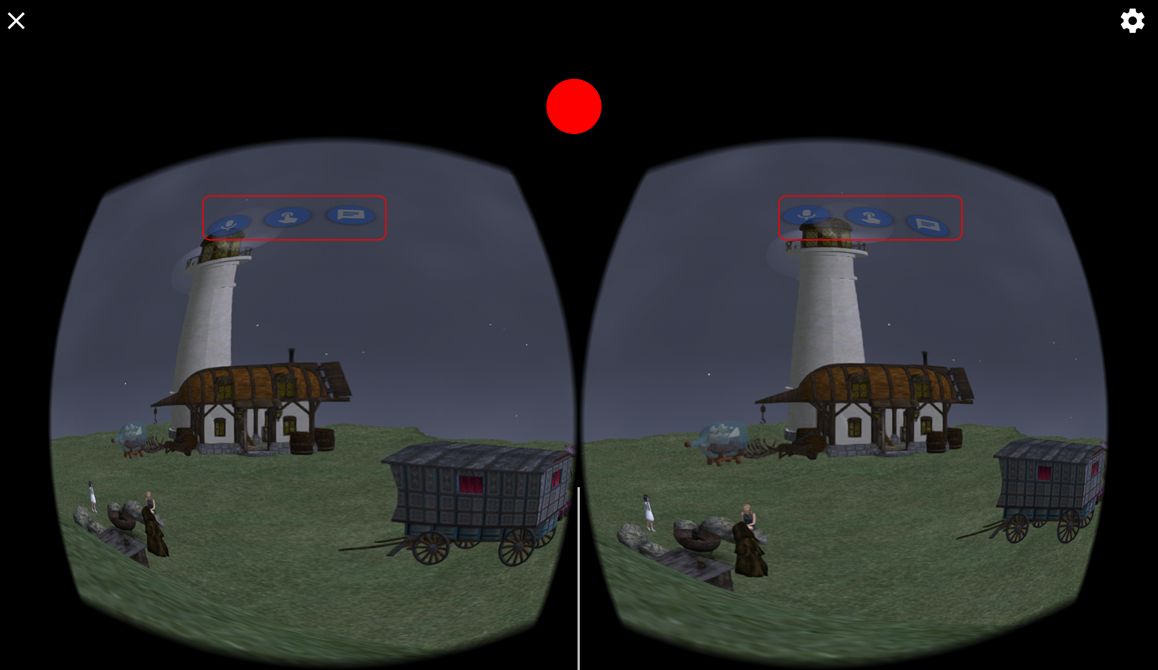
Whether you Allow or Deny the speech-to-text conversion, Lumiya will switch output to a stereoscopic format, suitable for use with Cardboard devices and the likes of the Samsung Gear VR. Three buttons are projected into the field-of-view:
Microphone – for enabling speech-to-text translation
Finger – for touching things
Chat bubble for text-mode chat.
Any of the three can be activated by staring at the required button – it should be highlighted when your stare is registered – then pressing the Cardboard device flap (or button / magnet actuator in the case of a Cardboard V1 device). If you’re trying Lumiya in VR mode without a headset, you can try staring at the button and touching the top of the screen between the left and right view – how successful you might be is debatable, and dependent upon on a number of factor (ambience background light, etc).
Movement is achieved by tapping and holding the same area of the device (or screen, if not using a device) while not looking at any of the buttons. You will then move in the direction yo are looking. Release the device / screen to stop.
Lumiya in VR stereoscopic mode. When using a Cardboard or similar device, staring at the on-screen buttons and pressing the flap / button on the device should activate the required function. Or if you’re not using a device, you can try staring at a button and touching the screen where indicated (approximately) by the red circle. Pressing this point (or the flap / button on a device) will allow you to walk in the direction to are looking
To exit VR mode, manually tap the X icon top left of the screen. The gear icon, top right can be manually used to access the Google Cardboard application for calibrating your headset device, if required (and if installed on your device).
The 3.2 release also includes a bug fix to prevent a black screen in the 3D world view when anti-aliasing is enabled.
As I am without a suitable headset kit / device, I was unsuccessful trying to test the button functionality, but the walking certainly worked for me without a hitch. Adding VR to Lumiya might seem to some a bit of a niche thing, but that doesn’t stop it from being a fun addition. It certainly further demonstrates what can be achieved with the application, and kudos (again) to Alina for her work.
As this is Thanksgiving week in the United States, there are no deployments for week #47. The next deployment should be on Wednesday, November 30th, with a new server maintenance package to be deployed to the RC channels. While the full details of what it will comprise aren’t available, it will apparently include a fix for a data server crash which, although rare, can affect multiple regions when it happens.
SL Viewer
There have been no changes to the current viewer pipeline this week.Viewer release updates are generally a part of the no change window, however, in recent times a couple of RC / project viewers have slipped out unexpectedly. Currently, there are updates anticipated to the Bento RC viewer, but whether or not this might slip through and appear before the Lab closes for an extended Thanksgiving weekend is debatable. A new Maintenance RC is also anticipated in the near future as well.
At the moment, the pipeline is as follows:
Current Release version: 4.1.2.321518, dated November 10th, promoted November 15th – formerly the Maintenance RC viewer
Project Bento RC (avatar skeleton extensions), version 5.0.0.321598, dated November 15th – bug fixes
360-degree snapshot viewer, version 4.1.2.321431, dated November 9th – ability to take 360-degree panoramic images – hands-on review
Obsolete platform viewer, version 3.7.28.300847, dated May 8, 2015 – provided for users on Windows XP and OS X versions below 10.7.
Other Items
Duplicated No Copy Items
Concern is growing about people who are using region crash exploits to duplicate No copy objects (particularly those from Gatchas) and then putting them up for sale on the Marketplace. The problem isn’t necessarily new, but is spreading. Various ideas have been put forward on how the situation might be dealt with, while the Lab is also aware of the problem and investigating what might be done. However, the caution at this point is that there is unlikely to be a simple fix for the issue.
Bento Meeting
A reminder that there is no Bento meeting either this week – Thursday November 24th – due to Thanksgiving or next week – Thursday, December 1st. This means the next Bento User Group meeting will now be on Thursday, December 8th, at the usual time of 13:00 SLT at the Hippotropolis Camp Fire Circle.
This summary is published every Monday, and is a list of SL viewer / client releases (official and TPV) made during the previous week. When reading it, please note:
It is based on my Current Viewer Releases Page, a list of all Second Life viewers and clients that are in popular use (and of which I am aware), and which are recognised as adhering to the TPV Policy. This page includes comprehensive links to download pages, blog notes, release notes, etc., as well as links to any / all reviews of specific viewers / clients made within this blog
By its nature, this summary presented here will always be in arrears, please refer to the Current Viewer Release Page for more up-to-date information.
Official LL Viewers
Current Release version: 4.1.2.321518, dated November 10, promoted November 15 – formerly the Maintenance RC viewer download page, release notes.
Cool VL viewer Stable branch updated to version 1.26.18.33 and the Experimental branch updated to version 1.26.19.35, both on November 19th (release notes).
Mobile / Other Clients
Group Tools updated to version 2.2.42 on November 19 (no release notes).
The majority of the notes in this update are taken from the abbreviated TPV Developer meeting held on Friday, November 18th. The video of that meeting is embedded at the end of this update. My thanks as always to North for recording and providing it.
On Tuesday, November 15th, the Main (SLS) channel received the same server maintenance package as previously deployed to the three RC channels in week #45. This includes:
llGetObjectDetails() will have a new OBJECT_GROUP_TAG function (feature request BUG-20064) – when pointed at avatars it returns the group tag you see floating above them; and also OBJECT_TEMP_ATTACHED – to tell you if something is a temp attachment (feature request BUG-5195).
There is was planned RC deployment for Wednesday, November 16th.
No Change Window
A No Change window is in force in week #47 (week commencing Monday 21st November) in the run-up to Thanksgiving in the United States. This means that all four server channels should now remain on the same release through until November 30th, when a new RC deployment is anticipated.
SL Viewer
[00:05] As noted in part 1 of this week’s report, the Maintenance RC viewer version 4.1.2.321518 was promoted to de facto release status on Tuesday, November 15th. Also, and as reported in my Bento update #34, the Bento RC viewer was updated to version 5.0.0.321598. This contains three significant bug fixes, but there will be a further RC release to correct the so-called “Viagra Bug” which causes an “ever-growing groin bone”.
[02:14] Further updates are anticipated on the 360 Snapshot project viewer. The Lab is still trying to work around conflicts with the Interest List, but at the moment it still appears the best solution is to slowly pan around the area you want to photography before attempting a capture to ZIP file, although this doesn’t always take care of things.
64-bit Viewers
[02:58] The 64-bit viewer builds, when they appear, will at some point include revisions to how the viewer goes about checking for updates and how the update process is managed. The aim is to make the update process more robust, and separate out the update checks from the rest of the code. There will be further discussions on this in December, which might be taken to indicate when the first 64-bit versions of the viewer might be appearing.
New Maintenance RC
[03:46] The next Maintenance viewer, containing further fixes and improvements is with QA, but should be appearing soon.
Intel HD2000 – HD4000 Graphics Issue
[58:57] As noted in my week #42 TPVD update, the Lab is going to resolve the Windows version detection issue with Intel HD2000 – HD4000 graphics on 32-bit systems by having the 32-bit version of their Windows viewer not opting into the Win 10 features, allowing 32-bit systems remain compatible with the chipsets; however, the 64-bit version will still opt-in. In addition, as the new viewer update process comes into force, the Lab is going to try to automatically update users into the correct channels, so they are no longer impacted by these issues.
Grid Status Page and Feed Changes
[04:22] The Lab is making further changes to how grid status information is displayed / delivered. This involves a move to a new status page provider, in part to provide more information over what was previously possible and to improve updates and management of grid status reports and updates.
The new grid status pages will be delivered via https://secondlife-status.statuspage.io/. Note that this isn’t actually live as yet, and any information displayed on the page is currently for testing purposes only.
The cut-over date for the new service is currently planned for Monday, November 28th, at which point a redirect will be put in place to steering people to the new status page when following dashboard links, etc. There may also be a redirect on the RSS feed URL as well. However, those wishing to use the new RSS feeds may need to manually update to one of the following URLs:
The changes are intended to allow Lab Operations to update grid status information directly from their internal chat system, rather than go through multiple steps to get the status pages updated, which is hoped will make the status information reflect updates and situations in a more timely manner, as well as the page itself having far more information available to users through the drop-down sections. There may also be a SMS feature so that those wishing to can subscribe to the service and receive grid status updates on the smartphone.
llTakeControl Issue
[10:18-36:22] Recent changes to the llTakeControl function, which among other things, manages interactions when in Mouselook have resulted in some users running TPVs being unable to complete Quest 3 of the new Horizons Experience as the guns for that section of the game will not function.
I’ve provided a separate report on the issue as it relates to TPVs and the Horizons Experience. However, the problem is symptomatic of wider issues with llTakeControl which also for a part of this discussion, and I refer readers the video to hear the entire conversation.
Voice Updates
[43:58] The current voice updates are progressing through LL’s QA, but has been delayed due voice attenuation with distance and direction issues occurring on Mac systems such that anyone on the left of a listening person attenuate rapidly with distance so that at a distance of less than 10 metres, they can no longer be heard. This requires further work from Vivox to correct. Once received – which shouldn’t be too long – then the updates will be released in a project or RC viewer.
Meanwhile, the server-side Voice updates have been held pending the completion of other server-side work which is deemed to have a higher priority.
[42:36] While a fix for SL Voice crashing when plugging / unplugging a USB device was broadly fixed some time again, there are some USB devices which can still result in a Voice crash when plugged in / unplugged from a computer. These seem to be devices which aren’t correctly recognised at the time they are connected (e.g. a headset being identified as a keyboard or camera, a camera as a headset, etc.). Vivox apparently now has a fix for this issue as well which will be coming shortly.