Logos representative only and should not be seen as an endorsement / preference / recommendation
Updates for the week ending Sunday, April 12th
This summary is generally published every Monday, and is a list of SL viewer / client releases (official and TPV) made during the previous week. When reading it, please note:
It is based on my Current Viewer Releases Page, a list of all Second Life viewers and clients that are in popular use (and of which I am aware), and which are recognised as adhering to the TPV Policy. This page includes comprehensive links to download pages, blog notes, release notes, etc., as well as links to any / all reviews of specific viewers / clients made within this blog.
By its nature, this summary presented here will always be in arrears, please refer to the Current Viewer Release Page for more up-to-date information.
Note that for purposes of length, TPV test viewers, preview / beta viewers / nightly builds are generally not recorded in these summaries.
Official LL Viewers
Current Release version version 6.3.8.538264, dated March 12, promoted March 18th. Formerly the Premium RC viewer – No Change.
At the end of March 2020, Speedlight, the browser / Android Second Life client, extended its world rendering capability to Free account holders whilst also offering Gold members the ability to move their avatars around.
Over the last few days, I’ve had the opportunity to take Speedlight’s world view for a test on both Free and Gold accounts, and this article is intended to act as both an introduction to the capability and to provide insight into where it stands at this stage of its development.
Before getting down to specifics, it should be remembered that it is still very early days in the development of Speedlight’s rendering capabilities – what is seen here is by no means anything close to what might be considered a “finished” product. Avatars, for example, are only presented as rudimentary “manniquins”, as the emphasis thus far has been on rendering in-world objects, and the Speedlight team plan to improve avatar looks in the future.
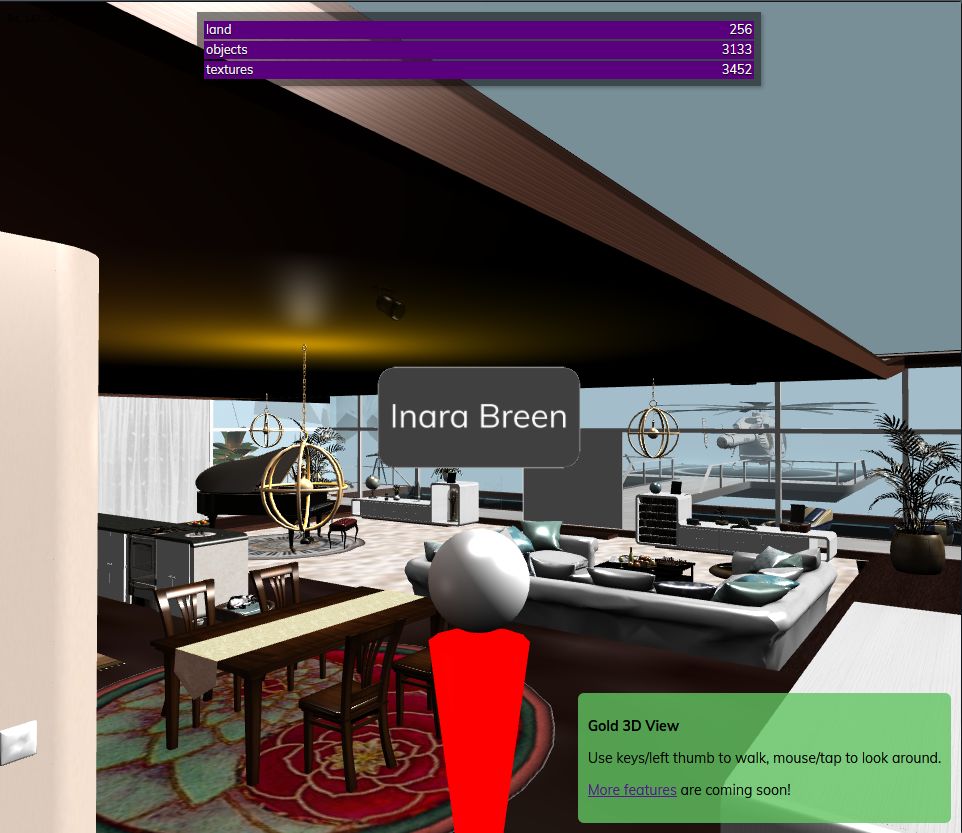
The Speedlight world view showing our living area at home. The rendering is acceptable, although there are some niggles that will doubtless be addressed in future updates (e.g. in this image, the “glass” doors rendered as soid grey objects, the ceiling rendering as black). Certainly, they are not enough to detract from what has been achieved at this early stage of work
Also at this point in time, the world view doesn’t offer any avatar / object interaction (no right-click options, etc.), and interaction (chatting, IMs) with other avatars is via switching tasks using the left menu. Other points worth keeping in mind with the world view are:
As I understand it, Speedlight uses an intermediary server for organising asset data information for download to the client, and this can have an impact of how fast a scene can be rendered. It also means that rendering can occur in “bursts” as object and texture data is collected (visible in the information bars at the top of the world view panel – see below), so it’s perhaps preferable to refrain from changing your camera view / moving your avatar until the scene has loaded.
Key differences between Free and Gold accounts in terms of world rendering are:
Free accounts do not (as of the April 1st 4.093.0825 release) have the ability to move their avatar, but can orbit / zoom their camera.
Gold account can move their avatar via the Arrows keys when running in a browser, or via the on-screen “joystick” when using the dedicated Android app.
I understand from Speedlight support that the number of textures / objects a scene loads is “capped” for Free accounts at present, in order to prevent the intermediary server from being flooded with requests to handle asset information.
The world view requires a minimum of Android 7.0 to work on an Android device (either using the dedicated app or when running Speedlight through an Android flavour of a web browser). As I only have Android 6.0.1 at my disposal, this precluded me from trying Speedlight’s rendering on a mobile device.
In order to limit any excessive load, rendering is limited to a radius of apprximately 50-60m around your avatar / camera, with objects fading into haze – an effect that helps disguise what might otherwise be glaring “holes” in a scene.
Accessing the World View
Log-in to Second Life via your Speedlight account and Open your avatar account.
The Summary screen will be displayed.
Click / tap the 3D World View option in the left side menu.
If you have not run the 3D world view during the current session, a blank window is displayed with the message: Avatar Is Not Rendering 3D World.
Click / tap the button under the message to start the rendering process.
Rendering will commence, with a warning that it could take 2 mins. Given the variables involved (complexity of scene, information fetching / caching, network connectivity and speed, etc.) this is a not unreasonable estimate.
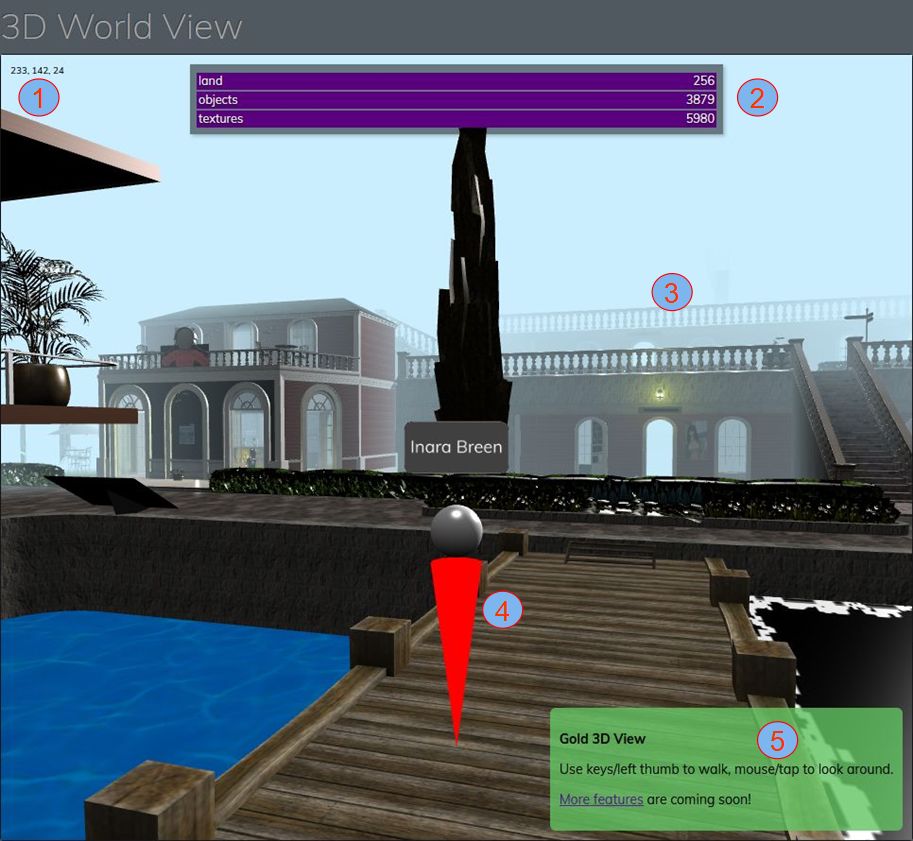
The information bars at the top of the world view (see image below) will report the land area, the number of textures and objects that are being processed / loaded.
The world view explained: 1: the X, Y, Z region coordinates of your avatar; 2: object and texture load count – will change as you cam / move / teleport. 3: horizon hazing at the limits of the pre-set draw distance; 4: avatar mannequin – displays a small green arrow (not always visible) to show direction being faced / avatar will move in (Gold only); 5: information bar – Gold membership shown; Free accounts have a yellow panel located on the left of the world view, carrying different information
Observations
Given this is still very much a first cut at scene rendering, what is presented is impressive, if with some niggles to be addressed, as noted above, and with things like dealing with blended alpha masks and with some transparent surfaces, etc.). However, these will hopefully be addressed over time.
Movement also seems to have a degree of latency surrounding it – possibly because of the use of an intermediary server on top of general network / connectivity aspects. This can be particularly noticeable when ceasing avatar movement, which can result in a degree of “rubber banding” as the avatar’s position as estimated by the client is updated with its position as recorded by the simulator. As such, I found it preferable to use light, repeated taps on the movement keys rather than holding them down for extended periods.
I also encountered a peculiar issue with my avatar simply refusing to stop walking, even after a teleport; something that I could only remedy by relogging. It’s something that may well be unique to me, although I’ve reported it to the Speedlight team just in case. Should anyone trying Gold membership with Speedlight encounter a similar problem also advise the Speedlight team?
Overall, and in terms of appearance, it is not unfair to say that Speedlight’s world view is pretty much on a par at this point in its development with that Lumiya’s world view during its earliest days of development – and look how far that went over time. Whether Speedlight will go on to mature to a similar level of capability with its rendering obviously remains to be seen. However, given that development is only a couple of months old (and niggles aside) what has been produced thus far is not to be sneezed at, and I look forward to continuing to cover the client’s development in the future.
There was no deployment to the grid on Tuesday, April 7th, 2020, leaving the majority of regions running simulator version 538914, containing support for the upcoming mobile companion applications (see: Second Life companion app: mini update, March 2020).
On Wednesday, April 8th, there should be two RC updates:
Simulator release 539362, containing infrastructure improvements related to the cloud uplift.
Simulator release 539684, containing the following:
BUG-228417 Emails created by llTargetedEmail() in deeded objects show owner as NULL_KEY in the received email metadata.
BUG-228412 Emails created by llTargetedEmail() are missing header info in the received email.
SL-12941 Disable TARGETED_EMAIL_ROOT_CREATOR in llTargetedEmail
BUG-226917 EEP Environment, New Sky should default to midday and not 6pm
BUG-226737 [EEP] The ‘get parcel_dayoffset’ request returns the value of the ‘parcel daylength’ parameter in the Region Debug Console.
SL Viewer
There have been no updates to the current crop of official viewers to mark the start of the week, leaving the current pipelines as follows:
Current Release version version 6.3.8.538264, dated March 12, promoted March 18th. Formerly the Premium RC viewer – No change.
Release channel cohorts:
Camera Presets RC viewer, version 6.3.9.538729 March 25.
Love Me Render RC viewer, version 6.3.9.538760, March 25.
EEP RC viewer updated to version 6.4.0.538823, March 20.
Zirbenz Maintenance RC viewer, version 6.3.9.538719, issued March 19.
Project viewers:
Copy / Paste viewer, version 6.3.5.533365, December 9, 2019.
Project Muscadine (Animesh follow-on) project viewer, version 6.4.0.532999, November 22, 2019.
Legacy Profiles viewer, version 6.3.2.530836, September 17, 2019. Covers the re-integration of Viewer Profiles.
360 Snapshot project viewer, version 6.2.4.529111, July 16, 2019.
In Brief
With work progressing on the cloud uplift, some concern has been raised by those using external services and HTTP calls to / from the simulators once the latter start to be transitioned and have their domains changed.
While in-world object URLs are dynamic, it’s been suggested that some use external services use URL validation with hard-coded domain names (e.g. “http://sim10446.agni.lindenlab.com….”) in response to issues, and will therefore need a formal warning of URL changes as a result of domain changes. Given this approach is not recommended, the fact that LL will start to transition simulators to AWS services later in 2020 should be taken as fair warning that such validation checks will break. However, for those with concerns:
Aditi (the beta grid) will be transitioned first, allowing scripts, external calls, etc., to be tested.
With respect to this issue, llHTTP on the wiki will be updated to reflect domain changes and HTTP call requirements.
April 2nd, 2020 saw the first full release of the viewer 1.x style Singularity viewer in almost four years with the arrival of version 1.8.9.8338. The last formal release of the viewer had been in June 2016, with the release of version 1.8.7 – although there have been many, many, “nightly” builds of the viewer made available in the interim to help keep Singularity users up-to-date with viewer changes.
As I don’t tend to report on “beta” or “nightly” builds of viewers unless they contain something absolutely vital to users – were I to try, it’s not unreasonable to say there would be times when I’d be writing nothing other than articles on viewers and clients – this release means there is potentially a lot for me to cover – the to possibly drown you in an ocean of text! To avoid this, please excuse me if I just touch on the core aspects of the update and point you towards the official release notes for a full list of updates.
In Brief
Linden Lab Derived Updates
Given the length of time that has elapsed between the last formal release and 1.8.9, the latter rolls-up a lot of significant releases from the Labs. As a summary, these comprise:
Experiences (World → Experiences from the menu bar).
Viewer Managed Marketplace. Actually released prior to the previous full release of Singularity, the Viewer Managed Marketplace (VMM) functionality didn’t make it into the 1.8.6 or 1.8.7 releases, and so arrives for the first time now.
The Marketplace Listings Panel can be accessed via either World → Marketplace Listings in the menu bar, or by activating the Marketplace Listings toolbar button (View → Change Toolbar Buttons → check Marketplace Listings).
Singularity also allows the listing ID for any Marketplace listing (active or inactive) to be obtained by right clicking on the associated folder in the the Marketplace Listings panel and selecting Copy Listing ID.
In support of VMM, Singularity also provides a Marketplace button (View → Change Toolbar Buttons → check Marketplace). Note that this will open the Marketplace in the viewer’s internal browser, regardless of whether links are set to open in an external browser.
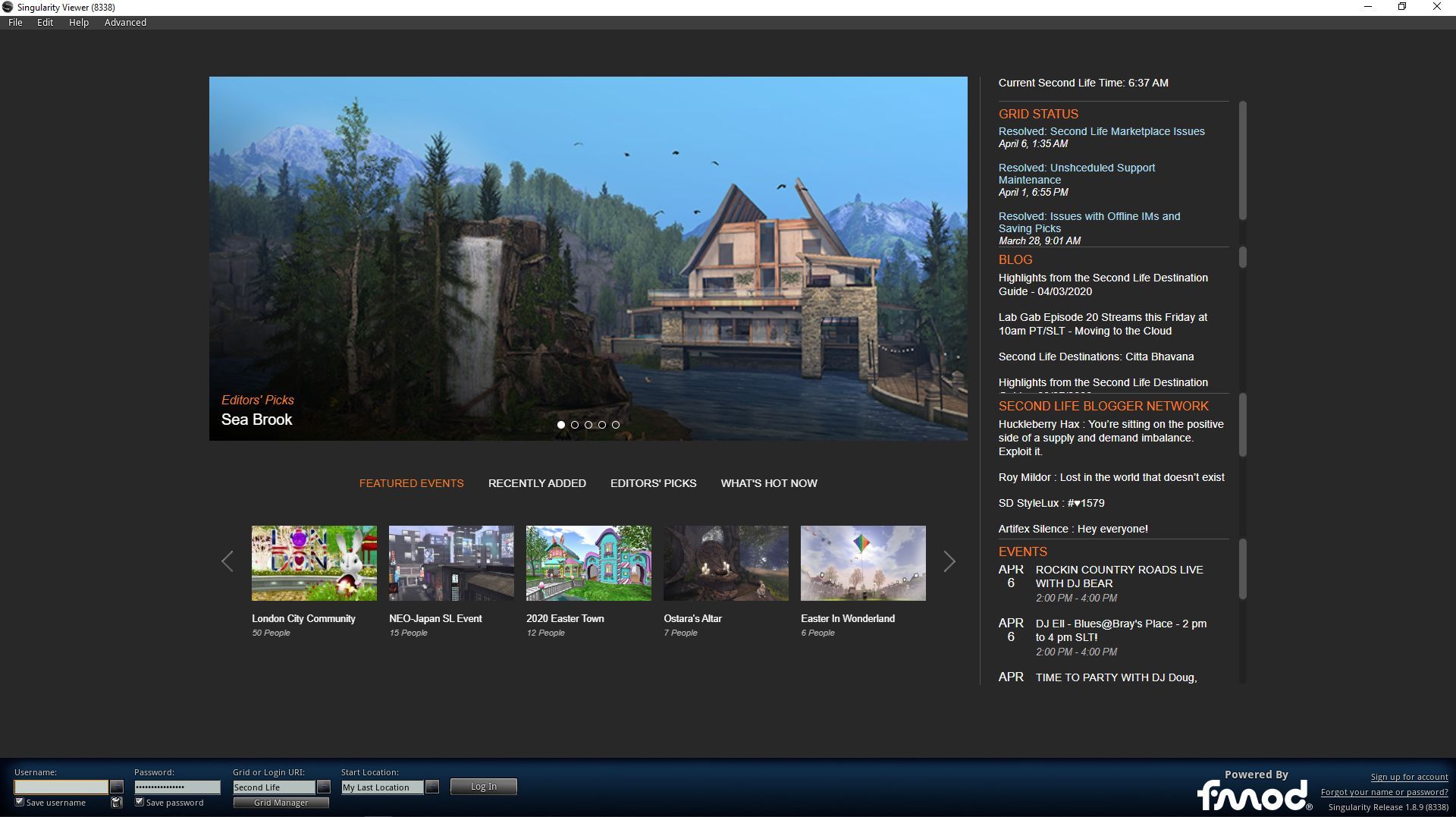
Singularity 1.8.9 also features the all-singing, all dancing LL viewer splash screen with tweaks
Singularity Updates
This is actually a huge list of new additions, improvements, updates and fixes. So big, in fact that trying to run through them here would give rise to a novel, rather than a review, as noted. So again, please refer to the official release notes for a complete breakdown.
Availability
At the time of writing, Singularity 1.8.9 had been released in 32-bit and 64-bit flavours for Windows; 64-bit Linux and promised an “emergency” version for OS X that is described as possibly “buggy” and “available soon”. As the download page on the Singu website still listed 1.8.6 as the last formal release for OS X, Mac users interested in Singularity are advised to watch the Singularity website for updates.
Feedback
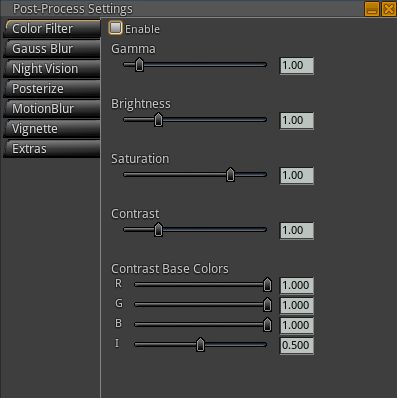
The Post-Processed Effects (PPE) panel (View → Change Toolbar → Post-Processed Effects) has some interesting real-time graphics processing options.
I’ve not had much time using Singularity 1.8.9, my total hours possibly amount to little more than an afternoon of fiddling. As such this feedback is perhaps a little more subjective in approach than might otherwise be the case.
All of the Linden-derived updates appear to work as expected, and the Singu-developed updates are certainly extensive and I have no significant issues with those I got to play with.
When it comes to rendering, where you’re looking, how far you can see, what is occluding your view, what to have cached, etc., all has a part to play in what the viewer renders, how fast it can do so and what your overall fps is. In an attempt at rudimentary “like-for-like” testing (e.g. same region, same location, same directions of view, roughly the same number of avatars, same graphics settings, etc), I found Singularly perhaps a little faster in rendering content than either the SL viewer or Firestorm, with average fps reporting pretty much on a par with, or very slightly higher than, those two viewers once rnedering had settled down for any given direction.
What I did notice with respect to 1.8.9, both in comparison to Firestorm and singularity 1.8.7, and when again, using the dame Windlight presets is that 1.8.9 produces a much more natural rendering result on my system – gamma, haze, tone, etc., – than I’ve noted with either Firestorm or the SL viewer when using the “default” settings.
For those who like a v1-style UI coupled with something of a more “power user” range of options, Singularity 1.8.9 is liable to be just the ticket. Hopefully the huge amount of effort put into this release will mean that in future, the viewer will be better able to keep pace with changes coming out of the Lab. Kudos to all involved in getting it back up to speed.
Logos representative only and should not be seen as an endorsement / preference / recommendation
Updates for the week ending Sunday, April 5th
This summary is generally published every Monday, and is a list of SL viewer / client releases (official and TPV) made during the previous week. When reading it, please note:
It is based on my Current Viewer Releases Page, a list of all Second Life viewers and clients that are in popular use (and of which I am aware), and which are recognised as adhering to the TPV Policy. This page includes comprehensive links to download pages, blog notes, release notes, etc., as well as links to any / all reviews of specific viewers / clients made within this blog.
By its nature, this summary presented here will always be in arrears, please refer to the Current Viewer Release Page for more up-to-date information.
Note that for purposes of length, TPV test viewers, preview / beta viewers / nightly builds are generally not recorded in these summaries.
Official LL Viewers
Current Release version version 6.3.8.538264, dated March 12, promoted March 18th. Formerly the Premium RC viewer – No Change.
The following notes are taken from the TPV Developer meeting held on Friday, April 3rd, 2020. These meetings are generally held every other week, unless otherwise noted in any given summary. The embedded video is provided to Pantera – my thanks to her for recording and providing it. Time stamps are included with the notes will open the video at the point(s) where a specific topic is discussed.
There were no viewer updates in week #14, leaving the official viewer pipelines as follows:
Current Release version version 6.3.8.538264, dated March 12, promoted March 18th. Formerly the Premium RC viewer – No change.
Release channel cohorts:
Camera Presets RC viewer, version 6.3.9.538729 March 25.
Love Me Render RC viewer, version 6.3.9.538760, March 25.
EEP RC viewer updated to version 6.4.0.538823, March 20.
Zirbenz Maintenance RC viewer, version 6.3.9.538719, issued March 19.
Project viewers:
Copy / Paste viewer, version 6.3.5.533365, December 9, 2019.
Project Muscadine (Animesh follow-on) project viewer, version 6.4.0.532999, November 22, 2019.
Legacy Profiles viewer, version 6.3.2.530836, September 17, 2019. Covers the re-integration of Viewer Profiles.
360 Snapshot project viewer, version 6.2.4.529111, July 16, 2019.
General Viewer Notes
EEP is now extremely close to release. The hope is to have the final RC version available for users in week #15 (commencing Monday, April 6th).
Providing no major issues are encountered with that version, and allowing for it gaining sufficient user hours as an RC cohort, it will then be promoted to de facto release status.
This viewer still has one of the lowest crash rates for the official viewer, and which is described as being “dramatically lower” than the current viewer release.
The Love Me Render (LMR) and Camera Presets RC viewers are both getting close to a point where they could be released at some point after EEP.
Tools update (Visual Studio 2017 and a more recent version of Xcode): the first full viewer build is ready to be issued, so an RC could be appearing in week #15. If so, it may be fast-tracked to release status behind EEP and ahead of other RCs.
There is still work to be done on the Copy / Paste and Legacy Profiles viewers to get them up to RC status.
Work is also continuing on the mesh uploader viewer, a version of which had yet to be made available to users as a compiled viewer.
The server team believe they have fixes for the issue off-line inventory losses from objects (see: BUG-227179 “All offline inventory offers from scripted objects are STILL lost”).
These fixes should be going to a simulator RC release in week #15, and no viewer-side updates are required for either of the fixes (UDP and HTTP).
TPVs have been asked to confirm the HTTP fix works, and if so, to switch to that mechanism (if they have not already done so), rather than continuing to rely on UDP messaging for off-line inventory offers, so that path can be deprecated.
Details on where the fixes can be tested will be made available to TPVs through the Open-Source Dev mailing list.
Apologies have been offered for the time it took LL to fix and fix the underlying causes.



 Inara Pey: Living in a Modemworld