2021 TPV Developer meeting week #31 summary

Cravone City, April 2021 – blog post

The following notes are taken from the TPV Developer meeting held on Friday, August 6th, 2021.

These meetings are generally held every other week.  They are recorded by Pantera Północy, and her video of the meeting is embedded at the end of this report – my thanks to her for allowing me to do so – and it is used with a transcript of the chat log from the meeting and my own audio recording to produce this summary, which focuses on the core topics discussed.

SL Viewer

[Video 1:00-2:32]

No updates to the current crop of official viewers this week, leaving them as follows:

  • Release viewer: version 6.4.21.561414, Fernet Maintenance RC dated July 14th, promoted July 19th.
  • Release channel cohorts:
  • Project viewers:
    • Legacy Profiles viewer, version 6.4.11.550519, dated October 26th, 2020.
    • Copy / Paste viewer, version 6.3.5.533365, dated December 9th, 2019.
    • Project Muscadine (Animesh follow-on) project viewer, version 6.4.0.532999, dated November 22nd, 2019.
    • 360 Snapshot project viewer, version 6.2.4.529111, dated July 16th, 2019.

General Viewer Notes

  • The CEF update viewer is being looked at as the next possible promotion to de facto release status. A decision on this may be taken on Monday, August 9th.
  • The 360 Snapshot viewer update is in progress, but it is still going to be a while before it surfaces.
  • [Video: 4:17-5:25] The Legacy Profiles viewer requires a couple of additional caps on the back-end. This work has yet to be queued, as the focus of back-end work remains on the tools update that is currently in progress; so it will be a while before this viewer is updated.
  • Both the revised Simplified Cache viewer and the Apple Notarisation viewer are both very close to making an appearance, most likely as RC viewers.
  • [Video 5:46-6:18] The new performance controls viewer (ARC, etc.), should be ready for issue as a project viewer in the “not too distant” future.

LOD Generation Viewer

[Video: 2:50-4:15]

A viewer using the mesh optimiser library for automatic LOD model generation for mesh uploads is in development. No date on when it is likely to appear.

This reportedly works better than the GLOD code that is currently in use. For the initial project viewer version(s) of this viewer, once available, creators will have a choice of using either GLOD or the optimiser at upload. Longer-term LL are still discussing whether or not GLOD will be retained as an option, or whether it will be removed (or at the least, made a non-default option).

Beyond this, there is the larger question of using the optimiser library in real time, and what to do with the available content that does not have properly defined LOD models, but this is regarded as “discussion for latter”; the onus at the moment is to make a viewer available that utilises the optimiser library.

Viewer-side Animation Override

[Video: 6:24-6:40]

The ability to run animations normally found in a scripted Animation Override HUD natively from the viewer has been a capability that a number of TPVs offer (animations play viewer-side anyway, so removing the need to operate them via simulator-side scripts helps reduce the script processing load on the latter). It is now the subject of discussions for a viewer-side AO system to be made a part of the official viewer, potentially leveraging what has been done by TPVs.

In Brief

  • [Video 6:50-7:49] As noted in my SUG meeting notes, the new simulator console command that let estate managers change the default EEP settings across an entire estate is now available on regions running on the RC channels, and will be grid-wide after the next SLS Main channel deployment (Tuesday, August 10th). This also paves the way for implementing a new default Mainland EEP setting that will be coming in a future update.
  • [Video 22:46-24:56] BUG-229227 “Offline group invites not working” this issue was the result of removing reliance on UDP messaging (which is not always reliable) and using a capability instead. While some fixes have been made to try to improve things, the code itself is described as a “Byzantine mess”, and in need of a complete re-write There are no time frames when / if this may happen.
  • Caatznip has been continuing investigations in to the cost of rendering Linden Water in cases where it cannot be see (e.g. when standing in the middle of a multi-region estate so it is completely “invisible” under the terrain), and have found that completely ignoring Linden Water rendering via occlusion checks can boost FPS by between 30-50%, with the most notable benefits being with lower-specification systems.

Next Meeting

  • The next meeting should be on August 20th, 2021.

August 2021 SL Web User Group summary

The Web User Group meeting venue, Denby

The following notes cover the key points from the Web User Group (WUG) meeting, held on Wednesday, August 4th, 2021.

These meetings are generally held on the first Wednesday of the month, with dates and venue details available via the SL public calendar. A video of the meeting, courtesy of Pantera, can be found at the end of this article, and the following is a summary of key topics / discussions.

Web Properties Updates

  • Back-end work is still on-going and has taken up a lot of time through July. This work includes a lot of system upgrades intended to improve things like the deployment of updates and features to the various web properties and improve the performance (speed of returns, etc.), in processes like Search.
  • The Land page has seen some general clean-up.
  • Improvements have been made to the flow of the sign-up page.
  • The investigative work on how and where Search might be improved is still also on-going.
  • Marketplace improvements:
    • The difficulty users with two-letter names were experiencing during authentication has been fixed.
    • Bulk redelivery (on the part of creators to their customers) has been implemented. This is via a button in the product page visible to the creator.

Mobile Update

  • There is a new beta that is ready to go for testing via Apple’s Test Flight software, which should be available for those helping to test in the near future. This  includes a “few more features” that LL wanted to get to Apple before trying to make the app more generally available via the Apple Store – however, the updates are still very much focused on communications, and are not rendering, inventory, etc. related.
  • The Android version remains somewhat behind the iOS version and won’t be appearing in the short-term.

In Brief

  • Legacy (in-viewer) Profiles are still being worked on. There had been a delay due to some back-end work being required, but things will be moving forward. However, as the viewer is still currently a Project viewer, it will still be a while before any updates reach release status.
  • Two-factor authentication (2FA) is still a work-in-progress.
  • The ability for users to offer grid-wide experiences is on hold.
  • It’s been asked if creators on the MP would find the following useful:
    • Having the UUID of customers recorded in any extracted .CSV file.
    • Having a “go to” page for their list of products, so they can jump directly to a page and select a listing for editing.
    • The responses to both questions (both raised as a result of feature requests) was yes.
    • It was pointed out that LL have a API for obtaining avatar UUIDs, although this wasn’t seen as useful by creators.

Next Meeting

  • Wednesday, September 1st, 14:00 SLT.

2021 SUG meeting week #31 summary

Butterfly Conservatory, April 2021 –blog post

The following notes were taken from the Tuesday, August 3rd, 2021 Simulator User Group (SUG) meeting. The meeting was recorded by Pantera Północy, and the video is embedded at the end of this summary.

Server Deployments

At the time of writing there was no server deployment thread, so please refer to the Server section of the forums for updates.

  • There was no deployment to the SLS Main channel on Tuesday, August 3rd.
  • Wednesday, August 4th should see a deployment to the RC channels. This includes:
    • BUG-220541 for llUnsit expansion.
    • A new simulator console command that will let estate managers change the default EEP settings across an entire estate. This also paves the way for implementing a new default Mainland EEP setting that will be coming in a future update.
    • A fix to llChar to reduce returns being translated as “?”. Some will still do so, but this will be addressed in the next maintenance simulator update.

SL Viewer

There have been no updates to the current batch of official viewers to mark the start of the week, leaving the pipelines as follows:

  • Release viewer: version 6.4.21.561414, Fernet Maintenance RC dated July 14, promoted July 19 – NEW.
  • Release channel cohorts (please see my notes on manually installing RC viewer versions if you wish to install any release candidate(s) yourself):
  • Project viewers:
    • Legacy Profiles viewer, version 6.4.11.550519, dated October 26.
    • Copy / Paste viewer, version 6.3.5.533365, dated December 9, 2019.
    • Project Muscadine (Animesh follow-on) project viewer, version 6.4.0.532999, dated November 22, 2019.
    • 360 Snapshot project viewer, version 6.2.4.529111, dated July 16, 2019.

In Brief

  • There have been numerous requests / feature requests for grater access to things like region performance states, etc. (e.g. BUG-10263, BUG-37717, and BUG-229172 – all of which which have been closed. Commenting on these and feature requests in general, Mazidox Linden commented:
We have to consider things like “How can this be abused” when we get feature requests like that, which is why even though I agree it’s better to have an API call than measure in a tight loop we might not want to make surfacing that data easier.
  • Rider Linden hopes to take a second pass at the way scripts are scheduled, with the support of Monty Linden. He hopes to be able to make the simulator “smarter” in how it schedules what script to run in what order and how frequently. However, given current workloads, it is unlikely this work will commence before the end of the year.
  • The simulator tools upgrade work has been “hanging fire” recently, but is due to resume.

2021 viewer release summaries week #30

Logos representative only and should not be seen as an endorsement / preference / recommendation

Updates from the week ending Sunday, August 1st

This summary is generally published every Monday, and is a list of SL viewer / client releases (official and TPV) made during the previous week. When reading it, please note:

  • It is based on my Current Viewer Releases Page, a list of all Second Life viewers and clients that are in popular use (and of which I am aware), and which are recognised as adhering to the TPV Policy. This page includes comprehensive links to download pages, blog notes, release notes, etc., as well as links to any / all reviews of specific viewers / clients made within this blog.
  • By its nature, this summary presented here will always be in arrears, please refer to the Current Viewer Release Page for more up-to-date information.
  • Note that for purposes of length, TPV test viewers, preview / beta viewers / nightly builds are generally not recorded in these summaries.

Official LL Viewers

  • Release viewer: version 6.4.21.561414, formerly the Fernet Maintenance RC, dated July 14th, promoted July 19th – No change.
  • Release channel cohorts:
    • Grappa Maintenance RC viewer, version 6.4.22.561850, issued July 29th.
  • Project viewers:
    • No updates.

LL Viewer Resources

Third-party Viewers

V6-style

V1-style

Mobile / Other Clients

  • No updates.

Additional TPV Resources

Related Links

Firestorm 6.4.21: catching up with the Lab

On Wednesday, July 28th, 2021, the Firestorm team released version 6.4.21 of their viewer.

The majority of the updates contained within this release are from recent releases of the official viewer, with a minimal number of Firestorm-derived updates, as Firestorm continues to move closer to a quarterly cadence of releases.

That said, as well as fixes and updates, this release includes a number of additional and new capabilities added by the Firestorm team, and these form the focus of this overview.

As is usual for me, this is not a review of every individual change to be found within this latest release of Firestorm. Rather, it is an overview of those changes that will be most noticeable to the majority of users. Given this, please refer to the official release notes for a complete list of fixes and changes.

Table of Contents

Installation

  • There is no need to perform a clean install with this release if you do not wish to.
  • Do, however, make sure you back-up all your settings safely so you can restore them after installing 6.4.21.
  • Again, please refer to the Firestorm 6.4.21 release notes for additional details of all changes and updates in this release.

Linden Lab Viewer Parity

Firestorm 6.4.21 incorporates updates from a number of recent Linden Lab viewer releases, as follows:

Jelly Updates, February 2021

Viewer release: 6.4.13.555567.

Most notably, this alters the behaviour of “jellydolled” avatars for better performance. Those avatars explicitly set not to render or have an Avatar Rendering Complexity (ARC) that exceeds the threshold set within the viewer (e.g. via Quick Prefs → Max Complexity slider):

  • Are now rendered a single grey, rather than appearing in a range of solid colours and as a basic humanoid shape.
  • No longer have any attachments or other customisations rendered and do not play animations.

Simplified Cache Viewer, March 2021

Viewer release: 6.4.14.556088.

This viewer introduced a less complex file caching system to save local copies of frequently used assets such as meshes, sounds and animations, but without the issues that impacted the original deployment of that viewer.

Custom Key Mappings Viewer, April 2021

Viewer release:  6.4.17.557391.

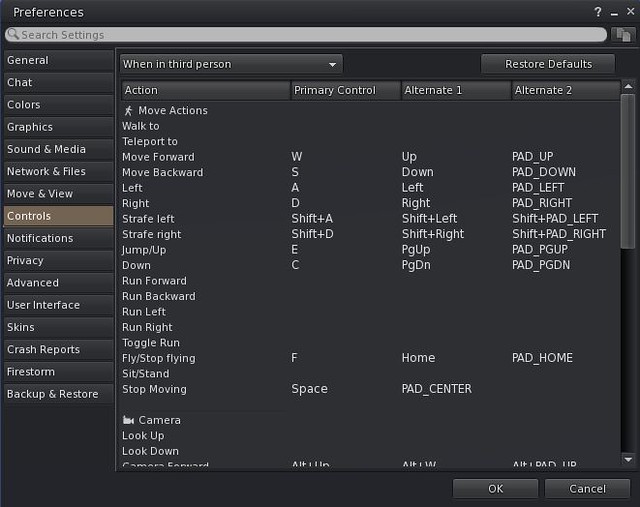
This release allows users to define their own key mappings for a number of viewer functions, via Preferences → Control .

The Custom Key Mappings panel in Preferences

Maintenance Eau de Vie, April 2021

Viewer release: 6.4.18.558266.

A further round of viewer bug fixes from Linden Lab. Perhaps most notable among them changes to the detection of Intel HD 2500 and 4000 and 400 GPUs (if running the latest drivers), that result in users of those graphics cards now being offered the 64bit version of the viewer.

Love Me Render 5, June 2021

Viewer release: 6.4.19.560171.

A maintenance viewer focused on rendering and graphics fixes, including a number of EEP improvements.

UI and Voice Updates Viewer, June 2021

New Guidebook

Viewer release: 6.4.20.560520.

This viewer introduced the first in a series of viewer UI updates, these specifically aimed at new users, notably a new Guidebook to getting started in Second Life following sign-up, and which is intended to be used within the new Welcome Islands.

The new user Guidebook, as developed by Linden Lab as a part of a new user experience
The Guidebook is access via a dedicated Toolbar Button, which if not automatically displayed in your viewer (clean installation) can be accessed by opening the Toolbar Buttons panel (right-click any button area and select Toolbar Buttons …) and then dragging the Guidebook button to your preferred button area.

Not that both the Guidebook and the new Welcome islands are subject to on-going testing and so may see further revisions.

Menu Updates

In addition, this release of the view included a number of menu changes to the official viewer. These have been implemented somewhat differently in Firestorm, and so are dealt with below.

EEP: Azimuth and Elevation Sliders

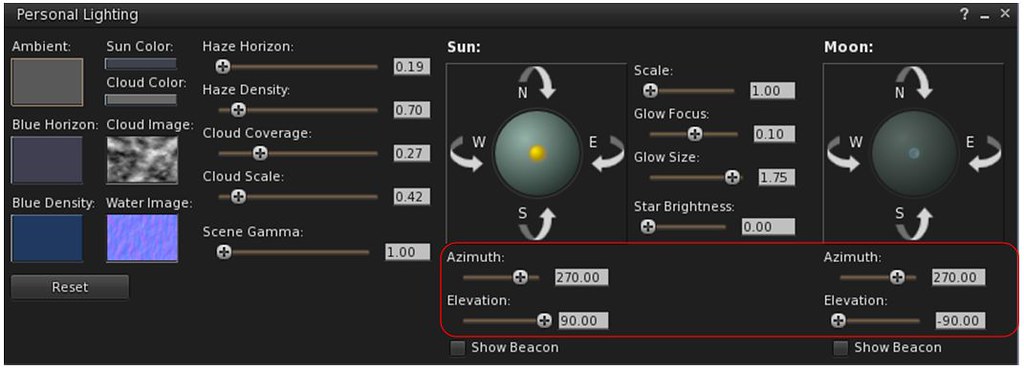
A further UI change with this viewer is the addition of new EEP sliders for those who have issues using the Trackballs in the Sun / Moon tabs of the Fixed Sky and Day Cycle floaters, and in the Personal Lighting floater. These sliders are:

  • Azimuth – which might be thought of as the east / west position of the Sun or Moon (technically, azimuth is more than this, but it’ll do for these notes).
  • Elevation – the position of the Sun or Moon over or under) the horizon, relative to azimuth.

They are tied to the Sun / Moon movement, so when used, the trackball locations for the Sun and Moon will also move.

The EEP Azimuth and Elevation sliders (Personal Lighting floater shown)
Voice Updates

Finally, this viewer brings a series of improvements to the viewer’s Voice settings a range of improvements to Voice handling, including changing to default Voice settings in the viewer intended to help prevent issues of drop-out when talking, and which have reportedly all but eliminated drop-outs for those using the new settings. Additionally, the VIVOX VAD options have been exposed via Debug Settings, and detailed notes on these can be found in the official viewer release notes, linked to above.

Continue reading “Firestorm 6.4.21: catching up with the Lab”

Kokua: release 6.4.21 and Radegast 2.34

Kokua released version 6.4.21 of their viewer on Saturday, July 24th, bring it up to parity with the official viewer version 6.4.21 (formerly the Fernet RC viewer, version  6.4.21.561414), and which also sees a further porting of options from Firestorm, together with a series of updates and fixes implemented by the Kokua team.

As always, all of the information relating to updates and fixes can be found in the official release notes; the following notes highlight the more directly user-facing changes.

Lab-Derived Updates

Kokua 6.4.21 includes all Linden Lab viewer updates through to the Fernet release. Most notably these include a range of improvements to Voice handling, including changing to default Voice settings in the viewer intended to help prevent issues of drop-out when talking, and which have reportedly all but eliminated drop-outs for those using the new settings. Additionally, the VIVOX VAD options have been exposed via Debug Settings, and detailed notes on these can be found in the official viewer release notes.

Preferences → Graphics Redesign

Kokua 6.4.21 sees an overhaul of Preferences → Graphics that to eliminate the Advanced panel and instead incorporate its content on three new tabs within the Graphics panel: General/Avatar, Hardware, Level of Detail / Shaders.

In addition, one of the never tab ports the dynamic sizing of texture memory developed by Ansariel Hiller for Firestorm.. More on this below.

The updated Preferences → Graphics panel with the new tab-style layout

The additional tabs provide a logical and clear-cut breakdown of options:

  • The General/Avatar tab presents the options perhaps used most frequently by the majority of users: Draw Distance, avatar complexity / number of imposter avatars, post-process, detail and physics quality settings.
  • The Level of Detail/Shaders tab provides access to the controls for the viewer shaders, and general rendering quality sliders (terrain, trees, objects, etc.).

The remaining tab, Hardware, is the tab that incorporates the dynamic texture memory sizing option. The idea with this is that it allows the viewer to use more of the available graphics memory whilst still reserving space for other uses (subject to the overall dedicated graphics memory / system memory that is available – you obviously cannot use more memory than your system actually has!).

The Preferences Graphics tab, showing the new (to Kokua) dynamic texture memory options (from Firestorm)

KKA-878 Add Option to Always Pop-up Chat/IM toasts

This is a fix for a noticeable issue with how Kokua handles chat notifications.

Until now, the default pop-up / Toast behaviour is as toasts show unless the local chat panel is visible and not overlaid by another floater. This is counter-intuitive in that the purpose of pop-ups / Toasts are designed to inform because floaters / panels may be obscured.

The new option to Always Pop-up the message, which is common to all of the drop-down lists on the Chat → Notifications tab in Preferences

BugSplat Updates

This release also includes a number of fixes for Kokua crashing whilst attempting to send information to the BugSplat reporting tool, before sufficient information can obtained to help pin down what might have been happening leading up to the crash, rather than just reporting where a crash happened. Please refer to the release notes for more on this.

Radegast 2.34

Radegast, the lightweight client for Second Life and OpenSim updated to version 2.34 on July 26th.

The majority of the updates included in the release are “under the hood” changes, specifically designed to:

  • Paving the way for future UI changes.
  • Providing better non-Windows platform and mobile support.

However, there have been improvements  to image processing, with JPEG2000 decoding and encoding times now improved.

Radegast JPEG2000 decoding and encoding times should help with elements of in-world rendering

As noted in the release notes, these improvements also require the installed version of Radegast to be specific to your computer’s architecture (e.g. the x64 version on Windows 64-bit system).

Also note that the 3D world rendering can give variable results (as it always has), depending on aspects of the system on which Radegast is being run, etc. While it has been a while since I last used the client in anger, the 3D rendering appeared to be a lot smoother than I remember, although it still includes issues in rendering mesh clothing correctly rigged to the avatar, and also demonstrated a familiar issue of failing to render textures on all prim faces.

For the full list of updates and fixes, please refer to the official 2.34 release notes.

Given it has now been several years since I’ve reviewed Radegast in-depth (it’s actually been a decade since my first review, and just a month shy of that since me first review of the client’s rendering capabilities), I will endeavour to offer a complete refresh in the future.

Links