A look at Dr. Phil’s show “featuring” Second Life

Dr. Phil McGraw is a psychologist turned television talk show host who first rose to prominence in The Oprah Winfrey Show in the 1990s prior to migrating to his own show in 2002, simply entitled Dr Phil. In it, he deals with a wide range of topics, offering advice in the form of “life strategies” based on his experiences as a psychologist.

Dr. Phil McGraw (courtesy CBS Television)

The show is a staple in the diet of US weekday television, and in the run-up to the July 14th show, Won’t Work, Won’t Go to School: “My Son Just Wants to Game All Day”, there was much brouhaha about the announcement that Second Life would be featured in the segment.

“Featured” tends to suggest a major role; as such, there were many efforts to promote the platform’s inclusion in the show through social media. There were also a number of blog posts expressing some concern as to how SL would be represented in the show.

Such reactions are understandable. This is our platform after all, so promoting it when the mainstream media will result in a natural reaction of anticipation. However, given the focus of this segment was advertised as being about  computer game addiction, the anticipation was countered by a degree of concern as to how the platform might be portrayed.

In the event, any concerns regarding just how Second Life might be portrayed proved to be without cause. Not so much because SL is shown fairly positively within the programme, but rather because, quite frankly, its role in the show was pretty minor; the overall focus for the programme was  squarely on the stated subject of computer game addiction.
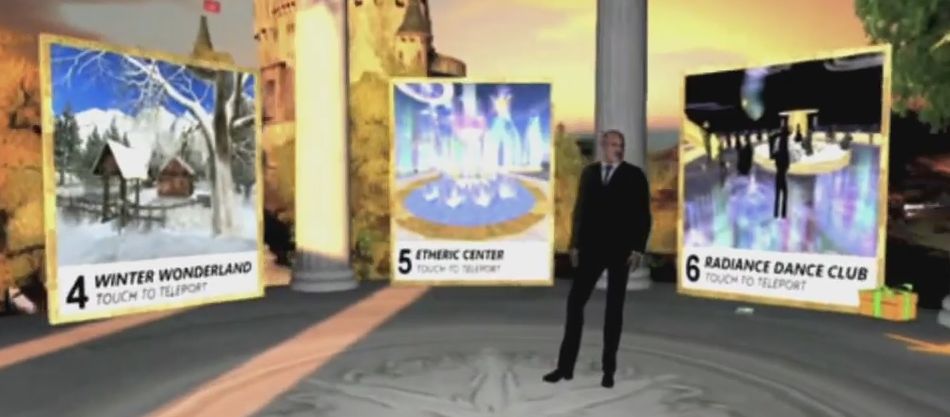
Yes, Dr Phil is shown in-world at places like Creations Park and Mont Saint-Michel, but really, SL is completely secondary to the show's focus
Yes, Dr Phil is shown in-world at places like Creations Park and Mont Saint-Michel, but really, SL is completely secondary to the show’s focus

We often joke about being “addicted” to this or that – including computer games; but the truth is that in extreme cases, “addiction” is precisely the correct term. Those suffering from it demonstrate the same responses and reasoning as those caught in more “traditional” forms of addiction such as drugs or alcohol; so much so that it is now beginning to be treated as a clinical condition by healthcare specialists.

Such is the case with the focus of the show: 23-year-old Justin, who is in every sense of the word, an addict. He is almost completely dependent upon playing computer games to the exclusion of all else (other than marijuana), including caring for his own body.

To be honest, it was this aspect of the show which caused me more concern than how Second Life might be presented.
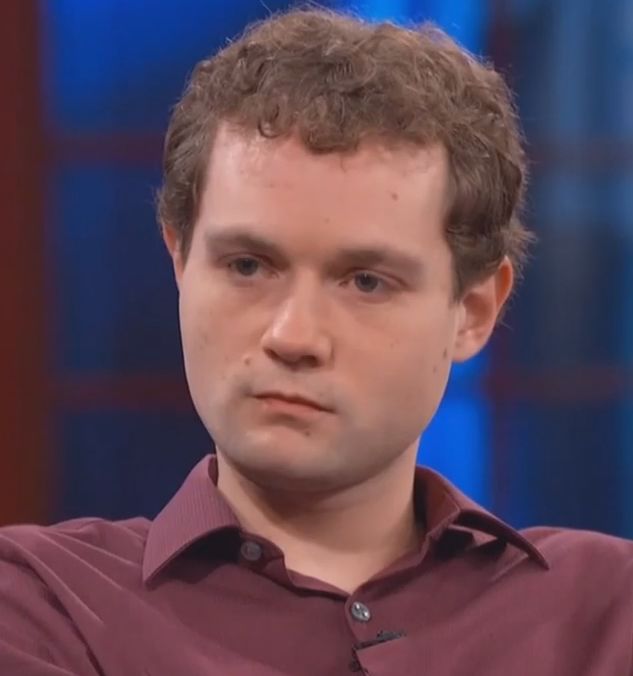
Justin - the young man at the centre of the show
Justin – the young man at the centre of the show

Addiction of any sort can be a traumatic situation for all parties caught within it; be it the person with the addiction or their family or loved ones. As such, I couldn’t help but wonder just how Dr Phil  –  a programme I’ve admittedly never seen before, but which has oft been accused of taking a “simplistic” approach to the topics covered – would handle the issue. Would it sensationalising the issue and Justin’s situation, or would it reduce the issue  to platitudes and sound bites for the sake of daytime television?

However, what we actually get is a reasonable study of Justin’s life and the factors which have contributed to his situation. These include long-standing family history (suicides, mental illness, alcohol and drug abuse); his mother’s own reticence to constructively deal with his childhood obsession with video games; his own personal trauma of being hit by a car at age 15, with a possible undiagnosed closed head injury that brought about a subsequent change in his nature. All of these are covered in a manner which is neither accusatory nor gratuitous, with Dr. Kenneth Woog of the Computer Addiction Treatment Program, providing context for the similarities between computer gaming addiction and more recognised forms of addiction.

There are the inevitable elements of drama in the show – notably around Justin’s examination by Dr. Rachael Ross and the clips of his home lifestyle; but on the whole what is presented here is a balanced look at a young man’s addiction, although it has to be said that given the segment is just 38 minutes in length, some matters are only lightly touched upon; at several points I found myself wanting Phil McGraw to follow-up more closely on comments passed by both Justin and his mother.

However, for a show that does get critiqued at times for its manner in addressing some issues, as noted above, this one did seem to offer a solid means by which Justin could obtain further help, both through the Lawlis Peavey PNP Centre (often used as a referral centre in the show) to further evaluate Justin’s condition, and the offer of a stay at a dual diagnosis treatment centre to help Justin deal with his addiction, depression and anxiety. I’d also hope that some measure of support was also extended to his mother and step-father, both of whom could perhaps use some counselling in how to more positively support Justin in handling his addiction.

I’m still not overly convinced as to the amount of clinical good that comes out of programmes like this, and there is certainly a good deal that could be debated about their merits or otherwise. As it is, and strictly in terms of this particular segment, it would be interesting to see a follow-up, say a year or so hence, so that we might learn how Justin has managed with his addiction and the results of the assistance offered to him.

As far as Second Life is concerned, the show references it twice. The first time is just after the opening titles, when there is around 90 second of footage showing McGraw’s avatar in-world (and McGraw initially manipulating it). Then, around two-thirds of the way through the show, Lab CEO Ebbe Altberg gets to talk about the more positive influences of virtual environments, overlaid with further clips from in-world, for about 60 seconds. In both instances, the platform is used to underline the fact that engaging in computer games and virtual environments is not in itself necessarily toxic, and to counterpoint any generalisations that might be drawn that this is the case. As such, I’d say the platform stood up well in the show.

Lab invites users to “Ask the CEO”

secondlifeOn Friday, June 26th, Linden Lab CEO Ebbe Altberg faced questions from Saffia Widdershins, Jo Yardley and the audience in the last of the Meet the Lindens series sponsored by Prim Perfect.

I have a transcript of that discussion / Q&A, as recorded by Chakat Northspring, available in this blog. Since posting that blog post, the Lab have posted the official video footage from the session.

However, as the Lab notes in a blog post published on Tuesday, July 14th, there were a number of questions asked (many in chat from the audience) which didn’t get to be addressed. There are also doubtless many more questions people have about both Second Life and Project Sansar they hope might be answered.

To this end, as again as indicated by the Lab’s own blog post, a new forum discussion thread has been opened, and residents are invited to Ask the CEO questions about either platform which he, or designated staff members from the Lab, will endeavour to answer – starting with those that didn’t receive an answer during the show.

Ebbe and Saffia getting ready for the SL12B discussion on June
Ebbe and Saffia getting ready for the SL12B discussion on June 26th – now you can put further questions to him on Sl and Sansar via the forums

This isn’t the first time the Lab has taken such an approach; following the initial news about Sansar’s development being given by Ebbe back in June 2014, he spent a considerable amount of time within a forum thread attempting to answer questions from users (and at the time, unfortunately being faced with no small amount of trolling by some determined to try to derail the discussion).

So, if you need to refresh you mind on what was said during the SL12B interview, feel free to check-out the official video or cast your eyes through my transcript. Then, if you have questions for the Lab on either Sansar or SL (or both), why not head on over to the forum and write them up?

Dolphin viewer bows out of Second Life, Adams style

dolphin-logoSometimes it takes us humans quite some time to admit something to ourselves that we don’t want to admit, but eventually there’s no more putting it off.

It is with a heavy heart that I have to announce the end. It’s over. No more new Dolphin Viewer.

Thus opens a blog post dated June 22nd, from Lance Corrimal, which I am ashamed to admit I missed when it appeared.   It serves as an introduction to Lance officially announcing the end of all Dolphin viewer development / maintenance work at his end of things.

He goes on:

With my current RL job and all the travelling that I’m doing there are more exciting things to do with the little time I have to spend on SL and other hobbies, than maintaining a third-party viewer… especially when most of the “maintenance” involves fixing stuff that shouldn’t have been broken in the first place.

I have been porting a few of the things that used to be in Dolphin Viewer 3 to Firestorm in the last few weeks …  I invite the FS team to grab anything from there that they like.

TheDolphin Machinima Toolbox was one of the last additions to Dolphin to be release (in beta form), and held a lot of promise
The Dolphin Machinima Toolbox was one of the last additions to Dolphin to be release (in beta form), and held a lot of promise

This is sad news; over the years Lance had built the Dolphin viewer into an excellent offering (it was my second viewer of choice of a good while). But time has conspired against him, even though he did attempt to get the viewer back on track (and in doing so started implementing some nice additions, such as the Machinima Toolbox, seen on the right).

But the viewer is very much a living, evolving things, and playing catch-up, even with the best will in the world, can become increasingly hard (and probably more than a little demotivating when the “to do” list constantly remains longer than the “done” list). This being the case, we can hardly blame Lance for wanting to spend what free time he has to devote to SL in enjoying things in-world that he finds fun and relaxing; I know if I were in his shoes, I’d have given up a long time ago.

Lance closes his blog post with a paraphrase of a Douglas Adams quote, saying, “Goodbye, and thanks for all the fish!”

I’ll add a small response of my own, “thanks, Lance, for all of your work over the years. May the wind be always be at your back!”

With thanks for the pointer to Nalates Urriah

A further look at the Experience Tools viewer in Second Life

secondlifeUpdated, July 2nd: A series of questions were asked at the Simulator User Group meeting following the release of the Experiences Tools viewer. A summary of those asked and which I’ve seen asked elsewhere has been added to the end of this article for reference.

On Tuesday, June 30th, the long-awaited Experience Tools viewer was promoted as the de facto release viewer by Linden Lab.

An official blog post announced the move, indicating that while experiences created using the new capability will be open to all, the ability to create new experiences using the tools is available to Premium members only, who have the opportunity to create one Experience by default.

For those not previously aware of Experience Keys, I’ll simply quote from the blog post issued by the Lab back when Experience Keys reached release candidate viewer status:

Experience Keys are a powerful feature that allows creators to build more seamless and immersive experiences in Second Life. Without this feature, you need to grant individual permissions to every single scripted object included in an in-world experience, and that can mean a lot of dialogue boxes interrupting the fun! Experience Keys make it possible for creators to build experiences that ask your permission just once. In other words, you can opt-in to the entire experience, rather than having to grant individual permissions to every single scripted object included in it.

A number of Experiences are already available across the grid for people to use. The Lab’s Cornfield shooter game available through the Portal Parks, for example, utilises Experience Keys, as does Loki Eliot’s outstanding Childhood Dreams, available at SL12B through until Saturday, July 4th, 2015. There’s also a growing section of the Destination Guide devoted to Experiences.

You don’t actually have to use the Experience Tools viewer to visit and participate in any Experience. However, the viewer does provide a lot of additional information to users than viewers without the code, and is essential for those who wish to build Experiences – so expect TPVs to be updating with the code as soon as they can.

An Experience dialogue box. On the left, as it appears in an Experience Keys enabled viewer, with options to display the Experience Profile (by clicking the Experience name link) and to accept / refuse the Experience and to block the Experience (so you'll never see a prompts anywhere for it again) or to block just the current inviter. On the right, how the same dialogue appears in a viewer that is non Experience Keys enabled - you can only opt to accpt or refuse the invitation
An Experience dialogue box. On the left, as it appears in an Experience Keys enabled viewer, and on the right, in a “non-Experience Tools” viewer. Both will allow users to join  / refuse experiences, and indicate the levels of permissions the Experience is requesting, but the Experiences Tools viewer provides additional options

As explained in the Lab’s video, once you have accepted an invitation to join an Experience, you never need to do so again; the fact that you have accepted it and the permissions you have awarded it in respect of your avatar are remembered – so each time you re-visit, you’re not hampered by having to accept. If there are HUDs and other attachments applicable to the Experience, these are automatically applied to you on your return; if there are scores or points associated with the Experience, these are also recorded and restored on your next visit. When you leave, HUDs and other attachments belonging to the Experience are removed and any permissions you’ve granted are revoked.

If you spend time in a place that has an Experience you’d rather not join, and don’t want to be bothered by invitations to do so each time you visit that place, you can opt to block the Experience (or specific objects offering invitations to the Experience). This will prevent further invitations being sent.

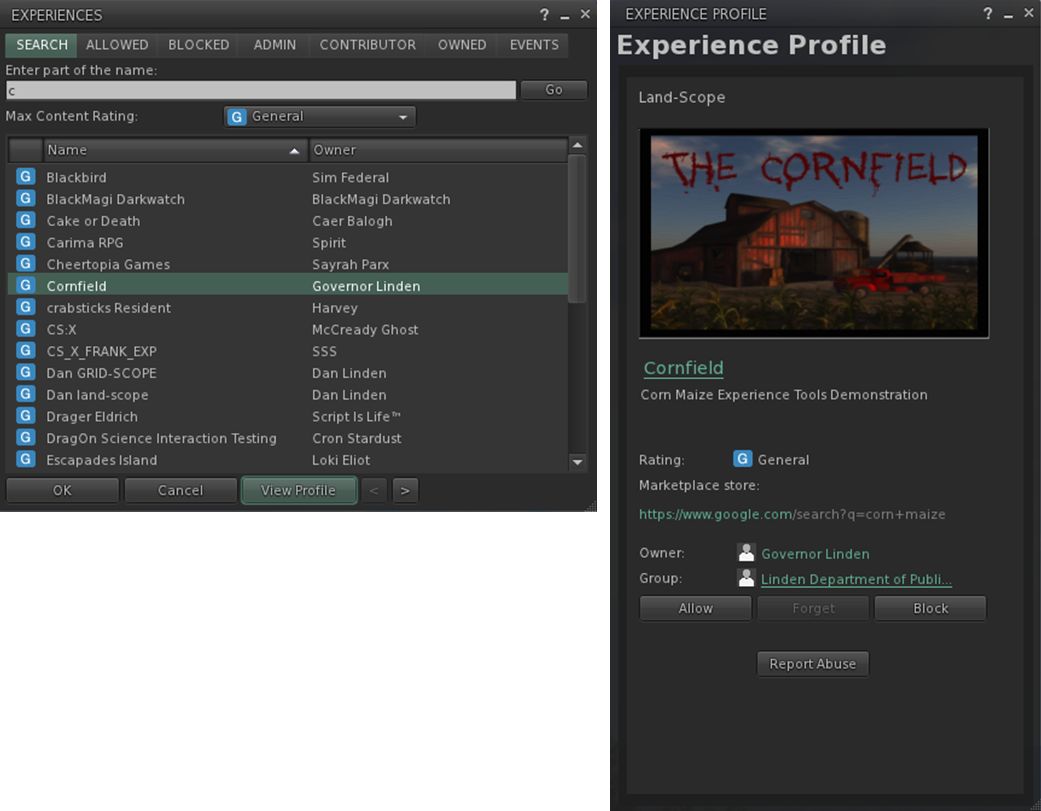
The Experience floater (left) can be used to managed the Experiences you've joined, blocked, own, etc., and allows you to see what events have acted on your avatar and to search for Experiences.
The Experience floater (left) can be used to manage your Experiences and to display more information about them through the Experience Profile (right) – click for full size

For Experience users and creators, the viewer introduces two new floaters – the Experience panel and the Experience Profile, both shown above.

The Experiences floater (Me > Experiences) helps you keep track of the Experiences you join or block, or which you are involved in as an owner or collaborator. It also allows you to search for Experiences in SL, and tracks the actions taken on your avatar by the Experiences you’ve allowed.

The Experience Profile provides additional information on a specific Experience, and can be displayed a number of ways. You can, for example, highlight an Experience in the Search tab of the Experience floater and then click the View Profile button. You can also click the Experience’s link in the Allowed / Blocked / etc., tabs to display its Profile.

The Profile allows you to Allow or Block an Experience, make an Abuse Report if it is doing something intentionally abusive (such as repeatedly orbiting you). If you wish to leave an Experience, you can use the Forget button. Note that the next time you visit, it will treat you as a new joiner. If an Experience Profile includes a SLurl, clicking on it will open the Places floater, allowing you to teleport to the Experience.

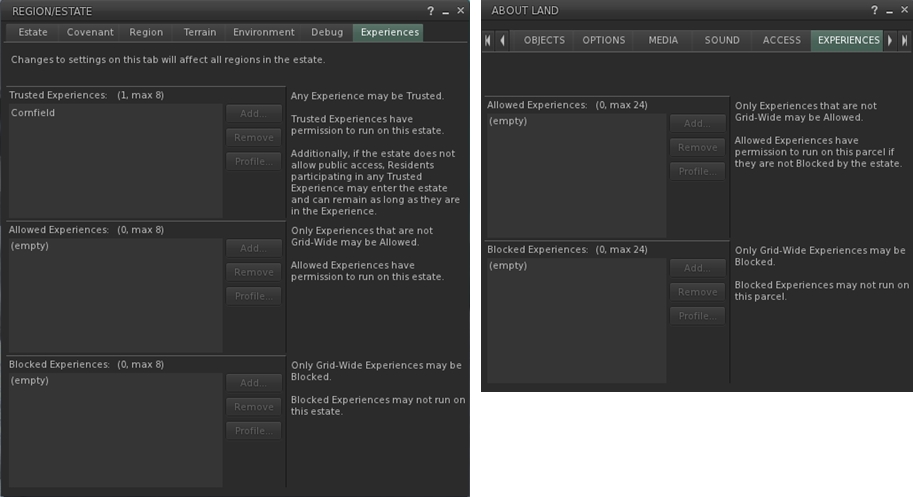
The Experience Keys viewer introduces additional Estate and Land tabs to allow management of the Experiences enabled at estate / region and parcel level.

Experience Keys – which allow Experiences to run – are currently restricted to the region / parcel level. There are currently no keys which automatically allow an Experience to run across the entire grid, although this may change in the future. To help land owners to decide which, if any, Experiences they wish to have running on their land, the Experience Keys viewer also introduces two new tabs to the Region / Estate floater and the About Land floater (shown above).

Adding an Experience to your Land should only be done if you’re actually an active collaborator / participant in providing the Experience to others, or have created it yourself. Do note as well, that a hierarchy that exists between regions and parcels; if an Experience is blocked at Estate level, it cannot be run within a parcel on that estate.

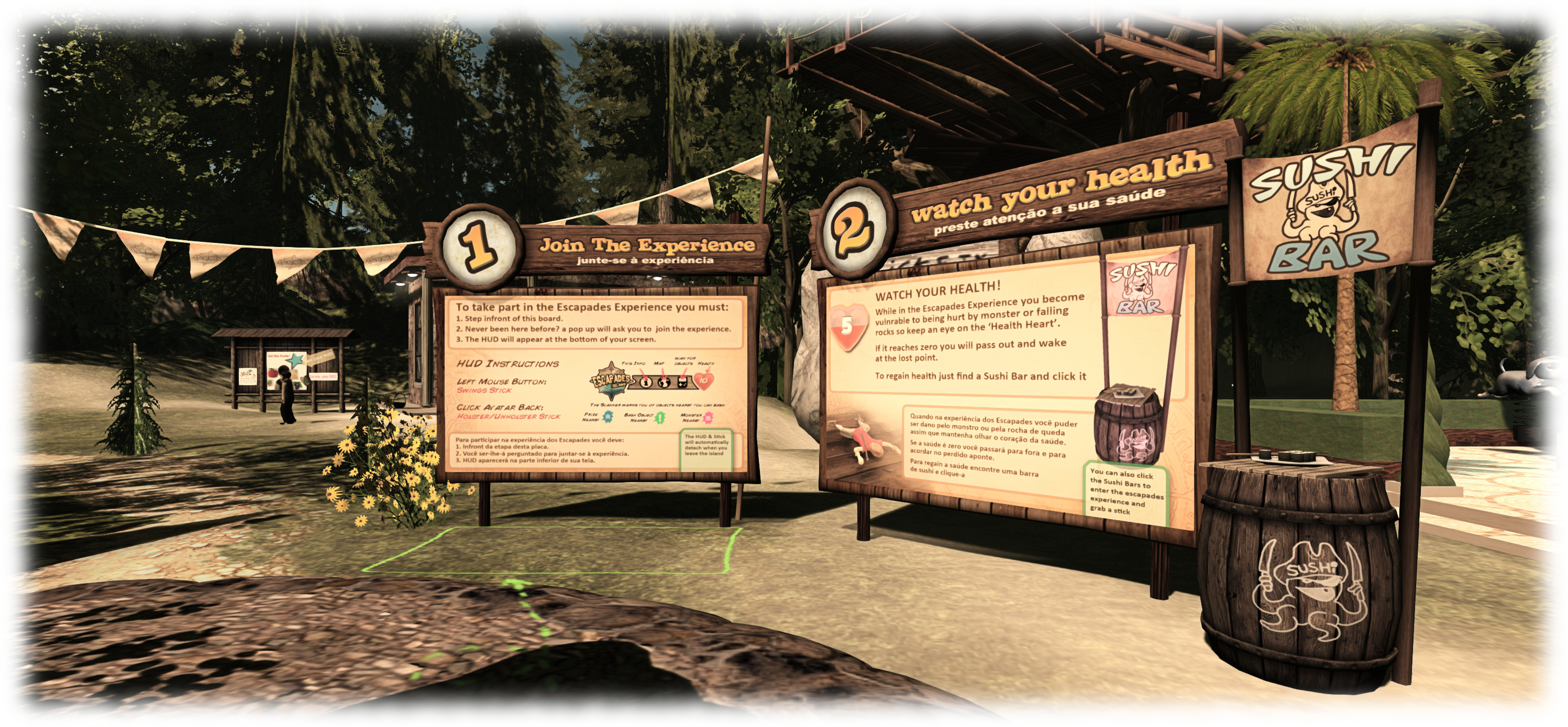
Loki eliot also has an Experience based game available at Escapades Island
Loki Eliot also has an Experience based game available at Escapades Island

In terms of creating Experiences, and as noted above, this is limited to Premium member. There is a lot of power involved in the capabilities, and so maintaining some degree of accountability with those using them is vital; so limiting the creative element to Premium members is a good way of ensuring that accountability (providing accountability is also why there are options to report abusive Experiences in both the Experiences floater and individual Experience Profiles).

Continue reading “A further look at the Experience Tools viewer in Second Life”

Celebrating historical communities in Second Life

The DECADES event region
The Decades event region

Commencing at 12:01 AM on Saturday, June 27th is a special 24-hour event celebrating historical role-play and educational communities in all their forms throughout Second Life.

Decades is a collaborative event involving a core team of 12 people who have come together to develop and build an incredible region of event areas, builds, exhibits and landscaping in  which no fewer than 19 live and / or interactive events will be held over the 24 hours (see the schedule below) amidst a total of 11 exhibition and activity spaces.

describing the event when inviting me to a special preview of the region, Sister (SisterButta), one of the organisers (and the co-conspirator in the original idea from which Decades grew, along with Freda Frostbite), said, “Most of us can think of at least one historical and/or educational region or RP community in SL that has been lost forever due to difficulties of financing these very precious and specialized builds and communities. We hope Decades can play a part in stemming the tide, increasing awareness and build bridges between people from all around the metaverse who celebrate history of whatever era.”

The Decades Pavilion

Throughout the event, people will be able to join-in with activities, tour exhibits, enjoy live performances, and more. There will be balloon rides and pony rides, even a zip line.  There is an historical ship to explore and an aerospace museum which – I can honestly say – is perhaps the best of its kind I’ve seen in Second Life; put together in less than 3 weeks and incorporating the guiding hand of a genuine NASA engineer.

Donations and funds raised through the kiosks scattered across the region will go directly to Historical Communities and Royal Courts,  which is designed to be an umbrella website for historical communities in virtual worlds, with the intent for it to become a clearing house for information on communities, events and activities. A place where people throughout the metaverse with an interest in historical RP and education can brain-storm and which can provide resources to for educators and historians in the use of immersive virtual environments.

Decades actually started quite modestly just a few weeks ago. “Originally, Freda and I thought, ‘oh, let’s have a dance to raise money for Royal Courts,” Sister told me as we wandered through the gardens of the region. “Then I said, ‘I’ll do an art exhibit of paintings from different time periods…’, and then…and then…voilà. it grew! Fast!”

Decades offers plenty to see and explore
In Memoriam, one of several places to visit at Decades

As it grew, so Decades attracted more and more support, with  Jacon Cortes de Bexar, Cloee Heslop, LadyFandango, Merrytricks,  Robijn, Claire-Sophie de Rocoulle, Aldo Stern, Heximander Thane,  Serenek Timeless and  Lucerius Zeffirelli all playing key roles in establishing the region and its associated activities, together with Freda and Sister.

Touring the region, I couldn’t help but be taken by the care with which everything has been put together and presented. As already noted, the Regional Air and Space Museum in the north-east corner of the region is simply mind-boggling in the exhibits it offers, drawing on content creators from across Second Life – and it is something I’d love to see preserved well into the future.

Towards the centre of the region there’s the main pavilion, with a display of historical horse-drawn and road vehicles, again from creators across SL, to one side, as well a a small display of vehicles of war from Da Vinci and the two World Wars; and an art display on the other. And that’s just the start – there really is a lot to see; I’m only going to make passing mention of Merrytricks’ delightful House of Cards maze, the fashion pavilion, the observatory, and the arts and period exhibitions going on throughout the event – so if you want to know more about them, make sure you set aside time on Saturday to visit Decades!

Decades: the Observatory on the hill

Continue reading “Celebrating historical communities in Second Life”

No more improvements planned for my.secondlife.com

During the Meet the Lindens conversation held at SL12B on Thursday, June 25th which featured Danger Linden, Senior Director, Product, Virtual Worlds and Troy Linden, Senior Producer, a question was asked about the SL feeds – also referred to as my.secondlife.com – and whether they would continue to be developed or enhanced.

Danger Linden was direct and honest in his reply:

That’s a though one, because I don’t think anyone’s going to like the answer … The short answer is no.

It’s kind-of a mess, and it’s very difficult to maintain; it’s usage rate is on the low side compared to other feature. So, it may not be a popular answer, but no more improvements are planned on that.

My.secondlife.com has had something of a chequered history. Web Profiles first appeared in 2011, growing out of the Lab’s attempt to provide a social media style capability to users with the acquisition of Avatars United in late 2009 / early 2010, and which was shut-down at the end of September 2010. The feed capabilities followed in mid-2011, and the capabilities grew from there.

My original web profile on my.secondlife.com
A part of my original web profile on my.secondlife.com

From the start things were a tad awkward; people’s rezdays lacked the year in which they were born (see WEB-3486  – thank you, Whirly!); profiles were very slow to load when viewed from within the viewer; once loaded, they initially required a fair proportion of screen real estate.

When the feeds were introduced, people weren’t too happy that posting anything to them from within the viewer automatically appended your location, whether you wanted it to or not, promoting concerns about the potential for stalking and similar.

The Lab, however, took the concerns and critiques on-board, and listened to suggestions. Years of birth reappeared; the profile panel was resized; better controls were added for who could see your feed / interact with it; a Twitter-like Follow button was added, as was a direct messaging capability (subsequently removed at the end of 2013 due to abuse). All of which made the feeds far more comfortable for people to use, and people did start using them more frequently as a result.

And even when things did persist in going sideways at times – such as the 2012 issues of the wrong names, posts and images turning up on the wrong feeds, or the feed gremlins dining on snapshots during upload, people still continued to use the feeds, and suggestions for improvements continued to be made.

I've tended to use the feeds for blog post notifications, the odd snapshot upload and the occasional chit-chat
I’ve tended to use the feeds for blog post notifications and snapshot uploads. It’s fun being ability to highlight the things we encounter in SL and sometimes have a little fun with them

Hopefully, “no plans to improve” will be shown to mean just that: no new shiny added to the feeds, and not that general problem solving when thing do hiccup will cease, or that the feeds themselves are liable to suddenly poof in the near future. While it may be a relatively small number of people who regularly use the feeds, they do so with gusto,  finding them a handy means of keeping in contact with friends and contacts.

The snapshots capability is a great means of pointing people to places and events in-world, and in sharing moments. Similarly, the comments capability is extremely handy for having informal discussions in an easy-to-follow format that’s a lot more immediate and convenient than using things like forums or shuffling through Plurk events. Also, and unlike Twitter, feed comments are not limited to 140 characters, something which can make the conversational flow a little diffic …