In keeping with statements made in recent user group meetings, Linden Lab has announced changes to the the Second Life minimum system requirements for both Windows and Apple MacOS operating systems which are to take effect from Saturday, July 1st, 2023. Specifically, from that point onwards, Linden Lab / Second Life will no longer support:
The 32-bit version of the Windows operating system.
Any version of MacOS below 10.13 High Sierra.
Available stats for Windows suggests that the percentage of users running the 32-bit version is in the low single-digit numbers by percentage – and many who are running it do so on hardware capable of supporting the 64-bit version. The stats for MacOS version below 1013 are less clear, but High Sierra has been generally available since 2017.
With these changes it is further noted that:
Users running the viewer on the 32-bit Windows will still be able to access Second Life after July 1st, 2023 – however, they will not be supported by the Lab’s support teams if they have viewer difficulties.
User on versions of the MacOS preceding 10.13 will need to upgrade their operating system to a newer version to access future Second Life viewer updates.
The steps are being taken to allow the Lab to focus on stability, performance and maintaining compatibility with the most up-to-date technologies, as well as viewer security considerations.
To help those users either running Windows 32-bit or an older version of MacOS maintain parity with the SL minimum system requirements from July 1st, 2023 onwards, the Lab provides the following advice:
Second Life 32-bit Windows Viewer Users:
Ensure your computer meets the system requirements for the 64-bit Viewer.
Back up your preferences and settings before making the transition.
Download and install the 64-bit version of the Second Life Viewer.
MacOS Users Older than 10.13:
Check the Apple support website for information on upgrading your operating system.
Upgrade to a supported version of MacOS that meets Second Life’s minimum requirements.
Before upgrading, backup your important files and make sure your system is compatible with the newer version of MacOS.
For full details on the changes, please refer to the official blog post. Concerns / feedback should directed to Linden Lab, as I am unable to address support issues.
Tuesday, March 28th, 2023 saw the Scripted Agent Access control – also known as “Ban the Bots” update – became a grid-wide capability in Second Life.
Designed as a means to provide estate / region holders with the ability to prevent unwanted scripted agents (“bots”) from accessing their regions. It is a response to increasing concerns over the use of scripted agents to gather data – including user data – from across the grid and send it for processing / viewing outside of the Second Life.
The following is quick overview of the functionality as it is now – full information can be found in the Scripted Agent Estate Access FAQ from Linden Lab.
How does it Work?
Currently, the Scripted Agents Access control uses an estate-wide flag called deny_bots, which for most viewers is currently accessible as a Debug Console setting, although a viewer UI update is available in the most recent official RC viewers found on the Alternate Viewers page, and will eventually be coming to the official release viewer and TPVs as they adopt it.
When ON, the flag prevents any properly indicated Scripted Agents from accessing a region. The only exceptions being:
It is region / estate wide, meaning it cannot be set at / excepted from individual parcels within a region.
When the the flag is OFF, all Scripted Agents are treated the same as any other avatar with regard to estate access.
Setting the Flag
The flag can be set in one of two ways: via the Region Debug Console or (for those viewers that have the update) via World Region / Estate (CTRL-R).
Via the Region Debug Console
If you do not have the Develop(er) menu option displayed, reveal it in one of the following ways::
Go to Advanced → Show Developer Menu.
Press CTRL-ALT-Q.
Go to Preferences → Advanced Show → check Show Developer Menu.
With the Develop(er) menu displayed, either:
Select Consoles → Region Debug Console from the menu, or:
Press CTRL-SHIFT-`
The Region Debug Console floater window will open; in the input field at the bottom of the console, type:
set deny_bots TRUE
Press ENTER. If the command is accepted, the floater will echo:
estate setting deny_bots = on.
If the console fails to echo for some reason, type the following and press ENTER:
get deny_bots.
The console floater should respond with the Estate setting message, above.
If you do not have permission to set the flag, the console will respond:
unknown or unauthorized parameter “deny_bots”
Left: the Region Debug Console, showing the deny_bots command options. Right: denying scripted agents option within the Region / Estate floater (when available in all viewers. Images via Linden Lab
Via the Region / Estate Floater
Again, note that this option is currently being rolled-out on Linden Lab RC viewers, and may take time to reach all third-party viewers (TPVs).
Type CTRL-R to display the Estate / Region floater.
Click on the Estate tab to open it, if required.
Look for the option Must Not Be A Scripted Agent, and click the check box to mark it.
If there is no such option, use the Region Debug Console option, as described above.
Click Apply.
Close the Region / Estate floater.
Additional Notes
If your estate has multiple regions, it may take time for the setting of the deny_bots flag to propagate out to all of them.
If a region does not appear to update with the flag being set, try restarting it, this should force the update.
If you have attempted to set deny_bots with the region console but the region continues to fail to reflect the change, please contact support.
If you get the error message “Estate already allows bot access, no change”, please try restarting the region, and then toggle deny_bots again. If you’re still having trouble after restarting, please contact support.
Note that the flag only applies to registered Scripted Agents (and all bots should be properly registered as such via the account’s Scripted Agent Status page on the account dashboard); it will not prevent unregistered bots accessing a region / estate. However:
It is a violation of the Second Life Bot Policy for anyone to operate a bot or bots which are not so identified. Failure to do so on the part of a bot operator can result in an account suspension.
If you have set the deny_bots flag, but believe your region is being repeatedly visited by an unregistered Scripted Agent, file an abuse report under the Disturbing the Peace category with the scripted agent’s name, where (region name) and when (date / time) it was seen.
As has been noted through various Web User Group (WUG) meetings, Linden Lab is engaged on a refresh and update of Second Life web properties.
This initially started in November 2021, with an overhaul of the Second Life Web Search, starting with a a facelift the the Search page before moving on to an overhaul of the ElasticSearch engine behind it as well, including the implementation of a scratch-built relevance engine.
Following this, time and effort was put into developing tools and capabilities intended to allow the Lab to more quickly refresh and update all Second Life web properties, and make them more uniformly manageable whilst affording them a newer, more modern look and feel. In February 2023, this work led to the roll-out of the new Land Portal front-end, as I reported in my February WUG summary.
Granted, and like the initial deployment of the Web Search update, there was not really anything behind the initial update – it initially just offers (at the time of writing) a fresher, cleaner portal by which to access the various Second Life web pages dealing with all matters of Land – Linden Homes, renting land, buying land, etc. However, it gave a feel for the direction the Lab is taking with its web properties, and work is apparently in progress (or about to start) in overhauling the Linden Homes pages to bring them into line with the styling of the Portal Page, and we will doubtless be seeing the results in due course before the work moves on to other land-related pages.
In the meantime, the Destination Guide has also gone through a facelift, with the new look being quietly deployed in the last week(ish) to present a new look Destination Guide with improved features. This new design follows the broad brushstrokes of the Land Portal in terms of layout – menu bar with logo to the top, large corporate footer area, user sign-in / log-out / sign-up links to the top right, the use of the new colour scheme, and use of large(r) images (than the “old” DG), etc. At the same time, it retains some of the look and feel of the “old” Destination Guide: the left sidebar with its list of categories, with the right side of the page used to display information on locations within the various categories. It also includes a plethora of navigation options and small touches. For example:
Clicking on any category name in the left sidebar will refresh the right side of the page to display locations in that category, and adds the category name to the small navigation bar at the top of the sidebar, between the top menu bar and the Search field.
Clicking on the HOME icon on this navigation bar will return you to the main Destination Guide page.
If the Category has sub-categories with in – indicated by the presence of an arrowhead – these will be exposed within the sidebar on the main category name, with the details of locations in the first sub-category/ies being displayed on the right of the page.
Alternately, clicking on the arrowhead will display the list of sub-categories below the main category name without moving you to a display of destinations with the category, allowing you to then display a list of destinations for that sub-category by clicking on the sub-category name.
Those items in the category list which have sub-categories of destinations will also display a small navigation bar at the top of the main page display, allowing you to move back and forth between the sub-categories of destination by clicking on their names.
Second Life Destination Guide refresh
In addition, clicking on the image, name or descriptive text for any destination location will move it to the top of the right-side list of destinations of the given category, together with:
A full description of the location, as provided by the owner.
A teleport button for visiting the location.
A Share/ embedded option button for creating a widget for the location which can be embedded in web pages.
A list of clickable Destination Guide categories and sub-categories in which the location is currently listed – clicking on any of these will move you to the category / sub-category.
Second Life Destination Guide refresh
Other touches include a little tick mark in the top left corner of the picture for any location currently featured in the Editors Picks section; a much clearer option for submitting locations for inclusion in the DG (Got A Favourite Spot?, at the bottom of every page); the ability to order the listings for a category by newest first, or alphabetically / reverse alphabetically, etc.
Some Grumbles
The new layout also has some irritating features I hope LL will address:
No option to view a location on the World Map. I find this a personal irritant because:
The Map gives locations within the DG / Second Life a sense of place, that they are part of a world and not just individual environments separated from everything else, suggesting they are stand-alone environments (a critique often levelled at Sansar).
Being able to view a location on the Map can answer some basic questions for the SL explorer: is it a standalone region? Is it part of an estate that might be further open to exploration? Is it on the Mainland? If so, which continent, and what might it be close to?
Similarly, seeing a location on the map can help determine whether or not it is accessible by means other than teleporting – such as by air, water or road – thus allowing people options in how they visit and (again) offer that sense of interconnectedness between places in Second Life.
The menu options at the top of the DG pages – What Next? Shopping, etc., – open pages in a new browser tab.
This stands in contrast to the Land Portal, when the options open in the same tab (and so the Back button can be used), which many users likely find preferable.
It is also annoying in that one can end up not only with multiple tabs being needlessly opened, but with tabs themselves chomping at a computer’s (potentially limited) resources.
Conclusion
The above grumbles noted, generally, I like the approach taken with the new page format for SL web properties. Fonts are reasonably large and hopefully a lot clearer than the “old” (/current) pages for those with vision impairments, and the use of colour is pretty reasonable as a well – certainly, the use of a lavender pink for the buttons on the pages does allow them to stand apart and be seen as buttons whilst not being as in-yer-face as the orange which has previously been used. That said, the Destination Guide is there for you to poke and decide for yourself as to whether or not you like it.
On Friday, March 10th, 2023, Linden Lab streamed a special session of Lab Gab featuring the Office of Second Life: Grumpity Linden, Mojo Linden and Patch Linden.
The session was built around announcements and updates relating to various initiatives and product developments. Note that the following is not a direct transcript of the entire session, but is intended to record the key points discussed.
For ease of reference, timestamps are provided to the relative points within the video where specific topics are discussed, allowing readers who prefer to listen to the comment directly to be able to do so.
Grumpity Linden: heads up Second Life Product team, where she has overseen a shift to growth, a stronger, more balanced economy, movement towards better community cohesion, and an overall forward-looking approach. She originally started at LL whilst working for The Product Engine, and was involved in the development of Viewer 2 (as designed by 80/20 Studio), prior to joining LL full-time in 2014. As the Vice President of Product, she is responsible for coordinating the various teams involved in bringing features and updates to Second Life, liaising with legal, financial and compliance to ensure features and capabilities meet any specific requirements in those areas, and so on; work which can involve looking at specifics within various elements of the overall SL product, such as UI design and layout, etc.
Mojo Linden: joined the Lab in 2021 at the Vice President of Engineering, filling the shoes worn for so long by Oz Linden. A 20-year veteran of the gaming industry, he has been responsible for launching numerous games across multiple genres and platforms, and has a strong understanding of platforms, architectures, and product development and technical capabilities. In his role at the Lab, he has shown enormous openness and candour in seeking to increase the platform’s functionality and performance, and in pushing to expand SL’s capabilities.
Patch Linden: originally a Second Life resident and business owner who joined the platform in 2004, and became a Linden in September 2007. He worked across a number of teams within the company – notably within the support and product spheres, and is responsible for developing the Land Operations team, and more recently setting-up the company’s support office in Atlanta, Georgia. Since 2019, he has been Vice President, Product Operations.
Grumpity Linden holds up a mobile ‘phone showing Second Life running on it using the upcoming SL Mobile capability
Built upon Unity.
Core development of this product began in October 2022, with the aim of gaining as high a fidelity of experience on mobile as is possible.
Works on all platforms – Android, iOS, tablets, ‘phones.
The product is still very much in development, with the focus having been on graphics fidelity, including full avatar rendering.
There is some way to go before the product is ready for release – work at the moment is on smoothing out some of the rendering edge cases before moving on to adding further functionality.
Initial release is planned for late 2023 with limited functionality, which will then be iterated upon to add more and more functionality and capabilities.
Grumpity re-iterated the drive (initiated by the late Ebbe Altberg, not long after he joined LL as CEO in 2014) to lower the cost of virtual land in SL – as had long been called for by SL residents – whilst also offsetting the lower land tiers through increases in fees elsewhere within the platform.
The fee increases – as noted in the official blog post – also relate to increased costs LL has faced, thanks to the general economic situation.
The fact that the option for paying for land using L$ (restricted to Premium Plus subscribers and limited to one region only at the time of writing) is higher than the USD fee for the same is explained as being a combination of the facts that the L$ to USD exchange rate, the fact that LL have to do the lifting of conversion from L$ to LSD through the LindeX, and as such must participate in the SL economy.
It was also noted that paying in L$ means subscribers avoid being charged VAT / state sales tax / similar.
Whilst the BonnieBot website has take steps away from publishing information which might be regarded as being within Second Life under the expectation it is private (a point that Linden Lab seemingly missed in their initial responses to forum thread postings), the Lab has recognised the need for clearer / better policies and has promised to provide them.
These new policies have gone through the necessary compliance and legal reviews within Linden Lab, and will hopefully be published in week #11 (commencing Monday, March 13th, 2023).
In addition, a new set of estate / region controls are being developed to enable estate / region holders to better control the use of Scripted Agents within their land. These will be deployed “soon” – hopefully within weeks of this session being aired.
In brief: PBR essentially models the flow of light within computer graphics in a manner which mimics light reflections on surfaces in the physical world.
It represents a significant technical step forward in graphical rendering for SL (in the order of 10 years).
The core of this work is to support a new approach to material maps / surfaces either directly on products development for SL by content creators or which can be used on suitable objects within Second Life, which give they sense of physical world lighting and reflection.
In particular, it draws on the Khronos glTF 2.0 specification, and allows creators to more readily use a range of tools supporting that standard (including Blender) and also contents libraries, etc., in support of their work.
An Intel-developed scene imported by Nagachief Darkstone and WindowsCE to demonstrate reflection probes (note the reflections on the knight’s armour – these are not generated by attached environment lights but by a reflection probe within the building structure. Image courtesy of Rye Cogtail
Also included in the PBR work is reflection probes – which in simple terms enable light sources to generate reflections of an in-world scene on suitable surfaces (i.e. those using the materials system).
None of this work does not necessarily mean users need higher specification computers in order to view it; however, reflection probes can impact system performance, so the viewer will include an option to enable / disable these if they prove to be a performance hit for people.
Demos of the PBR work, including an imported Sponza scene, can be found on the following regions on Aditi (the Beta grid): Materials1; Materials Adult and Rumpus Room 1 through 4.
The PBR viewer itself – required to see the content on Aditi, is (at the time of writing) still in the Project Viewer stage (so not ready for use as a primary viewer!) and is available through the Alternate Viewers page.
The next stage of the project is to provide support on Agni (the main grid) and promote the viewer to Release Candidate status, both for more widespread testing, but there is no set time frame for this to happen.
This work does not mean LL are investing in a new graphics engine – this work, and the recent performance improvements work has been on updating and enhancing the existing graphics engine to better support users and what might be regarded as recognised graphics standards.
VR still requires a consistent 60 fps left eye / right eye), and for many; the feeling at LL is that SL is not there yet even with all the recent performance improvements.
Various initiatives – adoption of Vulkan, the Puppetry Project – should help improve things further, and LL might reconsider VR headset support in 2024.
This was a large update (lifting the search engine from version 2.3 to 8.4, and did involve some issues on deployment, which are being addressed – see: Updates to Marketplace Search.
Further fixes and improvements to the update will be deployed in due course, the first of which will be Boolean searches.
A fix for Featured Lists not updating correctly is also due to be deployed “soon”.
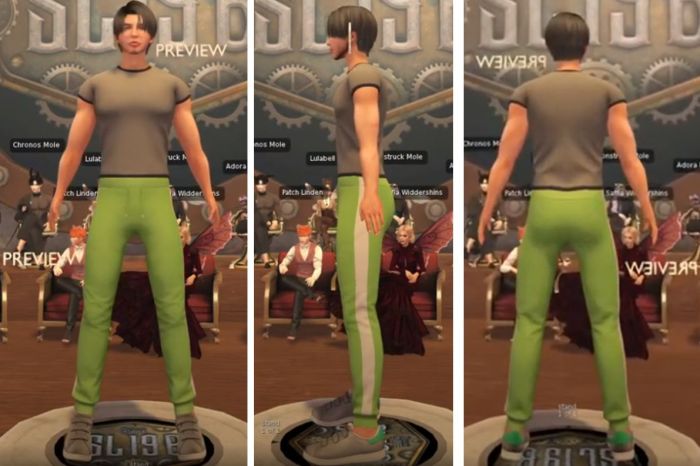
The avatars are now regarded as completed, and work is currently focused on developing clothing and accessories for them.
A preview version of the new, single mesh (head-to-toe) avatar, which will use by mesh clothing and Bakes on Mesh, and be open for creators to design clothing and accessories
That said, the project has taken longer to develop than had been anticipated.
There will be a dev kit for creators wishing to support the NUX Avatars. This will be launched ahead of the release of the new avatars.
The entire system is intended to be “PBR ready” in that PBR materials may not be included in the clothing and accessories released by the Lab, but the items will be capable of supporting the use of PBR materials on them.
Everyone is pretty much having fun with the SL Mobile project, and hopes were expressed that a “blooper” reel could be made available. It was also indicated that news on the theme for the 20th Second Life Anniversary event (SL20B) will be made available in due course.
On Monday, March 6th, Linden Lab announced a series of fee changes / payment changes to Second Life which have sparked some debate.
The announcement leads with the reduction in “standard” Full private region (i.e. a region with the standard 20,000 Land Capacity) monthly tier being reduced by US $20 a month, from $229 / month to US $209 / month – the reduction being to mark 2023 being SL’s 20th anniversary.
Note that the monthly Homestead tier and the US $30 / month for the Full Private region land capacity bonus remain unchanged.
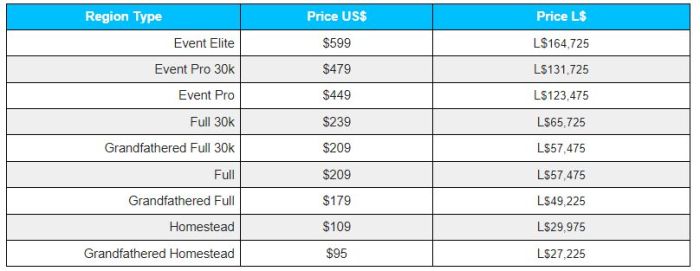
It also introduces an option that has been requested numerous times over the years: the ability to pay tier on regions obtained directly from the Lab using Linden Dollars. However this option comes with some caveats:
It is limited to only one region per Premium Plus subscriber.
It is only available for Premium Plus subscribers.
It is currently a “beta” programme, currently set to end on September 6th, 2023 – although this date may change / be extended.
Land tier rates for regions in Linden Dollars – available for Premium Plus subscribers with land holdings, per the notes above. Table via Linden Lab.
Payments are made on the basis of a stable conversion rate of L$250 to the US dollar, and to facilitate payments, Linden Lab has created a Land Payments region, although at the time this blog post was written, it did not appear to be available. For further details on it, and the all information on using Linden Dollar to pay tier to Linden Lab, please refer to L$ Payments for Land.
Fee Changes
In what is likely to be a less popular move, the blog post notes the following Lindex fee changes, which come into immediate effect from Monday, March 6th, 2023:
The buy fee is increased to 10%, with the minimum and maximum fees charged remaining unchanged at US $1.49 and US $14.99 per transaction respectively.
The sell fee is increased to 5%, regardless of the size of the transaction.
The blog post notes that these increases are to offset the above land price reductions (and thus a continuation of LL’s policy of redistributing their means of revenue generation to be less reliant on a single product (land)), and also as a result of rising operational costs.
A brief FAQ on these changes is provided in the official blog post, and specific questions on them can be made through the forum thread associated with the blog post, or possibly submitted as a question which might be asked of the SL management team as a part of the Lab Gab session to be broadcast on Friday, March 10th (in which case the question must be submitted by 09:00 SLT on Thursday, March 9th, 2023.
At 09:00 SLT on Friday, March 10th, 2023, there will be pre-recorded Lab Gab session, featuring three of the Lab’s Second Life leadership team: Grumpity Linden, Mojo Linden and Patch Linden. They will be discussing all things SL-related and responding to questions submitted in advance of the event.
Grumpity Linden: heads up Second Life Product team, where she has overseen a shift to growth, a stronger, more balanced economy, movement towards better community cohesion, and an overall forward-looking approach. She originally started at LL whilst working for The Product Engine, and was involved in the development of Viewer 2 (as designed by 80/20 Studio), prior to joining LL full-time in 2014. As the Vice President of Product, she is responsible for coordinating the various teams involved in bringing features and updates to Second Life, liaising with legal, financial and compliance to ensure features and capabilities meet any specific requirements in those areas, and so on; work which can involve looking at specifics within various elements of the overall SL product, such as UI design and layout, etc.
Mojo Linden: joined the Lab in 2021 at the Vice President of Engineering, filling the shoes worn for so long by Oz Linden. A 20-year veteran of the gaming industry, he has been responsible for launching numerous games across multiple genres and platforms, and has a strong understanding of platforms, architectures, product development and technical capabilities. In his role at the Lab, he has shown enormous openness and candour in seeking to increase the platform’s functionality and performance, and in pushing to expand SL’s capabilities.
Patch Linden: originally a Second Life resident and business owner who joined the platform in 2004, and became a Linden in September 2007. He worked across a number of teams within the company – notably within the support and product spheres, and is responsible for developing the Land Operations team, and more recently setting-up the company’s support office in Atlanta, Georgia. Since 2019, he has been Vice President, Product Operations.
If you have a question you’d like Grumpity, Moho or Patch (or all three!) to answer, be sure to submit it via Lab Gab Google Form, and to do so before 09:00 SLT, on Thursday March 9th. The session will be shown of the Second Life You Tube channel, I hope to have a summary of the session available some time after it has streamed; in the meantime, the salient details are summarised below.
Viewing Details
Time and Date: 9:00 SLT on Friday, March 10th, 2023.


 Inara Pey: Living in a Modemworld