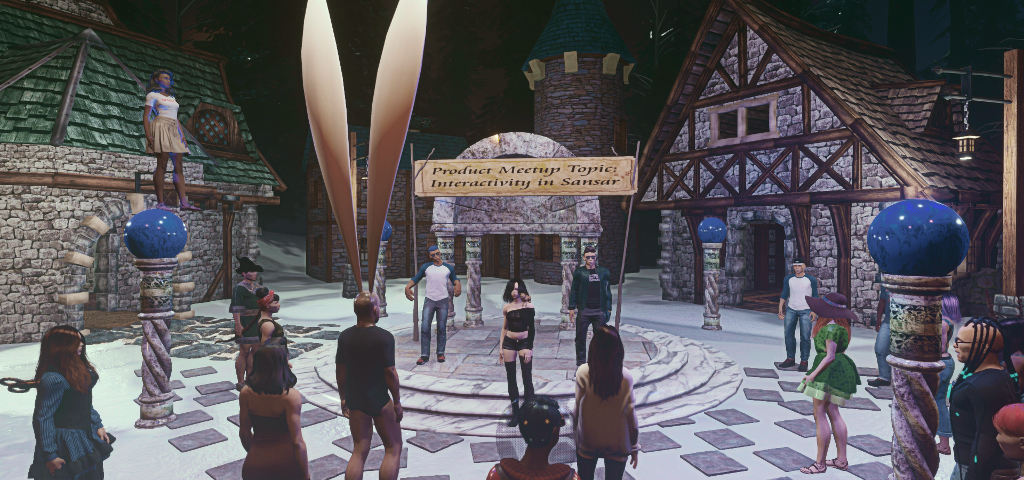
Sansar Product Meetings #10: events in Sansar

Sansar: The Whyst Garden – blog post

The following notes are taken from the Sansar Product Meetings held on Tuesday, March 6th and Thursday, March 8th. These weekly Product Meetings are open to anyone to attend, are a mix of voice (primarily) and text chat. Dates and times are currently floating, so check the Meet-up Announcements and the Sansar Atlas events sections each week. Official notes, when published can be found here.

The subject for both of the week #10 meetings was Events in Sansar. These notes are an attempt to bring together the key points of discussion from the meeting note that they represent discussion points, not necessarily ideas the Lab will be implementing in Sansar.

Changes to Event Submissions

Currently, the process of adding events to the Sansar events calendar (visible on the Web Atlas events page, and within the Client Atlas) is via e-mail submission to Linden Lab.

  • This will be changing soon to allow users to post their events directly to the events listings.
  • However, the option will initially be limited to hosting events in a user’s own experience – it will not be possible to post events taking place in an experience run by someone else.
    • This is primarily to prevent issues of people trying to unfairly monetise other people’s experiences.
    • Once there is a means for splitting revenue between event organiser and event “host” (experience creator), this restriction would likely be lifted.
    • As an alternative, LL might consider ruling that events can be held in any public experience, but where the experience creator is not the event organiser, than the event must be free of charge to access.
  • Some time after the events submissions process is revised, the system will be expanded to allow people to invite other users directly to their events.

How Should Events / Event Access Be Governed?

Controlling who can access events is still under discussion, with the Lab courting feedback on ideas for how this might be managed.

  • The Lab’s thinking is that there should be two broad categories of events:
    • Public – as in anyone can attend (subject to the payment of any associated access costs)
    • Private – the event is restricted to a defined access list / via invitation for the event host / experience owner only.
  • The above could be expanded  to a more defined set of event types that experience creators might use to define their events (e.g. live music, DJ / Dance, etc.,).
    • This is seen by some as potentially limiting and requiring additional management overhead (maintenance of the central list to suit all needs; experience owners having to resign “allowed” events depending on what they want in an experience at any given time, etc.).
  • There has been a feature request for the Lab to provide event-focused access control lists (ACLs).
    • A single ACL could be used to control access to multiple activities of a similar nature across multiple experiences.
    • Combined with the idea of scene “privacy volumes”, ACLs could be used to control access to content with an experience (e.g. there is a puppet show in the experience, but casual visitors don’t get to see / enter it, as it is within a privacy volume, until they “pay” an entry booth, which then adds their information to the controlling ACL – and they can access all other puppet shows controlled by the same ACL).
  • A counterpoint to this is that if better persistence of data is provided by LL – such as an API to allow experience creators to store data in an external database -, then such “hard-coded” ACLs would not be required, and experience creators could script them.
    • There are questions as to how user-friendly would individually coded access lists be; how would they scale, etc.

Accessing Events and Event Instances

Instances of experiences are capped for the number of users able to access them. No hard limit has been officially defined, although the number is currently around 30, and the Lab has indicated they are aiming to perhaps have 100 avatars active within an individual instance of an experience.

However, when attending events, this does raise questions, including:

  • How can large numbers of people witness a single event?
  • How can people wishing to attend an event together be sure they will be able to access the same instance of that event, and thus share it?

To address the first question, the Lab has already raised the idea of having a “broadcast” or “parent” event.

  • This would be the primary instance of an event (e.g. a live band performing on stage, a presenter on stage addressing and audience, etc.), which broadcasts out to multiple instances of the event as they are spun-up to meet the needs of the audience numbers.
  • Those in the “audience” instances might not be able to communicate into the “parent” instance or directly interact with avatars in other “audience” instances (e.g. dance with them) – but they would see / hear everything going on in the “parent”.
  • There is currently no time frame on when this capability might be introduced.

To address the second question – people being able to access the same instance of an event together – the Lab is looking at various ideas, including:

  • Access based on group size / queuing: people define themselves as a group, and effectively access an event together, allowing them to be sent to the same instance.
  • An “event lobby” system where users can see where they could go in order to be together.
  • The ability for people to directly invite one another into an instance of an experience.
  • Some combination of all of the above.

Monetising Events

The ability to monetise events – particularly events hosted in experiences created by someone other than the event host – is unlikely to occur until the supply chain / licensing system has been deployed. However, some ideas for monetisation that have been put forward include:

  • The ability for people to “rent” experiences built by others for a specific event / specific period of time.
  • The ability to make the “parent” instance of an event a “premium” experience, where people pay extra to be in it and able to interact with the performers / presenter(s) – so they could, for example, ask questions during a presentation.
  • The ability for people to charge subscriptions to events / activities.
  • The ability for event hosts / experience creators to define a specific “event” scene of a public experience.
    • This “event” version could be “reserved” for those paying / allowed to access the event (e.g. a dance, a hunt, a game, etc.), and instanced accordingly.
    • Anyone not paying the admission fee go to a “normal” instance of the experience which does not have the event running within it.
    • However, creation of such an “event scene” of an experience would still count against the creator’s allowed total of published experiences, even if it is effectively a “copy” of an existing published experience (although the scene could obviously be unpublished after the event).
    • A suggestion put forward to offset hitting the cap on the number of published experiences a creator can have, is to allow a creator to pay a nominal fee to have an “extra” experience published for a specified period of time, before it then goes away.

Monetising events touches on the wider aspect of monetising experiences in general, and during the meetings the Lab re-iterated that coming on the roadmap is:

  • The ability for creators to build and sell entire scenes / experiences.
  • The ability to offer direct tips in Sansar Dollars (which encompasses both events and experiences).
    • This is seen as more relevant at this point in time than offering a means to pay wall experiences.
  • Possibly the ability for experience creators to charge people wishing to access their experiences.
    • This does raise the question – as the Lab acknowledges – of how do users gain an assurance that the experience / content is worth paying for in order to view it?

Continue reading “Sansar Product Meetings #10: events in Sansar”

Events in Sansar, 2018 week #10

Courtesy of Linden Lab

A critique oft levelled at Sansar is there while it looks very nice, there is little to actually do. To a degree, given the state of the platform’s interactive capabilities, this is true; compared to Second Life, Sansar is still very limited in terms of providing people with things to do – but this is gradually changing (see my Product Meeting report for Wednesday, February 28th for more on plans to increase interactive capabilities in Sansar).

However, one of the things that Sansar is already enjoying is a strong and growing range of social activities which are open to anyone wishing to participate. So, if you are curious about Sansar, and want to learn more about it, trying the platform’s social calendar can be a good place to start. These are displayed in both the Web and Client versions of the Atlas.

To help get you started, here’s a summary of Sansar events for week #10 2018 (Monday, March 5th through Sunday, March 11th, 2018). If popular, I’ll run this as a weekly series.

Notes:

  • The times given here are all PST (the default Sansar time) however, times given in the Atlas are given in your own local time, so times / dates may appear to be at variance to those quoted here.
  • Be aware that voice chat is the preferred – but not exclusive – means of communication at many of these events.

Community Meet-ups

Sansar community meet-ups are social gatherings where almost anything is open to discussion and which may be associated activities.

Meet-up are held between 14:00-15:00 at the following venues:

Try your hand at 10-pin bowling at a Community Meet-up

Product Meetings

Product Meetings are twice-weekly opportunities for Sansar users to discuss Sansar’s development with members of Sansar’s Product Team and specialists working on specific aspects of the platform. This week the topic for both meetings is: events in Sansar.

Twitch TV Events

  • Thursday, March 8th 19:00-20:00: Geek and Sundry Lounge – watch livestreams from the Geek & Sundry Twitch channel. Today: dungeons and Dragons.
  • Friday, March 9th
    • 14:00-16:00: Chess TV Lounge –  watch John Urschel, ex-NFL star and current MIT mathmetician, makes moves towards becoming a chess master via the Twitch Chess TV channel.
    • 17:00-18:00: Joy of Painting – on the Bob Ross Twitch channel.

Hover Derby

Hover Derby is Sansar’s first competitive team sport. Training and practice sessions are held 5 days a week, with newcomers welcome. The first official game day is scheduled for April 1st, 2018.

Other Events

  • Wednesday, March 7th, 17:00-18:00: Marvelous Designer Workshop – a hands-on workshop on clothing making in Sansar using Marvelous Designer (MD), with members of the MD team.
  • Thursday, March 8th, 17:00-17:30: Sansar Top 5 -Mars! – a livestream event with Sam and Boden Linden, who explore  Sansar via VR. This week – living on Mars.
  • Saturday, March 10th, 19:00-21:00: Red Bull Crashed Ice – watch the heart-pounding finale of this downhill ice skating championship and the Sansar Origin Cinema.

Sansar Product Meetings #9: interactivity

The Wednesday February 28th, 2018 Product Meeting

The following notes are taken from the Sansar Product Meeting held on Wednesday, February 28th. The subject for the meeting was Interactivity in Sansar, although more than this was covered. These notes are an attempt to bring together the key points of discussion from the meeting.

These weekly Product Meetings are open to anyone to attend, are a mix of voice (primarily) and text chat. Dates and times are currently floating, so check the Meet-up Announcements and the Sansar Atlas events sections each week. Official notes, when published can be found here.

Bust a Move Release and Update

  • The Bust a Move (February) release was made subsequent to the meeting, which includes some of the updates indicated in the meeting – these have been noted below.
  • An update to the Bust a Move release was made on Friday, March 2nd, 2018, specifically aimed at fixing the issue of complex Marvelous Designer clothing items exploding briefly when entering cloth simulation mode.

Roadmap Notes – Interactivity

Aleks summarised the following as the key points for interactivity in Sansar the Lab has deployed , or is looking to, deploy and build on, over the coming months.

  • Keyframed motion type: introduced with the Bust a Move release on March 1st, which allows objects to be moved by object animations and certain script API functions.
    • This means that, while they are capable of movement, they are unaffected by gravity, cannot collide with static or keyframed objects, and can collide with dynamic objects and avatars, but are not moved by them.
    • Keyframed objects are useful for creating things like doors, that need to perform a specific motion reliably without adding unnecessary strain to the physics simulation.
    • It is acknowledged by the Lab that “keyframed” in this context is perhaps not the best descriptor for the functionality, and it may be changing to “scripted objects”.
  • A New Dynamic objects flag: used to determine if a dynamic object can be picked up or not.
  • Gravity / Centre of Mass:
    • Initial gravity scaling (0 through 5x “normal”) introduced with the Bust A Move release.This is straight up-and-down gravity.
    • Does not affect animations / locomotion, etc., at this time (a walk in 0 gee will be the same as in 1 gee, for example).
    • Ability to set centre of mass of objects and adjust the mass of objects via script will be coming.
    • Cylindrical and / or spherical gravity are not being worked on at this time.
    • Opens the case for avatar jumping / flying.
  • Friction and bounce controls to be made available for both terrain and objects surfaces. So ice will be slippery, a lead cannon ball many be set so it doesn’t bounce, but a rubber ball does, etc.
  • Scripted object interactions: this will allow creators to define what items  support interactivity, and how users can interact with them.
    • Will likely take the form of some kind of indicator which is visible when a mouse pointer (Desktop Mode) or hand (VR mode) is over the object, perhaps with a little tool-tip outlining the available interaction.
  • Manipulation abilities: the Lab is investigating how best to allow creators to define how items are held (e.g. a rifle and a hammer have different means of being held, one to the other) and for users to manipulate the objects they are holding (left hand? right hand? swapping between hands? etc).
  • Resource containers: objects that can be used to contain all of the sounds or animations or textures or rezzable which might be used in a scene, which can then be called via script as needed.
  • New interaction API: to provide abilities such as touching a button to change the colour or intensity or brightness of a light, or pull a lever, etc.
    • Again such capabilities will be introduced iteratively over time.
  • Scripted animation of textures: the ability to animation multiple textures on a surface, and potentially hook-in to a flipbook of textures.

Persistence Across Sessions

  • The Lab is looking at how to handle data persistence across sessions in Sansar (e.g. progress to date in a quest, or points scored in a game, etc.).
  • It’s not clear if this will be something handled internally with experiences, or by providing experience creators with some form of API, allowing them to create external mechanicals to store such data.
  • Seen as a capability which will be added once more in the way of game creation capabilities have been added to Sansar.

Particles

  • Not on the immediate  roadmap, and viewed as a “nice to have”, but not a priority at this point.
  • Are being considered with regards to emotes, e.g. type or say “smile” and a smiley pops up over your avatar or similar.
    • (Quite how this wouldn’t be as “immersion breaking” as having an unobtrusive voice indicator illuminate over an avatar’s head when voice is being used, as some at the lab claim, totally escapes me.)

Scripted Animation

  • Comprehensive scripted controls (start, stop, select a frame, change speed, etc.) for animations (and eventually leveraging the ability for .FBX files to contain multiple animations?) are being developed.
  • Initial work will be to provide scripted access to one animation on an object, rather than being able to control multiple animations.
  • The ability to swap between different sets of animations is acknowledged, but seen as “further out”.
  • This should allow for a range of NPC-style creations which can respond to avatar proximity.

Permissions System / Supply Chain

  • Still being worked on by the Lab.
  • Seen as a “sticking point” for many capabilities  / options within Sansar.
  • Currently prioritised is a script update system.
    • This won’t extend to objects, which will eventually have their own update mechanism.
    • It is not an automated update process (i.e. a new script is released and all previous versions are automatically updated).
  • Overall, the permissions system / supply chain is split into a number of areas, none of which is set for deployment in the near-term.

Performance Improvements

  • Voice is being revised so that when in an experience, only the voice data for those you can hear speaking is sent to the client, rather than voice data for all users in the experience, regardless of whether or not you can hear them.
  • Avatar LODs are also being looked at to help reduce the amount of avatar data being transferred to the client (do you really need to have every single tri in an avatar’s hair rendered when they are 300 metres away?).

Sansar Bust A Move (Feb 2018) release

Female dancing in Sansar Desktop mode – part of the Bust a Move release

The Sansar release for February 2018, called “Bust  A Move” was deployed on Thursday March 1st. This release builds on some capabilities added in recent Sansar releases, as well as adding some new capabilities. to the mix, notably for experience creators, but also to help improve with user-user engagement.

The release notes provide full information on the new features, updates, documentation changes and resolved / known issues within the release. The following is a general overview of the update’s key changes.

Initial Notes

  • As with Sansar deployments, this update requires the automatic download and installation of a client update.
  • One launching the client the first time, following update, the log-in splash screen’s Remember Me option will be unchecked, and needed to be re-checked for log-in information to be correctly retained by the client.
  • Changes to the avatar system (e.g. avatar emotes) means that on logging-in for the first time following the update, users will be placed in the LookBook (Avatar App).

Experience Access Controls

The new means of controlling who can access an experience have been introduced with the Bust a Move release:

  • Only Me: only the creator can access the experience.
  • Guest List: only those defined on an access list will be able to see the experience in their Atlas, and access it, regardless of whether or not they are on your Friends list.
  • Ban List: maintain a list of individuals specifically banned from accessing an experience (they will not see it listed in their Atlas).

These options work alongside the existing options of making an experience open to anyone, or limiting access to only those people on your Friends list, and are set when publishing an experience.

The default published status for an experience is to have to open to everyone, and with only the ban list active (if used). To change this:

  • Either edit the experience and select the Publish option or from the My Experiences list, click on the Publishing Options buttons for the experience you with to update.
  • Make sure the Publishing Options > Who Can Visit tab is open (if not already selected).
  • Use the top drop down (Everyone, Only the Following, Only Me) to set the initial level of access to the experience.
  • Selecting Only the Following allows you to limit access to an experience to friends and / or a guest list (both can be set together).
The updated experience access controls mean you can now define access to an experience by both your friends list and / or a guest list, according to your preference of using one / the other / both in combination.
  • Note that any experience you have set to access by friends only and / or a guest list will appear in your Atlas with a yellow icon in the top right corner of their Atlas image.

Creating either a Guest List or a Ban List comprises the same basic steps:

  • Click on the required Edit List button. This opens the list, which will display the names of anyone already added.
  • Click the Add button to add further avatar names / avatar IDs (no “@” required for the latter) and click Search.
  • Click the correct name in the list box (if more than one) to highlight it, and then click Add Selected to add them to your list.
  • Repeat for each new name; click Done when finished, to return to your updated list.
  • Click Save to save the list.
Adding people to a guest or ban list both follow the same basic steps

Names can be removed at any time by clicking on any name in a list to highlight it, then clicking the Remove button – note that no confirmation is required.

Bookmark Favourite Experiences

Users can now bookmark experiences for display in a Favourites tab within both the Client and web Atlas. To add an experience to your list of favourites:

  • Display the information page for the experience in either the Client or web Atlas.
  • Click on the heart icon to add the experience to your list of favourites. The icon will turn a solid white, indicating you have added it to your favourites, and the Favourite count for the experience will increment by one.
  • To remove an experience from your Favourites, display the information page for the experience and click the heart icon again. It will no longer appear solid white, indicating the experience has been removed from your favourites, and the Favourite count for the experience will decrease by one by one.
You can add any visible experience in the Atlas to your list of favourites by clicking the heart icon in the experience description page (arrowed). This will also increment the number of favourites for the experience (circled, lower left corner)

Avatar Emotes

Using the “/clap” animation / gesture / emote. Courtesy of Linden Lab.

A rudimentary set of “avatar emotes” (that’s basic animations to you and me) have been added for Desktop mode with this release.

Triggered by nearby chat commands, three basic animations are provided:

  • /clap – Causes your avatar to clap its hands for a few seconds.
  • /dance – Causes your avatar to perform a short dance.
  • /thumbsup – Causes your avatar to give a “thumbs up” gesture.

The dance animation perhaps leaves the most to be desired, bringing to mind as it does visions of the hoary old “dad dancing at a wedding” visual gags. The clapping is (for me) the most effective, and the thumbs-up sitting between the two.

The Lab has indicated that more sophisticated means of animating avatars will be coming down the pipe, so regard these options as just a first step along the way towards more expressive avatars.

Chat Improvements

It is now possible to access the chat app from experience load screens and the Atlas, allowing conversations to continue more broadly across Sansar.

Continue reading “Sansar Bust A Move (Feb 2018) release”

Sansar Product Meetings week #8: communication

Sansar: Treehouse Overlook

The following notes are taken from the Sansar Product Meetings for 2018 week #8,  held at 14:00 PST on Tuesday, February 20th. Unfortunately, illness kept me from attending the second meeting on socialisation, held on Thursday, February 22nd.

These weekly Product Meetings are open to anyone to attend, are a mix of voice (primarily) and text chat. Dates and times are currently floating, so check the Meet-up Announcements and the Sansar Atlas events sections each week. Official notes, when published can be found here.

Communications – Ideas from the Lab

The following is a list of some of the communications elements the Lab is actively investigating for Sansar. Note none of the following currently has a delivery time frame associated with it.

  • Group chat: somewhat similar in nature of SL conference calls: starting an IM with someone and then inviting others into it, to allow a select number of people to jointly converse together privately in Sansar as a whole (e.g. when in an experience or browsing the Atlas or working in LookBook).
  • Multiple instance communications: currently, users can only converse with one another in open chat if they are all in the same instance of an experience. The Lab would like to broaden this to allow some form of open chat between users in different instances of the same experience.
  • Broadcasting: the ability of nominated people in one instance of an experience to “broadcast” out to all other instances of that experience. This is being developed specifically for events such as presentations, concerts, etc.
  • Chat App improvements: including time stamps, and hopefully copy / paste – the problem being here that at the moment, the Chat App UI can break if trying to copy a large swathe of text. Hence why the option was disabled.

Ideas that are not currently being pursued, but may be considered in time include:

  • The ability to see where friends are in Sansar and teleport to them.
  • The ability to send a teleport invitation to friends to have them join you in an experience.
  • The ability for users to engage in private, one-to-one Voice conversations (Voice IMs, so to speak).

Voice Chat

A number of issues have been identified with Voice chat:

  • Audio occlusion: this does not always work as expected, allowing shows from part of an experience to bleed into a neighbouring part, even if the two are separated by a solid wall.
  • Voice roll-off: it’s been noticed that recent changes mean that where there was a clear break between different voice chat sessions scattered over an experience, there can now be times when multiple conversation overlap, potentially confusing the listener as they move around.
  • There needs to be a quick, effective means to focus in on someone talking in a group, which can be applied to both Desktop and VR modes.
  • there needs to be a more granular approach to being able to adjust the volume at which a users hears those around them talking.

Text Chat in VR

The Lab is looking at ways to surface text chat in VR mode, so that VR users can read what is going on in text and respond to it via Voice. This alone would be a huge improvement, given that in groups are VR dominant, anyone using Desktop text chat is essentially ostracised, as one of the VR users can see what they have typed.

User Profiles

Spanning both communication and socialisation is the user profile. Familiar to everyone in Second Life, it has been lacking any kind of implementation in Sansar. However, this is now changing.  Being prepared for a future release is the first iteration of a Sansar user profile. This will initially include:

  • The user name and an avatar head shot (obtained via the LookBook).
  • A field in which a short biography can be added.
  • And option to friend others through their profiles.

Additional options such as instant messaging, recording an avatar’s rez date and having a field in which notes on an avatar can be recorded.

2018 Sansar Product Meetings week #7: on-boarding and audience

Mario2 Helstein’s M2D City, location for the Thursday, February 15th, 2018

The following notes are taken from the Sansar Product Meeting held at 16:00 PST on Thursday, February 15th, 2018. are open to anyone to attend, are a mix of voice (primarily) and text chat, and there is currently no set agenda.Dates and times are currently floating, so check the Meet-up Announcements and the Sansar Atlas events sections each week. Official notes, when published can be found here.

Unfortunately, I was unable to attend the Tuesday, February 13th Product Meeting for week #7.

New User / On-Boarding Process

As noted in recent Sansar project updates (see 2018 week #3 for example), this is a priority for the Lab: making the new user sign-up and on-boarding smoother, possibly with fewer steps and hopefully (in the future) providing the means for experience owners to engage directly with their own audience through the events listing, their own web page with a URL to their experience and bring that audience of new users directly into their own experiences.  The Lab has been looking at a number of possible options for direct on-boarding, including something akin to Second Life’s Social and Learning islands.

Introducing Sansar to an Audience

Related to on-boarding is the idea of how to introduce Sansar to a new audience. Like Second Life, Sansar isn’t a game; there are no goals to work towards, no achievements to gain, no quests to be completed per se (although individual experiences can obviously include these). Therefore, providing videos, live streams, etc., which might help newcomers understand Sansar is a difficult topic to encompass.

  • One suggestion is to focus on the common elements within Sansar – such as the form-form ability to create environments, or the ability to participate in the economy either as a creator or a consumer (or indeed, a consumer-creator), and make “let’s play” style videos.
    • This could would well for the consumer-creator especially: showing how someone not versed in Maya, Blender, ZPaint, etc., can enter Sansar, come up with an experience idea, purchase items through the store and then create an experience and using the Edit Mode to lay things out and then set-up an Atlas presence and bring people into that space.
  • A problem with a “creation” perspective videos is that they might only appeal to a small percentage of a potential audience – simply because a) creation is complex in Sansar (even for the consumer-creator) in using the Edit Mode; and b) many people are looking for more-or-less for instant gratification. So having a focus on what people might find and do could be more effective.
  • Another suggestion is to have videos of the community meet-ups and the Top Five videos better promoted.

Audience Identification and Outreach

Part of the problem with encouraging an audience into Sansar is actually identifying that audience. Again, this is not a “one stop shop” like a conventional game. Those running a social environment for discussions and conversation in Sansar aren’t necessarily seeking the same audience as those making a learning or historical experience, who in turn aren’t necessarily going to be looking to the same audience as a sci-fi role-play experience. Thus, consideration must be given to experience creators finding their own channels to reach their preferred audience – be it YouTube or some other video outlet, forums, etc.

Is Sansar Ready for a Bigger Audience?

This is a chicken-and-egg question: users are need to drive adoption and grow content. Content is needed to attract users and engagement – content here not only being experiences and mesh models etc., but the platform’s capabilities: users being able to interact with one another and with the environment, etc. Right now, and in many respects, Sansar isn’t ready for a broader audience, simply because it isn’t capable of supporting these broader / deeper levels of activity. Focused communities cannot easily be managed, for example, because there is no mechanism (platform content / capability) to be able to do so.

This is already potentially leading to people visiting Sansar and walking away with the impression it is just a pretty place with nothing to do – so how to engage with these people and encourage them back needs to be considered and made a part of thinking, rather than – for the time being at least – simply looking to try to attract people in from elsewhere in greater numbers, by it from the world at large or SL or other platforms.

Social aspect of Sansar are picking up – look at the events listings during the week (not so much at weekends as yet). However, these can be very close-knit (for example, the preference is for voice chat, not text – which can be off-putting for those who do not wish to use – and equally importantly, if often overlooked – people who do not wish to hear chatter. Voice, frankly can be off-putting socially, simply because so many people don’t have the wherewithal to toggle their microphones off when not speaking, often leaving disconcerting background noise, conversations with other in the physical world with them, and so on.

On-Boarding / New Users Focus Group Discussion

On-boarding is liable to be the subject of a focus group meeting in the near future.

In Brief

  • Experience access control: currently, access to an experience can be limited to those on the creator’s Friends list. The next element – possibly to be rolled-out in the March update (ish) will be the ability to govern access via a white list of names. Anyone not listed for access won’t see the experience on their Atlas.
  • Sansar roadmap: this will likely be a focus for the Product Meet-ups in week #8 (commencing Monday, February 19th, 2018).
  • Improved object interactions: the ability to touch-interact with objects (e,g, touch a book and it opens, click a switch and a lights come on, etc)., are being worked on – but the Lab is sensitive to developing these capabilities so that such capabilities can be scaled and grow to meet a broad a range of needs as possible, rather than pushing the capabilities out quickly “to give people something to do”, and then having to revise them, possibly breaking content.
  • Windows Mix Reality Headsets: some people have been trying Windows Mixed Reality headsets with Sansar. While Sansar doesn’t officially support these headsets, people are finding the work, but the avatar arms don’t respond to the user’s hand / arm movements, even those the available VR interaction (picking up objects, etc), does work.