August 25th will see the start of the first ever Relay for Life season held in InWorldz, with a special kick-off rally.
The three-month event will run through until November 17th and has the full support of the American Cancer Society.
Other key dates for the season include:
Saturday September 22nd: RFL of InWorldz Half-way Event
Friday November 2nd through Sunday November 4th: RFL of InWorldz Relay for Life Weekend
Saturday 17th November: RFL of InWorldz Closing Party.
The theme for this inaugural season is Colour of Hope, as featured in the season’s banner, as seen in the video, above.
The kick-off rally will be held on Dreamscapes of Poseidon (IWurl), commencing at midday IW time (PDT). It presents a chance for participants to learn how their involvement benefits the American Cancer Society’s goal to save lives and create more birthdays and the opportunity to meet the Society’s IW representative as well as gain inspiration from DJ KyFire Oakleaf’s library of originals created by all those who have been involved in the fight against cancer, including survivors, caregivers and loved ones of those who sadly succumbed to the disease.
Kick-off Rally Schedule
12:00 pm KyFire Oakleaf – RFL Songs
12:15 pm Hairy Thor Chair
12:22 pm RFL Video
12:30 pm TIGGS Beaumont
12:37 pm KyFire
12:40 pm Sting Raymaker
12:50 pm KyFire Oakleaf- closing.
Following the kick-off rally, the season will comprise a number of events held within InWorldz, culminating in the Relay Weekend itself at the start of November. In it, individuals and teams will camp out, picnic, dance, play games and take turns circling around a track “relay” style to raise funds and fight cancer. The Relay Weekend will open with cancer survivors leading the way around the track and being honoured in the Survivor Lap. They will be followed throughout the day by groups, teams and individuals participating in the track walk which will continue over 24 hours, and the weekend will include the beautiful, moving and silent luminaira ceremony, in which lights are lit in memory of a loved one who won the fight against cancer or in remembrance of a special someone who lost their battle.
Relay For Life represents hope in that those lost to cancer will not be forgotten, that those who face cancer will be supported, and that one day, cancer will be eliminated.
Related Links
RFL of InWorldz media contacts: Bain Finch or Wildstar Beaumont at RFLofIW.PR@Gmail.com
This week has been perhaps the busiest to date for the MSL team, with a series of milestones for the project being reached one after another which pretty much complete the initial characterisation phase of the mission (phases 1a and 1b). These have included the first firings of the rover’s laser system, an initial stretching of the instrument-laden robot arm and Curiosity’s first drive.
Zap!
On Sol 13 (19th August), the mission team carried out the first test firings of the ChemCam laser at a surface object. The inaugural target was a small rock some 7 centimetres (3 inches) across which scientists christened “Coronation” to mark the event, but which was previously designated N165. It had been selected as it presented a relatively flat surface to the rover.
The test firing lasted some 10 seconds, during which the rock was struck by 30 pulses from the laser system, each pulse delivering more than a million watts of power for about five billionths of a second to a tiny spot on the surface of the rock, vaporising it into plasma. Light from the plasma was captured by ChemCam’s telescope and fed via fibre-optics to the rover’s three spectrometers for analysis.
A composite image of the test firing. The background image is from Curiosity’s Navcam, showing N165. The two inset images are from ChemCam’s Remote Micro Imager (RMI)
The results were far better than anticipated, prompting ChemCam Deputy Project Scientist Sylvestre Maurice of the Institut de Recherche en Astrophysique et Planetologie (IRAP) in Toulouse, France, to comment, “It’s surprising that the data are even better than we ever had during tests on Earth, in signal-to-noise ratio. It’s so rich, we can expect great science from investigating what might be thousands of targets with ChemCam in the next two years.”
This was followed-up with a further series of firings on Sol 16 at some of the rocks exposed by the motors of the Descent Stage as it hovered in “skycrane” mode to lower the rover onto the surface of Gale Crater. Here the laser was fired some 50 times at three targets in the exposed rocks, which were also photographed by ChemCam’s RMI.
Images from ChemCam’s RMI showing a laser “hit” on Sol 16. The main image shows the rocks roughly 6 metres from the rover. The inset is a composite “before” and “after” image of a laser strike. It shows an area on the rock 2.5 sq cm in size. RMI can resolve details as small as 0.5 to 0.6 millimetres
Stretch
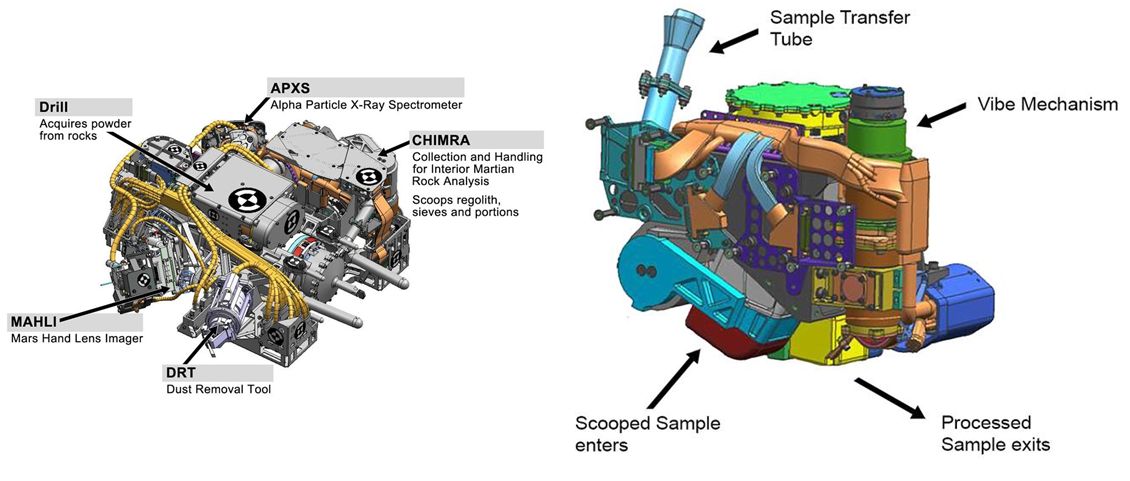
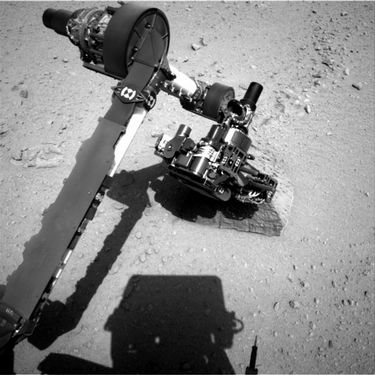
On Sol 14 Curiosity finally got to give her arm a bit of a stretch. The 2.1-metre (7 foot) long arm includes a 60-centimetre (2 ft) diameter “hand” called the Turret, which contains a range of scientific instruments and tools essential to the mission, including a dedicated camera (the Mars Hand Lens Imager, or MAHLI), a drill system, a scoop for collecting Martian soil (“fines”), and an Alpha-particle X-ray Spectrometer (APXS).
In this initial manoeuvre, the arm was raised, extended and rotated to use all five of its joints prior to it being stowed once more in preparation for Curiosity’s first drive. The manoeuvre marks the first step in calibrating the arm’s movements and preparing it for science operations. Further tests of the arm and its equipment load will take place over the next several weeks, but the system is unlikely to be fully commissioned until around mid-October.
Curiosity raises its turret of equipment as the robot arm is tested (image captured by the black-and-white Navcam system)
Taking the second of the new additions first, Kitely users can now add an image of their world(s) to the Public Worlds listing. Previously, the Public Worlds list was just that – a text list of all worlds in Kitely available for public access. The use of images makes the list more visually appealing and gives those browsing the list a glimpse of the world prior to clicking on the image to access the region’s World Page.
Adding a Public Worlds image via the Manage World Advanced tab
Pictures can be set in one of two places – the World Page, and in the Advanced tab of the Manage World dialogue box. Submitted pictures are automatically resized to fit the available space on upload.
The Public Worlds page has been redesigned to support the new images, with world images being displayed 12 to a page, with the world name below the image with the world owner’s name. Those worlds that have not yet had an image uploaded for the page will show the Kitely logo, and will generally be listed after all those that have an uploaded image available.
The updated Public Worlds page layout, with my own region in the list 🙂
Big Worlds
Following-on from the promise in the last update, Kitely have implemented their “big world” feature. This allows large, high-performance worlds to be created which can be up to 16 regions in size (i.e. 4 regions x 4 regions). In addition to the 16-region world, big worlds are also offered in four region (2×2) and nine region (3×3) sizes.
The free worlds offered within the Silver and Gold subscription plans can be used to create various mixes of big worlds and standard regions, according to the user’s requirements. For example: a Silver plan might be used to create 10 individual regions, or two 2×2 big worlds and two “standard” individual regions or a 3×3 big world and single individual region, etc.
However, the size of a world can only be set when it is created, and cannot be changed afterwards. Therefore, single region worlds already created in Kitely cannot be converted to big worlds, regardless of the remaining quota of free regions in a silver or gold plan (e.g. if a user has 3 regions left in their free quota, they cannot combine them with an existing single-region world to create a 2×2 big world).
Additional worlds beyond a plan’s quota can be purchased using Kitely Credits (KC) at the rate of 10KC per region per day. So a 4-region (2×2) big world would cost 1200KC a month (4 regions x 10KC x 30 days), or as little at $4 a month when purchasing Kitely Credits at the maximum discounted rate. The costs of copying, exporting, and replacing big worlds are also dependent on the number of regions in the world. For example, copying a 4-region world will cost 40 KC (10KC per region).
Additional points of note about big worlds:
Big worlds have a “root region”, which is always the region in the South-west corner of the world
Big worlds have a “default region”, which is initially the root region (SW corner region) of the world, where incoming visitors arrive
This can be altered through the use of a tele hub, which can be placed in any region in the world, making it the default for incoming visitors
Deleting the telehub will not alter the updated default region
Moving the default region does not change the location of the root region
There is a limit of 100,000 prims for a world, regardless of the number of regions it contains. How the total allocation is distributed among the regions within a big world is up to the world owner, but the total of 100,000 prims cannot be exceeded
When running in megaregion mode (see below), region crossings are completely eliminated
Vivox works seamlessly across all regions in a big world.
By default, Kitely’s big worlds use the OpenSim megaregion mode, wherein multiple regions have been merged into one contiguous region. This eliminates region crossings within a big world and all the dependent issues around them for building, vehicle movement, etc., and provides a much smoother overall performance.
However, Megaregions are an experimental feature so some OpenSim features don’t work properly (e.g. parcel audio only works in the root region). Kitely therefore allows big worlds to be run as either megaregions or non-megaregions; a check-box is provided in the Advanced Tab of the Manage World dialogue box to switch any inactive world (i.e. a world not currently running on a Kitely server) between the two modes.
Kitely have also added a new world template to help in the creation of big worlds. This is the Universal Campus, a 2×2 region build created by Michael Emory Cerquoni (a.k.a. Nebadon Izumi), and licensed under the Creative Commons Attribution-ShareAlike licence.
To support the safe archiving of big world builds, Kitely have extended to the OpenSim Archive (OAR) file format to support the saving of a multi-region world as a single OAR file. Currently, the file format cannot be used to export builds elsewhere, but the code has been submitted for inclusion in standard OpenSim, and once adopted by OpenSim, will allow the exchange of multi-region OAR files between Kitely and other grids (with limitations to protect 3rd party content), although pre-existing multi-region OAR files may require replacing should the file format change as a result of adoption by OpenSim.
In the meantime, Ilan Tochner, Kitely’s CEO has offered a workaround for people to import their own multi-region builds to Kitely ahead of the new file format being adopted.
Work continues on readying Curiosity for surface operations on Mars, with characterisation phase well underway.
The week has seen the rover’s Chemistry and Camera system – ChemCam – undergoing its calibration tests using a target system located towards the back of the rover, while scientists have been looking for candidates for the first full test firing of the system at a suitable surface target.
ChemCam is a complex system split between Curiosity’s mast and body. The mast unit is the large box-like unit at the top of the mast. It contains a laser unit, a remote micro-imager (RMI) and a telescope for focusing both.
The Chemcam mast element
The body unit carries three spectrographs for chemical analysis and has its own power supply and an electronic interface to the rover’s central computer system.
ChemCam has two main functions, split between the laser system (the Laser-induced Breakdown Spectroscopy (LIBS), to give it its proper name) and the Remote Micro-Imager (RMI).
LIBS is designed to fire series of laser pulses at a target spot smaller than 1 millimetre on the surface of rocks and soils, vaporizing it. Light from the resultant plasma is captured by the telescope and sent via fibre-optics to the on-board spectrographs for analysis, which should provide information in unprecedented detail about minerals and micro structures in Martian rocks. Additionally, the laser can be used to remove dust from the surfaces of rocks, allowing the drill on Curiosity’s hand to obtain samples of the rock free from surface contaminants.
The RMI provides black-and-white images at 1024×1024 resolution in a 0.02 radian (1.1 degree) field of view – approximately equivalent to a 1500mm lens on a 35mm camera. RMI has two functions. In the first, it will be used in conjunction with LIBS to identify suitable targets and target locations (targets can be selected autonomously or via Earth-based selection and command). Working independently of LIBS, it will be used to obtain close-up images in support of robot arm-mounted experiments or provide images of very distant objects.
This week, ChemCam was calibrated using a target system mounted on the rear section of the rover, mounted below the UHF antenna. As a result of this, ChemCam was confirmed ready for operations, and is expected to make it first test-firing on an actual Martian rock sample on Saturday August 18th. The sample is provisionally designated N165, and sits a short distance from the rover.
ChemCam’s first Martian target
ChemCam is a joint US / French experiment, with the US Los Alamos National Laboratory providing the body unit, the French national space agency (CNES) proving the mast unit (RMI, laser, etc.) and JPL the fibre-optic link between the two.
Curiosity should be resuming the characterisation phase tests following the upgrading of the on-board computer systems to the R10 flight package. Following the upgrade, NASA hosted a teleconference in which it was indicated the software transition proceeded smoothly and successfully.
This week will see the REMS system commence continuous operations, so mission scientists are hoping to get the first complete 24+ hour Sol cycle of weather data returned later in the week. The mission planners are also looking to run another series of high-resolution images of “Mount Sharp”, right up to the peak of the mound, now that the rover’s orientation relative to the ground and the Sun are understood.
Curiosity – an initial self-portrait via 360
With the successful software transitioning, the characterisation phase for the rover now enters stage 1b characterisation (the first week having been 1a characterisation). This will see more of the rover’s science systems enter operation, and preparations made for Curiosity’s first drive. This will be preceded on Sol 13 by a static test of the rover’s steering actuators. The initial drive – probably no more than a few metres and turning the rover in an arc – is currently scheduled for Sol 15.
Curiosity on Mars: captured by MRO’s HiRISE. The discolouration around the rover is the result of soil disturbances from the descent stage engines. The blue hue is due to over-emphasis in the colour processing and is not thought to indicate anything unusual in the properties of the rocks
It is estimated that the 1b characterisation phase will last a couple of weeks, and should result in everything aboard the rover being declared as commissioned and ready for operations with the exception of the robot arm and hand. These will be tested during a third characterisation phase (called “characterisation 2”), which is still around a month away. In the period between the end of characterisation 1b and characterisation 2, the rover will be commencing an initial set of science operations using its other instruments.
As it stands, mission staff are already building up a plan for the rover’s traverse from the landing zone to the slopes of “Mount Sharp”. The mound is only around 8 kilometres (5 miles) from the rover, but the route will not be direct, and there are a number of mesas the rover must navigate around – and which may themselves have points of interest to be investigated, although the aim is to get the rover into the ravines cutting into the slopes of the mound, rather than in diversions elsewhere.
A close-up of Curiosity’s “hand” (centre right), with the blast patterns from the descent stage motors just beyond. The paddle-shaped high-gain antenna is to the left
Mission Trivia: Does Curiosity Dream of Electric Sheep?
To conserve power, Curiosity has what is called a “sleep state” in which the main computers are hibernating and systems are largely running in a minimal state. During this time, monitoring the rover’s status and condition is the responsibility of a small monitoring system independent of the rover’s computers. JPL engineers refer to the data returned from this unit (the MRU) as Curiosity’s “dream state”.
See Gale crate for Yourself
Want to see Gale Crater exactly as Curiosity sees it as the Mastcam is rotated through 360-degrees? Want the ability to zoom in and out of images and have a look at the rover itself?
Photographer Andrew Bodrov has taken images captured by Curiosity’s Mastcam last week and put them into a superb 360-degree interactive panorama, allowing you to see Gale Crater, the surface of Mars and the rover itself in marvellous detail (the images of the rover used here are captured from the view).
The back of the rover. On the left: the UHF antenna; on the right, the low-gain antenna (LGA). In the middle: the rover’s RTG power source
To take a look for yourself, visit the 360cities.net website (unfortunately, WordPress.com blew a raspberry at attempts to embed the view here).
Curiosity continues to operate well on Mars, with the MSL mission’s characterisation activity phase proceeding precisely as planned.
The last two Sols have been the focus of some intense work, including preparing the rover for what NASA has dubbed its “brain transplant”.
Like all computers, Curiosity’s computers have finite storage capacity, and to cram all the code required for the mission aboard the rover would be impossible. So the software in broken-down in sections that equate to various phases of the mission. The software is then uploaded to the rover and committed to its on-board computers as it becomes required, over-writing the previous mission phase software.
Prior to its arrival on Mars, Curiosity’s software was concerned with three things: the cruise phase of the mission (keeping the vehicle on-course for Mars and the planned landing site and correctly oriented for both this and communications with Earth); carrying out experiments to monitor radiation in interplanetary space and how it penetrates the vehicle (part of planning for a manned mission to Mars); and the EDL (Entry Descent, Landing) phase of the mission itself. Now the rover has landed, that software package (called the R9 Flight Software Package) has done its job, and so needs to be replaced with the software (called the R10 Flight Software Package) required for Curiosity to operate on Mars.
Sol 3
The day began with the upload of R10 files to Curiosity. Installation did not immediately take place – it is planned to commence on Sol 5 – but the rover’s back-up computer was powered-up and checked-out ready for the upcoming software upgrade. The transition will be handled on a per computer basis, in case anything unforeseen occurs. The software will, among other things, allow the robot arm and Curiosity’s “hand” of instruments to be activated and checked out. The software also contains software related to Curiosity’s ability to drive on Mars and self-navigate.
Curiosity in action: the “hand” deployed on the end of the 2-metre robot arm with the MAHLI camera visible on the top of the hand and in the foreground
The hand is crucial to the mission, containing a range of instruments capable of a range of tasks including: viewing surface features in extreme close-up (the MAHLI camera); gathering soil and dust samples from the surface; scraping the surface of rocks and drilling into them to obtain samples, and so on, all of which can be returned to the rover’s onboard analysis lab.
The Mastcam completed final calibration and then undertook a 360-degree look at Gale Crater around the rover with 130 images, each compressed into a 144×144 pixel format, returned to Earth and used to create the first colour panoramic view of the rover’s location.
The Navcams were used to take high resolution images of the rover’s deck, taking a number of shots which revealed the vehicle to have some small debris scattered on the deck as a result of jet-wash from the descent stage motors, but nothing serious. These images were returned together with the low-res colour images during the scheduled overhead passes of Mars Odyssey and the Mars Reconnaissance Orbiter (MRO).
Hi-res Navcam image of Curiosity’s rear deck – see description in the main text
Image above: Curiosity’s rear deck. One the extreme left of the image, angling away from the deck is the RTG housing at the back of the rover. Immediately to the right of this, sitting on top of the raised structure is the arrow-like low-gain antenna (LGA). In front of this and side-on to the camera is the high-gain antenna (HGA). The rim of Gale Crater is the line of sun-brightened hills on the horizon.
Sol 3 also saw initial check-outs completed on a range of other instruments on the rover: the Alpha Particle X-ray Spectrometer (APXS), Chemistry & Mineralogy Analyzer (CheMin), Sample Analysis at Mars (SAM), and Dynamic Albedo Neutrons (DAN), all of which were successful. instruments were all successful. Issues with the Remote Environmental Monitoring Station (REMS) were resolved, allowing both REMS and RAD (Radiation Assessment Detector) to return further data on the environmental and climatic conditions in Gale Crater to Earth.
Another hi-res image of the rover’s deck
Image above: a further image of Curiosity’s deck taken as the Navcam rotates more towards the front of the rover in relation to the previous image. The LGA, HGA and drive system arm can still be seen to the left. In the right foreground is the rover’s “hand”, still in its stowed position against the front of the vehicle. Pebbles and dirt can clearly been seen on the rover’s deck, thrown-up by the jet-wash from the descent stage motors. Blast marks from the motors can themselves be seen a short distance from the rover.
Sol 4
Sol 4 was a relatively quiet day for the mission. Work continued on preparing the rover to transition to the R10 Flight Software. Key capabilities in the R10 package, as mentioned above, enable full use of Curiosity’s robotic arm and hand, and includes advanced image processing to check for obstacles while driving. This software will enable Curiosity far more autonomous than is the case with Opportunity, allowing it to make much longer drives along routes it identifies for itself and to avoid potential hazards along the way.
During the period of the transition, science and check-out operations have been deferred, and while the rover did return some images and additional data to Earth, the focus was on readying the on-board systems for the new software. The transition itself is expected to run through the weekend, with an end-time targeted for August 13th (PDT) Earth time. While this work is ongoing, the mission scientists have been putting together a geological map of a rough 390 square kilometre (150 square mile) region of Gale Crater, including the landing zone.
Elsewhere in JPL, and following the successful MSL landing, a unique video was cut together mixing footage from the “seven minutes of terror” simulation of Curiosity’s arrival on Mars with scenes from mission control at JPL during the actual sequence of events from EDL. The result is a unique film that puts a new perspective on the mission and the landing sequence.
Mission Trivia
Curiosity’s Sol 3 wake-up call came in the form of Good Mornin’ from Singin’ in the Rain.