Modding a house in Second Life: tips and pointers

This slideshow requires JavaScript.

I recently wrote about my purchase of the CONVAIR Edelweiss Chalet and work on modifying it for use on our main island home (see: A little Edelweiss in Second Life).  The article prompted a request from BarbarA for me to go into more detail about how I go about such work – and it’s not the first time I’ve received such a request.

Truth is, and for a variety of reasons (e.g. how any particular house is put together, what someone might want to do with a house, etc.), providing a step-by-step guide to modding a house isn’t really practical. So instead, I’ve tried to provide a set of more general notes focused on how I go about things.

Basic Skills

Obviously, any modding requires some basic skills:

  • An understanding of the core Build functions (e.g. creating prims; moving / rotating / resizing objects; using Shift-select; linking (CTRL-L) and unlinking (CTRL-SHIT-L) objects / object parts; use of the Show Transparent Prims toggle (CRTL-ALT-T).
  • Knowledge of texturing: how to select object faces, apply textures, scale and (possibly)  rotate them; how to use Local Textures to “test fit” textures you may wish to upload from your computer & use; and a basic appreciation of basic texture memory use. Note that “seamless” textures are generally best for buildings.
  • A basic understanding of the permissions system, particularly the Modify and Copy permissions (the former is vital to any form of modification, since without it you won’t be able to alter a building so easily; latter a nice-to-have).

An article like this isn’t really the place to go into any of the above in particular depth, so I refer those who need to learn more about editing and building in SL, I’m including some links to resources at the end.

My General Approach

I tend to approach modding any building as a 3-step process:

  1. Determine what is to be done. For example: will the work require combining parts of different buildings? Will it involve integrating items from other creators? Will it require inclusion of purpose-made new prim elements (e.g. walls, floors, etc.)?
  2. Visit a copy of the building in-world (e.g. a copy displayed at an in-world store or found in a public region) before any purchase and:
    • Confirm it has the required permissions (generally Copy and Modify).
    • Examine the use of textures to determine if they might need replacing / make require replacing as a result of my changes (e.g. because some surfaces have shadows or lighting effects “baked” into a texture.
    • Check how the building has been put together, and whether the desired changes can easily be made (e.g. by removing parts), or whether there might be complications / whether you may have to include “replacement” prim parts yourself.
    • Look at the general structure of the building and whether simple structural changes can be made to  improve LI.
  3. Revise plans accordingly after (2.), and if the decision is made to go ahead, break the work down into logical steps and complete each in turn.

Checking the Suitability of a Building for Modding

Checking Textures

There are a couple of reasons why textures might need to be replaced:

  • They don’t meet the desired aesthetics.
  • They include “baked” details that may not be wanted.

In the case of the latter, some baked details may be easy to spot – as per the image below left, other may be harder to identify, such as with the image below right, and may not be revealed until you actually start physically altering the build, should you go ahead. However, in both cases, it’s worth checking the faces (surfaces) of a building that you might want / need to re-texture.
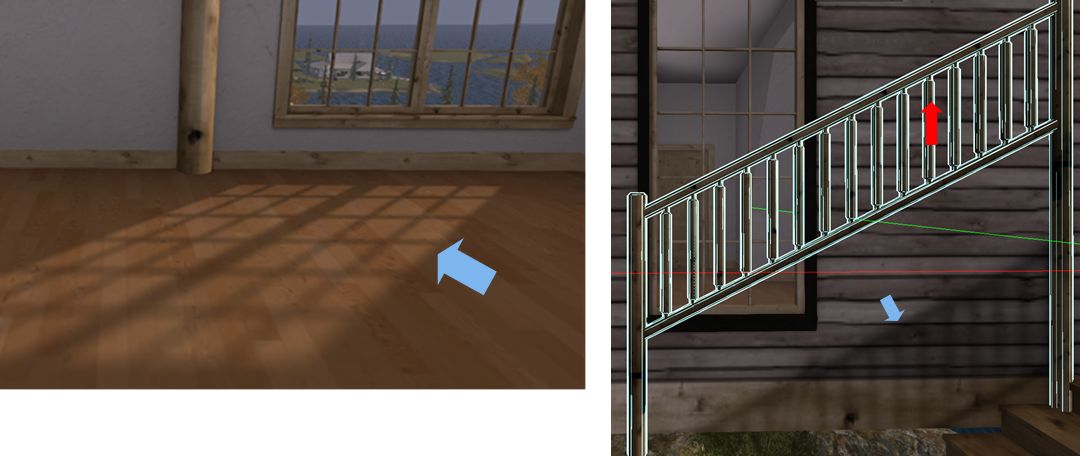
Some builders bake details into their textures, such as the light “cast” by windows (l); or shadows which can be left behind when an element of the building is moved or removed, as with the railings (r). So careful checking of a building may help determine where / if textures may be replaced.

Carrying out such checks is pretty straightforward:

  • Visit a copy of the building in-world and right-click on it and select Edit from the menu.
  • In the Edit floater, do two things:
    • Click on the Edit Linked selection box to make sure it is ticked (enabled).
    • Click on the Select Face radio button to enable it as well.
  • Finally, left-click on the surface in the building you would like to re-texture to display the texturing cross-hairs.
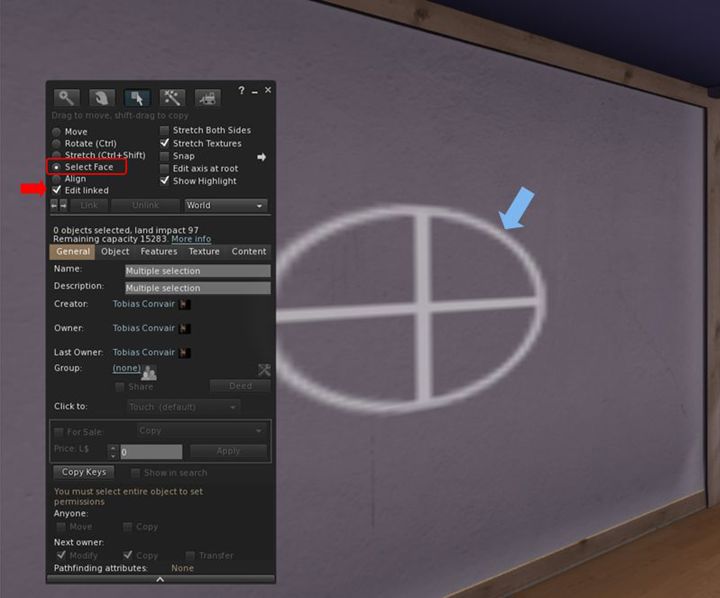
Identifying and checking surfaces for re-texturing it. Use the Edit Linked and Select face options in the Edit / build floater to identify the extend of a given face, shown by the cross-hairs (arrowed).

Note that some builders incorporate transparent prims in their builds (e.g. in walls and floors). Such prims can get in the way of checking surfaces, so you must keep an eye out for them. There are two ways to do this:

  • By pressing CTRL-ALT-T: this will highlight all transparent surfaces in red. If a part of the red is highlighted, then you have likely selected a face of the transparent prim.
  • With the surface selected, click on the Texture tab in the Edit floater. If the Transparency % spinner is set to 100, you have selected the face of a transparent prim.

Should you find you’re actually selecting a transparent prim face instead of the surface you want, I’m afraid there is no easy solution except manoeuvring your camera in as close as possible to the surface you want, and then trying to select it. To assist with this, go to the Advanced menu (use CTRL-SHIT-ALT-D to display the Advanced menu if not already enabled) and make sure Disable Camera Constraints is checked (click it if not).

With the required surface selected, check around it carefully for any of the following:

  • If the cross-hairs / highlighting on a wall / floor / ceiling extend into other rooms beyond the one you’re checking (e.g. a neighbouring wall / floor).
  • Whether the highlighting extends to other features within the surface you’ve selected (e.g. if you’re checking a wall with a window frame, is the frame also highlighted, or if you are checking a door, is the handle and other furniture also highlighted?).
  • Do any other parts of the house you might not expect to be highlighted appear to be so?
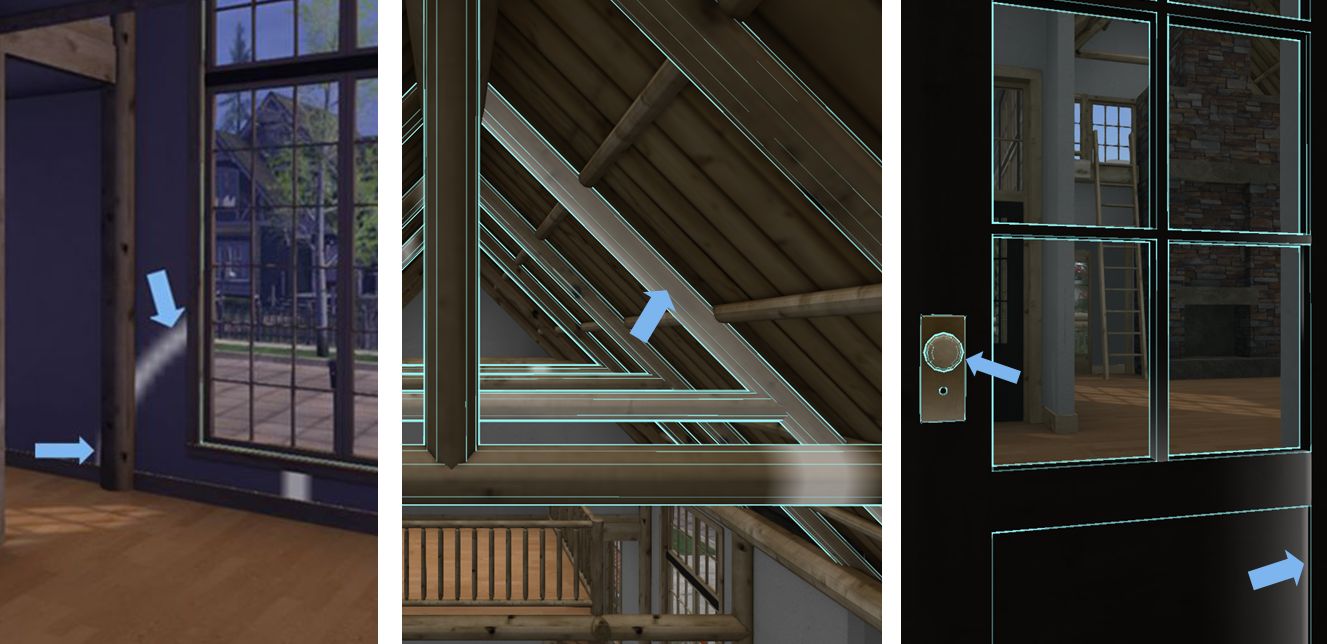
Always check around surfaces you might want to re-texture to see how other surfaces might be affected. Left: the texture cross hairs extend beyond a doorway into the next room, indicating they share a single wall face. Centre: selecting a single roof beam (arrowed) all selects those “in front” and “behind” it, indicating they are all a single texture face. Right: selecting the paintwork of the door (right side arrow) also highlights the door handle (left side arrow), indicating they are the same face and any texture applied to the door will also cover the door handle.  

If the answer to any of these questions is “yes”, then the items that are highlighted will also be affected by any texture you apply. This doesn’t mean you cannot necessarily go ahead with your ideas, just that you may revise what your re-texture or how you go about your alterations (e.g. might your problem be overcome by adding a prim and texturing that?).

Continue reading “Modding a house in Second Life: tips and pointers”

A little Edelweiss in Second Life

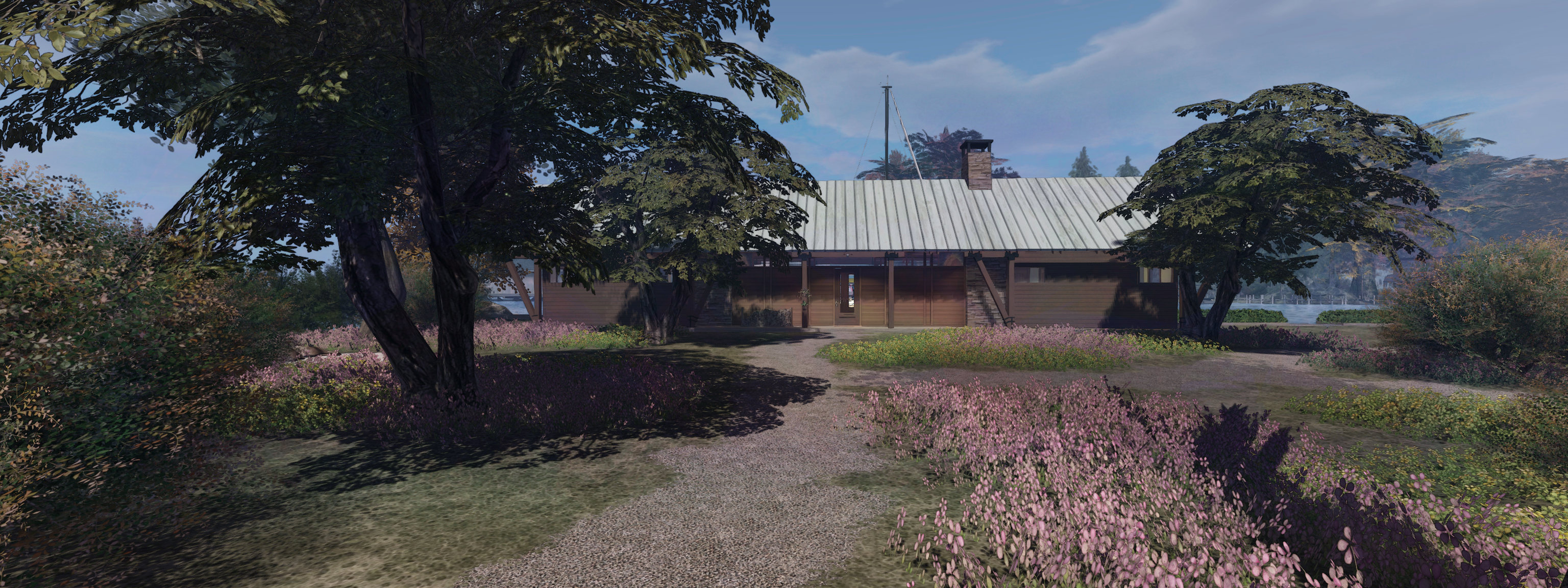
The CONVAIR Edelweiss Chalet at Isla Caitinara with a Trompe Loeil pavilion on the deck

In December 2020 I picked up the CONVAIR Bridge House by Tobias Convair for use on our main island home in Second Norway (see: A Bridge House in Second Life). It’s a nice looking house with a good internal layout and it fits well with the Second Norway environment, having something of a Scandinavian feel.

It is also a design that gave me something of a taste for CONVAIR builds. So when we recently visited The Redwoods (see: Exploring The Redwoods of Second Life) and saw another CONVAIR build being used as the park lodge, I started getting the itch to see how well it might fit as yet another alternative for our house – and as it turns out, it does so fairly well.

The design in question is the Edelweiss Chalet, a two-storey design with wood exterior and exposed beams and woodwork inside. Unfurnished at purchase, it is priced at L$2,200 both in-world and on the Marketplace, and is supplied Copy and Modify. While delivered boxed, it doesn’t come with a rezzer. Instead, the entire 99 LI building is a single item that can be pulled out of inventory and positioned as required.

The layout comprises a single large main room on the ground floor with two smaller rooms at one end. the upper floor area is split between a bedroom and gallery overlooking the main room and one end and reached via a staircase, with a loft-like space accessed via a ladder located at the other end of the house. This sits over a broad verandah that also continues along the length of one side of the house.

The CONVAIR Edelweiss Chalet at Isla Caitinara with a Trompe Loeil pavilion on the deck

This verandah is one of the attractions of the house. As it is raised on stilts, the house can sit partially over water, making the long arm of the verandah – with suitable modification – ideal for mooring boats.

Having said that, the slits were something we needed at Isla Caitinara, as the water’s edge there is sufficiently elevated. This allowed me to locate the house at ground level, the verandah neatly forming a part of the existing moorings while also allowing me to remove the eternal steps leading up to the verandah and to the two doors leading into the house on the other side, together with their attendant transparent prims. Making the space available to boats was then a simple matter of removing the railings guarding the edge of the verandah.

This slideshow requires JavaScript.

In terms of living space, this is a house that really has a lot to offer: the main room has plenty of space for use as a living / dining / kitchen area, as I hope the slideshow above demonstrates. The two additional downstairs rooms could be used as a separate bathroom and toilet or as a small bathroom / toilet and second bedroom. The upstairs bedroom has a reasonable amount of space, although given the slope of the ceilings, fitting taller furnishings might be a little difficult.

I particularly like the gallery overlooking the main room; this both offers a lower ceiling for a kitchen area helping to make it feel cosier, whilst also offering a nice location for one of my pianos so that it isn’t crowding out the main room – but the space could just as easily be a little office area or similar. Across the main room, the “loft space” is similarly very flexible – it could be a little reading space with books or – as we’ve done, a little snuggle spot, made warmer through the addition of a wood-burning stove that uses the main fireplace flue.

That said there are a few niggles with the build. There is a slight over-reliance in the use of transparent prims. The main floor,for example, uses a mesh and two transparent prims – so why not simply forego the former and make the latter visible and texture hem? That’s what I did. The use of baked shadows can also be an annoyance when modding the build. Again, replacing the main floor solved this in part, although I had to retexture the exterior walls in order to get rid of other nuisances. Finally, some of the textures are disappointingly blurred: I’m still fiddling with options to replace the texture used for the wooden beams.

A mug of hot chocolate before bed, after outfitting the new house

Fortunately, there aren’t insurmountable problems;  as noted above, I solved them easily enough, allowing for fixing the texture blurring. I will admit I felt this let what is otherwise a very capable and worthwhile design down. certainly, the interior mesh faces are more than sufficient to allow comfortable re-decorating of the walls if you wish (I did!), and as noted you get a good deal of space in which to make a home – indoors and out.

Link and SLurl

A personal look at the Linden Stilt Homes in Second Life

My over-the-water Stilt Home parcel at Bellisseria, with the Tortuga style house rezzed and furnished

Back when I previewed the Linden Homes Stilt House theme, and again when the theme was released at the end of 2020, I mentioned it was the first theme that might tempt me away from the Houseboat theme, which has tended to always win-out against the subsequent Linden Home releases in terms of desirability.

While swapping homes wasn’t high on my priority list, I have to admit that the temptation to just give the Stilt Homes a try had been growing over the Christmas break. And so, while it did cause no small amount of anxiety – my Houseboat location was really very good – at the start of the week, I decided to make the swap, trying for an over-the-water Stilt Home.

Obtaining one took a little time – Stilt Homes-are obviously popular, being new, and the over-the-water version particularly so (Stilt Homes are offered individually as over-the-water; with pier or on land variants on the Linden Homes selection page). But careful refreshing within the page throttle limit meant I was able to eventually pick one up.

My Linden Stilt Home parcel with the Havana style house with moorings I’ve added myself

When previewing the houses, I had been somewhat swayed towards the two-storey designs (Lauderdale and Santiago). However, after re-familiarising myself with all four styles, I actually found the Havana and Tortuga better suited to my tastes, providing the best value (in my view) between living space and available water in the parcel for mooring boats, and betted options for interior customisation, having very good sized rooms (the Tortuga in particular).

Both styles are 3-roomed designs, with the Tortuga offering the slightly greater interior space in the form of two large through-rooms and a smaller room, while the Havana presents a central front-to-back through room flanked by a smaller room on either side. Both designs have a large, split-level rear deck that gives plenty of scope for sun decks and moorings.

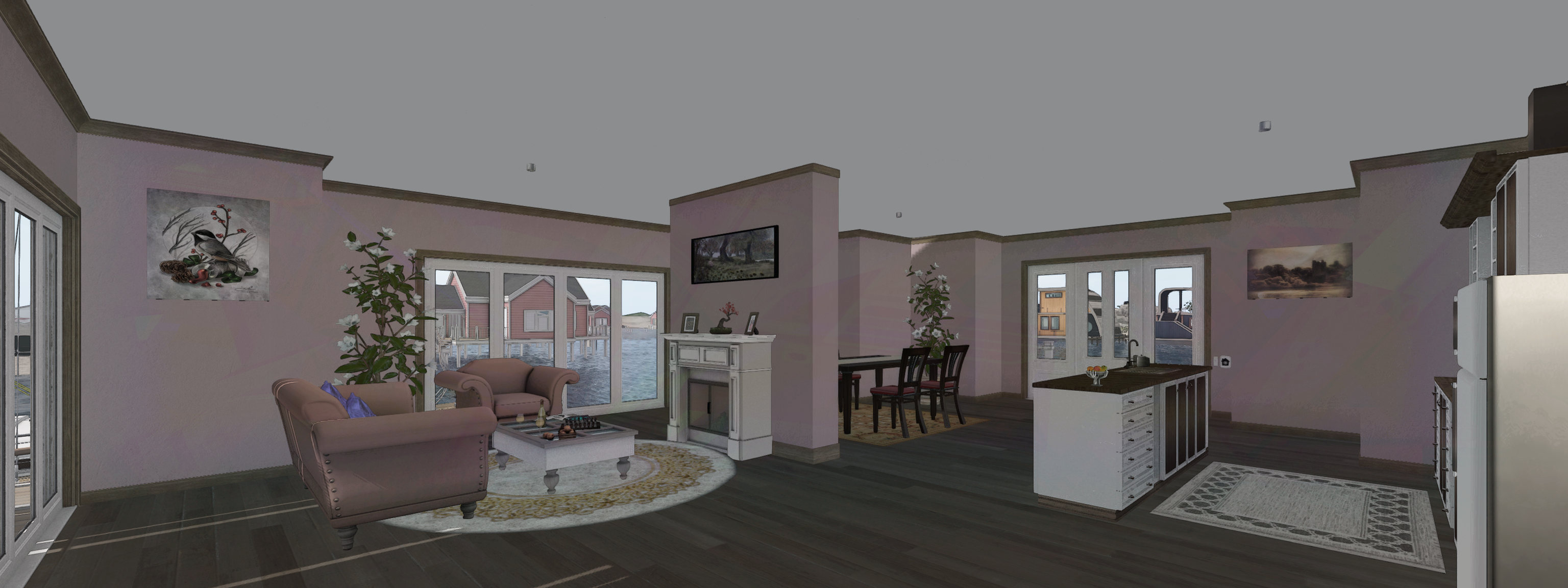
Havana interior: the main room gives plenty of room for expression

While I cannot compare it directly with  Camper / Trailer, Victorian or Log Home themes, the Content Creation Pack for the Stilt Homes offers a somewhat greater range of options than the pack for the Houseboats, with furniture plants, textures, useful colour matching guides and other little goodies than might be put to good use. I was a little disappointed no corner posts were offered to go with the additional deck railings, or that there was no bi-fold door that might be used to split the Tortuga’s two through-rooms, but these are not exactly hard-to-overcome “shortfalls”.

Although there are already add-on kits for the Stilt Homes a-plenty on the Marketplace, I much prefer building / kitbashing, and the Tortuga with its big rooms immediately attracted me with the potential for adding my own features. So much so, that I spent several hours playing with different ideas in both rooms!

The Tortuga’s large deck area can be used for boat moorings without it feeling crowded – although admittedly, I’ve thus far minimalised décor and furnishings( a simple pergola, suitably sized, shading a couple of rocking chairs and some planters with flower to break things up

In the end, I went with the simplest approach: a free-standing “room divider wall” that splits the largest room in the Tortuga into two without actually dominating the space or looking out-of-place. One side of this became my “living room” overlooking the rear decks, with the divider itself neatly providing space for a fireplace (with added chimney jutting from the roof above!). This then allowed me to use the “front” part of the room as a kitchen / the dining area, with the long interior wall ideally suited for placing kitchen units, while the width of the room meant I could include a kitchen island, again naturally breaking up the floor space quite naturally.

While the Havana’s large main room could be similarly broken up, I found that with a little careful placement of bits, this isn’t really necessary; I was again able to include living area, dining area and kitchen comfortably into it. With the addition of decking and steps to  moorings outside the front of both (and the use of one side of the Tortuga’s deck), I have been able to provide ample space for mooring those boats I want to have rezzed (all of them otherwise sitting in my vehicle rezzer until I want them).

I’ve deliberately kept furnishings and décor on the decks of both the Havana and Tortuga to a minimum, the former having a free-standing pergola with large sofa, etc., and the latter a pergola and shades directly adjoining the back of the house (thus helping to shade the living room from the Sun) and a couple of rocking chairs  I may admittedly play with both decks a little more in the future, but for now, that’s all I really need.

I like the large main room of the Tortuga particularly amenable to being made a comfortable living space – plenty of room for a kitchen, dining area and lounge space – and even a fireplace to act as a natural room divider

As noted earlier, giving up my Houseboat did give me a moment of anxiety after I’d let it go, but over the last 3+ days I’ve become more settled with my decision; the Tortuga has been proving to be a very comfortable and flexible living space (even if only as a second home when Isla Caitinara isn’t available), and it is very likely I’ll end up saving several internal layouts of furnishings, etc., into my personal rezzer, just as I did with the Houseboat. I’m also admittedly fortunate that, like my old Houseboat, the parcel I’m on is fronted by a large channel of open water (a natural divide between Stilt Homes and Houseboats), so I don’t feel at all crowded in.

I’m not sure I’ll make use of the 2-storey styles;  while I like to look of both, they’re a little too big for my needs. But then, I might just be tempted at some point to have a play.  in the meantime, would I recommend the Stilt Home designs to someone looking for a new Linden Premium Account Home? Absolutely.

Paint your skies with Stevie Davros’ EEP sets

A dramatic EEP Fixed Sky with custom cloud texture (Painted Drama Windy Afternoon from the Painted Clouds set) by Stevie Davros

Back in 2018, I wrote about Stevie Davros, and Australian photographer, who had produced as series of Windlight skies and clouds for people to use to help enhance their environment when taking pictures, or to offer a unique environment within their region (see: Clouds and windlight skies by Stevie Davros).

Since the arrival of the Lab’s Environment Enhancement Project (EEP), Stevie has been working on new skies and cloud assets specifically for use with EEP, and offered me the opportunity to try some of them out. And I have to say, that like his Windlight skies and clouds, these are impressive collections, ideal for photographers looking to enhance their images, and offering region and parcel holders a set of options for setting a Fixed Sky over their parcel / region (and which can also be used to create dynamic Day Cycles).

If you are unfamiliar with using EEP assets and settings, I recommend you refer to one of the following:

However, and for completeness, these notes include a quick overview of how to apply Stevie’s settings.

Saturn looms large: a EEP Fixed Sky setting from the Cosmic Skies set by Stevie Davros

At the time of writing this article, Stevie had a dozen EEP packs available via his Marketplace store, comprising:

  • Painted Clouds: a folder of 13 Fixed Sky assets featuring cloud texture files sampled from the brush strokes of 19th Century French impressionist painters.
  • Aussie Cirrus: a folder of 19 skies featuring cloud texture files created from photographs Stevie took of the skies over Adelaide in Australia, and then processed.
  • Gossamer Cirrus: a set of 19 skies featuring cloud textures depicting very high altitude cirrus strands, some of which are presented in a their own “fantasy” style of sky.
  • Cirrus Cloudbank: a set of 21 skies featuring strands of cirrus cloud overlaid with / extending from banks of cloud
  • Cirrus Clouds: a bumper set of 34 cloud textures, suitable for “real” and “fantasy” settings.
  • Stormy Skies: a selection of cloud texture collages created by Stevie to give dramatic sky and cloudscapes.

All of these packs, whilst focusing on cloud formations, include customised ambient lighting and may include custom Sun / Moon textures.

Painted Sky Banded Sky from the Painted Clouds set by Stevie Davros

In addition, Stevie has produced several sets of Fixed Skies offering more of a “cosmic” setting:

  • Replacement Moons: a set of six replacement Moon textures (crescent, waxing, full, gibbous dual crescent and blue).
  • Replacement Suns: a set of replacement Sun textures very suitable for sci-fi settings, including a blue giant and a binary system with a blue giant and red dwarf star.
  • Cosmic skies: a set of 10 textures offering various astronomical / sci-fi images, including solar eclipses, a comet, a (frighteningly large) meteor, galaxies, a crescent Earth (ideal for a Moon base setting) and Saturn with his rings.
  • Aurora Night Sky: a selection of night skies with cloud textures designed to give the effect of looking at the aurora (Borealis or Australis, you pick 🙂 ).

The remaining two packs are more quirky in nature the first presents something for the romantics: link heart clouds,  and the second that places an erupting volcano on the horizon (the volcano replacing the Sun texture).

A radical sunrise (Gossamer Cirrus Surf Beach Sunrise from the Gossamer Clouds set) by Stevie Davros

There are a few points worth noting with these sets:

  • When purchased, each pack is delivered as a folder to the Received Items folder / panel of  your inventory (so no unpacking required). They can all be used directly from the folder they are received in; however, you might want to copy said folder to the Settings folder in your inventory – the system folder than is intended to contain all EEP assets you create and / or purchase.
  • As Fixed Sky elements, these are all assets that have fixed ambient lighting, and fixed Sun / Moon positions in the sky, with the clouds moving dynamically in response to the wind direction and speed.
  • The assets are supplied Copy / Modify, so you can make copies of any of them and then make alterations to it using the EEP Fixed Sky editor to produce your own variants. You can also use any of them as a basis to create your own dynamic Day Cycles.
  • Alternatively, to make changes purely for photography purposes, these assets can be applied and then adjusted using the Personal Lighting panel.
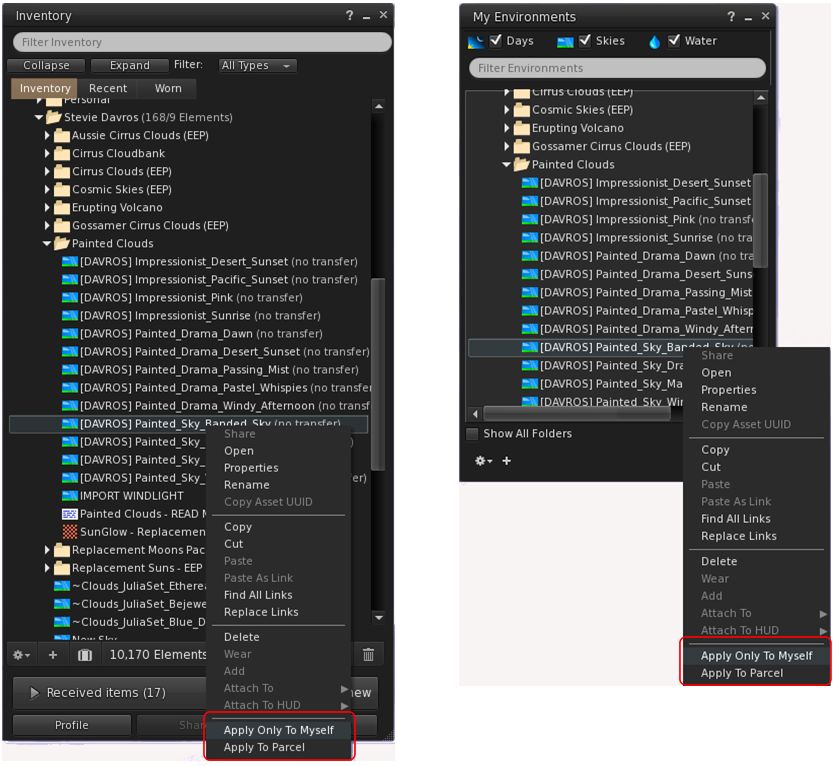
Use the standard EEP options for using Stevie’s assets

The easiest way to use these assets is to apply them directly to your avatar – highlight the asset you wish to use the right-click on it and select Apply only To Myself. This can be done from inventory or from World → Environment → My Environments … Applied in this way, the setting you’ve selected is only visible within your viewer, and will not be seen by others.

Alternatively, and if you have the requisite permissions, you can apply the asset to your parcel, where anyone within it who is using an EEP-supporting viewer set to (World → Environment →) Used Shared Environment, will also witness it. Further, if you are a region holder, you can apply the asset to your region  this option is not shown in the image above, as I do not have region rights, and so Firestorm has removed the option from my context menu).

Rigel in the sky (Big Giant Sun from the Replacement Suns set) by Stevie Davros
With prices ranging from L$99 to L$399 for the cloud packs, and the “cosmic” sky packs all priced below L$100, Stevie’s EEP sets represent very good value for money for photographers, and a potentially useful means for those interested in learning how to manipulate EEP settings (although the latter can admittedly be done via EEP settings available through the Library → Environments folder as well).

Again, you  can pick up Stevie’s packs from his Marketplace Store, and my thanks to him for taking them for a test drive.

Second Life and the Lab: looking back at 2020

It’s become an end-of year tradition in the blog to offer a look back over the past 12 months and summarise much of what has happened in terms of Second Life, Linden Lab, my involvement in the platform, and the various other topics covered in these pages.

Last year I altered my usual approach to these look backs, as I felt the 2-part format I had been using was perhaps a little dry, so instead, I focused more on the notable events in SL through the year. I’ve opted to follow that approach, with some the highlights of the year (at least, as I see them).

Linden Lab

Acquisition

The biggest news of the year with regards to Linden Lab was the July announcement that the company was in the process of being acquired by new investors. At the turn of the year, the negotiations, etc., still appear to be in progress, although there have been no further updates from the Lab on the matter. The latter is hardly surprising,  given the complexity that can be involved in such deals, which in some cases can take well over a year to complete.

At the time of the announcement, the news brought forth a lot of angst and some negativity – although such acquisitions are not uncommon by by no means  indicative of “bad” news. With this situation, and given the backgrounds of the new investors, the move appears positive,  prompting me to point out a couple of things and offer some speculation.

J. Randall Waterfield (l) and Bradford Oberwager, the incoming Linden Research Inc., investors.

Sansar

The start of the year was not a little confusing for Sansar. 2019 had seen some rapid changes of direction with the platform, suggesting Linden Lab were having trouble settling on a market  / audience for Sansar, with a portion of staff working on the platform being laid off. In February, rumours were circulating that the Lab had suspended all development for Sansar and were laying off the rest of their staff working on the platform. Such were the rumours, the Lab took the step of publicly providing  reassurance about the future of Second Life, whilst seeking a future for Sansar.

In March it was confirmed Sansar had been sold to Wookey Projects Inc., (later Wookey Technologies). The deal was largely brought about by members of the Lab’s team directly involved in managing and running Sansar, and saw the majority of those who had been laid-off being hired by Wookey, whilst former Linden Lab Management Team members Sheri Bryant and Julia Munck also moving to Wookey to directly manage things.

Following its acquisition, the platform continued to focus on “live” events, including a major link-up with Lost Horizons to host a virtual Glastonbury Shangri-La festival in the summer, and a further Lost Horizons set of events at the end of the year – see my general Sansar reporting for more.

Tilia

Tilia Inc., is the wholly-owned subsidiary of Linden Lab that handles all micro-transactions and payments /payouts related to Linden Dollars and Sansar Dollars, and which manages the Lab’s compliance with regulations relating to its role as a Money Transmitter / Money Services Business (MSB).

I’d previously speculated that Tilia might be a means for the Lab to spin-off its expertise with managing micro-currencies to other companies wish to offer such services. With the sale of Sansar, Wookey Technologies effectively became the Lab’s first customer in this regard. Then in May 2020 it was announced that the property trading game Upland. had become Tilia’s second client customer.

Merchandise

After requests to do so for many years, Linden Lab started offering SL-related merchandise via RedBubble – see: Linden Lab launches the Official Second Life Merchandise store.

Second Life Marketing

2020 allowed users to see into the Lab’s marketing efforts for Second Life – which, contrary to popular belief – are actually carefully managed and coordinated. In February, Brett Linden penned The Heart & Science of Second Life Marketing, while in March, he and Darcy Linden appeared on Lab Gab information / insight into the Marketing Team’s work, with the entire team also participating in the 2020 Meet the Lindens sessions at SL17B.

Then at the end of the year, Brett followed-up with a further blog post looking back  at yhr year and offering a “behind the scenes” look at a Second Life’s first broadcast quality commercial – about which I’ll have a lot more to say come 2021.

Two of the more curious aspects of the 2020 marketing activities came in the form of tie-ins with  [Adult Swim], the American adult-oriented night-time programming block of the Cartoon Network (see: Adult Swim special streaming event in Second Life), and with animation studio Titmouse (see: Second Life to have a smashing time with Titmouse).

Technical Updates

Project Uplift: AWS Migration

The majority of the year was dominated on the technical front by the work to migrate all of the Second Life services and infrastructure to Amazon AWS hardware and infrastructure. Initiated in 2017, the reached a point of critical mass in 2020 with the transfer of all services from the Lab’s co-location facility in Arizona to running on AWS service out of Oregon. The last major element of the project was the migration of all of SL’s main grid regions to AWS, a process that came in the last part of the year, and proceeded relatively rapidly and smoothly, with the Lab confirming all regions were running on AWS services on November 19th.

The migration of all regions was not the end of the work, nor was it entirely without issues, technical and otherwise. In the case of the latter,it did require the suspension of new region provisioning from May through November. The work also saw a delay in the release of the Premium Linden Homes Stilt theme. However, by the end of 2020, the vast majority of the work had been completed, the Lab to discontinue all operations out of the Arizona co-location  facility just before Christmas 2020.

April Linden celebrates the Lab moving out of their former co-lo facilities.

2021 will see further adjustments and fine tuning of all SL-related services that will hopefully see like general improvements. For you wish to review the year’s progress, please use my SL in the Cloud and Cloud Uplift tags.

Viewer Highlights

  • In January 2020,the Lab ceased providing support and viewer-side updates for Windows 7, in line with Microsoft ending its support of the operating system.
  • Camera Presets – the ability to create a save multiple positions for your viewer camera arrived in a Release Candidate viewer. When the viewer reached de facto release status, I provided a complete tutorial for the capability.
  • The Environment Enhancement Project – a complete replacement for the Windlight rendering system – was launched in April, and I provided both a primer and an in-depth tutorial.

The official iOS / Android client continued to progress, with the iOS version making it to a closed alpha release, and from that to being submitted to Apple for evaluation – which remained its status at the end of the year. The Android client has year to surface, but is being actively worked on. Details on both can be found in my SL Mobile updates.

Second Life and the SARS-CoV-2 Virus

March 2020 saw the growing issue of the SARS-CoV-2 / COVID-situation start to bite the world very hard. As a result, the Lab switched to fully remote  working (a large portion of the Lab’s staff already worked from home either full-time or on a regular basis, allowing the company to switch all of its centres  – Seattle, San Francisco, Boston and Atlanta – more readily  than other companies might have managed).

At the same time, the Lab put in place some practical steps to help those wishing to use Second Life as a means to support their staff working remotely. These steps included:

  • A new micro-website secondlife.com, and an accompanying updated FAQ on working in Second Life.
  • A reduction in region fees for registered non-profits and educational organisations / institutions, with Full regions fixed at US $99 a month.
  • Region holders experiencing difficulties in meeting their tier obligations as a result of the pandemic were encouraged to contact LL to discuss their situation and to see if assistance could be obtained.

In addition, I provided coverage of a number of ways in which Second Life was utilised by various organisations and groups as a direct result of the pandemic. See:

The Balticon science fiction convention was one of a number of physical world event that used Second Life as a means for attendees to come together

The pandemic also gave me pause to look at what was left of one of the most extensive past uses of Second Life – by the US Armed Forces in the platform’s early years. See Coalition Island: looking at the US military’s use of Second Life.

The pandemic almost also brought about the end of one of the popular Second Life estates – Second Norway – but rescue came, and the estate not only survived, but is growing. See: Second Norway & Sailor’s Cove East: rumours & statements, Second Norway and Sailor’s Cove East – status update, Second Norway: the future is bright, Second Norway: making the changes and Second Norway: a closer look.

Continue reading “Second Life and the Lab: looking back at 2020”

A Bridge House in Second Life

The CONVAIR Bridge House at Isla Caitinara, with modified bridge / deck with added pergola from Maya’s Builds

So, another couple of months have gone by, so it must be time for a change of house at Isla Pey 🙂 . Well, the reason is a bit more complicated than that, given it involves things going on in Second Life and the physical world that combined to make me feel I needed to tinker around and ktbash … again.

The SL side of things was in part down to the fact that, while the last house was fun to covert (see: A Country Hall in Second Life), it was, given the size of our new island, a little small. So, given we were in Second Norway, I hunted around for a design that might be taken to have something of a Scandinavian feel to it. And I found the CONVAIR Bridge House by Tobias Convair.

Priced at L$2,00 in-world, or L$2,200 via the Marketplace, the Bridge House is a single-storey property with a linear layout: a central lounge / kitchen /dining area flanked by end rooms on either side, one the same width as the lounge area,  they other slightly narrower, and with a narrow fourth room – advertised as a bathroom – to one side.  The lounge area benefits from a large fireplace and exposed ceiling trusses and boarding that gives it a very spacious build. The three remaining rooms all have flat, lower ceilings in wood. Outside, the house has extended eaves, particularly at either end, whilst one side also has full hight windows that could offer picturesque views in the right setting, the other having small windows. double doors are set into the “windows” side of the house, and a single door on the other.

The re-textured CONVAIR Bridge House, coloured in an attempt to match the original, sitting without our garden

No lighting is supplied, nor does the house come in a rezzer – at 56 LI, the structure doesn’t need one, being a single linkset. However, it comes are a range of deck / bridge “add-ons” that can be used in a variety of ways to extend the available space around the house and offer various over-the-water options. These are something I found particularly attractive, as they gave me a range of ideas for dock and deck options for a water-side setting like Isla Caitinara.

However, there are a couple of small niggles I have with the design. The fist is that it includes baked textures. Nothing unusual with this – many SL items do include shadow elements, both baked and linkset elements. However, with this house, the bakes reflect the shadows cast by chimneys, eaves, timber frames, etc, by a static Sun. Not a problem if you run with Shadows disabled in the viewer or life under a fixed sky. Bu, if you’re like me, and run with shadows enabled and under a dynamic sky, these baked shadows can conflict with “natural” shadows, and look odd. Getting around this was was no biggie; as I like kitbashing (and wanted to retexture the floors and stone walks in the build, it was a simple task to replace the supplied textures – once I’d found some that close matched the original woodwork and roof, as I wanted to maintain as much as a the original character of the design as possible.

The other point to note with this design is that it relies very heavily on transparent prims to provide physics / “solidity”. Again, there’s nothing wrong with this per se, particularly if you’re using the house “as is”. However, I found it preferable to remove those making up the floors and the floor mesh with prims I could then more easily texture to suit our needs, Doing so his increase the default LI a little – from 56 to 61; but it allowed for a better finish from my perspective.

This slideshow requires JavaScript.

Like the Country Hall build, I opted to make  the new house a waterside house adjoining our boat docks, and the included bridge add-ons worked as a good template for me to re-work the existing dock, and a deck for a gazebo. However, again given the use of transparent prims, I opted to replace almost all of the bridge elements with my own, again for no increase in LI – at least until I linked them in to the existing docks on the island!

Despite the above niggles on my part, the Bridge House does make for a stylish home, and can be used “as is” from the box – instructions are supplied with it for correctly aligning the desired bridge and deck sections; although this does assume the bridge goes to one side of the house and the deck to the others. But again, if you’re OK with editing and moving items in-world, manual  alignment of elements can be done relatively easily.

Overall, an aesthetically pleasing build offering plenty of scope for customisation / expansion that can easily be tailored to suit individual needs. Ours came out at a total of 89 LI, including additional rugs, pictures and wall hangings, lighting, net curtains and window blinds.

Link and SLurl