As always, please refer to the server deployment thread for the latest updates.
There was no deployment to the Main (SLS) channel on Tuesday, July 4th, and it remains on simulator version #17.06.12.327066. However the bi-weekly restart did take place.
On Wednesday, July 5th, the RC channels should be updated as follows:
BlueSteel and LeTigre will remain on simulator version #17.06.23.327344. This contains internal fixes, and an update to the week #25 deployment (#17.06.19.327206 )
Magnum should receive a server maintenance package (#17.06.29.327400) comprising the ongoing OS system update for the simulators.
DJ Boards Issue – Magnum RC
The original deployment of this OS update to Magnum resulted in breakages to scripts used by various streaming service DJ boards (as noted in BUG-10073 and also in the forums). An initial attempt to fix the issue was made in June, but wasn’t entirely successful. The Magnum deployment (#17.06.29.327400) above contains a revised fix for the problem.
SL Viewer
The Project Alex Ivy 64- bit viewer moved to release candidate status with the release of version 5.1.0.507006 on June 30th.
The 360-degree snapshot project viewer updated to version 5.1.0.506743 on June 29th. This version still does not correctly define images for 360-degree playback on Flickr (tag must be manually set). I have a hands-on look at the updated viewer: Second Life 360 degree snapshots hands on II.
The rest of the viewer pipeline is as follows:
Current Release version 5.0.6.326593, released on May 26th, promoted June 20th – formerly the AssetHTTP RC viewer – overview
Release channel cohort:
Maintenance RC viewer version 5.0.7.327250 dated June 22nd
Voice RC viewer, version 5.0.7.327253 dated June 23rd
Obsolete platform viewer version 3.7.28.300847 dated May 8, 2015 – provided for users on Windows XP and OS X versions below 10.7.
User Group Meetings
There is no Simulator User Group meeting on Tuesday, July 4th due to the US Independence Day holiday.
The Content Creator User Group will be meeting on Thursday, July 6th, rather than being held over to allow for the Lab’s internal start-of-month meeting.
Updated July 7th: to include information on easy embedding in WordPress.
Linden Lab has recently made two updates to the 360-degree snapshot project viewer, which I’ve been meaning to review for the last couple of weeks.
On June 19th, version 5.1.0.506488 of the viewer was issued, which included image processing updates, and which included offering the viewer in both 32-bit and 64-bit Windows flavours. Then, on June 29th, the viewer was further updated to version 5.1.0.506743 (at the time of writing the current version), which largely saw the viewer brought up to parity with the current release viewer.
The core functional changes to the viewer in both of these updates is the removal of the need for manual post-processing via zip file download and a web back-end provided by the Lab (see my original hands-on of the initial release of the viewer for more). Instead, the viewer is intended to process the image and provide the necessary meta-date to allow automatic playback on most 360-degree image sharing sites.
I’ve so far tested the viewer on Flickr and a number of 360-degree photo sharing sites such as VRchive. The latter appear to work as expected, Flickr requires 360-images uploaded from the viewer to be manually tagged from within Flickr in order to work. This is a minor inconvenience – but would be smarter if the metadata allowed for auto-tagging of the images as equirectangular, as can be done with other 360-imaging tools. A JIRA has been raised on this.
In the meantime, here’s a look at taking photos with the viewer, and getting them working on Flickr.
The 360-degree photo option is fully integrated into the snapshot floater, and when selected will disable all other options and will only allow you to save images to your local hard drive. Note that if you set any other options (e.g. check the Interface option or setting a filter) prior to checking the 360-degree snapshot option, this will result either in the viewer reverting to taking a “normal” snapshot, or ignoring the filter when processing as a 360-degree image.
The 360-degree option enabled in the snapshot floater
Before taking a shot, you should do a little preparation first:
Position your avatar / camera at the centre point of the image you wish to capture (you can “hide” your avatar using a full body alpha or something like a “vanish” animation if you don’t want it appearing in the shot). Use ALT-cam or flycamming to position the camera if you want your avatar to appear in the image, but not at its centre.
Use Menu > World > Environment Editor >Sky Presets > Edit Presets to set your desired Windlight and use the Clouds tab to freeze the clouds. Avoid the use of Depth of Field.
Turn your camera / avatar slowly around in a circle to see everything in the snapshot field of view, allowing everything to render as you do so.
When you’re ready to take your shot, click on Save to Disk on the snapshot floater and set your preferred image size:
Small – 1024×512
Medium – 2048×1024
Large – 4096×2048
Save your snapshot to the location of your choice on your hard drive. You can now upload it to your preferred 360-degree image sharing website.
Displaying In Flickr
If you are uploading to Flickr, remember to manually set the equirectangular tag in the image page, and then refresh the page. The image should reload and display in 360-degree format.
To get snapshots to display as 360-degree images in Flickr, click the Add Tag option and enter “equirectangular” (without the quotes) and press ENTER. Refresh the page and the image should start to auto-scroll once the page has reloaded
Displaying in WordPress
WordPress has a beta 360 photo and video processor allowing users to embed 360-degree images into their posts. However, in the case of images, this requires the .JPG file extension to be used. Currently the snapshot viewer uses .JPEG. However, once the extension has been changed, images should work fine.
To embed a 360 image, upload it to your WordPress media library (or similar on-line storage – but not a photo sharing website), making sure it has the .JPG extension. Then within your blog post, add the following shortcode between square braces (i.e. [ and ]) in either the Visual or Text editor:
vr url=path-to-photo.jpg view=360
This should result in the image being displayed so that it can be clicked on an manually scrolled, as per the image below:
As noted, 360-degree snapshots should auto-play on any photo sharing sites such as VRchive which parse uploads to ensure they are in the required equirectangular ratio (information on using VRchive can be found in this blog here).
Whether or not the viewer can be set so that the metadata allows Flickr to auto-recognise the 360-degree images as such, and simply play them without manual tagging remains to be seen. But as noted, it’s not a major inconvenience of not (after all, who of us here doesn’t fiddle with images post upload to Flickr?). As it is, this is a definite step up for the viewer in managing 360-degree images, and I’d certainly be interested in hearing from anyone as to how it works with Facebook.
One other point to note as well is that at the moment, the 360-degree snapshot project viewer is not compatible with format used for 360-degree images on SL Places Pages. However, the latter will be revised to support displaying images captured by the viewer at some point in the future.
Riflessi Sul Nero (“Reflected On Black”) is the title of the latest installation by Italian artist Terrygold, which is now open to the public at Solo Arte. It comprises a series of around 15 large format avatar studies, all set out within the setting of an old mine works visitors must explore.
On arrival, visitors should be sure to set their viewers in accordance with the local instructions – accept the local windlight, then ensure Advanced Lighting Model (ALM) is set via Preferences > Graphics and, if your system can handle them, enable shadows (a little is lost in terms of general ambience by not having shadows active, but not enough to spoil the installation). Once set, follow the tracks down into the mine.
Within the tunnels and vaults of the mine can be found Terrygold’s self-portraits, and the reason for the title . Rather than being in her usual alabaster skin, she is using an ebony skin for the portraits – so she is literally a reflection (image) of herself in black. Presented in a large format, these are to be found spaced along the tunnel walls and within the side room and chamber opening off of the main horizontal shaft as it slopes and twists gently downwards.
The mine itself is superbly done – testament again to Terrygold’s skills as a designer. Beautifully lit and atmospheric, it gives a very real impression of going underground. The lighting is extremely well done (again, just make sure you have ALM enabled), while shadows further add to the ambience.
The setting might also be a play on words, working on a number of levels. Gold is often mined, and we have Terry’s full name – Terrygold, so we are literally entering a mine to discover the gold of her images. Coal is also mined, and this is a celebration of an ebony look, so again there could be a thematic tie. Finally – and as Caitlyn pointed out, there is the reference to black gold used in jewellery. Just as the latter can be produced by a variety of means, including eletroplating, which sees the gold coated with black rhodium or ruthenium, so Terrygold has coated herself in an ebony covering to produce these images.
My one minor quibble with the installation is that the lighting does in places work against the images; in places it can be a struggle to fully appreciate them. Nevertheless, this is an intriguing and interesting installation to visit.
Logos representative only and should not be seen as an endorsement / preference / recommendation
Updates for the week ending Sunday, July 2nd
This summary is published every Monday, and is a list of SL viewer / client releases (official and TPV) made during the previous week. When reading it, please note:
It is based on my Current Viewer Releases Page, a list of all Second Life viewers and clients that are in popular use (and of which I am aware), and which are recognised as adhering to the TPV Policy. This page includes comprehensive links to download pages, blog notes, release notes, etc., as well as links to any / all reviews of specific viewers / clients made within this blog
By its nature, this summary presented here will always be in arrears, please refer to the Current Viewer Release Page for more up-to-date information.
Official LL Viewers
Current Release version 5.0.6.326593, released on May 26th, promoted June 20th – formerly the AssetHTTP RC viewer – overview – download and release notes – No change
On July 4th, 2017, we will have had a robotic presence at Mars 24/7 for twenty years. Here’s a look at those missions, and more. Credit: NASA/JPL
July 4th is a special date in American history, and this year it will, for space exploration enthusiasts be doubly meaningful, as it will mark the point at which we have been examining and exploring Mars continuously for 20 years without a single break.
Of course, attempts to explore and understand Mars began much earlier than that. We first started launching missions to the Red Planet far back in the 1960s. The first successful mission – the United States’ Mariner 4 probe – shot past Mars in July 1965, returning just 22 fuzzy images as it did so, travelling too fast and without any fuel to achieve orbit. In 1969, and total overshadowed by the Apollo 11 mission to the Moon, Mariner 6 also flew by Mars in July, and was followed in August by its twin, Mariner 7, becoming the first dual mission to visit another world in the solar system.
Mariner 4’s route past Mars in July 1965, and the 22 images returned to Earth. Ironically, the vehicle flight path took it over some of the more “uninteresting” parts of Mars, leading some to dismiss it as being much the same as the Moon in looks. Credit: NASA
The first American mission to orbit Mars was Mariner 9, which arrived in orbit in November 1971, the exact time Mars was wreathed in a series of globe-spanning dust storms. Fortunately, the space vehicle had a planned orbital life of around 18 months, and successfully waited out the storms before returning the most spectacular images of Mars yet seen – including the mighty Tharsis volcanoes and the great gash of the Vallis Marineris, named in honour of the probe.
Russia also finally successfully reach Mars orbit in 1971 with the dual Mars 2 and Mars 3 missions. The former arrived just days after Mariner 9, and the latter became the first mission to successfully deploy a lander to the surface of Mars – although the craft ceased transmitting just 15 seconds after a safe landing had been confirmed, probably due to the dust storms. Unlike Mariner 9, the Russian orbiters had a shorter operational lifespan, and both ceased operations before the dust had fully cleared, resulting in them being classified as “partially successful” missions.
Then, in 1976 came the twin Viking Missions, comprising two pairs of orbiter and lander vehicles. Even now it remains one of the most ambitious robotic missions ever undertaken. The Viking 1 orbiter and lander combination launched on August 20th, 1975 and arrived in Mars orbit on June 19th, 1976. Viking 2 departed Earth on September 9th, 1975 and arrived in Mars orbit on August 7th, 1976.
Viking returned the first colour still images of the surface of Mars, including this one, taken by Viking Lander 2, 1100 Sols into its mission and showing frost scattered over the ground before it. Credit: NASA/JPL
Viking Lander 1 had been scheduled to depart its orbiter and attempt a landing on Mars on July 4th, 1976 – the 200th anniversary of America’s independence. However, images of the landing site taken by the orbiter revealed it to be far rougher terrain than had been thought, so the landing was delayed while an alternative site was surveyed. The lander eventually touched-down on July 20th, 1976, marking the seventh anniversary of the first mission to land on the surface of the Moon. Viking lander 2 touched down half a world away on September 3rd, 1976.
Viking really was a landmark – and controversial – mission. Landmark, because they utterly changed our understand over Mars during years both orbiters and landers operated. Controversial because it is still argued to this day by some that two of the five life-seeking experiments carried by each of the landers did find evidence of Martian microbes living in the planet’s regolith, although it seems more likely that the positive results – in both cases, from the same two experiments – were the result of inorganic chemical reactions between mineral in the Martian soil samples and elements within the experiments.
After Viking the came a pause. While missions continued to be launched to Mars by the USA and Russia in the 1980s and early 1990s, none of them were successful. It was not until 1997 that the current trend of having vehicles continuously operating around and on Mars began – and which NASA has been celebrating, having been the stalwart of the 20-year effort of these 24/7 operations.
This run technically started in early November 1996, with the launch of NASA’s Mars Global Surveyor (MGS) mission. It was followed a month later by the NASA Pathfinder Mission. By a quirk of orbital mechanics, the Pathfinder Mission – designed to test the feasibility of placing a lander and small rover on Mars – arrived at Mars first, performing a successful aerobraking and landing on July 4th, 1996.
Mars Pathfinder being prepared in a clean room at NASA’s Jet Propulsion Laboratory. The lander’s base station in the centre of the vehicle and during flight would be surrounded by the three solar panel “petals”, one of which houses the Sojourner mini-rover, in its stored configuration. Credit: NASA/JPL
The Pathfinder lander arrived in Ares Vallis on Mars, an ancient flood plain in the northern hemisphere in an innovative way. A conventional aerodynamic heat shield protected the craft through initial entry into, and deceleration through, the upper reaches of Mars’ tenuous atmosphere. Having slowed from a velocity of several thousand kilometres an hour to just over 1300 km/h, allowing a supersonic parachute to be deployed. This slowed the vehicle’s descent to around 256 km/h and lowering the vehicle to just 355 metres above the surface of Mars, where several things happened.
Firstly, a tetrahedron cocoon of protective airbags was inflated all around the vehicle in less than a second. A set of rocket motors in the back shell beneath which the airbags and lander were suspended, then fired. These slowed the vehicle almost to a hover about 15-20 metres above the ground, at which point the tether connecting the cocooned lander was cut, and the lander fell to the ground, bouncing several times before coming to rest and the airbags were deflated and drawn back underneath the lander. The triangular lander was designed to right itself while unfolding its three solar power “petals”, however, this was not required as the lander came to a stop the right way up, allowing the petals to be deployed, and – after check-out tests – the little Sojourner rover was command to drive down off of the lander and onto the surface of Mars. The same system would later be used for the MER rover missions.
The Sojourner mini-rover on Mars during Sol 22 of its mission
As a proof of concept mission, Pathfinder was not intended to be a long duration mission. Just 65 cm (25.6 in) long and 48 cm (19 in) wide, the 10.5 kg (23 lb) Sojourner rover had a top speed of 1 cm a second, so it could never roam far from its base station; in fact it never went further than about 12 metres (39 ft) from the base station, which acted as a communications relay as well as studying the Martian atmosphere and imaging Sojourner in action. Nevertheless, the mission exceeded expectations, lasting some 3 months, with the little rover examining 16 points of interest with its humble 0.3 megapixel cameras and its on-board spectrometer.
Gale Storm Retreat is a Homestead region designed by Chania Leuce (CheekiChica). It adjoins the full region of Aphrodisia, home to Chania’s store and which, at the time of writing, is listed as “under construction. The landing point sits at the northern end of Gale Storm Retreat, serving both regions; a gated path leads up to Aphrodisia, while wooden signs point the way to the more open areas of Gale Storm Retreat.
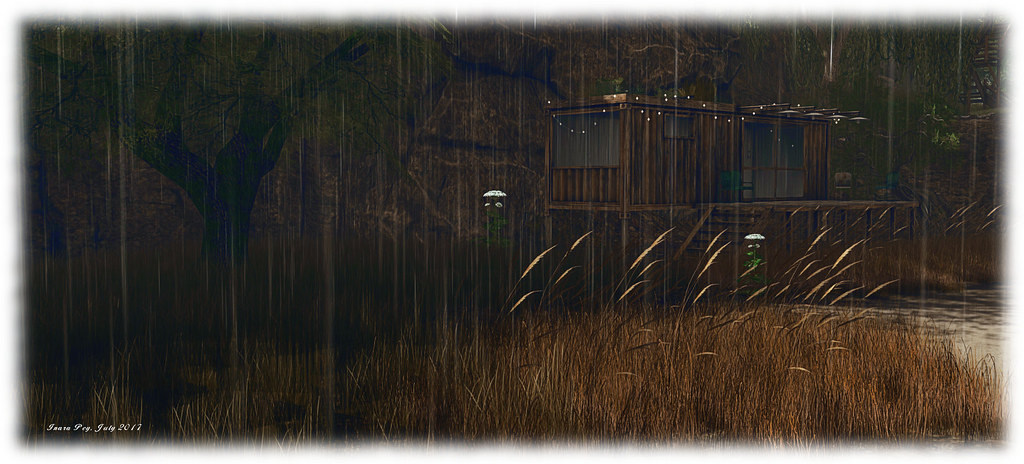
As the descriptions for the region found in the Destination Guide and in About Land state, this is a remote location, modelled after the US Pacific North-west, where a storm is brewing just off the coast. In fact, the rain has already made landfall – so you might want a brolly and raincoat when visiting!
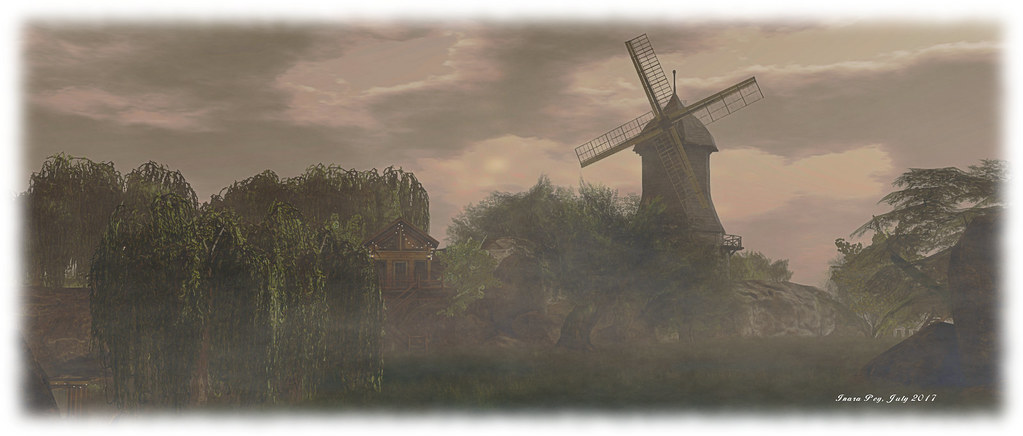
Follow the signs east and south from the landing point, and you’ll pass under a great stone arch, watched over by a wooden windmill, and you’ll find yourself on a high plateau which quickly drops away to the south and west to a sandy coast, where the tide appears to be on the rise. To the east, the land falls sharply away as cliffs, their edge guarded by rocky walls and slender fences.
Walk beneath the line of these eastern rocky walls- avoiding a slim finger pointing inland – and you’ll find your way southward past a large stone patio with pool and tiled roof, the latter protecting a fire offering warmth and respite from the rain, and down to a rocky headland where the revolving eye of a lighthouse watches over land and sea.
Below the lighthouse lay the beach and sandbars of the coast, straddled in part by wooden houses raised on stout wooden piles to avoid the ravages of a returning tide. Huts and tents sit further in from the sea, huddled on the sands above the high tide mark, but still looking vulnerable as rain lashes down and lightening forks and flashes its way across the sky.
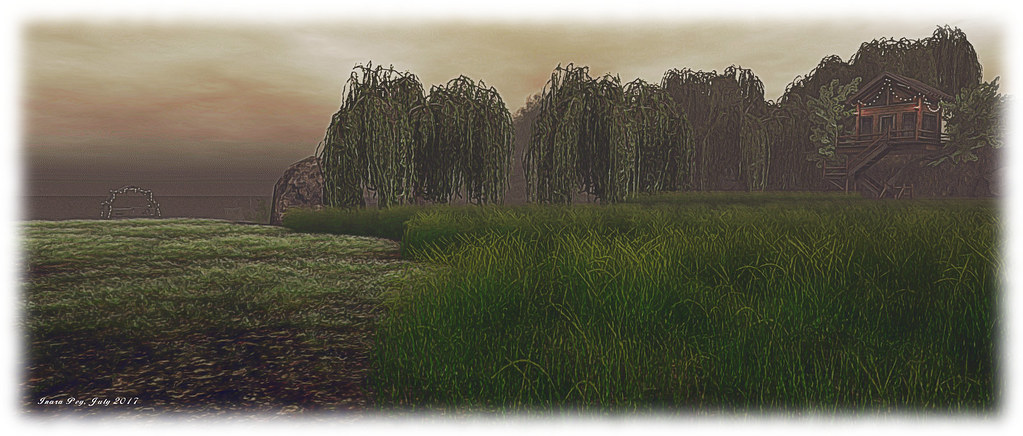
Further to the west and north, above the lie of the beach, but lower than the main plateau, sits a grassy bluff, home to a stone and wood cottage with smoke rising invitingly from its tall chimney, suggesting another place where shelter from the rain can be found. The cottage sits close to another line of cliffs to the north and which march back eastwards, part of the divide between the coast and the town on the neighbouring region. And old shipping container, converted into a hideaway, sits within the shadow of the cliffs, watched over by the weeping willows lining their narrow tops.
This is an atmospheric region, designed for photography and which lovers of the sea and the rain will enjoy. There are plenty of places scattered across the landscape for couple to enjoy, indoors and out – including in at least one of the tree houses. A group joining fee of L$500 secures rezzing rights and the ability to claim the pose gifts on offer at the landing point. Chania also notes that it is a work-in-progress (as with the region to the north), so don’t be surprised if details have changed between reading this description and any visit you make.
And about that region to the north? Well, it may be the subject of a future article, once Chania and her friends have had the opportunity to finish building it. Time will tell on that!






 Inara Pey: Living in a Modemworld