CtrlAltStudio issues Oculus CV-1 update

CAS-logoOn July 18th, 2016, Strachan Ofarrel (Dave Rowe) released an updated Windows version of his CtrlAltStudio viewer. Version 1.2.6.43412 Alpha use Oculus Rift SDK 1.5.0 and so should support the Oculus CV1, DK2 and DK1.

The release has been made to provide a level of Oculus HMD support in Second Life and OpenSim following the Lab’s decision to withdraw their own project viewer support for the Rift, after significant issues were found with the July update to that viewer.

However, as Strachan states in his blog post on the release, the CtrlAltStudio Windows update is presented “as is”, and still utilises the Firestorm 4.6.9 code-base, which is itself running well behind current releases, and therefore lacks functionality users might otherwise be familiar with in more recent versions of the SL viewer. This means CtrlAltStudio doesn’t support recent HTTP updates, inventory improvements or the TLS 1.2 update (so the built-in web browser will not work with things like Marketplace transactions when using the built-in browser).

Stratchan also warns that it is unlikely that users will get the level of recommended frame rates for CV1 use (which is something the Lab were stating prior to the release of their update), although he notes – again as did the Lab – that the experience should be enough to get a feel for what user-generated VWs are like in immersive VR.

Windows CtrlAltStudio users should be able to install this version over the 1.2.5 Alpha and 1.2.4 Alpha versions if they have either already installed. Those with older versions of the viewer should carry out a clean install (and can always back up and restore their settings before / after doing so). Note that if you install over the top of a previous version you may need to press the “Reset” button next to the “UI depth” Display Output option.
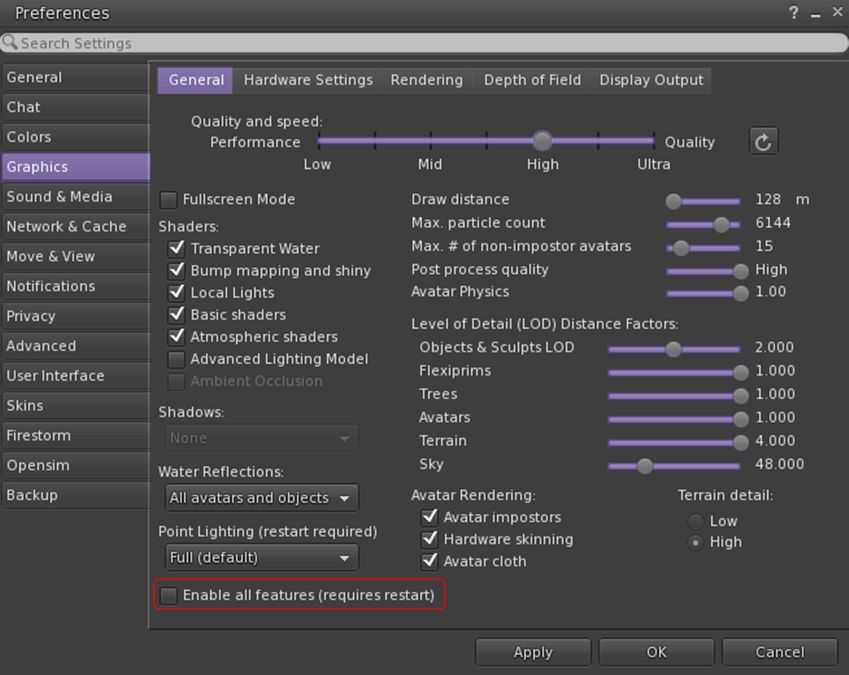
To overcome issues of the viewer failing to recognise very high perfromance GPUs, CtrlAltStudio 1.2.6.43412 includes and Enable All GPU Features option to force enable all graphics settings (e.g. Basic Shaders, etc.)
To overcome issues of the viewer failing to recognise very high performance GPUs, CtrlAltStudio 1.2.6.43412 includes and Enable All GPU Features option to force enable all graphics settings (e.g. Basic Shaders, etc.)

The full set of updates in this release are given as:

  • Updated to Oculus Rift SDK 1.5.0 so that the viewer works with the Oculus runtimes supporting the CV1 as well as the DK2.
  • Fixed the “UI depth” display setting to work for both DK2s and CV1s.
  • Added an “FOV multiplier” display setting that decreases or increases the field of view with respect to the Rift-recommended value.
  • Added a “Pixel density” display setting that decreases or increases the number of pixels rendered in the process of calculating the Rift display output.
  • Removed the following display options which are no longer available in the Rift SDK: “Low persistence”, “Dynamic prediction”.
  • Fixed crash at start-up if Rift display output is enabled but no Rift is connected and turned on.
  • Updated the GPU table.
  • Added an “Enable All GPU Features” display setting that enables all graphics settings that may otherwise be limited if a new, high performance GPU is not listed in the GPU table.
  • Added a “Combine Xbox One triggers” joystick setting that combines the left and right trigger values of the Xbox One controller into a single value like the Xbox 360 controller outputs, thus letting the triggers be used to fly up and down.

It is worth noting that when in Riftlook mode, the cursor is only visible in the left eye. This is intended behaviour, allowing the cursor to hover over UI elements and in-world objects correctly without having to use additional and complex code to calculate what relative depth should be used to place the cursor in a stereo rendering.
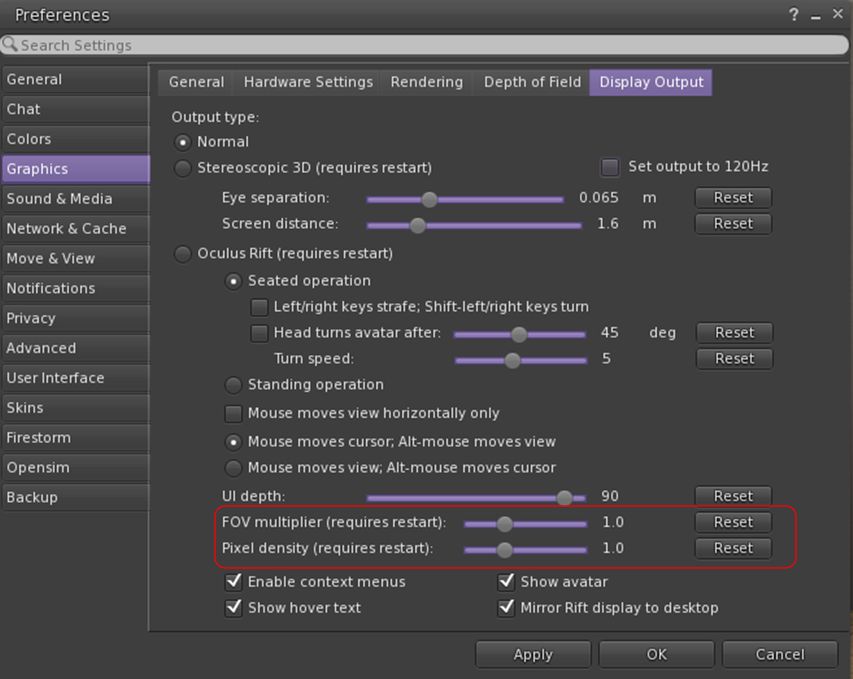
Release 1.2.6.43412 also includes a new FOV Multiplier and Pixel Density display settings to adjust the displayed field of view and number of pixels rendered in the Rift images. Depending on your graphics card capabilities, these may provide improved visuals when adjusted upwards (at the cost of FPS). Reducing the settings will improve FPS. Both require a viewer restart after adjustment

Ai Austin has provided a blog post on his experiences in using this viewer, and I would recommend it for further reading, particularly in you are new to using the Rift with Second Life, as Ai provides point-by-point sets on getting started.

An interesting broader note in Ai’s post is with regards to using the HTC Vive with CtrlAltStudio – a questions which has been raised a a couple of “Meet the Lindens” sessions. In this regards, Ai:

Some users have reported that the CtrlAltViewer set to use the Oculus Rift works with the HTC Vive using LibreVR/Revive. This is a compatibility layer between the Oculus SDK and OpenVR. It allows you to play Oculus games on your HTC Vive.

Related Links

Space Sunday: celestial harmonics, breathing air and singing for Pluto

July 14th: Jupiter with Io, Europa and Ganymede as seen by Juno after the craft had finished its critical orbital burn to slip into a 53.5 day orbit around the giant planet
July 10th: Jupiter with Io, Europa and Ganymede as seen by Juno after the craft had finished its critical orbital burn to slip into a 53.5 day orbit around the giant planet on July 4th. Credit: NASA/JPL / SwRI / MSSS (click and image for full size)

The banner image, captured by NASA’s Juno spacecraft, might look like the one I used in my last Space Sunday update, but there is one important difference. The images used last time around had been captured by Juno on June as it approached the Jovian system on June 29th, five days before the craft had to complete a critical engine burn whilst almost scraping the planet’s cloud tops, to place itself in an extended orbit around Jupiter. The image above was captured on July 10th, as Juno headed away from Jupiter, having successfully completed the manoeuvre.

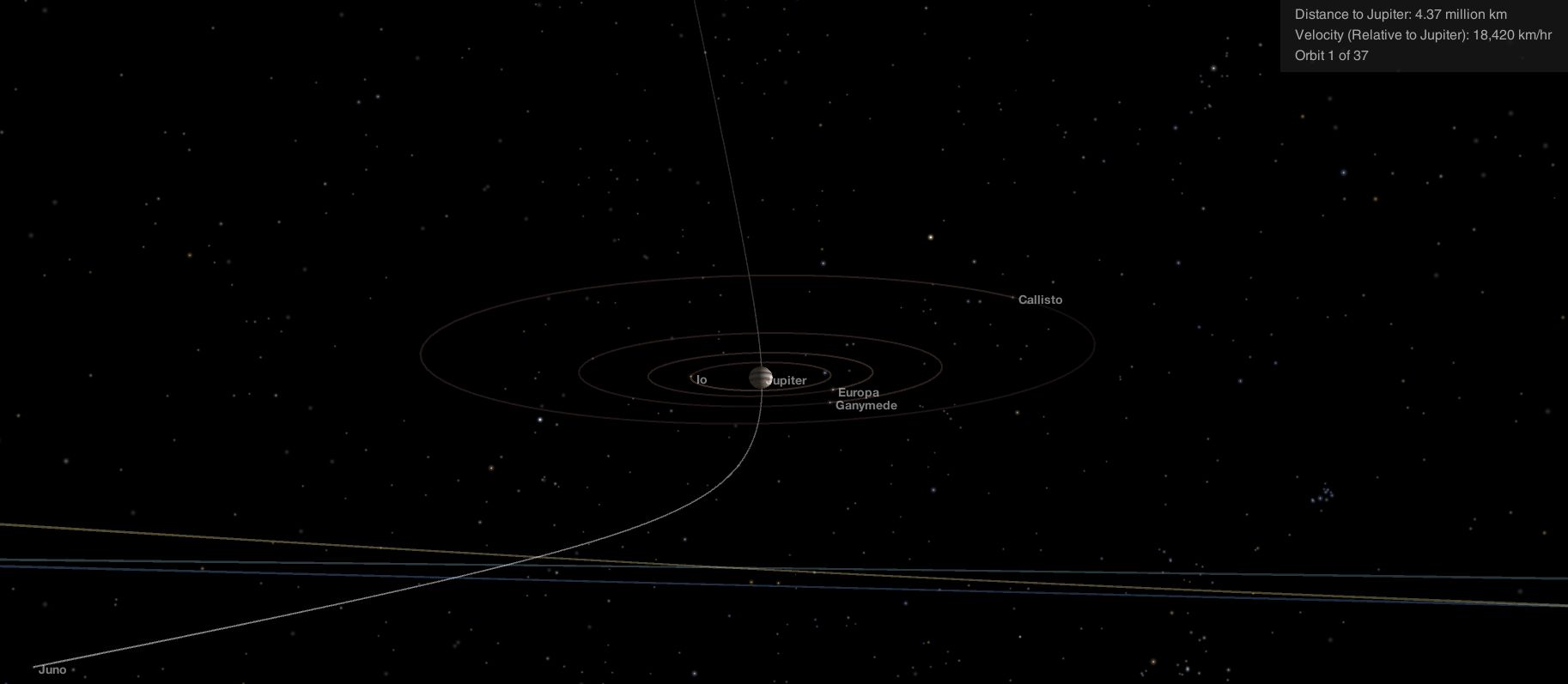
At the time the picture was captured, 17:30 UTC on July 10th, 2016, Juno was already  4.3 million kilometres (2.7 million miles) distant from the planet, and heading away from it at a relative velocity of 18,420 km / hour (11,446 mph) and decelerating under the influence of the Jupiter’s gravity.

Juno's flight around the poles of Jupiter and it's position on July 10th, as seen by the NASA Eyes application
Juno’s flight around the poles of Jupiter and it’s position on July 10th, as seen using the NASA Eyes simulator (click for full size)

Juno’s imaging system – JunoCam – had, along with other major systems aboard the craft, been shut down prior to the July 4th engine burn, both to conserve power – Juno had to turn its solar panels away from the Sun during the burn manoeuvre, limiting the available electrical power – and to protect them through the initial passage through Jupiter’s tremendous radiation fields. It wasn’t until July 6th that the instruments were all powered back up, and after testing them, the July 10th exercise was the first opportunity to have a look back at the Jovian system.

Juno will keep travelling outwards from Jupiter until the end of July, slowing to a relative velocity of just 1,939 km/h (1212 mph), before it starts to “fall” back towards the planet, making a second close flyby on August 27th. At this time, the craft will pass just 4,142 km (2,575 mi) above the Jovian cloud tops at a speed of 208,11 km/h (129,315 mph). More importantly, all of vehicle’s science instruments will remain powered-up, and JunoCam in particular should gain some stunning images of Jupiter during this second close pass.

To celebrate Juno’s arrival around Jupiter, NASA released a time-lapse video of the Jovian system as seen by the approaching spacecraft. It begins on June 12th with Juno 16 million km (10 million mi), and ends on June 29th, when JunoCam was shut down and Juno was 4.8 million km (3 million mi) distant.

Made possible by Juno’s high angle of approach into the Jovian system, it is the first close-up view of celestial harmonic motion we’ve ever had. Also, the 17-day duration of the movie means we see Callisto (flickering very faintly) make a full orbit around Jupiter, and get to see Ganymede, Europa and Io (counting inwards towards the planet) each experience eclipse as they pass through Jupiter’s shadow. Note that the flickering exhibited by the moons is an artefact of JunoCam, which is optimised to image bright features on Jupiter, rather than capturing the (relatively) dim pinpoints of the distant moons as they circle the planet.

Curiosity Resumes Operations as 2020 “Sister” Takes Shape

In my last update I reported that NASA Mars Science Laboratory, Curiosity, had entered a “safe” mode on July 2nd.  On July 9th, the mission team successfully recovered the rover from this safe mode – a precautionary state the rover will set for itself should it detected an event which could damage its on-board systems – and then subsequently returned Curiosity to a fully operational status on July 11th.

The cause of the problem lay in  a glitch in one of the modes by which images are transferred from the memory in some of the rover’s camera systems to its main computers. This generated a data mismatch warning, prompting the rover to active its “safe” mode and call Earth for assistance. Use of this particular data transfer mode between the identified camera systems and the computers is now being avoided in order to prevent a repeat of the problem.

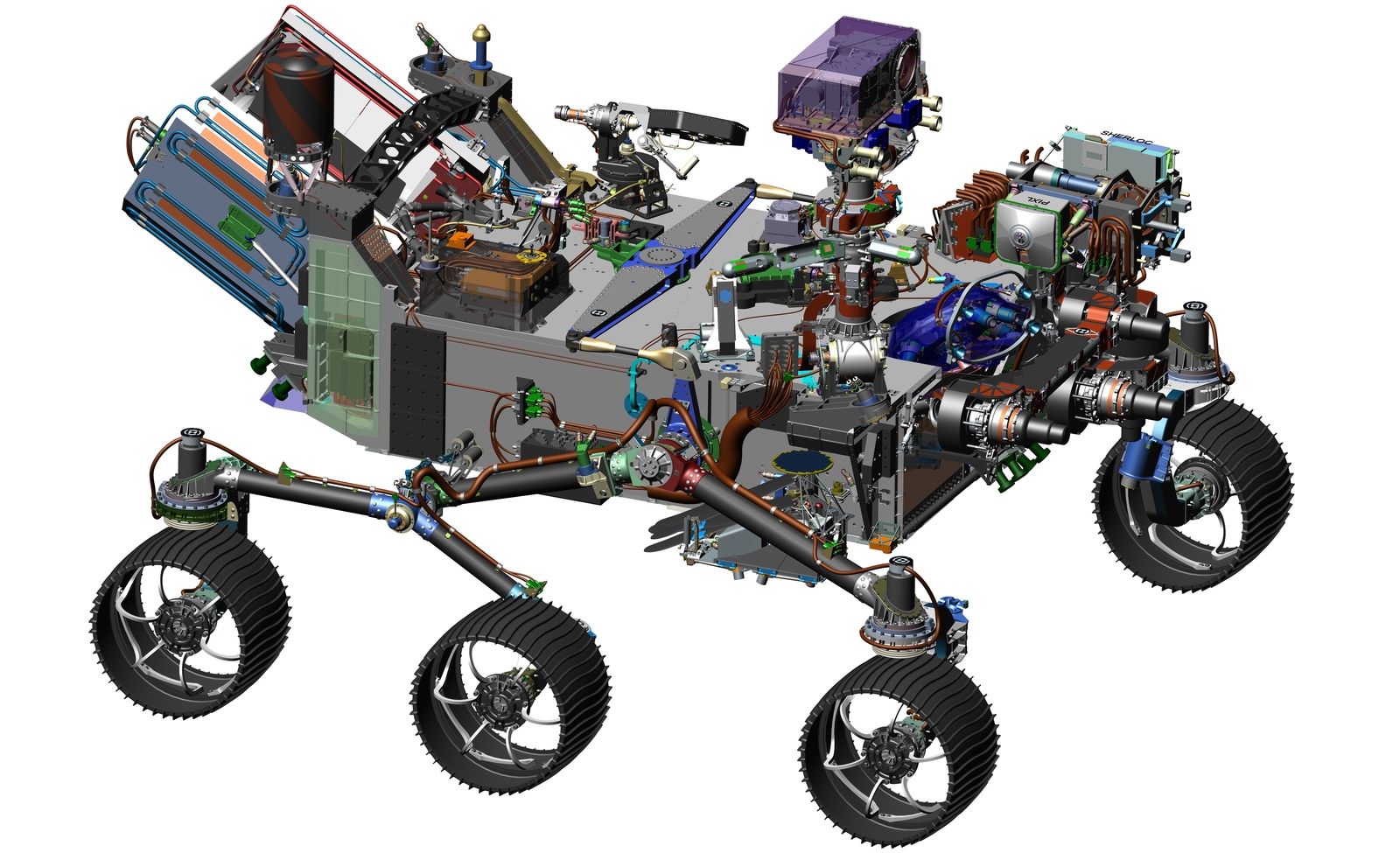
Meanwhile, NASA’s next rover mission – designated Mars 2020 at present, as it will launch in the summer of that year to arrive on Mars in February 2021 – is taking shape. The basic vehicle will be based on the Curiosity class of rover, but will carry a different science suite and have somewhat different capabilities.

A CAD image of the Mars 2020 rover: visibly similar to MSL's Curiosity rover. Credit: NASA
A CAD image of the Mars 2020 rover: visibly similar to MSL’s Curiosity rover. Credit: NASA

In particular, the new rover will carry an entirely new subsystem to collect and prepare Martian rocks and soil samples which can be stored in sample tubes. About 30 of these sample tubes will be deposited at select locations, so that they might be collected by a possible future automated mission and returned to Earth for direct analysis for evidence of past life on Mars and possible health hazards for future human missions.

Two science instruments mounted on the rover’s robotic arm will be used to search for signs of past life and determine where to collect samples by analysing the chemical, mineral, physical and organic characteristics of Martian rocks, while a suite of advanced camera systems will be housed on the vehicle’s mast. As with Curiosity, Mars 2020 will carry a comprehensive meteorological suite for monitoring the Martian environment and weather, together with a ground penetrating radar system for determining what is going on under the rover’s wheels.

Continue reading “Space Sunday: celestial harmonics, breathing air and singing for Pluto”

The Vordun: a new art experience in Second Life

The Vordun Gallery
The Vordun Gallery

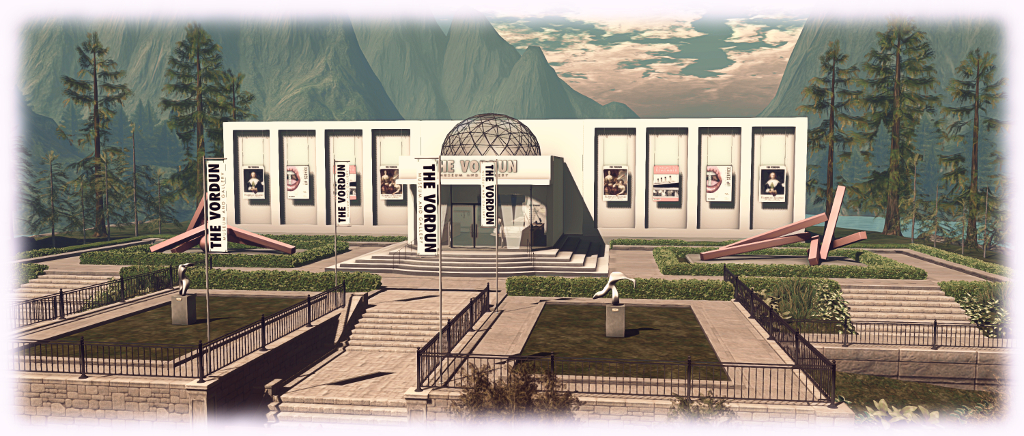
Saturday, July 12th witnessed the opening of The Vordun Museum and Gallery, created and curated by Jake Vordun, the owner of Fancy Decor.

Occupying a large, modern building on one side of the Fancy Decor region, the museum and gallery presents a venue capable of supporting multiple exhibitions, with two art exhibits and a museum exhibition being presented for the opening season. Together they make for a unique and immersive visit.

The Vordun: European Masters
The Vordun: European Masters: 300 Years of Painting

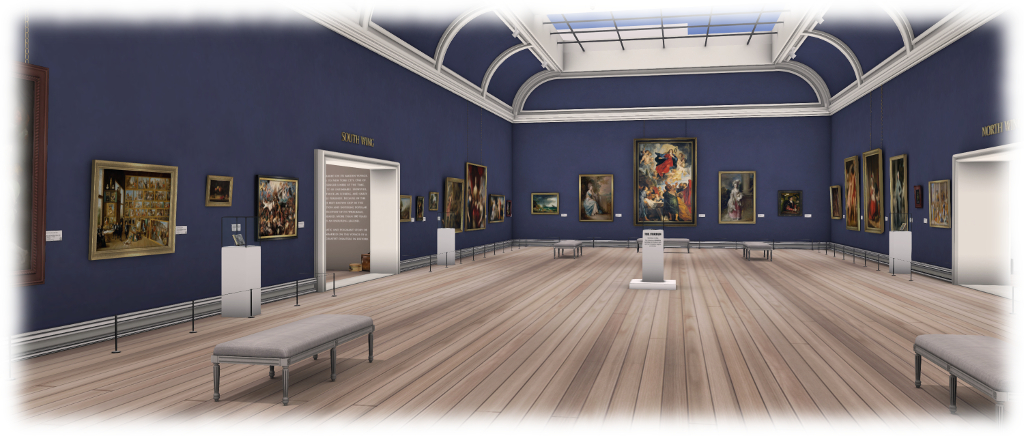
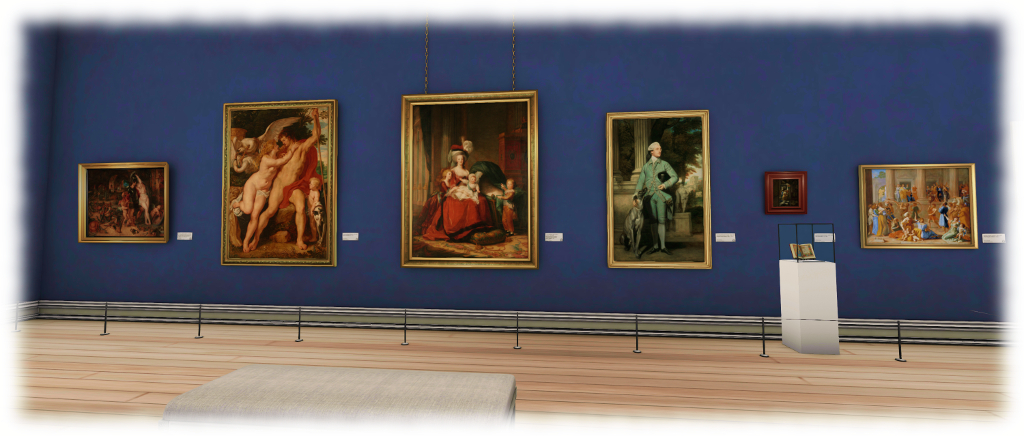
The first of the art exhibitions is European Masters, 300 Years of Painting, which occupies the main gallery hall. On displays are over 30 paintings from the period 1500 through 1799, all of which are presented in a scale consistent with one another and to their physical world originals.  These can be freely perused and admired, title cards alongside of each one offering information on its provenance:  artist, title, year of painting, medium and the physical world collection where it current resides.

However, what makes this exhibit unique is that it has an associated experience. On entering the gallery lobby, visitors should be asked to accept the gallery’s experience, smartly scripted by Tangle Giano of Madpea fame (if the dialogue is not displayed, click one of the racks of headsets on the lobby counters). Accepting it will attach a HUD and explanatory note card to your screen. The card can be clicked away once read (and the permissions requested by the experience are automatically revoked and the HUD removed & deleted on leaving the gallery area / teleporting away from the region).

The Vordun: European Masters

The HUD comprises a numbered keypad and display screen, each of the numbers corresponding to a number displayed in the lower right corner of the title card for 28 of the displayed paintings. When standing in front of one such painting, clicking the corresponding number on the HUD will focus your camera directly on the picture and display additional information (courtesy of Google Culture and Art) in local chat. An audio reading of the same text is also given for those with local sounds enabled, while the provenance information for the painting is displayed in the screen area of the HUD. Once the audio track has finished, control of the camera is released, allowing individual paintings to be more freely admired.

This approach adds considerable immersive depth to the exhibition, offering something of an audio tour of the paintings on display, whilst allowing visitors to freely wander between them in an order of their own choosing.

The paintings themselves are superbly reproduced, and run from portraits of famous figures of the times, through still life scenes, landscapes, allegorical paintings and biblical scenes. All studiously avoid the use of Full Bright, and this coupled with the use of a neutral windlight settings for the region, allows them to be presented in as close to “real world” lighting conditions as possible, further enhancing the immersive feel of the exhibition.

The Vordun:: Lip Service by Celeste Forwzy
The Vordun: Lip Service by Celeste Forwzy

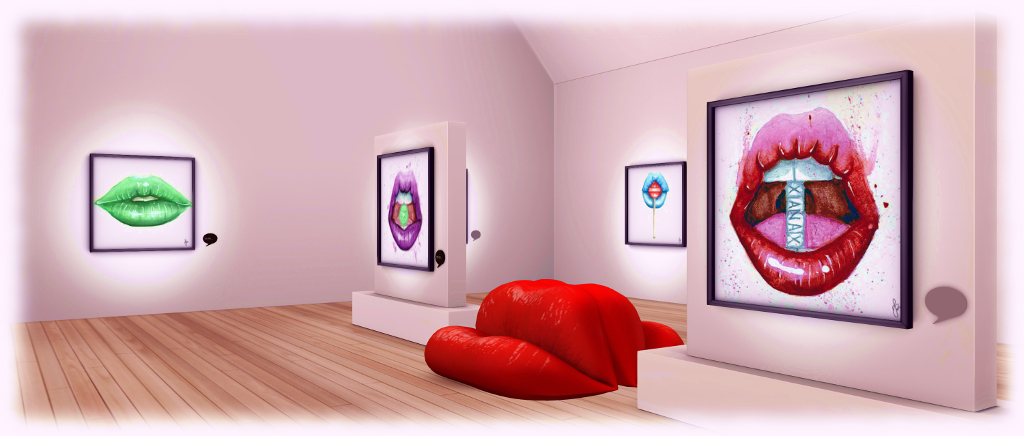
The north wing of the gallery houses the second art exhibition, entitled Lip Service. Running through until September 19th, it features a set of watercolour drawings of female mouth – or specifically lips – by physical world and Second Life artist Celeste Forwzy.

Twelve framed images are presented in the exhibit, and again considerable care has been taken in their presentation. The gallery space is rendering in a neutral white, with a simple wooden floor, with each drawing softly lit through the use of a projected light. The result is and environment ideally suited to focusing one’s attention on the drawings, each of which is extraordinarily attractive.

The Vordun: A Night to Remember

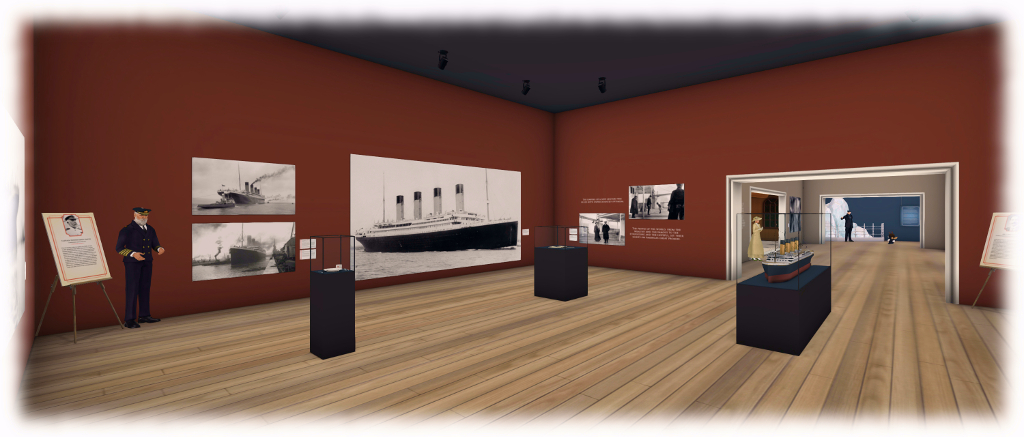
Across the hall, in the south wing, is A Night To Remember (from the 1958 film of the same name), curated by Emery Milneaux. An interactive exhibition commemorating the loss of RMS Titanic on the night of April 14th 1912, it runs through until October 9th, and is another extraordinary piece.

On entering the exhibition space, visitors are asked to attach a boarding pass to their screen. This bears the name of an actual passenger aboard the Titanic, with the promise that the fate of the passenger will be revealed further into the exhibition. From here, visitors move through a series of rooms which take us through Titanic’s brief history, from construction to loss.

The Vordun: A Night to Remember

This is told through a richly mixed medium of interactive photos and title cards (click the former to focus your camera on the photo, click the latter to receive further information in chat), together with principal figures from the liner’s story: Commodore Edward Smith, the Titanic’s Captain, socialite Madeleine Astor, first class passenger and survivor, Frederick Fleet, one of the vessel’s lookouts on the fateful night, and a young newspaper boy in London, Ned Parfett. Bump into any of them, and they will present a short “first hand” narrative. There are also reproductions of the ship’s Grand Staircase, together with a first and third class cabin – the latter two starkly outlining the massive class divide of Edwardian society.

However, it is the final gallery of this exhibit which is the most poignant, dealing with the liner’s sinking. In particular, in the final room, three large plaques list the names of every passenger who sailed with the Titanic, together with their fate on the night of April 14th. Through these, visitors can discover the fate of the person named on their boarding pass, adding something of a personal dimension to the exhibition. A fourth plaque commemorates the liner’s crew, 700 of whom (out of 916) lost their lives.

The Vordun: gift shop

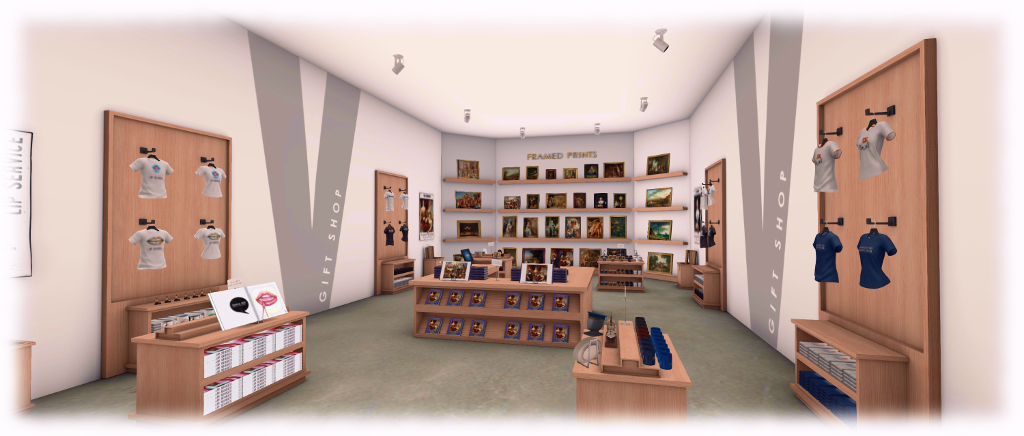
Individually, any one of the exhibitions at The Vordun would be more than worth visiting. Taken together, and a visit becomes a singular experience of many facets, one I have no hesitation in recommending. And I’ve not even covered the gift shop, which offers copies of the drawings, paintings and memorabilia for sale, together with a range of other souvenir items.

My congratulation to Jake and all involved in the project for developing such an outstanding venue. I look forward to making many future visits to The Vordun, and seeing future exhibitions, and the use of capabilities like Experience Keys might be further leveraged.

SLurl Details

With thanks to Kess Crystal for introducing me to Jake.

Mysterious lodgers, road trips, memoirs and odysseys

It’s time to kick-off a week of story-telling in voice, brought to our virtual lives by the staff and volunteers at the Seanchai Library. As always, all times SLT, and events are held at the Library’s Second Life home at Bradley University, unless otherwise indicated.

Sunday, July 17th

13:30: Tea Time at Baker Street

Tea-time at Baker Street returns for the summer, featuring a new location – 221B Baker Street at the University of Washington in Second Life, and a return to His Last Bow.

A 1917 anthology of previously published Sherlock Holmes stories by Sir Arthur Conan Doyle, the volume originally comprised seven stories published by The Strand Magazine between 1908 and 1917. However, later editions of the book saw an eighth story included, The Adventure of the Cardboard Box, originally published in 1892. This week sees Holmes and Watson engaged upon  The Adventure of the Red Circle.

Mrs. Warren, a landlady, visits 221B Baker Street with what she feels is a worrying situation. She has recently rented out a room to a young bearded man who speaks accented English. He paid twice the going rate for the room – but on the condition he has it on his own terms.

However, after going out on the evening he rented the room, only to return well after everyone else in the house had gone to bed, the young man has not been seen since. He appears to be in the room, but all communications – such as requests for The Daily Gazette newspaper to be placed outside the room each morning – have been via written notes. Holmes quickly deduces that whoever is occupying the room, it is not the man who first rented it and that the key to the mystery lies within the Gazette’s agony column.

The game is then well and truly afoot when Mrs. Warren returns with news that her husband had been kidnapped, only to be dumped unharmed at the roadside. Realising that the kidnapping is a case of mistaken identity, Holmes insists he and Watson visit Mrs. Warren’s house to determine the identity of the secret lodger …

18:00 Magicland Storytime: The Legends of Opening Day at Disneyland

With Caledonia Skytower.

Monday July 18th To the Vanishing Point

vanishing pointGyro Muggins returns with his Monday Night treat of sci-fi, starting with Alan Dean Foster’s To the Vanishing Point.

When Frank Sonderberg insists his family make their annual vacation a road trip, his wife and kids are less than impressed. When he pulls over to the side of the road to pick up a beautiful young hitch-hiker apparently stranded in the desert, his wife definitely isn’t impressed.

But no sooner has the young woman, calling herself Mouse, boarded their motor-home than reality changes – and not necessarily for the better.  Mouse, it turns out, is an alien on a mission and in picking her up, the family is inextricably joined with her in that mission. The universe, with all its many realities, is coming apart because the Spinner, the creator of those realities, has a headache. Mouse has the cure, but in order to give it, she must reach the Vanishing Point – and she need the Sonderbergs to get her there.

Tuesday July 19th, 19:00: Blueberry Summers: Growing Up at the Lake

Kayden Oconnell reads from Curtiss Anderson’s classic coming of age memoirs.

BlueberryBorn in 1928 in Minneapolis, Curtiss Anderson grew up in an extended family of Norwegian-Americans, among whom the highlight of the year was time spent among the lakes of northern Minnesota.

For young Curtiss, growing up in the 1930s and 1940s, these were especially idyllic years. Time spent in the farmhouse among this extended family presented an opportunity for him to escape the strained and troubled relationship he had with his parents and enjoy the company of others, aunts and uncles, the loving care offered by family friends Leigh and Clara, the companionship of the family dogs – and the chances to experience young love of his own.

Through the tales he relates of these summers, so Anderson also explores the notes and letters he wrote as a boy, carefully produced on a hand-me-down typewriter. Missives and notes which, although he never realised it at the time, were in fact his first forays into what would blossom in his adult life into a distinguished career as a writer, editor and publisher.

Wednesday July 20th 19:00: Ollie’s Odyssey

OllieCaledonia Skytower reads William Joyce’s children’s tale about Oswald (or Ollie, or Oz), a stuffed rabbit and favourite of young Billy. Oz goes everywhere with Billy, until one day, he is accidentally left under a table during a wedding, and is kidnapped by the wicked Zozo.

An unwanted amusement park prize, Zozo hates all toys that are favourites; so much so that he doesn’t just want them lost – he wants them forgotten by everyone – and he has gathered other embittered toys to his cause.

Now Oz must work to not only rescue himself and get back to Billy, he must ensure all the other “lost” toys reach safety.

Thursday, July 21st 19:00: Kolchak: the Night Stalker

A supernatural thriller with Shandon Loring


Please check with the Seanchai Library SL’s blog for updates and for additions or changes to the week’s schedule.

The featured charity for July-August is WildAid: seeking to end the illegal wildlife trade in our lifetimes by reducing demand through public awareness campaigns and providing comprehensive marine protection.

Additional Links

Creative Inhalations in Second Life

reative Inhalation: Breaking Bad in Frenzyville
Creative Inhalation: Breaking Bad in Frenzyville

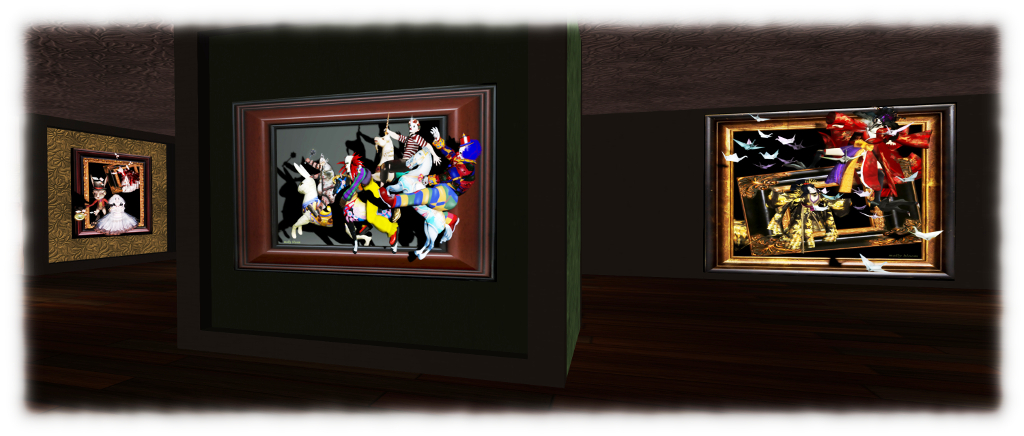
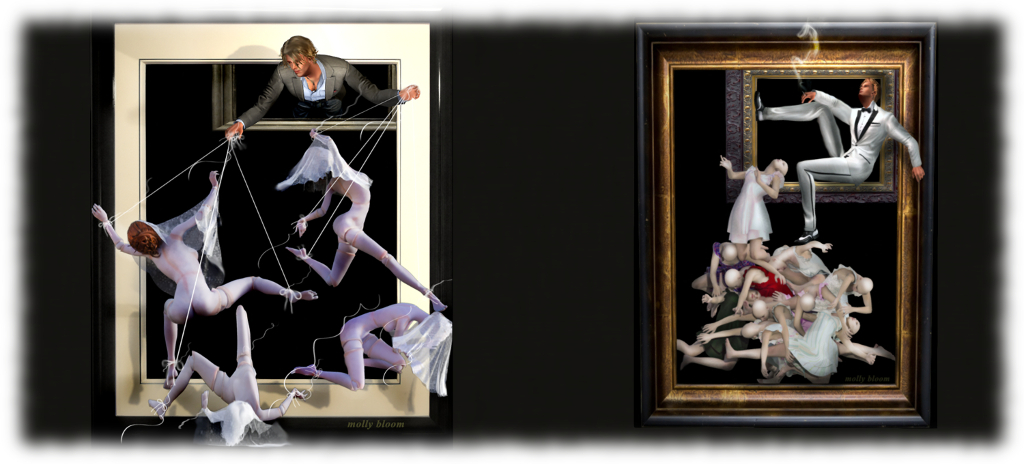
Open through until the end of August at the Paris Metro Art Gallery is Creative Inhalation: Breaking Bad in Frenzyville, featuring the wonderful, whimsical and intriguing art of Molly Bloom.

Noted for her ability to play with our perception of depth by having elements of her images reaching beyond the confines of their picture frame, even to the point of using props completely outside of the picture, Molly’s art is instantly recognisable when encountered in Second Life – and it is always a delight to visit exhibitions of her more recent work, as is the case here.

Creative Inhalation: Breaking Bad in Frenzyville

On display are 22 pictures (23 if you count the superb self-portrait on the upper floor, which makes clever use of one of the gallery’s arched windows), which are split between the two floors of the gallery. Collectively, the exhibition is presented in memory of Molly’s late father, who passed away in May 2016 at the age of 95, with four of the images in particular being dedicated to him.

Not that this is in any way a downbeat exhibition; quite the reverse. As Molly notes, she inherited her sense of humour from her father, and it is much in evidence in many of the pieces displayed here and in a variety of ways, from the subtle, smile-inducing, through to the right-in-you-face-laugh-out-loud. Between these extremes sit the whimsical, the thought-provoking   and – of course – the dedications.

Creative Inhalation: Breaking Bad in Frenzyville

As I noted at the top of this piece, it is always a delight to see Molly’s art in Second Life, and Creative Inhalations: Breaking Bad in Frenzyville is no exception. Do be sure to drop in before the end of August, especially if you’ve not encountered her work before.

SLurl Details

Project Bento User Group update 19 with audio

Project Bento – extending the SL avatar skeleton

The following notes and audio were taken from the weekly Bento User Group meeting, held on Thursday, July 14th at 13:00 SLT at the the Hippotropolis Campfire Circle . For details on the meeting agenda, please refer to the Bento User Group wiki page.

Note that this update is not intended to offer a full transcript of the meeting, nor does it present the discussion points in chronological order. Rather, it represents the core points of discussion, grouped together by subject matter were relevant / possible, whilst maintaining the overall context of the meeting.

Viewer Update

The Bento project viewer updated shortly ahead of the meeting to version 5.0.0.317597. This is intended to be the final round of skeleton and slider changes, and as such includes the modifications to the head bones that were previously offered through the experimental viewer, which can be summarised as:

  • A new bone, mFaceJawShaper, intended to resolve issues around the jaw angle (see my Bento update #17 for background)
  • Additional tweaks to existing facial bones
  • Some slider changes.

In addition, the viewer includes the avatar height update referred to in my Bento update #18, although this has been causing some issues, and some quasi-scaling for wings and tails with avatar height.

These latest updates may mean that content built using earlier versions of the skeleton may no longer display correctly in the updated viewer.

With this release, the Lab is not intended to make any further significant changes to the skeleton or sliders, but focus solely on bug fixes and moving the viewer to Release Candidate status. The only exceptions will be if major regressions are found which affect pre-Bento content, or major issues of a similar nature. If such issues are found with the project viewer, the request is to let the Lab know via bug report and forum thread feedback.

There are also updated avatar test models to go with the updated viewer, which can be found on the SL wiki Bento testing page. These also include mesh eyes now that scaling has been added to the eyes.

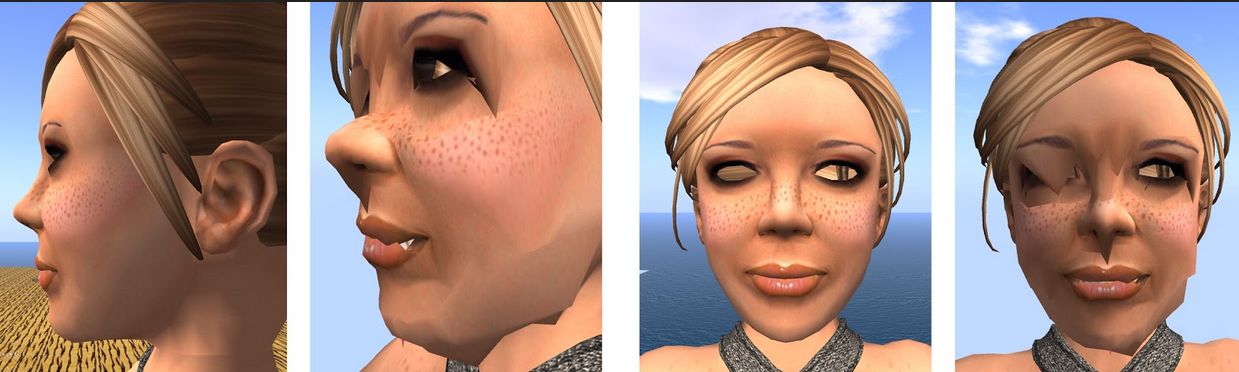
The hope is that allowing for vacations and there being no significant issues found within the July 14th project viewer, it will move to RC status in August. This may also be dependent on whether or not the Lab an resolve the issue of facial distortions occurring at altitude when software skinning is used, which is still being examined.

The issue of facial distortions at altitude when using software skinning in Bento has yet to be fully resolved (images courtesy of Cathy Foil)

Should finding a resolution to this issue continue to prove problematic, and providing the issue does not cause performance issues, the Lab might leave it unresolved with the recommendation that creators use hardware skinning, so that the viewer can be promoted to RC status with this flagged as a known issue.

Any progress from RC to release status for the viewer will depend on whether further bugs or issues are found within the Bento viewer, what other RC viewers are in the release channel, what the relative priorities are for the viewers in the release channel in terms of promotion to release status, etc.

Questions were raised in the meeting about making use of the body fat slider with Bento to make for easier weighting of body weights with mesh heads. However, the body fat slider works entirely on morphs, so to be effective with Bento, it would require the addition of additional body joints, which is not on the cards at this point in Bento.

Alt_Eyes

Following the discussion about the Alt_Eye bones, some modifications have been made. In particular, they are now parented to the face root bone, rather than having the same parenting as the original eyes, although they still respond to the same sliders. The viewer has also been updated so that it will animate both sets of eyes consistently (e.g. looking at speakers or other visual targets).

The re-parenting of the alt_eyes is intended to make things eyes for people wishing to use them on non-human avatars. This isn’t as general-purpose as had been hoped (see my update #18), but there were constraints on how the original eyes could be handled for non-human avatars without risk of breaking pre-Bento content, so this route was seen as the best means of presenting people with alternative eye sets, rather than completely re-purposing the alt-eyes.

Rigging to Attachment Points

During the development of Bento, the Lab were introducing validation checks on the simulator side to improve reliability in SL (e.g. checks to ensure animations are what they say they are, further checking of mesh uploads to ensure they can be rendered correctly, etc.). A side effect of these updates would have been that it would no longer be possible to upload mesh items rigged to attach points.

This caused a degree of consternation among content creators (see my SL project update for 2015 week #44), and the decision has now been made not to disable the upload to content weighted to attachment points so as to prevent breakage with existing content (e.g. when issues updates). However, the Lab will not be encouraging people to rig to attachment points.

Continue reading “Project Bento User Group update 19 with audio”