Update, 11:23 SLT, Wednesday, December 14th: The mirror sites are now available – the links are available here.
On Tuesday, December 13th, Firestorm released the much-anticipated Bento update, Firestorm 5.0.1 – which you can read about here.
HOWEVER, such has been the demand for the update, the Firestorm servers have been overloaded, a situation which has left Firestorm without the ability to provide their download and web services.
“This is an unprecedented situation for us,” Jessica Lyon, the Firestorm project lead informed me. “While we have had download problems in the past, we’ve never seen demand on this scale before. It’s repeatedly taken all our servers off-line with the load.”
Because of the demand is preventing people from even accessing the Firestorm web services – the blog, JIRA, etc., – the Firestorm team is asking that people hold-off if they cannot obtain a download or access the Firestorm website, and not to keep repeatedly trying.
Jessica added, “Please, just be patient. Our servers need the breathing space. We are working on adding additional capacity to meet the demand trough mirror sites, but this does take time. When we have these up and running, we’ll let people know through the in-world Firestorm support groups and social media.”
In the meantime, and in an attempt to alleviate the lack of downloads, some people have placed the Firestorm 5.0.1 installers on cloud servers, dropboxes, and other network file sources. While the effort to help meet the download demand is appreciated, the Firestorm team ask that people do not do this, but to wait until Firestorm’s own mirrors are up and running.
“With the best will in the world, not all networked download sites are secure, and there is a chance that by going to some, users could inadvertently expose themselves to the risk of viruses or Trojans,” Jessica said. “At the end of the day, we can only guarantee our download service and its mirrors are secure, and we’d prefer that people wait a little while, rather than expose themselves to any such risk.
“Again, we will notify people via the in-world support groups as the situation improves, and also via Twitter and any other medium we can use.”
Following the unprecedented demand for Firestorm 5.0.1 (see here for details), formal mirror sites are now available. When downloading Firestorm 5.0.1, please ensure you use with either the Firestorm download page or one of the mirror site links. Please do not source your copy of Firestorm from elsewhere. The mirror site download links are available here.
On Tuesday, December 13th, the Firestorm team released Firestorm 5.0.1.52150 – the new version number both reflecting the inclusion of the Lab’s Project Bento code and also bringing Firestorm more into line with the Lab’s own viewer version numbering, which the latter has been gently requesting for some time now.
As well as Bento, the release includes almost all the latest code updates and improvements from Linden Lab, and a lot of new nips and tucks from the Firestorm team and via contributions from other parties.
In keeping with my usual approach to Firestorm releases, what follows is not an in-depth review of version 5.0.1.52150, but rather an overview, highlighting some of the more significant / interesting changes, updates and fixes, which I feel will be of most interest to users.
For full details of all changes, and all due credits to contributors, etc., please refer to the official release notes. Note that this release means that Firestorm version 4.7.5 will be blocked in around three weeks time.
The Before We Begin
There is no need to perform a clean install with this release if you do not wish to.
You should, however, remove your existing version of Firestorm before installing 5.0.1.
Before removing your current version, make sure you back-up all your settings safely so you can restore them after installing 5.0.1.
Lab Derived Updates
Firestorm 5.0.1 brings the viewer up to parity with the Lab’s 5.0 code base, which means this release supports the new Bento skeleton enhancements plus VLC media capabilities, the Visual Outfits Browser (VOB), a range of fixes and improvements and some upstream additions from the most recent Maintenance RC.
Bento Avatar Skeleton Enhancements
As most people are aware, Project Bento is a collaborative project between the Lab and content creators to improve and enhance the Second Life avatar skeleton in order to better support mesh avatars (Bento does not work with the Second Life system avatar). It adds numerous new bones to the avatar skeleton, allowing easier creation and animation of things like additional wings and limbs, and offers the opportunity for greater facial animations with mesh heads and faces, and even finger manipulation on mesh hands.
In addition, Bento provides a set of new attachment points to work with the new joints – however, the overall limit of the number of attachments you can wear at any one time remains 38 (including HUDs).
Most of all of this work is entirely under-the-hood. However, there are two additions to the avatar right-click context menu for both your own and other avatars: Reset Skeleton and Reset Skeleton And Animations, which should be noted.
These options have been added because sometimes, when changing between one mesh avatar and another, the basic SL avatar can become deformed, resulting in it looking squished, stretched, caught between two looks, or something else. This problem is generally the result of race conditions when the avatar’s appearance is being updated, and both of these buttons are intended to correct the problem – the option to reset animations being intended to fix deformations which may be due to animations also kicking-in incorrectly / at the wrong time as well, which may cause an avatar to deform.
The reset skeleton options should “fix” your own or other avatars which appear distorted in your view after changing looks / shape – note both options only affect your view of the avatar in question, it does not affect how others may see the same avatar. Those using the Pie Menu should find the options under Appearance > Reset
Note than anyone not using a Bento-capable viewer will see Bento avatars “deformed” or “melted” and will also see any attachments using the new Bento attach points rendered in the avatar’s chest.
Further information on Bento can be found via the following links:
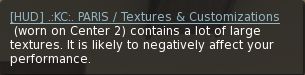
If you attach a HUD which makes heavy / excessive use of large textures and which, as a result, can impact your system’s performance, the viewer will display a warning to indicate the problem and which names the HUD. It will naturally fade after a set time has passed.
The new HUD complexity warning
Visual Outfits Browser
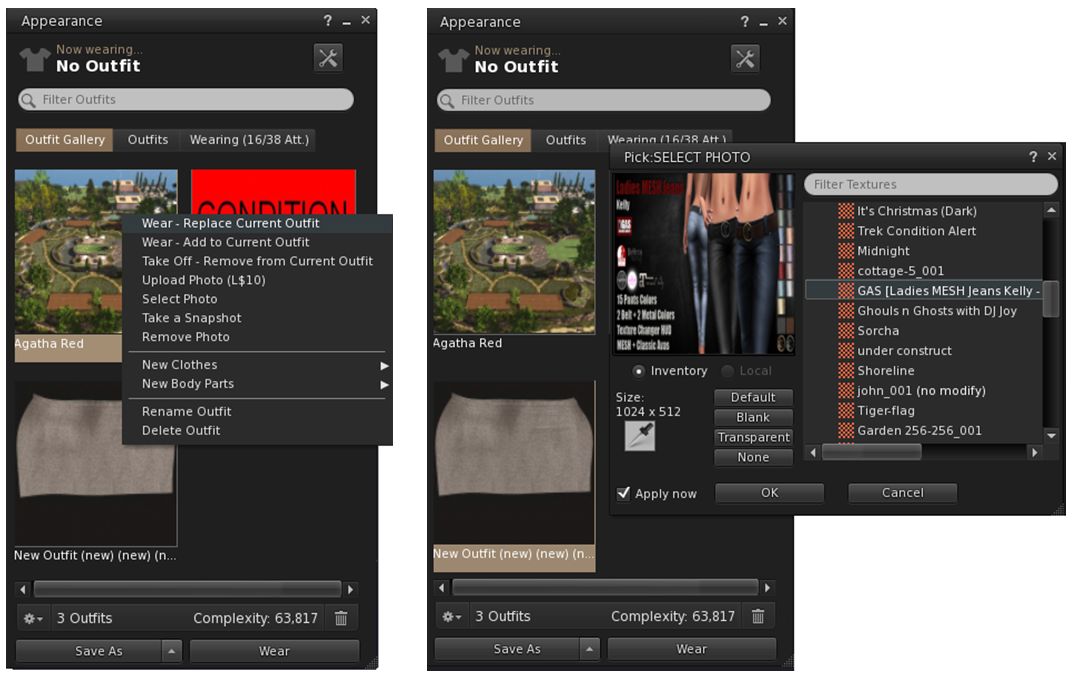
The Visual Outfits Browser (VOB) allows you to use the Appearance floater to capture / upload / select images of your outfits and save them against the outfits in a new Outfit Gallery tab within the floater. It can be accessed by either right-clicking your avatar and selecting Change Outfit or Edit Outfit > Click the left arrow at the top of the floater or via Avatar > Appearance / CTRL-O, then
The tab displays all of your created outfits as a series of folder icons, each one with the name of the outfit beneath it. You can replace these icons with an image of the outfit quickly and easily in one of three ways:
You can wear the outfit, then right-click on its associated folder icon and select Take a Snapshot. This will open the snapshot floater with save to inventory selected by default, allowing you to photograph yourself wearing the outfit and upload the image to SL, where it automatically replaces the folder icon for the outfit
You can use Upload Photo to upload an image of the outfit your previously saved to your hard drive, and have it replace the folder icon
You can use Select Photo to select any image previously saved to your inventory (including any image supplied with the outfit in question, if appropriate), and use that to replace the folder icon for the outfit.
The Visual Outfits Browser (VOB) allows you to browse your outfits in the Outfits folder be associating a snapshot with them which can be uploaded directly, or pulled from inventory (256×256). You can also wear or remove outfits through the VOB (images purely for show – I don’t actually use the Outfits folder!)
Any outfit within the gallery can be worn (Add to or Replace current outfit) and removed via the right-click context menu, which also includes options to create / delete new outfits, and to create new system clothing items / body parts.
When using the capability there are a number of points to keep in mind:
Both the Take a Snapshot and the Upload Photo options will incur the L$10 upload fee, with the images themselves saved in your Textures folder
In all three cases, link to the original images are placed in the outfit folder
VOB only works for outfits you’ve created using the Appearance floater / the Outfits tab. It doesn’t work for any other folders where you might have outfits – such is the Clothing folder.
QuickTime has been replaced with LibVLC support for the Windows and Linux versions of the viewer. This is due to Apple discontinuing QuickTime for Windows while leaving vulnerabilities unpatched. see QuickTime for Windows: “uninstall today”.
Other Lab Updates of Note
The viewer is now DPI aware on Windows 8.1+. This fixes the problems with tiny font size & user interface size on high-resolution monitors on Windows 8.1 and above. The UI Scaling is now be automatically set to the correct value for the system at viewer launch. The maximum UI scaling setting has also been raised as follows:
Windows 7: 2.0.
Windows 8.1: 2.5.
Windows 10: 4.5.
Improvements to the region “Object Bonus” setting – see BUG-11913.
A time stamp has been added to Help > About floater.
A fix to prevent editing marketplace listings before inventory has fully fetched causing listings to be unlisted – see BUG-11804.
A fix for resetting scripts via the build menu no longer works on many scripted objects – see BUG-20086.
A new alert has been added, warning if too much inventory is in coalesced objects.
PERMISSION_DEBIT notification now defaults to Deny, to to help prevent accidental granting of debit permissions (see below).
The old debit notification (left) gave equal emphasis to accepting / denying the request to access account balances. The update now focuses Deny as the default option.
Firestorm Updates
Preferences
Notable Preferences updates are:
Move and View: new option to re-render temporary derendered objects after teleport or after end of session/manual re-rendering via the asset blacklist floater: Re-Render Temporary Derendered Objects After Teleport (see also Asset Blacklist Updates, below).
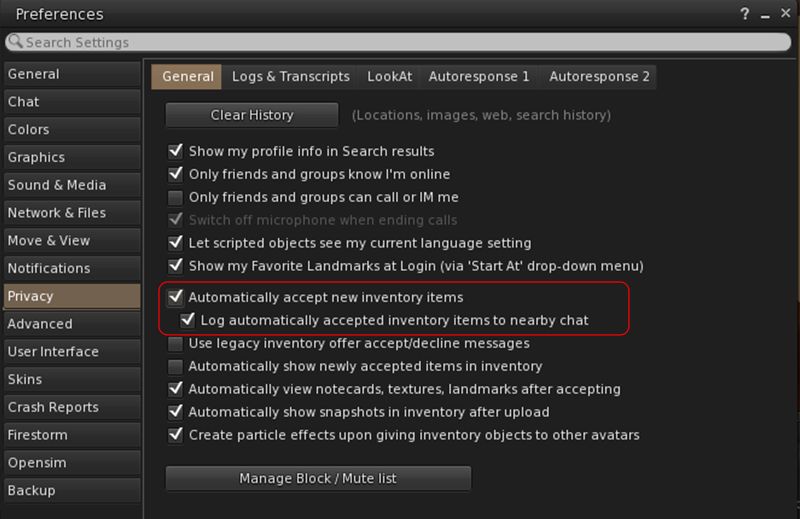
Privacy > General: New option to log auto-accepted inventory to nearby chat (requires Automatically Accept New Inventory Items to be enabled).
New option to log auto-accepted inventory to nearby chat when Automatically Accept New Inventory Items is enabled
User Interface > Font: new font option: Noto.
Avatar Render Settings
Unlike the official viewer, the avatar render settings you apply to individual avatars will persist across log-ins, so if you set an avatar to Do Not Render, that avatar will only render as a grey imposter until such time as you right-click on them again and select either Render Normally (e.g. fully or as a Jelly Doll, depending on your Complexity Setting), or Render Fully, so they will always render in your view, no matter what your Maximum Complexity setting.
With Firestorm 5.0.1 you can track those avatars you’ve set to either always render fully or to never render (other than as a grey imposter) using World > Avatar Render Settings. This displays a floater listing all the avatars you’ve applied a render setting to as either Fully or Never. Right-clicking on an avatar’s name (or using SHIFT-click / CTRL-click for multiple selections) will display a pop-up menu, allowing you to change the current setting for the selected avatar(s). You can also right-click on an avatar’s name and then click the information icon just to the left of their render setting to display their profile.
World > Avatar Rendering Setting allows you to review all avatars whom you have set to either always render Fully or Never (other than as a grey imposter)
Asset Blacklist Updates
The Asset Blacklist (World > Asset Blacklist) has a number of improvements:
Temporarily blocked objects are now shown in the blacklist floater so they can be removed.
A fix has been added to prevent crashing when leaving an area where many objects were blacklisted.
A Preferences option has been added to re-render temporary derendered objects after teleport or after end of session/manual re-rendering via the asset blacklist floater: Preferences > Move & View > View > Re-Render Temporary Derendered Objects after Teleport.
A Clear Temporary button has been added to the blacklist floater to clear all temporary derendered objects.
Graphics Presets Now Global
Graphics presets (a Linden Lab capability introduced into Firestorm with the 4.7.9 release) are now treated as a Global setting, rather than a Per-Account setting. This means that presets can be set from the log-in splash screen without actually logging-in to the viewer, and helps ensures consistent presentation of the current preset setting. However, it also means that any existing presets either have to be re-created, or need to be manually copied from the per-account settings folder to the global user_settings folder. See FIRE-19810.
FSExperimentalLostAttachmentsFix
There is currently (at the time of writing) an issue in messaging between the simulator and the viewer during region crossings (physical or teleports), which can result in attachments being detached or, harder to detect, attachments being removed server-side, but remaining visible (but effectively ghosted) in your view, and which cannot be individually removed, as the simulator doesn’t recognise them as being there.
A common cause for this problem is multiple items using the same attachment point – which can be a major issue with things like rigged meshes, which then to be set to attach to something like the right hand. Thus, a way to solve this is to move multiple attachments using the same point elsewhere – in the case of rigged mesh, this should be relatively simple, as it will retain its orientation and position relative to your body no matter where it is attached.
The Lab is still investigating this problem. However, in an attempt to help mitigate it, Firestorm have implemented two new debug settings in Firestorm 5.0.1:
FSExperimentalLostAttachmentsFix: enabled by default, this triggers an attempt by the viewer to correctly resync what it believes to be your attachments with the simulator’s understanding of what you have attached, and either prevent items being unexpected removed, or items being removed, but remaining ghosted in your view, etc.
FSExperimentalLostAttachmentsFixReport: this option is disabled be default to prevent message spamming on your screen. When enabled, it reports any attachments which the simulator attempted to incorrectly detach during a teleport or region crossing to nearby chat.
RLVa (Restrained Love) Updates
For the full list of RLVa updates, please refer to the release notes. However, the following are worth highlighting:
RLVa restrictions can be sorted in ascending / descending order via RLVa > Restrictions and clicking on the Restrictions header
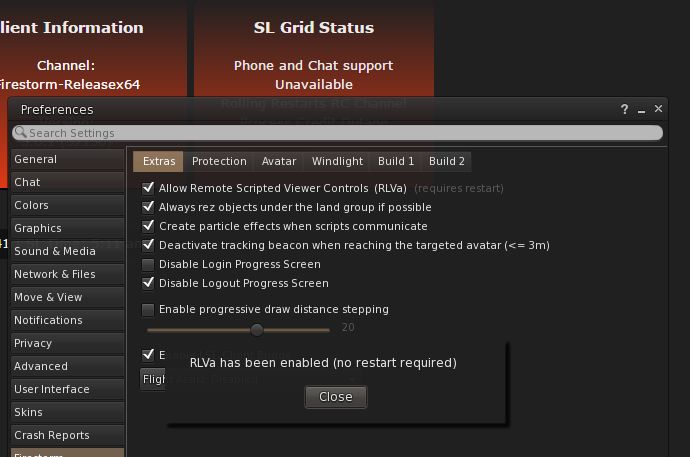
RLVa can be toggled on / off from the viewer log-in splash screen without the need to re-start the viewer on doing so.
If you are not logged-in to the viewer, RLVa can be toggled on / off from the Firestorm 5.0 login / splash screen without having the restart the viewer.
Building and Scripting
Mesh uploads should no longer fail from a folder with Unicode characters in the name (FIRE-19806 and BUG-37632), and clicking on a link in a script dialogue should no longer open it as a SLurl rather than launching a web browser (FIRE-20054).
In addition, the LSL preprocessor has the following improvements:
The “Preprocessed” text window of the preprocessor is no longer editable.
Line and column are now shown on the “Preprocessed” tab.
Context menu items and button which are unavailable are properly disabled.
Actions for context menu items and for buttons are performed on the active tab (if action is available) instead of always on the possibly hidden editor tab.
The Search / Replace and Goto Line floaters now work on the active tab instead of always on the possibly hidden editor tab.
Other Updates of Note
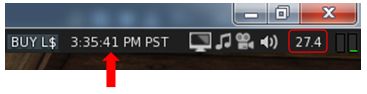
An FPS meter has been added to the viewer status bar, with a seconds count also added to the status bar clock (top right corner of the viewer
FPS meter (circles) and seconds on the clock
64-bit CEF for Windows x64 in now built as native 64-bit plug-in; no more QuickTime
The custom payment message is now also sent in-world with the payment instead of only being visible in transaction history
Your own avatar’s attachments should now appear in the correct locations when in Mouselook (FIRE-10574 and BUG-1408)
CTRL-F will now focus the local search editor of a window if available – can be disabled through the Debug setting FSSelectLocalSearchEditorOnShortcut to FALSE
Comma separators added to the avatar complexity notification (so 1,456,897 appears as such, rather than 1456897)
A refresh button has been added to the texture preview window when viewing people’s profile pictures, group insignia, textures in inventory, etc, to overcome issues of the image failing to render in the preview (FIRE-20150)
A refresh button has been added to texture preview windows to help deal with situations where the image may not properly load or render
Group updates:
A Copy SLurl to Clipboard option has been added to the right-click context menu when clicking on a group name – this copies the group’s URI to the clipboard (FIRE-20146)
Clicking a group URI should now put focus on an already open and maximised group profile.
Flickr upload fixes:
Direct snapshot uploads to Flickr should no longer upload multiple copies (FIRE-20026)
Flickr upload time-out increased to 5 minutes
Uploader now checks std:string.max_size() before appending image data to avoid buffer overrun (FIRE-20094)
OpenSimulator Updates
Setting Home location should no longer fail on OpenSim grids (FIRE-19894)
Legacy search results list items should now be selectable under all circumstances in Inworldz (FIRE-19912).
General Observations
Firestorm 5.0.1.52150 brings Firestorm bang-slap up-to-date with the Lab’s own viewer, something the Firestorm team have been striving to achieve for the past couple of years, so kudos to all concerned.
With the inclusion of Bento, this release now means all those making use of the most recent releases of all currently maintained viewers can now correctly render Bento products – so it will be interesting to see how the Bento market for mesh avatars (human or otherwise) now develops.
A side benefit with Bento is that during testing, a good number of preview and beta testers reported an overall improvement in viewer performance – potentially more than can be put down to a purely placebo effect. I run a reasonably high-end system, but have witnessed a step up in average frame rates on our home island / region when compared to 4.7.9 (which also brought something of an improvement for me), and have found some regions I’ve traditionally had problems with (FPS down in the teens with the bells and whistles on) also behaving better.
5.0.1 has, for me, so far been the most stable of all the recent Firestorm releases – not that I tend to have major issues (just oddball ones!). So, as Christmas presents go, this release certainly fills the stocking nicely!
“Hand over your coal and carrots, and don’t try anything funny. This hair-dryer is plugged in, and I know how to use it!” North Pole at Alki, Alki – blog post
Server Deployments
As always, please refer to the server deployment thread for the latest updates and information.
On Tuesday, December 13th, the Main (SLS) channel received the same server maintenance package, as deployed to the RC channels in week #49. This includes the following feature requests:
BUG-6377 – llGetObjectDetails(id,[OBJECT_ATTACHED_SLOTS_AVAILABLE]) – Returns a value that is number of attachment slots allowed by the server minus the number of attachments worn by avatar. Returns 0 if avatar is not in the same region or if UUID is not an agent.
BUG-40871 – llGetEnv() constant “region_object_bonus” – returns the object bonus set for a region.
On Wednesday, December 14th, all three RC channels should receive the same new server maintenance package, comprising improved internal server logging.
SL Viewer
The Maintenance RC viewer updated to version 5.0.1.322219, bringing it to parity with the current release viewer, incorporating the Bento updates. This leaves the remaining viewers in the pipelines unchanged from week #48:
360-degree snapshot viewer, version 4.1.3.321712, dated November 23rd.
Obsolete platform viewer, version 3.7.28.300847, dated May 8th, 2015 – provided for users on Windows XP and OS X versions below 10.7.
No Change Window
The Christmas and New Year 2016/17 No Change window comes into effect from Friday, December 16th. This means there will be no further server deployments and no further official viewer promotions after that date, through until Monday, January 2nd, 2017.
Issues
Mesh and Texture Rezzing
As noted in my week #49 update, people have been noticing increased delays in object mesh and texture rezzing, with fingers being pointed at the Lab’s CDN supplier(s). The issues are continuing for some, while for others they appear to have cleared up. It’s still not obvious if it is a potential LL / CDN issue or a network problem in general.
As Simon Linden said in the meeting, the problems have been seen by the Lab, but are proving to be intermittent and hard to pin down. The problem also seems to manifest differently for people: some report very slow texture rendering, other report textures load and render fine, but mesh items are prone to failing to fully render, others report a mix of the two.
Region Crossings
Region crossings have been widely reported as increasing again – including avatars being dumped at 0,0,0 (again). Some are reporting the issue as cumulative: the more regions they cross, the greater the likelihood they’ll encounter a serious issue (becoming unseated, return of vehicle, forced log-out). The usual advice is being circulated – reduce script load, handle crossings with caution, etc. However, the Lab are again aware of the uptick, but have not come to any specific conclusion on the cause.
The avatar appearing at a region’s 0,0,0 co-ordinates appears to be linked to connection problems and / or UDP packet loss (usually the first packet) resulting in messages arriving in the wrong order and the viewer and simulator falling out of synch with one another.
With both the rendering issues and the region crossing issues, fingers have been directed at the increased land impact allowances. This may be a case of post hoc, ergo propter hoc. In particular, it has been claimed that region crossings “became” bad after the mainland LI allowance increase, although people were reporting issues before the LI increase took place.
Appearance Issues / Bake Fails
Some are finding their avatar is failing to render in their view (bake fail) when logging-in. Changing outfits, camming away / back to your avatar may fix this, or a re-log. In extreme cases reverting to the default Character Test avatars may be required, or deleting and recreating the affected avatar appearance folder on your hard drive.
Rider Linden is looking into the problem, and believes it may be due to a missed inventory fetch at log-in, leaving the viewer thinking you’re missing a critical part of your appearance (e.g. your shape), but he is not 100% certain at this point in time.
“Just for fun, Zoidyn and I have built a light-hearted north pole area over Alki,” Alana Onyett informed me whilst chatting recently. “We had a little dance there, so the elves are a little busy cleaning up, poor things! But we hope you and Caitlyn can come over in your leisure time and relax. We’ll have the build up until the end of December.”
Alki is Alana and Zoidyn’s Full region which offers a lot for people to see and do. Focused on music in Second Life, it presents visitors with a rich mix of music venues, activities, a photogenic public park to wander through, rides, amusements, and much, much more (see here for notes on my last visit). It’s a place always well worth a visit, and the idea that Alana and Zoidyn were having a little seasonal fun as well have Caitlyn and I donning our woolies and jumping over to see.
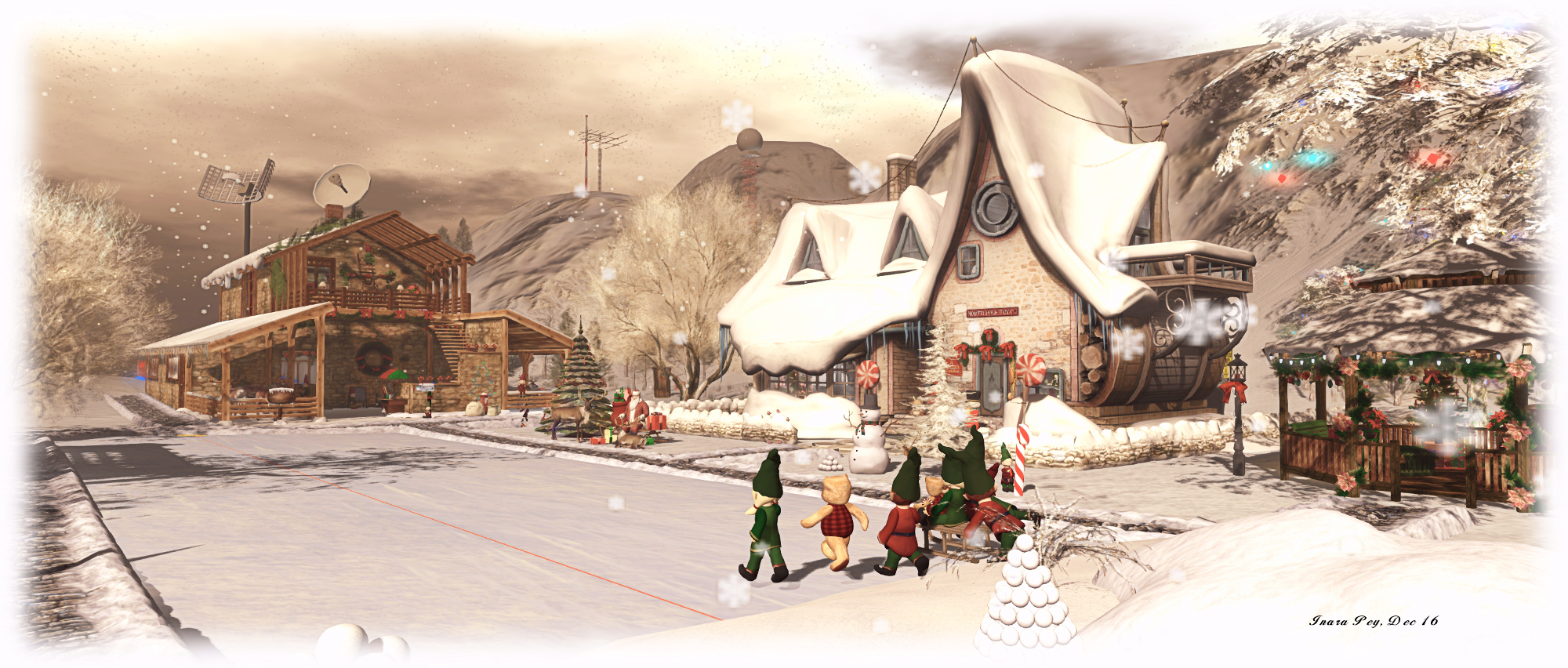
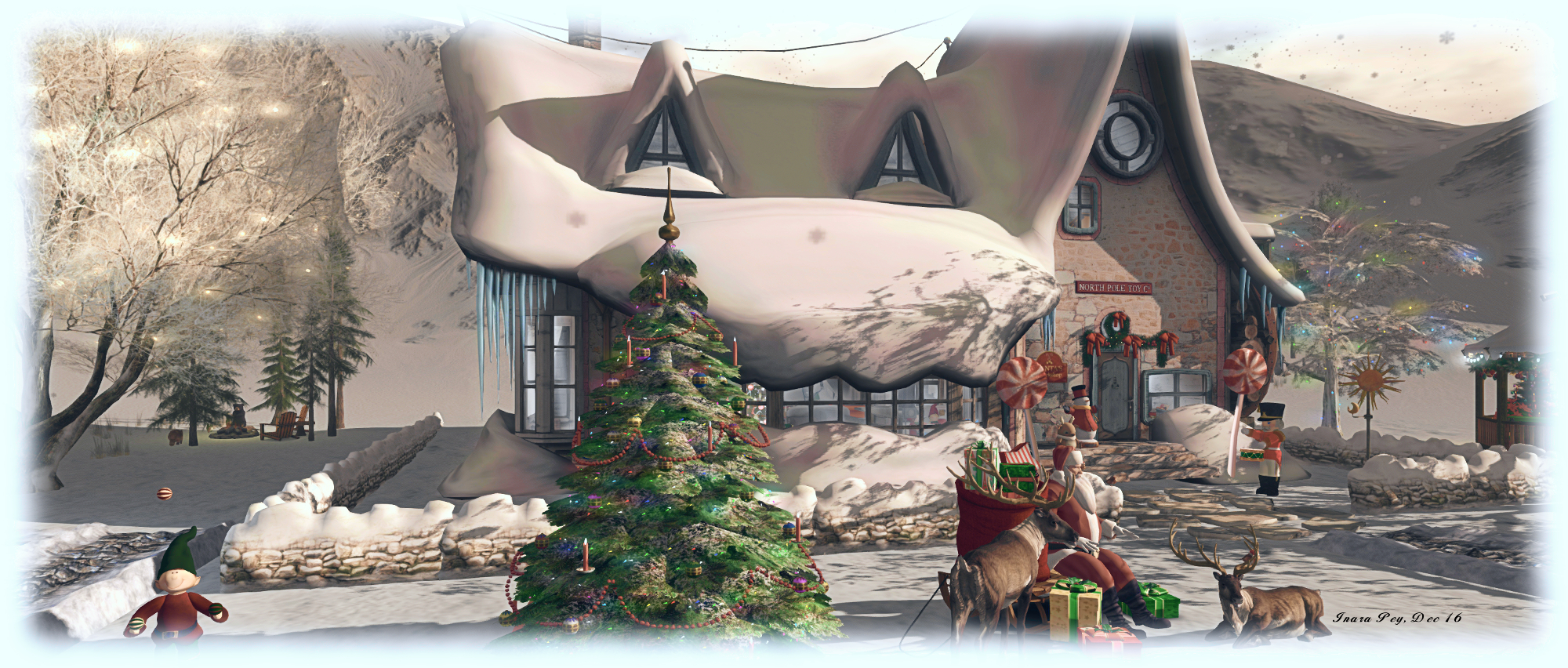
“Hand over your coal and carrots, and no funny moves. This hair dryer is plugged in, and I know how to use it!” North Pole at Alki, Alki
Sitting at 1500 metres above the region, the north pole area can either be reached via a teleport portal just a few metres away from the main landing point (link above) and here is also another up on the Z&A Plateau, outside the Coffee House; or visitors can use a direct landmark. Whichever route you take, you’ll be delivered to Santa’s North Pole Headquarters, a delightful mix of the quaint and the high-tech (it would seem Santa has moved into the 21st century!).
Of course there is Santa’s toy factory – housed, as one might expect, in a snow-capped cottage, complete with bay windows, sagging roof, stone walls and all. But don’t be fooled; inside things are pretty well automated, production monitored via computer. This means that most of Santa’s Little Helpers (or subordinate clauses, as I call them) can get on with more enjoyable tasks, such as putting up the decorations, baking, and, “product testing” (spelt p-l-a-y-i-n-g).
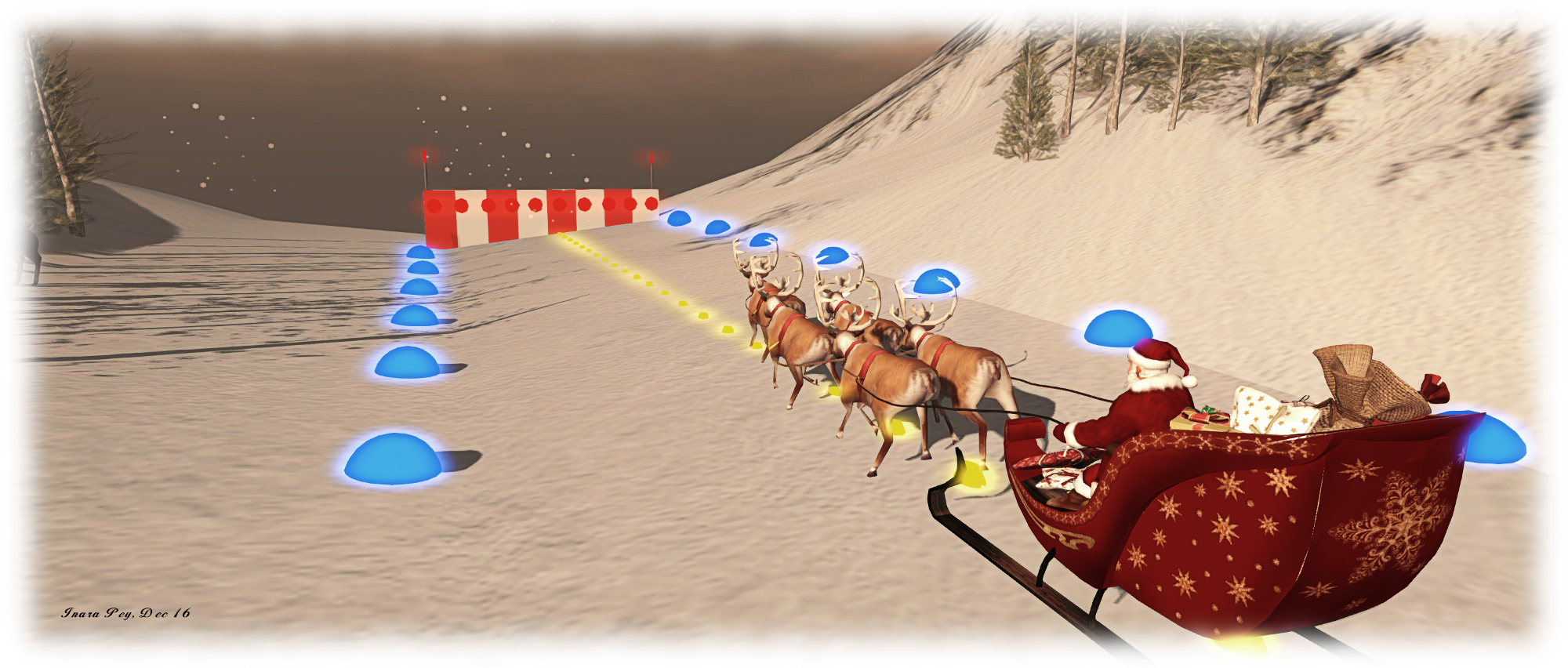
Along a cobbled footpath carefully cleared of snow, elf and safety first, after all (OK, I promise that’s the last of the elf puns), sits the rest of Santa’s operation: a sturdy 2-storey stone-and wood-building offering stables for the reindeer (and a sleigh prepping area), with the staff lounge and kitchen above. Further evidence of the high-tech nature of this operation can be seen in the form of the radar dishes on the roof, and the precisely laid-out sleigh runway on the far side of the building. There’s even a weather and communications station up in the hills!
Follow the footpath away from Santa’s operations and through the trees, and you’ll find the elves have been having fun within the circle of a little railway and penguins – presumably up on vacation from Antarctic – are also enjoying themselves.
“Wait. Only five reindeer? With an overloaded sleigh and an overweight, jolly pilot? Are you sure that runway is long enough?” North Pole at Alki, Alki
Fun really is the theme of this build, and Zoidyn and Alana have included a lot of little details which make exploring it carefully well worth the time (not all of them are immediately obvious). Fun can also be had by visitors, be it sledding (with an elf or alone), snowboarding, ice skating or dancing. If quieter pursuits are more your thing, there are plenty of places to sit, snuggle, relax and chat.
And when you feel you’ve seen enough of Santa’s corner of Alki, why not take the portal down to ground level? As noted towards the top of this piece, there’s a lot to be discovered – and a few things added overhead as well since our last visit – just look for the teleporters! When you visit, do please consider a donation towards the region’s upkeep.
“We’re trying to show new people much of what is possible in Second Life,” Damian Zhaoying informed me. “As part of that, we want to promote art and music. We’ve already held recitals by Latin singers – Merkabah Oh, for example.”
“Art must be present in the new user experience,” Mona (MonaByte) added, “It’s an important strand of Second Life.”
We were standing in the foyer of one of two galleries spaces hosted by the Ayuda Virtual Community Gateway, which has been designed specifically for Spanish-speaking people around the world, and which is part of the Lab’s Community Gateway programme. Both Damian and Mona are prime movers behind the project, and our conversation came about after I dropped into the region to see the art space – which is curated by Mona – after artist Storie’s Helendale (GitterprincessDestiny) pointed me towards it.
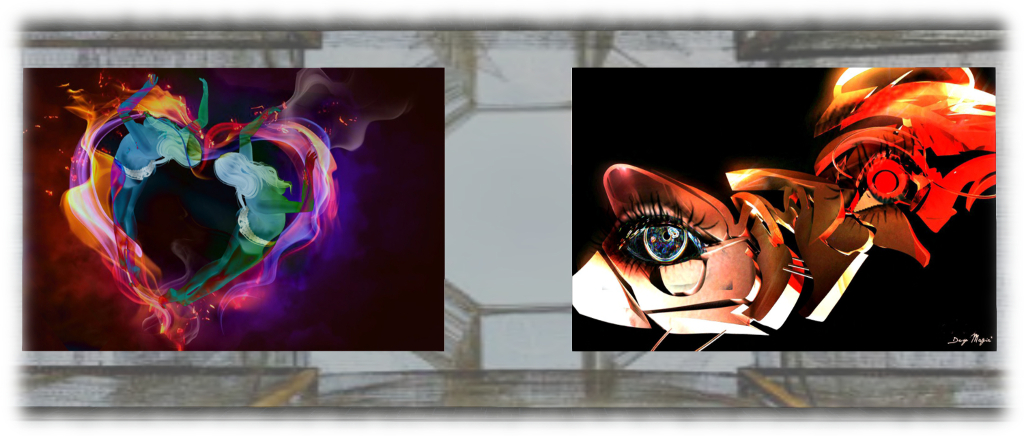
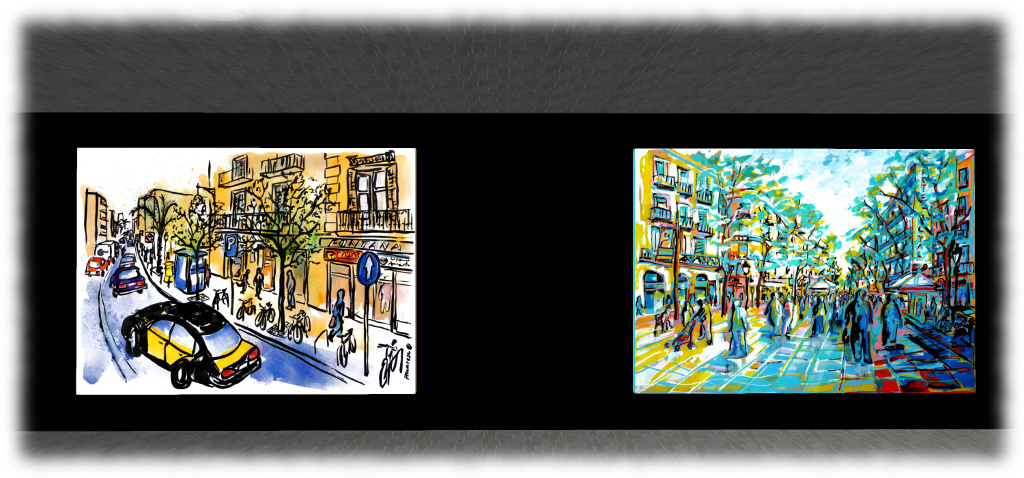
Two artists are currently on display within the galleries: LeMelonRouge (LeMelonRouge Onyett) – aka Francesc Palomas – and Desy Magic. They present very contrasting exhibitions which illustrate the breadth of 2D art potential in Second Life, whilst also touching on 3D art in-world as well.
In one, LeMelon displays BCN, LON, NYC, a selection of his physical world paintings of the cities of Barcelona, London and New York. Presented in bold, striking colours, the paintings show street scenes, parks, public walkways and café views, their rich colouring perfectly capturing the vibrant nature of all three cities. For me, and having spent more time in them than I have Barcelona (which I’ve only visited the once 😦 ), both London and New York are instantly recognisable, and not just because of their respective taxi cabs! I’ve wandered through Camden Market often enough to instantly identify it, even without the sign, while Piccadilly Circus and Brewer Street are unmistakable, as is New York’s Times Square.
The second gallery space is exhibiting Desy’s art, which features both 2D and 3D pieces. The former are primarily avatar studies presented in a range of styles and finishes, from “straightforward” portrait style studies through nudes to abstract works. Again the use of colour is vivid and striking, with the images amply demonstrating what can be achieved when using SL as a medium for artistic creativity. Also on display are a number of 3D works, at least two of which are prim-based, with all of them further demonstrating the versatility of the platform for creating / displaying sculpture-based art.
Including art within a Community Gateway is a welcome idea, and I was pleased to hear from Damian and Mona that Ayuda Virtual consider art – visual and performance – as an important aspect of Second life which should be showcased to new users. Which should not be taken to mean the Ayuda gallery spaces and these two exhibitions are intended just for new users coming into SL through the gateway. Both are richly expressive, are open to visit by anyone – and are worth taking the time to see.
I’ll be covering more on Ayuda Virtual at a future date, as there is a lot to see within the region.
This summary is published every Monday, and is a list of SL viewer / client releases (official and TPV) made during the previous week. When reading it, please note:
It is based on my Current Viewer Releases Page, a list of all Second Life viewers and clients that are in popular use (and of which I am aware), and which are recognised as adhering to the TPV Policy. This page includes comprehensive links to download pages, blog notes, release notes, etc., as well as links to any / all reviews of specific viewers / clients made within this blog
By its nature, this summary presented here will always be in arrears, please refer to the Current Viewer Release Page for more up-to-date information.
Official LL Viewers
Current Release version: 5.0.0.321958, dated December 1, promoted December 5 – formerly the Project Bento RC viewer download page, release notes.
 Update, 11:23 SLT, Wednesday, December 14th: The mirror sites are now available – the links are available here.






 Inara Pey: Living in a Modemworld