Fantasy Faire: the climb to Titan’s Hollow

The elves of Yuale Nura would not allow me to travel onwards alone. “Your way must take you through the Valley of Ish’Nar, filled with wonders great and also dreadful, and where the heart can be drawn to seek the Key of Hope,” they told me. “And while that is a great and noble quest, perhaps it is one for your return, when our kinsmen of Caras Calar will bring you back to us, and we well all seek the key together…”

And so, with heavy heart, I departed the tree tops of Evensong Woods; but I did not travel alone, for a small company of elves travelled with me, longing to hear the sound of water against rock and see their brethren on the high walkways of Caras Calar.

At first our journey took us deeper into the great forest, the path winding between great trunks which gradually thinned as the road began to climb. As the days passed, so the deeps of the woodland fell ever further behind us, and my companions began to sing less. High peaks rose before us, their tops held by sunlight when all below was deep in the day’s end twilight. Eventually, we came to a great gorge, as if riven into the high peaks by a great axe: the Valley of Ish’Nar, guarded by the tall, silent figures carved into the living rock, great swords held at rest before them.
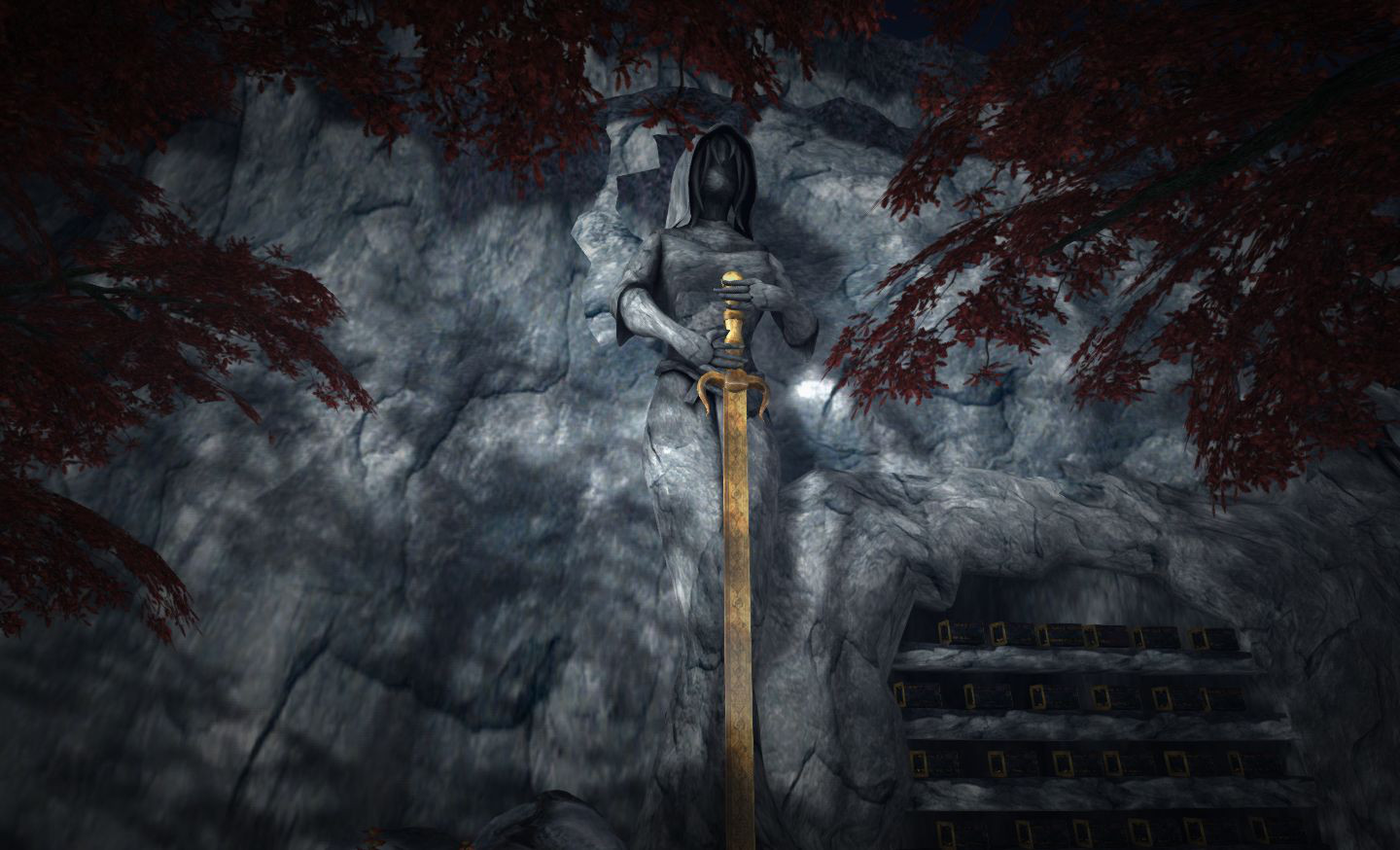
The Valley of Ish'Nar
The Valley of Ish’Nar

Here our mood became sombre as we travelled through the valley, passing among those who had come in search of the Key of Hope – and what I had been told was true; my heart yearned to join them. But I knew my quest lay in another direction for now. And so we followed the stone road, passing ancient ruins and lonely buildings of which my companions would say little, until we reached a great falls, and before it, a stone-built bridge, with one arch collapsed into the waters below. 

“That is the way we must pass. Beyond the bridge lay the stairs and the road to Caras Calar. But beware! the water is swift and cold; tread with care as we have no wish to fish you from the waters a dozen leagues from here!”

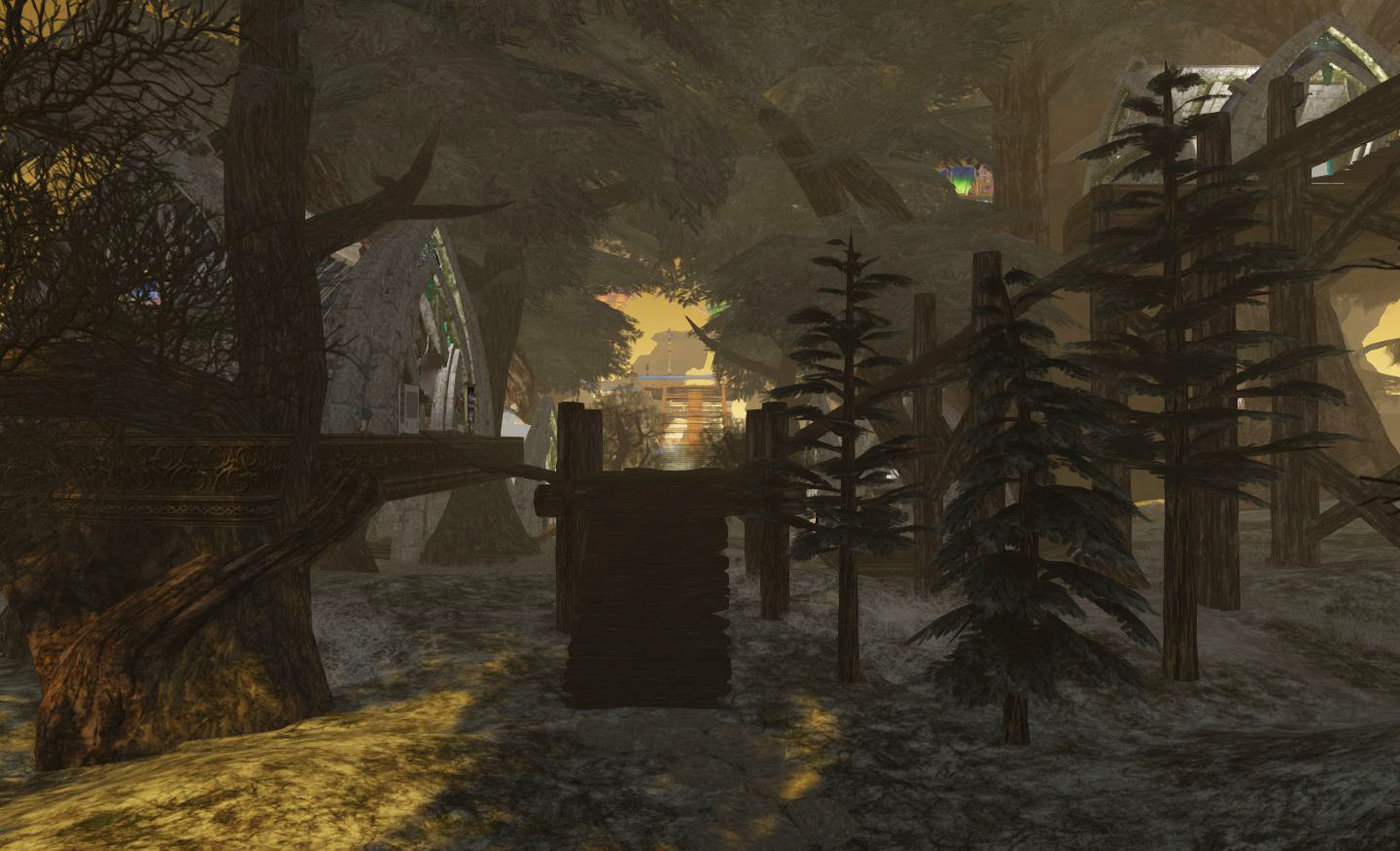
So we crossed the bridge and threw down ropes which we used to descend to the waters below, crossing with care yet with haste; yet another day was drawing to a close and my companions were eager to show me the wonders of Titan’s Hollow as the sun set. Beyond the waters of the falls, after a steep climb, we rejoined the path and climbed broad stairs which soon became a carven path, cut into the rocks of the valley. And so it was, as the sun descended before us, another valley opened before us, this one deep and wide, surrounded by tall cliffs and filled with clear waters and over which, suspended like a hundred gleaming lanterns, lay the cliff city of Calas Calar.
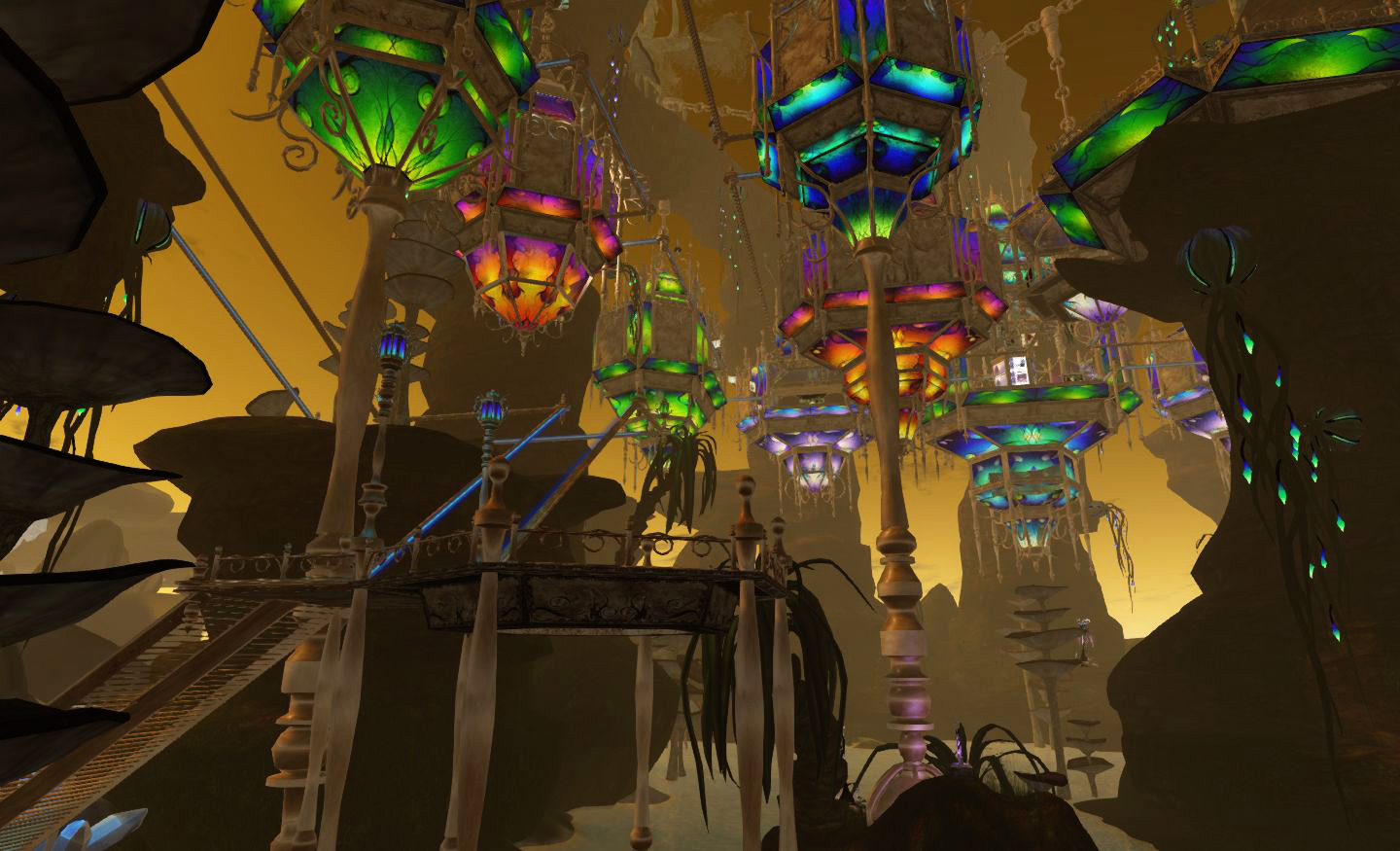
Titan's Hollow
Titan’s Hollow

Those who have not visited the city can scarce understand the magnificence of its beauty or the wonders of its design; crystal-walled houses, framed in gold, glass-like walkways and crystal stairways, all suspended on great golden chains cast across the clear waters of the valley from the high cliffs, and everywhere flowers and plants the likes of which the world has not otherwise seen!

Swiftly, we descended the path to join the broad stairs leading up to the great city and, spied from above, we were quickly joined by the fair folk of those high houses, eager to greet their cousins and brethren from the deep woods. I was welcomed as well, and many a wish for may stay to be long and refreshing were given; and looking up at the great houses and passing the tall flowers, inhaling their rich and delightful scent, I knew that my journey would again face a pause. 

Region designs: Valley of Ish’Nar by Rynn Verwood and Titan’s Hollow by: Elicio Ember

Titan’s Hollow sponsored by: Cerridwen’s Cauldron; featuring: FATEwear; Dragon Magick Wares; L’Uomo; Spyralle; Mermaid Treasure & Boutique; FANTAVATAR & MOONSTRUCK; and with themed stores: Dreamscaped Designs; Sterling Artistry; [][]Trap[][]; [Gauze]; [ni.Ju]; Arx Loricatus; AZE Jewelry; Bliensen + MaiTai; Southpaw; yo bailo.

Related Links

Firestorm 4.4.0 bake, backup and roll!

Updatefirestorm-logo April 29th: Don’t forget my additional piece on the new cloud options in Firestorm 4.4.0.

Firestorm 4.4.0.33720 made its formal debut on Monday 22nd April, although it has been well and truly put through its paces by both the Firestorm beta testers and the preview group for some time now, in order to ensure it is as ready for mainstream release as possible.  It includes a huge number of updates and revisions, both from the Firestorm team and their contributors and from Linden Lab.

Given the size of the release, this is not intended to be a review of absolutely everything within Firestorm 4.4.0 – please refer to the release change log for that. Instead, this review focuses on what I regard as the key updates / changes. As always, credits for the various updates and contributions to Firestorm which re mentioned here can be found in the release change log – again, please check them there.

Server-side Baking /Appearance Support

Note that this item is Second Life-specific.

This isn’t actually a visible change to the viewer in term of UI, etc., – but it is an important one.

Server-side Baking / Appearance is a major change within Second Life which is primarily aimed at reducing or eliminating issues of “bake fail” (when the avatar skin & clothing layers fail to render correctly and with remain blurred or show the avatar wearing the “wrong” outfit). This capability is being introduced in two parts: viewer-side support and server-side support.

Viewers which do not have the viewer-side support will not work with the Server-side Baking  / Appearance service once it starts being deployed on the grid – people using them will increasingly see grey avatars around them. Therefore, it is essential that Firestorm users update to Firestorm 4.4.0.

Server-side baking and how others see you: (l) if you continue to run Singularity without SSB support when the new service goes live, others will see you as a cloud, (and, other than attachments, you'll see them as grey); (r) when you're running Singularity with SSB support, you'll appear correctly to everyone else - and they will to you.
Server-side baking and how others see you: (l) if you continue to run a viewer without SSB support when the new service goes live, others will see you as a cloud, (and, other than attachments, you’ll see them as grey); (r) when you’re running a viewer with SSB support, you’ll appear correctly to everyone else – and they will to you.

For further information on Server-side Baking / Appearance, see the following blog posts:

Preferences Updates

This release sees a large number of Preferences updates, all of which are reported in the change log, and which include:

  • Chat:
    • General: new option to select display name format for IM tabs – a drop-down list of: Display Name, Username, Display Name (Username) and Username (Display name)
    • Notifications: a new option to Show group chat in chat console (useful if you opt to hide chiclets – see below); new drop-down option for IM receipt sounds: Play sound only if not in focus
  • Graphics:
    • General: the Quality and Speed slider incorporates additional settings (Low-Med, Med-High and High-Ultra); Lighting and Shadows is renamed Advance Lighting Model (as per the LL viewer); the Depth of Field check box is moved to the Depth of Field tab; the Windlight Sky Detail slider and the Avatar Physics slider swap positions
    • Rendering: Max number of concurrent HTTP GET requests slider removed; check box to Enable rendering of screen space reflections added
  • Sound and Media > General: uses radio buttons to show stream title notifications in chat, toasts or to be turned off
  • Move & View:
    • View: new check boxes to: disable the mouse wheel from controlling camera zoom; Show user interface in Mouselook; Enable context menus in Mouselook and Leave Mouselook after regaining focus
    • Firestorm: new check boxes to Reset camera position on avatar movement and Show the default camera controls mini-floater always as opaque
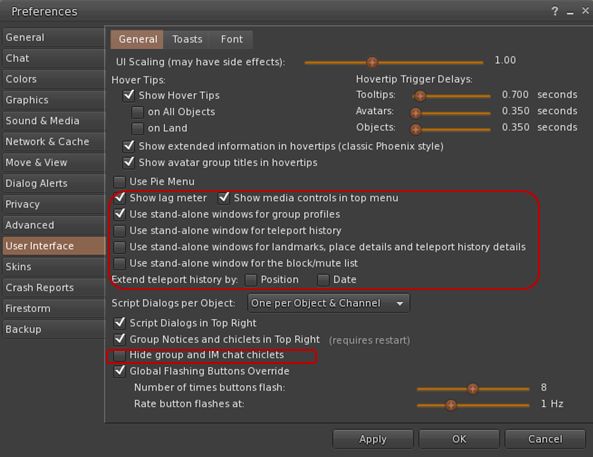
  • User Interface > General: new check boxes to open group profiles, teleport history, landmarks, place details, block / mute list in their own floaters; adds an option to show / hide the media control in the menu bar (useful when using a skin which includes the media controls elsewhere) and an option to hide IM and group chat chiclets completely (the notifications envelope and the number of IM’s will remain on the screen all the time whether or not chiclets are disabled)
  • New User Interface > General options
    New User Interface > General options
    • Skins: new colour option (Ectoplasma) for AnsaStorm
    • Firestorm:
      • Windlight: new capability to define cloud texture
      • Build: options to default prim settings, texture and permissions on creation – see the Firestorm Custom Prim Parameters video tutorial and the Firestorm wiki
    • Backup tab – see below.

    Custom Quick Preferences

    A popular feature with Firestorm is the Quick Preference floater which, as the name suggests, provides fast and easy access to some of the most frequently used options in the viewer without having to open the “full” Preferences floater.

    With release 4.4.0, the Quick Preferences floater has been made somewhat customisable – essentially allowing almost anything which is a debug setting to be added to the floater. However – be warned that this capability is considered to be for advanced users, and does require a willingness to delve deeper into the viewer than some users may be used to. Further, not every debug setting can be added to the floater.

    Cutomising Quick Preferences (click to enlarge)
    Cutomising Quick Preferences (click to enlarge)

    For those wishing to find out more, Firestorm have produced a tutorial video on using the Customise Quick Preferences option, and a Firestorm wiki page.

    Settings Back-up

    Often, when installing a new version of a viewer, the recommendation is that one performs a “clean install” – removing all cached and settings files. This can make any viewer installation labour-intensive, as settings all need to be restored after the installation is complete, and this can take time and effort.

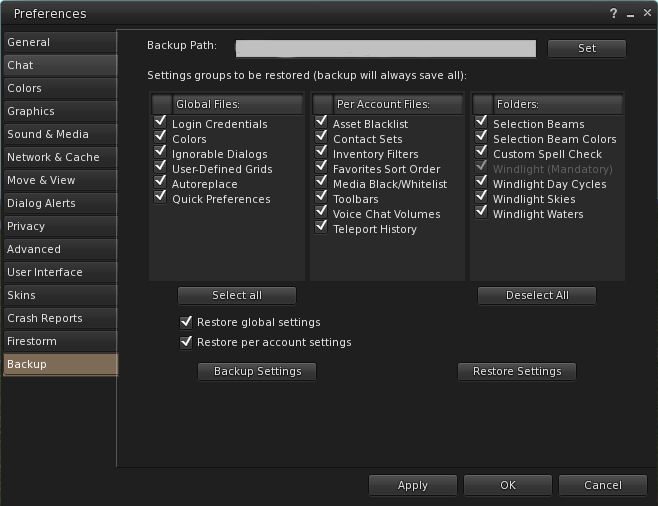
    Firestorm 4.4.0 attempts to ease some of the pain by presenting users with a Preferences option which allows them to back-up many of their global and account settings to a local hard drive. Once done, the back-up can then be restored to an updated version of Firestorm following installation; so providing the back-up is kept up-to-date, restoring the majority of preferred settings is no longer a chore.

    The Preferences Backup tab and options
    The Preferences Backup tab and options

    The back-up option can be found in Preferences > Backup. To use it, simply select a folder on a local hard-drive as the back-up location, then select those options which are to be saved; you can then delete all files associated with Firestorm prior to performing a clean install.

    Continue reading “Firestorm 4.4.0 bake, backup and roll!”

    Fantasy Faire: to tarry in Evensong Woods

    I departed the fair, colourful city of Luminaria with a heavy heart; it was not an easy place to leave, filled with bright peoples and wonders as it was. But my quest demanded I must; time was passing and I knew I had far to go.

    After a day’s travel I came across a vast woodland, tall trees with deep shadows standing like sentinels blocking my way. I knew not how broad it might be, nor how many leagues it may run on either side of my path; so while it seemed foreboding to my eyes, I dared not turn aside to try to find a way around it. Instead I decided to take the last of the day’s light and try to cross the forest as quickly as I could, and followed a rough path under the first outstretched boughs.

    Beneath the trees snow still lay on the ground, as if spring had passed by without note, and I turned my collar against the chill which seemed to fill the air beneath the great trunks of these mighty trees. 

    Evensong Woods
    Evensong Woods

    “Wrap up warm, fair traveller, for the days beneath our homes are yet cool, and the nights colder still!” I stopped at the sound of the voice, fair and light, which seemed to float down to me from above, accompanied by gentle laughter. “What brings you to our home beneath the stars, and why do you hurry so beneath our trees?”

    I remained paused, looking to find the source the source of the voice and the gentle laughter which followed it. As I did so, the rays of the sun broke through the green canopy above and I perceived houses and walkways high up in the boughs, some straight and wide, others slung like bridges between the trees – and there, to one side, a wooded stair leading high overhead, on upon which stood, fair and tall – elves!

    Evensong Woods
    Evensong Woods

    “Come!” said one, extending his hand to me. “Night draws near, and as homely as we find the Evensong Woods, they are no place to be alone. Come join us if you will, and tarry among our homes amid the trees, for we have much to show you, and would hear what tales you have to tell of the wider world!”

    And so it was, scarce a day from Lumenaria, I found myself once again amidst wonders, these high in the trees in the elven enclave of Yuale Nura, by day washed in the light of a warm sun and by night bathed in silver moonlight and lit by a hundred glowing crystals. And everywhere … everywhere they sound of music and laughter and the sweet voices of the fair folk, always lifted in greeting and welcome.

    Region designed by: Searlait Nitschke.

    Sponsored by Roawenwood; featuring: Boudoir; ~*Star Kindler Designs*~; Illusions; Mystique; Mindgardens Creations;ThatChick; and with themed stores: Swings Paradise Furnitures; Unique Obsession; Kotori; +Half-Deer+; {Lemon Tea}; An Lema; EagleHeart Designs; ~Sa-eela~; ~ Mystic Sky ~; .:EMO-tions:.

    Total raised at the start of day 3: L$3,296,095 (approx: $13,184 USD).

    Related Links

    Singularity prepares for SSB/A

    singularityThe Singularity team released version 1.8.0.4114 of their v1-style viewer on Sunday April 21st. The chief update with this release is for server-side baking / appearance, which I’ve covered extensively in this blog.

    The following is a look at the principal updates in the 1.8.0 release. For information on contribution credits, please refer to the Singularity release notes.

    Server-side Baking /Appearance Support

    This isn’t actually a visible change to the viewer – but it is an important one.

    Server-side Baking / Appearance is a major change within Second Life which is primarily aimed at reducing or eliminating issues of “bake fail” (when the avatar skin & clothing layers fail to render correctly and with remain blurred or show the avatar wearing the “wrong” outfit). This capability is being introduced in two parts: viewer-side support and server-side support, with the former occurring first.

    Viewers which do not have the viewer-side support will not work with the Server-side Baking  / Appearance service once the server-side of the capability has been activated on the grid. People using them will increasingly see grey avatars around them. Therefore, it is essential that Singularity users update to Singularity 1.8.0.

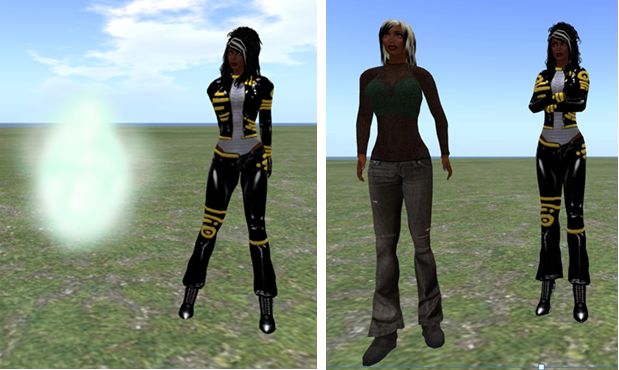
    Server-side baking and how others see you: (l) if you continue to run Singularity without SSB support when the new service goes live, others will see you as a cloud, (and, other than attachments, you'll see them as grey); (r) when you're running Singularity with SSB support, you'll appear correctly to everyone else - and they will to you.
    Server-side baking and how others see you: (l) if you continue to run a viewer without SSB support when the new service goes live, others will see you as a cloud, (and, other than attachments, you’ll see them as grey); (r) when you’re running a viewer with SSB support, you’ll appear correctly to everyone else – and they will to you.

    For further information on Server-side Baking / Appearance, see the following blog posts:

    Pathfinding Updates

    Singularity 1.8.0 gains options to display pathfinding information on linksets and characters. These options are on the Tools menu > Pathfinding sub-menu, or by right-clicking on an object / character and selecting MORE > MORE > PATHFINDING from the pie menu.

    Singularity 1.8.0 adds Pathfinding Linkset and Character floater support
    Singularity 1.8.0 adds Pathfinding Linkset and Character floater support

    For those unfamiliar with working with pathfinding, I have two summary articles:

    Note this release of Singularity does not include navmesh support, so as to maintain compatibility with OpenSim.

    Mesh Upload

    Mesh upload capabilities also reach Singularity with the release of 1.8.0, with the incorporation of the non-Havok based uploader by Nicky Dasmijn.

    Mesh uploads with Singularity on Aditi
    Mesh uploads with Singularity on Aditi


    Script Info

    Script information can now be displayed for both your own avatar and for your current region in one of two ways:

    • Right-click on the ground and select ABOUT LAND from the pie menu and click on the Script Info button displayed in the General tab of the About Land floater
    • Right click on yourself and select TOOLS > SCRIPT INFO.

    Either option will display the Script Info floater, with tabs for region memory information or avatar script information.

    Continue reading “Singularity prepares for SSB/A”

    Viewer release summary 2013: week 16

    This summary is published every Monday and is a list of SL viewer / client releases (official and TPV) made during the previous week. When reading it, please note:

    • It is based on my Viewer Round-up Page, a list of  all Second Life viewers and clients that are in popular use (and of which I am aware) and which are recognised as adhering to the TPV Policy
    • By its nature, this summary will always be in arrears
    • The Viewer Round-up Page is updated as soon as I’m aware of any releases / changes to viewers & clients, and should be referred to for more up-to-date information as the week progresses
    • The Viewer Round-up Page also includes comprehensive links to download pages, blog notes, release notes, etc., as well as links to any / all reviews of specific viewers / clients made within this blog.  

    Updates for the week ending: April 21st, 2013

    Discontinued Viewers

    • Phoenix – Development and support officially ended December 31st, 2012
    • Zen – Development and support officially ended January 27th, 2013.

    Related Links

    Exodus: passing the torch

    exodus-4Recent updates to the Exodus viewer have been a little slow in some respects. This is in part hardly surprising – at least one member of the team (Geenz Spad) has been up to his eyeballs in working on the materials processing project. However, other factors – such as real life commitments  – have meant that other members of the team have also been unable to focus on the viewer perhaps as much as they would have liked.

    As a result of this, both Clix Diesel and Ayamo Nozaki have decided to step aside from lead roles in the project and pass the torch on to others – with Katharine Berry taking over ownership of the project and the role of lead developer. Clix himself made the announcement in an Exodus blog post on Sunday April 21st, which reads:

    Hello everyone!

    I know it’s been a while since an update but we have some important news to share with you.

    I would like to announce Katharine Berry as the new lead developer and owner of the Exodus viewer project!

    Exodus has been a passion of Ayamo and myself for just shy of two years now and we have enjoyed leading the project immensely. Originally we built Exodus as a viewer to compliment various Second Life combat scenarios, Exodus has since catered for a wide variety of user and continues to provide a the best viewer experience we possibly can thanks to the skill and dedication of my team. This will never change. Recently we have not been able to focus on viewer development as much as we would like. Ayamo Nozaki will be leaving as our lead developer and passing the torch to Katharine Berry. Katharine is also the ideal candidate to hand ownership of the project, as Ayamo and I cannot spare the time to do so any longer.

    Thank you everyone, from Ayamo and me, it’s been a blast!

    Exodus remains one of the three viewers I most frequently use, depending upon what I’m doing in-world, so I look forward to seeing what this hand-over brings; I also wish Clix and Ayamo the best for their future endeavours, in-world and elsewhere.

    Related Links