Update: Neva River is currently closed to public access
I’ve previously written about Wendy Xeno’s work in Second Life, having covered both Hazardous and Humanoid in these places. So I was intrigued to learn that she had helped with the design of Neva River, owned by Atteris Amarth and Neva Crystall.
Neva River
Those who visited Humanoid will find Neva River somewhat familiar in terms of broad themes and tones: the same use of water and warm colours. The region offers a contemplative setting, with two houses designed by yacchan Clip and interior fittings by Neva Crystall which are open to exploration. Visitors are welcome to wander around the ground level areas and the houses, take photographs and simply pause and reflect in the last rays of a setting sun as clouds skitter overhead and birds wheels around the tree-tops before settling as the night draws in.
Use the local Windlight environment settings and enjoy.
The Linden Endowment for the Arts has announced applications for the third round of land grants is now open. For artists not familiar with the LEA or the land grant process, the following is taken from the formal announcement:
The LEA Land Grant program seeks to promote and nurture the arts in Second Life, through a six-month land grant to recipients. Recipients can be individuals or groups interested in creating or curating art, or proposing cultural projects which would require/utilise a full-sim build and can be completed within the allotted time frame. The LEA is able to offer land grants through the generosity of Linden Lab.
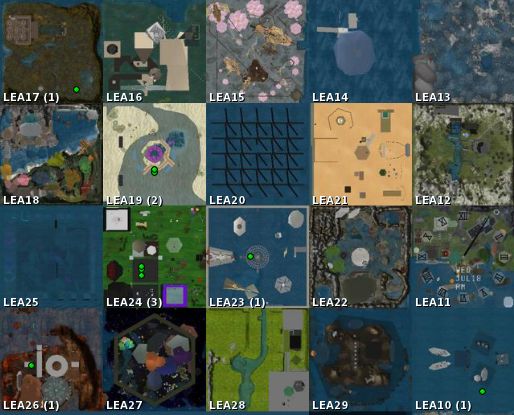
Twenty regions, donated by Linden Lab and managed by the LEA, are generally offered under the land grant programme, and successful applicants will be granted the use of one full region for a period of six months. The region may then be used on an individual or group basis for such diverse activities as:
Full sim exhibitions and / or immersive installations
Curated projects, especially those which have a connection to physical exhibitions and events (augmented reality)
Land grant regions: LEA10 through LEA29
Applications are not limited to visual art but are welcomed from all areas of artistic expression, including performance, music, and film.
Preference is for submitted works to be original in nature, although curated projects may present extant works. Successful applicants will have up to four months in which to execute their build, and must have it open for public viewing for at least the last two months of the grant period. Artists may alternatively use the land for multiple exhibits, but it is imperative that projects will be ready within four months from acceptance, and this time-frame should be considered (and reflected) in applications.
Application Timeline
(Dates subject to change by LEA in the event of unforeseen circumstances)
July 18th: applications open
August 15th: deadline for submissions
August 26th: final decision by the LEA Committee for primary applications
August 27-31st: Notification period for successful applicants / selection of alternates (if required)
September 1st: region hand-overs and public announcement of successful applications.
You can find the application form at the end of the LEA blog entry, together with all other necessary information.
Update: The tiling fixing reached the SL viewer in December 2012, and has subsequently been incorporated into the majority of TPVs. Please refer to your preferred TPv developer for information on the fix (MAINT-628), if unsure.
The ongoing issue with taking high-resolution snapshots resulting in “seams” appearing in captured images may have a final fix on the way.
The issue was initially reported in JIRA MAINT-628 at the end of 2010, and has impacted viewer releases since then, becoming the subject to intense investigation by users and LL alike. The problem has tended to make itself known when taking images at a higher resolution than that of your monitor, resulting in lines breaking-up the captured image, as shown below.
The problem (image courtesy of Dil Spitz)
In reporting the fix, which has a couple of limitations, Runitai gave the following update on the JIRA:
Runitai Linden added a comment – 18/Jul/12 1:57 PM
Fixed in viewer-cat
Fix was to use a large render target for snapshots that are larger than the window, but only when lighting and shadows is enabled. Screen space effects will still show seams when lighting and shadows is disabled.
If the graphics card is unable to allocate a single render target large enough for the high res snapshot, the old method of tiling is still used. On my GTX 580, I could take artifact-free snapshots up to 3500 pixels wide, but could not allocate a full set of render targets at 4000 pixels wide, so the old method is used.
Changes involve an invasive set of changes to LLRenderTarget, so QA should be careful to check various shadow modes, ambient occlusion, depth of field, and anti-aliasing with lighting and shadows enabled. Running with Debug GL enabled will likely cause a crash now when taking high-res snapshots (expected and acceptable behaviour), since the driver reports “out of memory” when trying to allocate a large render target. When Debug GL is not enabled, the viewer handles this error condition gracefully and continues to function.
The code is in a changeset, and will be going through LL’s QA testing. If all goes well, it will hopefully progress through viewer release cycle soon.
Update December 1st, 2012: The Mountains of the Moon appears to have now closed
I am a huge fan of George R.R. Martin’s epic A Song of Ice and Fire, which is now perhaps more widely known as Game of Thrones due to the world-wide success of the HBO series, now commencing production of its third season. Over the last year or so, a number of role-play regions have been established within Second Life that are based on the world Martin has created in his novels, so I thought I’d start paying them a visit.
The Mountains of the Moon is one such region. Here you will find the city-port of Gulltown and the mountain-top fortress of House Arryn, The Eyrie. Whether you are into Game of Thrones related role-play or simply a fan of the books and series, it is a feast for the eyes.
Using the main landmark will bring you to the arrival point, 1500 above the region – and if you are making your first visit, I strongly recommend that you do start here; while visitors are always welcome, this is first and foremost a role-play sim, and it is best to familiarise yourself as to what is going on. On arrival, you’ll be given a short introductory notecard, and you can also take a copy of the map of Gulltown (texture), as well as collecting a suitable free outfit which will allow you to blend-in with things at ground level, if you haven’t anything suitably medieval-looking to wear in your inventory.
When you are ready, you can proceed through the doorways at the far end of the ruin in which you’re standing, where a large basket – which should be familiar to those who have read Martin’s descriptions of the Eyrie – is waiting to “lower” you to ground level. Also here is a further series of notecard givers which provide additional information – such as the setting for tales within the sim (several hundred years before the events of A Song of Ice and Fire, and prior to the unification of the seven kingdoms of Westeros under the rule of Aegon Targaryen, with information drawn from the Westeros.org wiki), combat information, notes on central conflicts, and so on.
“After the cold, grey hostile waters of the Shivering Sea, it was with joy that we arrived at the port of Gulltown, where I looked upon the mighty walls of the fortress they call The Eyrie for the first time.”
Teleport to the ground via the waiting basket, and you find yourself on a ship, apparently newly arrived at the port of Gulltown, largest city in the Vale of Arryn, the stern walls of The Eyrie, fortress of House Arryn, dominating the landscape high atop the Giant’s Lance.
This is quite an amazing visualisation of both Gulltown and The Eyrie which has been put together by Alysanne Lejovy – or Alysanne Arryn, the Lady of House Arryn. The attention to detail is wonderful – right down to being able to ride a basket up the face of the Giant’s Lance to reach The Eyrie itself, the ride commencing, as in the books, from a point part-way up the mountain.
Sim extenders are used to create an authentic backdrop of the Mountains of the Moon…
The attention to detail is also much in evidence in the use of sim extenders which are used to convincingly create a stunning backdrop of the Mountains of the Moon, and to also create the Bay of Crabs leading out to the Narrow Sea beyond.
…and also of the waters of the Bay of Crabs and the Narrow Sea beyond
This is a place worth exploring carefully as there is a lot to see and take in, both on the ground and up inside the high walls of The Eyrie. If you are exploring, though, please (again) be aware of any role-play that may be going on; you’re not obliged to join in, but you may find yourself being treated as a participant; should this happen and you do not feel comfortable joining in, simply have a quick word with the person concerned via IM.
During my visit, I had a chat with Elduran Stormcrow – also known as Thane, a mountain clan leader (and one of the principals behind The Mountains of the Moon) – and he informed me that the sim has been open a month and the associated RP group now has over 150 members.
With direct teleport links to the house Tyrell at Highgarden and to the Game of Thrones Role-play Welcome Centre, Mountains of the Moon offers a fabulous means of exploring a part of George R.R. Martin’s mythical world and of joining in the adventures of the people who populate it.
July 17th. Kitely has today announced extensive pricing restructuring which has come about in part as a result of requests from users asking that they be able to spend more time in-world rather than receiving additional Kitely Credits (KCs).
New Subscription Options
Under the new subscription system, monthly KC awards are abolished and in-world times revised. This means the basic Bronze level subscription now provides 30 hours in-world per month (up from 25 under the old system of combining free minutes and awarded KCs), with the Silver plan now providing 120 hours in-world, up from the 100 hours offered under the old minutes + KCs model. With both Bronze and Silver plans, the number of supplied regions remains unchanged (two and 10 respectively).
The old Kitely subscription model (top) and the new (bottom)
The biggest changes are at the top end of the subscription model, with the Platinum plan being completely abolished and the Gold plan reduced in price from $50 a month to $35 a month. Gold does also sees a reduction in the number of offered regions (down from 30 to 20), but Gold plan users now get unlimited time in-world.
The new subscription plan comes into effect for Bronze and Silver subscribers from August 1st, 2012. Gold and Platinum subscribers have the option of continuing with their old plans if they wish, or swapping to the new system.
There is also a small change to the free plan: new users signing-up to this now receive six hours of free in-world time during the month in which they create their account. After this (i,e, at the start of the next month), their free usage reverts to 2 hours a month.
Further pricing Updates
In addition to this:
The costs for setting-up and/or storing additional regions (over and above the free allocation of regions within each subscription plan) has now been increased. The one-off cost of establishing an additional world increases from 1KC to 10KC, while the cost of storing a region similarly rises from 1KC to 10KC per day
Users can now buy up to $500 USD of KCs at any one time (up from a maximum of $50 USD in a single purchase), options rising in $100 USD increments from $100 onwards
It is now possible to pay for a subscription plan using Kitely Credits as well as PayPal at the start of each month. Three options are available:
Via PayPal: as per the current system
Via PayPal, or Kitely Credits whenever possible: providing your account has sufficient Kitely Credits, payment will be made via KCs at a rate of 300 KC per $1. Otherwise, your PayPal account will be billed
Using KCs only: this option is only recommended for those who purchase large amounts of Kitely Credits and / or who prefer not to use PayPal for their subscription payments. If there are insufficient KCs in an account when payment is due, the plan risks cancellation (a warning e-mail will be sent out in advance of cancellation).
Setting your preferred subscription payment option
Setting a Price for Visiting Region
Until now, users have only been able to decide whether they pay Kitely for the time others spend visiting their worlds (effectively making the region “free” for visitors), or whether they pass the charge onto visitors. In either case the rate was 1 KC per minute a visitor spent visiting a region.
These options continue unchanged, but as from July 17th, users are able to charge visitors directly for the time they spend in a region; KCs earned can then be used towards subscription plan payments, for example (subject to the notes above). Further, the new functionality allows region holders to pay others for the time they spend visiting the region.
Pricing can be defined in terms of group access and is calculated on the basis of minutes spent visiting the world.
Changing options for visitors to a region
This approach offers a tremendous flexibility of use, including:
The ability to charge different amounts on the basis of the group a visitor is in. For example, a RPG region could charge one rate for all members of the associated RPG group and a slightly higher rate for people visiting the region out of curiosity
The ability to automatically pay others for visiting your world – the blog post uses the example of paying performers for their time performing in a region
The ability to initially have a region set, for example, to free access ahead of an event (allowing people to come and sample it), and then turn on the additional pricing as the event is about to start; users are then presented with an pop-up dialogue asking them to confirm their willingness to pay or to be disconnected from the region if they do not
Payment options can be mixed within a single region, so it is possible to charge visitors for their time in the region while also paying performers.
All charges applied to a region are in addition to the basic rate of 1KC per minute. Furthermore, Kitely charge a 10% commission on all Kitely Credits that are earned using these monetization options (i.e. so if you charge 10KC per minute to visitors, you will receive 9KC; if you pay a performer 10KC a minute, they will receive 9KC). This commission does not apply to any of the other ways users can transfer KC to one another.
Update July 18th: The Magnum RC roll-out has been delayed until Thursday July 19th. Oskar may supply a reason on the deployment thread in the forums – keep an eye on that for updates (with thanks to Wolf Baginski).
Main Channel Release
Tuesday 17th July sees the a roll-out of LSL functions related to the Advanced Creator Tools. This release will see the addition of three new LSL functions (comments taken from the release notes):
llAttachToAvatarTemp(integer attach_point): Follows the same convention as llAttachToAvatar, with the exception that the object will not create inventory for the user, and will disappear on detach, or disconnect. It should be noted that when an object is attached temporarily, a user cannot ‘take’ or ‘drop’ the object that is attached to them. The user is ‘automatically’ made the owner of the object. Temporary attached items cannot use the llTeleportAgent or llTeleportAgentGlobalCoords LSL functions
llTeleportAgent(key agent_uuid, string lm_name, vector landing_point, vector look_at_point): Teleport Agent allows the script to teleport an agent to either a local coordinate in the current region or to a remote location specified by a landmark. If the destination is local, the lm_name argument is a blank string. The landing point and look at point are respected for this call. If the destination is remote, the object must have a landmark in its inventory with the teleport agent script. lm_name refers to the name of the landmark in inventory. This function cannot be used in a script in an object attached using llAttachToAvatarTemp
llTeleportAgentGlobalCoords(key avatar, vector global_coordinates, vector region_coordinates, vector: Teleports an agent to region_coordinates within a region at the specified global_coordinates. The agent lands facing the position defined by look_at local coordinates. A region’s global coordinates can be retrieved using llRequestSimulatorData(region_name, DATA_SIM_POS). This function cannot be used in a script in an object attached using llAttachToAvatarTemp.
The new LSL functions work with the current runtime permissions system and are precursor to future work with experience permissions. More information about the runtime permission is here:PERMISSION_TELEPORT.
The keen-eyed will note that these are the functions that were rolled-out to the Magnum RC channel in May, and which were subsequently abused for griefing purposes. However, Linden Lab have added a new capability to the functions – what is described as an “on / off” switch which is available only to Linden Lab personnel, and which allows the functions to be enabled / disabled (the functions were also rolled-out to the Le Tigre RC on July 11th with the “on / off” switch capability). As the release notes make clear, the functions are disabled by default in the roll-out, and will presumably remain that way until such time as the updated permissions system has been rolled-out.
The release also includes three bug fixes (again, as specified in the release notes):
SCR-342: llTeleportAgent() does not fail gracefully when specifying an invalid landmark name
SVC-7966: Magnum RC, llTeleportAgent gives a wrong message
SVC-7987: llTeleportAgent always points in the positive Y direction on teleport.
Pathfinding release: Magnum and Le Tigre
On Wednesday 18th July, the Magnum RC will get a further roll of the pathfinding code and Le Tigre will apparently get the same code as well. At the time of writing, the actual release note pages on the SL wiki for Magnum and Le Tigre still reflected the releases for July 11th and the forum post announcing the release did not show any specific changes from the forum post relating to the July 11th release. Any alternations which may have been made following the difficulties some initially encountered on the Magnum RC following that roll-out are therefore hard to identify. This ma change prior to the actual roll-out.




 Inara Pey: Living in a Modemworld