Catznip R5 helps claw back your lost work

catznip logoCatznip R5 (3.2.1), available for Windows and Linux is released today with some rather smart features.This was apparently intended to be a maintenance release, but things grew as work progressed to the point where it became a release in it own right. It’s based on the V3.2.7 code base (“ish”, as the Catznip blog puts it), and so should include some of the latest Shining fixes from LL to reach the Viewer code repositories.

Installation

The Windows installer weighs-in at just a touch over 26Mb – par for the course for most V3.2-based Viewers nowadays, and installation is pretty much as expected as well. no unpleasant surprises, just accept the licence and away you go. As usual, I opted for a completely clean install, including the manual deletion of all user-related folders, although this isn’t listed as an explicit requirement for the release.

Mini (Location Bar) Moves

On start-up, everything appears pretty much as usual: the familiar V3.2 FUI, buttons ranged to the left and along the bottom of the screen, the mini-Destination Guide open by default. Nothing special here, it would seem. However, as we all know, looks can be deceptive.

That the Navigation Bar can be switched with the Mini-location Bar is common knowledge among V3 users. Usually when this is done, the Mini-Location bar replaces the Navigation Bar, occupying the same space beneath the Menu Bar, but shunted to the left of the screen, hence earning the name “mini”. However, Catznip offers-up more screen real-estate to users by placing the Mini-location Bar within the Menu bar and the top of the screen. Additionally, users have the options to hide either or both of the BUY L$ and the Marketplace SHOP buttons.

Navigation & Mini-location Bars in V3.2 and most V3 TPVs (top) and the Catznip approach (bottom), using the Menu Bar and with the Marketplace button hidden

Both the move of the Mini-location Bar (which will dynamically resize as the Viewer Window is resized) and the ability to hide the buttons are well-considered. The former gives a modest increase in screen real estate while the latter are likely to be appreciated by those who either don’t buy their Linden Dollars through the Viewer, or who prefer to access the Marketplace directly through a Browser bookmark. Moving the maturity rating to a clearly visible icon within the Mini-location Bar is also a smart move.

Chat and Spell

This release brings some nice additional options to Nearby Chat. Right-clicking on the Chat Bar itself reveals new menu items: the ability to switch between a single-line and multi-line chat bar and to change the displayed font size in Nearby Chat on-the-fly, together with the ability to reveal blocked chat (from muted avatars). Both the single/multi-line Chat Bar and the font size options will update the options in the relevant Preferences tabs (Catznip->Chat and Chat respectively).
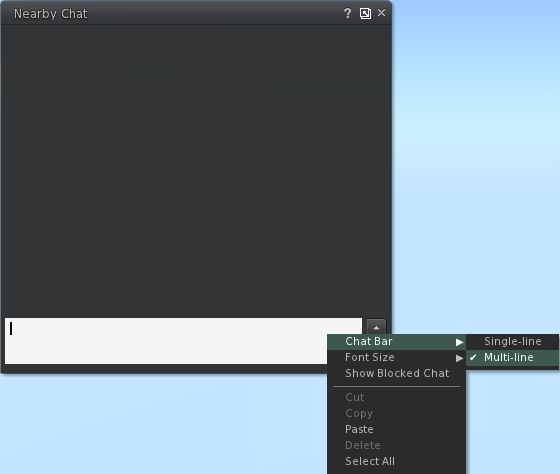
New Nearby Chat options.

Alongside of these, although it is not at all obvious from using the Viewer, is a completely re-written in-line Spell Check. For those that aren’t aware, Kitty volunteered her services in order to bring the Spell Check to the official Viewer, and the re-write present in this release of Catznip represents part of this ongoing work. The core changes to the in-line checker comprise:

  • added : ‘Second Life glossary’ dictionary (enabled by default)
  • fixed : overwriting existing text won’t trigger a new spell check
  • fixed : opening an existing modifiable notecard doesn’t always show existing misspellings
  • fixed : scrolling through a notecard can hide all misspellings
  • fixed : squiggly lines aren’t centered on the misspelled word (fixed for LLTextEditor)

(from the Catznip blog)

Preferences Updates

This release brings with it a tidy-up of the General settings tab in Preferences, and sees the Notifications options moved to their own sub-tab under Catznip, together with additional items, but little in the way of other major changes in layout.
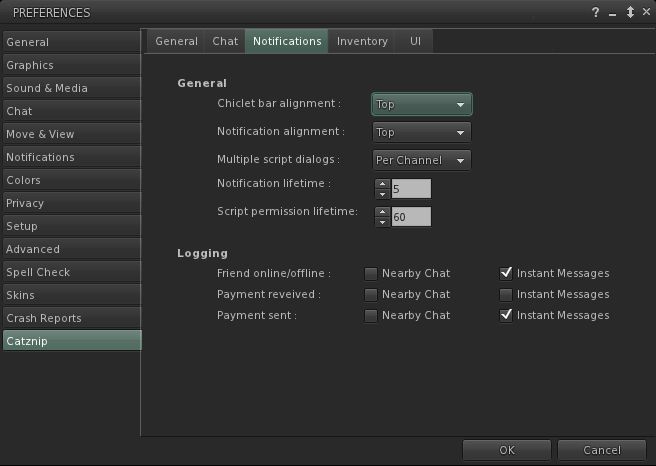
New Notifications sub-tab

A lack of widespread updates to Preferences shouldn’t be seen as a sign that Viewer isn’t still growing a developing – as the next section shows, Catznip is being constantly enhanced. A stable Preferences floater is more a sign that the Viewer is maturing in a stable, smooth manner.

Script Recovery

The major new addition to Catznip is the Script Recovery feature. To quote from the Catznip blog:

“Ever crash or get logged out while editing a script and then lose all your work?

“Following a crash or forced disconnect you’re now presented with a dialog offering to recover the scripts you had open.

“This works for all scripts, everywhere, and as we found out while trying to take the screenshot for this release, is very robust and persistent. It won’t go away till you either recover or dismiss it .. even if you crash.”
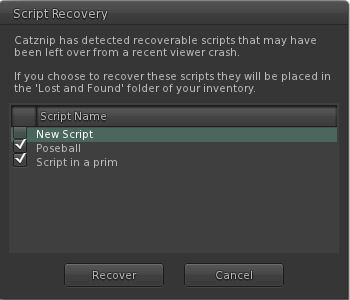
Catznip Script Recovery floater (with thanks to the Catznip team)

Script Recovery works by locally auto-saving open scripts every 60 seconds. Should the Viewer crash, scripts are presented to the user via the floater shown above, and optionally recovered to lost & found folder. Further:

  • The backup copy is only saved when the editor isn’t pristine
  • The backup copy is removed when the script has been successfully uploaded, or when the floater is closed.

Once would anticipate this finding favour among scripters, and is liable to be picked up by other TPVs down the line. However, full kudos and credit to Kitty and the Catznip team from bringing it into being.

Other Nips and Tucks

RLVa is overhauled with this release, with a number of FUI-induced bugs being eliminated. Specific updates include:

  • changed : flipped “RLVaEnableSharedWear” on by default
  • fixed : disabling a toolbar button doesn’t block the button’s commit signal
  • fixed : LLFloaterReg::toggleInstanceOrBringToFront() bypasses the blocked folder list and the validation signal
  • fixed : region “alerts” aren’t show location or show names filtered
  • fixed : various issues and enhancements relating to @showloc
  • fixed : the RLV API renames “Avatar Center” to “Root”
(from the Catznip blog)
Group Moderation gets a Catznip boost – with this release it is possible to directly remove someone from a Group by opening the Group Participants list and right-clicking  against an individual name – the eject option will appear in the context menu.
There are a number of other nips and tucks to the Viewer which can be seen listed in the official blog post on the release.

Performance and Opinion

Based on 3.2.7 (or thereabouts), this release of Catznip runs extremely well on my standard PC; in fact, Catznip, as with Exodus, has tended to run somewhat better than other TPVs as a rule anyway; I’ve no idea why – it simply seems to like my PC. This release tends to continue the trend, and puts Catznip, tested against the current 3.2.6.248086 V3.2 release on the same sim with the same avatar load (albeit with different screen layouts, yadda, yadda), gave a pretty good run for itself in default mode – averaging some 32-33fps on the ground with 5 other avatars on the same sim while about 8-10fps faster at 390m. Enabling deferred and shadows easily halved these figures – with ground rates only just managing to stay in double figures.

Overall, another release that solidly builds on Catznip’s reputation, and which includes another series of smartly convenient extras that make the UI even more convenient to use in terms of direct access to functions and options. Not being a hard-core scripter, I have no idea how often crashes feature in terms of lost work, but as stated above, those that script from directly within the Viewer are liable to appreciate the Script Recovery function should they find their Viewer vanishing on them unexpectedly.

Links

Claudia’s Spirit at Art Screamer

It’s no secret that when it comes to the work of Claudia222 Jewell, I’m a confirmed supporter / fan. Her work, which spans the most creative use of sculpts and – more particularly – mesh, is some of the most breathtakingly captivating in Second Life, bringing to life the great and varied breadth and depth of her own imagination in wondrous pieces that are hauntingly beautiful and, sometimes, tingled with a little Bosch-like darkness.

Yesterday I was fortunate enough to attend a special preview of her latest sim-wide installation, Spirit, which is being hosted at Art Screamer starting today, Saturday 11th February, 2012. And I can say, all my bias aside, it is simply magnificent.

Claudia222 Jewell at Art Screamer

Words and images alone are not going to bring justice to the piece – it is one that has to be seen, pondered, savoured.

Claudia222 herself describes the installation as, “This exposition for me is the letting go of a long period of grief, to let the spirits pass, and to start anew in peace.“ The element of letting go, and the symbolism of farewell is strongly – if sometimes in the most subtle of ways – evident throughout the work, frequently in the most beautiful of images.

Memories, reflections, passings…

Exploring the sim, one does come across familiar motifs that instantly mark this as one of Claudia222’s work. There are also a couple of familiar works seen elsewhere in exhibits last year; however, this is no r-tread of previous work by any stretch. The vast majority of the work here is fresh and new and ranges in size from the very big to the exquisitely small – itself another hallmark of Claudia’s extraordinary talent and vision. And where one or two familiar pieces do appear, they are fully in keeping with the overall theme of the exhibit; indeed, seeing one, I couldn’t help but feel Spirit is very much an expansion of the vision first encompassed by that particular piece, bringing it to full and glorious maturity. As such, it’s inclusion is not intrusive in any way; rather the reverse – it is entirely fitting.

Familiar motifs, Claudia222’s imaginative signature

This is truly a stunning tour de force of mesh art, one that I urge you to visit. It combines technology and art in a brilliant mix that artists across the grid are finding gives a new lease of artistic expression, as Claudia222 notes herself, “Creating things with mesh brings a great new freedom that will enable many of us artists to learn more about 3D techniques inside Second Life”.

So, makes sure you find the time to visit Spirit; you will not be disappointed. Take your time as you explore the vignettes; there is so much more to see, above and below, than might initially appear to be the case. Music has been provided to accompany the piece, and it is very much worth having audio enabled for it, and I do recommend you use the region’s Windlight settings to gain the fullest impact from the piece – particularly if you can run with deferred rendering enabled.

Spirit opens at Art Screamer opens at noon SLT on Saturday 11th February, with entertainment by Jordan Reyne.

Many thanks to the Art Screamer team for hosting this exhibit and, to Claudia222 for sharing her art and vision with us.

Return to Fallingwater 3: Guest House and all

Note: this is a personal project only. The finished model is not intended for sale or profit in any way.

My obsession with Fallingwater has continued through the week, with attention turning to the guest house / staff wing. These are a curious mix, as they form an L-shaped building existing on two-and-a-half levels, due to the lay of the land. Facing south (in the original) and overlooking Fallingwater itself, is the single-floor guest house. Linked to this, but facing west, is the estate’s garaging, the floor level of which is raised slightly above the guest house level, with the staff bedrooms over the top.

Reproducing these in-world has been interesting, working from unscaled drawings and a plethora of photos. As the latter don’t show all sides of the building, I’ve made some guesses as to how various parts look as a result, but then, this isn’t supposed to be a 100% accurate replica, so I have my excuse if there are inaccuracies :). That said, however, the overall simplicity of both wings of the building do lend themselves to being reproduced in-world quite well.

Garaging with staff quarters above, complete with a few trees for effect and inset, the real thing

Prim count isn’t particularly light on the build: 305 prims – although this includes some of the interior fittings in the guest house itself and the covered foot path linking the wing to the main house.

Guest house front door area

I’m not sure I’ve scaled the footpath looping up from Fallingwater to the guest house correctly – it makes the overall build pretty huge given there has to be space in front of the house for the river and falls – but I’ll tackle that problem if I ever end up opting to take-up a parcel or land of a suitable size for the place.

Guest house plunge pool with bedroom beyond
Guest house from the footpath, sans plants and landscaping
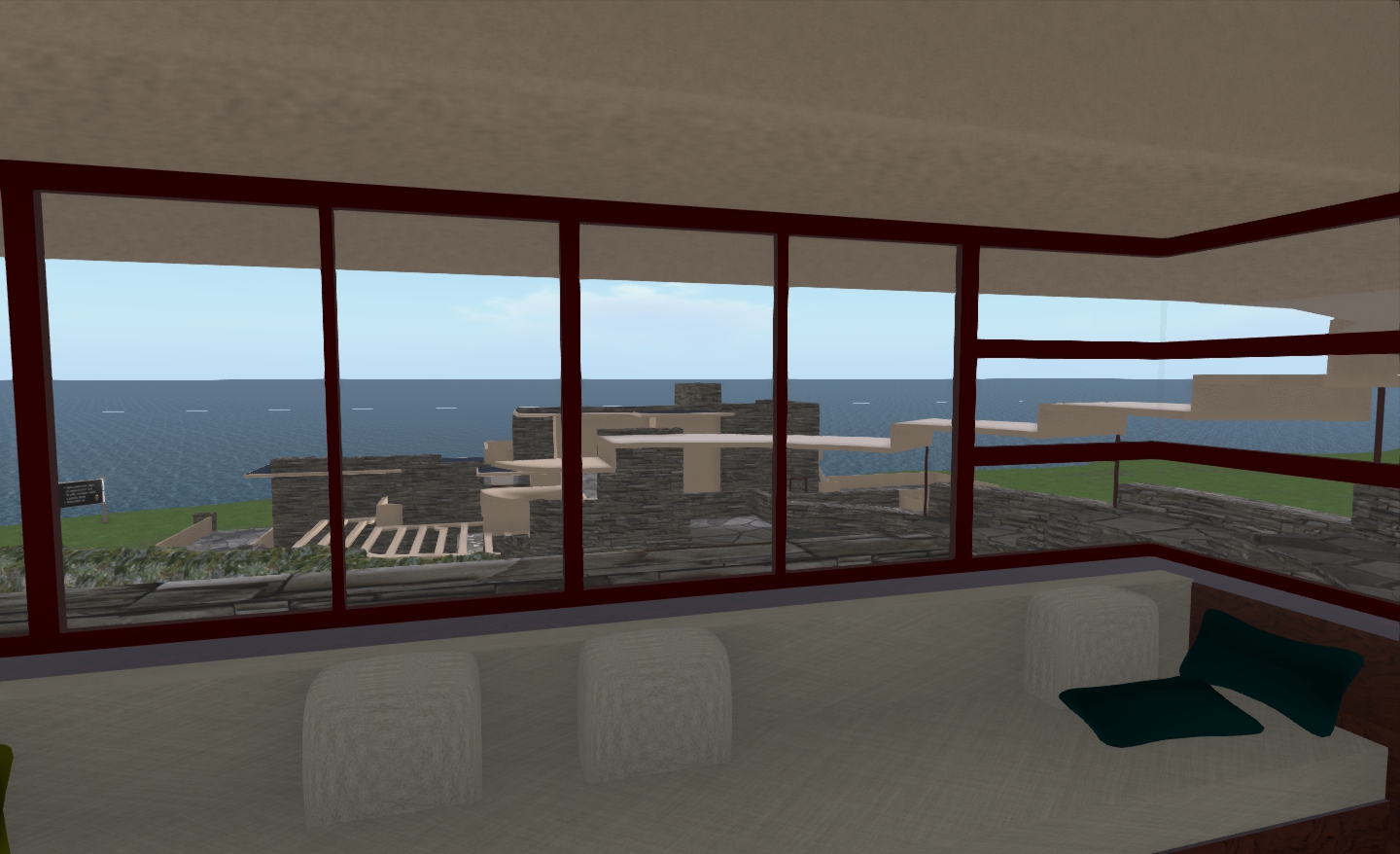
Fallingwater from the guest house lounge

Overall, I’m pleased with the way the build has come out; I still have a few nips and tucks to take care of: the guest house would benefit perhaps from some lighting effects, and there are a couple of small details by way of handrails that need to be added, and I’ll add these shortly.

If ever I do get to the point were I again have land large enough to rez the house with a decent amount of landscaping, I’ll doubtless follow-up with another piece on my obsession. For now though, I think this marks the end of renovations and updates for Fallingwater where I’m concerned…

Fallingwater with faux landscaping to the rear, and the unadorned guest house, etc behind

Of Prims and Pieces

As people have asked, both on previous articles about the build and directly, here’s a broad breakdown on the build:

  • Total prims, main house, excluding faux landscaping: 428
    • House shell sections (3): 301
    • Additional house segments: 11
    • Doors and opening windows: 38
    • Stairs:8
    • Furnishings: 15
    • Lighting & fires: 11
    • Window frames & interior fixtures (light details, etc): 44
  • Total prims guest house: 305
    • House shell sections (3): 251
    • Window frames: 15
    • Doors: 14
    • Furnishings: 19
    • Stairs: 4
    • Fire: 2

Of the total count, the builds are designed specifically so that the shell sections (552 prims in total) can be converted to convex hull physics shapes, reducing their overall impact by 50%  – these sections are entirely without sculpts, complex prims or script-carrying elements (once the root rezzing scripts have been removed). This can bring the combined build’s overall Land Impact cost from 733 to 453.

Now, if only I could design and create the house using mesh…..

Related Links

The three C’s: Community, Communications and Chestnuts

Recently, LL put out a call for bloggers (I’m linking to my own post, as that contains the full text of the original LL forum post – and I get tired of forum stuff vanishing down a plug hole and invalidating links over time).

The call was met with widespread derision, not just in these pages, but across other blogs as well, and frequently very humourously.

Yet there is a serious side to this – and in part, it is something I should hold up my hand to and say mea culpa to some degree.

There is an ongoing malaise at Linden Lab. It started several years ago (some might say with the arrival of Catherine Smith and grew steadily through the tenure of her various successors (all women, to my shame), wherein constructive and an open communication with the SL community has increasingly become anathema to the company as a whole. In fairness to Kim Salzer, who departed in November last year, things haven’t improved at all since she left the company – so one assume any unwillingness to constructively engage with users at a corporate is an illness that lies deep in the roots of the company.

Certainly, as Tateru has noted, it is one of the things that has become decidedly worse since Rod Humble took over the reins.

When seen against this background, the recent call to bloggers becomes a little less funny and a little more indicative of a company that seemingly is at a complete loss as to how to communicate about its primary (currently only) product and / or its brand. Don’t get me wrong – many in LL do take time out to communicate publicly, through User Groups and the like (Oz, Charlar, Oskar, Runitai, et al), and Rodvik himself does still take plunges into Twitter as well as posting to his SL Feed – and all of their efforts are appreciated greatly, as is the fact that LL staff have personally taken time out to contact me directly and provide feedback, pointers and other assistance (again, thanks to Rodvik, Charlar, Pete and Viale).

But none of this forms a part of an overall communications strategy. There is no cohesiveness in the approach. The result is that the SL blog in particular languishes to the point of irrelevancy – as demonstrated by the fact that out of 5 blog categories, three carry “front page news” nigh-on a year old or more (Land & Business (which even carries a post relating to Jack Linden – and he’s been gone from that Lab more than a year!), Tips & Tricks, Tools & Technology), while the 4th (“Inworld”) is only “up-to-date” large due to the “Flickr Pic of the Day”.

Of course, as I’ve pointed out myself, when discussing the likes of marketing (and here’s where I hold up my hand in admission), the finest resource LL have at its disposal is the user community when it comes to formulating a potential message to send to the world at large. So am I not being a little two-faced when promoting the idea of using the community, and then rounding on LL when they try to do so?

Well, no, I’m not. I absolutely have no problem with the Lab turning to the community for assistance – providing it is willing to play fair. Machinima is an excellent marketing tool, and it is probably fair to say that the best machinimatographers for SL are involved in SL – so as long as LL recognises this and offers suitable remuneration (a cash prize competition, for example), then why not seek to leverage the expertise in order to promote the platform.

The same rule applies to blogging about SL – and frankly, LL should be employing someone to take the time to blog about the platform on an ongoing basis. They don’t need to be an expert in all things server, viewer and what have you (in fact, better that they’re not). But simply paying someone to do the rounds, talk to the various project teams, gain quotes, publish articles on what is going on in-house, what is coming down the road, what is being done to fix X, Y or Z, and so on, as well as getting out and about as time allows within SL to produce articles, would enormously benefit LL in terms of how the company is perceived by its users.

It’s not, after all, rocket science (or “rocket engineering”, as my father always insists on correcting that quote). It is simple. Common. Sense.

Obviously, keeping abreast of the wider community is somewhat harder – there is much that is going on around the grid and much that can be easily missed. So again, actually making use of the community, getting people to engage with the company is not that unreasonable – providing that effort is met with suitable reward – say, through commissioned pieces.

Communications are a hoary old chestnut with me – there are times when I feel that I’m banging on about it every other week. But the fact is that LL seem to have comprehensively lost the plot here when it come to speaking with a corporate (rather than individual) voice to the community as a whole, and to the wider marketplace. And that is hurting them, and it is hurting SL (might it not also speak to why, despite routinely high user sign-up rates, actual user retention isn’t growing as steadily as one might expect?).

If the problem is going to be solved, it’s not going to be through dangling blog enticements in front of people (or indeed, locking-off the forum post carrying the enticement and deleting replies simply because people are having fun at your expense). It’s about being outward and professional and having a plan.

It’s actually hard to believe there is not someone at LL who is capable of carrying out the kind of role I’ve described above.

And if there isn’t, well, Rod – I’m willing to relocate to San Francisco for the right price and incentives, and you know where to find me: details are on file with you :).

LL calls on bloggers, bloggers call out LL

Updated 8th Feb: I’ve added the full text of the job advert forum post, lest the mists of time swallow it whole.

I almost missed this one – thank you, Chestnut Rau!

Yesterday, LL put out a call to bloggers, inviting them to submit articles for publication on the SL website. It reads in part full:

Are you a passionate Second Life resident who loves to write about your Second Life experience?  If so, you might want to submit your blog posts to us and they could end up being featured in the Second Life Community blogs.

As the movers, shakers, and experts on everything Second Life, we’d like to invite you to submit your original blog articles to us at blog-call@lindenlab.com with the Subject Line: Guest Blog Submission.  Selected submissions will be posted to the Blog section of the Community as a featured guest post!

Here are some popular Second Life topics to consider: Fashion, Home Decor, Mesh, Relationships, Spirituality, Education and Music.

GUIDELINESIf you would like to submit a guest post for the Second Life Blog, please consider these guidelines. Only submissions that meet these criteria will be considered for publishing.

  • All selected posts must adhere to our Community Participation Guidelines.
  • All selected posts should support the inclusiveness of the Second Life community.
  • Selected posts must not include marketing-related links and must not be entirely self-promotional.
  • The post may include links to your website and blog in a brief author’s bio (approximately 3 sentences), which will be published at the end of the guest post.
  • Please limit the number of images included in your submission to 4 or less.
  • We reserve the right to review and edit. We regularly edit posts by our contributors and guest bloggers.
  • Guest posts must be original and may not have been published elsewhere online already.  

The blog call is on!  Read the guidelines, then submit your posts to blog-call@lindenlab.com

Well, yes I am passionate and I do write a lot about SL – some might say at times, obsessively so. I do take pride in the fact that this blog is read by those within Battery Street as well as those outside. I’m far from alone in being a blogger that has this privilege, but it is worth mentioning because the very fact that LL does take time out to read external blogs is a sign that they are attempting to keep a finger on the pulse of things across the broader community, and that’s a good thing.

However….

As Chestnut points out, what is being asked for here is pretty much involvement in LL’s marketing and promotional efforts both within the community, and to the wider world as a whole.

OK, then; that’s fair enough. So what are the pay rates? Will they be per article, with a word ceiling, or per word? How about offering commission rates based on required monthly subject matter?

No, I’m not being facetious here. It’s not unreasonable for bloggers to be paid for their time and effort; rather the reverse – it’s actually common practice. Indeed, you’ve paid for at least one writer in the past yourselves, LL (take a bow, Hamlet! 🙂 ). I’m also not alone in feeling this – as a glance through the comments on Chestnut’s post and following the LL forum post demonstrate. Fair is fair, after all.

So, LL, I’ll gladly write for you – and within your guidelines (after all, your blog, your rules). I’ll even Op-Ed (if you’d dare go in that direction 😉 ). But let’s be reasonable here – what’s in it for me? I’m taking time-out to give you copy – how much are you willing to pay for said time, effort and IP?

With thanks to Chestnut Rau

Raise the (flight) limit!

Update April 2012: The flight limit has been raised to 5,000m. 

Nalates Urriah keeps her finger on the pulse where all things server and scripting are concerned, as well as keeping an eye on other technical aspects of SL. Today she reports on server scripting, and carries an interesting little nugget on flight limits.

Apparently the Lab is considering whether or not to raise the current flight “ceiling” for unassisted avatars. As we’re all aware, if you fly without any kind of scripted  / client-side assistance, you’ll start slowing down from around 165m onwards, and come to a complete halt at about 180-190m. To go any further, scripted / Viewer assistance is required.

I’ve no idea why this limit was set – there has to be some solid reasoning for it in the depths of time. However, for as long as I’ve been involved in SL, build height has (I think, my memory is getting fuzzy in some areas) always been at least 768m (prior to being raised to the current 4096m), so the brake-point at 180-190 to “natural” flight does seem rather arbitrary.

Simon Linden apparently puts forward an argument that raising the limit will shoot people using flight assistance systems into orbit. I’m not entirely sure I follow his logic. There is a plethora of flight assistance alternatives available across SL, from the ubiquitous Flight Feather or Flight Ring of old, through to fancy backpack attachments to options built-in to a range of tools such as Em Dash and Mystitool. Many of these include accelerators which allow the rate of vertical ascent to be adjusted by the user – some of them quite ridiculously so. Yet none, so far as I’m aware, have resulted in people ending up in orbit on the click of a button / key, even when employed at altitude. So would the removal of the current limit suddenly cause these tools to behave any differently?

It’s not even as if flight assistance tools are required, either. Firestorm bypasses the current limit by adding flight assistance to the LSL bridge. Milkshake (prior to being withdrawn from public use) demonstrated that it is possible to override the flight limit directly from within the Viewer without even resorting to any form of bridge attachment. Both of these capabilities tend to make the current limit somewhat pointless.

As it stands, and with maximum build height sitting at 4096m, it would make sense for LL to lift the limit to that altitude (as I’m sure they are only too aware). This would not only make mobility at altitude easier for all (especially around the more expansive higher-altitude builds where flying is allowed), it might even lessen people’s dependency on attachments, be they wearable or HUDs (not that this is a critical issue, given the threatened script limits project is now apparently shelved).

It’s not what I’d call a priority in any way shape or form, but it would potentially make people lives a little bit easier in-world; so if LL are considering the move – I for one say, “go for it – and push it to 4096!”

With thanks to Nalates Urriah