Calat Alhambra, Second Life

Update June 6th 2012: Sadly, Al Andalus Alhambra, Second Life, closed on June 6th 2012. My slideshow of the build will remain on this site as a reminder.  

It is one of the most stunning palaces in the whole of Europe, one that brings together light, life, culture and geometry in a stunning tour de force of medieval Islamic architecture – albeit one forced to incorporate western European styles as exemplified by the Palacio de Carlos V. It is the Calat Alhambra, al-Qal‘at al-Ḥamrā’, the Red Fortress.

Occupying the top of the hill of the Assabica in southwestern Granada, the palace symbolised the height of the Islamic presence in Spain, with Granada itself the last of the great city-states of Islam within Spain to ceded itself to Christian rule when Ferdinand and Isabella conquered the city in January 1492.

Christian history would have us believe that the reconquista of Al Andalus – the Moorish name for Spain – was a Christian fight against an invading and oppressive Islamic nation – yet nothing could be further from the truth. Alhambra in many respects stood at the pinnacle of some 700 years of progressive Islamic rule in Spain which saw places such as Cordoba recognised as remarkable centres of learning for all – some 70 public libraries lay within its walls at a time when the rest of Europe saw books and learning the reserve of religion and those who ruled, while the teachings of ancient Greece – so thoroughly embraced by the people of Islam – were often regarded as heretical by the church.

al-Qal‘at al-Ḥamrā’ as it looks today

Alhambra takes its name from the rich red clays of the soil upon which it is built, rather than from any bloody elements of its history – although in some respects the fortress did initially grow out of bloodshed: following a particularly violent meeting between the Muladies and Arabs, the latter fled south to take refuge in a red castle on or near the site during the rule of ‘Abdullah ibn Muhammad (r. 888–912). In the 11th Century, and in a bid to preserve a Jewish settlement, the ruins of the red castle were rebuilt by Samuel ibn Naghrela, although accounts of the time state it was easily overrun.

However, the Alhambra we know today was started by Ibn Nasr, who fled south to avoid persecution by King Ferdinand III of Castile. In 1238, he arrived at the palace of Bādis and set about enlarging the Alhambra into a palace complex fit for a sultan.

And it is this citadel palace that is beautifully brought to life by the Al-Andalus Community Project. Spread across two regions, Al Andalus 1 and Al Andalus Generalife, which themselves reflect the layout of the Nasrid dynasty’s citadel, the build is quite simply stunning.

Calat Alhambra

The citadel comprises several distinct elements: the Royal Complex comprising the Patio de los Arrayanes (perhaps Alhambra’s most famous element), Patio de los Leones, Salón de los Embajadores, Sala de los Abencerrajes, over thirty watchtowers, living spaces for staff, as well as outlying pavilions located in the Palacio Generalife, or Garden of the Architect (Jennat al Arif in arabic). Much of this has been reproduced in the Second Life build, which avoids any of the reconstruction undertaken post-reconquista and attempts to represent the Alhambra at the pinnacle of its glory as a centre of rule and of culture – although there is a concession to another great Moorish building to be found within its walls.

There are a number of teleports to the build that can be found in Search. These include Patio de Los Leones, the auditorium (which appears to be under the Patio del Mexuar), and just inside the original entrance of the Puerta de la Justicia, in the la Plaza de los Algibes.

Where you roam from any of these is entirely your choice – there is a lot to wander around, and no set order in the direction you may opt to take. There are numerous notecard givers to be found around the citadel, each of which provides more detailed information on the section you are visiting.
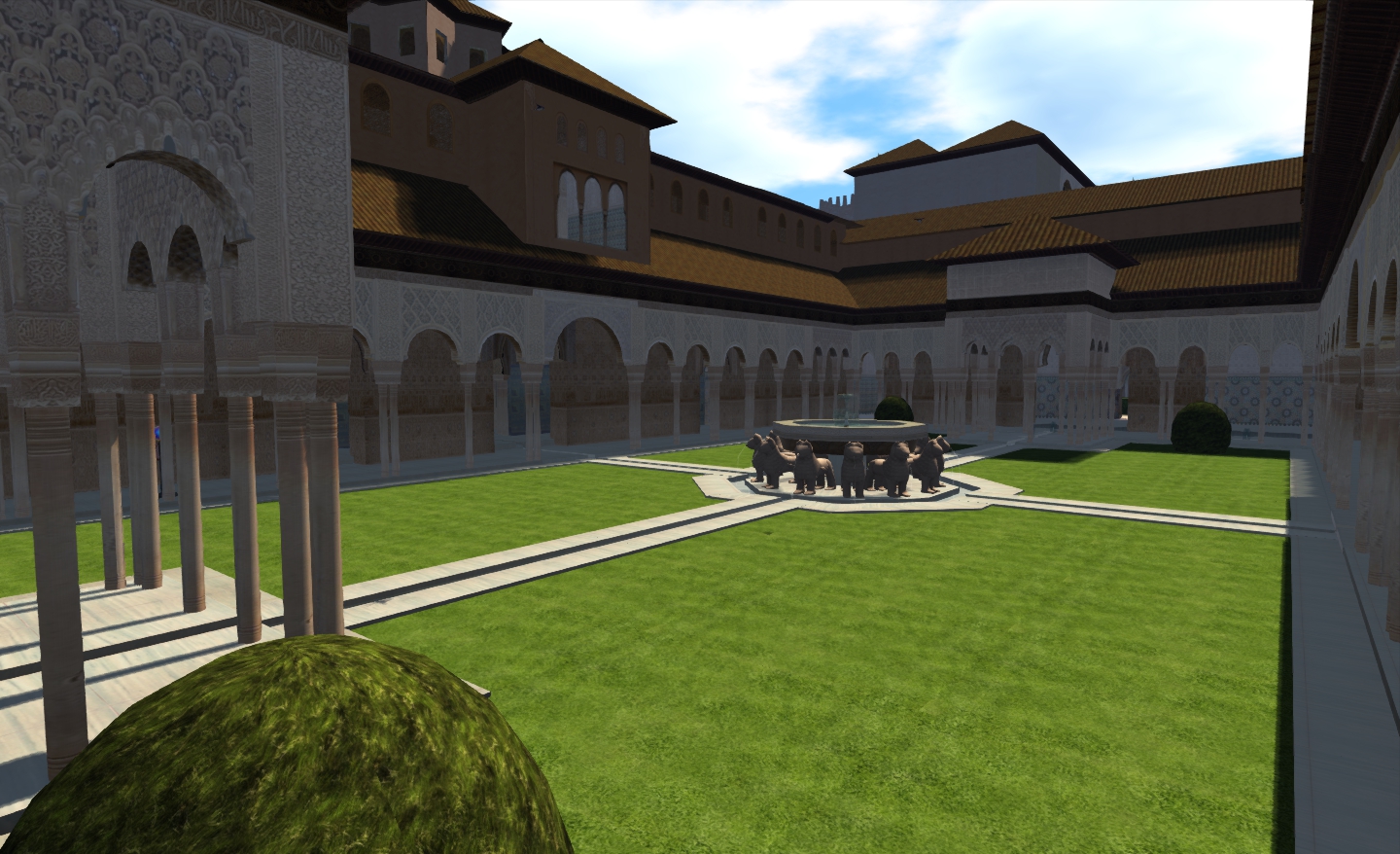
Patio de los Leones, Alhambra

While there are some doubts that Alhambra’s growth beyond the original expansion started by Ibn Nasr was seen as a part of some over-arching plan for the citadel, the original royal complex was exquisitely designed over successive generations using a geometric progression based on a simple Pythagorean principle to achieve the stunning and harmonious design evident in the complex as a whole. The progression was based on the relationship between the length of a side in a square with that of its diagonal, and is elegant in its simplixity and magical in its meaning.

To explain: take a square and then measure the diagonal between two corners. This measurement becomes the long side of a rectangle with the same base length as the original square. Now take the diagonal of the rectangle and use that as the long side of another rectangle, again with the same base length as the original square. Now take the diagonal of that rectangle, and make it the length of the long side of a third rectangle.
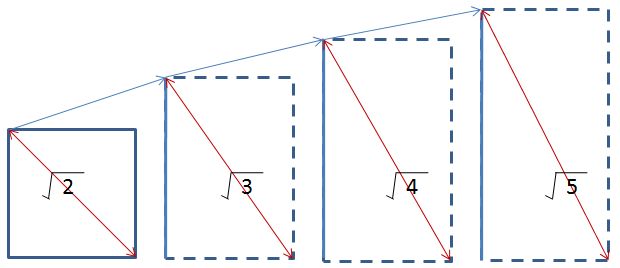
When you do this, you get two intriguing results: the first is that the diagonals of all four progress through the square roots of 2, 3, 4 and 5. The second is that the third rectangle is exactly twice the height of the original square.

The unique geometry of the Alhambra is clearly evident in the Patio de los Arrayanes and the Torre de Comares beyond.

This approach to building the Alhambra is repeated around the original royal complex, and is perhaps most notable in the Patio de los Arrayanes, where the Torre de Comares rises behind it, to form a perfect geometrical and symmetrical design that is reflected perfectly in the water of the Patio’s infinity mirror. It lends the Patio an even greater feeling of sitting in harmony with nature.

The use of this progression is in evidence elsewhere within the royal complex, both in the buildings and in the layout of the courtyards and gardens. Similar geometry is also evidence in varying forms within the ornate wall coverings and carvings.
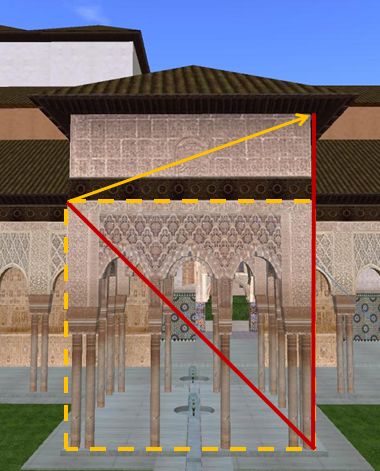
Patio de los Leones and the geometry of the Alhambra

It is also something that has been captured in some measure in the Second Life reproduction.

Take the Patio de los Leones, for example (right). Here the progression using the square and rectangle can clearly be seen. The lower section of the pavilion (up to the bass-relief) is the square. The diagonal of this square gives the elevation of the wall to the eaves of the pavilion. It’s a very subtle nod to the original, and it is sad in some respects that the nature of Second Life, where scale is compromised by things like the average height of avatars (7+ feet) and the default placement of the camera, that this ratio / progression isn’t always obvious or achievable throughout the build.

Kirsten’s Viewer: final 10 days for funding

Today, the attempt to get Kirsten’s Viewer crowdsourced has just about 10 days left in which to achieve its goal.
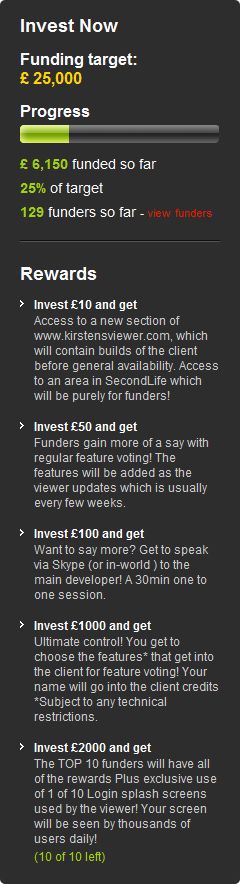
So far, some £6,150 ($9663) has been put into the project, representing 25% of the required total of £25,000 ($39279). Whichever way one looks at this, it is a remarkable achievement. However, the fact remains that in order for Kirsten’s Viewer to survive, it’s not enough.

Kirsten, and her rl “avatar” Lee Quick, together with partner Dawny Daviau have been caught-up in moving from Europe back to the UK, and so haven’t been able to maintain full internet access. Nevertheless, I did manage to catch up with Dawny this evening, and asked her if there were any chances of the fundraising effort being rolled forward another 60 days (assuming Crowdfunder allows this – it is something sites like Indiegogo support). Her reply was very clear and very understandable:

Hey Inara, No we won’t. If the target isn’t met the viewer will not return.

So if the Viewer is to be saved, there’s a lot to be done.

Participating in the project can bring with it certain benefits, as defined on the right, making it even more worthwhile for people to get involved.

Over the years, Kirsten’s Viewer has been leading-edge in terms of capabilities and usability, renowned for its ground-breaking support for photographers and machinema makers throughout SL. Many of the innovations found in the official Viewer(s) owe their heritage to Kirsten’s Viewer.

In its more recent developments, the Viewer was the first TPV to offer full mesh upload capability within Second Life (and other grids) and also introduced 3D Viewing to the grid.

For KirstenLee, the Viewer has been a labour of love for more than three years of his life, and only recent and unavoidable changes to his and Dawny’s personal circumstances forced them into shelving the Viewer – while a huge response to the news that development work on the viewer would be indefinitely suspended, coupled with the response to an idea put to the community by Hamlet Au, encouraged them to try the crowdsourcing route.

We’re entering the season of miracles and giving, so if you are a Kirsten’s Viewer user, and you’ve not contributed to the project and are in a position to do so – why not visit the project page (click the image above right, or click here). £18,000 sounds a lot to raise in just 10 days, but if people do pull together, who knows what might be achieved.

And if there is anyone out there with especially deep pockets, a love for virtual environments and who enjoys technology – KirstenLee and Dawny would love to hear from you as well!

Five years

Tuesday December 5th 2006; the day I logged in to Second Life for the first time as Inara Pey. Little did I know then how much that name would come to symbolise my on-line time.

I’d been active in SL prior to that date – although not for particularly long before wandering away again – and curiosity brought me back for a second look. As I wanted to do so unfettered by previous experiences, Inara was born.

A lot has changed in the intervening time; rather more than I care to remember, but which a flick through Google and the official blog archives brought to mind. Yet reading some of the blog entries and the comments that follow them, it’s interesting to see an old adage hold true: the more things change, the more they remain the same. So by way of saying “hippy yardbath” (any AA Milne readers out there?) to me, here’s a few random reminders of times gone by…

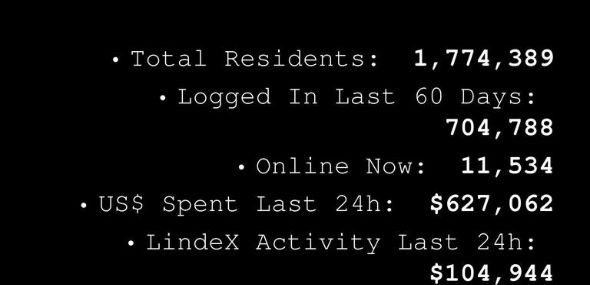
First, a little context: on the day I returned, Second Life had some 1,791,246 registered accounts of which 690,800 had been active over the previous 60 days. At one point during the day, 16,124 of those accounts were logged in, which was somewhat on the high side for the times, as we shall see (my thanks to the wonderful Wayback Machine for spitting out the data via a half-formed snapshot of the “old” SL website).

Back then, SL was not only in the media – it was the media darling, although some were then (as now) bemused and confused by its presence, while others were convinced it was The Next Big Thing (little did we know then how much that would come back to bite us in our collective bum…hello, Mr. Kapor!). Philip Rosedale was popping-up all over the place, as was Ashe Chung (who had yet to encounter flying penises – such things doth success bring, sadly).

Within Second Life itself, Windlight was still more than a year away and Mono  even further over the horizon. We did have skyhomes – but none that could be built or placed above 768 metres; we didn’t have sculpties (although they were coming, and were even LL’s darling for a while!), but we did have flexiprims. We also had Torley and his wonderful “tips of the week”…

..a reminder that actually makes the lack of his on-going video presence within the SL website that much sadder…

Log-in info found on the Viewer

Back then, the Viewer log-in screen used to carry some interesting data; while concurrency was very different in terms of “high volumes” causing problems.

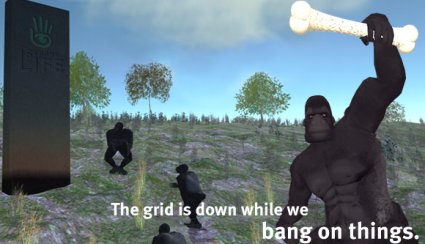
Also back then we didn’t have weekly roll-outs. Things were a lot more direct! Each and every Wednesday the gird would be shut for an average of 4-6 hours (and sometimes as many as 8-10) without any log-ins at all, while LL went and – as they put it – “banged on things”. Oh, the time spent waiting for the monkeys-and-monolith (that’s one image Google failed to find for me 😦 ) to vanish and log-ins to reopen….

(with thanks to Robin Cornelius)

We only had one Mainland continent (although a second was coming), but we did still have gambling (although not for very much longer).  We had Viewer updates causing video woes, but had yet to reach release 1.17 and the start of the introduction of a new “communicate” floater panel would get a lot of people all in a tizwas for bringing change to the UI.

And that’s without mentioning the major points in SL’s history such as the Adult Policy and age verification, the OpenSpace / Homestead fiasco, the arrival of Rivers Run Red and their thinly-veiled hostility towards the user base (whatever did happen to Justin Bovington? No, don’t answer that 🙂 ).

I was also very different back then. In 2006 I started off blonde and blue-eyed – about as far from the real me as I could get. Over the years, like many in SL, my look changed and evolved – and at times grew closer to my real life appearance before straying away again until I reached 2010 and the perfect expression of self-through-looks.

During the last five years, Second Life has given me so much. I’ve met many amazing people, some of whom have since left SL; others of whom are still on my Friends list to this day. I’ve learned to be creative, discovering the joy in taking pixelated bits of “plywood” and turning them into something delightful; I managed to get my head around simple scripting and experienced the joy of having my first door swing open and my first lamp illuminate.

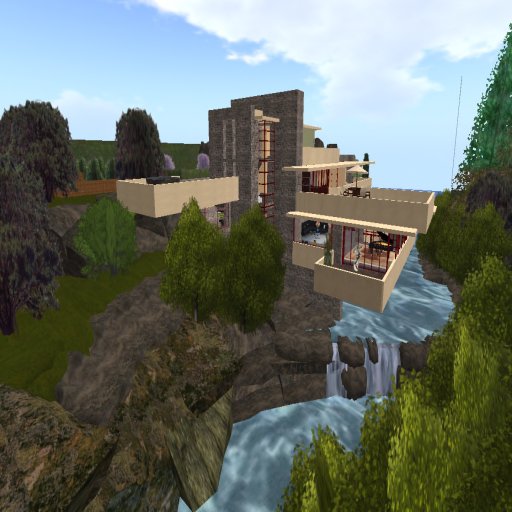
Fallingwater: my first “serious” SL build

I’ve had an entire world to discover and explore, made possible by amazing talents and featuring mind-boggling works of art.

“Through the Lens of Dreams” @ Art Screamer – just one of the many places I’ve been lucky enough to explore

I’ve also taken time to wag a finger and growl at LL over actions and decisions; but like everyone engaged in this marvellous platform, I’ve done so simply because I do love it so much. So I make no apologies for pointing the finger where I’ve felt it warranted, just as I make no apologies for the times I’ve supported LL at the times I’ve felt they’ve got it right or that they are being unduly chastised.

I’m not sure what my family and friends outside of SL would make of the time I devote to it – both in-world and in blogging about it. I’m pretty sure most would be at best bemused. The truth is that, five years on from the height of the hype about Second Life, we’ve still to reach that point where having a virtual extension of ourselves in a digital world is as accepted by society as a whole as going to work and paying taxes are.

But that’s also what makes being involved in Second Life attractive. While a lot of the hype has evaporated, and while we might not always appreciate it when we see things going wrong, the fact is that SL, in so many ways, still sits on the leading edge of a digital wave, riding waters both rough and smooth leading to who knows where.

All I can say is with certainty is that good or bad, high or low, it’s been fun. What’s more, it is still fun – and it’s very likely I’ll continue to be here for as long as that remains the case.

Lighting projectors: adding depth to SL

Updated to reflect the arrival of ALM.

Projectors are a neat way to add lighting effects, reflections, etc., to your Second Life environment. Originally, the relied somewhat on shadow rendering, but then changes made to the rendering system made them easier to use – no active shadows required. With the advent of the Advanced Lighting Model over the more involved deferred rendering options, they became even more straightforward to use.

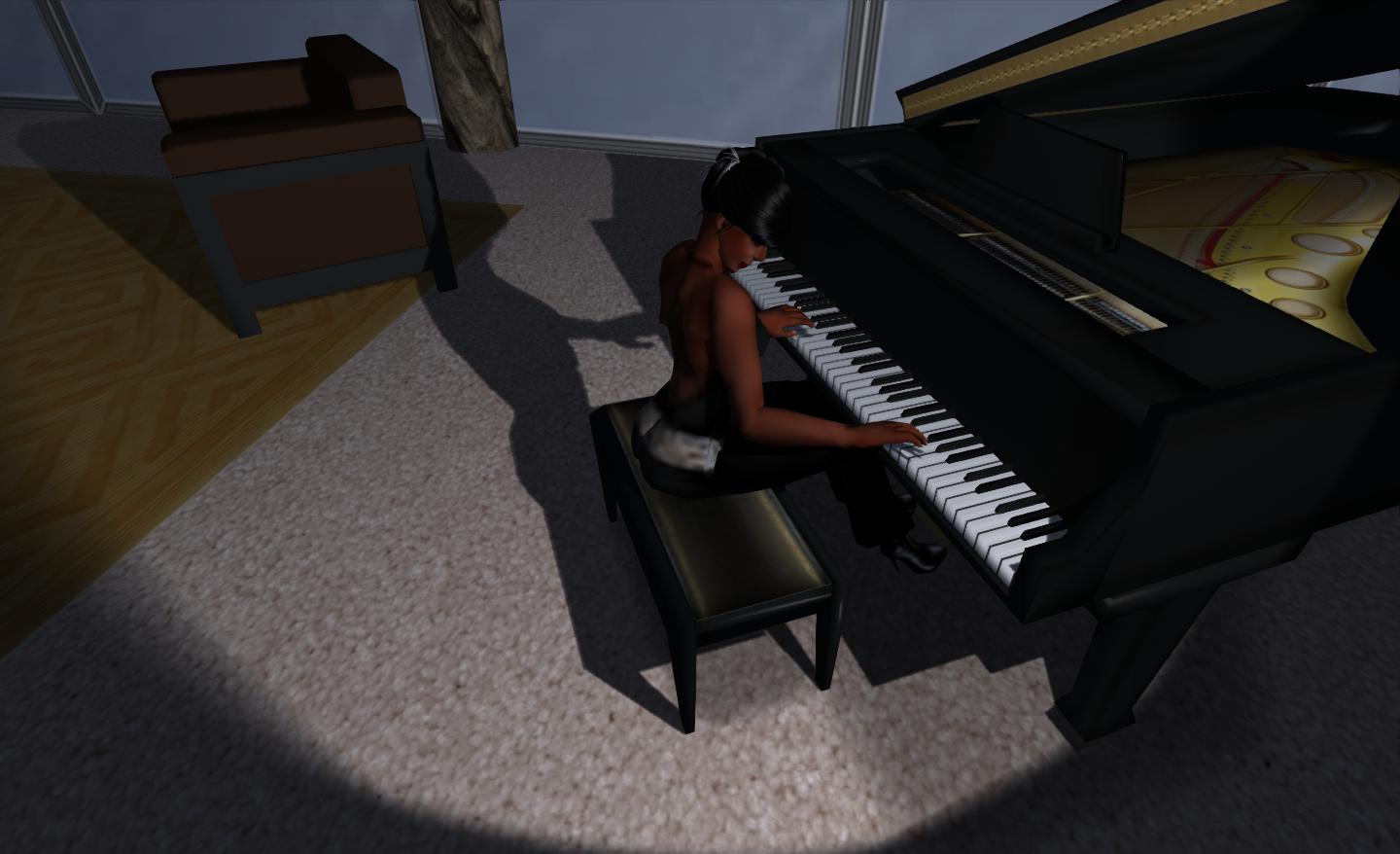
However, rather than burble on about things, here’s an image of a simple projector in action at my house:

“That’s me in the corner / That’s me in the spotlight…”

So, how is this done? Pretty simply, actually.


First: Enable Advanced Lighting Model

You need to make sure Advanced Lighting Model (ALM) is enabled on your Viewer before actually setting-up your projector. If you don’t, you won’t see anything (nor will anyone viewing your scene – they’ll need ALM enabled).

  • Go to PREFERENCES->GRAPHICS
  • Find the Advanced Lighting Model option and check it, if it isn’t already checked.
  • You may also want to tweak your HARDWARE options – these may not be vital steps, but they may just boost your computer’s performance a little:
    • Turn off ANISTROPIC FILTERING
    • Turn down / turn off ANTIALIASING
  • Some systems may prefer it if you disable AVATAR IMPOSTERS and AVATAR CLOTH; I found that on older V3-base viewers, I actually get a slightly higher fps with AVATAR CLOTH off when shadows are enabled (around 5 fps), but notice no real change with AVATAR IMPOSTERS disabled than with them on.

Second: Create a Projector

I emphasise here that I’m only talking you through a very simple projector. How far you go with things is up to you.

  • Create a prim. Any prim will do – shape isn’t overly important.
  • Click on the FEATURES tab in the Build menu
    • You may have to click on MORE / v (at the bottom of the EDIT menu) to see the tabs
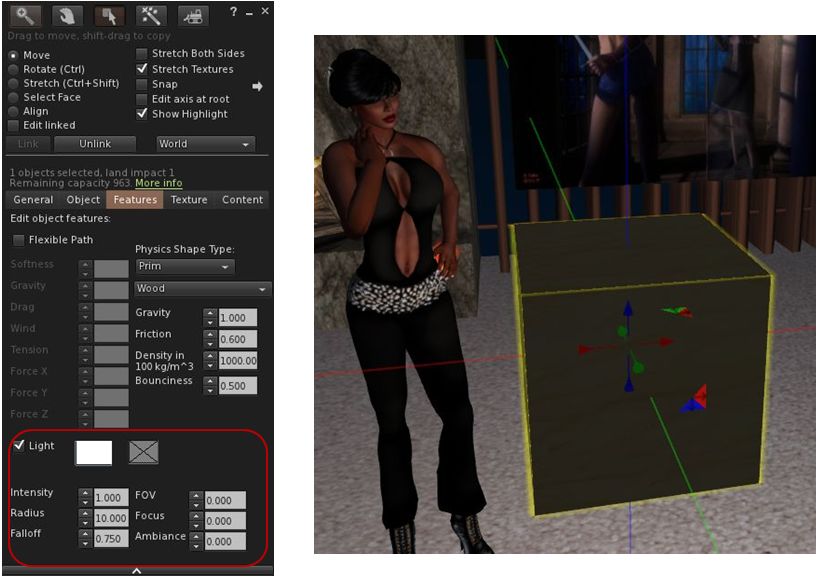
  • In the Features tab, there is an option called LIGHT (see below, left)
    • Note that this will only be displayed with all the options shown if you have ALM properly enabled.
  • Check the LIGHT option. You should immediately see the area around the prim passively illuminated (below, right). Nothing special here, this is normal behaviour.
So? It’s an illuminated prim…
  • Raise the prim off the ground and the spot effect will be apparent under the Z axis on he prim – projectors only work in one direction.
  • Rotate and position the prim for your desired effect and then make the whole thing transparent (and phantom, if it is at a height / location where it it liable to be walked into).
  • Done!

Projecting Textures

The projector option also allows you to project textures onto surfaces – this offers a range of opportunities, although a little thought on how you might use them needs to be consider.

To do this, select your projector prim and:

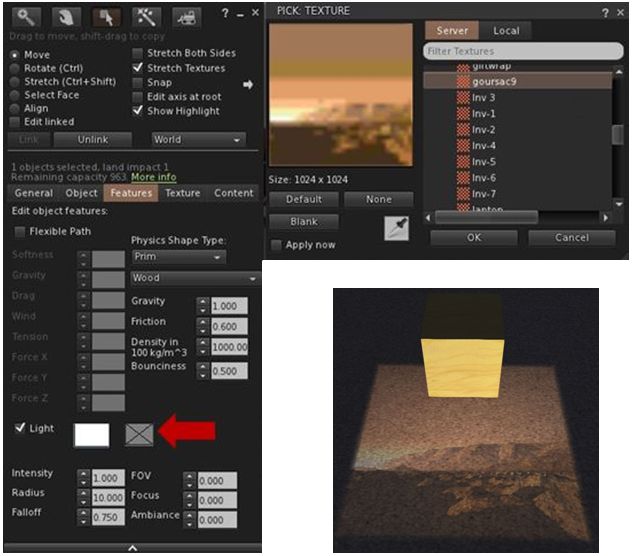
  • Click on the second box next to the LIGHT option and click on it to open your texture picker.
  • Navigate to the texture you wish to use and click OK to select it.
…It projects!
  • The texture will be projected by the prim.

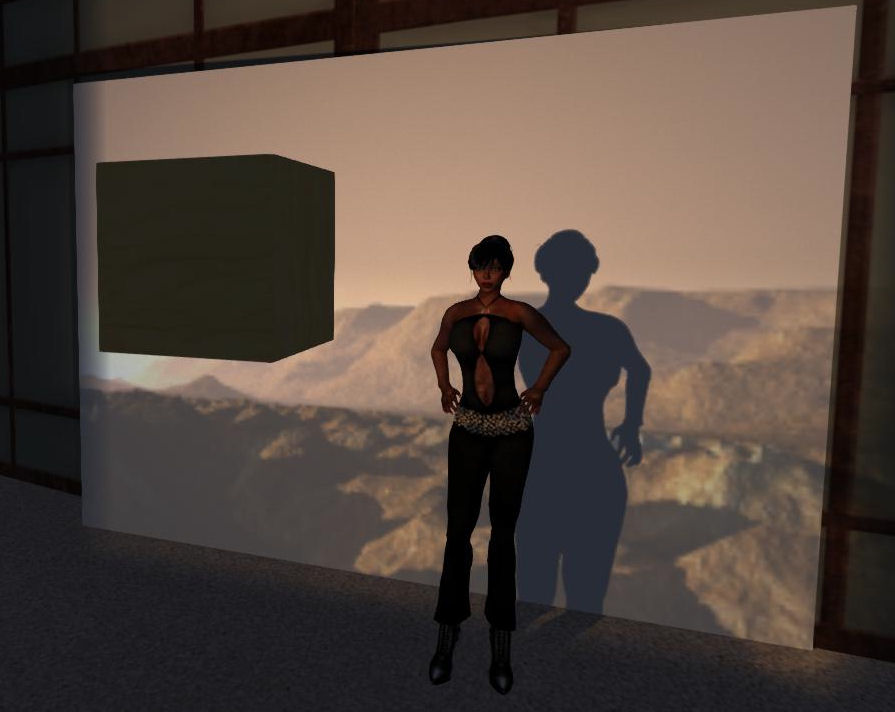
All that remains now is to rotate and position the prim. Here’s my finished example, rotated and projected against a temporary screen.

I cast a long shadow…even over Mars! 🙂

Additional notes:

  • You can change the colour tone for a projected texture by clicking the box closest to LIGHT to open your colour picker.
  • You can also modify the look of the projected image using:
    • Intensity: overall intensity of texture – range 0 to 1.
    • Falloff: relative brightness – range 0 (brightest) to 2.
    • FOV: size of the projected image – range 0 to 3 (largest projection) – also influenced by the projector prim’s distance from the surface(s) on which the image is being projected.
    • Focus: focus of the image (hardness / softness) – range -20 to +20.
    • Ambience: contrast of the image – range 0 to 1.


Summing-up

How you use projectors is down to your imagination: using rotation scripts, you can generate “spinning” lights and other effects suitable for discos and so on; you can make the prim transparent, you can reduce it in size, you can incorporate it into other items – the list is endless.

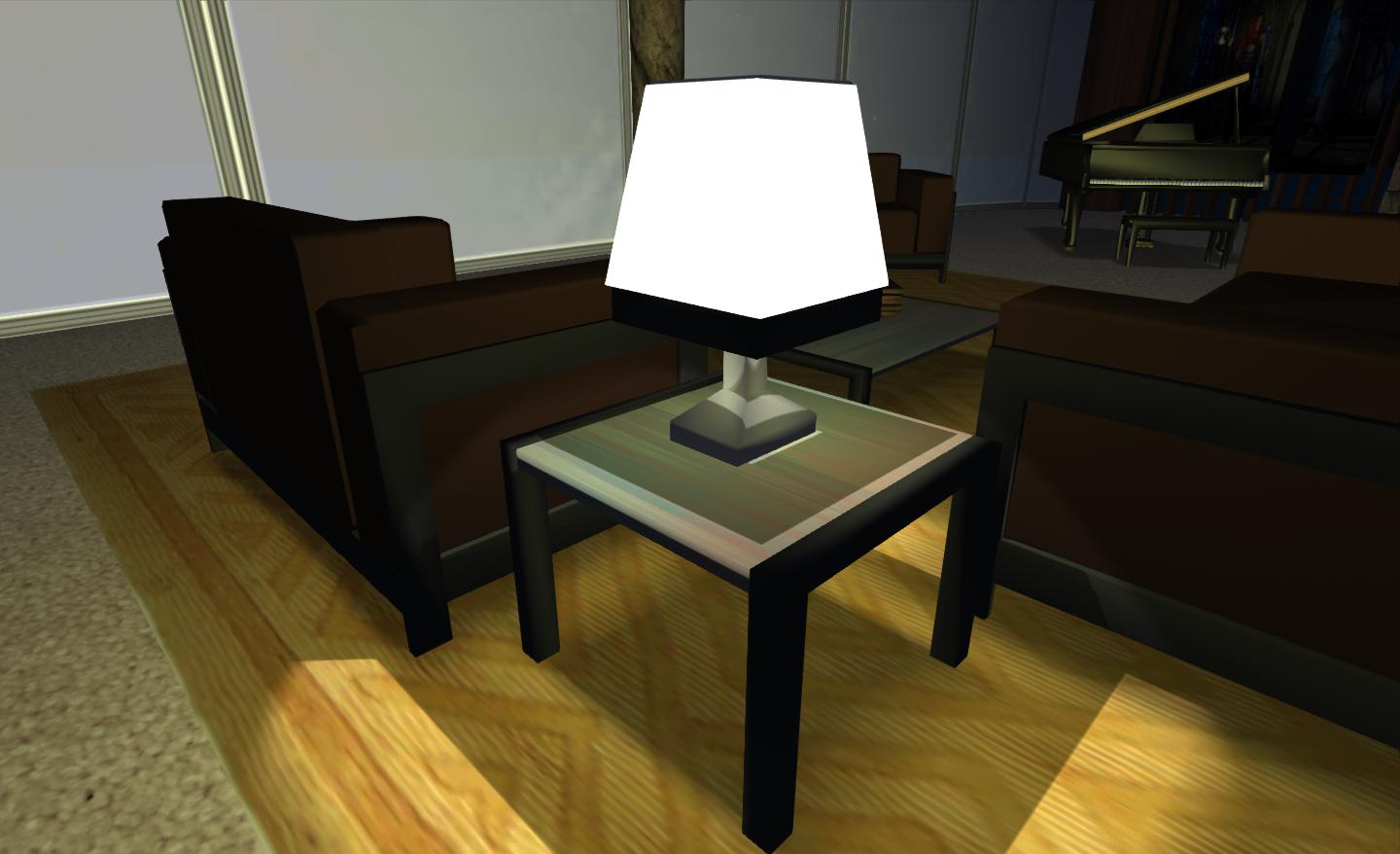
For my part, I combined a projector with a “lamp shade” prim and a little bit of scripting so that the table lamp that forms a part of my 1-prim PrimPossible lounge suite will not only turn itself on at dusk and remain on through the “night”, it’ll also cast a pool of comforting light:

Realistic table lamp

Again, remember this is a Viewer effect – so only those who have shadows enabled on their own system will actually see the results of your labours.

Happy playing!

Addendum: in this article I have shadows enabled (my usual mode of running SL. As Ayamo Nozaki note in the comments – remembering this piece was originally written at a time when activating some of the more advanced graphics options was a little more convoluted – shadows *do not* have to be enabled for effects like this.   

“Backing-up” and applying your Viewer Preferences across multiple computers

Note: Firestorm has a built-in option to back-up your settings to a local drive and restore them.

I was recently asked if there is any way to quickly and easily copy your Viewer Preferences between computers if you use more than one machine to access Second Life.

As someone who uses both a reasonably powerful PC and a modest (but still SL-capable!) notebook, this is something that is of interest to me, because frankly, I get fed-up of resetting everything after each and every clean install – which, given the number of Viewers I flick between (currently  – wait for it – 18 for SL, not including Text clients!), can get a little tedious.

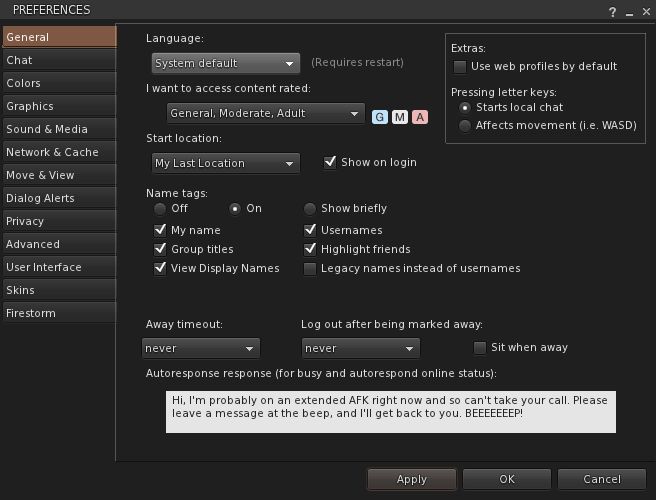
Preferences – setting once is OK…twice a drag…

And the short answer is – yes you can; what’s more, you can (in most cases) do it on a per Viewer basis.

There are two file locations used to store preferences and settings:

  • The user_settings folder, which contains all preference settings common to the Viewer
    • Note this may contain a sub-folder if you use Viewer-side Windlight presets
    • Copying this folder will also copy any camera presets you can created using the debug settings
  • The avatar setting folder (which has your avatar’s name in the format first_last), which contains information specific to your avatar

Generally speaking, the only folder you need to folder is user_settings. However, it is possible your Viewer may use some per account settings (such as Firestorm allowing tag colours to be set per account) – so you may need to move the avatar settings folder as well.

These folders are generally stored in the following locations:

  • Windows 7 / Vista: C:\users\\AppData\
  • Windows XP: C:\Documents and Settingxs\\Application Data\
  • Mac OS: ~/Library/Application Support/
  • Linux: ~/. (hidden folder, so you’ll need to enable “Show Hidden Files and Directories”)

Where: “” is the Windows account under which the Viewer was installed, and “” is the name of the Viewer (e.g. Firestorm, Exodus, etc.).

  • If you cannot find a folder in these directories named after your Viewer, the chances are the Viewer is using the default “secondlife” folder (so in Windows 7, for example, the location would be: C:\users\\AppData\secondlife)
  • If you have multiple Viewers using the same location (e.g. Viewer 3.x, Viewer 3.x Development and Viewer 3.x Beta), then the one set of files in user_settings will apply to all three Viewer versions.

Simply set your preferences on one computer, then:

  • To back them up, copy the folder(s) to another location / drive on your computer (remember to overwrite the copy with a fresh version each time you update your Preferences!)
  • To use them on another computer, copy the folder(s) to the required destinations on the other computer via your network / a removable drive.

And that’s it! Simples!

See also: user settings in the SL wiki.

Linden Realms open to all

Update Dec 2nd:I spoke to Tiggs Linden today regarding the HUD issue, and he has now fixed the problem.

Linden Labs have announced that Linden Realms, the crystal-hunting game is now open to everyone.

Portals are now available across the grid, allowing users to teleport to the game areas.

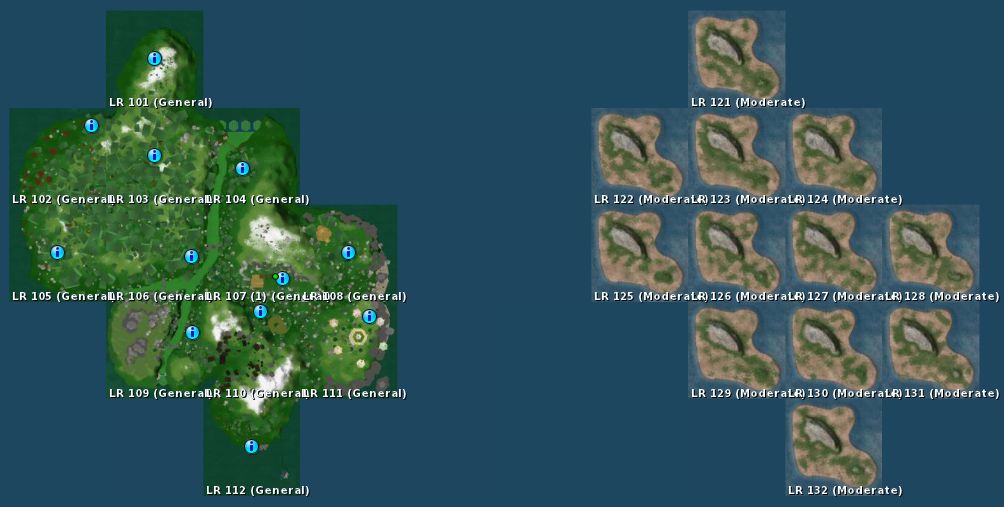
Some six “island clusters” of 12 regions each have been established to provide space for users to play the game without undue lag. From the map, it would appear another two further “islands” of 12 regions apiece may be under development for further expansion of the game, should they be deemed necessary – or perhaps they’re being prepared for the next Linden Realms project?

Linden Realms 12-region game “island” (l) and another Linden Realm area apparently under development (r)

Note that you cannot teleport directly to the game areas – you must go through one of the designated portals.

Game Portal

I reviewed the game a while back, the objective is to collect crystals, avoid various rock monsters and other obstacles and, as a side benefit, earn L$ (but don’t look to make a fortune – that not the point!).

I took a quick look at the expanded gaming areas earlier, and did find there seemed to be a slight issue: some people were arriving and failing to receive the game HUDs. As these also provide instructions – and the LL blog post announcing the game to be open doesn’t mentioned them at all, I actually encountered quite a few very confused people wandering around wondering what was going on and what they were supposed to be doing. I actually tried the portals at Barbarossa, Eldervale and Degrand – and failed to receive a HUD through any.

Hopefully, this issue will be fixed in short order.

The game is a lot of fun – and there is a rumour further quests may be added; if true, I’m not overly sure it’s a good idea. The aim of the game (from LL’s perspective) is to introduce mechanics and features that are to be made available to all – as such building an entire multi-quest game smacks a little of biting the hand of content creators – who are the people who should be using the tools to make engaging, fun and very different experiences for people to enjoy.

That said, I recommend that if you have 30 mins to spare – and once the initial rush has died down (and the HUD issue fixed), why not give it a try?