My Ideal Viewer

OK, so over the years I’ve looked at just about every major Viewer to come out of the starting gate. Some I’ve reviewed in this blog, some I’ve chosen not to. I can’t claim to be intimately familiar with all of them, but I think I’ve used enough of them for long enough to determine what I would personally like to have in my Ideal Viewer.

Version and Installation

Right, well first off, I want a Viewer that can keep up with the latest developments  – or more particularly, improvements – churning out of Linden Lab. This means I want a Viewer that comes from the Viewer 2 Snowstorm code. Sorry, Viewer 1, but you’ve had your day. My ideal Viewer is one that installs cleanly and easily and tells me what I’m getting; I don’t want to be faced with a lot of tedious swapping of .EXE files, unpacking of additional folder and what have you – so again, bye-bye some Viewer 1 TPVs.

Frame Rates
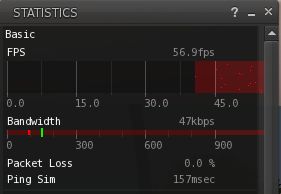
Good frame rates

Frame rates aren’t everything, but they certainly smooth things for the better. As such, my ideal Viewer will consistently push out the best possible frame rates for my hardware. Given SL 2.6.4 banged things through at around 55 fps at a consistent rate when on my own (and over half that with other around), so it’s not unreasonable for me to expect that kind of performance on a consistent level (SL 2.7.1 has, for some reason now tailed off to figures below Firestorm on my machine after a good start during the first day or so I played with it).

Ideally, and allowing for the fact my graphics card and CPU are not cutting-edge and I only run Windows 7 32-bit, so have a RAM limitation – I’d ideally like to be able to run shadows without seeing my machine grind to a halt. Right now, only Viewer 2.7.1. and Firestorm Beta seem to be able to do that for me – and 2.7.1 does so significantly better than S21.

Top Bars

My ideal Viewer will minimise the impact of the top-of-screen navigation bars, etc., that doesn’t impact on their usefulness and which give me the option of being able to display my location information without compromise in terms of screen real estate or without the information vanishing just because I turn a bar or two off.

Firestorm’s top bars – note the location information right at the top, allowing me to turn off the navigation bar without losing information

On the subject of top bars – my ideal Viewer would have a pre-requisite that the Preferences shortcut button is employed in every skin variant.

Sidebar

My ideal Viewer will avoid the Sidebar like the plague; if it must use the Sidebar then:

  • It will do so without idiotic tabs cluttering up the right side of the screen and making things look unsightly
  • It will provide button-based access to all of the Sidebar tabs, either from the toolbar at the bottom of the screen (e.g. Firestorm) or via an optional floating palette (e.g Kirstenlee’s & Kokua)
  • It will be appropriately sized so as not to feel like an elephant is taking up residence on my screen
  •  Tabs detached from the Sidebar will given me the option of closing them (not minimising – closing) without having to re-dock them, and will then be persistent on opening thereafter (preferably via a toolbar button, but even by retaining the relevant right-side tab if necessary).

Communications

My ideal Viewer will properly integrate my communications options, be they local chat, individual IM sessions or Group Chat. It will present these options in a single, tidy reference-point and not force me into having to use the People tab of the sidebar to reach someone . It will also present my options for communicating without making large demands on  screen real-estate. So far only Firestorm successfully grants all of this.

Viewer 2 Communications: Top left – Viewer 2: limiting in extremis; Top right – Kokua: wasted space; Bottom left – Firestorm: perfect! (windows all default size)

Walking and Camera Movement

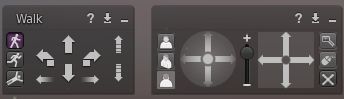
Movement and Camera Controls, please

I like the camera movement options with Viewer 2 et al, even with a trackball rather than a mouse (although still a pain in the bum on my netbook’s touchpad). However, there are times when the camera controls and the movement controls are handy to have around. Therefore, my ideal Viewer would include both. Just like Kokua.

In-World Profile Windows
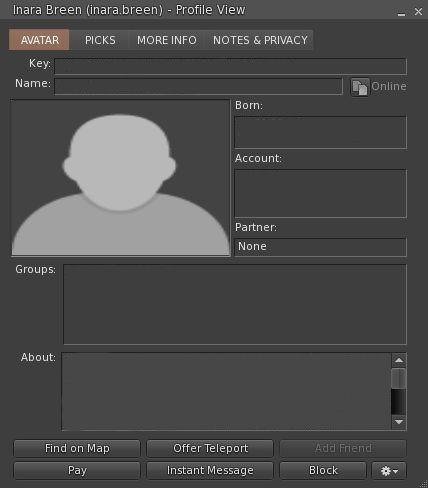
In-world Profile window

Yes, the new web-based profiles have their uses – but the fact remains, they are most frequently used in-world – and having to repeatedly have the Viewer web-browser thrown open, or to be chucked out into your external browser is on the high side of bloody annoying. It’s also slow at times. Therefore, my ideal Viewer will retain a “Viewer 1” style approach to Profiles (Firestorm) and include the option to use either it or the web-based view.

UI Flexibility

While Viewer 2 has come a long way over the last 18 months, some aspects of it remain something of a pain. Information can easily be missed, for example. It’s also fair to say that old habits do die hard and many of us have doing things a certain way ingrained ‘pon our souls for better or for worse.
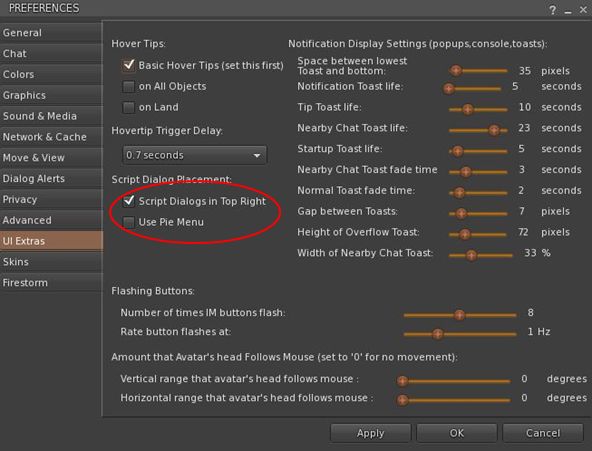
UI Extras – it’s about choice

Therefore, my ideal Viewer would include options that allow some degree of customisation within the UI and provide people with options that help them feel more at home with the Viewer.

At the moment, Firestorm leads the way here – not only for the privacy options and the like, but for the fact it includes a UI Extras tab in Preferences, which not only includes some handy sliders with which you can carry out small adjustments to the UI, it also includes some options liable to put a smile on a lot of faces (circled) – although Kirstenlee’s Viewer, in fairness, offer the old-style pie menus as well, athough they are turned off by default, rather than on by default as with Firestorm. Indeed, the only additional option it needs here is one that will chuck system alerts and notifications up to the top right of the screen.

Context Menus
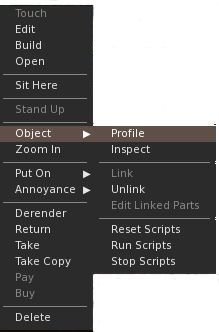
Proper context menus

I prefer the context menus over pie menus. Done right, they are far more intuitive than hunting for the right slice of things & in keeping with the majority of computer applications. But they are not with fault. My ideal viewer would therefore consider what someone is likely to be doing wherever they are, and provide the menu options they are most likely going to want to use, whether they are building, shopping or whatever.

Firestorm blazes the trail here (no pun intended), and I’d definitely incorporate their approach into my idea Viewer. It’s fast and efficient and doesn’t require multiple step-downs to get to the things you want.

Built-in AO

Take the load off the server; give yourself client-side flexibility & lose the need for HUDs. My ideal Viewer is one that incorporates an client-side AO system that is comprehensive and easy-to-use. Right now, that’s Firestorm only, but doubtless Kokua will be following suit.

And the Rest

No Viewer would be complete without:

  • RLV  / RLVa (it’s not just about the BDSM, OK?)
  • Radar a-la Firestorm
  • 3D (only in Kirstenlee’s S21 Build 8 right now)
  • Comprehensive privacy options (Firestorm)
  • The ability to disable various blank screens (i.e. teleport)
  • Media filter Viewer 1 TPV-style TP indicator displayed whe teleporting & the Tp screen is disabled
  • Can easily be optimised for photography / machinima (as with Kirstenlee’s S21)

And that’s about it. There is nothing extraordinary here. Everything I’ve described above exists in various flavours of the Viewer right now. Question is, will anyone bring them all together into a single offering?

SLCC 2011 Opens Registrations

SLCC 2011, to be held in Oakland, California, has opened registrations. The event will be held from the 12 through 14th August and I shall once again not be attending. Sorry, but California at the height of the holiday season in the northern hemisphere is not an economical destination.

Apparently, the event will be held on the East Coast on even-numbered years from next year (Boston, to be precise). Again, this isn’t always a particularly low-cost destination from Europe – but it is a bloody sight cheaper than California can be in August. One cannot deny it’s good to see an unbending of the “California only” mentality that seems to have pervaded SLCC up until now. I also happen to love New England, and I’ve always enjoyed time spent in Boston; so maybe next year will be the year in which I actually surprise myself and join the event.

In the meantime, here’s the home page link for the conference.

Livin’ the 3D Sec’ Life

Klee 3D

Kirstenlee’s Viewer has always been bleeding edge; it is the Viewer for the serious SL photographer and Machinimaist.

At the end of May, the Viewer took another leap forward as it went…3D!

I hadn’t been able to test it myself, due to a lack of any appropriate glasses. However, a trip to the local cinema solved that problem, so this afternoon I got to have a paddle with it.

The first thing I will say is that my PC is not top-of-the-line, nor is my graphics system. That said, it handles shadows reasonably OK, if with something of a performance hit, so I was pretty sure 3D would work – and it did! I’ll be honest, there was a performance hit (GeForce 9800 card with 1 Gb, btw, running with a Q6600 2.63 Mhz processor & Win 7 32), but it was nowhere near as massive as when enabling shadows. My normal 40-50fps tumbled to around 25-28. The glasses I have from the cinema perhaps weren’t the greatest (after all, your supposed to be sitting tens of feet from a big screen when wearing them, not sitting a dozen nose lengths away from a table-top screen), but with some jiggling of the sliders, I got a reasonably impressive result and spent 20 minutes bimbling around my sky platform.

Given my GPU / CPU, I didn’t hold out too much hope of running shadows and 3D effects – and I was right. While both enabled, I was left with a frame rate of 1 fps. Erp, as the spokesperson once said, but not surprising.

The only real problem I had lay with the fact that while the in-world view was 3D, my HUDs weren’t – and the colour separation on them was appreciable to the point of making text illegible.

The 3D controllers can be found in the PREFERENCES -> VIEWER -> MISC tab, and comprise a check box to enable and a couple of slider controls – adjust with care. If you try it, be aware that the Build 8 Viewer is experimental and may do Unpredictable Things.

As photos don’t really do the 3D justice, here’s a video made by Chantal Harvey showing off the results:

S21 Build 8 is currently only available in for Windows; Mac and Penguin versions to follow.

SL8B: of Dates and Denizens

It’s courted controversy; it’s been met with everything from joy to indifference, with a fair measure of consternation. But from Monday of next week SL’s eighth birthday celebration kick-off.

The SL8B official blog is still pretty light of any meat on the celebrations (what is going on? Anything?) – which kind-of makes it hard to stir up the “whoopie!” factor.

Some dates have been released on the SL official blog, but even these are pretty lightweight, comprising:

  • Kim Linden’s opening address at 11:00am SLT on the 20th
  • Rodvik’s appearance on the main stage at  3:00pm SLT on the 23rd
  • Err, that’s it.

There is apparently a “press preview” on the 18th – and one assumes it will be open to members of the SL Press Corps (that’s what we’re here for, right? To report on things going on in SL?); but event that is bereft of any details such as “when” and “where” – making it kind-of hard to plan on being there. If it is left to an 11th hour Press Corps Group Notice for the details to be supplied, I’ll be sorely disappointed.

On a broader front, I appreciate that we still have a couple of days to go before everything kicks-off, and that the “special celebrations” don’t take place until the 23rd – so there is still time to “get the news out”. Nevertheless, the lack of any real calendar of activities at this point in time runs the risk of the entire event passing most people by – which has, if I’m honest, frequently been the case in previous years.

Avination “try a sim” promo

Avination have launched a “try a sim” promotion. you can pick-up a 15K prim simulator for $40USD for the first three months, rising to their standard $60USD a month thereafter.

The offer starts today and runs for an indefinite period. Builds from one discounted sim cannot be transferred to another discounted sim (so no $40-a-month sim hopping!).

Amanda and Courtney – gone

Rumours are churning in-world and now on Twitter and Purk that both Courtney Linden and Amanda Linden (Amanda van Nuys) have both departed Linden Lab. And the rumours are true.

Courtney Linden

Courtney, who was most recently in the driving seat for SL8B, is said to have left as she has another job. I never had many dealings with her – but in those I did (around the MoM events and other activities) she always came across as enthusiastic and helpful.

I can only wish her all the best for the future, and hope that her departure (said to have been on the 10th June) hasn’t left a hole in the last-minutes arrangements for SL8B.

Amanda Linden joined Linden Lab from Organic – Mark Kingdon’s old haunt prior to his coming to LL as well. Originally holding a marketing brief, Amanda was responsible for push SL towards the world of business, and as such seemed at times to have a openly hostile attitude towards users in general; she was one of the first to push the envelope with regards to SL / rl identify linking, and she gave support to Justin Bovington’s view (Rivers Run Red) that LL should consider turning swathes of Mainland over to corporate-only use and ban “everyday” users from it.

Amanda Linden

Certainly, it must be said that Amanda has frequently had that unique LL ability to simultaneously promote the platform and shoot herself in the foot while doing so. I doubt few will forget her post from February this year in which she announced the forthcoming “Community Platform” which  would encourage greater communications between Lab and users – and then promptly told everyone that if they really want to engage with LL and find out what is going on, they should all go to Facebook. Not exactly the most sparkling way to get people enthusiastic about using a platform you’re about to roll out.

My own dealings with Amanda were, it has to be said, unedifying. “Spin” seemed to be her watchword when it came to responding to genuine questions.  As such, I found her hard to take at face value, which is perhaps unfair of me, but I couldn’t help but take anything she said with a pinch of salt and an eye on the possible hidden meaning. That said, I wish her well for the future.