Second Life 360-degree snapshots hands-on III

Credit: Linden Lab

Update: The 360 snapshot viewer was updated to version 5.1.6.515934 on June 6th.

On Thursday, February 22nd, Linden Lab issued a further update to the 360-degree snapshot project viewer. While version 5.1.2.512774 brings with it some updates and changes, it still fair to say this is more an interim update than the set of improvements and capabilities some of us had been hoping for.

As with the previous update, released in June 2017 – see my Hands-on II review here – this viewer:

  • Uses the Alex Ivy viewer code base (only the release code, this time, obviously), and so is available for Windows (32-/64-bit) and Mac OSX; there is no Linux version at present.
  • Handles the “stitching” of a captured set of images into a single equirectangular 360-degree image ready for upload to suitable suites supporting 360-degree images.

However, what’s new with this viewer is that it:

  • Moves the 360-degree photo option from the snapshot floater to its own floater.
  • Sets the 360-mage resolution to 4096×2048 (no more “small”, “medium” or “large”).
  • Includes the required meta data for images to auto-display in Flickr’s 360-degree viewing mode, so you no longer have to manually set the equirectangular tag

So, how does it stack-up?

On the positive side, the new capture UI  does a credible job of easing the capture process and in offering preview of the 360-degree image. Hopefully there will be some further options added to it in the future – such as image size.

On the negative side the current  4096×2048 resolution could still do with improvement – Alexa Linden informed me that this work is in-hand – as it can exhibit a very definite fuzziness.

Taking the Shot

  • Position your camera at the centre point of your 360 shot.
  • While it is not specified, I would suggest camera in a circle to encourage the scene to load before capture.
  • Use Menu > World > Environment Editor > Sky Presets > Edit Presets to set your desired Windlight and use the Clouds tab to freeze cloud movement. Avoid the use of Depth of Field.
  • Press CTRL-SHIFT-C to display the 360-image capture floater.

The new 360 snapshot floater – default mode
  • Click Capture 360 to commence the capture process.
  • The floater will display some basic messages as the images are being captured and process, and the Lab have indicated these may be improved, depending upon feedback.
  • Once image processing is complete, the floater will expanding to show an auto-rotating previewing of the captured image. As with any 360-degree image, you can press and hold the left mouse button while over the image and scroll around it.
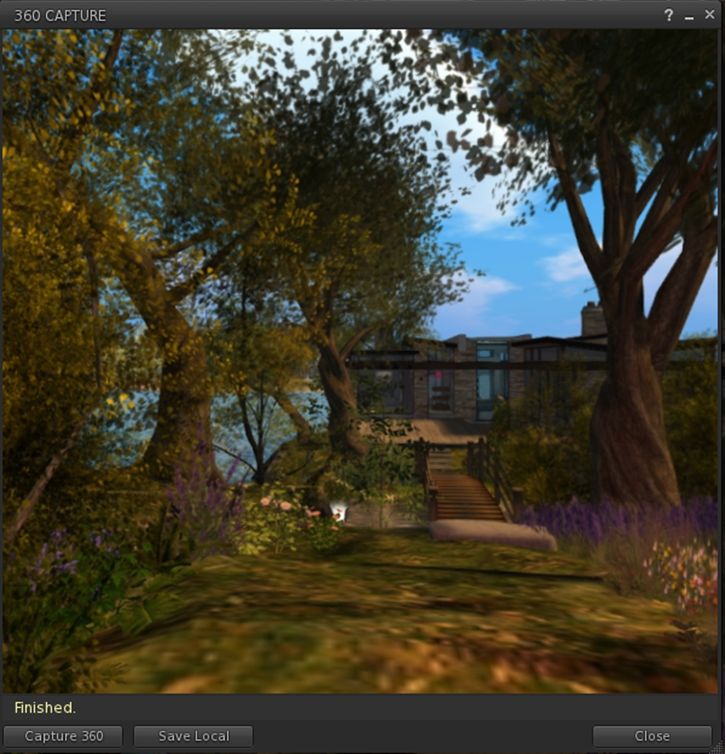
The 360-degree image preview
  • Note that there is currently an issue with the preview on Mac systems which can leave it black. If this happens, click Save Local and then Cancel. This should force the preview to displayed correctly.
  • If you’re unhappy with the preview, you can re-start the process by clicking Capture 360 again, or you can save the image using the Save Local button. This will save the image in equirectangular format to a location of your choice on your computer, from where yo can upload it to photo sites supporting 360-degree equirectangular images.

As noted above, images captured in this version of the viewer should automatically display in 360-degree viewing mode in Flickr without the need to meta tag them manually. They also should display in the WordPress  “VR” shortcode, placed within square braces (“[“, “]”) and in the format:

vr url=path-to-photo.jpg view=360

This should yield a result like this:

Feedback

A welcome update to a project viewer that was a little long-in-the-tooth: obviously, as well as the 360 snapshot changes, this version also brings the viewer up to par with all of the most recent viewer releases.

I was a little disappointed that there’s no support for uploads to Second Life Place Pages with this iteration of the viewer – something that had been indicated as being on the horizon in some recent user group meetings; apparently, and like the overall image resolution, it requires further work. As the 360 image captures now has its own floater, I’d also personally like to see it gain a dedicated toolbar button as well. CTRL-SHIFT-C isn’t a taxing short cut to remember, but buttons can make for convenience.

That said, the thing to remember here is that this is still only a project viewer – it still has a good way to go before being ready for prime-time use, which is something the Lab fully acknowledges. So, while it is worth taking it for a drive and having a play, expect to see further improvements and added functionality appearing in – hopefully not-too-distant – future updates.

Download and Release Notes
 

2018 SL UG updates #8/1: server, viewer

Flying Coyote River; Inara Pey, January 2018, on Flickr Flying Coyote Riverblog post

Server Deployments

As usual, please refer to the server deployment thread for the latest updates.

There was no deployment to the Main (SLS) channel on Tuesday, February 20th, again leaving it on the same server release as weeks #6 and #7: 18#18.01.17.511913. as the channel was restarted in week #7, there was no rolling restart this week.

All three of the major RC channels should receive a new server maintenance package on Wednesday, February 21st. Release 18#18.02.12.512536 should hopefully improve (if not resolve) an odd viewer crash situation some users have experienced. At the Simulator User Group meeting on Tuesday, February 20th, Simon Linden described it thus:

The server is doing some better checking on update data it sends to the viewer. We saw a very odd situation a week or two ago where the region was sending odd data and viewers would crash immediately. It went away after we restarted the region, and we think it was some memory corruption … FWIW, the server was sending a value of zero for a prim-code … which is totally invalid … There were also some other invalid data (like a zero’ed UUID) so my theory was memory corruption.

We didn’t have any other smoking guns. That region was fine after restarting, or when we tried our own copy. It was one of those mystery bugs, which we sometimes get since SL is so big and complex. We don’t know why it got that way, or how to make it happen again. we ended up making both the region and the viewer more robust. The underlying problem is still there and, assuming it happens again, will still cause problems.

(See also: BUG-214564.)

SL Viewer

There have been no updates to the viewer in the current official pipelines thus far, leaving them as per the end of week #7:

  • Current Release version  5.1.1.512121, dated January 26, promoted February 7 – formerly the Voice Maintenance RC.
  • Release channel cohorts:
    • Media Update RC viewer version 5.1.2.512574, February 15.
    • Nalewka Maintenance viewer version 5.1.2.512522, February 14.
  • Project viewers:
  • Linux Spur viewer, version 5.0.9.329906, dated November 17, 2017 and promoted to release status 29 November – offered pending a Linux version of the Alex Ivy viewer code.
  • Obsolete platform viewer version 3.7.28.300847, May 8, 2015 – provided for users on Windows XP and OS X versions below 10.7.

Region Crossing Issues Investigation

As noted over the last few weeks, user Joe Magarac (animats) has been digging into the viewer code handling region crossings in an attempt to improve avatar handing  when seated on objects and looking at the “partial unsit” issue (when the avatar becomes visual detached from a vehicle on a region crossing, but acts as if still attached (e.g. appearing seated, with any attempt to stand causing a viewer crash. Information pertaining to his effects can be found at the following location:

He now believes he has an extrapolation fix for unsits at region boundaries, which could be appearing in a future Firestorm release.

In addition, he believes he has now isolated the cause of the “partial unsit” issue as being a network bottleneck issue, and is confident he can recreate the problem simply by “overloading” his network connection by running multiple net-intensive operations in the background (resulting in packets being lost or arriving out-of-order), or by forcing packet loss.

Rather than using RLV(/a) to address this problem as a workaround, he’s now looking at using a “scripted seatbelt” – essentially a scripted attachment which can detect a partial unsit, and teleport the avatar to the last known “good” position for the vehicle, attempting to deliver the avatar 3m above the vehicle, which might make it possible for the user to then re-sit. It’s not a total solution, particularly if the vehicle has been handed-off OK and is continuing along its path, but as Simon Linden noted, at least it puts the avatar (hopefully) in the vicinity of the vehicle. And as was also acknowledged in the meeting, anything more direct is likely going to require the Lab find resources to bang on the region crossing code in both simulators and in the viewer.

2018 UG updates #7/1: server, viewer

Thor's Land; Inara Pey, January 2018, on Flickr Thor’s Landblog post

Server Deployments

As usual, please refer to the server deployment thread for the latest updates.

  • There was no deployment to the Main (SLS) channel on Tuesday, February 13th, leaving it running on simulator version  18#18.01.17.511913. However, in keeping with the Lab’s policy of running channel restarts every 2 weeks, regardless of whether there was a deployment or not, the channel was restarted.
  • There will be no deployment to the RC channels on Wednesday, February 14th, and no restarts. All three will also remain on simulator version 18#18.01.17.511913.

SL Viewer

The Project Render project viewer was updated to version 5.1.1.512446 on Friday, February 9th, 2018. Otherwise, there have thus far been no changes to the SL viewer pipelines, leaving the current list as follows:

  • Current Release version  5.1.1.512121, dated January 26, promoted February 7 – formerly the Voice Maintenance RC – NEW.
  • Release channel cohorts:
    • Nalewka Maintenance viewer version 5.1.1.512226, January 31, 2018.
    • Media Update RC viewer version 5.1.1.512264,released January 30, 2018.
    • Voice RC viewer, version 5.1.1.512121, January 26
  • Project viewers:
  • Linux Spur viewer, version 5.0.9.329906, dated November 17, 2017 and promoted to release status 29 November – offered pending a Linux version of the Alex Ivy viewer code.
  • Obsolete platform viewer version 3.7.28.300847, May 8, 2015 – provided for users on Windows XP and OS X versions below 10.7.

Other Items

Region Restarts Causing Disconnects?

When a region is being shut-down / restarted, a 5-minute warning is given to encourage people to leave (or they’d be disconnected on shut-down). If everyone leaves ahead of the actual shut-down time, the region will wait for about 15 seconds and then go ahead and restart. However, there has been an issue some have experienced whereby if they are the last to leave a region that is shutting-down, they can teleport away, arrive at another location – but as soon as the original region is shut-down for restart, they are logged off (see BUG-5034). Linden Lab had thought this issue to have been resolved, so a new JIRA has been requested to allow for further investigations.

Region Crossings

Joe Magarac (animats) has been doing his best to investigate some region crossing issues, documenting his work via a forum thread. He’s now produced a basic document on his findings. Most of his work is around “patching” things – using a viewer-based RLV (or a permissioned base) approach to forcing an avatar resit on a vehicle post-crossing, if unseated, for example. The Lab’s view is that they would rather work more comprehensively as improving vehicle-related crossings than trying to patch things. The problem here is that region crossings are something of a 3-corner protocol issue (the viewer, the region an avatar / vehicle is departing, and the region the avatar / vehicle is entering), making improvements more difficult to achieve, as it is likely code on all three will at some point need to be revised.

2018 UG updates #6: no meetings

Ivy Falls; Inara Pey, January 2018, on FlickrIvy Fallsblog post

This week is the week of the Second Life team’s meeting to discuss future plans. So there is very little news to impart.

  • There are no planned deployments or restarts for week #6.
  • All scheduled user group meetings are cancelled for the week.
    • The next Open-Source Developer meeting will be on Wednesday, February 14th, 2018 at
    • The next Content Creation User Group meeting will be on Thursday, February 15th, 2018, as 13:00 SLT.
    • The next Server Beta meeting (Aditi) will be on Thursday, February 15th, 2018 at 15:00 SLT.
    • The next TPV Developer meeting was set for Friday, February 16th, 2018 at 12:00 noon (same date as the next Web User Group meeting, so one or the other may move).

Further, there have thus far been not SL viewer updates, leaving the current official viewer pipelines as:

  • Release viewer version 5.1.0.511732, dated January 9th, formerly the Alex Ivy Maintenance RC – No change.
  • Release channel cohorts:
    • Nalewka Maintenance viewer version 5.1.1.512226, January 31, 2018.
    • Media Update RC viewer version 5.1.1.512264, released January 30, 2018.
    • Voice RC viewer, version 5.1.1.512121, January 26
  • Project viewers:
  • Linux Spur viewer, version 5.0.9.329906, dated November 17, 2017 and promoted to release status 29 November – offered pending a Linux version of the Alex Ivy viewer code.
  • Obsolete platform viewer version 3.7.28.300847, May 8, 2015 – provided for users on Windows XP and OS X versions below 10.7. This viewer will remain available for as long as reasonable, but will not be updated with new features or bug fixes.

2018 SL UG updates #5/1: server, viewer

 R.A.H.M.E.N.L.O.S.; Inara Pey, January 2018, on Flickr R.A.H.M.E.N.L.O.S.blog post

Server Deployments

As always, please refer to the server deployment thread for the latest news and updates.

  • On Tuesday, January 30th, the Main (SLS) channel was updated with server maintenance package #18.01.17.511913, which comprises internal fixes.
  • There are no scheduled deployments for either the Magnum or LeTigre RC channels planned for Wednesday, January 31st, 2018. A deployment to the BlueSteel RC has been indicated, but no deals were available at the time of writing.

SL Viewer

A new Media Update RC viewer was released on Tuesday, January 30th, 2018. Viewer 5.1.1.512264 includes updates to the built-in media support that were not quite ready to be integrated when the 64 bit Viewer (Alex Ivy) was released. These include various fixes, updates, security patches and improvements for CEF (Chromium Embedded Framework) that is the basis for the built-in web browser and VLC that provides support for video media playback. Fixes are included to Dullahan (the third-party library that uses CEF) as well as all the media plug-in code itself. As per the Alex Ivy 64 bit viewer, there is no Linux version.

Otherwise, the SL viewer pipeline remains as:

  • Current release viewer: version 5.1.0.511732, dated January 9th, promoted January 16th. Formerly the Alex Ivy Maintenance RC – no change.
  • Release channel cohorts (please see my notes on manually installing RC viewer versions if you wish to install any release candidate(s) yourself):
  • Project viewers:
  • Linux Spur viewer, version 5.0.9.329906, dated November 17, 2017 and promoted to release status 29 November – offered pending a Linux version of the Alex Ivy viewer code.
  • Obsolete platform viewer version 3.7.28.300847, May 8, 2015 – provided for users on Windows XP and OS X versions below 10.7. This viewer will remain available for as long as reasonable, but will not be updated with new features or bug fixes.

Other Items

Joe Magarac (animats) continues to look into region crossings with vehicles. As noted in my previous update, he’s learning-by-doing, and testing ideas with a self-compiled version of Firestorm (see this forum thread for more). He currently believes he has workarounds for vehicle animations topping on a crossing and bad camera positions after a crossing. His workarounds are a scripted camera re-set of the camera and animation re-start. Not ideal, and as he noted at the Simulator User Group meeting on Tuesday, 30th January, 2018 – the preferable solution would be a server-side fix.

Part of the problem is that vehicle region crossings are extremely complex, as Simon Linden notes:

The avatar and object are disconnected, passed to the new region, then re-assembled. It’s supposed to be transparent, of course, but things get weird when any part gets slow or fails

One of the things that can go wrong is what is being referred to as a “half unsit” situation, where the vehicle crosses to the next region but the avatar is stuck in the old one and unable unsit, move or teleport, leaving only a relog as a means to recover. The problem is recognising where things break: is it a server-side problem, something in the viewer or the result of a race condition?  In theory the hand-off of a vehicle and its passengers should commence until the root prim of the vehicle actually crosses the boundary. This is to prevent avatars sitting on the vehicle in advance of the root prim being handed-off and the vehicle then turning back, possibly leaving the avatars stranded in the neighbouring region.

Simon’s thinking is that the receiving region is doing a more than it should while it waits for everything to come together, potentially attempting to move an avatar and / or run scripts before everything is available to put back together correctly. He also acknowledges that specific issues can be difficult to reproduce and so solve.

SL Linux viewer to help bridge the gap

As noted in my recent article on the promotion of the Lab’s Alex Ivy 64-bit viewer to release status, there is currently no official 64-bit support for Linux at this time.

It is hoped with will change: the Lab is establishing a viewer build environment to build a Debian version of the viewer with the various specialist libraries required by the various flavours of Linux. The hope being that this, with contributions from the open-source community, will provide a means for the Linux flavour of the viewer to continue, with viewer developers adding the specific libraries they may need as required.

It’s not clear how long it will take for all of this to mature, and for a Debian version of the viewer to appear. In the meantime, it means that as the Lab baseline their viewer build process on Alex Ivy, and existing project and release candidate viewers are updated to the Alex Ivy code, they will cease having Linux versions. This can already be seen with the 360 snapshot viewer, the project render viewer, and the Nalewka RC at the time of writing (versions 5.1.0.506743, 5.1.1.511873, and 5.1.1.511871 respectively), none of which have a Linux flavour of the viewer. As the remaining project and RC viewers currently in the pipeline are updated with the new code case, they will also be without a Linux version for the time being.

To help compensate for this, on Thursday, January 18th, 2018, the Lab release the Linux Spur release candidate viewer, version 5.0.9.329906.  Dated November 17th, 2017, this viewer is in fact the Martini RC viewer which was promoted to release status on  November 29th, 2017 – the latest viewer to be promoted to release status prior to Alex Ivy being promoted.

While it is not explicitly stated in the release notes, it is unlikely this version of the viewer will be updated with bug fixes, updates, etc., but will be offered until such time as a Linux viewer using the 64-bit libraries is made available.  As such, it may offer a means for SL viewer users on Linux wishing to continue using that viewer, rather than a TPV flavour of Linux.

Obviously, those TPVs providing their own Linux flavour of the viewer are free to continue to do so.