The PrimPossible mesh piano in Second Life

The new PrimPossible mesh piano

I’ve previously written about my passion for pianos, both in the physical world and the virtual (where I can indulge my fantasy of owning a concert grand). Over the years I’ve shifted from the Musical Alchemy grand by Persephone Milk, through Ample Clarity’s 1 prim / LI PrimPossible sculpted grand, to the current piano gracing the music room at home, the 8 LI Lisp mesh grand.

On March 12th, 2016, Ample launched his latest piano. It’s again a model with just a single LI, but this time it is presented in mesh, and he was kind enough to pass over models for me to take a look at.

The new piano offers a far more natural grand piano form then the earlier sculpted model, with a much higher level of detail
The new piano offers a far more natural grand piano form then the earlier sculpted model, with a much higher level of detail, including a 3D cast iron plate in the harp assembly (which can be substituted by a texture of the entire visible harp: plate, strings and soundboard, if preferred)

The new piano is s collaborative piece, Ample tells me, and on rezzing it is certainly striking. Not only is it unsurprisingly less taxing, rendering-wise, than its sculpted predecessor, the details and style are a lot more refined. The keyboard is one of the best I’ve seen in terms of attention to detail, and there is a nice little touch with a reflection of the keys in the open lid.

Controls are straightforward: touch (left-click) the piano once to initiate it. This presents the  menu controlling the music selection (15 classical pieces, although a further 9 are included in a separate book which can be mounted on the music stand), the piano’s appearance (change the textures and / or shine and also switch between either a 3D cast iron plate for the harp, or one of 9 different soundboard / strings / plate textures), set general access permissions for the piano, etc.

They keyboard is beautifully detailed and includes and interesting "reflection" in the lacquer of the lid)
They keyboard is beautifully detailed and includes and interesting “reflection” in the lacquer of the lid)

Left-clicking a second time will seat you (and add a 1LI invisible “pose shell” around the piano to allow the pose system to work). When seated, the animation / pose menu is opened, with the PG version offering some 400+ individual and couples animations, while the Adult version offers a further 400 “XXX” rated animations (again, individual and couple). A permissions option can also be used to limit access to this menu.

The playing poses are split between male and female and offer several playing styles, and all poses can be adjusted, as one would expect. Music playback is as good as any other high-end piano available in SL, although there is on occasion a slight distortion during intense passages – but again, this can be found in other models as well. When seated,  the top boards automatically close to facilitate the animation system (which makes use of the top of the piano). To open it for playing again, type “open lid” (sans quotes) in local chat (you’ll have to STOP the system via the menu and then re-sit if you later wish to use the animations as part of the same session).

Some of the detailing, such as the top board props and music stand are a little heavy compared to the rest of the piano, probably due to the fact the entire instrument is a single mesh

Given this is a 1 LI item (2 with the pose shell, as noted above, and which is required for the piano to work in SL), the amount of detail and capabilities packed into this piano is remarkable. However, the fact that the piano is just a single mesh has led to one or two minor compromises in detailing which for me had the annoying habit of attracting my eye once noticed, leaving me feeling that perhaps the use of a second mesh (the 1 prim approach of PrimPossible notwithstanding) might have avoided them.

But that said, the PrimPossible mesh piano is a stylish, ultra-low LI design. The L$950 price tag for both No Copy models equates to that of most Copy versions of other upmarket SL grand pianos, but few others have the range of animations associated with this model. The Copy versions, meanwhile are priced at L$2,400 (PG) or L$2,800 (Adult).

The PrimPossible mesh piano at Caitinara Bar
The PrimPossible mesh piano at our Caitinara Bar

I’ll be honest and say that the PrimPossible mesh piano hasn’t persuaded me away from the Lisp at home, but it certainly now adds an extra grace at Caitinara Bar. Certainly, those who like their pianos to give something a little extra beyond music will be hard pressed to find a piano to match this one, while those operating on an LI budget who want a really nicely style grand piano simply won’t find better.

The PrimPossible mesh piano is available via the PrimPossible Marketplace furniture store and via the PrimPossible in-world store.


Playing with a hovercraft in Second Life

The Hovercraft 1.0 on land
The Hovercraft 1.0 by Kaliska (Yetius) on land

Every so often it happens: you’re hunting for something specific on the Marketplace or in-world, when something else grabs your attention. It’s not what you’re looking for and it may even be something you’re not sure you want – but it’s there and it gets your attention just enough for you to think, “why not?”

Such is the case with the all mesh Hovercraft 1.0 by Kaliska (Yetius), which I happened across on the MP whilst looking for mooring buoys. Despite being into my tenth year in Second Life, I’ve not really seen that many hovercraft around, so the idea of a little single-seater (and which is offered free to boot) proved to be a little too distracting.

... and over water ...
… and over water …

Kaliska describes the vehicle thus:

I recently discovered the dinkie avatar (a mesh tiny sized avatar), and just had to do something about the total non-existence of dinkie-friendly vehicles.

So this is primarily a diminutive hovercraft for dinkies.  It’s loosely modelled on pictures of single seat racers and personal/leisure/small utility craft, but based on nothing in particular.

By “dinkie”, I think Kaliska means “petites”; however, and as she notes, this is not a vehicle aimed at a single small market; there is a version included in the package suitable for tinies and one for “normal” sized human avatars (if you’re 7+ feet tall, some adjustment to the sitting pose may be required).

Everything bar the engine script is supplied Mod, offering plenty of opportunities for playing around with the vehicle and texturing / colouring it to suit personal tastes – maps are supplied to assist with both, and can be found in the instructions note card. For the purposes of testing, I simply recoloured parts of mine from white to red. I could well end up playing more extensively with it at some point 🙂 .

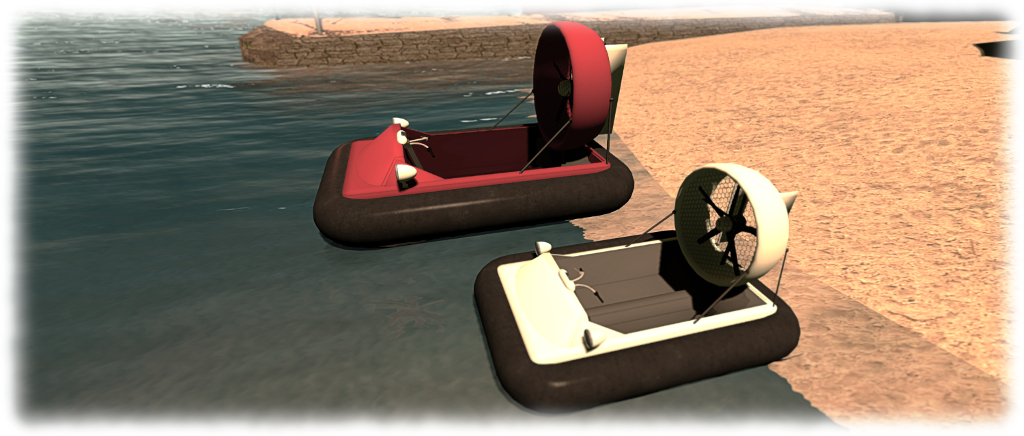
The full-size Hovercraft (red) and the "dinkie" / tiny version
The full-size Hovercraft (red) and the “dinkie” / tiny version

At just 12 LI for the human version and 8 LI for the “dinkie” / tiny version, this is a little craft which can easily fit within most land budgets. It is also, I have to say, A lot of fun once the controls are mastered – and these are not exactly taxing. Sitting in the vehicle and typing “start” in chat enables the engine, lifting the vehicle slightly as dust (is on land) our spray (on water) is blown out from under the skirt.

From here, movement is simple: the UP and DOWN arrows are your throttle (faster and slower respectively), LEFT and RIGHT turn you. If you prefer, WASD achieves the same). PAGE DOWN / C acts as quick stop, bringing you immediately to a standing hover. A couple of things to note is steering is only possible when in forward motion, and doesn’t work at all in reverse, which is accessed by coming to a standing hover and then pressing and holding the DOWN key.

In addition to the above, PAGE UP / E will toggle the headlamps on/off – note that these use projected lighting, so ALM needs to be enabled to see them decently. Finally, typing “HUD” in text shows / hides the vehicle’s hovertext info, and typing “stop” shuts down the engine.

The default pose for "normal" sized human avatars is pretty spot-on in terms of handlebar placement
The default pose for “normal” sized human avatars is pretty spot-on in terms of handlebar placement

Overall, the hovercraft handles very well; a quick few taps on the UP key and you’ll be zipping along; both water and terrain are handled well, and mesh terrain doesn’t prove a major challenge. I zapped from home across the waters and to Holly Kai Park in next no time and traversed from mesh beach to water and back to beach with ease at both ends of the ride.

I’d actually be happy paying for this little vehicle, and perhaps see it with group driving were it offered for sale, as it’s the kind of thing that’s fun to rez when friends visit, and then scooting around the sea together. Setting a nominal fee for it would allow it to be gifted, which is something I’d like to do with a few close friends as well, rather than nagging them to go grab it as a freebie.

But these are really minor point.As a freebie, there is absolutely no faulting it – and it really be worth paying for it were it to be offered at a reasonable price. As it is, if you’re looking for a little vehicle to mess around with on land and water, this could certainly be just the ticket. Now, if you’ll just excuse me, I’m off for a little more fun…

Hovercraft 1.0 by Kaliska (Yetius)

Links

From a forest cabin to a beach house in Second Life

The Skye Beach House - superb accommodation for Second Life
The Skye Beach House – superb accommodation for Second Life

It’s no secret that I’m an admirer of Alex Bader’s creations in Second Life. I’ve loved his castles since I first encountered one by chance during my travels, and I have a fair few of his landscape and texture sets stuffed into my purse (aka inventory) as well as making a fair amount of use of them on the home island.

One of my favourite items obtained from Alex earlier in the year was his Luxury Forest Cabin, which has been my home since April 2015. It’s an outstanding and stylish design presenting a spacious 2-room living space, fully furnished and packed with detail (and animations) for a land impact of just 55, and a tidy footprint of 23.5 x 21.5 metres. However, as is the way of things in Second Life, it has now been retired to make way for a new house. And guess what? It’s again from Alex.

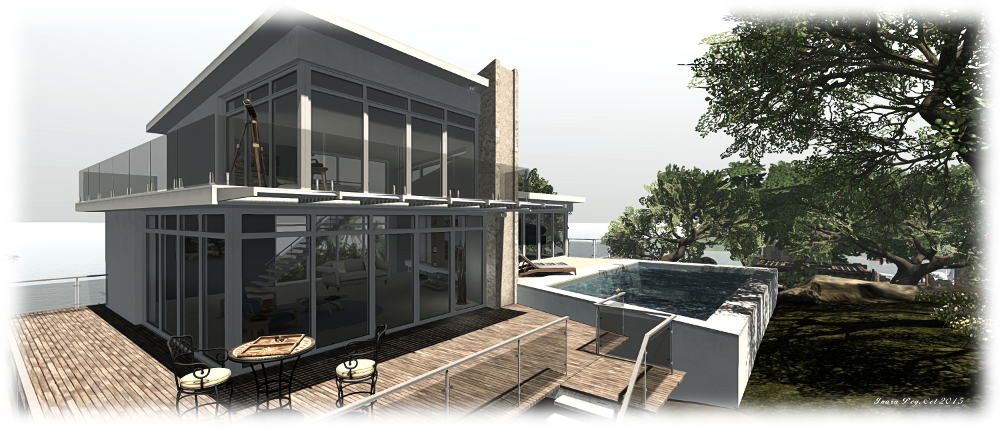
The Sky Beach House (steps by the pool my addition, using a copy of the original steps supplied)
The Skye Beach House (steps by the pool my addition, using a copy of the original steps supplied)

Truth be told, I’ve been quite taken by the Skye Beach House for a while now, but haven’t had reason to invest in it as I have been very comfortable with the Forest Cabin. However, As a recent encounter has come to be something rather more, the desire to have a new home has grown.

This is a contemporary design with a similar footprint to the Luxury Cabin (24 x 19.5 metres), but benefiting an upper floor to provide a third room. Fully furnished and complete with a swimming pool, the house has an overall land impact of 61, and offers a lot of living space in a compact layout.

Plenty of interior space (sofa, cat and piano not supplied!)

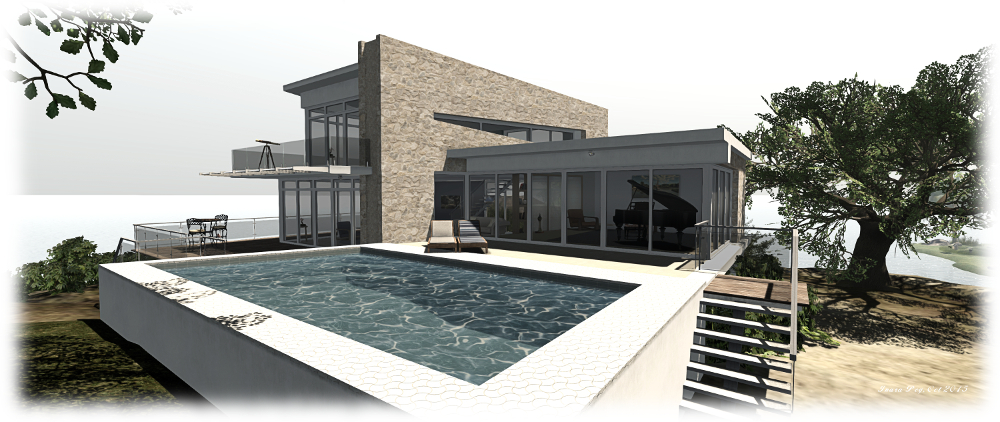
To cater for beach locations, where the terrain can be uneven, the house and its deck are raised up on legs. This can leave the pool, located at the front of the house, looking like a bit of a brick, but overall, the approach works well and certainly overcame the unevenness of the rock-top location on our little island. Access is via a set of steps leading up to the deck, which has glass railings to two sides and offers a fair amount of space for additional outdoor seating.

Indoors, there is a large lounge which is pre-furnished with armchairs, tables, a dining table and 4 chairs, paintings on the walls, etc. Alongside of this, and up a set of three steps is the second ground floor room which is nominally the bedroom and opens-out onto the pool patio. The third room sits over the lounge and by default comes with armchairs, table and telescope. There are lots of other touches – lighting, picture frames (just drag and drop your own photos), books, etc., which make this a complete out-of-the-rezzer home, while allowing anything to be swapped out as required. A pose system allows for various poses (single and couple) to be used on the deck and on and in the pool

The house atop the island, replacing the Skye Luxury Forest Cabin

The house is copy / modify, making any necessary small changes relatively simple. For me, that meant a slight resizing of the pool and the addition of an extra set of steps alongside it to make access to the house easier. Convenience of use also meant shifting the bedroom upstairs, where the balcony also gives a great views of the setting sun :).

As with all of Alex’s work, the attention to detail is exemplary, and the use of materials exquisite; one of the most attractive things about both the Beach House and Forest Cabin is the manner in which the windows naturally “reflect” light, be it sunlight or from a scripted source.

Home sweet home (and note the sunlight reflected in the upper floor windows... I do so like that!)
Home sweet home (and note the sunlight reflected in the upper floor windows… I do so like that!)

All told, this is another fabulous product from Alex Bader, and one we have absolutely no hesitation in recommending.

Related Links

Bring your Little Bee to life in Second Life

Neural's "Honey Bee" finish for the Little Bee is beautifully reflective of the boat's spirit
Neural’s “Honey Bee” finish for the Little Bee is beautifully reflective of the boat’s spirit

As regular visitors to this blog know, I’m quite the fan of Ape Piaggio’s boats (and also her autogyro!). I’ve owned her Kv23H FoilStream since the start of the year, and more recently was involved in helping with the development and promotion of her tender-style speedboat, the AD25H Little Bee, as well as owning a copy.

Both boats come with painting systems, and a friend of mine, Neural Blankes, has been producing a range of paint kits for both of them, which I think are well worth taking a look at if you have either boat are looking for a really eye-catching finish for it.

Neural's "sunset" finish for the Little Bee - one of (at the time of writing) 35 paint kits she has produced for the boat
Neural’s “sunset” finish for the Little Bee – one of (at the time of writing) 35 paint kits she has produced for the boat

As a fan of the Little Bee, Neural has focused on that boat to produce (at the time of writing) 35 paint kits, some of which are beautifully complex in design and execution, and all of which offer very unique loks for the boat, both in terms of hull finish and cockpit colours.

Prices for the kits vary, but this reflects the level of work Neural has invested in creating the different looks. I admit to being quite partial to the Honey Bee finish, which beautifully encapsulates the spirit of the boat – and I know Ape herself has been motoring around on the water with a Bee in that finish 🙂 .

Neural's FI (Foilborne Industries) custom finish for the Little Bee
Neural’s FI (Foilborne Industries) custom finish for the Little Bee

Neural is also responsible for a number of special custom finishes for individual Little Bees for close friends, and the results are impressive – I can say this with hand on heart, as Neural came to my assistance and helped me in my efforts to produce a specific look for my Bee when it wound up somewhat comprised due to my lack of talent in graphics manipulation.

While not as extensive as those for the Little Bee, Neural’s range of kits for the FoilStream can also be found on her MP store, and offer an equal level of quality and distinctive looks.

So, if you are looking for a design that is eye-catching and just that little bit special for either your Little Bee or your FoilStream, I have no hesitation in recommending Neural’s work.

Note: the Red Ensign visible in some of the images above is the flag I use on my Little Bee, and not a part of Neural’s kits. Bee owners can fly the flag of their choice.

Related Links

A Baron comes to the castle

The DSA G58 Baron sans floats - my latest light aircraft
The DSA G58 Baron sans floats – my latest light aircraft

So, I’m a bit of an SL aviator, as I’ve blogged in the past. Over the course of the last 12+ months in particular, I’ve become quite partial to DSA aircraft, having both the C90 King Air GTx and the C33 Debonair. I particularly like this make due to the ability to swap between wheel and floats for the landing gear without having to swap the plane in and out of inventory.

As a result of various things, I found myself at the weekend debating whether to add another DSA ‘plane to my collection – and if so, which one. I was caught between the Model 17 Staggerwing biplane, the Spitfire and the G58 Baron. In the end, on Sunday, the latter won out – although the Staggerwing could well be a future acquisition!

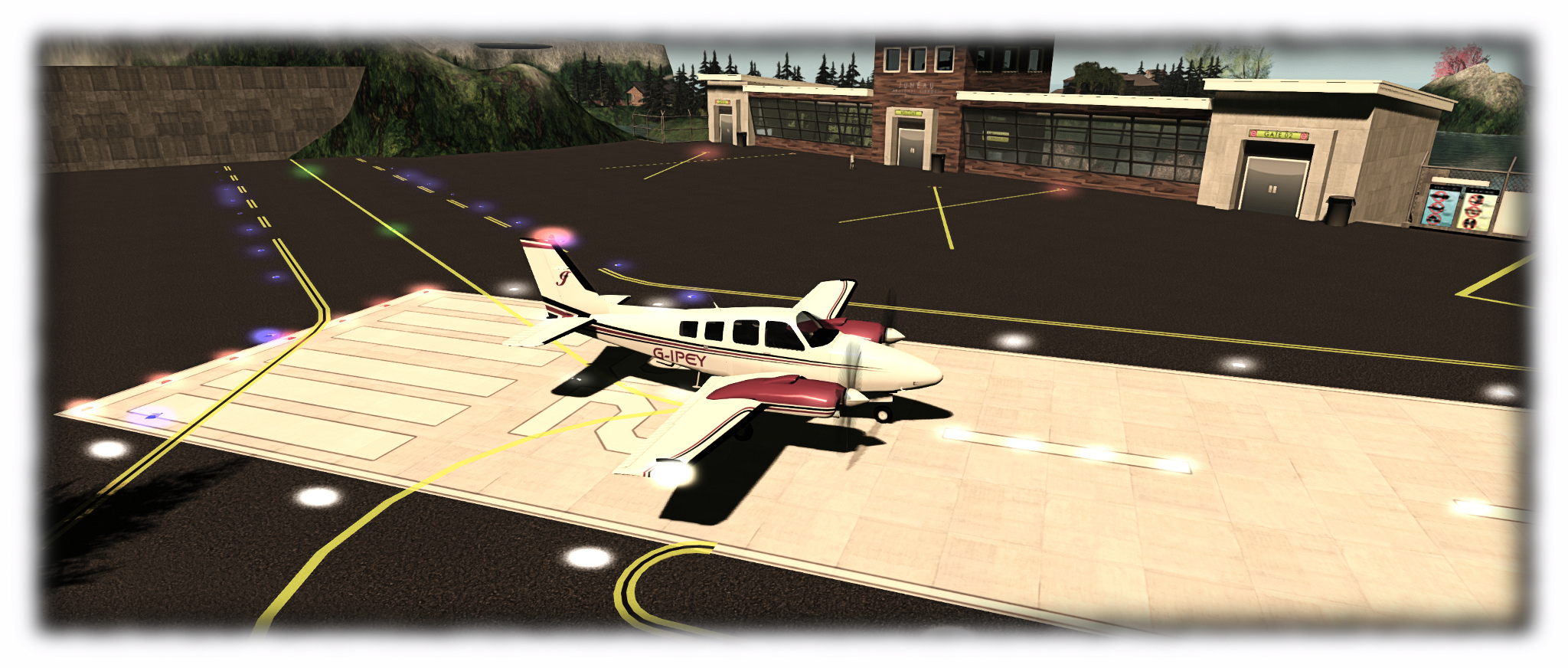
No. 1 on the runway at Juneau, about to start rolling ...
No. 1 on the runway at Juneau, about to start rolling …

The G58 is another twin-engined plane, sitting between the Debonair and King Air in size, offering seating for up to 5 avatars + the pilot. It’s a smart-looking, clear design which hasn’t really aged over the decades, and comes supplied in DSA’s usual offering of the default black / red / white Beechcraft colours. Having converted to using VetronUK’s paint and scripting options my ‘planes, I also grabbed a paint pack and Vetron’s float rocking and enhanced lighting scripts for the Baron.

Vetron paint kits are simple to use; drop a script into the plane, wear the HUD, click a button to add the paint scheme, then use the Advanced option to add materials to various surfaces, and add any other options supplied with the kit (the Debonair paint kits, for example, allow you to re-texture the cockpit dash with a new set of controls, while the King Air’s kit allows you to switch between the C90 and C90 GTx variants). A full set of maps are supplied full perm with each kit, making customising them easy.

The cabin obviously isn't as expansive or plush as the King Air, but seats up to four in the back
The cabin obviously isn’t as expansive or plush as the King Air, but seats up to four in the back

For the Baron’s paint scheme, I didn’t stray too far from that supplied by the kit: just some small tweaks, the addition of my own registration and familiar monogram, plus a little work on the floats so that they better matched the rest of the ‘plane.

The enhanced lights and rocking scripts (L$25 each) simply drop into the ‘plane (make sure you purchase the scripts designed for your aircraft). The lighting script greatly enhances the aircraft’s nav, strobe and landing lights, while the rocking script is Linden Water sensing, and when on water with the floats deployed, adds a rocking motion to the aircraft as well as the sound of water lapping against the floats, etc. When on land, the rocking ceases (although I’ve found the sound continues to loop).

If you’ve flown any DSA ‘plane, you’ll know how the Baron handles: very well. The HUD is the usual DSA offering and works exactly as expected. In addition, the Baron share’s the Debonair / Bonanza engine sounds (and, indeed, paint templates). Once in the air and trimmed, with the yoke set to wide, the Baron is again great fun and graceful. It handles region crossings with the usual DSA aplomb and accepts aerobatics well, if you’re so inclined, and perhaps with a little more grace than the King Air.

The Baron (front) and the King Air in their "matching outfits") largely based on VetronUK paint kits
The Baron (front) and the King Air in their “matching outfits” utilising VetronUK paint kits

In buying the Baron, I had it in mind to maybe swap it with the King Air as my main twin-engined ‘plane, and then perhaps swapping the Deb for the Staggerwing. However, with only 7 LI difference between the Deb (39) and the Baron (46), I ended up retiring the Deb to inventory instead. Plus, I simply adore the King Air, so I also gave it a new Vetron paint finish, again with my own small touches, so it and the Baron share similar designs. Sort of her-and-her outfits, you might say 🙂 .

Related Links

A Little Bee that’s a real honey in Second Life

The Foilborne AD25H
The FoilBorne AD25H “Little Bee” by Ape Piaggio

Regulars to this blog will know I’ve been closely following the development of Ape Piaggio’s latest project – the AD25H “Little Bee” – (see here and here). Well, I’m happy to say that the Little Bee is now ready for launch – and what a honey it is! This is a package overfull of surprises, and something every motorboat lover in SL is going to want.

The AD25H is a boat which has from the start been a winner in my eyes. Built on the lines of a classic tender speedboat, it evokes an immediate feeling of summertime on the Italian Riviera, cruising along a sun-drenched coast or speeding by golden beaches, the music of Dean Martin, Tony Bennett, Connie Francis, Morgana King or The Chairman himself – take your pick – playing on the boat’s radio.

My Little Bee moored against my Foilborne Kv23H to compare relative sizes

Marketed under Ape’s FoilBorne Industries brand, the Little Bee builds on the stunning work put into her Kv23H FoilStream (which I reviewed in January 2015), and while a lot smaller, the Little Bee actually packs a lot more into it.  With passengers aboard, it can be a gentle, caring ride with Ape’s Anti-Crash Security System (ACSS) doing much to assist with region crossings. But should you feel a need for speed when out on your own ,this boat can deliver – up to and including converting to a hydrofoil for that extra kick of driving fun.

One of the many things about Ape’s designs I love is the sheer attention to detail. With the Little Bee, this starts with the packaging, which is delightful in its presentation, and a promise of goodies to come.

Like a kid at Christmas: kneeling behind my newly-arrived AD25H, admiring the packaging
Like a kid at Christmas: kneeling behind my newly arrived AD25H, admiring the packaging

On unpacking, the box delivers a number of items to inventory: the boat, a HUD for the boat, a trailer and “TugBee” – a little VW Beetle  specifically designed for towing the Little Bee on its trailer. A paint system brings up the rear, while the boat itself hides a stand it is automatically mounted upon if rezzed away from Linden water.

This is a friendly boat. Get in as the driver, and it will welcome you aboard in both text and via an audio message (unless turned off).

The controls are the usual,  UP / DOWN or W & S for the throttle, LEFT / RIGHT or A & D for turning, with PAGE DOWN and PAGE UP operating the hydrofoils (only at low speeds / when stopped). Touching the boat as owner accesses the full menu, passengers the seating menu.  I’m not going to run through all the options – suffice it so say, everything you need is there to operate the boat, and owners of the Kv23H will see the Little Bee has matches it in options – and offers more besides.  The expected options such as multiple camera options, auto-mooring, engine / race options, and so on, are all here together with the AD25H’s wakeboard and parasail deployment options and a few surprises.

The boat includes a HUD for those who prefer not to see hover text floating over their vehicles, with essential controls for deploying / retarding the foils, rezzing the wakeboard / parasail, etc.

Talking of the parasail and wakboard, both of the latter can be rezzed from the boat’s Accessories menu. Note that you will have to be on water that allows object entry, and should leave a degree of space behind the boat (don’t rez them when moored with a pier right behind you, for example). Once rezzed, riders simply sit on the wakeboard / parasail (and will receive a wearable handle for the former), and away you go. You  can even rez multiple wakeboards and also have the parasail rezzed and used with the wakeboard(s).

Those riding either the wakeboard or the parasail have a degree of control on their motions. The former can be turned left or right via the usual A/S / arrow key options, with stunts accessed via the PAGE DOWN and the UP / DOWN keys. The parasail’s rider can adjust their height with the UP / DOWN keys. When driving the boat with the wakeboard / parasail in use, I’d recommend keeping your speed down to no more than about 50% of throttle to avoid region crossing complications.

When deploying the foils and  / or using the wakeboard / parasail, you’ll get to see two additional features on the Little Bee: the Event Cam and the CineCApe system. These allow for some dramatic shots of the boat in action, with CineCApe notably allowing the wakeboard and parasail riders to adjust their camera position using PAGE UP to gain some impressive views of their ride. I’ve used clips from both in the accompanying video.

Wakeboarding on the AD25H
Wakeboarding on the AD25H “Little Bee” – you can rez multiple boards for friends – and even take someone parasailing at the same time!

The car and trailer offer a sophisticated system for taking the Little Bee overland. The “TugBee” VW Beetle is nicely designed and comes with a range of features: opening doors, working lights and brake lights. The usual WASD / arrow keys are used for driving, and the Page keys for stepping up / down through the gears.

Hitching the trailer to the car is a matter of rezzing both, preferably in the same orientation and close to one another, then clicking the car for its menu and selecting Attach. To get the boat on the trailer, carefully reverse the car down a suitable slip or gentle bank so the trailer is about up to its axle in the water. Drive the boat up close to the trailer, click on it and select Trailer from the menu. The trailer’s hand brake should unwind and the boat haul itself out of the water and safely onto the trailer. Raise the hand brake by touching the trailer and you’re ready to drive away.

Continue reading “A Little Bee that’s a real honey in Second Life”