The further revamp of Linden Realms in Second Life

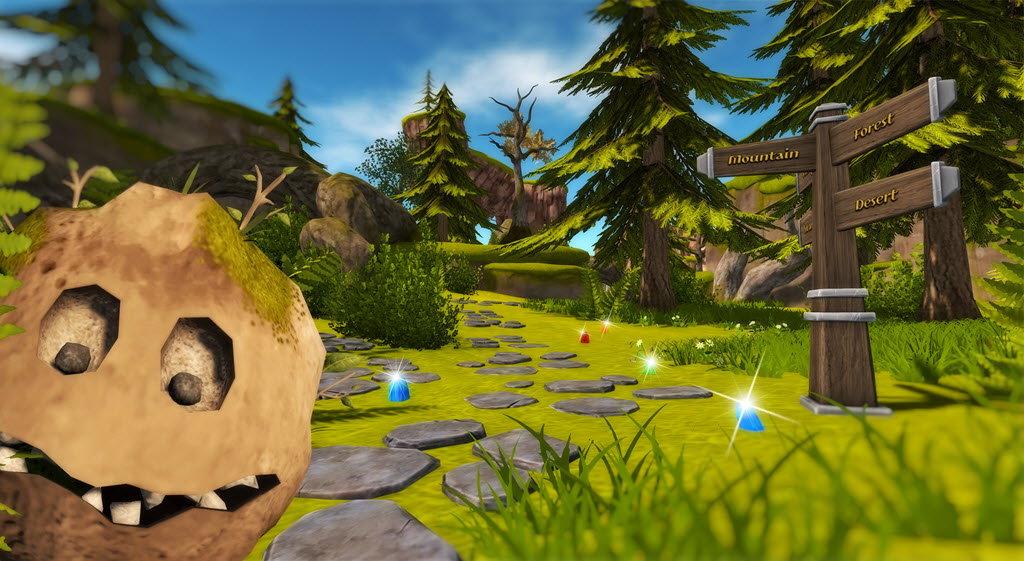
The re-vamped Linden Realms and rock monsters. Credit: Linden Lab

Since it first opened in 2011, Linden Realms has proved to be an enduring game within Second Life. It’s seem various updates over the years, with the most notable (until now) occurring earlier this year when the existing playing regions were effectively fire-bombed as a part of an ongoing saga involving the wicked Ruth, she of the villainy in Tyrah and the Curse of the Magical Glytches (see my review here) and named for the original default avatar of Second Life.

On Tuesday, October 9th, linden Lab announced the latest revamp of the game, which sees it completely overhauled in looks and aims, building further on the backstory of Ruth and possibly – just maybe, perhaps – (I’m not going to give everything away) seeing the return of Old Boozehound himself, Magellan Linden.

In the new version of the game, the Linden Realms regions get a much-needed face-lift with much more modern-looking mesh items (most notably the rock monsters). In terms of game play, players must complete tasks and try to reassemble Ruth’s magical amulet … the breaking of which might have led to Magellan faking his own death in order to escape her wrath. (If this all sounds like the script from a soap opera, wait until Tyrah wakes up and finds Magellan stepping out of the shower*.  Just kidding! Although on second thoughts, I wish I hadn’t; the mental image of an undressed Magellan is now fixed in my head.)
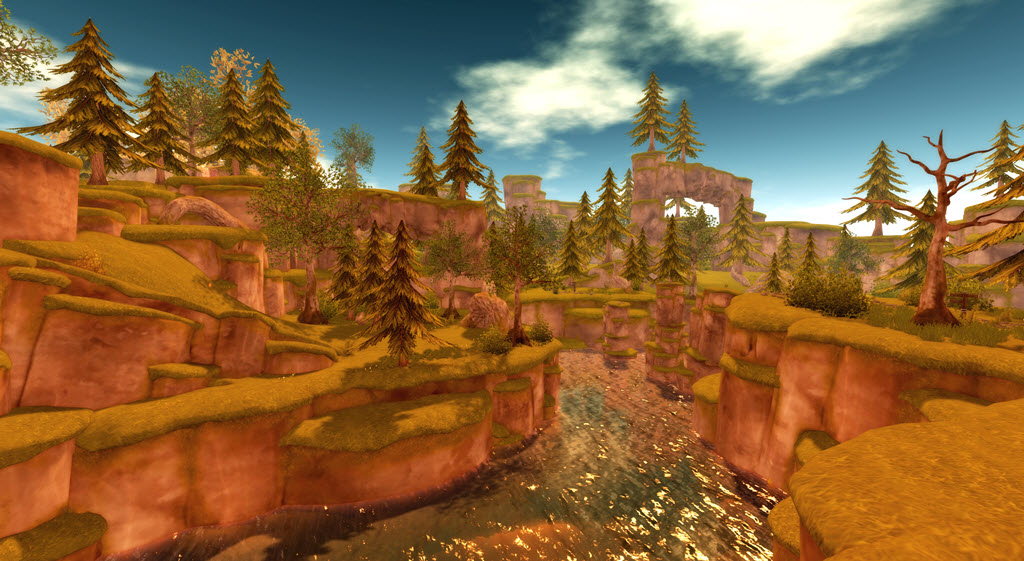
Part of the re-vamped Linden Realms. Credit: Linden Lab

Anyway, I’m not going to go into great depth here, on account that LL have themselves with a veritable tome of documentation and images on the updated game. Suffice it to say, collecting crystals (exchangeable for L$) is still very much a part of things, so expect the new Linden Realms to be as popular as previous iterations.

I can say the new look is refreshing when compared to the old, and the detailing such that the locations spread across the 12 regions of each game area shouldn’t place too much extra load on things when avatars are running hither and thither in their hunt for crystals and amulet bits.

The game HUD has also been nicely updated, and looks the part – the old one really was looking long in the tooth.

The updated game HUD

As always, accessing the game is done via the Portal Parks (links below). As with previous iterations, those new to the game will have to accept the experience to gain access, but if you’ve previously played and have not revoked the game, you’ll be automatically granted access. And no, this isn’t anything to do with Project SSR 😀 .

More is promised by the Lab on Linden Realms, by way of an article on how this new version was developed and built, as a part of the Lab’s efforts to show creators how tools such as Experience Keys might be used.

*Yes folks, A Dallas reference!

Portal Park SLurls

Note the portal Parks and Linden Realms are all rated General.

EEP testing and project viewer officially announced

Courtesy of Linden Lab

On Wednesday, October 3rd, 2018, Linden Lab officially announced the opening up of EEP testing to Second Life users.

EEP  is the Environmental Enhancement Project – in short as series of in-development updates to the existing windlight capabilities in the viewer, and to environment settings / rendering across the board. In brief and in part EEP:

  • Gives region and parcel owners the ability to define the environment (sky, sun, moon, clouds, water settings) at the parcel level.
  • Provides new environment asset types (Sky, Water, Day) – referred to as “settings”  – that can be created in the viewer, stored in inventory and traded through the Marketplace / exchanged with other users.
  • Allows the Sun, Moon and Cloud textures to be replaced with custom textures.
  • An extended day cycle, supporting up to 7 days a week and 24-hour day / night cycles.

And that’s just to start. The project will also include rendering updates to allow for atmospheric effects such as crepuscular rays (“God rays”), plus scripted and experience support for the new environment asset types (e.g. assign specific environment settings to an experience, which all participants will automatically have applied in their view when visiting the experience).

A simple 5-minute (including uploading the textures) demo of replacing the Sun and Moon with Mars and Jupiter respectively, then adjusting their respective sizes & putting them in the same quadrant of the sky. Note the windlight clouds drifting in front of Mars.

Testing EEP can only be carried out on Aditi (the beta grid) for the time being, where there is a limited number of parcels available for purchase. Testing can only be carried out using the EEP project viewer.

  • Download the viewer via the Second Life Alternate Viewers Page.
    • At the time of writing, the viewer was version 5.1.10.520121 – but use the above link to get the most recent version.
  • Test region: Aditi EEP Testing (secondlife://Aditi/secondlife/EEPTesting/128/128/23).
    • Parcels cost L$1, but as Aditi funds are provided by Linden Lab, you are not paying for anything with your own money.
    • You MUST be using the EEP test viewer why trying to purchase a parcel on the test region – if you are using any other viewer, your purchase will time out.

Should you opt to test EEP and find issues, please be sure to raise a bug report, using the [EEP] tag. Reasonably feature requests may also be considered.

The parcel-level controls for using EEP, showing the Sun / Moon options and day cycle track

If you do not successfully purchase a parcel, or wish to see what others are doing with EEP, you can still visit the test region  – but you will need to be using the EEP test viewer in order to see anything.

There are a number of resources already available for EEP to get people started

EEP atmospherics via Graham Linden

I’ll continue to have EEP project news and updates through my Simulator User Group meeting, Content Creation meeting and TPV Developer meeting summaries.


It’s Dog Food Day at the Lab!

Eating your own dog food is a colloquialism that describes a company using its own products or services for its internal operations.

The Second Life team already do this to some extent – as a geographically split company on both coasts of the United States (operating out of both San Francisco and Seattle on the West Coast), and having a support centre in Georgia, the company frequently uses its own platform for staff meetings and the like. There are also, of course, the various in-world weekly user group meetings that hold as well.

However, starting on Friday, September 21st, the Lab is starting on what they are calling their Dog Food Days.

It’s not clear how frequently these will be held, but the idea is for members of the Second Life team to use the platform in ways outside of what they might normally do, and see things more from the perspective of users – including the pain points people might feel when using the platform or learning about it; as well as how the limits of the platform are being pushed creatively.

Alexa Linden, as one of the instigators of the idea, offered an example of her thinking around it:

One of the reasons I wanted to have Dog Food Day … it that a lot of people [at the Lab] have still not gone through the process of meshing up their avatar … I’ve done it on all of my alts, and it’s a learning process; it’s not an easy thing to do. And it’s something we need to understand as new users come in, it’s important for us to understand their frustrations, the learning curve, what people are creating, what the quality of content is, etc.

– Alexa Linden, Product Supervisor, discussing the Lab’s Dog Food Day idea

Given this, Alexa is interested in receiving constructive suggestions for what might be considered for inclusion in these Dog Food Days. One suggestion already put forward was to have Lab staff run through the SL sign-up and on-boarding process from end-to-end, including going to the Learning and Social island and experience the entire process from a user’s perspective – and this has been taken on-board.So, if you do have a suitable idea, please consider dropping Alexa a note card.

Also, every Tuesday, Alexa runs an in-world tour of public places on the grid for Lab staff. She’s always interested in appropriate recommendations – places where staff will feel comfortable going, etc., – and welcomes suggestions on possible visits as well (I’ve actually passed on a few myself). So again, if you have ideas for interesting / photogenic / fun locations, drop her a note card with landmarks.

Second Life: switches to Stella Connect for support feedback

Whirly Fizzle tapped me about a recent change to the support ticket system she recently noticed.

Previously, when a support ticket was closed by the originator or by the Lab, a pop-up feedback box would be displayed. Well, no more, as Whirly Fizzle noted to me via IM:

I just had a ticket closed, and I got an e-mail from something called secondlife-at-stellaconnect.net. I thought it was a scam at first!”

– Whirly Fizzle

However, she checked with Alexa Linden, who confirmed the e-mails to be genuine.

Stella Connect is actually platform geared towards improving support staff motivation, increasing the quality of support services and provides a means to help train and develop support staff skills – and it is now being used by the Lab to help in their Second Life support operations. The most user visible element within the system is a  new approach to obtaining feedback on support cases, as exemplified by the e-mail Whirly received.

With Stella Connect, when a support ticket is closed, the originator of the ticket receives – as noted – an e-mail via secondlife-at-stellaconnect.net. Within this e-mail is a link the user is asked to use. This takes them to a web page that:

  • Displays information on the Second Life support team member who assisted them
  • Allows them to rate the support team member’s performance on a star rating where 1 star is a rating of “poor”, and 5 a rating of “excellent”.
  • Provide text feedback on why they have given their rating.
A sample of the new feedback form users will see when responding to an e-mail from secondlife-at-stellaconnect.net after their support ticket has been closed. Image via Whirly Fizzle.

In addition, and depending on the star rating given, the user will be asked to do one of the following:

  • If they have given a high star rating, they will be asked if they wish to recommend a reward for the support team member providing the assistance (below, left).
  • If they have given a lower star rating, they will be asked to indicate specific areas where they feel the support experience could be improved (below, right).
If a user gives a high star rating to a support team member, they are additionally asked if they would like to have the team member rewarded for their efforts (l). If a low star rating is given, the user will be asked to indicate where the support experience could be improved (r). Images via Whirly Fizzle.

The rewards system is an interesting way of both motivating support staff to provide a positive experience for users, and to help engage users in the entire support process. Alongside of providing information on the support team member who assisted them, the rewards option can help personalise the entire process where the user has had a particularly positive experience.

While discussing this approach, Keira Linden, who supervises the Land Team,  informed me the exact details of the rewards are still being finalised, and, over time, may well depend on how popular they are with both support staff and with users (e.g. which of the available options do users tend to select).

We’re still working out the rewards system, but I kinda like giving my folks that go the extra mile to make someone happy an actual reward. The lunch thing will probably happen, but it’s pretty new still. We’ll get feedback from the support folks as well as take a look at what options are popular from the resident side. We’re able to do a lot of customisation there on the rewards.

– Keira Linden, Second Life Land Team Supervisor

Beyond this, all of the feedback generated  – positive or otherwise – is directed back into managing support operations. This both allows overall customer satisfaction to the be assessed, and also helps in highlighting weaknesses within support activities / responses with may need addressing. Additionally, the data generated by the system could, if required, be made available to other customer experience teams to help further improve interactions with users, and so on.

So, if you do have support tickets filed with Linden Lab, and you find yourself receiving an e-mail from secondlife-at-stellaconnect.net, you can be assured it’s not spam or a scam – it’s a genuine Second Life related e-mail, and one intended to help the Lab’s Second Life support team assess and improve the support service they are giving to users – so do please take the time to respond to it.

With thanks to Whirly Fizzle and Keira Linden

A look at the new Second Life sign-up pages

The first of the new sign-up pages. Courtesy of Linden Lab

Linden Lab has deployed a new format sign-up process for those joining Second Life.

Using a simpler, more unified page design, the new sign-up process brings together the previously separate avatar picker and sign-up form into a single page, effectively reducing the number of individual steps a new user must take from initial sign-up through to downloading the viewer.

Picking a starter avatar is now a case of selecting one of two galleries from a drop-down menu in the left-hand panel in the initial page (shown below): Classic Avatars (the default) or Fantasy Avatars. Clicking the portrait of an avatar will display a full body animated thumbnail of the avatar, while personal information can be entered into the form on the right-hand panel.

The avatar selection panel, showing the Fantasy Avatar, complete with the thumbnail of the highlighted avatar

The options for selecting Basic or Premium membership follow the same page format, although the Premium button takes a user to the more familiar Premium upgrade page, allowing them to choose their preferred payment option: monthly, quarterly or annual. The Basic option button will complete the sign-up process and allow present the download option for the viewer.

The revised Basic and Premium options display

The new sign-up process also gave me the opportunity to try the latest iteration of the Learning Island new users are delivered to the first time they log-in to Second Life using the official viewer.

As I reported in 2015 and 2016, the Lab have been using experience keys to help guide new users in gaining familiarity with the basic movement controls in the viewer. The most recent version of the Learning Islands continues this approach, offering incoming new users a basic set of tasks  – walking, jumping, flying – using the camera – they are asked to complete, before moving through a set of portals that deliver them to the Second Life Social Islands.

On arriving at the updated Learning Island, the guidance HUD automatically attaches, guiding users through the initial exercises. It detaches on leaving the island through the main portal

The new island design is a route through a series of broad halls built around a central terrace that might be suitable for socialising with other newcomers, and which is reached via a portal at the end of the final lesson (using the camera), and which contains the portal that delivers users to the Social Islands.

The lessons themselves and are indicated both on the HUD (seen in the image above) and via instruction tablets within the halls. Animated arrows (again seen in the image above) and on the floor help direct users around the halls.

The lessons are simple enough, and have been used before. however the environment is a marked improvement over the last iterations of the Learning Islands I’ve visited

Overall, the new sign-up process is a lot cleaner and – perhaps more importantly – a lot more modern-looking than the last iteration, which always felt cumbersome to me. It is concise enough to hopefully prevent a new user from bailing out before getting as far as downloading, installing and running the viewer.

Similarly, the updated Learning Island  – which may well have been in use for a while, I’ve not been keeping an eye on the generic islands of late, only the themed islands, – offer a much more straightforward approach to getting started with the basics of the viewer. It might be argued that as this particular iteration doesn’t include information on inventory, Linden Dollars, etc., it might be a little too light on details; but keep in mind this may be one of a number of Learning Island variants the Lab might periodically rotate into use.