SL project updates week 20/1: server, viewer

Crystal Garden Estates, Quararibea Cordata Island; Inara Pey, May 2017, on Flickr Crystal Garden Estatesblog post

Server Deployments

As always, please refer to the server deployment thread for the latest updates and news.

  • There was no Main (SLS) channel deployment or restart on Tuesday, May 16th.
  • On Wednesday, May 17th, the three RC channels should be updated as follows:

Simulator Operating System Update

The build of the simulator code using an updated version of Linux was initially deployed to LeTigre in week #19. However, it was rolled back on Thursday, May 11th and replaced with the server maintenance package originally deployed to the Magnum RC channel that week. The reason for this can be found in BUG-100667, “Krafties HUD does not work on LeTigre regions only”. The BlueSteel deployment should hopefully correct this issue.

SL Viewer

The Alex Ivy 64-bit viewer was updated to version 5.1.0.505089 on May 11th. If you’re on a 64-bit version of Windows, make sure you click on the correct download link to avoid receiving the 32-bit version.

On Friday, May 12th, the Maintenance RC viewer, version 5.0.5.326168 was released. This viewer includes improvements to Trash purging behaviour designed to assist with avoiding inventory losses and the new UI controls for the new parcel access overrides – both of which have been previously noted in these updates, with the latter being deployed to LeTigre this week.

The new Trash purging warning, giving a count of the items about to be permanently deleted from the trash folder – one of the new behaviours in the Maintenance RC viewer designed to help combat accidental inventory loss through Trash deletions

In addition, the Maintenance viewer has additional fixes and UI improvements, including a contributed feature which allows users to search and replace asset links in their inventory. This should greatly simplify updating links related to a product when it has itself been updated. The default media playback volume has also been reduced, in keeping with recent requests from some Community Gateways.

Outside of these two viewers, there have thus far been no other changes to the viewers in the pipeline, which remain as:

  • Current Release version: 5.0.4.325124, dated April 3rd, promoted April 19th – overview
  • RC viewers:
    • Voice RC viewer, version 5.0.5.325998, re-released on Friday, May 5th
    • Project AssetHttp project viewer, version 5.0.5.325940 dated May 4th
  • Project viewers:
    • 360-degree snapshot viewer,version 4.1.3.321712, dated November 23rd, 2016
  • Obsolete platform viewer version 3.7.28.300847 dated May 8, 2015 – provided for users on Windows XP and OS X versions below 10.7.

Terrain Issues

The golfing community has noticed an apparent behaviour change affecting wither the terrain or scripted golfing systems. The change manifests in a number of ways, for example: indicators which should only be triggered when a ball registers as being in Linden Water triggering when the ball is on land; golf balls apparently penetrating the terrain and being marked as deep under it; balls hitting prim objects and bouncing wildly, etc.

The problem has been noted a multiple golf course and appears to affect all popular golf systems – those by Fa Nyak or Cowley, for example. The issues have been around for about 5-6 weeks, and reports are that they are getting worse. They don’t appear to be linked to issues of “lag” either in the viewer or at the simulator end (e.g. due to the volume of avatars in a region), as the problems can pop-up with just two people playing a round; they are also somewhat inconsistent and difficult to deliberately reproduce. A JIRA has been requested on the problem to help the Lab investigate.

SL project updates week 19/1: server, group chat

The Mill, Pale Moonlight; Inara Pey, May 2017, on Flickr The Mill, Pale Moonlight blog post

Server Deployments

As always, please refer to the server deployment thread for the latest updates and news.

On Tuesday, May 9th, the Main (SLS) server channel was updated with the server maintenance package previously deployed to the LeTigre RC channel, containing sim logging improvements.

On Wednesday, May 10th, the RC channels should be updated as follows:

  • BlueSteel and Magnum should receive a server maintenance package with “internal updates”
  • LeTigre should receive a server update comprising a new version of the simulator code built using a newer version of Linux. This has previously been on test both on Aditi and the Cake micro-channel. In the words of the Lab, it sees pretty much everything change.

Commenting on the current underpinning server updates the Lab are carrying out, Simon Lab said, at the Simulator User Group meeting on Tuesday, May 9th:

We have some internal projects that are pretty big that will occupy us for months at this point.  They’re needed and will help set up SL for a long-term life … it really is investing in the future … Imagine what our back-end systems look like. The design is ancient, it’s been added-on and adjusted for 14+ years. Sometimes we have to stop and do overhauls.

SL Viewer

A Maintenance RC viewer is anticipated this week. However, at the time of writing there have been no updates since the end of week #19, leaving the viewer pipelines as follows:

  • Current Release version: 5.0.4.325124, dated April 3rd, April 19th – formerly the Maintenance RC viewer overview
  • Release channel cohorts:
    • Voice RC viewer, version 5.0.5.325998, dated Friday, May 5
    • Project AssetHttp project viewer, version 5.0.5.325940, dated May 4th
  • Project viewers:
  • Obsolete platform viewer version 3.7.28.300847, dated May 8th, 2015 – provided for users on Windows XP and OS X versions below 10.7.

Group Chat Issues

Group chat on some of the larger groups again seems to be acting up – messages being dropped, people unable to send messages, etc.

Should you encounter repeated  / severe issues with group chat, the recommendation is to file a support ticket with a request in the format of: “group XX is suffering excessive chat lag, please check its server”, where XX is the name of the group itself. All such requests should be passed on to Operations, who will take a look at the server responsible for managing that particular group’s chat sessions.

SL project updates 18/2: server, viewer, inventory loss

The Anthropic Principle – Gem Preiz – blog post

Server Deployments  – Recap

As always, please refer to the server deployment thread for the latest information  / updates.

SL Viewer

On Thursday, May 4th, the AssetHTTP RC viewer updated to version 5.0.5.325940, which looks to be to addressing further crash issues with the previous RC version.

All other viewers in the pipelines remain unchanged:

  • Current Release version: 5.0.4.325124, dated April 3rd – formerly the Maintenance RC viewer overview
  • Project viewers:
    • Project Alex Ivy (LXIV), 64-bit project viewer version 5.1.0.504536, dated April 25th
    • 360-degree snapshot viewer version 4.1.3.321712, dated November 23rd, 2016 – ability to take 360-degree panoramic images
  • Obsolete platform viewer version 3.7.28.300847. dated May 8th, 2015 – provided for users on Windows XP and OS X versions below 10.7.

Inventory Loss Issues

I recently reported on people’s experiences with inventory losses, as recorded through the forums. As a result of both the forum discussion and JIRAs filed such as BUG-100541), the Lab has been looking again at inventory and possible causes of inventory loss. This will be resulting in some viewer behaviour changes  as Grumpity Linden explained during the Server Beta meeting on Thursday, May 4th:

So we are actively looking at the various reports of inventory loss (Quick thank you to everyone who takes the time to file bug reports… It helps!). With this recent wave of reports, it seems like there are a lot of things ending up in trash unexpectedly and we can’t be sure whether there’s an evil gremlin in the machinery or a bunch of accidental key presses. So we’re putting in some viewer changes to at least make the accidental key presses less likely. We’re:

  1. Amending the prompt that comes up when you have over 5K items in trash to show the trash folder when you’re ready to purge it – before you can purge it.
  2. Backspace will only delete on mac, not windows.
  3. [The] purging trash warning will give you the count of items you’re deleting and will be unavoidable.
  4. You’re going to have to see the “Are you sure you want to delete this thing” warning at least once per session.

Also, I’d like to clarify something – a lot of reports we’re seeing come up right now but are actually of past incidents. I think the discussion on the forum(s) has led to an increase in reporting.  which is great because then maybe we’ll finally get a reproducible scenario and find ways to fix.

These changes may not resolve all the issues being experienced, but they may help with at least some, and in creasing people’s awareness of what might be happening in their Trash folder. There is currently no time frame as to when these updates will appear in an RC  / project viewer; I’d assume they would most likely be appearing in a Maintenance RC.

Profile Feed Snapshot Uploads

People are (once again) experiencing issues with uploading snapshots to their Profile Feed. A bug on the matter has been raised – BUG-100516.

SL project updates 18/1: server, viewer

Asian Fusion: Oyster Bayblog post

Server Deployments

As always, please refer to the server deployment thread for the latest information  / updates.

SL Viewer

There have been no updates to the current viewer pipelines to start the week, leaving them as follows:

  • Current Release version: 5.0.4.325124, dated April 3rd – formerly the Maintenance RC viewer overview
  • Project AssetHttp RC viewer version 5.0.5.325825, dated April 27th – This viewer moves fetching of several types of assets to HTTP / CDN – overview
  • Project viewers:
    • Project Alex Ivy (LXIV), 64-bit project viewer version 5.1.0.504536, dated April 25th
    • 360-degree snapshot viewer version 4.1.3.321712, dated November 23rd, 2016 – ability to take 360-degree panoramic images
  • Obsolete platform viewer version 3.7.28.300847. dated May 8th, 2015 – provided for users on Windows XP and OS X versions below 10.7.

Region Crossings

There have been reports of worsening in vehicular region crossings recently (by coincidence, Caitlyn and I ran into so particularly unpleasant crossings over the most recent weekend). Simon Linden agreed to have a poke at server logs, time permitting, to see if there is any other change in crossing stats. He also mused on the potential impact of mesh bodies and attachments on such crossings, which constitute a considerable amount of additional data (including saving and restoring the state of scripts associated with them.

It was also pointed out that worn mesh attachments bring with them an (unneeded?) physics shape calculation, potentially adding to the load. This prompted a further discussion on whether any attachments should have a physics shape data used or calculated until such time as it is physically rezzed in-world.

As a first point of call, Simon repeated that as time permits, he’ll look into what goes into the region crossing calculations, and have a closer look at attachments physics calculations in general to she what is going on.

What Is the Lab Working On?

Things seem pretty quiet at the moment, but the Lab is working on a lot right now, although much of it is transparent to users, as Oz linden indicated at the Simulator User Group meeting on Tuesday, May 2nd:

At the moment, we happen to have a number of projects in flight that are either not good to discuss (security changes), or system upgrades that really shouldn’t be visibly different…. that’s unfortunate, but we’re getting started on (or getting ready to start on) some that will be much more interesting.

The recent changes to land access and control, together with the upcoming changes to allow region / estate staff to better managed Public Access regions are examples of more visible changes affecting users – or will be, once the viewer has been updated to handle the latter; and there a further changes to the likes of region-level ban lists coming down the pipe which will also bring visible changes to the viewer and provide better controls / support for land owners.

SL project updates 17/1: server, inventory issues

Dawn’s Promise by Marcus Inkpen and Sharni Azalee, Fantasy Faire 2017 – blog post

Server Deployments

As always, please refer to the server deployment thread for the latest information  / updates.

SL Viewer

The Project Alex Ivy (LXIV) project viewer updated to version 5.1.0.504536 on April 25th. According to comments passed at the TPV Developer meeting on Friday, April 21st, this update should now include Havok for Mac, although the release notes currently do not reflect this, possibly because they have not been updated from the previous release.

Outside of this update, the viewer pipeline is as follows:

  • Current Release version: 5.0.4.325124, dated April 3rd, promoted April 19th – formerly the Maintenance RC viewer overview
  • Release channel cohorts:
    • Project AssetHttp project viewer version 5.0.5.325600 dated April 20th – This viewer moves fetching of several types of assets to HTTP / CDN – overview
  • Project viewers:
    • 360-degree snapshot viewer version 4.1.3.321712 dated November 23rd, 2016
  • Obsolete platform viewer version 3.7.28.300847 dated May 8th, 2015 – provided for users on Windows XP and OS X versions below 10.7.

Inventory  / Inventory Loss Issues

Inventory loss is not a new issue within Second Life, and it is something the Lab has acknowledged in the past and sought to try to reduce. However, there are new reports of odd cases of inventory loss resulting from folders apparently somehow being moved to the Trash folder without apparent user intervention, from whence they are then purged (see this forum thread for examples).  Others have also reported seeing folders move themselves to Lost & Found.

While it is only speculative, it has been suggested that a bug somewhat akin to BUG-4617 might be in part responsible. It is also possible that is some cases, the loss is due to accidentally moving a folder to Trash and then purging as a result of a (fairly) recent introduction of the pop-up warning to purge Trash (intended to show up when Trash exceeds 5K items, unless the threshold is manually increased via debug), which may be causing people to purge their Trash without double-checking to ensure nothing is there that shouldn’t be there.

However, the above doesn’t explain the apparent movement of folders into Trash (or lost & Found) where the user is certain then did not mis-click or mis-drag. A further problem appears to be that when moved, folders don’t always appear in Trash – although this may be due to people incorrectly looking at Trash via the Recent Tab in the Inventory floater, or as a result of inventory filters being active.

Kyle Linden is apparently ware of the latest batch of reported issues, which means that  hopefully, they are being looked into. In the meantime, if you do suffer any kind of noticeable inventory loss on the scale being reported, immediately file a support case; it may not work, but the sooner a case is logger potentially the greater the chance of the matter being resolved.

General Steps to Help with Inventory Loss

The following steps are not suggested as a panacea for the kinds of losses noted above, but are offered as a potential help to those experiencing lost inventory (and are based on using the official viewer):

  • Try a cache clear first:
    • In the top menu bar of the viewer, go to Me > Preferences > Advanced -> Click the “Clear Cache” button -> OK
    • Restart the viewer – the cache will be cleaned when the viewer launches
    • Login to a low lag region (for example Pooley), open your inventory and wait for it to fetch
  • If you are still missing inventory, then work through all the relevant steps on the Inventory Loss wiki page
  • If still no luck then you need to contact Linden Lab support directly for help by submitting a support case form at https://support.secondlife.com/contact-support/

SL project updates 16/1: server, teleports and other bits

The Incredible 4 blog post

Server Deployments

As always, please refer to the server deployment thread for the latest information.

  • On Tuesday, April 18th the Main (SLS) channel received the server maintenance package previously deployed to the RC channels in week #15. This includes:
    • Several internal fixes and two new internal logging modes
    • Another adjustment to fix issues with off-line IM and Group Notice delivery reliability
    • Fixes an issue where large numbers of objects could be returned after a rolling restart.
  • On Wednesday, April 19th, the RC channels should be updated as follows:
    • BlueSteel and LeTigre should receive the improved region capacity and access capabilities
    • Magnum looks set to receive a new “secret” update, which has been under testing on the Snack channel (and will likely have Snack reabsorbed into it).

SL Viewer

There have been no viewer updates thus far this week, leaving the viewer pipeline as:

  • Current Release version: 5.0.3.324435, dated March 13 – snapshots to e-mail hotfix
  • Release channel cohorts :
    • Project AssetHttp project viewer version 5.0.4.325368 dated April 12th – This viewer moves fetching of several types of assets to HTTP / CDN – overview
    • Maintenance RC viewer version 5.0.4.325124 dated April 3rd – avatar rendering and other updates
  • Project viewers:
    • Project Alex Ivy (LXIV), 64-bit project viewer version 5.1.0.503537 dated March 17th
    • 360-degree snapshot viewer version 4.1.3.321712 dated November 23, 2016 – ability to take 360-degree panoramic images – hands-on review
  • Obsolete platform viewer version 3.7.28.300847 dated May 8, 2015 – provided for users on Windows XP and OS X versions below 10.7.

Other Items

Differences Between Teleporting and Physical Region Crossings

As we know, whether you teleport between one region and another or physically cross the boundary between two regions, you are performing a region crossing. However, there is a slight different in how they are handled. Rider and Simon Linden described the processes involved during the Simulator User Group meeting, which makes for interesting reading if you weren’t previously aware of the processes involved.

In referencing teleporting between regions, Rider said, “Teleport packs your avatar into a big ball of data and throws you at the destination.” It’s then left up to the destination region to determine whether or not you actually get in. Hence the teleport progress bar.

Simon then said of a physical region crossings, “They do a bit more pre-crossing checks to see if you go into the neighbour[ing] region than TPs do.” Rider Linden then added, “If the regions are adjacent, the sim you are on checks to see if it should smush you into that ball before it does.”

These pre-crossing checks are handled through your child agent on the neighbouring region, allowing the simulator running the region you’re currently in to “see” if you’re able to access the neighbouring region. If it believes you can’t, it won’t bother creating the ball of data about your avatar (and everything attached to it), reducing its workload.

When is a Region Not a Region?

A curious topic came up at the meeting: when is a region not a region? The simple answer is probably “when you can’t see it”. But what about if you can – apparently – see it, at least on the map, and it doesn’t appear to have a name.

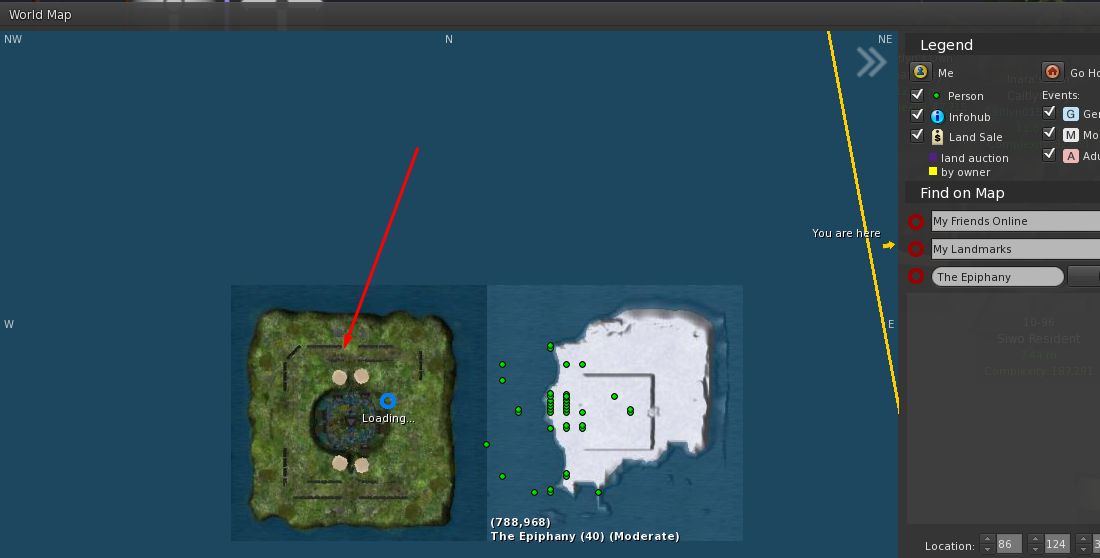
The mystery island as it appeared for some people using both the LL viewer and Firestorm

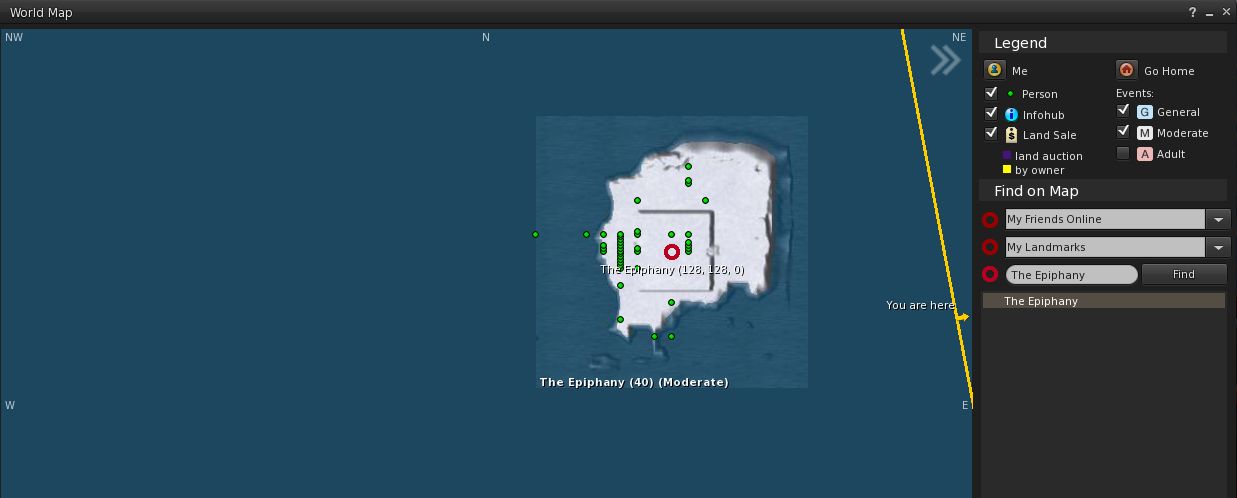
Whirly Fizzle spotted this phenomenon on the World Map with a region apparently adjoining The Epiphany, although her curiosity was piqued as it was apparently without a name. The mystery deepened when most of those at the meeting reported they couldn’t see any such region on their maps – although two or three besides Whirly could, on both TPVs and the official viewer (ruling on an issue in how a specific viewer is handling the map data).

What was equally mysterious, was that those who were able to see the unnamed island on the World map could also see it on the web SL map – while those who couldn’t see it on the world map also couldn’t see it on the web SL map.

As other saw the same area on the map – regardless of viewer

Several theories were put forward for the phenomenon, including it being a  non-updated map texture; a potential error in map tiling and loading;  an  old texture loaded and stuck at the  wrong LOD; and so on.  Running a quick check, Simon Linden couldn’t find any evidence for a region ever having been placed in any of the eight grid areas surrounding The Epiphany. He did, however, offer a possible explanation of what might have happened:

I do know the support team will do some interesting tricks sometimes … they will move one of their regions next to another to do some sort of work, then move it away. Perhaps that got captured there.

Either way, a curious little anomaly.

Mesh UUID Flipping via Script / UUID

Back in the mists of time as mesh support was being added to Second Life, there was the ability to change mesh assets via UUID / LSL. However, the ability was used most frequently as a means of animating meshes  – putting considerable stress of the rendering system in the process. Because of this, a wiki page on the subject was raised, and the ability to change mesh UUIDs via script was eventually removed altogether.

The Lab is currently considering implementing a means to animation meshes (something routinely discussed at the Content Creator’s User Group meeting). This would be a far more efficient and less stressful means of animating meshes where it to be taken up as project, and completely negate the need for animation via UUID flipping.

However, while allowing meshes to be changed through scripts / UUIDs has other potential uses, it is unlikely to be re-introduced even if animated meshes are introduced to SL, because anyone obtaining the UUID for a mesh could potentially download the “mesh” as a vnd.ll.mesh  file from the CDN, and could then theoretically reconstruct the original mesh item from that data (thus effectively stealing it).