Firestorm Halloween Hunt to open Gateway

The Firestorm Gateway regions: setting for a special Spooky Hunt, but merchant assistance sought

Firestorm will be opening their new Gateway regions to the public on Saturday, October 31st, with both a special Halloween party and the launch of their Spooky Nights Hunt, which will run through until Monday, November 30th.

The Firestorm Gateway is one of up to 20 new Community Gateways which will soon be opening as a part of a trial of a new Community Gateway programme initiated by the Lab, and  which I previewed back in September.

The idea is to allow communities and groups within Second Life to build their own gateways focused on bringing new users into Second Life and to help get them started. These gateways will include web pages to attract new users to them, which will include a registration API to allow those users to sign-up to SL and create and account without necessarily having to go through the central registration process at secondlife.com.

While the hunt isn't focused on encouraging new users into Second Life, the Firstorm Gateway regions, once officially opened, are itentded to help incoming users gain familiar with SL, gain support, and experience some of the activities to be found in-world, such as socialising, flying, boating and - as shown here - scuba diving
The Firestorm Gateway regions, once officially opened, are intended to help incoming users gain familiar with SL, gain support, and experience some of the activities to be found in-world, such as socialising, flying, boating, playing games, and – as shown here – scuba diving and underwater exploring

The Firestorm party and Spooky Nights hunt do not mark the official opening of the new Gateway programme as a whole – the Lab will hopefully be announcing this is due course. However, they do present the opportunity for Second Life users to explore the Firestorm Gateway regions, five of which will be featured in the hunt, which will also serve as the first event designed to attract new users to Second Life via Firestorm’s website.

A special stage area has been created for the party on October 31st, which will feature Mankind Tracer and Nance Brody, among others. There will be more details on this announced by the Firestorm team in due course.

The Firestorm Gateway regions also include areas suitable for intdoucing people to role-play, etc. - and you can explore them once the Spooky Hunt opens on October 31st
The Firestorm Gateway regions also include areas suitable for introducing people to role-play, etc. – and you can explore them once the Spooky Hunt opens on October 31st

The Spooky Nights Hunt will take place across the five activity regions of the Gateway, and it is hoped it will provide fun and interaction for both established and new users. Right now, and in support of the hunt, the Firestorm team are reaching out to Merchants who are willing to provide goodies as hunt prizes, with Jessica Lyon, the Firestorm project manager noting:

Although it is a Halloween hunt, the hunt remains open after Halloween. You can make a spooky gift or not.

If you are a Merchant interested in supporting the hunt, please hop over the Firestorm website and the Spooky Hunt application page for further information.

As well as participating in the hunt, newcomers and visitors will be able to explore all six of the Firestorm Gateway regions, which include an orientation region for people new to Second Life and a social area where people can meet and interact (and where questions on using Second Life can be answered). In addition, they’ll be able to participate in any of the activities offered across the regions. These are designed to present a broad feel for the things people can enjoy in Second Life, and include fly aircraft, sailing, jet skiing, scuba diving, playing games, etc. In addition, they can explore a simple role-play environment, or use the sandbox area to learn the basics of building.

The Firestorm Gateway opening will focus on a Halloween party of Saturday, October 31st, followed by a month-long Spooky Nights Hunt in the 5 activity regions of the Gateway

The Firestorm Gateway opening will focus on a Halloween party of Saturday, October 31st, followed by a month-long Spooky Nights Hunt in the 5 activity regions of the Gateway

One of the most important aspects of any Community Gateway is providing volunteers who are willing to spend time in-world providing help and support for new users as they arrive. If you would be interested in supporting the Firestorm Gateway by becoming a mentor there, please send a note card with your name and relevant background information (e.g. whether you have been a mentor in the past, experience in helping newcomers and users, etc.), to Jessica Lyon.

To keep up to date with preparations for the party and the hunt, as well as with further news on the Firestorm Gateway, keep an eye on the Firestorm website. I’ll hopefully have more news on the Gateway programme itself as it is announced by the Lab and / or more Gateways come on-line.

If you are participating in the Gateway trial programme, and would like your Gateway to be previewed in this blog, please use the contact form to drop me a line, or contact me in-world.

Firestorm 4.7.3: are you ready to rock?!

firestorm-logoUpdate:this release has seen further issues for those using Webroot anti-virus (problems include low FPS, high ping rates to the simulator, very slow rendering, etc.). If you have Webroot installed on your system and are experiencing issues, please try manually whitelisting the viewer’s cache folder.

Tuesday, August 18th saw the release of Firestorm 4.7.3.47323. This release comes a little later than had been planned, thanks largely to a series of last-minute blockers caused be assorted external influences (such as win 10 driver issues for Intel).

This is once again a major release, packing a huge amount into it, and which brings Firestorm pretty much to parity with the Lab’s code base. It also sees the return of the Linux 64-bit build to the fold.

Given the sheer number of updates in the release, I do not intend to cover everything here, but rather offer an overview of some of the more major / interesting changes, updates and  fixes to be found in the release.   for full details of all changes, and all due credits to contributors, etc., please refer to the official release notes.

The Usual Before We Begin Notes

For best results when installing this release:

Version Blocking

As this is a full release, expect an announcement on the blocking of version 4.6.1 and 4.6.5 to be made once the dust from this release has settled.

Log-in Screen Updates: Text Mode and Remember User Name

Login Screen > Select Mode >Text

When enabled, this disables the viewer’s 3D rendering, allowing Firestorm to be used as a “text viewer” for low-end systems and launches the viewer with the in-world view blanked out, but all of the menu options and tool bar buttons accessible HUDs (which are not displayed) and other attachments can be manipulated via the Touch option in the Inventory context menu.

The Text Mode option, accessed from the Select mode drop-down on the right of the log-in / splash screen enables you to run Firestorm without 3D graphics on a low-end system - menus and buttons will still be accessible, as will floaters. The Remember user name check box (highlighted above left) is also a new feature, restoring the functionality last seen in Pheonix
The Text Mode option, accessed from the Select mode drop-down on the right of the log-in / splash screen enables you to run Firestorm without 3D graphics on a low-end system – menus and buttons will still be accessible, as will floaters. The Remember user name check box (highlighted above left) is also a new feature, restoring the functionality last seen in Phoenix

The Remember Username check box has been added to Firestorm in response to a series of requests to bring back this functionality from the Phoenix viewer – see FIRE-5735.

Additional Log-in Screen Fixes

  • The issue of Remember Password box checking itself after a failed log-in attempt and refusing to uncheck itself (see FIRE-16535) has been fixed
  • Several focus issues within the login panel have been fixed (see FIRE-6930)

Lab Updates

The 4.7.3.47323 release brings Firestorm up to parity with the Linden 3.8.2 code base (with some additional updates from the current 3.8.3 code base). Chief among the LL updates are the following.

Viewer Build Tools Update

This release means that Firestorm is now built using the updated viewer build tools, notably Visual Studio 2013 for windows and Xcode 6.1 for Mac, with some additional tool improvements, all designed to provide improved performance and stability, as well as easing the viewer build process. Details on the new build tools can be found in my blog post on the subject, however the key points with this change are:

  • The Windows version of this viewer will not install on Windows XP systems, regardless of the Service Packs also installed  (previous versions of the release viewer would install on Windows XP system which had Service Pack 3 installed)
  • The Mac version of the viewer will not install on any version of OS X below 10.7.

Attachment Fixes

Firestorm 4.7.3 includes the Lab’s Project Big Bird fixes for a wide range of viewer attachment loss issues, which tend to noticeably occur after regions crossings (physical or teleport), such as: attachments appearing to be detached in your view, but not to others, and vice-versa; attachments appearing to have detached from you, but showing as attached in Inventory, and so on. These also fix issues such as adding multiple attachments at the same time failing to attach everything selected, and attempting to wear an outfit with too many attachments failing.

Project Layer Limits

This changes how system clothing layers (shirts, pants, under shirts, jackets, etc.), are handled. Prior to this update, an avatar could wear a maximum of 5 items of any single layer – say the jacket – at one time. With this change, an avatar can wear any combination of layers up to a global maximum of 60 – so you can wear 1 pair of pants and 59 jackets if you so wish, or just 60 jackets, etc.

Note that this change does not apply to body layers – skins, shapes, eyes, etc., for which the limit is still one of each, nor is it applicable to attachments, which retain a limit of 38 per avatar.

Experience Keys / Tools

Firestorm 4.7.3 adds the full set of Experience Keys / Tools controls and floaters in the viewer. For those not familiar with Experience Keys / Tools, I offer my own overview from July 2015.

This update means that on entering an area where an Experience is running, Firestorm users will see the full permissions request dialogue, rather than an abbreviated version.

With release 4.7.3, Firestorm users can access the Experience floater and review information on those Experiences they have allowed, blocked, owned, etc., and display individual Experience profiles
With release 4.7.3, Firestorm users can access the Experience floater and review information on those Experiences they have allowed, blocked, owned, etc., and display individual Experience profiles. Land owners can also display information on Experiences running  / blocked on their land through World > Region Details and / or the About Land tab

In addition, Firestorm gains the additional Experiences-related panels and floater options. So users can now access the Experiences floater via Avatar > Experiences, and the Region and About Land floaters have also been updated to include Experiences tabs and information.

Viewer-Managed Marketplace

Firestorm 4.7.3 incorporates the Marketplace Listings folder
Firestorm 4.7.3 incorporates the Marketplace Listings panel (Avatar > Marketplace Listings)

Viewer-Managed Marketplace (VMM) is designed to enable merchants to manage the creation and management of Marketplace product listings through the viewer, bypassing the need to use the Merchant Outbox (and have copies of items stored on the Marketplace inventory servers) or using Magic Boxes (as VMM fully supports the sale on No Copy objects). It was fully deployed in July 2015, and all merchants have had their Marketplace listings migrated to VMM, and should by now have also migrated their Magic Box listings and items to VMM.

Firestorm 3.7.3 now fully supports VMM functionality, providing the Marketplace Listings panel and hiding the Marketplace Listings folder by default.

Those still requiring information on VMM are referred to my blog posts on the subject, which also include links to the Lab’s official information resources.

Dragging Folders into My Outfits

A recent change to viewer functionality meant that it was no longer possible to drag and drop sub-folders of items into the My Outfits  / Outfits folder – see BUG 9209 (FIRE-15603). This changed caused some consternation among those who use My Outfits to order their outfits. As a result of the use-cases supplied to the Lab within the JIRA, this has been reversed in an upcoming release, and has been cherry-picked for inclusion in Firestorm 4.7.3.

Continue reading “Firestorm 4.7.3: are you ready to rock?!”

Firestorm ask “viewer translations, can you help?”

firestorm-logoOn Friday, July 17th, Jessica Lyon of the Firestorm team issued a blog post updating users on the progress of the upcoming release, together with an appeal for assistance.

The last release of Firestorm – which I overviewed here – was officially referred to as a “beta” release, as it was rolled out at a time when further updates were expected from the Lab which would prompt a further Firestorm release, possibly in short order. In particular, Firestorm were waiting for the following “big three” from the Lab to reach release status with the Lab:

  • Experience tools, (which were promoted to release status by the Lab at the end of June)
  • The Project Big Bird fixes for viewer-side attachment issues (promoted to the official release viewer on Tuesday, July 14th)
  • Viewer-Managed Marketplace  (which the Lab have just announced as “released”, ahead of the start of the automated migration process for Merchants, despite the viewer code still being at RC status at the time of writing).

While the Firestorm post doesn’t commit to a date when the new release might appear, but does make it clear that the release is coming soon. Also, as well as these particular updates, the blog post indicates it will include additional fixes and updates from the Firestorm team and contributors – including updates from Kitty Barnett for RLVa (one of the most frequently requested updates), and other goodies beside – such as updates to the Unified Snapshot floater.

For those not overly keen on the preview pane in the Unified Snapshot Floater (see above left), the next release of Firestorm should see the return of the "old" snapshot preview (seen above right), with the option to freely switch between the two
For those not overly keen on the preview pane in the Unified Snapshot Floater (above left), the next release of Firestorm should see the return of the “old” snapshot preview (above right), with the option to freely switch between the two via the arrow button

As well as hinting at what is to come, the Firestorm post also includes an appeal for help, as Jessica explains:

There was a time when Linden Lab had the interface translated in multiple languages, and we did, too, since we are based on the Linden code. However, as time passed, new additions to the interface were added, and the translation of these interface elements fell behind. Today most translated language interfaces actually contain more English than the chosen language, and it is becoming more and more difficult to merge these half-translated UI elements with upstream code.

Because of this, the team have decided to discontinue and remove translations which might be regarded as “incomplete” and for which they do not have the internal expertise to correctly maintain.  These comprise: Chinese, Danish, French, Portuguese, Spanish, and Turkish.

However, the team is will re-introduce any of these languages if there are people willing to commit to providing UI translations for them, and maintaining the translations long-term. As such, the Firestorm team is looking to hear from volunteers willing to do so. However, as Jessica notes:

UI translation involves more work than merely providing the terms for the correct language. Volunteers must be comfortable with editing and properly formatting xml files or should be able to learn how to do so.

If you have the necessary language and technical expertise, and are confident you can provide the required commitment to update and maintain a viewer translation for one of the languages listed above, please read the Translating Firestorm wiki page for further information, and then express your interest directly to the Firestorm team via e-mail to  admin@phoenixviewer.com.

Firestorm 4.7.1 Beta: It’s here!

firestorm-logoSunday, May 3rd saw the release of Firestorm 4.7.1.45325 Beta. This is another big update which brings Firestorm pretty close to being up-to-date with the Lab’s viewer.

However, it has been given a beta status as there are further important updates coming out of the Lab, such as fixes for AIS v3 attachment issues, the new Viewer-Managed Marketplace functionality, etc. As such, the Firestorm team will be working on a further release, which will be made available once the Lab has made these updates and new functionality generally available through their viewer release channel, and this will count as a “full” release of Firestorm.

Given the sheer number of updates in the release, I do not intend to cover everything here, but rather an overview of some of the more major / interesting changes, updates and  fixes to be found in the release.   for full details of all changes, and all due credits to contributors, etc., please refer to the official release notes.

The Before We Begin Notes

For best results when installing this release:

Version Blocking

As this is a beta release, there will be no blocking of any older releases of Firestorm until after the next “full” release is made.

Lab Updates

The 4.7.1.45325 release brings Firestorm up to parity with the Linden 3.7.26 code base (with some updates from the 3.7.27 and 3.7.28 releases). Given the last release (4.6.9) brought Firestorm to parity with the Lab’s 3.7.8 code base, this means this release includes a significant number of updates direct from the lab, which include, but are not limited to, the following.

Avatar Hover Height

The Lab’s Avatar Hover Height option is included in this release, allowing users to make on-the-fly adjustments to their Avatar’s relative position above the ground / the  floor / an object it is sat upon, via a slider or spinner, with a range of +/- 2 metres. The option is accessible via the avatar right-click context menu  / the pie menu, which displays the slider / spinner.

Avatar Hover Height allows for on-the-fly adjustments to your avatar's relative position above the ground, etc.
Avatar Hover Height allows for on-the-fly adjustments to your avatar’s relative position above the ground, etc.

Avatar Hover Height can be used whether you are standing, sitting, using a poseball, etc. However, note that it is a change to the graphical representation of your avatar – the option does not make any associated change the avatar’s height in terms of platform physics.

Default Permissions

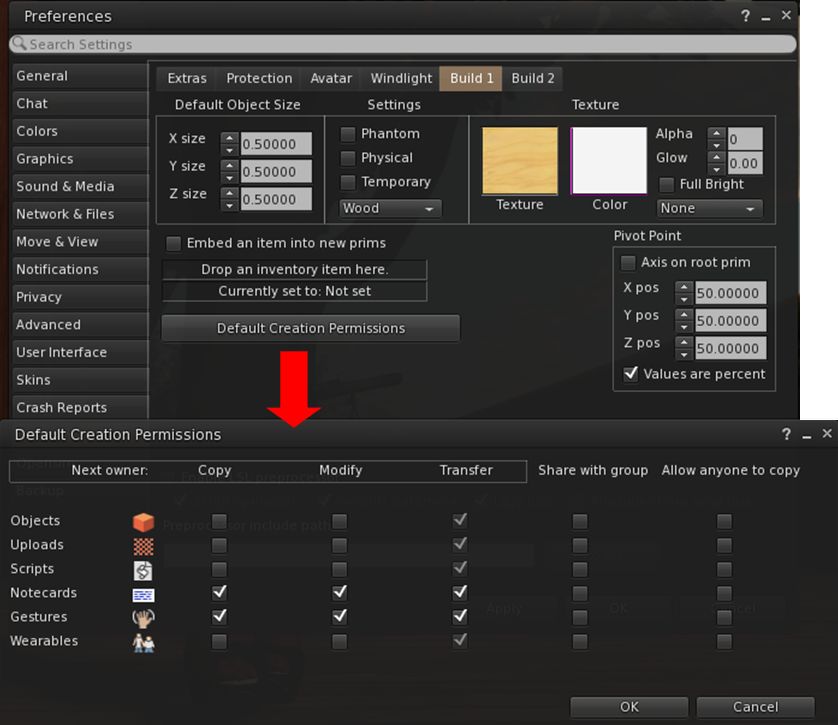
Firestorm 4.7.1 includes the new default permissions panel for setting the initial permissions on created items – objects, uploads, scripts, notecards, gestures and wearables.  contributed to the official viewer by Jonathan Yap under STORM-68, the new panel can be opened via Preferences > Firestorm > Build 1 > Default Creation Permissions.

The STORM-1968 default creation permissions are now integrated into Firestorm
The STORM-68 default creation permissions are now integrated into Firestorm

Other Lab Updates of Note

  • GPU Benchmarking Feature: in common with the Lab’s viewer, Firestorm no longer uses the GPU table to define your GPU and initially set the viewer’s graphics. Instead, a test is carried out when the viewer is first installed to determine the GPU type and graphics settings are initially set as a result of this test. You can, of course set alter your graphics settings to suit your needs  / load your settings for any saved presets you have
  • Server-side Appearance (SSA) polish / Advanced Inventory System (AIS v3): stability and performance improvements for SSA, including retry logic, removing redundant requests, detecting various appearance stuck conditions; the removal of code related to the old client-side baking framework; appearance bug fixes 
  • HTTP Pipelining and faster inventory fetching: significantly improves the download of data (currently avatar baking information, texture data, and mesh data) to the viewer and improves inventory fetching and loading on logging-in
    • As HTTP fetching using HTTP is now used exclusively by SL (support for UDP fetching has been removed from the simulators), the option to disable HTTP Inventory has been removed from the Developer menu
  • Joint offsets in rigged mesh attachment fixes: removes the unpredictability from attaching multiple meshes with joint offsets which meant you could see yourself with different joint positions at different times, and the way you saw yourself might not match up to what others saw. Instead, wearing the same set of meshes should always produce the same joint positions, and the way you see yourself should consistently match the way others will see you. The process for removing attached meshes is also more robust, so you should be able to reliably get your old joint positions back after meshes are removed.
  • Obtain LSL syntax table from the simulator so that it is always up to date: see STORM-1831
  • Added glossy reflections for projectors: This feature makes use of the glossiness parameter to calculate the “gloss” of projector reflections – see STORM-2067
  • New unified snapshot floater and updated SL Share 2 capabilities: see Snapshots and Photography Updates, below.

Preferences Overhaul

Perhaps the most noticeable update in this release is the complete overhaul of the Preferences panel, tabs and sub-tab. Every major tab in Preference has been revised and rationalised, and most of the sub-tabs have been revised / added-to, along with a number of new sub-tabs being added to various tabs.

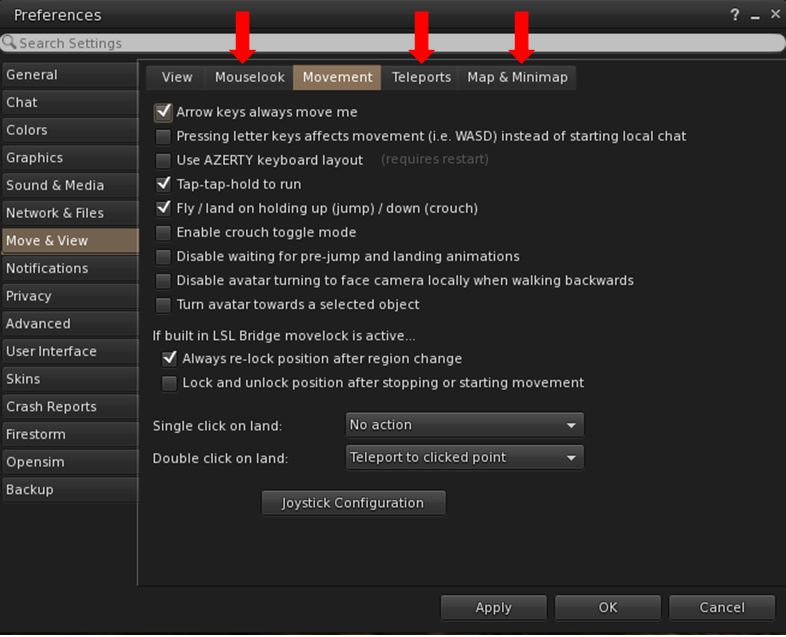
Firestorm 4.7.1 sees the Preferences panel extensively overhauled, with revised tabs and updated / new sub-tabs, such as the new Mouselook, Teleports and Map & Minimap tabs under Movement
Firestorm 4.7.1 sees the Preferences panel extensively overhauled, with revised tabs and updated / new sub-tabs, such as the new Mouselook, Teleports and Map & Mini-map tabs under Move & View

The result, while possibly confusing when first discovering a particular option has been moved, is actually a better, more logical set of Preferences tabs and sub-tabs.

Documenting all of them is beyond the scope of a review such as this, and the recommended means for finding options and to gain familiarity with the new layout is to use the Preferences search bar.

Continue reading “Firestorm 4.7.1 Beta: It’s here!”

Firestorm: counting down to the next release

firestorm-logoThe Firestorm team are working towards  their next major release. This has been in the works for a while now, and will represent a significant step forward for the viewer, as it will bring it up to parity with  the Lab 3.7.26, and also includes a number of cherry-picked fixes and updates from the more recent maintenance fixes, etc..

This means the viewer will include updates such as the revised snapshot floater, as originally re-designed by Niran V Dean as a contribution to Linden Lab, together with additional effects filters; the new Avatar Hover Height capability, the latest updates for HTTP pipelining and fastpipe changes, plus the recent AIS v3 changes, and much, much more, including numerous updates and improvements made by the Firestorm team and  from other TPVs.

Preview Testers Wanted

Beta versions of the release have been undergoing assorted tests for the last several weeks. However, prior to it reaching a formal release status, the team want to expose it to more extensive testing among users. To this end, a call has been put out through the Firestorm blog requesting more people to consider joining their Preview group.

Things you can expect in Firestorm 4.7.0: the revised snapshot floater (as developed by Niran V Dean), complete with an expanded set of default filter effects

If you are a Firestorm user and have a good working knowledge of the viewer, do please read the blog post and consider joining the Preview group. However, do keep in mind the following guidelines:

  • You will be required to give feedback on any Preview release you receive. This includes being prepared to report them through the Preview group and raise bug reports on the Firestorm JIRA – if you’ve never filed a bug report before, you can find guidelines on the Firestorm wiki. There is also a Reporting Bugs class which may also help
  • Please, do not join the group simply to get your hands on shiny new versions of the viewer – not only will this defeat the object of trying to test the viewer and uncover any issues possibly missed during QA and beta testing, you could find yourself running a viewer than has bugs, etc., and for which you cannot get assistance through the normal Firestorm support channels
  • Please do not share any links you are given to Preview versions of the viewer to people outside of the Preview group. Again, this defeats the object of controlled testing, and it runs the risk that if there is a significant issue with the viewer, then it means limiting the impact of the issue is that much harder (if not impossible).
Things you can expect in Firestorm 4.7.0: Avatar Hover Height

The Current Release Plan

As it stands, Firestorm hope to ramp-up to a formal release over the next few weeks as follows:

  • A further release to the Beta test group ready for the week commencing Monday, April 13th
  • If no significant issues with this release are found by the Beta testers, it will be released to the Preview group for wider testing
  • A further release is then likely to be made to the Beta and Preview groups for final testing and assessment.

Assuming nothing major is found to be a problem with the second preview release, a formal release of the viewer will then be made – potentially around three weeks (ish) from the date of this article.

Things you can expect in Firestorm 4.7.0: the Preferences floater has been completely overhauled and sub-tabs / options rationalised for easier use

It is possible that when it is made, the formal release will be classified as a “Public Beta”, rather than a “full” release. Part of the reason for this is that there are a number of further updates coming out of the Lab – such as the new Viewer-Managed Marketplace (VMM) functionality, once it has cleared its beta testing – and the Firestorm team will want to incorporate these updates as soon as they can into a follow-up release, allowing for the Lab’s own release schedule.

However, whether a “Public Beta” or a “full” release, I’ll of course be providing an overview / review of the viewer once it is available to everyone.

Firestorm TTT: building

firestorm-logoIn the Firestorm Tool Tip Tuesday video for Tuesday March 31st, 2015, Jessica takes a look at the assorted tools and options Firestorm provides in order to assist people with in-world building. As with some of the other TTT video, various options described within the video are not exclusive to Firestorm, which makes the video a worthwhile watch by anyone wishing to get more to grips with building, manipulating prims, and so on; although admittedly, if you’re not using Firestorm, you’ll have to poke at your preferred viewer’s Preferences, etc., to see where the options might reside.

Starting with changing the default colour of the basic rezzed prim shapes, the default size, prim status (physical, phantom, etc), and the next owner permissions (a function now common to all viewers, including LL’s own), Jessica takes a rapid-fire run through many of the the more frequently used build options and tool additions.

The build sub-tabs on Firestorm, located under Preferences > Firestorm, present access to the majority of additional options and capabilities associated with building using the viewer

This includes a look as assorted features within the build floater itself, many of which are, again, presented through other viewers as well, including the ever-popular prim alignment option (which, sadly, remains as something the Lab have refused to adopt, as they feel it does not fulfil enough potential use cases, despite the fact it actually achieves precisely what it sets out to do).

The video concludes with a look at the Z-drop and Z-take options, which respectively allow you to drop the contents of a folder into an in-world prim without needing to select and physically drag-and-drop them, and to take a number of in-world objects and place them within a root folder in your inventory – both of which are powerful and useful options, before finally providing an overview of one of the most useful building resources within Second Life: Builder’s Brewery. You can also find out more about BB through their website.

Getting to grips with building isn’t easy, and while this video isn’t intended as a beginning guide, for those who have paddled in the shallows of building, it offers some very useful pointers. Even those with a little more experience might also find it contains some interesting little tips!