Firestorm TTT: building

firestorm-logoIn the Firestorm Tool Tip Tuesday video for Tuesday March 31st, 2015, Jessica takes a look at the assorted tools and options Firestorm provides in order to assist people with in-world building. As with some of the other TTT video, various options described within the video are not exclusive to Firestorm, which makes the video a worthwhile watch by anyone wishing to get more to grips with building, manipulating prims, and so on; although admittedly, if you’re not using Firestorm, you’ll have to poke at your preferred viewer’s Preferences, etc., to see where the options might reside.

Starting with changing the default colour of the basic rezzed prim shapes, the default size, prim status (physical, phantom, etc), and the next owner permissions (a function now common to all viewers, including LL’s own), Jessica takes a rapid-fire run through many of the the more frequently used build options and tool additions.

The build sub-tabs on Firestorm, located under Preferences > Firestorm, present access to the majority of additional options and capabilities associated with building using the viewer

This includes a look as assorted features within the build floater itself, many of which are, again, presented through other viewers as well, including the ever-popular prim alignment option (which, sadly, remains as something the Lab have refused to adopt, as they feel it does not fulfil enough potential use cases, despite the fact it actually achieves precisely what it sets out to do).

The video concludes with a look at the Z-drop and Z-take options, which respectively allow you to drop the contents of a folder into an in-world prim without needing to select and physically drag-and-drop them, and to take a number of in-world objects and place them within a root folder in your inventory – both of which are powerful and useful options, before finally providing an overview of one of the most useful building resources within Second Life: Builder’s Brewery. You can also find out more about BB through their website.

Getting to grips with building isn’t easy, and while this video isn’t intended as a beginning guide, for those who have paddled in the shallows of building, it offers some very useful pointers. Even those with a little more experience might also find it contains some interesting little tips!


Firestorm: of releases and springing into Spring

firestorm-logoAs noted in a recent TPV Developer meeting summary, things are in a state of flux with regards to Firestorm updates.

Originally, it had been hoped the team would have an update released during March; however, there have been numerous projects coming through the Lab which have encouraged the team to delay their release. These include things like fixes for the assorted issues of attachments either dropping off following region crossings (notably teleports) or failing to attach, and also with the upcoming Viewer-Managed Marketplace updates (VMM).

In addition, testing of the current pre-release beta has resulted in a very mixed bag of feedback from users involved in the beta process. Some have reported significant issues which may be linked to HTTP pipelining or the recent AIS v3 updates from that Lab, while others have indicated they’ve encountered very few issues, up to and including the attachment loss / failure issues mentioned above (although somewhat limited due to PC issues, my own use of the 4.7.0 pre-release versions of Firestorm has given me almost no issues whatsoever).

Because of this, it now seems likely that the Firestorm team will be handling the next release as follows:

  • Two initial preview releases, issued to the Firestorm preview group. One of these will have the latest AIS v3 updates and HTTP pipelining updates from the Lab enabled by default, and the other will have them disabled by default. The hope is these will help determine how many users may be impacted by any AIS v3  / HTTP pipelining issues, and how things should be defaulted for the follow-up releases
  • A public beta release will follow these two preview releases, which will see Firestorm brought up to par with the current LL viewer code
  • A “full” release will follow some weeks after the beta release, which may include any additional updates from the Lab (e.g. the attachment fixes and / or VMM, depending on the overall status of these updates from the Lab).

No precise time scales are available for any of these releases, but it seem likely (based on comments passed at the TPV meeting linked-to above), that there will likely be an initial call for users to join the Firestorm preview group to assist with the preview testing. The public beta then many still appear later in April.  So, keep an eye on the Firestorm blog for any call that may be made, and for news on upcoming releases.

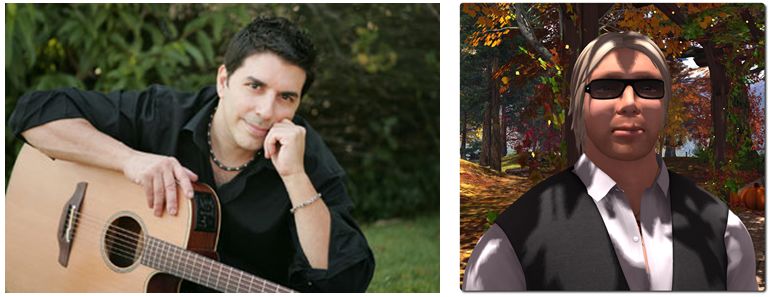
Seth Regan (Mankind Tracer in SL) will be headlining Firestorm's
Seth Regan (Mankind Tracer in SL) will be headlining Firestorm’s “Fed up with Winter” party, with Firestorm’s Ed Merryman spinning the discs afterwards

In the meantime, the Firestorm has announced a “Fed up with Winter!” party – or as I’ll prefer to call it, a “spring into Spring” party.

Headlining the event which will start at 12:00 noon SLT on Saturday, March 28th, will be Seth Regan, known in-world as Mankind Tracer. After his set, Firestorm’s own Ed Merryman will be providing the music in his usual style of spinning the discs until he (or everyone else) fall over from exhaustion!

The party is open to all – or at least, all who can get into the region, and will take place in a party area overhead on the Firestorm Support island.

Firestorm TTT: clean install revisited

firestorm-logoIn the Firestorm Tool Tip Tuesday video for Tuesday March 3rd, 2015, Jessica gave a rapid-fire overview of performing a clean install. In trying to keep the video to around 5 minutes in length, the result, while informative, came across as rushed.

Given people did feel the first video did feel hurried, and that clean installs can be a necessary part of viewer life, the latest Tool Tip Tuesday video from Jessica might be referred to as “Clean installs: the Director’s Cut”.

With a running time a little under 13 minutes, the new video provides greater information and clearer instructions on:

  • Saving your chat and IM logs to a custom location on your PC
  • Using Firestorm’s backup capability to save and restore your viewer’s global and per-account settings
  • Performing a clean install.

The video both complements the original clean install video, and stands as an instructional guide in its own right, providing a lot more explanation and background. So, if you were confused by the speed of delivery in the original video, this revisit may well be for you!

Firestorm TTT: the clean install

firestorm-logoUpdate, March 10th: In response to feedback following the release of this video, Jessica released a more in-depth video examining clean isntalls, settings back-ups, etc. The new video can be found here.

The Firestorm Tool Tip Tuesday video for March 3rd, 2015, covers what can be a thorny and intimidating issue: that of performing a clean install of the viewer.

In an ideal world, clean installs wouldn’t be needed. However, there are times when installing a newer version of a viewer over an existing version, that things which shouldn’t happen do happen, and things that should have happened don’t happen correctly. And while the frequency with which people are asked to perform clean installs have decreased in recent times for most viewers, they can still be the first step in avoiding later issues.

Where Firestorm is concerned, and given it has so many additionally exposed features with supporting UI elements and so on, the chances of something hiccuping during an install and causing problems later cannot be overlooked. Hence why, when releasing a particularly complex update to the viewer, or when dealing with support requests from users after a complex update being released, Firestorm support will often advise / ask if a clean install has been used with the new release.

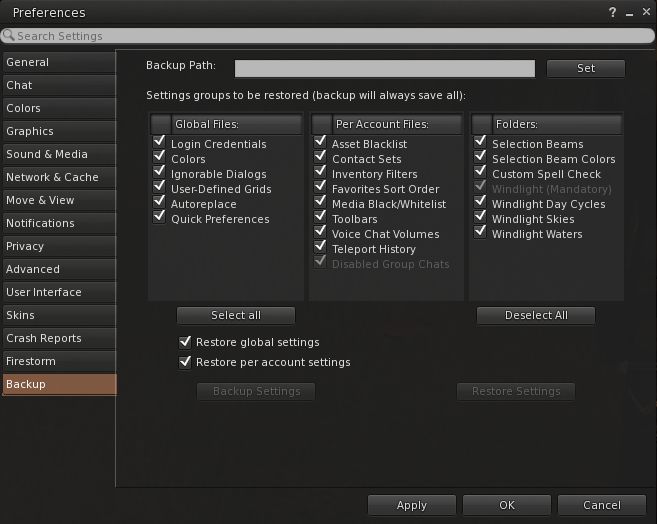
Firestorm's settings backup feature can help remove some of the pain involved in a clean install, by allowing you to save many of your preferred global and account setting locally, and then quickly restore them after a clean install of a new version of the viewer
Firestorm’s settings backup feature can help remove some of the pain involved in a clean install, by allowing you to save many of your preferred global and account setting locally, and then quickly restore them after a clean install of a new version of the viewer

To make things easier, the Firestorm team has provided additional capabilities within the viewer which allow you to not only save things like your chat logs, etc., to a dedicated folder to avoid them being lost as a result of a clean install (as is the case with all viewers), but they’ve provided a means to back-up and restore all of your viewer settings. However, even with these capabilities, performing a completely clean install can be a daunting task for many.

So in this video, Jessica takes you through her preferred method of running a clean install on a PC – starting from ensuring all or logs files and setting are safely saved  / backed-up through to launching the viewer after a clean install and restoring all of your settings.


Firestorm TTT: command line shortcuts

firestorm-logoThe Firestorm Tool Tip Tuesday video for Tuesday, February 24th offers insight into using local chat as a quick means of using a number of viewer-related and other command options.

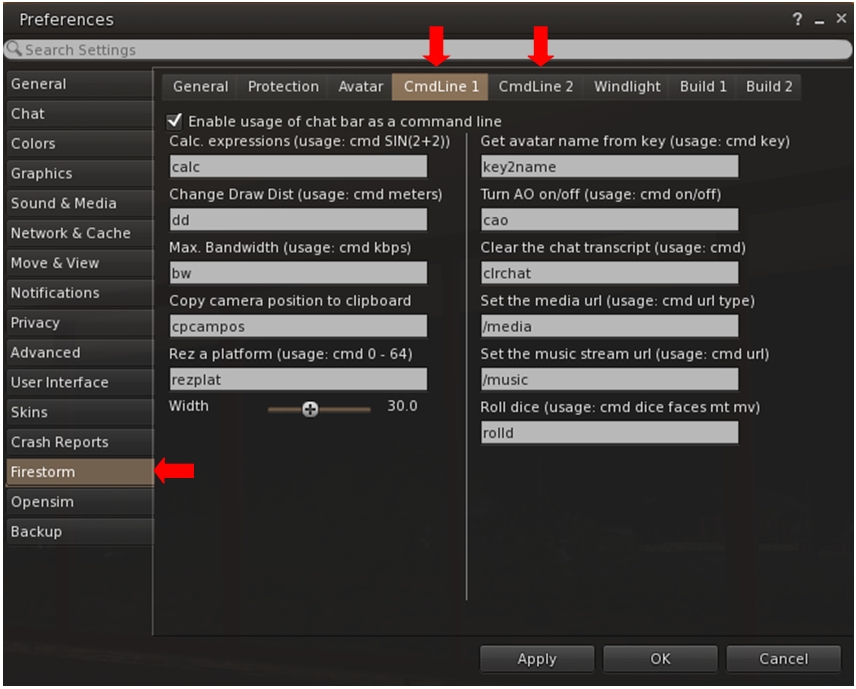
This is achieved by using what Firestorm calls the “command line options”, which can also be found in some third-party viewers (Singularity being another which uses the capability). There are essentially pre-configured shortcuts which allow you to do a number of things; for example, you can quickly step your draw distance down / up, or teleport to a specific region or height within a region, rez a platform, and so on.

Firestorm is one of several TPVs offering "command line" shortcuts which can be typed into local chat to achieve a number of things - the the full list of options via Preferences
Firestorm is one of several TPVs offering “command line” shortcuts which can be typed into local chat to achieve a number of things – the the full list of options via Preferences

In the video, Jessica takes viewers through several of the more popular command line options as well as looking at some of the commands people might not be so familiar with, such as the calculator, turning your Firestorm AO off / on, clearing-down your local chat history display, and so on. She also touches upon customising the command names to make them easier to remember and use, if you need to.

So, if you’ve never looked into using chat command via the command line option, this is the video for you!

Lock’n’load: it’s snowballs 2: this time it’s Firestorm!

On February 6th, residents and Lindens met in-world for what proved to be a challenge met with gusto and delight: the first in-world snowball fight involving Linden staff in a fair while.

As I was able to report from the front lines (when not picking myself up off the floor and dusting myself down after getting splatted by a certain Mr. Gibson Firehawk … several times 😛 ), the event was held in the Winter Wonderland created by the Lab and the Moles to help demonstrate the forthcoming experience keys / tools.

2015 snowball fight, Winter Wonderland;; Inara Pey, February 2015, on FlickrBut will Strawberry “Snap Shot” Singh be on-hand this time? … 

Well, with Winter Wonderland liable to be closing its doors in March, due to springtime arriving, the gauntlet has been once again laid down, with a challenge handed out to one and all for a further snowball fight – only this time it comes from the Firestorm team!

The challenge was given out in a Firestorm blog post, which reads in part:

The Firestorm team wants to do it again! Snowball fight pt 2! For those who couldn’t make it to the first one this is your chance to get involved and have some old school fun! We have extended an invitation to the Lindens as well and hope some of them will join in too.

February 6th proved to be a huge amount of fun for everyone involved, something which even recalcitrant weapons vendors and a healthy smattering of lag amidst the snow could do little to dampen.

2015 snowball fight, Winter Wonderland;; Inara Pey, February 2015, on Flickr… and who might find they’re in need of a bit of a sit-down amidst all the excitement? (And will hot cocoa also be available this time?)

So… if you missed out the first time around, or if you want to do it all over again, be sure to be in-world at the Snowball Warzone in Winter Wonderland by 13:00 SLT on Sunday, February 22nd!

Related Links