Second Life: the Web Team’s work and “last names”

Early on October 1st, 2019, Linden Lab blogged a update on the work of the Second Life web team and to act as a reminder of the monthly Second Life Web User Group meeting.

The update – Web User Group And Updates! – provides insight into some of the major areas of work the Lab’s SL web team are involved in. The most visible element of this work – possibly the most visible of all of LL’s web services – is the Marketplace (MP). However, the team are involved in all aspects of Linden Lab’s Second Life web properties and services – and this includes the work to move them to AWS cloud services and preparing the ground from the re-implementation of Last Names.

To take the updates given in the official blog post in reverse order:

SL Marketplace

In terms of the Marketplace, the blog post offers a round-up of recent Marketplace changes – notably the introduction of MP Store Manager functionality (see: SL Marketplace: store managers introduced), that is currently being further refined based on feedback from store holders.

In addition, the post indicates a couple of capabilities referenced by Reed Linden, the Product Manager responsible for the Lab’s Second Life web infrastructure mentioned during his appearance on Lab Gab (see: Lab Gab episode 2 with Reed Linden – a summary). These are:

  • In-world purchase notifications: an opt-in system allowing store owners to receive a viewer notification of purchases made through their Marketplace stores.
  • The gifts received listing – allowing users to see the gifts they have received, who sold it, a link to their store, who purchased / sent it, and any accompanying message. Also included is an option to have the item to be redelivered.
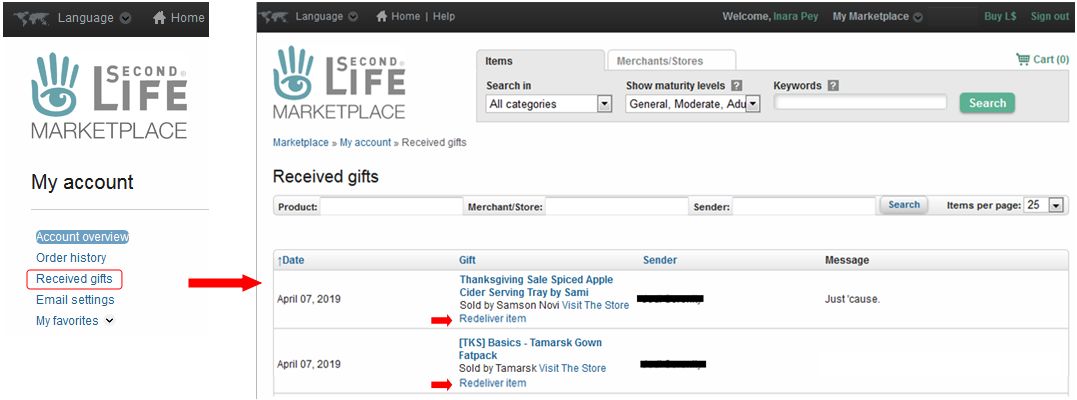
Received Gifts (MP → Account Name → My Account Page → Received Gifts) allows users to review details of the gifts they have received, together with the ability (if applicable) to have a gift redelivered (arrowed). Click to enlarge, if required.

Cloud Migration

The work in migrating Second Life services to the cloud is continuing – but as I’ve noted in other reports on this, it is a long-term project; there are a lot of services that need to be translated from operations within the Lab’s dedicated co-location facilities to provisioning via the cloud well before LL reach the point of attempting to transition simulator servers.

Much of the work in moving these back-end services is being carried out by the web team, with the blog post noting multiple web services are now operated through the cloud while others are either being moved from third-party vendors to an in-house implementation or decoupled from their previous dependencies into stand-alone services ready to be migrated to the cloud.

Even so, as Oz and April Linden have indicated recently, there is still some way to go, and the Lab approaching this work from the perspective of not saying too much about which services have been moved, to avoid user reports of issues being swamped by subjective beliefs that problems “must” be the result of X or Y being transitioned or changed.

Names Changes (aka “Last Names”)

The term “last names” really is something of a misnomer for this project, given it offers users the freedom to choose (and change) any first name, and to select (and change) a last name using pre-defined (and routinely updated) lists of names.  Hence why the Lab’s blog post refers to thework as Name Changes

Within the Lab’s blog post, the following comment on the status of the project is offered:

We’re extremely pleased to say that in the last month we’ve made significant progress in laying the foundations for the long-awaited Name Changes feature.  All of our teams have been working hard on preparing the grid and all of our systems to accommodate account name changes, both first and last. We’re not quite ready to release all the details yet, but suffice to say that if you’ve ever wanted to change up your account name for whatever reason (and we know you have!) STAY TUNED.

This would appear to imply the project may be approaching the point where LL are ready to deploy it. In the meantime, those wishing to catch up on the Name Changes project can do so via these links:

Web User Group

The monthly Web User Group (WUG) meetings allow users to meet with members of the Second Life Web Team to discuss the various SL web properties and services, learn about projects related to them, ask questions, etc. The meetings are a combination of the Voice and text (you’ll generally need Voice to hear responses from the Web Team representatives – questions and comments can be made in local chat if preferred).

As noted in the official blog post, the next WUG meeting is on Wednesday, October 2nd, 2019 at 14:00 SLT. The meetings are held at Alexa Linden’s barn in SL, and the agenda, if set, is available on the WUG wiki page.

Note: you can also find out about all of the in-world user group meetings via the sidebar on the right of this blog and scrolling down to SL User Groups – hover the mouse over the links for quick information on each of them, or click the link to go to the relevant wiki page.

Firestorm 6.3.2: welcome to Bakes on Mesh

On Monday, September 30th, 2019, Firestorm released version 6.3.2.58052 of their viewer.

This release features the awaited support for Linden Lab’s Bakes on Mesh capability, together with a number of Lab-derived updates and updates from the Firestorm Team.

Please note that this update is for Second Life only – see below for more.


Table of Contents

As per usual, this article provides an overview of the more visible updates in the release. Please refer to the release notes for a full list of updates and all associated credits. Also, note that this update means that version 5.1.7.55786 will be blocked from logging in to the Second Life grid in the near future – check the Firestorm blog for updates.

Why No OpenSim Version?

Jessica Lyon, project lead for Firestorm, recently blogged on the situation regarding OpenSim, and some of the steps the team are having to reverse as well as to take in order to offer some level of support for OpenSim unless they can obtain an OpenSim developer to assist with the viewer. For details see OpenSim the Good, The Bad and the Ugly.

At that time, Jessica had been hoping to provide OpenSim support “as is” with future releases of Firestorm – and had planned this to be the case with this release. However, a major issue was found with this release that could result in OpenSim regions crashing.

This will take time to resolve – hence no OpenSim version with this release. Instead, Firestorm will continue to offer version 6.0.2.56680 for OpenSim users. As the 6.3.2.58052 release installs separately to 6.0.2.56680, both versions can be run side-by-side on the same computer for those wishing to access both Second Life and OpenSim.

The Usual Before We Begin

As per my usual preamble:

  • There is no need to perform a clean install with this release if you do not wish to.
  • Do, however, make sure you back-up all your settings safely so you can restore them after installing 6.3.2.
  • Please refer to the official release notes for a full breakdown and changes, updates and credits associated with this release.

Again, please refer to the Firestorm 6.3.2 release notes for details of specific Lab-derived fixes for this release.

Lab Derived Updates

The version of Firestorm brings the viewer to parity with the Linden Lab 6.3.1 code base, with some cherry-picked updates from upstream release candidate versions.

Bakes on Mesh

Simply put, Bakes on Mesh (BoM) allows system clothing layers as used with the “classic” Second Life system avatar – skins, tattoos, underwear, shirt and jacket layers – to be applied to mesh bodies and heads, and without (necessarily) the need for additional applier systems.

The system requires mesh bodies and heads to be “BoM enabled” – and many creators have already updated their products, or are in the process of updating their products to support Bakes on Mesh. In addition, some applier makers are producing applier systems that leverage Bakes on Mesh to apply wearables to mesh bodies and heads – although these may be limited in some respects due to differences between how skin textures and mesh bodies are made).

Through Bakes on Mesh, Linden Lab hopes:

  • Users can avoid the need to use appliers, but can add wearables to their mesh avatar directly from inventory.
  • Creators will be able to simplify avatar mesh bodies and heads by removing the need for some of the “onion” layers. This should – if done – reduce the rendering complexity for bodies and heads, thus hopefully improving people’s SL experience (as avatars won’t be quite so resource intensive or require quite so much “assembly time” when encountering them on logging-on or after teleporting somewhere).

Note that Bakes on Mesh support is required to both use the BoM capability and to correctly view mesh avatars using BoM.

Bakes on Mesh adds new options for applying suitable textures to the baking channels for application on a mesh body by the Bake Service

For more detailed information on Bakes on Mesh, please refer to the following links:

Linden Lab:

Creator-related BoM documentation:

Informative Bakes on Mesh blog post:

In addition, Firestorm has created their own Bakes on Mesh wiki.

External Note Card Editor

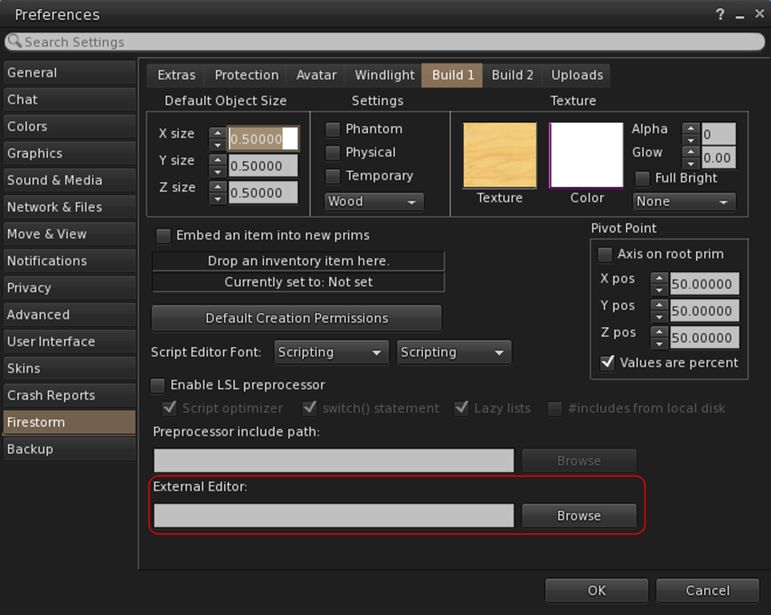
Note cards can now be edited using an external editor.  Firestorm has adopted this as follows:

  • Select your preferred editor:
    • Go to Preferences → Firestorm → Build 1 → External Editor
    • Click Browse alongside the External Editor text entry field.
    • Use the picker to navigate to your preferred text editor and select its .EXE / launcher.
    • Click OK
    • The path to the editor should now be displayed in the text field.
    • This generally only has to be done once, unless you opt to change your preferred editor.
You can now set an external editor when writing / editing note cards
  • To use the external editor:
    • Create / open a note card for editing.
    • Click on the Edit button in the bottom left of the floater.
    • Your external editor will open and load the text.
    • Edit the text as required, and save using the external editor.
    • The edited text will be uploaded to the note card and saved in it.

Notes:

  • There is no charge applied for the upload and saving to the note card.
  • Rich text editing (bold, italic, indentation, etc) used within the external editor will be ignored and the text converted to plain text for saving to the note card.

Other Lab Updates of Note

  • Ability to duplicate a group role – allows you to duplicate a group role so that the copied role has the same permissions and you can just give the copied role a different title (see: BUG-226986).
    • Open the group profile → Members & Roles → Roles → Left click on a role to select it → Click the Copy Role button
  • Animesh objects not being highlighted when viewing objects owned by users in About Land fixed (see: BUG-227240).
  • Animesh objects should now be easier to select (see: BUG-226860).
  • Depth mode snapshots no longer broken when snapshot size is set to anything above current window size (see: BUG-227191).
  • Scoreboards and visitor trackers broken by the last CEF update should not longer be broken (see: BUG-226704).
  • Viewer-side support for playback of sound files up to 30s in length
    • Note this feature is awaiting simulator support to work.
  • The ability to share photos & post to Facebook has been removed from the viewer (see: BUG-225205).
    • This has been broken at the Facebook end for some time, with no sign of being fixed.
  • Build → Texture → Align Planar Faces should now work on normal or specular maps (see: BUG-6489).
  • Under Help → Report Abuse, Gaming Policy Violation has been revised to Skill Gaming Policy Violation for clarity.

Firestorm Updates

Link to Discord

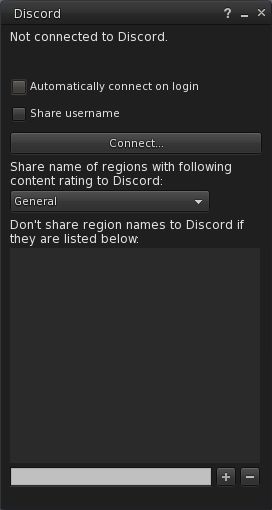
 6.3.2.58052 includes the ability to link your Second Life account with your Discord account. Once connected, Discord will show your Second Life on-line status & session length, and optionally, your user name and location in SL.

Discord floater

Notes:

  • This capability only works with the Discord client – it does not work with the Discord web pages.
  • To work, you must have the Discord client running when attempting to link to it from Firestorm.
  • Both Discord and Firestorm must be running with the same access level (note: it is not recommended you run discord in Admin mode).

To link you SL and Discord accounts:

  • Go to Comm → Discord …
  • The Discord floater opens.
  • In the floater you can opt to:
    • Automatically display you are using Second Life / Firestorm whenever you log-in to the viewer.
    • Display your Second Life user name.
    • Select whether or not you wish to display your location in Second Life, or, if opting to show your location, opt to only display it according to the maturity rating of the region you are in.
    • Create a list of region names you do not wish to have displayed by Discord when you are visiting them, regardless of any maturity rating set in the panel.
  • When you have set your preferences, click the Connect … button.
  • Once connected, you can disconnect from Discord at any time by displaying the panel and clicking Disconnect …

Avatar, Appearance and Inventory

Attachment auto-refresh: Firestorm 6.3.2.58052 adds a timer for automatically refreshing attachments when an attempt is made to kill them after a teleport / region change. It is designed to help resolve issues where your attachments are invisible to observers after a teleport or region change, and provides the same functionality as the manual Avatar → Avatar Health → Refresh Attachments (Alt-Shift-R).

Optionally, if the debug setting FSExperimentalLostAttachmentsFixReport is set to TRUE, Firestorm reports attachments that were attempted to get detached during a teleport or region crossing to nearby chat, followed by reporting “Refreshing attachments…” to nearby chat when the auto-refresh starts.

See FIRE-12004 and BUG-7761.

Profile Links to Force Appearance Change: it has been possible for users to put obfuscated links (e.g. “Photo of me in RL”) in their profile floater that, when clicked by another user, would replace outfit with one of the default outfits from the inventory library.

With this update, such links will no longer work, and the obfuscated link will display as “Wear Inventory Folder”. This matches a similar fix included in the Linden Lab Legacy Profiles folder. See also: FIRE-24262.

Fixes:

  • Removal of the restriction on adding system layers with identical asset UUIDs at the same time (see: FIRE-24334).
  • LookAt target clamping no longer causes your avatar eyes to cross (see: FIRE-24175).
  • The Firestorm Animation Overrider should now work correctly with child prim sits.

General Updates of Note

  • Movement at region crossing: this release fixes the issue of region crossing Predict option (Preferences → Move & View → Movement at Region Crossing) behaving like Stop (see: FIRE-24184).
  • The option Use HTTP For Receiving Textures has been removed from the SL-only version of the viewer’s Preferences.
    • This option forced the viewer to switch from UDP texture fetching to HTTP.
    • As Second Life no longer uses UDP for asset fetching (including textures), the option is no longer required for the SL version of the viewer, thus prompting its removal (see: FIRE-24256).
  • Payment confirmation is now skipped if paying yourself (e.g. paying your own tip jar) – see FIRE-24208.
    • Also fixed a case where the payment confirmation notification would not be shown if the amount would be exactly the remaining L$ balance.
  • FMOD Studio updated to version 2.00.03.
  • RLV updated to RestrainedLove API: RLV v3.2.1 / RLVa v2.2.0.58052.

Feedback

I actually don’t have a lot to report; I’ve been using the Bakes on Mesh betas for some time, and found the BoM functionality works fine after some early hiccups. One or two of the early beta gave some crashes for me, but the 6.3.2.58051/58052 versions (the latter including a minor update from 58051) have between them been stable – although I’ve only had the 58052 version installed for the time it has taken me to write this review.

Related Links

2019 viewer release summaries week #39

Logos representative only and should not be seen as an endorsement / preference / recommendation

Updates for the week ending Sunday, September 29th

This summary is generally published every Monday, and is a list of SL viewer / client releases (official and TPV) made during the previous week. When reading it, please note:

  • It is based on my Current Viewer Releases Page, a list of all Second Life viewers and clients that are in popular use (and of which I am aware), and which are recognised as adhering to the TPV Policy. This page includes comprehensive links to download pages, blog notes, release notes, etc., as well as links to any / all reviews of specific viewers / clients made within this blog.
  • By its nature, this summary presented here will always be in arrears, please refer to the Current Viewer Release Page for more up-to-date information.
  • Note that for purposes of length, TPV test viewers, preview / beta viewers / nightly builds are generally not recorded in these summaries.

Official LL Viewers

  • Current Release version 6.3.1.530559, formerly the Umeshu Maintenance RC viewer, dated, September 5th – No change.
  • Release channel cohorts:
    • Ordered Shutdown RC viewer updated to version 6.3.2.530972 on September 24th.
  • Project viewers:
    • No updates.

LL Viewer Resources

Third-party Viewers

V6-style

  • No updates.

V1-style

  • Cool VL viewer update to version 1.26.22.62 (Stable Branch) and version 1.26.23.15 (Experimental Branch) on September 28th (release notes).

Mobile / Other Clients

  • MetaChat updated to version 1.2.9109 on September 27th (release notes)
  • Mobile Grid Client updated to version 1.25.1270 on September 25th (?) (release notes)

Additional TPV Resources

Related Links

Exploring Kinglet Sound in Second Life

Kinglet Sound, September 2019 – click and image for full size

Designed by amberfff, Kinglet Sound is a recently opened Full region offering visitors the opportunity to escape to a late summer setting where there is a plenty to see – although a little effort in exploration is required order to reveal everything!

To me, the region’s name evokes a location in North America, a place in the wilder, perhaps more northerly aspects of the east or west coat of the United States, or perhaps – if at a slightly higher latitude – just over the 49th parallel north; although there is a fair mix to the region that suggest some of the inspiration for it may have been drawn from elsewhere. The setting is predominantly rugged in nature, with cliffs raising the land to the south and east and through the middle of the region, before allowing it to fall gently away to lower grasslands and sands in the north and the west.

Kinglet Sound, September 2019

A gorge cuts its way diagonally through the landscape from a set of falls to the north-east, slicing its way south and west to the coast. It has also managed to branched to the north, breaching the lower-lying land to form a large body of water, thwarted in its efforts to reach the sea on that side of the island by a low-lying wall of rock. This wall, in part natural, also in places has the look of being carefully built up by unseen hands to expressly prevent that side of the island from being completely overwhelmed by water.

Caught within the bounds of the rock, the lake forms a place for people to relax and enjoy themselves. Decks are built out over the water to offer places to sit, while boats and floats offering more intimate places to snuggle are watched over by swans. On the sands, picnic spots await company, while further places to sit and enjoy company are to be found on the seaward beaches on the far side of the low rocky divide. These face a small island tucked into the north-west corner of the region that holds an altogether more tropical look, and what appears to be a venue for music and dancing.

Kinglet Sound, September 2019

The landing point for the island sits on the uplands, close to the gorge that splits them almost into two. Here, on one side of the divide sits an octagonal pavilion in a field, horse grazing quietly around it, a track from the bridge linking it with the rest of the uplands snaking away down a gentle slope to the shaded lowlands alongside the lake. This trail, crossing the bridge, also runs by the landing point and into a little circle of commercial style properties surrounding a fountain.

Primarily places to eat and / or drink, these little properties are all complete with décor, and together with the seating and other touches outside of them, both welcome exploration and offer places to sit down or for photography. A little south of them, and visible beyond a curtain of trees from the landing point, the ruined wall of what might have once been a very large structure invites investigation. Reached via another path, it stands as a backdrop to another cuddle spot and overlooks a further music venue sitting on the headland that in turn offers an view across the gorge to the highest point of the island.

Kinglet Sound, September 2019

Reached by crossing the single bridge spanning the gorge, this high table of rock has paths curling around it, one rising to the low-slung ranch house occupying its flat peak. Fully furnished, the ranch house is open to the public and offers further seating both indoors and out – including a fine look-out point extending over the cliffs, and another right at their edge.

However, the ranch isn’t the only point of potential interest here. As well as going up, the path cutting into the cliffs also descends, offering a path down to a ribbon of sand and the base of the rocks. The sand curls around to the west and then north, offering further places for couples to slip away from the rest of those visiting the island. Follow it far enough and it will turn to a grassy path that passes under a rocky arch back to reach the north side beaches. When taking this path down and around the base of the cliffs, keep an eye out for a couple of burning torches; the inquisitive might find they betray a secret within the cliffs.

Kinglet Sound, September 2019

All of this is still only scratching the surface of the region’s richness; there are paths and trails around the landscape I’ve yet to mention, both coastal and inland. Follow the sound of a faint guitar as the tune of Greensleeves is played, and it might lead you by way of path and sand to where a little garden cosy sits amidst a copse of trees showing the first hints of autumn with their golden leaves.

Offering an entirely natural look, a rich environment to explore (although it’s a bit of a shame that the “secret” aspect of the region referenced above doesn’t offer one or two little snuggle spots / points of interest) and with multiple opportunities for photography (and a Flickr group through which to share images), Kinglet Sound comes wrapped in a perfect sound scape to present a setting well worth visiting – and supporting by way of a donation at the landing point.

Kinglet Sound, September 2019

SLurl Details

With thanks to Shawn for the LM!

Space Sunday: SpaceX Starship update

A Starship / Super Heavy pairing lifts-off from a dedicated launch facility in this still from an animated video produced by SpaceX for the September 28th, 2019 update. Credit: SpaceX

On the occasion of the eleventh anniversary of SpaceX achieving orbit for the first time with their Falcon 1 rocket on September 28th, 2008, CEO Elon Musk presented an update on the company’s progress developing its massive Super Heavy booster and interplanetary class vehicle, Starship.

It has been some 12 months since the last update on the development of the two vehicles – the last update really being overshadowed by the announcement SpaceX planned to fly a Japanese billionaire and his entourage around the Moon and back (see Moon trips, Mr Spock’s “home” and roving an asteroid for more), and the programme has moved on significantly since then, as indicated by the fact that the 2019 update took place at the SpaceX facilities in Boca Chica and against the backdrop of the first of the Starship prototype vehicle.

Starship Mk1 under construction at the SpaceX facilities near Boca Chica, Texas. Credit: unknown

Since its first public unveiling in 2016, the Starship / Super Heavy combination has been through a number of iterations and name changes. However, it is fair to say that things have now settled down on the design front, and what was presented at Boca Chica is liable to remain largely unchanged, assuming everything proceeds as SpaceX hopes.

In this, the flight capable prototype Starship at Boca Chica is the first in a series of such vehicles. A second is  under construction at the SpaceX facilities in Cocoa, Florida, and three more are planned, one of which will be used to make the first orbital flight within the next 6 months, and Musk suggesting another could be used in a crewed orbital flight within the next 12 months – which sounds exceptionally ambitious. Construction of the two initial Starship prototypes has not exactly been secret: both have been literally assembled in the open. So even ahead of the September 28th event, some were already developing renderings of the new Starship design compared to the last known iteration.

A rendering by Kimi Talvitie comparing the 2018 design for Starship (l) with the prototype (r). The rendering of the 2019 prototype was based on direct feedback from Elon Musk

The new design sees some significant changes in Starship – notably with the fins, canards and landing legs. The 2018 variant was marked by three large fins, two of which would be actuated (hinged for up / down motion relative to the hull) for atmospheric flight, with all three fins containing the vehicle’s landing legs. At the time of that design, I commented that this approach appeared risky: a heavy landing on the Moon or Mars might conceivably damage one of the actuated fins, affecting the vehicle’s ability to undertake atmospheric flight on its return to Earth.

With the new design, the fins are reduced to two and reshaped, both of which are actuated to hinge “up” and “down”. In addition, the landing system is now independent of the fins, removing the greater part of the risk of damaging them on landing. The number of landing legs is also increased to six. At the forward end of the vehicle, the canards are enlarged and hinged in a similar manner to the fins.

Starship’s basic specification. Note the “dry” mass of 85 tonnes is incorrectly stated in the slide: it is expected the production version of Starship will mass around 120 tonnes (the prototype masses around 200 tonnes. Credit: SpaceX

The remaining aspects of the design are more-or-less unchanged as far as the body of the ship is concerned: it will be some 50 metres (162.5ft) in length and have a diameter of 9m (29ft). The forward end of the vehicle will be given over to crew and passengers or cargo (or a mix of the two), although Musk now estimates the vehicle will – with the aid of the Super Heavy booster – be lifting up to 150 tonnes to low Earth orbit – an increase of roughly a third – and return up to 50 tonnes to Earth.

To help achieve this, the motor system has been slight revised. While six engines will still be used, three will now be optimised for vacuum thrust, ideal for orbital flight and pushing the vehicle out to the Moon or Mars, and the remaining three optimised for sea level thrust and capable of being gimballed for use during a descent through an atmosphere and landing.

Starship’s motor arrangement: three central Raptor engines optimised for sea level thrust and capable of gimballing and three outer vacuum optimised motors with fixed, large diameter exhaust bells for maximum efficiency. The “boxes” visible in the rendering are potentially additional cargo bins. Credit: SpaceX

During the presentation, Musk explained the rationale behind the use of 301 cold rolled stainless steel in the design, noting a number of reasons. Firstly, the cold rolling process results in a stronger, light finished product, and this becomes even stronger when exposed to the very low temperatures of cryogenic fuels. Thus, Starship and Super Heavy in theory have a structural strength equitable to that of carbon composites – but at a much lower overall mass.

Secondly, the cold rolled steel has very high melt temperatures, reducing the amount of direct heat shielding required, again reducing the vehicle’s overall mass. It is also both highly corrosion-resistant and easy to work with. This means that basic repairs to a vehicle on the surface of the Moon or Mars could be effected, or even that a Starship could even be dismantled and the steel from the hull re-purposed. Finally, there’s the fact that all these advantages are gained in a product costing around 2% that of an equivalent mass of carbon composite.

Starship Mk 1 filmed during the September 28th livestream event. Credit: SpaceX

In terms of heat shielding, the “windward” side of Starship (the side facing the fictional heat of entry into an atmosphere) will be coated with lightweight ceramic tiles. Somewhat similar in nature to those used within the space shuttle, they will be of a hardier material and less prone to damage. The re-entry profile was also discussed, with Musk comparing Starship to a sky diver.

To explain: the vehicle will approach the atmosphere at a relatively high 60-degree incidence, using the heat generated by contact with the upper atmosphere to slow its velocity from Mach 25 to a point where, once within the denser atmosphere, the vehicle is literally falling more-or-less horizontally. The fins and canards can then be used to maintain the vehicles orientation in a similar manner to that of a sky diver using his arms and legs. in addition, the lift generated by fins and canards will further help slow its descent until, roughly 2 km above the ground, the vehicle will rotate to a vertical position and use the three gimballed Raptor motors to make a propulsive, tail-first landing.

SpaceX plan to offer Starship in support of lunar operations – but the company’s goal is to establish a permanent human presence on Mars. Credit: SpaceX

Starship Mk 1 is equipped with the same sea level optimised Raptor motors as intended for the production vehicles.  SpaceX hope to see it make at least one flight before the end of the year – although the company has yet to secure a permit from the US Federal Aviation Authority to commence flights. This first attempt will be to an altitude of around 20 km (12.5 mi) before a descent and landing. If successful, the test programme involving the various prototype vehicles will unfold from there.

Continue reading “Space Sunday: SpaceX Starship update”

This week at Seanchai Library in Second Life

Seanchai Library

It’s time to highlight another week of storytelling in Voice by the staff and volunteers at the Seanchai Library. As always, all times SLT, and events are held at the Library’s home at Holly Kai Park, unless otherwise indicated.

Sunday, September 29th

13:30: Tea Time with “Last Words”

We live in an age in which words are disappearing from the daily lives of children content to live before screen and game console. Words like dandelion, otter, bramble, acorn and lark that represent the natural world of childhood, a rich landscape of discovery and imagination lying beyond back doors and into which children seem to venture with increasing rarity.

The Lost Words, combining thoughts and poems by British nature writer Robert Macfarlane and illustrated by artist and author Jackie Morris, stands against this loss of wild childhood times. It is a joyful celebration of the poetry of nature words and the living glory of our distinctive, British countryside. Call it a book of spells, if you will, seeking to conjure back the beauty and wonder of nature that is fading from childhood lives, whilst reminding parents of the precious fragility and marvellous joy of the natural world.

In July 2019, July eight leading folk musicians released their response to the creatures, art, and language of The Lost Words, and in this special session at Seanchai Library, Caledonia Skytower and Elrik Merlin celebrates both the book and those responses in Second Life.

Lost Words – Sunday, September 29th, 2019

18:30: Tilly and the Bookwanderers

Eleven year-old Tilly has lived above her grandparent’s bookshop ever since her mother disappeared shortly after she was born. Like the rest of her family, Tilly loves nothing more than to escape into the pages of her favourite stories.

One day Tilly realises that classic children’s characters are appearing in the shop through the magic of `book wandering’ – crossing over from the page into real life.

With the help of Anne of Green Gables and Alice in Wonderland. Tilly is determined to solve the mystery of what happened to her mother all those years ago, so she bravely steps into the unknown, unsure of what adventure lies ahead and what dangers she may face.

Join Caledonia Skytower at the Golden Horseshoe to find out more!

Monday, September 30th 19:00: Moonheart

Gyro Muggins reads Charles de Lint’s 1994 novel.

When Sara and Jamie discovered the seemingly ordinary artefacts, they sensed the pull of a dim and distant place. A world of mists and forests, of ancient magic, mythical beings, ageless bards – and restless evil.

Now, with their friends and enemies alike–Blue, the biker; Keiran, the folk musician; the Inspector from the RCMP; and the mysterious Tom Hengyr; Sara and Jamie are drawn into this enchanted land through the portals of Tamson House, that sprawling downtown edifice that straddles two worlds.

Sweeping from ancient Wales to the streets of Ottawa today, Moonheart will entrance you with its tale of this world and the other one at the very edge of sight and the unforgettable people caught up in the affairs of both. A tale of music, and motorcycles, and fey folk beyond the shadows of the moon. A tale of true magic; the tale of Moonheart.

Tuesday, October 1st 19:00: The Spooky Classics

Halloween is approaching and for the next few weeks, Caledonia Skytower will be reading ghostly stories from some of the classics of the genre. Each week features a different author associated with tales of the macabre, Gothic, or just plain spooky. This week: Washington Irving, with Corwyn Allen joining Cale.

Wednesday, October 2nd: 19:00 Anne of Green Gables

As soon as Anne Shirley arrives at the white farmhouse called Green Gables, she is sure she wants to stay forever. The problem is, the owners of Green Gables, Matthew and Marilla Cuthbert wanted a boy to help Matthew with household chores; so at first it seems as if she will be returned to the orphanage from whence she came.

However, Anne is determined to stay, trying hard not to get into trouble or speaking out of turn, and the Cuthberts come to realise she is someone blessed with an enormous imagination. The latter is especially noticed by the quietly-spoken Matthew, who persuades his sister that young Anne should stay.

Thus we are drawn into Anne’s life and world as she settles into her first real home. Over the course of a five year period from her arrival in Bolingbroke at age 11 through until her move to Queen’s Academy at the age of 16, where she earns a university scholarship, we follow Anne’s adventures and ups and down within the close-knit community, making friends (and sometime enemies whom she is perhaps too stubborn to admit she’s long since forgiven for perceived wrongs) and her domestic trails and tribulations. The later, when tragedy strikes, we follow her back to Bollingbroke, where she indeed becomes Anne of Green Gables, and her story is left open.

Join Faerie Maven-Pralou as she reads L.M. Montgomery’s 1908 classic (and first of a series).

Thursday, October 3rd

19:00 The Bride of Frankenstein

Shandon Loring reads Guy Preston’s adaptation of the 1935 screenplay of the same name. Also in Kitely – teleport from the main Seanchai World grid.kitely.com:8002:SEANCHAI.

21:00: Seanchai late Night

Contemporary Sci-Fi-Fantasy from on-line sources with Finn Zeddmore.