Nitroglobus Roof Gallery: Dido Haas – Fade to Grey
It was back to Dido Haas’s Nitroglobus Roof Gallery for me for the second of the May / June exhibitions on offer there. Fade to Grey, offered within Dido’s space at the gallery is an exhibition of Dido’s own images, all of which have been rendered as monochrome pieces, with some additionally post-processed to give the impression of drawings.
Dido is perhaps best known for her curation of Nitroglobus Roof gallery where – as I’ve oft stated in these pages – she is able to encourage artists from across Second Life to present exceptional exhibitions of their art. She is also, again as I’ve noted, a gifted photographer-artist herself. What may be less well known is that she is a blogger and Second Life traveller.
Since July 2009 I put a lot of my SL time in writing for my blog ‘Exploring SL with Dido‘, however the emphasize shifted more and more from text to images. In line with this I started to place my best blog images and more private photos in my Flickr account … Being so busy with curating the gallery, I have little time left to make images myself … But sometimes when I am in the right mood I do make images, most of them black/white.
– Dido Haas
N
The eight images reflect Dido’s talent for black-and-white images and her love of exploration. They have been captured in various regions around Second Life, including Furillen, Quoted Memories and AEAEA islands. However, seven of the images are all very much studies in narrative, the focus being both Dido herself, and the embodiment of mood and emotion, while the eighth is presented as a self-portrait, finished as a drawing, an arm stretched forward as if in greeting / encouragement. All of them together offer an invitation for us to step into Dido’s Second Life and share in both her artistic view of our digital world and in her personal time in-world.
Small in size, intimate in content, Fade to Grey is a warm exhibition that can be enjoyed for itself – and for those who might like to, Dido suggests viewing the exhibition whilst listening to the most successful single released by British synth-pop group Visage, and which has the same name as the exhibition (and, as it was originally written as an instrumental piece, there’s also this version, if you prefer).
Nitroglobus Roof Gallery: Dido Haas – Fade to Grey
The following notes were taken from my audio recording and chat log of the Content Creation User Group (CCUG) meeting held on Thursday, May 4th 2022 at 13:00 SLT. These meetings are chaired by Vir Linden, and their dates and times can be obtained from the SL Public Calendar.
This is a summary of the key topics discussed in the meeting and is not intended to be a full transcript.
Official Viewers Update
On Wednesday, May 4th, the de facto release viewer was updated to version 6.5.5.571282, formerly the MFA RC viewer, dated April 26. See my notes on this viewer here.
On Thursday, May 5th, the Performance Improvements RC viewer updated to version 6.6.0.571507.
The focus for this viewer is now bug and crash fixes, rather than adding functionality.
This update also sees the viewer merged with the release viewer MFA code base, and so will require anyone who uses MFA and who has not logged-in to Second Life using an MFA token to do so -follow the link above for details.
The rest of the official viewers remain as:
Release channel cohorts:
Makgeolli Maintenance RC viewer (Maintenance M) viewer, version 6.5.5.570983, April 26.
Project viewers:
Performance Floater project viewer, version 6.5.4.569531, March 18.
Mesh Optimizer project viewer, version 6.5.2.566858, dated January 5, issued after January 10.
Legacy Profiles viewer, version 6.4.11.550519, dated October 26, 2020.
Copy / Paste viewer, version 6.3.5.533365, dated December 9, 2019.
Graphics Update
During the previous CCUG meeting, the potential direction for Physically Based Rendering (PBR) materials support was discussed at length, and concerns were raised that for PBR to be effective, SL’s lighting / reflections model would need to be updated.
As a result, these branches of work have commenced:
The foundational work in creating a materials type with an associated inventory asset, as per the week #16 meeting. This will initially comprise the ability to copy a texture entry (with its specific parameters) to inventory.
Foundational work on the PBR graphics pipe in the viewer.
Work on an implementation of reflection probes which can be used both with PDR shading and with legacy content. This formed the focus of this meeting.
Reflection Probes
Runitai Linden envisages two forms of reflection probes:
Those that are part of a scene’s environment and are automatically placed, but which can (hopefully) be adjustable by scene builders – this is the current focus of the work, with the reflection probes married to the octree so they will align with octree nodes.
Reflection probes which can be specifically placed within structures by their creators (e.g. a probe within each room of a house) or which can be created and added to a legacy structure.
These would override “environment reflection probes” to prevent clashes (so that, for example, your nice shiny kitchen worktop is not reflecting the sky outside, but is offering reflections of the static objects on and around it.
Their size would be based on the volume they are attached to, which would allow for parallax correction, allowing the reflections to be accurately generated within a room space.
“Environment reflection probes” used with legacy content: on the left, shiny surfaces of a prop engine as most of us are used to seeing them today. Right: the same engine but with its shiny surfaces now showing reflections generated via a reflection probe in the scene. Credit: Runitai Linden
These probes:
Comprise an object (prim) defined as a reflection probe which essentially uses the 360º snapshot code viewer to produce a cube map of its surroundings with each face set to 512×512 resolution (so 6 x 512×512), which can then be used to generate object “reflections” on surfaces within their volume of control.
This will require some additional checkboxes to be added to the build floater / viewer, but otherwise means probes can be inserted into “indoor” scenes using the existing build toolset.
Capture everything except avatars (so no reflections of your avatar walking past a shiny surface).
Initially trigger the generation of their cube maps by the viewer on entering a scene.
Maps are cached on disk, with up to 64 held in memory.
Currently only 8 maps are active at any one time. However, given sampling of just 8 maps for rendering can take up to 70% of an RTX 3080 GPU, this number is likely to be dropped to 4, unless a more targeted means of sampling for a given pixel can be determined.
Are updated whenever the number of objects in them changes or the Day Cycle changes, although the update rate is no more than one probe per frame.
Glossiness and reflection probes: in this image, the centre left row of spheres have a white face, and the centre right all have black faces. Each pair, front-to-back, has a matching and increasing level of glossiness applied. Note how the greater the amount of glossiness, the sharper the reflections of the probe’s cube map. Credit: Runitai Linden.
The overall aim of this work is to provide a means to support more physically accurate reflections in SL than can be currently generated (seen as a requirement for PBR support). This work can then both:
Be integrated into the PBR work as that is added to Second Life.
Improve the existing SL environment map so that legacy content does not clash with PBR content as badly as might otherwise be the case – although it will not be a perfect blending of the two.
However, it will be “very, very hard for this to not break [some] content”, although the overall result should improve so SL looks.
Given this, the capability will need a lost of assistance with testing.
Concern has been raised about how to limit / control the use of probes so as not to cause potential performance issues (e.g. by creators including a probe with all of their products that have a shiny / reflective surface).
The plan is to have every single pixel in a rendered scene covered by at least one probe via the automatic placement, so objects that are outside certainly should not need their own reflection probes.
Even so, it has been suggested that time is taken to produce a “best practices” guide to using reflection probes and to provide examples of bad probe set-ups.
It was also suggested that a flag for “do not reflect” should be provided to help control what is included in a cube map in a given setting. It was not clear if this would be possible, so the question was set aside for the next meeting.
General Notes:
This work is still in its early stages, and elements may change.
Several aspects of reflection generation have yet to be tackled (e.g. handling 100% transparent and 100% alpha textured surfaces).
The work has yet to be tied-into the existing graphics controls in the viewer so that everything works consistently and logically.
Some of the additional work required for generating reflections might be compensated for by optimising other elements of the shader system as this work progresses.
At some point this work will be available within a project viewer for testing on Aditi.
Note: while reflection probes formed the core of this meeting, this does not mean this work will be shipped ahead of the more PBR-related work. All three project branches are in their early stages, and so no decision on prioritisation among them has been taken.
PBR-Specific Work
The PBR graphics pipe is still being plumbed-in.
No work has really started with the PBR shader set.
The plan is still to follow the glTF specification.
As this embraces the PBR Metallic Roughness workflow, this will be the first to be supported.
If demand surfaces, LL might add Specular Glossiness as a follow-up.
B sori is the name given to a Homestead region by holders Len (Len Mercury) and Twin Clover (poemnletters) that offers a glorious, almost mystical setting well deserving of its About Land description:
Peaceful ⋮ Dreamy ⋮ Romantic ⋮ Lonely ⋮ Nostalgic ⋮ Lost ⋮ Homey … leave your precious memories with your heart
The core of the region sits as a deep crescent of a sand-and-grass reef rising from calm waters and sits under a sky that forms a surrounding dome speckled with the points of distant stars and across which clouds seem to creep spirit-like. Sunlight streams down from above and the waters around the land glow as if washed by a low-lying mist that adds the first sense of mystery to the setting.
B sori, May 2022
The landing point sits at the broadest curve of the island’s sweep, where a cluster of wooden building sit, some with closed walls, others open-sided , the majority of them sitting up on stilts or on old shipping containers in what appears to be a retreat above the sand that has grown organically over time, rather than being intentionally planned. Shaded in part by tall willows and shrubs growing on the roof areas, it is fronted by a broad deck and old terrace while to one side and under the shade of the trees grows a wild garden with potting shed and birdhouses.
Sweeping away from this home-built structure, the arms of the island curve outwards to point towards the north-east, cupping a shallow bay within their protective embrace. Each arm has its own attractions: to the west lay the most enticing wash of blue and flowers, grasses and shrubs in which more colours – yellow, lavender, white, teal – emerge as one walks towards it, a single tree spreading its boughs over the flowers.
B sori, May 2022
An old greenhouse can be found alongside this tree, apparently caught in an instant in time: outside of it blue and white butterflies hang in the air, their stilled wings caught in mid-beat as this rise like a glistening streamer out over the waters of the bay. Within the greenhouse, a little group of butterflies flutter and circle untouched by whatever has frozen their brethren outside. Beyond this, the path continues to the end of the island where another greenhouse offers a further retreat, nestled in the arms of a raised steel walkway.
Travel in the other direction, and a short walk will bring visitors to a shaded deck sitting over the water and a semi-collapsed boardwalk that leads to a small sandbank with more places where people can sit, relax and reflect.
Out on the water, the mist-like glow is actually floating fields of glowing white spider lilies sitting as a garden sitting above the ripples of waves. Spreading out towards the edge of the region, these lilies are home to more places to visit: an iron gazebo, glass piano within; a bed beneath a metal pavilion frame and, furthest from the main island a floating garden of more “traditional” flowers, trees and grass, the home to a little bus shelter. Those worried about getting feet wet when trying to reach or walk through these garden spaces need not fret: the way over the water is quite dry, providing you follow the path.
B sori, May 2022
Those who need the comfort of a cuddle but have no-one to give them one need only look to the sky over these water gardens to where a globe floats, vines and grass growing within and through it. Sitting inside it and at home on the grass is a large teddy bear who is more than happy to give and receive a hug!
Throughout this deceptively simple-wounding region design is a wealth of detail I’ve not touched on here, but can be appreciated by all who visit. Such detail includes the décor around the landing point and within the buildings, where it mixes with the furnishings to give the structures a rich sense of life and of being used. Further out, there are many more touches and places to sit, whilst the paths out over the spider lily fields are watched over by exotic dandelion-type plants.
B sori, May 2022
A delight to visit and photograph – and use as a backdrop for avatar photography – B sori is a genuine jewel of a region design and a visit is thoroughly recommended.
In September 2021, Linden Lab introduced Multi-Factor Authentication (MFA) as an opt-in service to provide additional account security to users who wish to use it.
The implementation was promised to be the first pass at MFA within Second Life and its services, and the capability would be extended and enhanced over time.
On May 4th, 2022, and as part of extending the current MFA implementation, the Lab announced that MFA is now officially a part of the Second Life Viewer (SLV), with the promotion of the MFA RC viewer to de factorelease (and download) status.
This means:
Anyone who has opted-in to MFA will be required to provide an authentication token the first time they log-in to Second Life using this viewer.
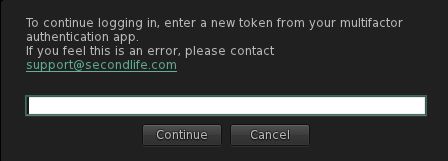
The token is requested after the user name and password have been entered, and should be generated using the preferred authentication app before being entered into the field shown below.
The MFA token prompt, displayed after entering your user name and password into the viewer
Once a valid token has been entered, clicking Continue will complete the log-in process.
Important Notes
Once a token has been entered into the viewer, it will remain valid for 30 days – so you do not have to provide a token every time you log-in to the viewer.
However, after 30 days, the token will expire, and the viewer will once again prompt you for a new token when logging-in.
Some authenticators generate their token as 2 groups of 3 digits (e.g. XXX YYY). Where this is the case, you can enter the code with or without the space.
Third Party Viewers (TPVs): MFA does not currently extend to TPVs, so if you are a TPV user and have opted-in to MFA, this functionality will only apply to you afteryour preferred viewer has updated to the MFA viewer code base.
Linden Lab is allowing all TPVs a “grace” period to adopt the MFA code.
Again, if you have not opted to enable MFA on your Second Life account, logging-in to Second Life, regardless of the viewer you use, will not change.
You can also disable MFA on your account and viewer log-ins by opting-out (Account → Multi-Factor Authentication, entering a code from your app and clicking on the Remove MFA button).
Sunday, May 1st, 2022 saw the opening of a new iteration of Bryn Oh’s Lobby Cam, a brand new iteration of an installation first unveiled in 2015 (see: Bryn Oh’s Lobby Cam).
As with the majority of Bryn’s work, Lobby Cam is set within a narrative universe she has created, and so sits with her two other installation currently available for public viewing: an updated version of Hand (which I reviewed in 2020), and the more recent The Brittle Epoch (reviewed here). Made possible by a grant from the Canada Council for the Arts, Lobby Cam is an entirely new build – new mesh models, soundscape, scripting – and a new narrative for visitors to follow.
My artwork in Second Life is one long narrative which began in 2009. Each new work I create is a chapter in this story, and in the case of Lobby Cam it is 110 years before the events of the Brittle Epoch and Hand which are being exhibited within the Immersiva and Bryn Oh regions.
– Bryn Oh
Bryn Oh: Lobby Cam, May 2022
As is common with Bryn’s work in Second Life, a visit to the installation commences at a set landing point. Here, for those who have visited Bryn’s work previously, a HUD can be obtained with a simple click, and will attach towards the top right of the viewer window. Those new to Bryn’s work or who have opted to previously tell the viewer to “Forget” they are a part of it, will need to join Bryn’s local Experience in order to access and use the HUD as intended.
Click the top right icon when the HUD – which is a diary – is “open” and it will minimise to free up screen space. Click the icon to expand it again.
An eccentric man discovers an impossible channel on his TV. This begins a story where you determine the ending.
– Bryn Oh on Lobby Cam
Bryn Oh: Lobby Cam, May 2022
Pass beyond the walls of the landing point, and those who remember the original Lobby Cam will doubtless recognise the sea of wheat within its fenced fields and the distant, hulking form of grain elevator 888. Originally built in Keatley, Saskatchewan in the late 1920s, the elevator formed a part of the Saskatchewan Wheat Pool, although it has since been relocated and serves now as a museum. However, just as the real elevator served as a local focal point in its day, so too does Bryn’s version of it in Second Life, beckoning people to hurry towards it.
However, giving it to such a temptation will result in visitors missing some key elements in Lobby Cam. As Bryn notes, this is an unfolding story, key elements of which are formed by missing pages from the diary HUD. These are scattered on the ground in various places (such as the path leading away from the landing point and the road pointing towards the grain elevator. Clicking on one when found will “add” it to the diary (the HUD icon will turn to colour). Opening the diary (if closed) and paging through the pages by clicking on them will reveal the entries as they are “added”.
Bryn Oh: Lobby Cam, May 2022
As well as the grain elevator, there are other new elements within the installation – such as the low barn sitting in the middle of one of the wheat fields. These should all be visited, wherever they lay (so sit well out in the landscape) and touched – as Bryn notes, people should pretty much click on everything, inside the grain elevator and outside of it – as some will be interactive and offer up secrets (such as links to Bryn’s videos) or objects.
Key among the latter are an envelope, pen, ink, and paper. Collect them alongside the pages of the diary, and you can further involve yourself in Bryn’s universe by interacting with another of her characters, Fern, as she explains:
[With them you can] write a letter from the main character [of Lobby Cam] to Fern. If you click the red mailbox on the train platform you can send this message to me directly by e-mail. I will respond to all letters sent and this will end the story. Depending on what you write. I will write as Fern would reply to your message.
– Bryn Oh on Lobby Cam
Note that Bryn’s replies really are individually written in response to your own words, not pre-prepared responses. Also, please keep in mind the last time she did this, she received several hundred e-mails, so it understandably took her a little time to respond to all of them!
Finished to resemble a painting – the use of the elevator, if I recall correctly from 2015, having been inspired by a painting Bryn either saw or created (my apologies to her for forgetting which, or possibly mis-remembering), Lobby Cam is deceptive in all it has to offer, and as such, is definitely more than work seeing. For those who need additional context, both Hand and The Brittle Epoch are also open to viewing, SLurls below.
With thanks to the Canada Council for the Arts for their continued support of Bryn’s work.
The following summary notes were taken from the Tuesday, May 3rd, 2022 Simulator User Group (SUG) meeting. It forms a summary of the items discussed and is not intended to be a full transcript. A video of the entire meeting is embedded at the end of the article for those wishing to review the meeting in full – my thanks to Pantera for recording it.
Tuesday, May 3rd saw the SLS Main channel updated to server release 571166, which includes:
A new LSL function llGetVisualParams(). Returns a list of avatar appearance details for a given agent.
New options for llGetParcelDetails(): PARCEL_DETAILS_LANDING_POINT, PARCEL_DETAILS_LANDING_LOOKAT, PARCEL_DETAILS_TP_ROUTING, PARCEL_DETAILS_FLAGS, PARCEL_DETAILS_SCRIPT_DANGER.
New options for llGetObjectDetails(): OBJECT_MATERIAL, OBJECT_MASS, OBJECT_TEXT, OBJECT_REZ_TIME, OBJECT_LINK_NUMBER, OBJECT_SCALE, OBJECT_TEXT_COLOR, OBJECT_TEXT_ALPHA.
New options for llGetEnv(): “agent_limit_max”, “agent_reserved”, “agent_unreserved”.
Wednesday, May 4th should see all RC channels updated with a new new infrastructure server that sees an update to code housekeeping within the simulator, but should not result in any user-facing changes.
Available Official Viewers
The current official viewers are as follows:
Release viewer: version version 6.5.4.570575 – formerly the Lao-Lao Maintenance RC viewer, promoted Monday, April 18 – No change.
Release channel cohorts:
Makgeolli Maintenance RC viewer (Maintenance M) viewer, version 6.5.5.570983, April 26.
Performance Improvements RC viewer version 6.6.0.570163, dated April 4, issued April 14(?).
Project viewers:
Performance Floater project viewer, version 6.5.4.569531, March 18.
Mesh Optimizer project viewer, version 6.5.2.566858, dated January 5, issued after January 10.
Legacy Profiles viewer, version 6.4.11.550519, dated October 26, 2020.
Copy / Paste viewer, version 6.3.5.533365, dated December 9, 2019.
In Brief
The fixes for off-line Group and Friend invites were due to go to an RC update this week, but have been delayed pending further testing.
BUG-231582 – “Newly rezzed objects are invisible after relog under certain circumstances”: a fix is in development and should be appearing in an upcoming simulator update.
BUG-232107 – “Bring back fun Sim Channel Names” – the simulator RC channel names (e.g. LeTigre, Magnum and Bluesteel for the main three, plus the likes of Cake, Ferrari, etc), were all obfuscated some time back.
The reason for this was that people would frequently assume the simulator channel on which their region was running to be the cause of any issues being experienced, and insist their region be moved to another channel – even if that channel was using the exact same simulator release.
However, the obfuscation has caused an equal amount of confusion for some and added the need to constantly cross-reference simulator version numbers when troubleshooting, ergo this request has been made to revert the obfuscation, something that the server engineering team indicated they might be willing to entertain at the week #17 meeting.
There was an extensive discussion on making EEP more robust for estate owners by allowing better control of the environment through script objects (which essentially send out region settings every 2 minutes and request viewers switch to them). Some of this work may be addressed by Rider Linden in the near future, and details supplied when this happens.




 Inara Pey: Living in a Modemworld