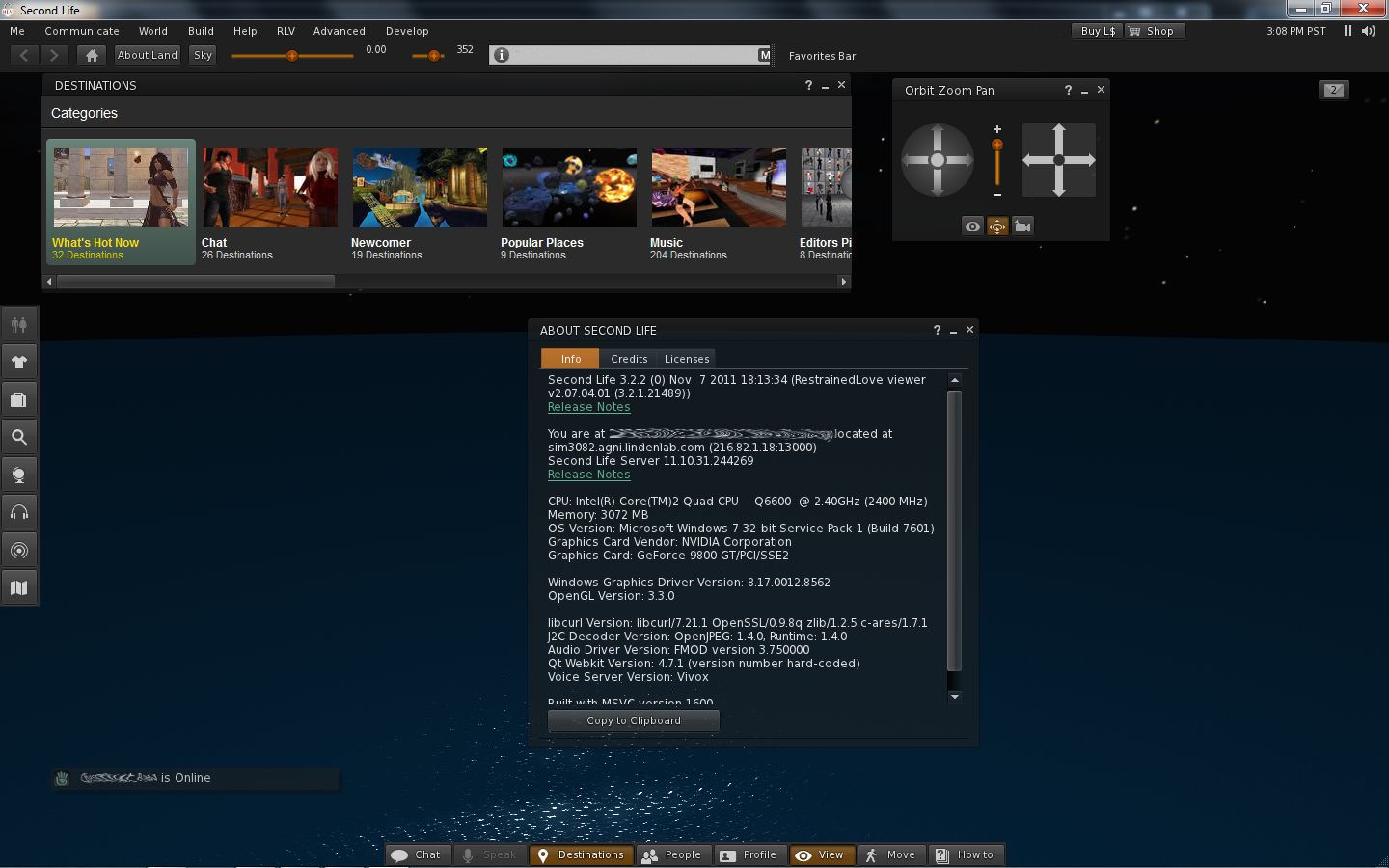
For RLV users wishing to try-out the new Viewer 3 UI, there is news: Marine Kelley already has a version of RLV out which incorporates the new UI and other bits.
RLV Viewer with new V3 UI
The Viewer, built on the 3.2.2 (0) release of November 7th, includes the new UI presentation of buttons, notifications appearing up in the top right corner (see image), Destination Guide open by default, and so on.
Additionally, it retains the RLV menu option and includes a couple of familiar sliders seen in other TPVs up in the Navigation Bar: the avatar offset and the Draw Distance (the latter of which I’ve always appreciated in those TPVs that have it in difference to a Quick Preferences button), as well as including the ABOUT LAND and SKY buttons.
Unlike the latest versions of the official Viewer, the mini-location bar is displayed in addition to the Navigation Bar / Favourites Bar, rather than the option allowing you to toggle between the Navigation / Favourites and the Mini-location. Being the (0) release means the Viewer doesn’t have the new snapshot floater – but given the speed with which Marine got this version out, one supporting the floater may not be far behind!
Performance-wise, on my usual machine the Viewer is on a par with the latest 3.2.2 release, coming in with an average fps around 20-22. Some have reported teleport issues with 3.2, I’ve not encountered any myself – and certain none in this Viewer while hopping around the place.
There’s not a lot to review here that I’ve not covered elsewhere when it comes to the new UI (see the link at the top of this post). All I can say is, kudos to Marine on the speed of her response with the release, and if you are curious about the new UI and want to give it a go but don’t want to crack out of RLV – now you can!
The latest Development – 3.2.3 (244722) Nov 8 2011 – and Beta – Second Life 3.2.2 (244666) – Viewers include a new snapshot floater that presents a set of simplified controls and some new features.
Snapshot folder – old (l) and new (r)
Send Snapshots to Your Feed
There is a button to send any snapshot directly to your feed ay my.secondlife.com. There is no charge associated with this option, and clicking the button allows you to:
Set the image size
Optionally include a caption for the snapshot and the location where the picture was taken
E-mail Revised
The option to send an image via e-mail has been revised; clicking on the button now opens the message options in the snapshot floater, rather than in a separate floater, and buttons allow you to toggle between the message view and the image settings.
Advanced Options
The advanced options for snapshots are now access by clicking the right-pointing chevrons at the top of the floater. Here you’ll find the familiar check boxes for including the interface and your HUDs in an image, and to set the auto-refresh function. However, there are two options some might not be familiar with that are worth mentioning.
Colour / Depth
Available when saving images to your computer via the drop-down menu, this option allows you to take a full colour image or something more atmospheric. The DEPTH option appears to work with the Viewer’s DoF (Depths of Field) option active in the PREFERENCES -> GRAPHICS tab. Examples of both settings are below.
Save options: Colour (l); Depth with Viewer DoF active (m); Depth with Viewer DoF disabled (r) – note loss of detail in (r)
Freeze Frame
This is probably the feature that will excite most people. Check the option will switch the Viewer to full screen mode, and freeze what you are seeing in-world while allowing you to position the camera for the shot you require!
With freeze frame active, you can pan, orbit, zoom until you’re satisfied, then take the shot. Clicking the refresh bution with the option active will update you screen to the last moves made by any avatars / moving objects in view.
All told, this is a very well-presented update with some fun new features. I like it!
With thanks to Opensource Obscure
Update 11th November
As has been pointed out – I’d somehow missed the fact that freeze frame has been around a while; as has, tbh the colour / depth options. Put this down to me staying up far too late at night looking at things when I should be a-bed!. Article revised to reflect these errors.
Quick note: A couple of other blogs have linked to this piece as a review of the new UI. If you are looking for a review, you can find mine here. This article only references the fact the new Viewer is released, and doesn’t carry any specifics.
Well, well.
After blogging yesterday that Viewer 3.2 had reached Beta – lo and behold, and with no fanfare whatsoever, it’s released!
Apparently there was a blog post about it that Tateru spotted on Monday, but it appears to have vanished into the sub-etha.
Version 3.2.0 (244443), dated Nov 3rd, doesn’t have the latest revisions that the Beta release has – there is no Destination Guide open by default, and there are no translation options on the Chat Preferences, nor does Inventory have the Direct Delivery revision (not surprising, given yesterday’s announcement). The new attach points (Neck and Centre) have yet to appear – although they are in the Beta, so expect them & translate, etc., shortly.
However, everything else I covered in my First Looks piece on the new UI is there – including the direct-to-marketplace shopping button top right of the screen which is liable to annoy many who have in-world shops.
3.2.0 UI
I’m not sure when on Monday the switch-over occurred; I’ve been checking the download page daily of late (sometimes more than twice), and when I downloaded the latest Beta, the release Viewer was still 3.1.2.
Short Random Thoughts on the UI
Given we have a button-based UI, I’m not going to suggest anything radical, but here are some thoughts:
Make the Chat bar optionally “sticky” so that if positioned over the bottombutton area, it displays a-la V1, without the floater surround (i.e. so the “nearby chat” floater title and X to close vanish). This would:
Reduce screen space used by the bar
Allow a further V1-like feel to the Viewer, helping those moving over from V1 feel more at home
Add more button options for greater flexibility, for example:
Environment settings to access the Environment Settings floater (and add sun positions as buttons on the floater)
Quick Preferences button, a-la Phoenix / Firestorm, that provides access to frequently used options such as the Draw distance, Particles count, Height offset, Physics and LOD sliders, etc, and WindLight presets
Button floaters were an idea that crossed my mind as well, but I’m not convinced they’d be a benefit.I hope the code is such that TPVs adopting the UI can add their own buttons easily enough.
I’m a little surprised that the improved camera controls / floater still hasn’t appeared and can’t help wondering what LL are doing with it.
Would also be nice at some point to see some form of client-side AO option included in the Viewer. TPVs have these as standard, they don’t impact on the sales of AOs (as people still need the walks, etc.). On that subject, LL, isn’t it about time the default waddle was reworked into something of a “unisex” walk?
Anyway, random thoughts aside, if you’ve not given the new UI a test, I recommend you do, even if you’re not a regular official Viewer user – it’s worth a look-see, and even if buttons aren’t to everyone’s liking, they at least allow a greater flexibility of approach to screen layout – and even allow a sort-of pseudo Viewer 1.x layout.
Updates: 9th November
Two excellent JIRAs on the UI have been raised, and they are certainly worth Watching (which, as we all know, is the new Voting – although putting in a vote as well won’t do any harm!)
VWR-27388 – make all menu options draggable to the button areas – thanks to Pat Perth
VWR-27455 – make button groups repositionable within the button areas (i.e. move to left/right or top/bottom edge of placement areas – thanks to Gwyneth Llewelyn
I’ve also raised a JIRA for the addition of a “Quick Preferences” button to access specific sliders: VWR-27457.
As most know, changes to the Google translation services are coming. The v1 service was depreciated in May of this year while free access to v2 service was discontinued for “new” application requests on the 24th August (access switching over to their paid service), with all existing access to the free service started prior to the 24th August due to be discontinued from December 1st.
The Lag – via Oz Linden mulled over alternatives for a time, via JIRA, and this has resulted in two options for continuing to use an in-built translator in the future, by using either the paid-for Google Translate API, or by using the Microsoft Bing translation API.
The new translation options are not live as yet, but can be seen in the latest Development Viewer (3.2.2 (224260) or above or the latest Beta Viewer (3.2.1 244227 or above and which also has the new Viewer UI incorporated in it).
Accessing the Translate Options
To access the translation options, go to PREFERENCES -> CHAT and click on CHAT TRANSLATION SETTINGS. This will open a further floater:
New translation service options
As can be seen, the Google translate option is retained – but you’ll have to sign-up and pay for the service yourself.
The Bing option provides a means to continue with a free translation service, but will require you register for a WindowsLive ID, if you don’t already have one.
Using the Bing Translator Service
To obtain a Bing AppID:
Click on the Bing AppID link in the floater. If you have a WindowsLive account and are logged in, you’ll be taken to the application registration page
If you don’t have a WindowsLive account or are not logged in, you’ll be taken to the sign-in registration page
Once you are signed-in or have gone through the registration / verification process, you’ll be taken to the application registration page. This isn’t a terribly helpful page, but essentially:
In Application Name type “bing” or “bing translator” (although I get the impression just about anything will work)
Fill-out the rest of the required fields and accept the terms & conditions
Clicking SAVE takes you to your Applications page – this may take a while to load, (and may even time-out – did on me the first time) – but it should eventually display the application name you gave, and an ID – highlight and COPY this
In the Viewer Chat Translations Settings floater:
Check ENABLE MACHINE TRANSLATION WHEN CHATTING
Click the Bing Translator API radio button
Paste your copied AppID into the Bing AppID field.
Click OK
Close the floaters and away you go!
Note that as this is a Development Viewer, as such details on the Chat Translation floater may change between now and it reaching a formal release (work was still on-going last week).
I actually missed this at the start of the month (blame it on my birthday and work…). The new Viewer UI has taken a step closer – it’s now at Beta (3.2.1 244227), and includes all the latest revisions, including:
Interestingly, the Direct Delivery Received Items section of Inventory, that was present in the Development Viewer is not present in the Beta release (nor is it visible in the latest Development Viewer release (3.2.2 (224260)). Is this an indication that LL are heed calls from merchants not to release DD before the New Year, or that the code slipped into the earlier Development releases in error?
I’ve taken it for a quick spin, and found performance to be equitable to earlier releases, and other than the translation and Destination Guide tweaks, I’ve not come across any significant changes – but it was a quick spin.
Given the UI is now in Beta and caveating the DD situation and – more importantly – the progression of the OpenGL fixes, this could be taken to mean the UI will be in a release update sooner rather than later – although admittedly not as soon as part of me thought LL might shunt it out.
There have been a couple of recent Viewer updates in the last 24 hours. Yesterday I reviewed the latest Exodus Viewer release; it wasn’t alone – Dolphin 3 also saw a new release – 3.1.1.21151.
Both of these are interesting as they include support for two new avatar attachment points: Neck and Avatar Centre.
Neck will allow the wearing of items at the neck point (such as necklaces, collars, etc.), which will move with normal avatar body movement
Centre is a “fixed” attachment point which is static – so it does not move with your avatar’s movements (i.e. in response to an animation such as a dance, etc). This allows attachments that do not need to be seen to be attached to the body, or can be used with reference to vehicles, etc.
New attachment points
Both attachment points are also available in the latest SL Development Viewer (3.2.2.244260 or above) and in any self-compiled builds from the latest Firestorm code release.
There are a few things to remember when using these new attachment points:
As one might expect, items will require a degree of adjustment to fit correctly – especially on the Neck attach point
Don’t use the Avatar Centre point for anything you wish to be visible and needs to move with your avatars movements – it won’t. Avatar Centre isn’t the place for skirts and belts, unless you want them standing on their own on the dance floor while you gyrate!
Until the code is fully supported across all Viewers, to anyone not using a Viewer supporting these attachment points it will appear as if you’re wearing items incorrectly (as with the old Emerald multi-attach issue). Once the code is absorbed into all Viewers, this issue should go away.
If I’m totally honest, there is perhaps too much movement encountered with the neck attachment point – if your AO causes a lot of natural head movement, you may find necklaces, etc, vanishing into your collar bones or into your chest rather a lot. Those familiar with wearing collars may find that rather than the collar remaining relatively static compared to head movements (as when attached to the Spine or Chest points), the collar moves rather disconcertingly.