This summary is published every Monday and is a list of SL viewer / client releases (official and TPV) made during the previous week. When reading it, please note:
It is based on my Viewer Round-up Page, a list of all Second Life viewers and clients that are in popular use (and of which I am aware) and which are recognised as being in adherence with the TPV Policy
By its nature, this summary will always be in arrears
The Viewer Round-up Page is updated as soon as I’m aware of any releases / changes to viewers & clients, and should be referred to for more up-to-date information as the week progresses
The Viewer Round-up Page also includes comprehensive links to download pages, blog notes, release notes, etc., as well as links to any / all reviews of specific viewers / clients made within this blog.
Updates for the week ending: 2 September, 2012
SL Viewer updates:
Beta version rolled to 3.4.0.264194 on August 30 – release notes
Development: rolled to 3.4.1.264186 on August 30
Mesh Deformer updated to: 3.4.1.264215 on August 31
Firestorm released version 4.2.1 on August 27, before withdrawing it and rolling to 4.2.2.29837 on August 28 – core updates: pathfiinding, Flickr snapshots upload, mute Group Chat, RLVa 1.4.7, client AO improvements, OpenSim improvements – release notes – my 4.2.2 review here
Kokua made pre-release 3.3.4.23783 available on August 30 – core updates: media fixes
Zen Viewer rolled to Zen version 3.4.1.0 on August 28 – core updates: sound explorer added; LSL fix for (llTargetOmega() (spinning / rotating objects); angular velocity for vehicles fixed; updated HyperGrid support
Cool Viewer:
Stable branch rolled to 1.26.4.28, on September 1- core updates: improved mesh uploader with male / female shapes radio button; numerous 3.4.1 backports and updates (incl llTargetOmega() for spinning / rotating objects); added work-around for disappearing / non-rezzing attachments following log-in / TP;
Experimental release rolled to 1.26.5.7 also on September 1 – core updates as per 1.26.4.28 plus fixes
Monday 27th saw Firestorm 4.2.1.29803 released. Unfortunately, this included a visual bug being inadvertently introduced into the release which made moving items such as doors and wheels appear to be “broken”. While this was only a visual impact rather than a code breakage, the decision was taken to withdraw 4.2.1 and replace it with 4.2.2 once the problem had been fixed.
As a result, and in case the release of version 4.2.2 included additional updates necessary as a result of fixing the issue, I opted to hold-off on my review of 4.2.1, and wait until I’d been able to look at 4.2.2 before Pressing a review.
So here it is, a look at Firestorm 4.2.2, featuring some of the key changes and updates which include an initial implementation of pathfinding. Alongside this, the release sees includes Katharine Berry’s snapshots-to-Flickr option, temporary uploads from the snapshot floater, new toolbar buttons and more.
A Note on OpenSim
This release does not include any fork between Second Life and OpenSim. That will be coming in a future release, which, as Jessica reports in her blog post on this release, might be a while in coming as the team have a lot of work on their collective plate.
Installation
The windows installer is some 33.7Mb in size – so par for the course with Firestorm. If you’ve previously installed version 4.2.1.29803 then a clean install is not required. However, if you’re upgrading from 4.1.1.28744 or earlier, a clean installis required / recommended.
Pathfinding Tools
As mentioned above, and with the exception of navmesh visualisation, all the main pathfinding tools are present in this release, complete with the expected Firestorm finesse when it comes to Rebake Region.
The Linksets and Characters floaters can be accessed using both the context and the pie menu when right-clicking on an object or character. The Build and Object Profile panels also have their pathfinding information panels added.
The Firestorm team have implemented the Rebake Region functionality somewhat differently to Linden Lab. Rather than incorporating a button displayed at the bottom of the viewer window when a rebake is required, the team have combined the rebake function with the pathfinding icon displayed in the Menu Bar / Navigation Bar (if displayed). Thus, when the icon is displayed (either with or without the initial warning pop-up, as shown in the image below), clicking on the icon will display a dialogue allowing a rebake to be initiated.
Region rebaking in Firestorm: The Menu Bar icon is used to trigger a rebake, rather than a button displayed within the viewer window. The default warning of the need for a rebake (top) may also be displayed, depending upon whether you have left the option enabled or not after its first appearance.
Combined with disabling the initial pop-up (by checking Do not show this again), this option makes the need for rebakes less intrusive when using Firestorm.
New Buttons
There are three new toolbar buttons in the 4.2.0 release: Asset Blacklist and Sound Explorer, both of which toggle open / close the Asset Blacklist floater or the Sound Explorer floater respectively (each otherwise accessible via the World menu), and Ground Sit – which is pretty self-explanatory.
Snapshots: Flickr, Temp Upload and More
Flickr option on Snapshots floater
Flickr is a popular medium for SL photographers, so having an option to save pictures directly to it is likely to be a benefit to many. With this release, Firestorm obtains Katharine Berry’s code to enable snapshots to be uploaded directly from the viewer to a Flickr account.
In order to work, this functionality requires Firestorm is authorised to access a Flickr account. Therefore, the first time the Flickr tab on the snapshot floater is clicked, a pop-up is displayed, both explaining the need for authentication and what will happen. Clicking on NO on the pop-up will stop the process, and you can use another option on your snapshot floater for saving the image.
Clicking on YES will take you to the Flickr authorisation page, which will outline the possible risks of connecting Firestorm to Flickr (a standard alert page, common when using inter-application authorisation). Read the warning carefully, and if happy, confirm you wish to proceed (refusing cancels the link and denies Firestorm the ability to upload to Flickr).
Confirming that you’re happy to proceed will display a code number on the Flickr web-page. Type this into the authorisation pop-up displayed in Firestorm to complete the authorisation process. Once done, you’ll be able to upload pictures to your Flickr account without further hindrance.
This release of the snapshot floater also includes an option to temporarily upload a snapshot to your inventory. Temporary snapshots are saved to your Photo Album, where they will be available for personal use (e.g. non-transferrable, etc) until your next re-log. Finally for the snapshot floater, all settings changes are saved between sessions.
Use the page numbers below left to continue reading
The following is summary of changes to SL viewers / clients (official and TPV) which have taken place in the past week. It is based on my Viewer Round-up Page, which provides a list of all Second Life viewers and clients that are in popular use (and of which I am aware) and which are recognised as being in adherence with the TPV Policy.
This summary is published every Monday, and by its nature will always be in arrears. Therefore, for the most up-to-date information on viewers and clients, please see my Viewer Round-up Page, which is updated as soon as I’m aware of any changes, and which includes comprehensive links to download pages, blog notes, release notes, etc., for Viewers and clients as well as links to any / all reviews of specific viewers / clients made within this blog.
Updates for the week ending: 26 August, 2012
SL Viewer updates:
Beta version rolled to 3.4.0.263727 on August 20 – release notes
Development: rolled to 3.4.1.263920 on August 16
Mesh Deformer updated to 3.3.1.264008 on August 24
Cool Viewer: Stable branch rolled to 1.26.4.27 and Experimental to 1.26.5.6, both on August 26 – release notes for both
Singularity release version 1.7.1.2888 on August 22 – release notes
Lumiya updated to 2.2.2 on August 20 – release notes
Update Aug 25th: The region is now open. See the link at the end of this article to visit.
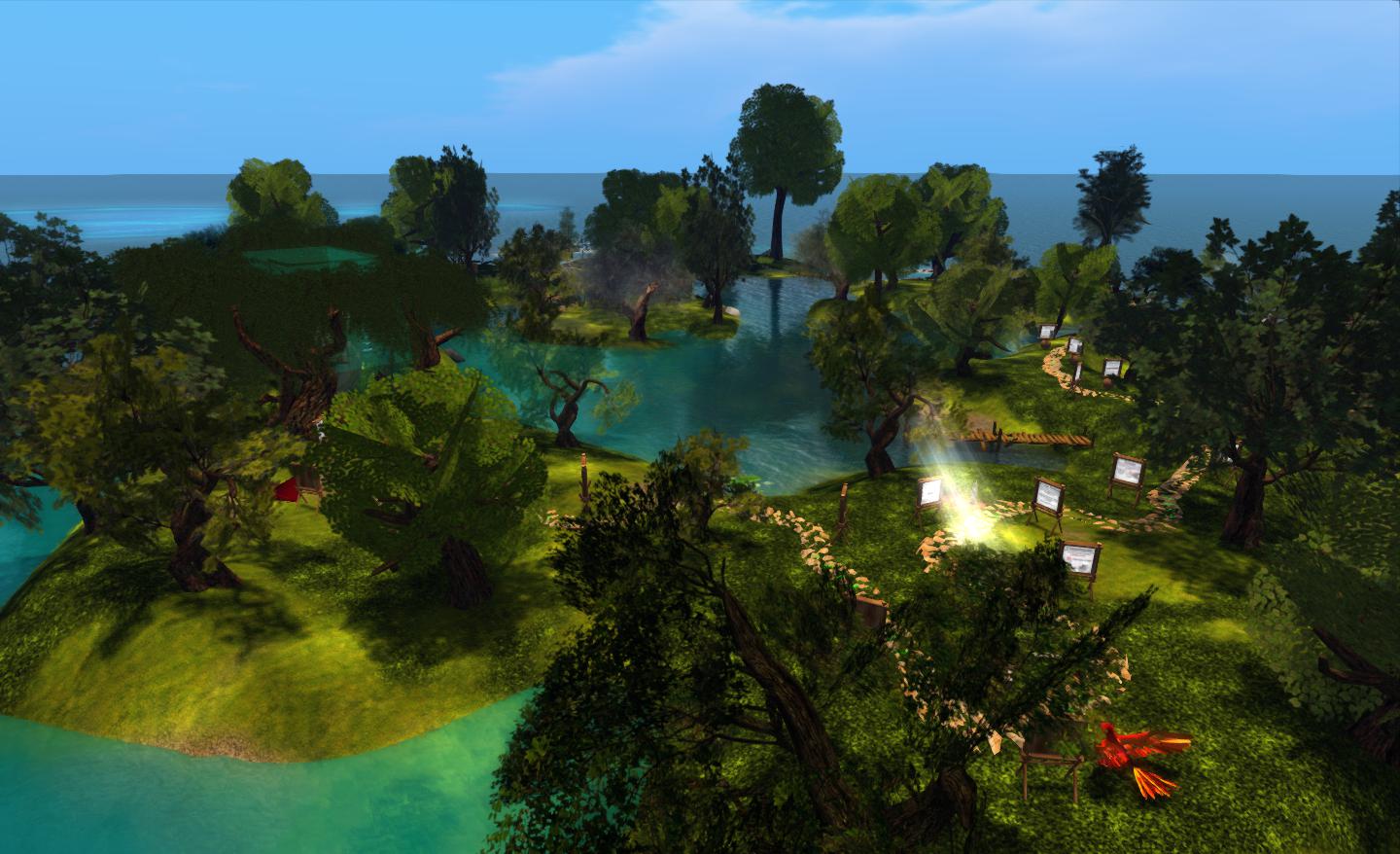
This weekend, the Firestorm team will be launching a new in-world venture: the Phoenix Firestom Support island.
The region is designed to serve two purposes. One is to provide help and support for users of any calibre, via the use of in-world tutorials supported by real life help in the case of users new to SL, and via the provisioning of an area more focused on providing real life help for users more familiar with SL and the viewer. The second is to provide an in-world base of operations to support Firestorm users in particular.
Firestorm’s new support island
The region is somewhat mindful of the old SL Orientation Islands where new users to SL learned about the basics of the viewer and how to do things – so much so, in fact, that I was half-expecting to find a beach ball and table during my preview explorations :). While neither turned up, I did smile on coming across a large and talkative phoenix, itself a reminder of the OI parrot…
However, this is not to say that the region has been deliberately modelled on the old Orientation Islands. As Jessica Lyon, the Phoenix / Firestorm project lead pointed out to me as we discussed the island and the ideas behind it, it’s a matter of form following function. A relaxed and visually pleasing tutorial path with few distractions naturally lends itself to this kind of open-air approach.
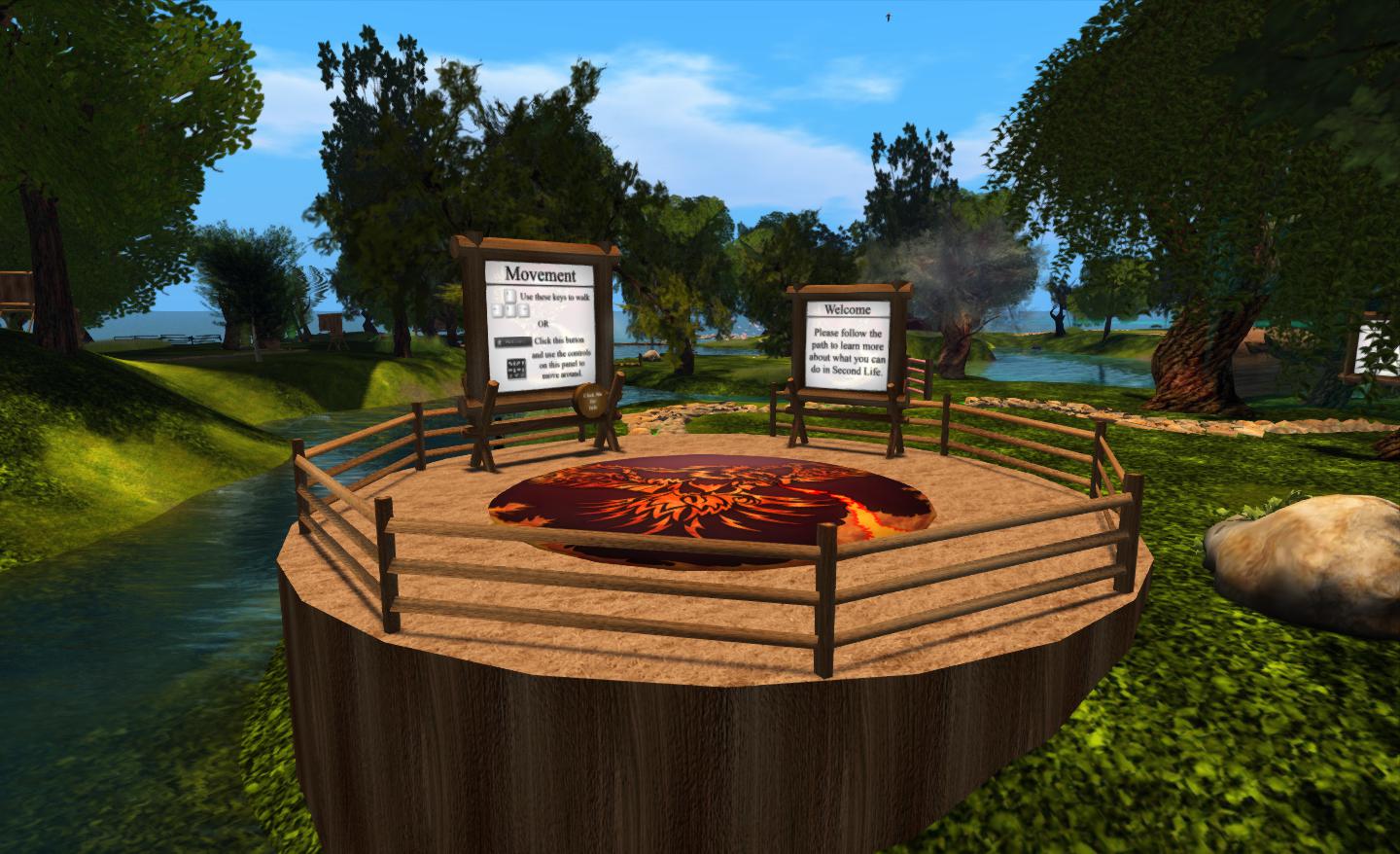
The main element of the region is a path which leads people around the island from the arrival point, taking them past various lessons in gaining familiarity with Second Life and the viewer. These are very much focused on “learn by doing” – such as jumping over a fence to understand walk / jump – and are very clearly and cleanly presented, and obviously intended for the more novice user.
Arrival point
The signs are clear and concise, and while based on Firestorm running in a default mode (i.e. with the pie menu active), they easily translate to other viewers, whether they are using pie or context menus.
Within this sits a central area where questions about Second Life and viewer use that go beyond those that tend to be asked by “new” users can be addressed. This can be reached via a bridge from the outer area of the island or via a teleporter located at the arrivals point.
The central area, where the more experience user can seek focused assistance from staff and mentors
A key aspect of the region is that is designed to be staffed. Although it had originally been hoped that in-situ help relatively small, things haven’t quite work out as originally envisioned. “Our original plan,” Jessica told me, “Was to have a first entry to SL region for zero – 30 day accounts only, and would staff it with our own support staff and a careful selection of mentors/helpers. We have a RegAPI from LL [which would allow Firestorm to run a sign-up page and deliver new users directly to the region]. Unfortunately, it doesn’t work with “Resident” last names, so we had to switch to plan B. Plan B is to open the region to the public, and heavily staff it with mentors and helpers to ensure new and old residents alike get real help from real humans.”
As a result of the switch to “Plan B”, and to ensure the island is properly staffed, invitations to participate have been sent to the RHN, White Tiger Mentors, Mental Mentors and other groups. One potential benefit of this is it will help ensure there’s a much more diverse wealth of experience on-hand to deal with viewer-centric questions than might otherwise be the case were the island solely staffed by Firestorm-focused volunteers.
The following is summary of changes to SL viewers / clients (official and TPV) which have taken place in the past week. It is based on my Viewer Round-up Page, which provides a list of all Second Life viewers and clients that are in popular use (and of which I am aware) and which are recognised as being in adherence with the TPV Policy.
This summary is published every Monday, and by its nature will always be in arrears. Therefore, for the most up-to-date information on viewers and clients, please see my Viewer Round-up Page, which is updated as soon as I’m aware of any changes, and which includes comprehensive links to download pages, blog notes, release notes, etc., for Viewers and clients as well as links to any / all reviews of specific viewers / clients made within this blog.
Updates for the week ending: 19 August, 2012
SL Viewer updates:
Development: rolled to 3.4.1.263582 on Aug 16
Dolphin rolled to 3.3.19.24756 on August 17 – core updates: hotkey to open / close Outfits floater; added Preferences option (Prefs->Dolphin Viewer 3->Build) to save scipts as LSL or Mono when editing directly from Inventory; added “auto media play” button (“A”) to media controls at the top right of the viewer window; Client (avatar) Phantom option hidden (no longer functional under pathfinding) – release notes. Dolphin also announced cessation of OpenSim support in preparation for Havok sub-licence compliance
Exodus release version 12.08.14.1 on August 16, (release notes) – primarily a hot fix release for the 12.08.09.1 release, incorporating Visual C++ 2010 runtime to avoid installation errors ability to rez objects under land group; updates to visual presets and raid advisor lists formats to conform with LLSD
Niran’s Viewer rolled to 1.49 on August 14 – core changes: further updates to the Preferences overlay; Graphics tab in default Preferences updated; bug fixes (release notes)
Restrained Love Viewer released version 2.8.3.4 on August 17 – core updates: pathfinding tools (excluding Navmesh visualisation*), improved Mouselook aiming controls; JPEG library handling improvements to reduce crash rates (release notes)
Zen viewer rolled to version 3.4.0.2 on August 17, after rapidly cycling through updates on the 13th and 14th August. Core updates – pathfinding tools (excluding Navmesh visualisation*); removal of mesh deformer; Keyword Alerts added to Preferences->Chat; Remove Scripts option added to menus; updated shaders; numerous bug fixes (release notes)
Cool Viewer: Stable branch rolled to 1.26.4.25 and Experimental to 1.26.5.4, both on August 18 – core updates in both: initial pathfinding support (excluding Navmesh visualisation*); various SLV 3.3. code back ports (release notes for both)
LittleSight released version 1.1.0 – fix fix release for failed log-ins and other issues
At the start of the month, Hypergrid Business reported on Linden Lab’s removal of support for the –loginURI parameter from versions of the SL Viewer.
This command is most commonly used to modify the command path used to launch the viewer, allowing it to connect to grids other than Second Life. It has already been removed from the latest development ad beta versions of the viewer, and as such will find its way to the release version in the near future.
For the majority of people who use the official viewer and only access Second Life, the announcement passed largely unnoticed. Even among those who do routinely bounce between Second Life and other grids using TPVs, the impact of the change was minimal – most viewers openly supporting access to both Second Life and OpenSim grids tend to do so through the use of a grid selector / grid manager option – which remained unaffected by the change.
The Shape of Things to Come
However, the removal of support for –loginURI was the tip of the iceberg.
In April of this year, Linden Lab announced a sub-licencing arrangement involving the Havok physics engine. While there is already some Havok functionality evident in the viewer as it is (used in conjunction with mesh uploads and pathfinding), the licence arrangement enables Linden Lab to develop a library of Havok functions for the viewer. In time, this may prove to have significant benefits for Second Life; however, there is a catch.
Once the new Havok libraries are in place and available for use, the terms of the sub-licence require that any viewer accessing them only connects to Second Life. Period. Ergo, no grid selector, no grid manager and no support of –loginURI or any other means of provisioning OpenSim log-in support for such viewers.
In other words, once the arrangement is up and running, those TPVs that currently support both Second Life and OpenSim access, and which are eligible to make use of the new LL Havok libraries, have to make a choice as to their future direction:
Do they sign-up to the new sub-licence agreement to gain access to the new libraries and completely forgo any OpenSim support they may have provided?
Do they fork their development to provide two flavours of their viewer – one configured to access SL only and make use of the new Havok libraries, the other specifically aimed at OpenSim and unable to access the Havok functions?
Do they abandon SL altogether and instead focus solely on OpenSim?
Do they perhaps opt to forgo the use of the new library functions and continue “as is”, ignoring any new capabilities provisioned via the Havok libraries?
The option to fork development between SL and OpenSim probably comes down to matters of bandwidth, maintenance and audience. Does a TPV have the bandwidth to develop two flavours of viewer? Does it enjoy a sufficiently largely audience in both SL and OpenSim to warrant the time and effort needed to do so?
Firestorm
The Firestorm team announced in June that they would continue to support both Second Life and OpenSim by forking the development of the Firestom viewer between the two in the near future (if this has not in fact already happened in the intervening time).
While one version of Firestorm will remain focused on Second Life, the second branch will be geared towards general support of the OpenSim platform and not incorporate code from Linden Lab that is ring-fenced by the new sub-licence arrangement.
Niran’s
In July, NiranV Dean confirmed Niran’s Viewer would not be supporting OpenSim – although the decision was possibly as much based on a personal preference as having anything to do with the upcoming Havok sub-licence situation.
Dolphin
Now, with the new sub-licence arrangement looming, Dolphin Viewer developer Lance Corrimal formally announced on August 18th that future versions of Dolphin will be solely focused on Second Life as he doesn’t have the bandwidth to maintain three flavours of his viewer across two environments (Second Life and OpenSim). He will, however, be providing a clone of the original repository should anyone wish to fork it and make an OpenSim specific version.
It remains to be seen if other TPVs will make formal announcements and which route they will opt to take.
Looking to the Future
Some commentators, on hearing the news regarding –loginURI, reacted negatively, with some citing the move as a further indication of the demise of SL. These reactions would appear unwarranted. It is unlikely that any split in how either Second Life and OpenSim are accessed is going to have a major impact on either the use of SL or its longevity.
Similarly, while some may be personally inconvenienced (having to move between two viewers depending on whether they are logging-in to SL or an OpenSim grid), it is hard not to see this situation as anything but beneficial for OpenSim. If nothing else, it frees those viewer developers who wish to focus on OpenSim to develop functionality and capabilities within the viewer that are specifically geared to the platform (e.g. much improved OSSL support) and unfettered from any constraints or worries about maintaining compatibility with SL (such as the 4,096-region teleport limit).