“Project Interesting” arrives as a release candidate viewer

The long-awaiting “Project Interesting”  viewer has finally made it to release candidate status with the arrival of version 3.6.11.283895 of the viewer on Thursday November 14th.

This viewer represents the last stage in the current work on improving interest list functionality, the code which controls how the data relating to your in-world view is handled by both the server and the viewer. This includes what is sent to the viewer, what is retained by the viewer for reuse and things like the order in which objects are rendered when you log-in to SL or teleport (so that the “interesting” objects which are closer to you or which are particularly large should render first, for example).

The vast majority of the interest list work has already been delivered, and everyone should already be enjoying the broader benefits. However, the final phase of the current batch of work has been focused on both server and viewer changes, and the latter have been somewhat delayed due to a number of bugs, some of which were the result of the need to further tweak things server-side which in turn adversely affected the viewer’s behaviour, while others were bugs which appeared to have been dealt with, only to return in a later build.
AS-12_001
The “project interesting” viewer updates should further improve scene loading for users through improved caching of region and object data, better use of memory, etc.

The core changes within this viewer relate to what can be cached locally. This should allow the viewer to store more information on objects and regions than is currently the case, enabling it to re-use object / region data without having to rely on the server to re-send the information, improving rendering times when you are exploring a region / teleporting back to a region previously visited.

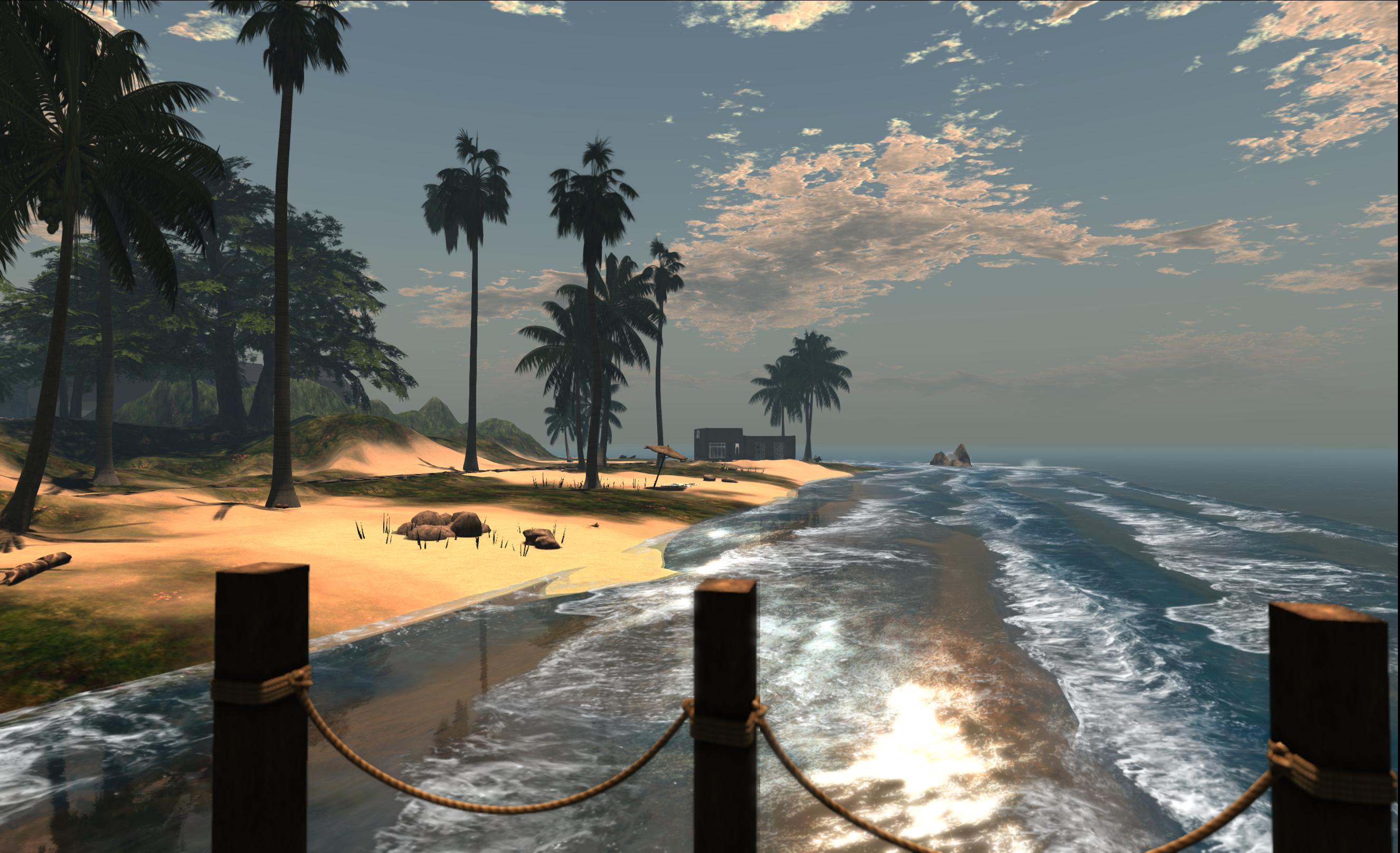
One of the bugs which delayed the arrival of the “project interesting” viewermeant that some objects would not render (as is the case with the house in this image). Unlike the recent “missing prims” issue, no bounding box, etc., was loaded by the viewer, so right-clicking where the house should be would not resolve the issue – a relog was required (image courtesy of Whirly Fizzle)

There are other improvements to further assist with scene loading as well. For example, when teleporting into a region never before visited, the viewer can now tell the simulator that it has no data for the region cached, and the simulator can in turn simply get on with prioritising the data and downloading to the viewer, rather than it having to repeatedly ask the viewer if it needs the data, as is currently the case. The result of this is that “several seconds” can be shaved from scene loading times for uncached regions. Also, the viewer will no longer load objects from cache into memory if they are completely by scene geometry, thus reducing unnecessary memory use.

The viewer is currently a release candidate, which means it will be downloaded and installed for some users who have indicated a willingness to participate in the release candidate programme through their viewer Preferences (Set-up > Willing to update to release candidates). Those who wish to manually install the viewer can read the release notes and download it from the link below.

The Lab issued a blog post to accompany the viewer release (which I initially missed), which includes a video demonstrating the changes, narrated by Torley Linden.

Related Links

UKanDo 3.6.10: nips, tucks and tweaks

logoUKanDo, the v3-based viewer from Connor Monaron updated to a new release on Wednesday November 13th. Version 3.6.10.27888 sees the viewer return to parity with the Lab’s release code base and gain the most recent improvements from the Lab including the Facebook SLShare capability.

This is more of a progressive update on capabilities already in the viewer rather than a major update with lots of new features and shinies, which is entirely in keeping with Connor’s stated intent to produce a viewer which is reasonably close to LL’s own, but which incorporates some of the more popular TPV functions and abilities.

In my last look at UKanDo, I reported on the arrival of the QuickTools floater, a variation of the popular Quick Preferences options found in a number of TPVs, which offers  rapid access to a number of the viewer’s capabilities. At the time, I pointed out that the icon for the toolbar button for the panel could perhaps do with a re-think, given it was the same as the icon for the viewer Preferences panel, so there was a risk of the two buttons being confused when set to Icon Only display mode.  With this release, the QuickTools button icon has been revised so that it is now a film reel / pie menu, making the button quite distinct from the Preferences button when both are used in a toolbar.

As well as the QuickTools button, the Area Search button and the Build button also get new icons.

Area Search Udpate

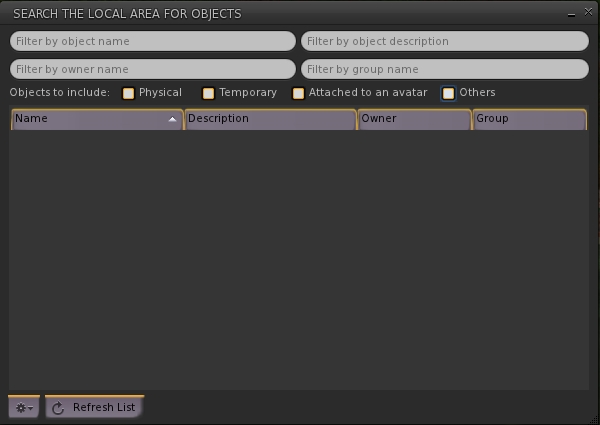
Area Search also sees the addition of further search criteria in the form of check boxes which allow the user to define the kind of objects which are to be located: physical, temporary, attachments, or others. These can be checked individually or in combination, and provide an additional level of granularity to object searches.

Area Search: updates with new checkboxes for more granular searches and a new option button (bottom left)

A new gear button has also been added to the floater, which can be used to access additional configuration options. Currently this only comprises Auto-Track Selections (displays beacon for an item selected from the list) and Stop Tracking (removes beacon). However, as this is reported as “part 1” of an overhaul of Area Search, more options may be forthcoming in the future.

Advanced Build Options

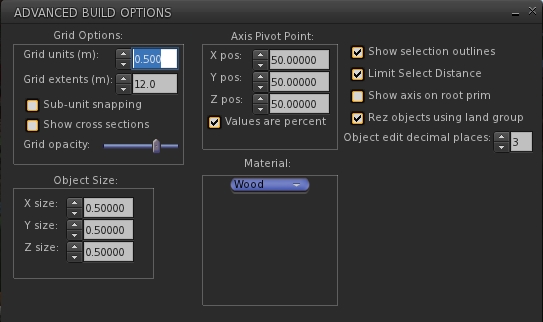
Version 3.6.10.27888 of UKanDo see the introduction of an Advanced Build Options floater, which contains some of the options also found in Preferences > UKanDo > Building, as well as some options not present in that tab.

The Advanced Build Options floater, offering additional default / options for builders, some of which can also be found in Preferences > UKanDo > Build

The new floater is accessed by editing / creating an object and selecting Build > Options > Advanced Build Options from the menu bar or pressing CTRL-ALT-B.

Geometry Overload Protection

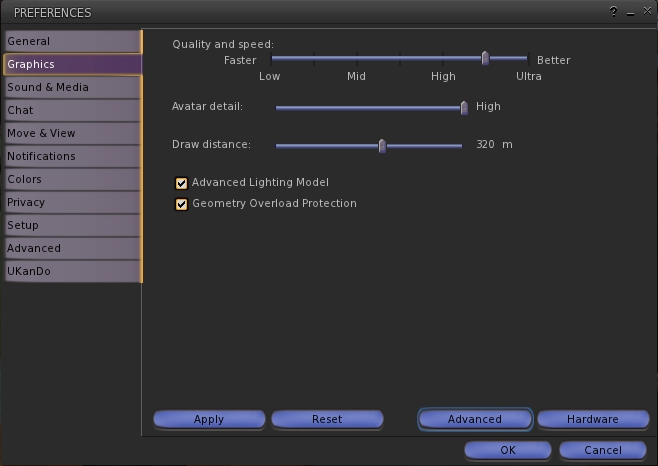
A new addition to the Graphics tab of Preferences with release 3.6.10.27888 is the Geometry Overload Protection. Enabled by default, this is designed to stop the viewer crashing due to someone using objects with excessive geometry (a common form of viewer attack in some regions). This addition brings a slight change in layout to the default display of the Graphics tab, which includes the option to enable the Advanced Lighting Model without having to access the Advanced options.

Preferences > Graphics gets revised to include the Geometry Overload Protection option and an option to enable / disable ALM without having to access the Advanced options

Other Updates

This release also includes:

  • Further adjustments to the viewer UI, with the buttons looking even more V1-style
  • Favourites Bar Landmark text now white for easier reading
  • Select only copyable objects Added to the Build -> Options menu
  • Show each avatar’s age in their name tag unless they are older than the number of days specified in Preferences > UKanDo > Avatar
  • Show LookAt / PointAt- includes names on crosshairs option Preferences > Privacy
  • Status Bar Hide/Show options for the:
    • Marketplace button
    • Buy Currency button
    • NetStats Bar Graph
  • Option to displayed log-in names as well as Display Names in the People floater tabs (click the options button and check View Login Name)

Feedback

A small, tidy update to the viewer which again draws upon some popular TPV features without risking the viewer becoming top-heavy.

Still no media filter at this point in time, which I’d personally like to see (and would like to see in the official viewer for that matter). Having it available discourages a complete disabling of media and allows one to more easily enjoy music when travelling around without necessarily being over-exposed to more nefarious goings-on. Another thing I’d like to see is the proper release note attributions for those elements incorporated from other TPVs.

That the Advanced Build Options floater and the options in Preferences > UKanDo > Building have an odd level of functional cross-over which might cause some confusion at times. Given both the degree of overlap between them and the degree of individual options found in one but not the other, it might be an idea to make them consistent in terms of the options offered by both, but this is a minor quibble.

Performance-wise, the viewer operates pretty much as anticipated, and I didn’t notice any particular drop-off in frame rates when using CHUI in expanded mode, so I assume this issue has been fixed in the last rebuild of the 3.6.10 viewer, and that UKanDo has the fix. However, this is only my experience, so don’t quote me on that if you find you are still having that particular problem either with the latest release of UKanDo or the official viewer!

In the meantime, I’ll keep following UKanDo as it develops.

Related Links

CtrlAltStudio: Oculus Rift configuration utility

Dave Rowe (Strachan Ofarrel in SL) is responsible for developing the CtrlAltStudio viewer. Based on Firestorm, the viewer comes in two flavours, one encompassing a Stereoscopic 3D world view, and the other pioneering Oculus Rift support for both Second Life and OpenSim.

The Oculus Rift configuration utility (image: Dave Rowe)

I’ve been reporting on both viewers as they’ve been updated, and noticed that Dave recently posted some useful information for those with a pre-release Oculus Rift SDK version and who might be using his viewer.

In it, he provides an overview of the headset’s configuration utility which allows users to:

  • Measure your eye separation (inter pupillary distance or IPD, also referred to simply as pupillary distance)
  • Correctly calibrate the headset
  • Update the headset’s firmware.

If you have a headset, and have not used the configuration utility, Dave’s article makes worthwhile reading, covering as it does all three of the operations bulleted above.

In addition to covering these options, Dave points out that the latest version of the firmware (0.18) includes improvements to reduce orientation drift. So, if you have been using the utility to calibrate the headset, but are finding your orientation is drifting a lot, you may want to try updating your headset’s firmware.

Related Links

Viewer release summaries 2013: week 45

This summary is published every Monday and is a list of SL viewer / client releases (official and TPV) made during the previous week. When reading it, please note:

  • It is based on my Viewer Round-up Page, a list of  all Second Life viewers and clients that are in popular use (and of which I am aware) and which are recognised as adhering to the TPV Policy
  • By its nature, this summary will always be in arrears
  • The Viewer Round-up Page is updated as soon as I’m aware of any releases / changes to viewers & clients, and should be referred to for more up-to-date information
  • The Viewer Round-up Page also includes comprehensive links to download pages, blog notes, release notes, etc., as well as links to any / all reviews of specific viewers / clients made within this blog.

Updates for the week ending: November 10th, 2013

Official LL Viewers

  • Release channel cohorts (See my notes on manually installing RC viewer versions if you wish to install any release candidate(s) yourself):
    • Maintenance RC updated on November 7th to 3.6.10.283403 (download and release notes) – finer access control for estate/parcel owners; CHUI: toggle expanding Conversations by clicking on icon (may impact frame rates); GPU table update + more
  • Project viewers:
    • None at present

LL Viewer Resources

Third-party Viewers

V3-style

  • Black Dragon updated on November 5th to version 2.3.7 Alpha (Maintenance) – core updates: preference panel largely completed with new layout and presentation through the existing floater; improvement to presentation of toast pop-ups (release notes)

V1-style

  • Cool VL updated on November 9th to:
    • Stable version: 1.26.10.0
    • Experimental version: 1.26.9.37
    • Release notes (both) core updates: FMOD Ex updated to v4.44.25; deformer enabled in both versions on OpenSim and SL Aditi grid, disabled on Agni; installer improvements for Windows; crash and bug fixes; Virtual Highway and DreamNation grids added to OpenSim grid list and login URI for Virtyou updated; materials export / import added to object backup on the Stable branch

Text Clients

  • Group Tool updated on November 7th to version 2.2.23.0.

Additional TPV Resources

Related Links

Kokua issues AIS test viewers

kokua-logoAs regular readers here will know from my weekly SL project reports, Linden Lab is (among other things) working on the final clean-up of the Server-side Appearance (SSA) code. A large part of this work is directly linked to inventory handling, and is being referred to as the Advanced Inventory Service version 3 updates (AIS v3).

The primary aims aim of these updates is to address a series of inventory issues outstanding from the implementation of SSA, and to aggregate some operations that are currently multiple things into a smaller set of more powerful APIs. As noted in my last update covering AIS, the viewer-side code has reached a point where the Lab is both keen to progress with further testing. This being the case, the Lab has asked TPVs if they could incorporate the updates into experimental versions of their viewers so that they might assist with the testing.

Integrating the AIS v3 code isn’t as straightforward for those viewers which support both OpenSim and SL as it is for those that are focused solely on SL, as the AIS updates have been combined with a removal of the old client-side baking code from the viewer, as this is no longer required by the Lab. So in order to ensure avatar baking continues to work when users log-in to an OpenSim environment, those TPVs supporting both environments with a single viewer are having to ensure the client-side code is not lost when incorporating the new SSA / AIS updates.

On November 6th, Nicky Perian reported that Kokua has now done this, and has a test viewer for Windows available in the former version 3.6.9.30799, which is available in both 32-bit and 64.bit flavours.This viewer both includes the AIS updates and retains the client-side avatar baking code.

As the AIS code is still under development, it is not recommended that either version of this test viewer is used as the primary viewer for logging into Second Life. The primary reasons for making the viewer available are to:

  • Allow SL users to test inventory transactions, including changing avatar body parts and body part parameters (for example, eye colors) using the dedicated test regions which have been established on the SL Beta test grid Aditi (sunshinesls, sunshinesls1, sunshinetest, sunshinetest1)
  • Allow OpenSim users to also test inventory transactions and avatar baking on an OpenSim, and check for any unexpected changes to expected behaviour when compared to the latest release viewer.

Related Links

Black Dragon viewer: progressing nicely

Blackdragon logoTuesday November 5th saw the release of Black Dragon 2.3.7 Maintenance 2, the second release for the viewer in as many weeks, the previous being (wait for it) 2.3.6 Maintenance 1. Since it’s been another two months since I last looked at Black Dragon, which is still officially in its Alpha phase of development, I decided the arrival of 2.3.7 was as good a reason as any to take another peek at what Niran has been up to.

And it is actually rather a lot, with each of the iterations of Black Dragon appearing since 2.3.1 both building on the basic LL v3.x look and feel while adding-in both more TPV features and Niran’s own unique take on the viewer’s appearance and layout.

  • Version 2.3.2 saw the inclusion of a host of CHUI, NORSPEC (materials), Cocoa updates, bug fixes and maintenance updates from Linden Lab, together with the return of Tofu Buzzard’s screen space reflections and a lot of general clean-up
  • Version 2.3.3 was to include further LL code updates and fixes, some updates to Niran’s Machinima Sidebar, and further rendering / graphics tweaks
  • Version 2.3.5 saw the re-introduction of RLVa, complete with a dedicated Preferences tab.

As noted above, both release 2.3.6 and 2.3.7 are classified as “maintenance” releases, planned by Niran to further enhance the work started in version 2.3.4, which introduced the first phase of overhauling the Preferences floater.  Given this, what follows is intended to be an overview of the most recent updates to Black Dragon, with a particular focus on the Preferences work, rather than an in-depth review.

Preferences

With Niran’s Viewer, Niran opted to go for a fairly radical overhaul of the Preferences options, presenting them as an overlay, rather than within a floating panel. It was a novel approach, and one which, while making better use of screen space, could also be disconcerting to users coming to it the first time, particularly when trying to find settings, etc. In the re-working of Black Dragon, he’s gone for something less radical and potentially less unsettling to users familiar with the “traditional” approach to the Preferences floater, but which still offers an interesting take on how Preferences can be presented.

The first noticeable change is that Niran has used headings to split the various Preferences tabs into definable sections. The result is a layout which tends to be more logically ordered and which the eye tends to follow more easily.

The RLVa Preferences panel introduced in version 2.3.5 of Black Dragon and showing the use of section headings to help logically arrange the tab's content
The RLVa Preferences panel introduced in version 2.3.5 of Black Dragon and showing the use of section headings to help logically arrange the tab’s content

The other obvious change is that rather than using additional sub-tabs within a given section of Preferences, Niran has opted to use a slider on the right of the given tab, allowing users to scroll up and down through options in order to display them. It’s an interesting approach to take, and one that is certainly as valid as the use of sub-tabs; however, having to scroll through an extensive list of options such as with the Display tab perhaps isn’t quite as efficient as being able to see tabbed headings at-a-glance in order to switch between them.

There are other touches as well which set Black Dragon apart in terms of Preferences presentation. Within the Display tab (Graphics), for example, Niran opts to use drop-down option lists rather than sliders for various settings. This is again a carry-over from Niran’s Viewer, and whether one likes it or not is liable to be a matter of personal taste. To me, being able to set the rendering quality for something like in-world objects to a value between Low and Ultra feels more intuitively user-friendly than adjusting a slider to an arbitrary point somewhere between 1 and 4, or 0 and 1, or 16 through 120.

The Display (Graphics) tab in Black Dragon's Preferences. Note the use of the slider (far right) rather than sub-tabs, the use of drop-down lists in place of sliders and the [default] option for quickly resetting those sliders which are still used
The Display (Graphics) tab in Black Dragon’s Preferences. Note the use of the slider (far right) rather than sub-tabs, the use of drop-down lists in place of sliders and the [default] option for quickly resetting those sliders which are still used
Continue reading “Black Dragon viewer: progressing nicely” →