It’s been several months since the release of the last Dolphin viewer update (March 2013). This means the viewer is lagging behind many of the 2013 updates from the Lab, including things like Server-side Appearance, materials, etc.
Lance Corrimal, the man behind Dolphin is not unaware that this is the situation. His real life this year has been such that it has required almost all of his attention (including starting a new job which sees him travelling and away from home a lot of the time), all of which has limited the time he can devote to the viewer, as much as he’d like to be able to do so.
In July and August he gave a couple of short updates on his situation, which I also passed on through these pages, and on November 22nd, he posted a further update on the Dolphin website, which reads in part:
I am not exactly happy about what I have to announce here, but this is how it is going to be:
The next Dolphin Viewer is not going to be around any time soon.
I have looked at the mess that my current state of the sources would produce, and I have (finally but far too late) come to this decision:
I will start from scratch.
Right now, taking the current Dolphin Viewer source and just “shoe-horning” in everything new from the official sources produces a terrible mess that does not compile cleanly, let alone works. Besides, the last Dolphin Viewer has a quite large number of features that don’t work any more, due to changes that the Lab has made in the meantime, temp uploads being one of them.
So, I’ll basically have to reinvent everything. That will of course take some time. I’m guessing “several months” right now, not the least due to the fact that with my new job that I have been doing since April, I’m travelling a lot, so I’m not even home all that much. I’ll see how much I can do on my company laptop.
I will go back to my usual “release early, release often” policy, as soon as I have something that is properly branded as Dolphin Viewer and has more to offer than just the name. I will plan to release at least a public beta as soon as I have something.
This would suggest that an updated Dolphin viewer is unlikely to emerge before the end of the year, and that we may be a few months into 2014 before one does. However, the upside of this is that Lance is not abandoning the viewer, which has enjoyed a loyal following. Patience remains the order of the day as he tries to balance the demands of real life and Second Life on his time.
One additional consequence of everything going-on for Lance right now is that he plans to eventually stop building / providing openSUSE rpm packages for some of the other third-party viewers; as he notes himself, he just can’t seem to pack more than 24 hours into a day.
Further news / updates from Lance will be reported as they become available.
This summary is published every Monday and is a list of SL viewer / client releases (official and TPV) made during the previous week. When reading it, please note:
It is based on my Current Viewer Releases page, a list of all Second Life viewers and clients that are in popular use which are recognised as adhering to the TPV Policy (and of which I am aware), including
By its nature, this summary will always be a week in arrears
The Current Viewer Releases page is updated as soon as I’m aware of any releases / changes to viewers & clients, and should be referred to for more up-to-date information
The Current Viewer Releases page also includes comprehensive links to download pages, blog notes, release notes, etc., as well as links to any / all reviews of specific viewers / clients made within this blog.
Updates for the week ending: November 24th, 2013
Official LL Viewers
Current Release version updated on November 21st to version 3.6.11.283787 (dated November 15th) – formerly the GPU table updates RC (download page, release notes)
Fitted Mesh viewer 3.6.11.283899 released on November 20th – This viewer adds new “collision bones” to the standard avatar skeleton. Properly rigging mesh objects to those bones will cause the garment to adapt to changes in the avatar shape made using the avatar editor sliders and avatar physics (download and release notes)
Black Dragon updated on November 18th to version 2.3.8 (Maintenance #3) – core updates: UI updates; RLVa update; rendering fixes (release notes)
CtrlAltStudio Experimental version updated on November 18th to version 1.1.0.34376 – core updates: variable-speed walk / fly; Kinect gesture support for avatar movement (release notes)
Kokua updated on November 18th to version 3.6.10.30662 – core updates: parity with SL 3.6.9 / 3.6.10 code base; significant rewrite to area search with context menu active; link to grid support groups (if available in settings file) added to Help > About Kokua (release notes)
V1-style
Cool VL Experimental version updated November 23rd to version 1.26.11.0 and again on November 25th to version 1.26.11.1 – core updates: 1.26.11.0 implemented “project interesting” updates; 1.26.11.1 fixed 2 bugs within the 1.26.11.0 release that prevented cache files to be written to the disk (losing the benefit of caching on return to visited regions) and which prevented object flags (touch, pay, modify, etc) to be propagated from the cache to the rezzed objects on cache updates (making it impossible to touch, pay, edit, etc random objects in the avatar’s field of view) – release notes
Text Clients
Group Tools updated on November 23rd to version 2.2.24.0.
Dave Rowe contacted me earlier in the week to let me know that he’s updated his CtrlAltStudio viewer with both a variable walk speed and support for Kinect for Windows.
In the time-honoured tradition of making things do that which they weren’t quite designed for, I’ve added a variable walking speed to the CtrlAltStudio Viewer, Alpha 5 1.1.0.34376. I’ve also added “spot standing” Kinect control of avatar movement for people to try out. These two items can be used with all display modes: normal, stereoscopic 3D, and Oculus Rift.
The variable walk speed came about as a result of some issues when walking / flying in-world when using the Rift, and Dave was pointed in the direction of a possible solution after reading a Firestorm JIRA raised by Adeon Writer requesting that the ability to more easily toggle between “full” and “quarter” speed movement when walking, running or crouching than solely by pressing and holding the spacebar.
Dave notes that his solution, which employs a slider in the Movement sub-tab of Preferences > Move and View, may not be ideal at present, and only affects avatar walking speeds. He also notes it may not work properly on OpenSim Grids or with the SpaceNavigator (at least at present in the case of the latter).
In all the slider has five presets, from “slow” (left) to “normal” (right). When using the viewer, I found that with the mid-point “half speed” and the preset between it and “normal”, my avatar (on an uncrowded region) moved forward reasonably well and was relatively responsive when turning as I walked. Walking backwards was also OK, although if you enable the option to turn your avatar around when walking “backwards”, you may find your avatar’s movement becomes jerky and it constantly tries to turn and put its back to you; something which becomes more pronounced at the lower settings.
I found the “slow” setting to be somewhat akin to being caught in a heavy lag situation, but without any accompanying rubber-banding or sudden speed-ups with walking; my avatar moved very slowly and was subject to intermittent pauses and froze on a couple of occasions, requiring me to adjust the slider more to the right.
While this may not sound promising, do remember that this is only the first cut at the work on Dave’s part.
Kinect Gesture Support
As well as the variable walking speed, Dave has also added gesture support for the viewer, which can be used via the Microsoft Kinect system. The supported gestures allow you to set your avatar walking, stop it, turn it around and fly up and down or stop gesture-driven control. He’s produced a set of easy-to-understand drawings of the gestures for each, and notes that you can also stop gesture-driven motion by walking out of the Kinect’s sensor range, and also fly down by crouching.
Kinect gestures (image courtesy of Dave Rowe)
In discussing the use of the variable walk slider and the Kinect options, Dave notes:
The variable walk speed improves the usability of Kinect “spot standing” control, usable in Windows builds on PCs with Kinect for Windows sensors installed. You set a “home” position of zero movement, then once you move out of a dead zone around that position your avatar starts moving in the direction you’ve moved in. Avatar movement starts off slow and increases speed as you move further out, with the maximum being that of the walk speed you’ve configured. Except that for forwards movement you start running after the maximum walk speed.
Even if you don’t have either active stereoscopic glasses or an Oculus Rift headset, but you do have a Kinect system (with Runtime or Software Development Kit installed on your PC), you can still use the Alpha 5 version of CtrlAltStudio to try both the variable speed walk and the gesture controls out – just leave both the Stereoscopic and Oculus options disabled. Note you do not have to have Kinect in order to try-out the variable speed walking.
A further change with this release is the inclusion of a Prediction Delta slider with the Oculus Rift options. Again, as Dave notes in his blog:
Sensor prediction helps reduce latency and you can configure how far into the future your orientation is predicted. With your Rift on, adjust the Prediction Delta value until moving your head feels most comfortable.
the new Prediction Delta slider in the Oculus Rift section of the Display Output sub-tab for helping to reduce latency and configuring how far into the future your orientation is predicted for a more natural head movement when using the Rift.
You can find out about these , and the other updates within the Alpha 5 version of CtrlAltStudio via the release notes.
CtrlAltStudio Adopted and Adapted by St. Andrew’s University
Dave’s work on CtrlAltStudio has not gone unnoticed. None other than St. Andrews University in Scotland have adopted and adapted it as a part of their own work to create a new viewer they’ve called ACE.
Faculty members and students at the university have been using virtual environments for historical reconstructions as a part of their Open Virtual Worlds project for some time now, running their own dedicated OpenSim grid (which is hypergrid enabled, or people can access by creating a log-in account).
Project members have now taken Dave’s work with CtrlAltStudio viewer and combined it with their own Kinect bindings created as a part of their Chimera project in order to produce their own ACE (Armadillo Control Extensions) viewer. This can be used to explore and experience their in-world reconstructions using Oculus Rift and without the need for any physical device to assist them.
The ACE viewer also requires the installation of the Kinect Runtime or SDK to be installed on the host computer in order to work, but once these and the viewer are installed, it can be used to connect to any grid (OpenSim or SL).
This summary is published every Monday and is a list of SL viewer / client releases (official and TPV) made during the previous week. When reading it, please note:
It is based on my Viewer Round-up Page, a list of all Second Life viewers and clients that are in popular use (and of which I am aware) and which are recognised as adhering to the TPV Policy
By its nature, this summary will always be in arrears
The Viewer Round-up Page is updated as soon as I’m aware of any releases / changes to viewers & clients, and should be referred to for more up-to-date information
The Viewer Round-up Page also includes comprehensive links to download pages, blog notes, release notes, etc., as well as links to any / all reviews of specific viewers / clients made within this blog.
Updates for the week ending: November 17th, 2013
Official LL Viewers
Current Release version updated on November 12th to version 3.6.10.283403 (dated November 6th) – formerly the Maintenance RC viewer comprising finer access control for estate/parcel owners; CHUI: toggle expanding conversations by clicking on icon; GPU table update + more (download page, release notes)
GPU Table Update RC updated on November 16th to version 3.6.11.283787 – GPU table updates only, no functional changes (download and release notes)
“Project Interesting” RC 3.6.11.283895 released on November 14th – more viewer-side control of which objects are loaded in memory at any given time; more aggressive scene caching; faster scene load when visiting a region never previously visited; expanded performance metrics (download and release notes)
UKanDo updated on November 14th to version 3.6.10.27888 – core updates: LL 3.6.10 code base; SLShare (Facebook) integration, updates to area search, toolbar button icon updates, Advanced Build Options floater, + more (release notes)
Release notes (both) core updates: FMOD Ex updated to v4.44.26; added Advanced menu option to save both default and current settings globally and per-account; Improved shared media handling; Backport of minor speed optimisation to alpha rendering from Singularity; numerous updates and improvements & pruning of dead code
Singularity updated on November 14th to version 1.8.4.5433 and then on November 16th to version 1.8.4.5434 after an issue with the camera controls was discovered in 1.8.4.5433 – core updates: materials and updated particle rendering support (ribbon, glow), Google Breakpad for crash reporting; assorted menu updates; inclusion of context menus; + more; Windows 64-bit release (release notes)
Text Clients
Group Tool updated on November 7th to version 2.2.23.0.
On Monday November 18th, Firestorm will commence blocking older versions of the viewer from accessing Second Life.
This is a move that has been coming for some time, and has been announced on a number of occasions through the Firestorm blog, through Firestorm user meetings and Q&A sessions, and which has been repeated through various blogs, including mine.
As it is, there are a good number of users still running versions of Firestorm that pre-date the introduction of Server-side Appearance (“avatar baking”) and some which even pre-date mesh rendering. Not only does running such versions lessen the user experience and increase the workload Firestorm support volunteers have in trying to assist people on older versions of the viewer.
Nor are the Firestorm team doing this entirely off their own backs. For obvious reasons, the Lab would like to see more users benefiting from the broad range of improvements which have already been rolled-out to SL (and those still being deployed in terms of further viewer-side updates), including SSA, interest list updates, improvements to the rendering pipe, improvements to viewer / server communications, and so on, all of which should improve the user experience, even for those on older hardware.
Given that Firestorm does have the lion’s user of active users, just under 65,000 of whom are still logging-in to Second Life on versions of the viewer pre-dating the more recent SL updates such as SSA, the easiest way to encourage them to update is to block older versions of the viewer.
Many Firestorm users are still on versions pre-dating SSB and mesh rendering
This being the case, once the block comes into force, it means only users on Firestorm 4.4.0 through to the current version(s) will be able to access Second Life. As such, from November 18th, the following versions of Firestorm will be blocked from Second Life (numbers of people still using each version given in brackets):
4.3.1.31155 (40,451)
4.2.2.29837 (14,120)
4.2.1.29803 (60)
4.1.1.28744 (3334)
4.0.1.27000 Beta (4585)
3.3.0.24882 maintenance release (606)
3.3.0.24880 hotfix release (571)
3.2.2.24336 (881)
3.2.1.24179 (166)
For those who feel they may be unable to run later versions of Firestorm, the recommendation is to give a later version a go and to contact Firestorm support teams for assistance or try the Firestorm troubleshooting wiki pages, as issues encountered may be fixable. For those who have genuine issues in trying to run later versions of Firestorm, Linden Lab’s Third-party Viewer Directory offers a list of self-certified alternative viewers you might want to try.
For further information, please refer to the Firestorm blog announcement.
Please note: I cannot address technical questions relating to Firestorm through this blog. Please contact the Firestorm support groups if you have specific technical questions.
Update: Singularity 1.8.4 was updated with release 1.8.4.5434 on November 16th, after an issue with the coamera controls was discovered in the 1.8.4.5433 build. Not other changes were made, and the functions / updates described in this overview remain current for the the 1.8.4 release.
Thursday November 14th saw the release of Singularity 1.8.4.5433, which brought to the v1-style viewer a 64-bit Windows version to sit with the existing 32-bit Windows version, and alongside the 64-bit Linux offering.
The new release adds a good number of Lab-driven updates to the viewer, including materials processing support (which has been available in various pre-release / alpha versions of Singularity for a while), inclusion of Google Breakpad for better crash reporting, support for the GetMesh2 capability for improved mesh object downloading and inclusion of support for the new LSL particle options. The release also brings with it a host of TPV updates and improvements, either from the Singularity team or which have come by way of other viewers.
The following is a rapid-fire overview for the release, rather than an in-depth review. As always, for a complete list of updates and changes together with all attributions for originators / contributors, please refer the official release notes.
Materials, Particles, Breakpad
Materials arrives in the Singularity release viewer
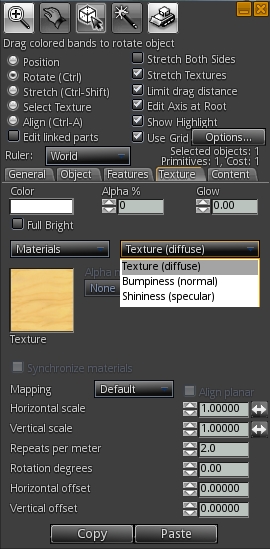
Materials processing support has been available for a while with pre-release and alpha versions of Singularity, and with 1.8.4.5433, they arrive in the release version. For those familiar with using materials (diffuse, normal and specular maps), the Texture tab on the Build floater presents the expected options in a familiar layout.
A couple of nice additions with materials are the Synchronize Materials check box in the main build floater, and the carry-through of the UUID field from the texture picker to the normal / specular map pickers. The former makes it a simple one-step process to keep parameter changes between the different maps on the face of an object in synch, while the latter makes it easy to apply maps using their UUID if known.
The particles support sees Singularity able to support the latest particle parameters, including ribbon particles and particle glow. However, while testing the viewer, I found that it does not appear to support the particle muting capability LL also introduced, whereby right-clicking on a particle stream will mute the corresponding emitter.
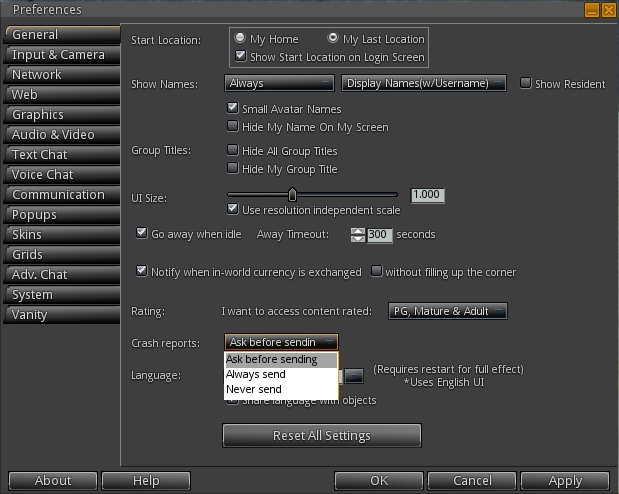
The Google Breakpad crash reporting system is enabled by default on first installing release 1.8.4. Providing such reports allows a TPV team to better understand and deal with potential crash modes within a viewer and identify and eliminate potential errors which can result in crashes, and users are therefore encouraged to keep the option enabled. However, if you don’t wish to send any reports, or don’t wish to be asked prior to a report being sent should you crash, you can change the crash reporting setting through a drop-down menu in Preferences > General (shown below).
Google Breakpad enables crash reporting to the Singularity team, and can be configured through the Preferences > General tab
Menu Updates
Singularity adds some nice little touches to the use of the pie menu, and adds the option to switch between using the pie menu and context menus.
Shift-clicking on the central “hole” in the pie menu will either step you back through levels (if you have been using the More > option), or close the pie menu
The pie menu can be displayed when in Mouselook by holding the ALT key and right-clicking. It can be cleared by holding the ALT key and left-clicking
For those who, like me, prefer context menus, they can be enabled in place of the pie menu via Preferences > System > Use Context Menus instead of Pie Menus.
Other Updates of Note
This release of Singularity also includes the following updates:
Inclusion of the latest fixes for the latest ATi/AMD Catalyst drivers
Addition of the default camera presets to the Quick Preferences panel
Several improvements to the instant message panels
Improved reliability of the texture cache
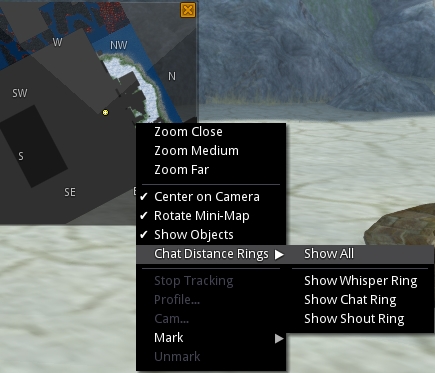
The mini-map gets updated with additional options on the right-click menu
Mini-map updates:
right-click option to hide or show objects
Ability to show Whisper, Chat and Shout range rings (hat rings aware of OpenSim chat range settings)
MiniMapPrimMaxAltitudeDelta and MiniMapPrimMaxAltitudeDeltaOwn debug settings added to allow customisation of objects displayed on the mini-map based on proximity
Linden tree animations re-enabled (Advanced > Rendering > Animate Trees)
Clicking on clock toggles display of local time
Grid URLs can be entered directly into the login panel’s grid field, bypassing the need to open the Grid Manager
OpenSim / Aurora sim updates, including:
Support for variable-sized regions
More OpenSim conformity
Issue with teleport failures and saving scripts taking a very long time on OpenSim regions run in the same simulator instance fixed
And more, again, please refer to the release notes for details and for the code attributions of all updates.
Windows 64-Bit
The 1.8.4 release of Singularity sees the arrival of a Windows 64-bit version. There is a known issue with this version of the viewer, which lacks support for the Quicktime plugin, so certain types of parcel media will not play. However, this does not affect streaming music and media on a prim (MoaP).
While my tests are far from conclusive, I have spent time running the 64-bit version on the SL Aditi (beta) grid and have encountered no problems or crashes.
 It’s been several months since the release of the last Dolphin viewer update (March 2013). This means the viewer is lagging behind many of the 2013 updates from the Lab, including things like Server-side Appearance, materials, etc.