Imprudence catch-up

imprudenceI’ve been meaning to run a catch-up on Imprudence since mid-April; my apologies to Onefang Rejected and crew for not doing so sooner.

My last report on Imprudence, back at the end of February, made mention of the fact that Onefang, who had been working on the Meta-Impy viewer (itself forked from Imprudence 1.4.0), had come forward with a stated goal of continuing Imprudence’s development and joined the Kokua / Imprudence team. After that, things went quiet as far as the rest of the world was concerned. However, this didn’t mean nothing was being done.

Recent Updates

In April 2013, the team released first experimental version of Imprudence 1.4, referred to as 1.4.0.3 exp 0, the first major release of the 1.4.0 code which had been in beta status for a very long time.

The update included a lot of under-the-hood work with many bug fixes from numerous contributors, improvements to the build processes, code clean-ups, the removal of the Google translate option, updates to the grid list, port of inventory category capability from Cool VL viewer, addition of a MOAP radar, and security improvements to the storage of users’ passwords.

This was followed almost exactly a month later, in May 2013, by a further release – referred to as 1.4.0.3 experimental 1, and which included further fixes and updates which built on the work released in 1.4.0.3 experimental 0.

With both releases, Onefang took time out to address a range of questions on Imprudence, and roughly outline what the team hope to achieve. His comments were caveated by noting two important points:

  • There is a fair amount of catching-up to do, and it will take time for the team to get there, so people shouldn’t expect everything to be done at once
  • The team is small, and all of them volunteer to do the work. As such, it has to be slotted-in between real life obligations, etc. Therefore, progress may be subject to interruption, and users were (and are) asked to bear this in mind.

Looking Ahead

In terms of bringing Imprudence in-line with some of the major updates other viewers have / are seeing, Onefang had the following to say (as noted in his replies to comments following the 1.4.0.3 exp 0 release – scroll down to read all of his replies in full). There are no time scales attached to any of the following because, again, the team are working on a volunteer basis and are subject to RL interruptions and obligations which may impact progress in one or more areas.

MOAP (Media on a Prim)

Robin Cornelius provided the team with the MOAP radar functionality, and subsequently with a working patch which includes most of what is required to get MOAP working in Imprudence, so the team hope to have this working “soon”.

Mesh Rendering

Currently, imprudence uses the “old” rendering code which cannot render mesh objects (boxes, cylinders and weird shapes result). Replacing this code is a major task and will take time to complete. As such, the aim for the time being is to catch-up on other code elements and come back and address the issue of render code update / replacement for a later date.

However, Onefang has been experimenting with code that bypasses the bulk of the old render code for meshes, and steps in at the last moment to add the mesh after the rest of the render is done. This approach has worked well as a proof-of-concept, and he hopes that if it can be shown to work “for real”, it will offer a possible interim capability for Imprudence to render mesh until such time as the rendering code can be properly overhauled / replaced.

Imprudence and mesh
Imprudence doesn’t currently support mesh rendering, as shown above with the LAQ mesh cottage (see inset for how it should look). BUT, while it may take a while for comprehensive mesh rendering support to be implemented, Onefang Rejected is looking at an interim solution which may allow Imprudence users to correctly view mesh objects in-world

Second Life Server-side Baking / Appearance

The team plan to make Imprudence SSB/A compatible in the future. This will not happen prior to SSB/A going live across the SL main grid (Agni), nor is it likely to happen any time immediately after LL have deployed SSB/A. However, Imprudence will be looking to support it as and when they can.
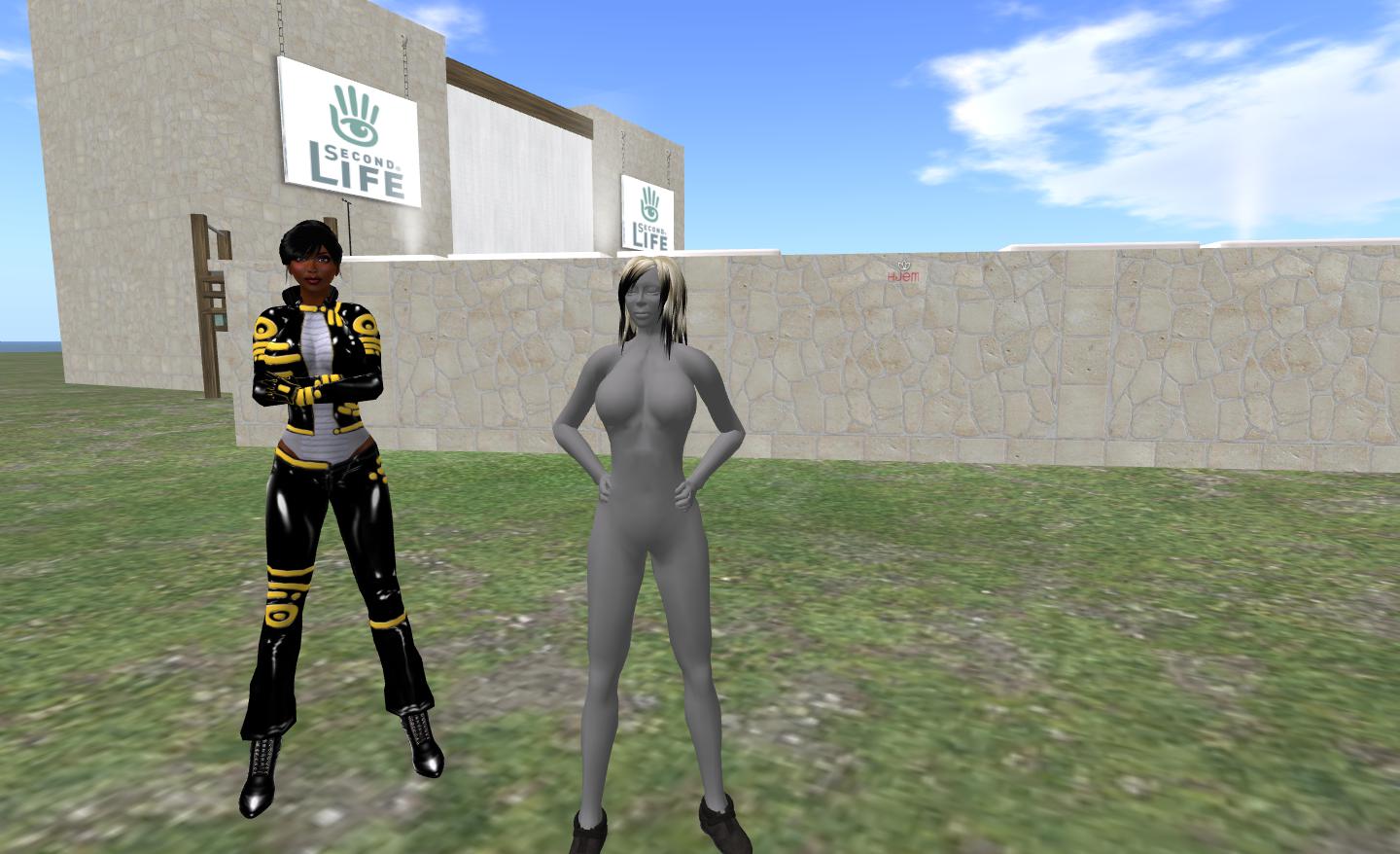
Grey people will be the order of the day for Imprudence users on Second Life once SSB/A is deployed - at least until the Imprudence team get SSB/A support implement, which they are looking to do in the future
Grey people will be the order of the day for Imprudence users on Second Life once SSB/A is deployed – at least until the Imprudence team get SSB/A support implement, which they are looking to do in the future

Materials Processing

Again, earmarked for inclusion in Imprudence, but not necessarily on the immediate horizon.

Other Things on the List

Obviously, the above is not the extent of the team’s plans, but tends to represent the items they are most asked about. Overall, the “to do” list includes a lot of work and covers things such a multiple attachment support, pathfinding support (NPC support for OpenSim), avatar physics, parcel privacy support, scripting additions, RLV/a updates, HTTP updates, and more.

Progress on Imprudence can be tracked through the project issue tracker.

Patience, Young Padawan!

Imprudence remains a popular viewer, and runs well on OpenSim. That OneFang and the team are committed to keeping the viewer going and bring it up-to-par with other viewers and both with OpenSim and Second Life is to be highly commended. It may take a while for some of the updates to reach the light of day, so some patience may be in order for those who’d like to continue / resume using it with SL in particular.

Related Links

Exodus: passing the torch

exodus-4Recent updates to the Exodus viewer have been a little slow in some respects. This is in part hardly surprising – at least one member of the team (Geenz Spad) has been up to his eyeballs in working on the materials processing project. However, other factors – such as real life commitments  – have meant that other members of the team have also been unable to focus on the viewer perhaps as much as they would have liked.

As a result of this, both Clix Diesel and Ayamo Nozaki have decided to step aside from lead roles in the project and pass the torch on to others – with Katharine Berry taking over ownership of the project and the role of lead developer. Clix himself made the announcement in an Exodus blog post on Sunday April 21st, which reads:

Hello everyone!

I know it’s been a while since an update but we have some important news to share with you.

I would like to announce Katharine Berry as the new lead developer and owner of the Exodus viewer project!

Exodus has been a passion of Ayamo and myself for just shy of two years now and we have enjoyed leading the project immensely. Originally we built Exodus as a viewer to compliment various Second Life combat scenarios, Exodus has since catered for a wide variety of user and continues to provide a the best viewer experience we possibly can thanks to the skill and dedication of my team. This will never change. Recently we have not been able to focus on viewer development as much as we would like. Ayamo Nozaki will be leaving as our lead developer and passing the torch to Katharine Berry. Katharine is also the ideal candidate to hand ownership of the project, as Ayamo and I cannot spare the time to do so any longer.

Thank you everyone, from Ayamo and me, it’s been a blast!

Exodus remains one of the three viewers I most frequently use, depending upon what I’m doing in-world, so I look forward to seeing what this hand-over brings; I also wish Clix and Ayamo the best for their future endeavours, in-world and elsewhere.

Related Links

Phoenix viewer appears set to continue (but not with SL)

PhoenixAs of January 1st, 2013, the Phoenix Firestorm team ceased support of the Phoenix viewer, bring a close to all further work on that viewer on their part.

While this signals the end-of-line for Phoenix where Second Life is concerned, it appears that efforts are underway to attempt to continue Phoenix development for the OpenSim / Aurora environment, under new leadership and a new brand name.

In a blog post dated 29th December, 2012, Virtual Reaility, the new developers for Phoenix state:

Over the past week the Jessica Lyon, Project Manager of the The Phoenix Firestorm Project, Inc. made an announcement that on Saturday, December 15, the Phoenix development team would no longer support the V1-based Phoenix virtual worlds viewer that has had a significant following of users in virtual worlds such as Second Life and OS Grid.  Ms. Lyon stated that support for the viewer will be dropped to provide development and support focus on their Phoenix-Firestorm viewer.

Though this may seem like a dark day for people who use and enjoy the Phoenix viewer, this cloud has a silver lining. Virtual Reality is pleased to announce that it will continue development, maintenance, and improvement of the Phoenix V1 viewer, which will be re-branded as the Virtual Reality Viewer. “I am excited to have the opportunity to fork this highly popular viewer for virtual worlds users who use it and desire to continue to use it.”, said, Virtual Reality owner and CEO, Sonic Boom Drillion. “The Virtual Reality viewer will continue to work within OpenSim and Aurora based grids, however we hope to update the viewer to address a number of technical advancements that are presently happening in virtual worlds.  We are eager to embrace this code base and develop it to support these changes.”

The post goes on to state that as of the 29th December, work was underway to move the Phoenix code to Virtual Reality’s own systems, however the work will not include porting outstanding / open JIRA relating to Phoenix, as these are related to Second Life, which will not be the target environment for the rebranded viewer.

virtual-realityVirtual Reality is an OpenSim hosting company focused on Aurora Sim side of OpenSim, and provides customers with grid space through its own  Virtual Reality grid, as well supplying private grids to customers.

Within the blog post / announcement is a request that any developer wishing to work on the rebranded viewer should contact Virtual Reality at virtualrealitygrid-at-gmail.com.

While this does not help those who have used Phoenix specifically with OpenSim, it does mean that potentially, the Phoenix legacy will live on, albeit under new management and a new name, on OpenSim.

Related Links

Calling all Phoenix users

PhoenixJessica Lyon has announced she and the Phoenix  / Firestorm team will be holding an Office Hour meeting, and all users are invited. Jessica is particularly keen to have users on Phoenix attend the meeting, commenting:

Everyone is invited and encouraged to attend but I especially want to see Phoenix Viewer users in attendance as the primary topic will be about Phoenix and its future. I also would like to see all you angry people who have been flaming and hating on us in our blog comments. I’d like to address your complaints so please at least be on the stream if you can. 

Because the lack of Phoenix Viewer development and in fact the future of the Phoenix Viewer itself needs to be discussed and your questions/concerns need to be addressed.

Firestorm users are also obviously welcome.

Event Details

Those wishing to attend / join the stream are advised to turn up around 30 minutes ahead of the meeting. As there are limited slots for both the in-world event and the stream, it would be advisable if those attending the event don’t also run the stream, as this could prevent others who are unable to get in-world from watching and listening on-line.

The event will be recorded for future playback.

Exodus 12.11.24.1: a compact update

exodus-4Saturday November 24th saw the next release of Exodus hit the download page, and Ash Qin from the team was kind enough to give me the nod – I confess, I’d lost track of the nightly builds and so have fallen well behind with the viewer’s on-going development – and access to the beta release of the build.

Exodus 12.11.24.1 is based on the Linden 3.4.2 code base, so it includes the majority of the most recent updates from the Lab, including the new Group Services code for managing and editing groups with more than 10K members, and a host of other Linden goodness.

Installation

The Windows installer weighs-in at a touch over 34MB in size and contains absolutely no surprises during the install process – as one would expect. As per usual, I did a completely clean install, which brought me to my first surprise: on start-up Exodus displayed the Steam-related “Create Account” prompt.

No, Exodus isn’t going to Steam.

This doesn’t mean Exodus is heading for Steam a-la the official viewer, just that the Steam code is now part and parcel of the SL beta viewer code, and the Exodus team didn’t see any reason not to merge it into their code, given it is only ever something established users are ever going to see once after a fresh install (and possibly not at all if they don’t perform a clean install or the team moves to an updater system – which is something they are considering).

Pathfinding

This release brings with it pathfinding, which the team had originally hoped to release a lot sooner. This includes not only the build tools associated with pathfinding (Linksets and Characters floaters, attributes in the Build and Object Profile floaters, etc.), but also includes the Navmesh visualisation code, as Exodus becomes the latest viewer to sign-up to the Havok sub-licence agreement with Linden Lab.

An impressive image of Deshima, showing the navmesh visualisation in Exodus

This means that anyone who has been using Exodus to access OpenSim grids via –loginuri will no longer be able to do so when using this release. Similarly, the optional grid selector which can be displayed on the login splash screen only lists Agni (the main grid) and Aditi (the beta grid).

The move to the Havok sub-licence also means that with this release, Exodus moves to the official mesh upload code from LL, rather than using the HACD code which has been in common use within TPVs.

Group Services

Large groups will load and can be edited with this release of Exodus

As mentioned above, Exodus gains the large group management and editing code from Linden Lab with this release, allowing groups with 10K or more members to load in the Group floater and which allow group owners and officers to edit and manage very large groups.

Again, just as a point of reference for those unfamiliar with the new code changes: these do not relate to group chat or anything related to improving group chat. That is an entirely separate project within Linden Lab (and one which may not be being actively progressed while other work is being undertaken). This is purely about using HTTP protocols (rather than the old UDP) to bring more stability to the downloading, viewing and editing of very large groups.

Viewer Updates

Alongside the updates and fixes from LL, Exodus 12.11.24.1 gets a number of updates all of its own:

  • The Flickr option on the Snapshot floater now includes an option to include the parcel name / SLurl in the description
  • You can now Paste as Link’ and Copy as Link using the right-click or CTRL-SHIFT-V and CTRL-SHIFT-C using Exodus’ built in “pastebin” functionality
  • A Copy as Link button added to the About Second Life Viewer floater, allowing the information in the floater to be viewed via the web
  • A Copy Key option added to the avatar right-click context menu, allowing for easy copying of the Avatar Key.
Two new options for Exodus: the include location option for Flickr uploads on the Snapshot floater, and Copy as Link on the About Second Life Viewer

Fixes and Changes

Exodus 12.11.24.1 also includes a number of fixes and changes from the team:

  • MOTD should work now on OS X
  • Added copy key to gear menu for avatar inspection panels
  • Colouring of certain elements
  • BMP cursors on Linux
  • Higher compression of LZMA packages on Linux
  • Curl on OS X no longer defaults to trying to use IPv6 in Curl (related to MOTD issue).

Performance and Feedback

Performance-wise Exodus 12.11.24.1 again gives very similar results on my usual review system (see the panel on the right sidebar of this page) as recent viewer releases I’ve taken a look at in the last month:

  • Deferred off:
    • Ground: 28-29 fps
    • 370 metres: 36-38 fps
    • 2875 metres: 43-45 fps
  • Deferred on + lighting set to Sun/Moon + Projectors; ambient occlusion off:
    • Ground: 9 fps
    • 370 metres:15 fps
    • 2875 metres: 18 fps

Like like Catznip R7 and the recent Firestorm beta, these figures dropped only very slightly (just 1 fps on average) if I also activated ambient occlusion in deferred; again marking the fact that for me, things seem to have improved recently over the start of the year.

Compared to other recently releases, this one from Exodus is relatively small and compact – which doesn’t lessen its overall impact; once again it places Exodus back among the leaders of the V3-based TPV pack. There are still a couple of things I’d like to see, one of them being my usual request of TPVs in general: the ability to left / right range the toolbar buttons at the bottom (or top for those that use that space) of the screen. Only one does it so far, and it is really handly having the option.

Nevertheless, nothing should be taken away from the Exodus team, offering as they do a pleasing and worthwhile update.

Related Links

Niran’s Viewer turns 2

NiranV Dean has been back working on Niran’s Viewer, and in doing so has lifted the viewer to version 2.0 with a number of initial Betas. On Wednesday October 24th, he made a final release, 2.0.2185, which he calls Niran’s Viewer Rebooted, given the amount of additional work put into it, which finally saw him bypass his planned 1.5 release.

As the last release of Niran’s Viewer in these pages was version 1.46, the following will touch on elements previously released in 1.47 – 1.49 as well.

Download and Installation

The download file remains an archive EXE, rather than an actual installer, and is just on 50MB in size. It will extract the files into a default directory Nirans Viewer in C:\Program Files. If you’ve had a previous version of Niran’s Viewer installed, it is strongly recommended that you remove it first, together with all cache and settings files. The viewer itself has no uninstaller, some removal is a matter of deleting the program folder. The locations for all three are:

  • Viewer: C:\Program Files\NiransViewer (delete this entire folder)
  • Cache: C:\Users\[user name] \AppData\Local\NiransViewer (delete this folder)
  • Settings: C:\Users\[user name] \AppData\Roaming\NiransViewer (delete this folder and all sub-folders inside).

First Time Running

Once you’ve made your initial keyboard camera preferences selection, the log-in screen features a new video from NiranV. I have to admit, I’m curious as to the music track and whether it is taken from something or original, as I rather like the keyboard arrangement in it.

Watch a video while entering your login credentials

You may get an anti-virus alert relating to the SLVOICE.EXE plugin – if you do, make sure that it is the plugin being referenced and clear it. The log-in splash screen is again liable to be something of a surprise to first-time users. There is no familiar splash screen feed from Linden Lab here. Instead, and providing you’re running flash, there’s a YouTube video NiranV has put together and which will play while you enter your log-in credentials in the panel to the right.

Note that Niran’s Viewer isn’t intended for use on OpenSim, so the other grids selection is limited to the SL Agni (main) and Aditi (Beta) grids. Once you’ve entered your you log-in credentials, you’re treated to a series of hints and tips as the viewer logs-in to Second Life.

Preferences Overlay

Niran’s alternative to the usual Preferences floater started appearing in version 1.46 of the viewer, where he referred to it as his “Skyrim influence”. It’s slowly been maturing through a number of releases since then, and with version 2.0, it completely replaces the old Preferences floater, which is no longer available within the viewer.

Accessed via the Preferences toolbar button, CTRL-P or NV->EDIT->PREFERENCES, the overlay does exactly what it says – overlays the in-world view.

Preferences Overlay with a submenu displayed

To the left of the overlay are the main options: Display, Audio Controls, Camera, Chat, User, Interface and Viewer. Depending on the complexity of the screens / options associated with this, clicking on one of them may display a panel directly, or may open-up a sub-menu of further options which in turn will open up individual panels on the right of the overlay.

Preferences overlay with an open panel

Please use the page numbers below left to continue reading this article