Due to the offline e-mail issue involving scripted objects, as reported in my last news update, there has been no Main Channel deployment this week. Two RC deployments are currently planned for Wednesday 12th December, however. These are:
BlueSteel and LeTigre: should receive the same maint-server project that rolled to Magnum in week 49, with bug fixes arising from that deployment. The release notes are available for review
Magnum should receive a superset of the changes scheduled for BlueSteel and LeTigre, which includes extra bug fixes, including stability improvements and a memory leak fix.
The only new feature new to Magnum is an increase in the allowed animation asset size – the 60KB size limit on animation assets has been raised to 120KB. This change is to allow for longer and more complex animations to be made in the future, once an viewer-side update to allow 60-second animation loops has been implemented. Magnum’s release notes can be read here.
So be sure to read them 🙂 (with thanks to Whirly Fizzle for the link)
Update on Key Region Issues
Physics Memory / Region Performance
As reported last time, the physics memory issues affecting some regions, which I reported in week 47, had been tracked down by Simon Linden to a Havok issue related to navmesh rebakes. His fix for this problem cleared QA and forms a part of the RC deployments for the 12th December, together with a fix for a low-level threading problem within the simulator code which has also been causing region crashes.
Offline IMs from In-world Objects Failing to Forward to E-mail
This issue, linked to llInstantMessage(llGetOwner(), caused the RC deployments in week 49 to be rolled back on Thursday 6th December. A fix has been developed and tested and is included in all three RC deployments planned for Wednesday 12th December.
Code Freeze / No Change Windows
Again, to re-iterate from my last report, there will be no server-side code changes over the holiday period as follows:
Week 52 – commencing Monday December 24th
Week 1, 2013 – commencing Monday December 31st
Simon Linden still hoped that one of the code being deployed to the RC channels this week can be rolled to the Main Channel in week 51. There will likely be a further update on this following the Thursday Server Beta UG.
JIRA / Bug Tracker Update
Linden Lab are still mulling the September closure of the old public JIRA system. Since the initial shut-down, things have opened up a little. Additional JIRAs have been left open as read only beyond the initial triage, while others have been opened and have had their comments enabled in order to allow feedback – such as the CHUI JIRA, which is being very constructively used for comments and feedback and shows how, in an ideal world, the system might work.
Currently, it appears that “nothing definitive” has been decided on the change, although it has been under internal discussion.
Feedback from those in the two JIRA support groups (developers who have significantly contributed code and those who have in the past supplied significant support in handling JIRAs) has been interesting. It appears that the number of feared duplicates on issues has been a lot smaller than had been feared. The overall quality of input given using the new form also appears to have been significantly improved since it was introduced.
Things have been relatively quiet viewer-wise with only two updates to the official viewer branches. The development viewer rolled to 3.4.4.267614 December 4th, while on December 5th, the beta viewer rolled to 3.4.3.267755. The latter included a good crop of updates, including a number of graphics and GPU support related changes, and the long-await snapshot tiling fix.
The MAINT-628 fix in action: an image taken with the latest beta viewer running in deferred mode and at a resolution of 3500×2154 pixels, well above the 1400×900 of my monitor – and no tiling! There are limits to how well the fix works at ultra-high resolutions, as noted in the JIRA comments included in my report on the release.
Server Deployments
Following-on from last week’s RC deployment issues, there was no main channel deployment on Tuesday December 4th, although a number of regions were restarted during the course of the day.
Wednesday December 5th saw the same maintenance release rolled to all three RC channels. This comprised the release originally aimed at Magum in week 48 and which included all bugs fixes for the problems which required the roll-back on Thursday 29th November. Initial statistics for this update during the brief time it was available last week showed a clear improvement in stability, and this seems to have continued with this week’s release, although there has been one major issue come to light and is under investigation.
This relates to IM messages sent by scripted objects failing to trigger e-mails to the object’s owner if they are off-line. The problem appears to be related to the use of llInstantMessage(llGetOwner(), and appears to affect regions on all three RC channels, but not every case where llInstantMessage(llGetOwner() is used appears to be affected.
Currently, it is thought that a fix will be available for deployment during week 50, and should reach the RC channels om Wednesday December 11th.
Details of the week’s RC release can be found in the release notes and in the forum discussion thread (including some discussion on the current scripted object / e-mail issue).
Andrew Linden continues to forge ahead with his initial work on Interest Lists, which forms a part of the Shining Project. As reported last time around, the issue of people’s HUDs appearing on other people’s screen has been fixed, and the code is currently with LL’s QA for testing.
Given the progress made, Andrew re-capped on the project / gave further insight into this initial phase of the work Server Beta User Group meeting on Thursday November 29th.
Object Updates
The first phase of the new interest list code is aimed at reducing the amount of information being sent to the viewer by the server. This done through the code only sending required updates to the viewer for objects which are within the camera’s line-of-sight. Essentially, updates on objects take three forms regardless of which Interest List code is being used:
A “full” update – required when an object is “seen” for the first time or which is constantly updating position / appearance
A “terse” update – required only when an object is changing appearance / position relative to the viewer’s in-world view
A “please delete” update when the object has been removed from the viewer’s in-world view (e.g. it has been deleted or taken back to inventory).
The new updates are aimed specifically at the number of “terse” updates being sent to the viewer. Under the current Interest List code, these updates are continuously sent out by the server to all viewers in range of an object in motion or undergoing change, regardless as to whether what is being updated (in terms of movement or appearance) is actually visible in the window of the viewer. With the new Interest List code, updates are only sent to your viewer based upon what is actually in your world view.
This means, for example, that if you can see a bouncing ball on your screen and then turn your avatar or camera so it is no longer visible to you, under the old system, data packets relative to the ball’s motion continue to be sent to your viewer, even though they are no longer required. With the new system, the updates cease shortly after the ball moves off your screen, and only resume as the ball moves back on to your screen once more (no actual content is broken by this change, it is simply a change in the amount of updates being sent from server to viewer).
The net result of this is to reduce the amount of data the server is sending to the viewer, thus helping improve performance. As the new code applies to both objects and avatars, this can amount to a substantial improvement, as Andrew commented during the meeting, “I think we’re currently seeing a 30% improvement (in the time spent in “Agents” in the stats) for the case of about 30 avatars running around in a region with 12k prims”.
However, there is a side issue with these changes, which Andrew and the devs are currently looking into. If you turn away from a moving object for a length of time such that the terse updates from the server are no longer sent, then suddenly pan the camera / turn so the object is once again in view, there might be a brief delay (one second, currently) before the object correctly updates. This is because the viewer is rendering the object based on its “old” data received from the server before getting the latest updates from the simulator. The time delay can potentially be reduced, but doing so can negatively impact the overall performance gains made. Because of this, Andrew is holding it at one second in order to ascertain how much of an impact the delay actually has as the code is tested.
Camera Follow
Currently, everything you see in-world is almost exclusively based on its position relative to your avatar, regardless as to where you move the camera. This is why, as you cam further away from your avatar, objects may appear with less and less detail, or may not render at all (particularly smaller objects) – their respective level of detail is being calculated based of their distance from your avatar, not from their distance from your camera.
With the new Interest List code, what you see in-world is now based upon the position of your camera. The benefit of this being that as you cam around, objects should render at the correct level of detail relative to your camera (so no more sculpts which appear to be stuck at a lower LOD despite your camera hovering a few metres away from them, for example). The difference between the two approaches can be seen in the image below.
Interest List in action: In both images, I’m standing 100m from a .5-cube with a 0.001 black cube on top of it. When I cam out to the cubes using the existing Interest List code (top image), the black cube fails to render, due to the level of detail sent to the viewer is based on my AVATAR’S position, despite my camera only being a metre or so away from the small cube. However, under the NEW Interest List code (bottom image), the small black cube is rendered, because the level of detail being sent to my viewer is now based on my CAMERA’S position (click to enlarge)
After a smooth deployment to the main channel on Tuesday 27th November, things got a little unsettled on Wednesday 28th November with the deployments to the RC channels. As noted in part 1 of this report, these were supposed to comprise a maint-server release to BlueSteel and LeTigre, with the same package and a few extras going to Magnum.
The problems started during the actual deployment on Wednesday, wherein after successfully updating Magnum and BlueSteel, the deployment team started noticing issues unrelated to the deployment which caused Coyot Linden to call off the LeTigre roll-out until things were sorted. However, as Maestro Linden takes up the story:
Then there were reports in the forums about offline IM emails from objects being broken; if an object sent you an IM and you were offline, the offline email would contain all the usual details *except* for the message. This bug affected both BlueSteel and Magnum since they both shared the responsible change. Then, after digging into offline emails a bit more, we noticed that the ‘To’ field of offline emails would show the object owner’s name instead of the recipient’s name … which was a little confusing … Anyway, these bugs were kind of bad, but we weren’t sure that they were worth the trauma and downtime of an emergency rollback …But then this morning, we became aware of a 3rd bug, from support. It turned out that deeding parcels to groups was failing.
It was this third bug which was deemed sufficiently serious enough to warrant a roll-back of the RC deployments, which took place on Thursday 29th November, with the result that all four channels are now running on the same release – 12.11.09.266804. Kelly Linden has fixes for all three issues, but they are currently in testing, and the plan is to try again next week with the RC deployments.
Region Performance / Memory Issues
The physics memory issues which I reported in week 47, and then provided an update on in Part 1 of this report have received further attention from Linden Lab. The problem has been with some regions experiencing severe physics memory bloat within a short time of being restarted, with the result being that they rapidly reach a threshold of memory use (~230MB for homesteads, ~920MB for full regions) which prevents rezzing of any objects, in-world or attached.
In investigating the issue, Simon Linden located a source of memory leak related to the Havok system which may address the issue, and is hopeful he has found a fix. Commenting on the matter at the Server Beta meeting on 29th November, “I’m in the midst of hacking a special test mode for a region … I’m going to make it continuously re-bake the navmesh and terrain data. I’ll let that run overnight and see what happens … I’m not going to claim victory quite yet … this is like that point where you hit the zombie hard, but you have to see if it comes back again.”
Aditi Grid Log-in Issues
It had been hoped that the Aditi situation, wherein problems with inventory-related data is preventing people from being able to log-in to the beta grid – would be discussed at the Server Beta meeting, but these were somewhat side-lined by discussions on other projects, most notably Interest Lists (work on which prevented Andrew Linden from digging into the matter following the Simulator User Group meeting on Tuesday 27th November).
While Maestro was able to confirm that a member of Linden Labs is, “Working on a script to help the Aditi inventory situation”, little more information was provided at the meeting due to other ongoing conversations. Hopefully, this matter will be picked up next week.
PATHBUG-183
In working on Interest Lists, Andrew Linden had hoped he’d sorted a fix for PATHBUG-183, which relates to offscreen physical objects flying across your in-world view. The code for the fix has been available on Ahern, on the Aditi grid, but there are reports that while the problem may have been somewhat reduced in scale, it is still very apparent. Andrew hopes to look into this during week 49.
Region “Flicker” and Content “Warping”
There has been some issues related to viewing neighbouring regions and crossing region boundaries. These issues take a number of forms, and are related to both server and viewer issues:
The entire neighbouring region “flickers” if you are near its edge
After crossing between regions, the content of the region you have just left seems to appear in the region you’ve just entered, usually somewhat warped / deformed
“Cachable” objects (e.g. unscripted and non-physical) objects vanish from your view of a region on leaving it
A region appears to “reset” (re-renders) itself shortly after leaving it
Sometimes on crossing between regions, objects from the region you’ve just left seem to appear warped and deformed in the region you’ve just entered……only to disappear after a few seconds / as you approach them
The first two of these issues are considered to be viewer-related bugs which are thought to have been resolved in code currently in the viewer development. The final item in the list is related to a server issue which Andrew Linden believes to have been fixed as a part of his work on Interest Lists. The “cacheable” objects problem was also considered to be a viewer-side bug which has also been addressed in viewer development, but in considering the problem at the Server Beta meeting, Andrew Linden thought there might actually be more than one bug responsible and indicated he would be looking into this some more.
After indications from LL that there may not be a Main channel deployment on Tuesday 27th November, restart commenced as the deployment made to the RC channels last week went ahead as per the usual schedule.
Wednesday 28th November should see the three main RC channels updated as follows:
BlueSteel and LeTigre: should receive a maint-server project. There are a few new flags for the LSL function llGetObjectDetails(), but the most important changes are some fixes for physics and mesh-based crash modes – see the server release notes
Magnum should receive the say package, with additional stability improvement changes – see the Magnum server release notes.
As usual there is a forum thread for the week’s server deployments.
Viewer News
Release Viewer
The 3.4.2 viewer code finally reached the release (production) version of the LL viewer with the release of 3.4.2.267137 on Monday 26th November, which I briefly reviewed here.
Beta Viewer
The beta viewer, now cleared of the crash issue bottleneck, moved rapidly through the 3.4.2 code base prior to Thanksgiving in the US, as previously reported in the news updates, and then reached 3.4.3 with the surprise release of 3.4.3.267135 during Thanksgiving week, after it had been indicated there would be no viewer releases during the week due to decreased support staff availability during the long weekend period. As reported last week, this release includes the first phase of Monty Linden’s HTTP texture fetch project, which should see people experiencing significantly faster texture rezzing when in-world.
CHUI Viewer
The CHUI – the Communications Hub User Interface – project viewer is due to go through another couple of iterations before moving towards a development / beta viewer code merge. There has already been one update since the project viewer, which is aimed at improving the capabilities and reliability of in-world text and Voice conversations, first appeared.
CHUI: potentially a couple more iterations to come
While he has not followed the project first-hand, Oz Linden believes CHUI to be nearing a “feature complete” status. The advice is that if you haven’t tried it out and wish to give feedback, now is the time to do so.
Nalates Urriah provides an update on some of the ongoing work around the mesh deformer. In the meantime, speaking at the Open Development User Group meeting on Monday the 26th November, Oz linden responded to a question from White Rabbit as to what garments are still required for testing by saying, “That’s a great question. I’m setting up a meeting with the people responsible for avatars to try to get a proper acceptance test defined for both that and STORM-1800.” STORM-1800 relates to the vertex weights of the default avatar character mesh.
While Oz didn’t specify a date for the meeting, those with a direct interest in either supplying mesh clothing for testing or in the JIRA should be hearing from him in the near future on the meeting details.
Week 47 marks Thanksgiving in the USA so as reported last time, there have been no server-side deployments for the Release Candidate or main channels, and no rolling restarts. This is liable to continue into week 48 (week commencing Monday 26th November), as there is unlikely to be any deployment to the main channel. There will, however, be deployments to the RC channels, details TBA.
HTTP Updates – Texture Fetching
After indicating that there would be no viewer releases during week 47 in the run-up to Thanksgiving, the Lab rolled out the first of the 3.4.3 beta releases – 3.4.3267135 – on November 20th. The major change to this is the inclusion of the first phase of Monty Linden’s new HTTP-based texture fetch capability, designed to significantly improve texture rezzing within the viewer. As the release notes state:
A new scheme for performing HTTP operations is introduced with this release. It is intended to reduce crashes and stalls while performing HTTP operations and generally enable performance and reliability improvements in the future. In this release, it is being used by the viewer’s texture retrieval code. Our expectation is that it will provide consistent and predictable downloading of textures. As well as the usual problem reporting, we’re also interested in confirmation of improvements where this release improves your experience.
The HTTP texture fetching code is now available in the latest SL beta viewer (3.4.3.367135)
The code for these improvements has already started appearing in some TPVs, and will doubtless be available across all flavours of the viewer in the near future.
Observable improvements in rezzing times have been reported by those who have used the project viewer releases of this code, so it should yield benefits for those using the beta. Monty Linden, who is handling this project is apparently now working on further improvements to the server-side of the equation, which should see additional improvements in the future.
Also pushed out during the week was a new version of the development viewer – 3.4.3.267201.
It is currently not clear when the renewed roll-out od beta and development viewers will result in updates appearing with the production version of the viewer, I believe that this may be additionally delayed while other requirements are put in place related to the Steam link-up (the code for the Steam link-up already having been merged into the beta viewer).
Volumetric Pathfinding
Also during the Tuesday Simulator meeting on November 20th, the question of volumetric pathfinding came up, and how pathfinding might be extended into the air, to allow birds, etc., and under Linden water. There are a range of issues with doing this – perhaps the biggest being the actual demand. There is also the matter of keeping birds and the like from crashing into buildings and skyborne objects, or in keeping fish in the water.
During the meeting, Baker Linden passed a question on the subject to Falcon Linden and indicated that Falcon felt, “It’d be about 3 months of work to get volumetric pathfinding — and that still wouldn’t handle dynamic avoidance (which is the hard part). Theoretically, it’s not that hard — it’s having to rework some Havok systems to work with intermediate data.”
This doesn’t mean that the work is about to be undertaken in any way whatsoever – just that were LL to consider it, getting the basics going for volumetric pathfinding going would take around three months. However, even then, unless the issue of dynamic hazard avoidance, it is unlikely this is something we’ll be seeing in SL for a while yet.
Server-side Object Rezzing Performance
Baker Linden indicated that he has started looking at server-side object rezzing. This work isn’t connected to Andrew Linden’s Interest list work, which is related to which assets the simulator should be loading ready for rezzing, but is rather focused on reducing the server-side lag which is induced when an object physically rezzes in a region. As Baker explained during the meeting, “If you get a really complex object, with many large meshes, or large LLSD files, it takes a while to rez into the world. I’m trying to reduce that.”
There are no timescales associated with the work, although it is expected that it will include avatar attachments as well as in-world objects have less of a performance / fps hit on the region when rezzing complex items, particularly in Baker can get the parsing of large object files to work asynchronously, which currently does not occur. Whether this will translate to visible viewer-side improvements is debatable.
SL Issues
Homestead Performance / Memory Issues
There have been growing reports of region performance issues occurring across the grid. These primarily appear to be impacting Homestead regions – although it can be encountered on full regions as well.
Essentially the problem manifests itself (for most users) when they find they are unable to rez objects in-world and / or as attachments, while raw prims created in-world may rez, but are reported as turning phantom on creation. The issue appears to be large and abnormal memory usage by the region’s physics system, although the precise causes as to why it is occurring are currently unknown.
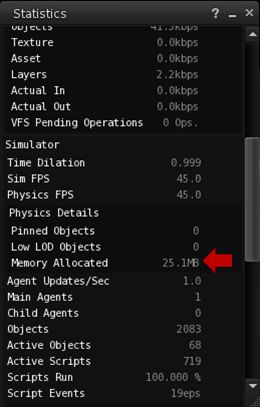
Physics memory use can be monitored via the Statistics floater (CTRL-SHIFT-1)
Regions are allocated a fixed amount of memory that can use. In the case of a full simulator, this is about 1GB, while Homesteads are allocated around 250MB. Generally, physics memory usage for a region – even a busy one – is around 40-80MB. However, on affected Homestead regions, the physics memory use is reaching or exceeding 200MB.
When the physics memory for a simulator gets abnormally high (close to or on 90% of the allowed maximum) internal region safeguards kick-in and prevent object rezzing in an attempt to limit further calls of the region’s memory and keep it alive. This is the behaviour people are witnessing in their regions. The safeguards themselves are designed to help prevent regions from becoming unstable during griefing attacks. However, the problems people are experiencing appear to be entirely unrelated to any form of griefing, and are thus causing a certain amount of head-scratching at Linden Lab.
Reed Linden, in responding to a support request from Motor Loon, provides clear guidelines on what to do if you have a Homestead and experience these issues. It is thought that the most likely culprit for the problem is an unidentified memory leak, but this has yet to be confirmed. Reeds comments regarding particle systems are fascinating. Particles tend to be more viewer-intensive than server, and as many commented at the Simulator User Group meeting on Tuesday 20th November, it would take something bizarre to be going on for particles to be impacting region performance; however, at least one region affected by the issue appears to have a large number of particle emitters in operation.
A further interesting twist came at the meeting itself, when a pathfinding snake and a number of pathfinding characters were rezzed, and the region suffered a severe performance hit (sharp FPS drop experienced by all attendees, sharp increase in both physics memory use and time taken to ping the region) which appeared to be linked with the snake (which was set to follow its creator around) re-calculating its path to both follow its creator and avoid other avatars / objects. However, when the snake was re-rezzed a short time later, no similar issue was noticed, with the region using around 116MB physics memory, with no other outward performance issues.
I the meantime, and as the Linden dev team continue to investigate the issue, if you experience this kind of problem, please ensure you raise a support ticket, supplying as much information as possible, including region name / simulator version (from HELP > ABOUT (either Second Life or the name of your viewer), the time the problem occurred, how it manifested and, if possible, information from the Statistics bar: memory used, FPS and physics performance details, etc.