This is intended to be a weekly round-up of current public SL viewers (of which I’m aware). Links to my most recent reviews of said viewers will be included, but may not reflect the current release. As few Viewers are static, and releases are made according to individual development cycles, further versions of any given Viewer may well be released between these updates, and as such the information here may become out-of-date as the week progresses. Please check with the relevant download pages.
Changes since the last round-up shown in green.
SL Official Viewers
Available for: Windows, Linux, Mac
Current Release version: 3.2.6.248931 (download page)
Beta version: 3.2.9.249510 (released: Feb 16th) (download page)
Development version: 3.3.0.248913 (released: Feb 16th) (wiki page)
Simplified Inventory Project version 3.2.8.248008 (wiki page)
Linden Lab have issued an update to the Third Party Viewer Policy, and it is causing something of a stir.
The key additions to the policy are sections 2.a (iii), 2.i, 2,j, and 2.k. These were discussed during the Viewer development meeting, and additionally announced via a blog post which followed the meeting.
Each of the clauses are given below together with key bullet points for each of them taken from Oz Linden’s presentation given during the Viewer Developer’s meeting. An audio transcript of the entire meeting is also available on-line.
Privacy Clauses
Three of the four new clauses (2.a.(iii), 2.i and 2.j are related to privacy issues.
2.a.(iii): “You must not provide any feature that circumvents any privacy protection option made available through a Linden Lab viewer or any Second Life service.”
Any privacy protection options that are coded into the Viewer cannot be removed, but must be implemented within a TPV in a compatible manner
This does not in any way limit or impact the use of client-side radar tools
If there is a feature in Profiles, a Second Life Service or the official Viewer which says, “I do not wish people to see this about me”, then the function cannot be overwritten or ignored
Directly affects “on-line truth” tools, whether built-in to a Viewer or scripted via LSL (llRequestAgentData())
The function will be altered such that it will only return true presence data if the script or object containing the script is owned by or created by the subject of the request
When the change is made, it is anticipated that any scripts using the function will simply return a false value (unless the subject is the owner or creator) rather than breaking
Objects like club or store-based on-line indicators will still work, providing they contain scripts created by the individuals whose status is being checked
For Viewers such as Phoenix, which include the functionality within the Viewer code, it means the capability will be removed in the next update (via Jessica Lyon in a Phoenix Viewer blog update)
The code change is in development, but LL do not currently have a release date for it
There is a possible use case situation with regards to sandbox tools (and similar) that run a check to see if a person is still within the region prior to requesting / running a clean-up of their prims, and this will be investigated for impact
2.i: “You must not display any information regarding the computer system, software, or network connection of any other Second Life user.”
2.j: “You must not include any information regarding the computer system, software, or network connection of the user in any messages sent to other viewers, except when explicitly elected by the user of your viewer.”
These more-or-less directly applies to Third Party Viewer client tags
A region update scheduled for next week (Tuesday / Wednesday) will be break the tagging system for all Viewers
The changes to be implemented will also break people’s abilities to set colours against the tags they see in their own world view
These clauses do not impact the ability for a TPV to include a check box users can use to specify their Viewer within, for example, Group chat (again as is the case with Phoenix / Firestorm support, as such a system in “opt-in”
An “opt-in” capability for people who wish to display their Viewer tag will not be allowed
These clauses do not prevent people from voluntarily adding the name of the Viewer they are using to a Group tag
Shared Experience
2.k: “You must not provide any feature that alters the shared experience of the virtual world in any way not provided by or accessible to users of the latest released Linden Lab viewer.”
This is the hardest clause to summarise, and the one that presents the greatest number of issues.
Essentially, LL are ring-fencing certain aspects of Viewer development – a move which is liable to stifle a degree of innovation within TPVs. To help understand the clause, Oz cited a couple of examples of what the clause isn’t directly about:
The clause is not about different ways of presenting the world – so things like an improved renderer, such as seen in the likes of Niran’s Viewer or Exodus, is not (to quote Oz), “A big deal”
The clause is not about changes to control mechanisms – so if someone develops a new means of moving objects in-world, that’s not an issue providing the way in which the object moves is seen to be the same no matter what Viewer is used by anyone witnessing the object in motion
The clause is intended to prevent is having a Viewer change the manner in which objects and / or the world behave without working in concert with Linden Lab.
As an example of this, Oz cited the old “second attachment” system initially seen in the Emerald Viewer, in which objects additionally attached to an avatar using Emerald’s secondary attachment point (“hand 2”, “shoulder 2”, etc.), would present “correctly” to other users of the same Viewer, but would not be presented correctly to anyone using any other Viewer (they would generally appear to be trailing along behind the wearer’s bum)
In terms of developing such “shared experience” features within the Viewer, Oz said: “That’s fine, that’s good. But you have to do it with us, and we have to get it into our Viewer and then propagate it out from there.”
Linden Lab is working hard to improve its responsiveness to Viewer shared experience feature requests and to better engage with developers – Qarl’s Parametric Deformer was cited as a case in point
However, if a shared experience feature is rejected by Linden Lab, then it cannot appear in any TPV used on Second Life
LL hope to “work as fast as we can” to get things done on the server-side, and then work as fast as possible with TPV developers to get things done on the Viewer side
LL request that in order to make this work, that TPV devs work on the LL code base rather than their own code when it comes to shared experience functions
The stated reason behind the addition of this clause is (51:06): “We have observed user confusion and problems that result from the fragmentation of the experience depending upon what Viewer you are running. And we think that all users should have … fundamentally the same world to be in, regardless of which Viewer it is.”
Thoughts on the Changes
I’ll be honest and say that the first three changes to the policy leave me in a neutral frame. The proposed changes to llRequestAgentData() strike me – admittedly a non-coder – as fair and reasonable and that they should overcome issues relating to fear of breakages.
TPV tags (and colours) are something I’ve never had an interest in, and while I can see cases where they are useful, I don’t actually see their removal as that big a loss. Certainly, when it comes to the issue of user harassment based on Viewer usage, I will say that Oz is not the first person I’ve heard this from; much the same has been said in TPV development circles – so eliminating tags could be a good thing.
The final clause, 2.k, on the subject of “shared experiences” is proving to be the real kicker however, stirring a lot of reaction – most of it negative.
I actually find myself sitting in the middle of the road somewhat when looking at it. Which probably means I’ll get run over from both directions…
On its own, the idea of ensuring all users are presented with a world that behave predictably the same way not matter what Viewer is in use, and with which users are assured they are seeing and sharing the same experiences as those around them are seeing and experiencing, is fair enough. There is actually a lot to be said for the approach in principle – as was said in the meeting, “It doesn’t help anybody, really, if someone implements a feature half-arsed … in whatever manner they can manage without the proper back-end support, versus the whole feature getting a project and … get proper back-end support and get it on-line properly for everyone at once, versus it getting half implemented and getting used, say like, by half the grid instead.”
There is also the fact that Linden Lab has, as a company, changed somewhat over the past year or so. While they do still have problems within and of themselves, the fact is that they have become more responsive, are putting more time into the platform, dealing with issues and working hard to bring the Viewer on. They’ve responded to user irritation with the V2 / V3 UI, they’ve taken-on feature development such as region Windlight settings (whether this is a result of Viewer parcel Windlight settings or hasn’t quite been implemented as some hoped isn’t entirely relevant – the point is, the Lab responded). We’ve seen them begin to solicit TPV developers for help in general Viewer functionality (such as with Kitty Barnett porting and re-coding her Spell Check for inclusion in the official Viewer). As such, when it comes to the company stating they want to work with TPV developers in order to implement accepted shared experience features as quickly as possible, one should perhaps take them at face value.
But in trying to ring-fence specific aspects of Viewer development, Linden Lab risks unravelling what has otherwise been years of highly innovative and beneficial (for users, to the grid and to LL itself) Viewer development which has not only dramatically improved their product as a whole, but which has been able respond to user requests and implement them with a level of flexibility and imagination that Linden Lab cannot hope to emulate, allowing the Lab to remain focused on core issues.
There is a very real risk that this policy change will completely stifle Viewer innovation – or even drive it away from Second Life entirely. One can well understand developers no longer wishing to invest their unpaid time into code and functions that LL might ultimately decide is unsuitable for the Viewer and SL as a whole.
Even if a feature is accepted by Linden Lab, things don’t appear to get any easier for the TPV developers. For a start, the function will have to propagate through LL’s development and release cycle – which means it is at the whim of the Lab’s own priorities well beyond the control of the developer. Then there is the added fact that should LL opt, for whatever reason, to alter the submitted code / function, the TPV also has no choice but to go back and change their original code to match. Finally, even if the code is accepted and percolates through the Lab safely, the TPV developer still can’t release it until after it has reached a release version of the official Viewer. All of which could leave even the most stout-hearted thinking, “Why even bother?”
Of course, it should again be emphasised that clause 2.k doesn’t apply to every function developed by a TPV. As such, it is currently hard to see how this will pan out. Certainly, TPVs are going to have to mull over the revised policy and determine how they are going to respond in terms of their development plans. Perhaps they’ll opt to bite the bullet and move ahead as best they can; perhaps they’ll opt to refocus efforts purely on those aspects of the Viewer that are not affected by clause 2.k.
One thing that is clear is that with Viewer tags due to be broken next week as a result of the server-side changes – something that is bound to bring matters to the attention of a wider public within SL – coupled with requests for the matter to be discussed at the next developer meeting, this is an issue that will be reverberating for a while to come.
When the decision to proceed with the development of Kokua was made, a problem remained for the Kokua / Imprudence team in how to support those users in the wider metaverse who still prefer to use – or even rely on – Imprudence. While the team hoped to be able to bring the 1.4 release of Imprudence to maturity, it was noted that this would only be done if it did not impact work on Kokua.
Following on from this, Onefang Rejected, aka David Seikel who is known to many as the developer of the Meta-Impy Viewer (itself based on Imprudence 1.4) stepped forward with a stated desire to continue Imprudence development.
As a result of Onefang’s willingness to volunteer himself, the Kokua team have opted to bring him into the fold as a team member, where he can hopefully build and lead an Imprudence-focused team that will work alongside of, but independently from, the core Kokua team.
To help establish this new Imprudence team, the Kokua / Imprudence project has put out a call for volunteers, requesting that anyone interested in getting involved in Imprudence as a developer or tester or some form of support category put themselves forward. Those wishing to join the team are asked if they can attend the next All Hands meeting, which will be devoted to Imprudence and its future.
As ZATZAI (Sean Greyhound) put it in the Kokua blog, “This will not be a ‘reboot’ of the project but a continuation. So for all of you out there who lamented the ‘death’ of Imprudence, here is your chance. Join us this Sunday, be you a potential developer or tester and help us to bring Imprudence into the future alongside Kokua.”
The meeting will take place at the usual time and venue: 12:00 midday SLT (20:00 GMT), Sunday February 26th at the Hoagie sim of the 3rd Rock Grid. Requests for further information should be directed to the Kokua / Imprudence blog.
This is intended to be a weekly round-up of current public SL viewers (of which I’m aware). Links to my most recent reviews of said viewers will be included, but may not reflect the current release. As few Viewers are static, and releases are made according to individual development cycles, further versions of any given Viewer may well be released between these updates, and as such the information here may become out-of-date as the week progresses. Please check with the relevant download pages.
Changes since the last round-up shown in green.
SL Official Viewers
Available for: Windows, Linux, Mac
Current Release version: 3.2.6.248931 (download page)
Beta version: 3.2.9.249510 (released: Feb 6th) (download page)
Development version: 3.3.0.248913 (released: Feb 16th) (wiki page)
Simplified Inventory Project version 3.2.8.248008 (wiki page)
It’s been a little over two weeks since the Imprudence/Kokua team announced they’d be moving towards focusing on Kokua for future development, but work is progressing. On the 16th, ZATZAI (sean Greyhound) from the team put out a “small update” on progress, which reads in part:
Work continues on the new Kokua viewer. We’re moving forward using the v3.2 Linden viewer as a base, we feel this version of the viewer is stable enough and has solved enough of the UI problems from v2 that our users will be happy with it. It’s also what many of you recommended in previous blog comments and at our meetings. We’re currently focusing on releasing a stable viewer on at least three platforms, Linux 32bit, Linux 64bit and Windows 32bit. You can follow our progress by trying our experimental viewers if you’d like, but buyer beware, these are alpha viewers and you should read the warning label carefully before use. You’ll find the link to our experimental viewers page on our wiki below…
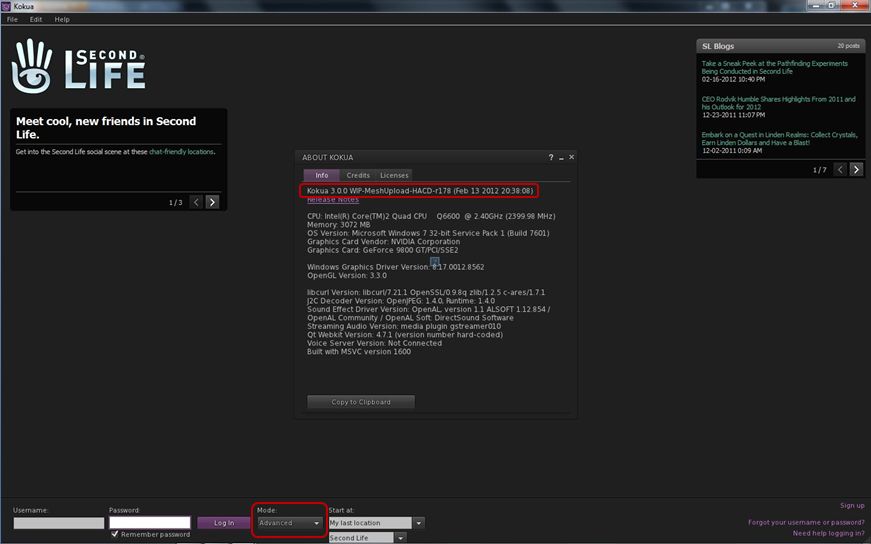
There follows a link to the Kokua wiki and links to the Windows and Linux release 3.0.0 downloads. However, before you get too excited, it should be pointed out that while the blog post refers to V3.2, the release available on the wiki, and the one immediately prior to it (0.1.1) are not based on the current V3.2 code, but rather on V3.0 code. Those installing and running either experimental will notice, for example, that the log-in splash screen still has the BASIC / ADVANCED mode toggle button.
Kokua *will* be moving to V3.2, but for now it is still based on V3.
I raised this point with ZATZAI, who was able to confirm after checking that, “The current Experimentals are indeed based on v3 … future ones (I don’t know how soon) will be based on 3.2+.” A clarification on the releases has since been posted on the blog entry itself.
So for those wishing to see a release of Kokua based on V3.2 code will have to wait just a little longer – and should keep an eye on both the blog and the wiki page!
How to Get Involved
For those who are further interested in the Viewer’s development, the team hold a weekly meeting every Wednesday at 20:00GMT on the Hoagie Sim in the 3rd Rock Grid. The meetings are for Dev and Project Contributor discussion and open to the public – although the meetings are not intended to deal with support issues. Transcripts of recent and past meetings cane be found on the wiki.
People can also join the Developer Mailing List (again: please note that this is not intended to deal with support issues).
NrianV Dean has been putting in a lot of work on Niran’s Viewer over the past couple of months, with new versions rolling-out fairly regularly. Many of these have experimental functions added to them – so much so that NiranV has taken to jokingly referring to the development work as coming from Niran’s Lab. He’s been keeping me appraised of updates and changed almost daily, but in-world projects and real life concerns of late have meant that I’ve not really been able to take Niran’s Viewer for a proper spin since release 1.13.
Releases 1.24 (Feb 14th) and 1.25 (Feb 15th – gives you some idea of the speed of updates!), have given me cause to play a little bit of catch-up. Release 1.24 was itself essentially a series of fixes and tweaks to the 1.23.5 release (also made on the 14th February), while version 1.25 adds version 0.2 of Qarl’s Parametric Deformer to the Viewer and includes some graphics related tweaks. You can therefore take this review as more-or-less a n outline of the key elements from all three of these releases (1.23.5 through 1.25).
If you’ve previously installed Niran’s Viewer – particularly 1.23.5, it’s probably best that you opt for a completely clean install of either 1.24 or 1.25, although I do comment on a couple of pre-1.23.5 updates as well.
There are two flavours of the Viewer EXE on offer – dedicated 32- and 64-bit variants. As Niran’s is compiled Large Array Aware, I’m not entirely clear on the difference, but I gather the 32-bit version of the EXE was a special request.
On start-up, there are no overt changed to the Viewer’s UI: as is common for Niran’s, the buttons are split between the left and right sides of the screen, the Navigation / Favourites bars are on, and the Destination Guide initially opens by default, as is common for most V3.2-based Viewers.Which is not to say the changes aren’t there.
Navigation Bar: Now You See Me, Now You Don’t
For those that both like to use the Navigation / Favourites Bar but at the same time find it slightly intrusive on their world view, Niran’s now includes a nifty auto-hide function. Enabled through PREFERENCES->VIEWER->UI SETTINGS, this will automatically hide the Navigation / Favourites Bar when the mouse isn’t positioned over it, and replace it with the Mini-location Bar. hovering the mouse at the top of the screen automatically displays the Navigation / Favourites Bar once more. Neat!
“Are you lookin’ (down) at me….?” – Camera Updates
On the subject of views, the Camera options have been altered. NiranV is keen to introduce more game-like elements to the Viewer – we’ve seen it with the experimental “Main Menu” (F1 – of which more below). Now with the camera, he’s replaced the traditional Front view with an overhead view. As a slight aside: does anyone actually use the Front View? I always tend to find myself orbiting the camera around myself.
Looking down on oneself
To me, the initial view is somewhat high, so many using the option are liable to find themselves using the Camera View Angle slider (PREFERENCES->ADVANCED-> CAMERA) to close the distance between themselves and their avatar.
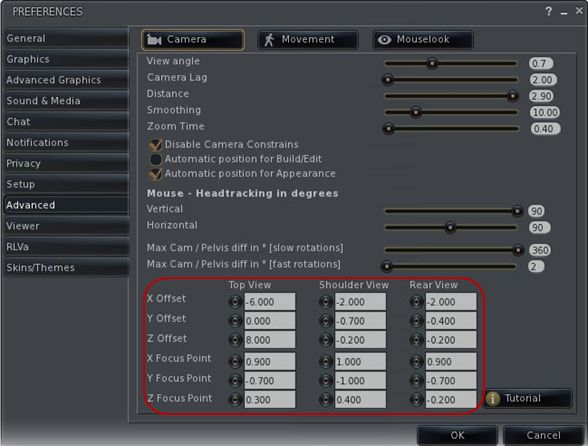
Staying with the Camera and Preferences, 1.24 introduces something I’ve been waiting for in Viewers for a goodly while: the ability to alter camera offsets without the need to twiddle about with Debug options. As many know, I’m a firm convert to Penny Patton’s Camera Offsets for SL (if you haven’t tried them, you should), so it’s great to see a Viewer that includes the ability to change offsets on-the-fly through Preferences. Kudos, NiranV!
Camera offsets within Preferences
Staying with Preferences
Regular Niran’s users will noticed as well that the entire Advanced tab has been revamped in this release, with Camera, Movement and Mouselook options separated into their own button-activated sub-tabs. This also marks a departure from the more usual “sliding panel” approach seen to date within Niran’s Viewer with regards to sub-tabs (and which can still be seen within the Viewer tab, for example. Referring to this re-vamp in his blog, NiranV states the new button approach may be added to the Viewer and Advanced Graphics tabs should it prove popular with users.
Also new to the Viewer (from version 1.22 onwards), and found in the Advanced Graphics tab are control from the new Visual Auto-mute function, complete with colour-codes guides to possible settings.
Visual Auto-mute controls
Avatar Animations
Work has been done around avatar animations with this release. Most notably for those developing animations, release 1.24 of Niran’s provides full support for uploading .ANIM files, as supplied by Jonathan Yap (see STORM-1803). Niran also adds his own touches in the form of options to control how your avatar reacts when being rotated. NiranV has included a couple of videos to demonstrate the functions, and I’ve taken the liberty of embedding one of them here.
Build, People and Rendering
Having just completed a vast amount of work on an obsession of mine, which involved working with some relatively small cross-section prims, I found myself constantly annoyed at the way in which the white stretch anchors repeatedly blocked access to the red, green and blue X, Y, Z stretch points on a prim. NiranV offers a solution to this problem: providing WASD is set to movement (rather than starting chat), you can press and hold the X key to eliminate the white “corner” anchors to ease access to the X, Y ands Z stretch points.
NiranV has also revised the People floater with this release, replacing the FRIENDS tab with an ACQUAINTANCES tab, his argument being most people we have on our lists are more like acquaintances than true friends, and one cannot fault his logic on this in many respects. Also with this release, the Acquaintances List will show the full set of permissions you’ve set for friends (ability to map you, etc.).
Finally, and also coming out of Niran’s Viewer Labs, is a new rendering option that may have potential use in the future. NiranV explains it thus on his blog: “One thing big has been done here except Tofu´s new project which has been merged, it’s called worldspace semi-random macro-dappling, which creates random big darkness spots on a SIM and your Avatar depending on the sun position. Later this could be combined with the cloud X and Y movement to create a good but faked cloud shadow effect!” At present only the depth / darkness of the effect can be altered – but it will be interesting to see where this goes.
The Main Menu
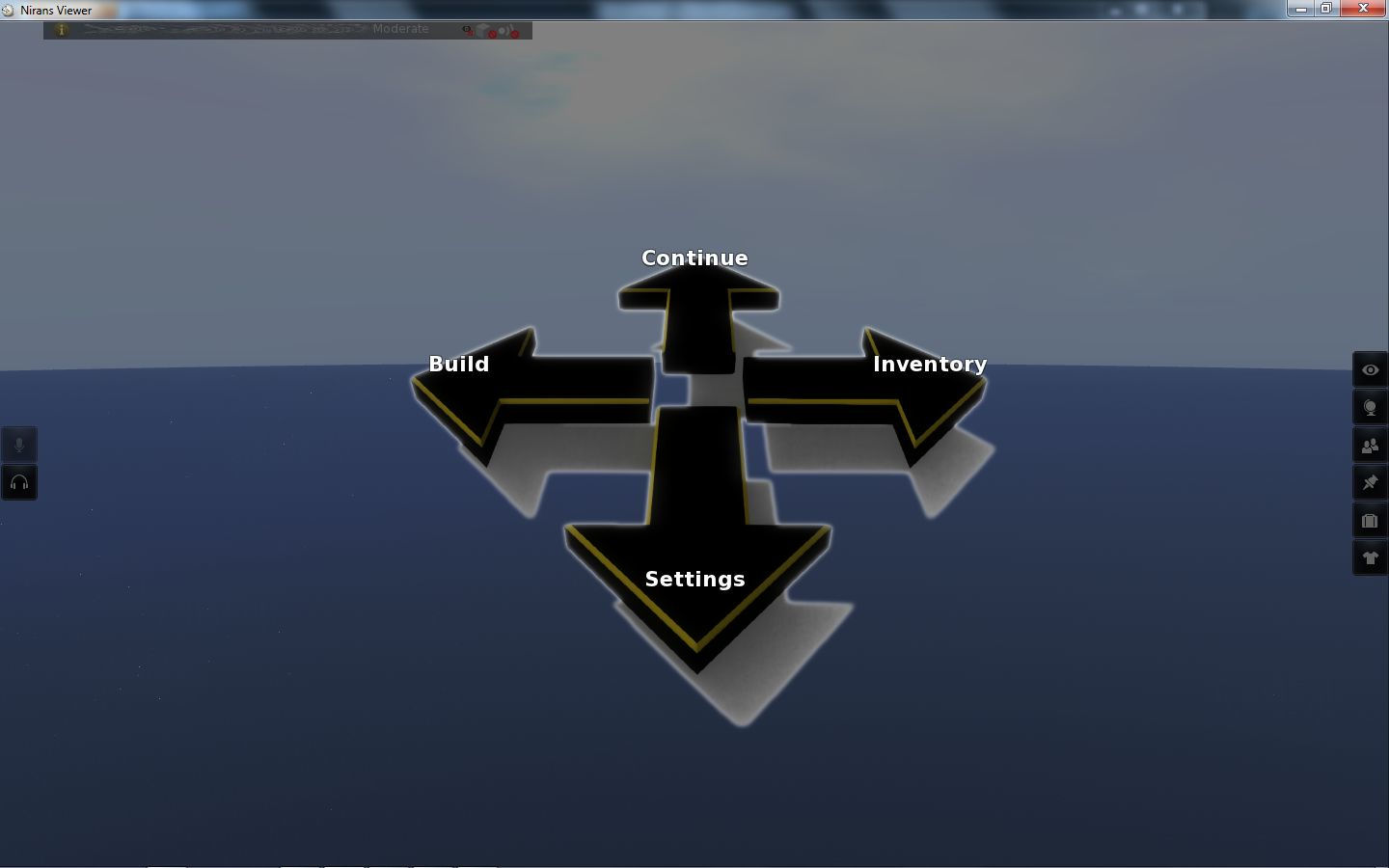
Finally, Niran has been working on his Main Menu idea for the last few releases. I first covered this in my review of release 1.13. Back then I commented on the fact that using ESC to invoke the menu wasn’t perhaps the best choice, given that key is traditionally associated with the Camera. NiranV took this on-board, and the menu has, for the last few releases, been accessed by pressing F1. The style of the menu has also been changed, as shown below.
Main Menu – “compass”
The look is apparently borrowed from a popular video game. I’ll be honest and stay that while I have no idea how well it has gone down with regular Niran’s users, I actually find it jarring and incongruous compared to the rest of the Viewer, factors that tend to make me shy away from using it.
Performance
Niran’s Viewer is intended for high-end machines and continues to get tweaked in that direct and further releases come out. As such, it’s a little unfair of me to comment on performance in some respects, because my hardware is well below the recommended hardware specifications for the Viewer (the closest I get to meeting them is that I’m running a quad-core CPU). My graphics card in particular now struggles mightily with Niran’s if I attempt to use deferred rendering & shadows, a factor that has, sadly, prevented me from using the Viewer quite as much as I might otherwise like.
That said, I’ve put the Viewer to several hours of reasonable use, bouncing around the grid, trying different environments, playing with the settings (as some of the screen caps here will show!) and generally poking and prodding, and the Viewer has taken it all in its stride (albeit without deferred rendering). The changes NiranV is introducing to the Viewer are both novel and leading-edge. There are some that are very practical – for me, the camera offsets in Preferences are a great addition, and those wishing to make use of the Visual Auto-mute option will find the inclusion of both that as a set of sliders and the annotation for settings that goes with it as being of benefit. Other additions – such as the top-down camera view are potentially more specialised, and it’ll be interesting to see how popular these prove to be for a wider audience of user.